Notistack: Variant style are using !important
I'm customizing any type of variant: success, error, info.
Previous code was:
variantSuccess: {
backgroundColor: '#43a047',
color: '#fff'
},
variantError: {
backgroundColor: '#d32f2f',
color: '#fff'
},
variantInfo: {
backgroundColor: '#2196f3',
color: '#fff'
},
variantWarning: {
backgroundColor: '#ff9800',
color: '#fff'
},
Now it is:
variantSuccess: {
backgroundColor: '#43a047 !important', // green
color: '#fff !important',
},
variantError: {
backgroundColor: '#d32f2f !important', // dark red
color: '#fff !important',
},
variantInfo: {
backgroundColor: '#2196f3 !important', // nice blue
color: '#fff !important',
},
variantWarning: {
backgroundColor: '#ff9800 !important', // amber
color: '#fff !important',
},
Expected Behavior
There should not be any !important inside the variant styles as I want to customize the style of my success, error, snackbars
Current Behavior
Now the current version is adding !important on each class and in order to customize them:
using other !important is not feasible
Steps to Reproduce
Upgrade to v1.0.1 version
| Tech | Version |
|--------------|---------|
| Notistack | v1.0.1 |
Thanks,
Glauco
 glaucopater
>All comments
Yes @glaucopater is right, it only works using important
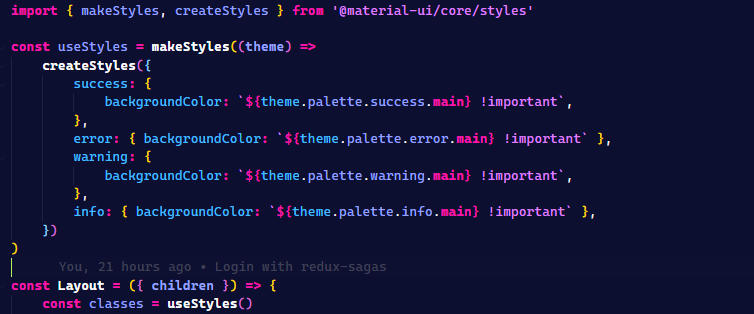
Regards,
Xabier
 xabierlameiro
on 30 Nov 2020
xabierlameiro
on 30 Nov 2020
Related issues
 VincentLanglet
·
3Comments
VincentLanglet
·
3Comments
 FabianoLothor
·
4Comments
FabianoLothor
·
4Comments
 iamhosseindhv
·
7Comments
iamhosseindhv
·
7Comments
 Mel0nHead
·
5Comments
Mel0nHead
·
5Comments
 kubalobo
·
5Comments
kubalobo
·
5Comments
Most helpful comment
Yes @glaucopater is right, it only works using important

Regards,
Xabier