Notepads: [Bug] Auto indentation is buggy
Describe the bug
With the iA Writer/Mono fonts, pressing enter with a paragraph of text which starts with spaces, will create a new line with the same amount of spaces but they will have half the width meaning that the lines look unaligned
To Reproduce
Install any of the fonts from https://github.com/iaolo/iA-Fonts, start a line with a couple spaces and then press enter
Expected behavior
Should be aligned
Screenshots
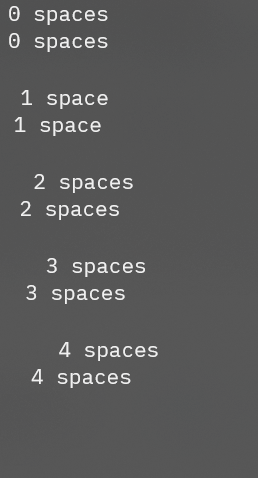
0 spaces
0 spaces

 1 space
 1 space

  2 spaces
  2 spaces

   3 spaces
   3 spaces

    4 spaces
    4 spaces
Desktop (please complete the following information):
- OS: Windows 10 20262
- Version: v1.4.2.0
Additional context
Add any other context about the problem here.
 carlinmack
All 2 comments
Issue-Label Bot is automatically applying the label bug to this issue, with a confidence of 0.99. Please mark this comment with :thumbsup: or :thumbsdown: to give our bot feedback!
Links: app homepage, dashboard and code for this bot.
![issue-label-bot[bot] picture](https://avatars2.githubusercontent.com/in/27079?v=4&s=40) issue-label-bot[bot]
on 29 Nov 2020
issue-label-bot[bot]
on 29 Nov 2020
This is a known issue of windows 10 RichEdit and I think there is an older thread disscuing about the same issue.
 JasonStein
on 4 Jan 2021
JasonStein
on 4 Jan 2021
Related issues
 AHBICJ
·
5Comments
AHBICJ
·
5Comments
 entdark
·
4Comments
entdark
·
4Comments
 WalterWolf49
·
5Comments
WalterWolf49
·
5Comments
 pnp0a03
·
3Comments
pnp0a03
·
3Comments
 beerisgood
·
3Comments
beerisgood
·
3Comments
Most helpful comment
Issue-Label Bot is automatically applying the label
bugto this issue, with a confidence of 0.99. Please mark this comment with :thumbsup: or :thumbsdown: to give our bot feedback!Links: app homepage, dashboard and code for this bot.