Notepad3: A better default dark theme
Current dark theme is not that good. such as yaml, json file which is too dark to read.
I know notepad 3 has config option to customize theme, but I think most of users are expecting a bundled better dark theme.
 silenceleaf
All 21 comments
Hello @silenceleaf ,
This issue is a duplicate of: https://github.com/rizonesoft/Notepad3/issues/2122
I suggest you to adjust the "Dark" theme to your wishes and export it.
With pleasure, we will import it for the benefit of the whole Notepad3 community. 😃
 hpwamr
on 24 Apr 2020
hpwamr
on 24 Apr 2020
Hi everyone,
I'd like to contribute to make a better dark theme. To achieve that goal, I want to make a template of every file type (currently 48 types + 2 commone bases) with every kind of colored items in it. For exemple, in _Commone Base_ there are 16 kind of colored items, in _Text Files_ 2, _Autoit3_ 12 and _VBScript_ 6. Can someone point me where I can find the text to use to make those templates? Thanks!
MDV
 MadDogVachon
on 27 Apr 2020
MadDogVachon
on 27 Apr 2020
Hi everyone,
I'd like to contribute to make a better dark theme. To achieve that goal, I want to make a template of every file type (currently 48 types + 2 commone bases) with every kind of colored items in it. For exemple, in _Commone Base_ there are 16 kind of colored items, in _Text Files_ 2, _Autoit3_ 12 and _VBScript_ 6. Can someone point me where I can find the text to use to make those templates? Thanks!
MDV
That's great! please assign this to your name.
silenceleaf
on 27 Apr 2020
@MadDogVachon : Great 👍
- Select the Dark Scheme (
Menu -> Appearance -> Scheme Collection -> Dark...), - Open the
Customize Schemesdialog (Menu -> Appearance -> Customize Schemes... Ctrl+F12)
Now 2 possibilities:
- Change the colors within this dialog, using the
Preview - Export the changed color to
OR - Use
Exportbutton to export the current scheme to- Open this file in Notepad3 and change the colors
(hovering over the color code will show the color (ifMenu -> View -> Color Definition Hotspotsis set),Ctrl+Alt+MouseClickwill a open a color editor to choose a new color.- Copy changed .ini-file to folder
Notepad3/themes, then you can select it viaMenu -> Appearance -> Scheme Collection ->...to test it - Open this file in Notepad3 and change the colors
 RaiKoHoff
on 28 Apr 2020
RaiKoHoff
on 28 Apr 2020
@hpwamr
Thanks for the assignation!
@RaiKoHoff
Thanks for your reply, very useful!
@everyone
In my first post, I've ask for a way to make a template. Maybe is my lack of English made me not understood, the template I want to make is to planify and verify my changes of color. I may be able to do something with few file types, I cannot do to every of them like I want.
As an exemple, if I want to see a comment in Autoit3, I only have to put a semicolon in front of a row. So there's somewhere something letting Notepad3 to know that a row beginning with a semicolon is a comment. Where can I find that information in order to know how to make an template or a test file (in fact 48 test files) with everything and test it?
MDV
MadDogVachon
on 29 Apr 2020
Where can I find that information in order to know how to make an template or a test file (in fact 48 test files) with everything and test it?
Hello @MadDogVachon ,
We have tried to build a kind of library of test files used by the various Lexers (the test files are sorted by extensions used by Lexers). 🤔
It is not complete, but we are trying to add every new file we come across.
Place take a look at: Test files
In addition, with the following procedure, you can easily download all the files to your workplace:
Download All Current Files.zip
If you have any difficulties or questions, do not hesitate to contact us...
Your comments and suggestions are welcome... 😃
hpwamr
on 29 Apr 2020
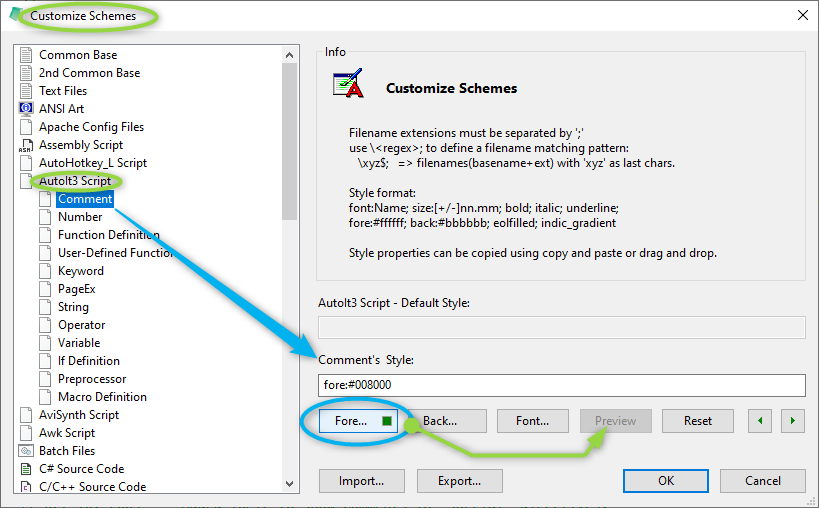
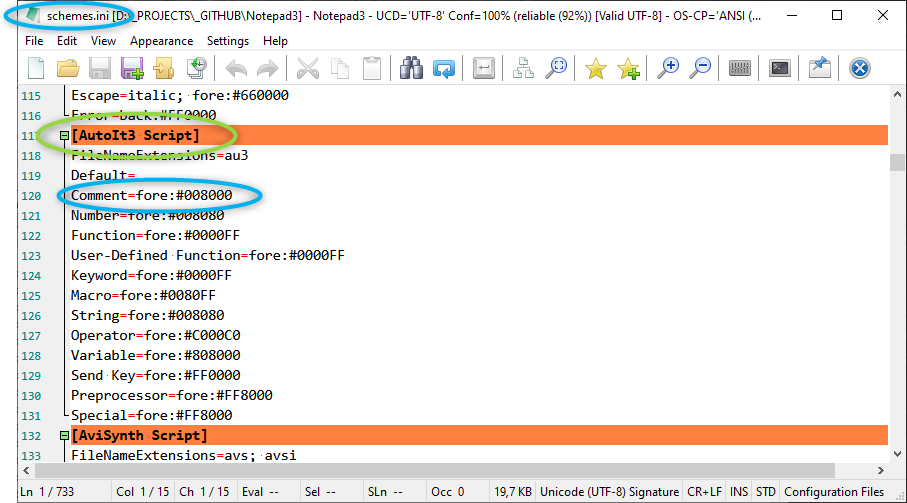
@MadDogVachon : The engine, which make Notepad3 aware of e.g. Autoit3's line comment sign, is called a "Lexer". Most "Lexers" are provided by Scintilla library and can be found in the source code (Notepad3/scintilla/lexers/LexAU3.cxx) - but I don't think this is what you think of.
To adjust the style of e.g Autoit3's line comment, use the Customize Schemes... dialog:
Or in the exported e.g. schemes.ini :
RaiKoHoff
on 29 Apr 2020
@hpwamr @RaiKoHoff
Thanks, the _Lexers_ are actually what I'm looking for.
MDV
MadDogVachon
on 29 Apr 2020
Hi everyone,
So, long story short, I give up about my initial project of making templates or test files. Many are already done, like said hpwamr. I ended up creating my own logarithm to go from a light skin to a dark one. It does a similar work, but less perfect, than the Dark Reader addon/extension/module. Then, I followed the instructions given by RaiKoHoff to test many files...
Here it is! You can test it.
MDV
MadDogVachon
on 9 May 2020
Good job
silenceleaf
on 9 May 2020
Hello @MadDogVachon , good job 👍
hpwamr
on 9 May 2020
Hello @RaiKoHoff ,
Edit: CORRECTION !
My fault: If is theme is added in \Notepad3Portable\Data\settings\themes ALL is correct ! 😃
hpwamr
on 9 May 2020
Nice work @MadDogVachon.
@RaiKoHoff , @hpwamr ,
Just a quick query I have been meaning to ask about, that I thought I could bring it up while we are on the topic. I have a few lexers that have custom extensions set, and each time I try a theme that someone has created, I have to manually add the custom extensions each time because they are saved into each theme file, do you think it is fine like that, or do you think themes should inherit any custom extensions from the main settings, when they are imported.?
 jupester
on 9 May 2020
jupester
on 9 May 2020
Thanks to everyone for your comments!
If you have any suggestions to improve it before spreading it, just tell. I will gladly do my best to make it better.
MDV
MadDogVachon
on 9 May 2020
@MadDogVachon : nice piece of work - thank you. @hpwamr : I suggest to add "Sombra" in addition to our default schemes (Dark and Obsidian), or shall we replace one of these ?
@jupester : currently, there is only a 2-stage inheritance:
- Internal (hard-coded, factory) defaults are applied for all styles as a base styles.
- Selected scheme styles are applied in override mode (no override if property is empty).
Possible Schemes (changes are stored here) are:
- Standard: (the styles defined in
Notepad3.ini) - Exported Schemes from "Themes" directory.
- Standard: (the styles defined in
Unfortunately the file extensions are exported too (needed for full property export/backup).
But my opinion is: Customized schemes should not provide other extension sets.
So, I have to adapt the Style Reader Import not to use extension set from other schemes, but only the customized set of "Standard-Theme" from Notepad3.ini (Change Request).
RaiKoHoff
on 9 May 2020
I suggest to add "Sombra" in addition to our default schemes (Dark and Obsidian)
Hello @RaiKoHoff ,
I support your suggestion to add "Sombra" in addition to our default schemes. 👍
I suggest to modify the first line as:
# Lexer Style "Sombra" from Mad Dog Vachon (https://github.com/MadDogVachon)
hpwamr
on 9 May 2020
Just a quick query I have been meaning to ask about, that I thought I could bring it up while we are on the topic. I have a few lexers that have custom extensions set, and each time I try a theme that someone has created, I have to manually add the custom extensions each time because they are saved into each theme file, do you think it is fine like that, or do you think themes should inherit any custom extensions from the main settings, when they are imported.?
Hello @jupester ,
If your "custom extensions" are "of public interest", we can add them "standard" to our Lexers list ! 🤔
hpwamr
on 9 May 2020
Feel free to test the BETA version "Notepad3Portable_5.20.509.1_BETA.paf.exe.7z" or higher.
See "Notepad3 BETA-channel access #1129" or here Notepad3Portable_5.20.509.1_BETA.paf.exe.7z
_Note1:_ "Notepad3Portable PAF" can be used in "2 flavors", see with or without extension ".7z".
_Note2:_ If you follow the instructions #1105, you can also update your "Notepad3 Installer version" with the latest BETA version (see #1129).
Your comments and suggestions are welcome... 😃
RaiKoHoff
on 9 May 2020
First off, let me preface this with a request to be forgiven for such a large (and veering off topic) post.
@hpwamr : Thanks for the offer, but I am doubtful they would be of value to the community currently, although at the risk of making this thread go off topic, I will explain the just 2 that are most relevant to me below. (which are adding (*.xys [official] & *.xyi [non official] to the C# lexer) and my doubtfulness of them being beneficial, that is to say, as things are currently anyway.
TLDR; My main use for Notepad3 is composing scripts written for the excellent file manager Xyplorer, its scripting language is a hybrid loosely based on php, initially I just wrote all my scripts without syntax highlighting, then eventually I found that the Notepad3 C# lexer to be an excellent drop in replacement and be a much nicer experience. The C# lexer is great because the line and stream commenting work exactly the same, and the syntax highlighting is pretty much always right , unfortunately, the biggest downside to using the C# lexer in NP3 is that 98% of the autocomplete syntax words are wrong, so I always have that disabled (a bit of a letdown). Since we have organically switched to this topic I will ask something here that I have wanted to request for a long time on this forum, and that is, @RaiKoHoff since the C# lexer works with XYplorer scripts 98% successfully (sans keywords), would it be a great deal of work to integrate a separate XYplorer lexer that is basically a mirror of the C# lexer but with just a different keywords list?
Admittedly I am not that competent and experienced in this regard, but a while ago I took it upon myself to modify "StyleLexers.h" that I found on the NP3 GitHub that in my opinion would be the main file requiring modification for any such adaption, since all the other parts work perfectly fine using the current C# lexer. Anyway I'll attach it to this post ( just in case you think this request is worthy of integration), if you think this request is viable I am happy to help in any way I can, and to do anything further to help towards this cause.
Disclaimer: I am actually a forum moderator on the XYplorer forums, and would be more than happy to recommend NP3 to that community, that is to say if it was able to be a more "works out-of-the box" script editor, especially for users new to scripting, which the only letdown currently, is the keywords, and having to manually add the extensions to the C# lexer (which I consider to be no big deal for those competent in such matters, but takes multiple steps to explain to those uninitiated).
@RaiKoHoff: If you think this request is viable, let me know and I can make a separate official request topic.
Anyway attached is a "StyleLexers.h" (that I hope I have made an acceptable effort of modifying), and more so , that it would actually become required and relevant to my above quasi-request.
jupester
on 12 May 2020
I'm not sure about whether the repo would be open to this sort of thing, but I could try increasing the luminance of each foreground color in Dark.ini and Obsidian.ini (maybe even Sombra.ini) so that it has a sufficient WCAG contrast ratio with the background (for bold text up to 14pt and ordinary text up to 18pt); for reference, these are the dimmest greyscale colors that work on the default background and their luminance values:
Contrast|Dark|Sombra|Obsidian
-:|-:|-:|-:
AAA|#B0B0B0 69%|#A1A1A1 63%|#959595 58%
AA|#8C8C8C 55%|#7F7F7F 50%|#757575 46%
AA-large|#6E6E6E 43%|#636363 39%|#5A5A5A 35%
The corresponding minimum contrast ratios are 7 (AAA for all text), 4.5 (AAA for bold over 14pt and ordinary over 18pt, AA for smaller text), and 3 (AA for bold over 14pt and ordinary over 18pt); smaller contrast ratios are not considered "accessible", and although this is a Web standard, the same sort of principle applies to any user interface.
 lewisje
on 23 May 2020
lewisje
on 23 May 2020
@lewisje Hi, thank for your post! I think I understand what you mean. For my part, if you can improve, do it! If you want my help, at least for Sombra, you may give me a link to understand better.
MDV
MadDogVachon
on 23 May 2020
Related issues
 vvyoko
·
3Comments
hpwamr
·
3Comments
vvyoko
·
3Comments
hpwamr
·
3Comments
 ggordon-vispero
·
3Comments
ggordon-vispero
·
3Comments
 tzleon
·
3Comments
hpwamr
·
3Comments
tzleon
·
3Comments
hpwamr
·
3Comments
Most helpful comment
First off, let me preface this with a request to be forgiven for such a large (and veering off topic) post.
@hpwamr : Thanks for the offer, but I am doubtful they would be of value to the community currently, although at the risk of making this thread go off topic, I will explain the just 2 that are most relevant to me below. (which are adding (*.xys [official] & *.xyi [non official] to the C# lexer) and my doubtfulness of them being beneficial, that is to say, as things are currently anyway.
TLDR; My main use for Notepad3 is composing scripts written for the excellent file manager Xyplorer, its scripting language is a hybrid loosely based on php, initially I just wrote all my scripts without syntax highlighting, then eventually I found that the Notepad3 C# lexer to be an excellent drop in replacement and be a much nicer experience. The C# lexer is great because the line and stream commenting work exactly the same, and the syntax highlighting is pretty much always right , unfortunately, the biggest downside to using the C# lexer in NP3 is that 98% of the autocomplete syntax words are wrong, so I always have that disabled (a bit of a letdown). Since we have organically switched to this topic I will ask something here that I have wanted to request for a long time on this forum, and that is, @RaiKoHoff since the C# lexer works with XYplorer scripts 98% successfully (sans keywords), would it be a great deal of work to integrate a separate XYplorer lexer that is basically a mirror of the C# lexer but with just a different keywords list?
Admittedly I am not that competent and experienced in this regard, but a while ago I took it upon myself to modify "StyleLexers.h" that I found on the NP3 GitHub that in my opinion would be the main file requiring modification for any such adaption, since all the other parts work perfectly fine using the current C# lexer. Anyway I'll attach it to this post ( just in case you think this request is worthy of integration), if you think this request is viable I am happy to help in any way I can, and to do anything further to help towards this cause.
Disclaimer: I am actually a forum moderator on the XYplorer forums, and would be more than happy to recommend NP3 to that community, that is to say if it was able to be a more "works out-of-the box" script editor, especially for users new to scripting, which the only letdown currently, is the keywords, and having to manually add the extensions to the C# lexer (which I consider to be no big deal for those competent in such matters, but takes multiple steps to explain to those uninitiated).
@RaiKoHoff: If you think this request is viable, let me know and I can make a separate official request topic.
Anyway attached is a "StyleLexers.h" (that I hope I have made an acceptable effort of modifying), and more so , that it would actually become required and relevant to my above quasi-request.
https://workupload.com/file/84ddE9hk4ea