It used to work fine until I changed python to lower version today(3.7 to 3.6). The jupyter notebook keeps giving me blank page when started. I changed the version back and it doesn't help. No error in the terminal. The error in the browser are as follows:
Refused to execute script from '<URL>' because its MIME type ('text/plain') is not executable, and strict MIME type checking is enabled.
VM26 tree:1 Refused to execute script from 'http://localhost:8888/static/components/es6-promise/promise.min.js?v=f004a16cb856e0ff11781d01ec5ca8fe' because its MIME type ('text/plain') is not executable, and strict MIME type checking is enabled.
VM26 tree:1 Refused to execute script from 'http://localhost:8888/static/components/preact/index.js?v=00a2fac73c670ce39ac53d26640eb542' because its MIME type ('text/plain') is not executable, and strict MIME type checking is enabled.
VM26 tree:1 Refused to execute script from 'http://localhost:8888/static/components/proptypes/index.js?v=c40890eb04df9811fcc4d47e53a29604' because its MIME type ('text/plain') is not executable, and strict MIME type checking is enabled.
VM26 tree:1 Refused to execute script from 'http://localhost:8888/static/components/preact-compat/index.js?v=aea8f6660e54b18ace8d84a9b9654c1c' because its MIME type ('text/plain') is not executable, and strict MIME type checking is enabled.
VM26 tree:1 Refused to execute script from 'http://localhost:8888/static/components/requirejs/require.js?v=951f856e81496aaeec2e71a1c2c0d51f' because its MIME type ('text/plain') is not executable, and strict MIME type checking is enabled.
VM26 tree:1 Refused to execute script from 'http://localhost:8888/static/tree/js/main.min.js?v=ab9f3a6cf8347df927864d58cfad7931' because its MIME type ('text/plain') is not executable, and strict MIME type checking is enabled.
VM26 tree:24 Uncaught ReferenceError: require is not defined
    at VM26 tree:24
I check some other posts which said to clean browser caches and cookies which doesn't help for my case. Any idea about how to fix this problem?
 andrewsunst
All 70 comments
Me too, with python3.7 at windows10.
And from the log, there's a 302 redirect record:
[I 01:04:46.632 NotebookApp] 302 GET /tree (::1) 1.00ms
I guess the localhost address is redirected to ::1.
 joddiy
on 10 Mar 2019
joddiy
on 10 Mar 2019
I have the same issue , python3.7 ,win10
 windyslove
on 10 Mar 2019
windyslove
on 10 Mar 2019
Me too, with python3.7 at windows10.
And from the log, there's a 302 redirect record:
[I 01:04:46.632 NotebookApp] 302 GET /tree (::1) 1.00ms
I guess the localhost address is redirected to ::1.
We have exactly the same problem in here.
andrewsunst
on 10 Mar 2019
Same issue here on Python 3.7.2, experienced on both Chrome (before and after clearing cache) and on Microsoft Edge. The issue appears to be that Jupyter's webserver is returning Content-Type: text/plain for main.min.js and all other JS files, which causes browsers to reject loading them under MIME checks.
Edit: It's most likely that this is an issue with the latest changelog item, which involves Content Type option changes:
5.7.6
-----

5.7.6 contains a security fix for a cross-site inclusion (XSSI) vulnerability,
where files at a known URL could be included in a page from an unauthorized website if the user is logged into a Jupyter server.
The fix involves setting the ``X-Content-Type-Options: nosniff``
header, and applying CSRF checks previously on all non-GET
API requests to GET requests to API endpoints and the /files/ endpoint.

The attacking page is able to access some contents of files when using Internet Explorer through script errors,
but this has not been demonstrated with other browsers.
A CVE has been requested for this vulnerability.
Edit 2: Opened a PR with a quick fix.
 ghost
on 10 Mar 2019
ghost
on 10 Mar 2019
@ciaranlangton Hey, thanks for the update but here is the strange thing. I tried the latest version (5.7.6) on another pc and it works fine. I also tried to modify the notebookapp.py as your pr but it doesn't fix the problem. So I am thinking about there might be something else.
andrewsunst
on 11 Mar 2019
@andrewsunst sorry to hear that it didn't fix it, is the other PC a Windows based machine? Plus, when you applied the patch, did you clear cache (either explicitly through browser options or CTRL+F5). It would also be helpful if you could see what the Content-Type header is on the working PC for the JavaScript files
ghost
on 11 Mar 2019
Well actually, it works after I clean the cache! So for the one that works, I don't exactlly know what do you suggest to take a look at. Is that something from the browser? If so then it is as follows:

andrewsunst
on 11 Mar 2019
You can check the Content-Type in Chrome by switching to the Network tab at
the top of the debug console, and then refreshing the page (ideally with a
CTRL F5). The files and requests will be visible in a list to the right,
select any .js file from there, and then on the left there will be a pane
containing a lot of information, under “Response Headers” you should see
Content-Type: ......
ghost
on 11 Mar 2019
So I followed your procedure and found the content-type in only one of the .js files which is http://localhost:8888/static/tree/js/main.min.js?. The content-type appears as
E.setRequestHeader("Content-Type",h.contentType)
and I checked the value of it which I think is as follows
return utils.promising_ajax(this.api_url(), {
            processData: false,
            type : "PATCH",
            data: JSON.stringify(newdata),
            dataType : "json",
            contentType: 'application/json',
        }
The other one is contentType:"application/x-www-form-urlencoded; charset=UTF-8". So is there anything we can get from these?
andrewsunst
on 11 Mar 2019
Still same problem. Blank page in either Chrome, or Opera. Either file tree page, or notebooks pages.
Got message in the console after attempt F5 or Ctrl+F5
[I 11:27:26.543 NotebookApp] 302 GET /?token=3023f5b77855d20b9cba73dd0036e2a7a4df1c1c77fcae77 (::1) 1.00ms
and

in browser.
Win10 1809 17763.348, latest Chrome 72.0.3626.121, python 3.7.1. By the way, downgrading jupyter and it's separate components, included ipython, with pip, make file tree page visible, but notebook page still blank.
P.S. ipython notebook shows the same behavior.
 Ornstein89
on 11 Mar 2019
Ornstein89
on 11 Mar 2019
I am having the same identical issue here. Both with python 3.6.8 and python 3.7.1. Browsers: Opera, Brave and Microsoft Edge
 simonsaysL
on 11 Mar 2019
simonsaysL
on 11 Mar 2019
Same Problem here. Python 3.7.2 and Jupyter notebook 5.7.6. Tried Firefox, Chrome, Opera and Edge
 xNi-cOx
on 11 Mar 2019
xNi-cOx
on 11 Mar 2019
I have the exact same problem, any solutions yet?
 alvaroqueiroz
on 11 Mar 2019
alvaroqueiroz
on 11 Mar 2019
I am struggling with the same problem
 manaimran
on 11 Mar 2019
manaimran
on 11 Mar 2019
I have same problem with Chrome and Edge. I have Python 3.6.4 and Jupyter 4.4.0.
 MR6996
on 11 Mar 2019
MR6996
on 11 Mar 2019
I'm having the same issue with both chrome and firefox. Tried clearing the cache, but it didn't resolve the issue for me. Python 3.7.2 and Jupyter 4.4.0, installed via pip.
 unipanic
on 11 Mar 2019
unipanic
on 11 Mar 2019
Same problem for me.
Downgraded notebook to 5.7.4, now it is working.
So do
pip uninstall notebook
pip install notebook==5.7.5
edit: use 5.7.5 instead of 5.7.4, see below
 LukasMueller187
on 11 Mar 2019
LukasMueller187
on 11 Mar 2019
Same problem for me.
Downgraded notebook to 5.7.4, now it is working.
So do
pip uninstall notebook
pip install notebook==5.7.4
Thanks. Old version is working.
manaimran
on 11 Mar 2019
Same problem for me.
Downgraded notebook to 5.7.4, now it is working.
So do
pip uninstall notebook
pip install notebook==5.7.4
Thanks buddy.
 AbdullahKaratas
on 11 Mar 2019
AbdullahKaratas
on 11 Mar 2019
It didnt work for me, tryed 5.7.4 and 5.7.3. It worked for everyone?
alvaroqueiroz
on 11 Mar 2019
It didnt work for me, tryed 5.7.4 and 5.7.3. It worked for everyone?
Just Clear the cache like CTRL+R or CTRL+Shift+R
manaimran
on 11 Mar 2019
It didnt work for me, tryed 5.7.4 and 5.7.3. It worked for everyone?
Just Clear the cache like CTRL+R or CTRL+Shift+R
Worked, I'm am using 5.7.5
Thank you!
alvaroqueiroz
on 11 Mar 2019
Yep, when using 5.7.4 there are issues with tornado version 6 (kernel not connecting).
Use 5.7.5 (as alvaroqueiroz suggested), it works with tornado 6.
So instead do (after uninstalling notebook):
pip install notebook==5.7.5
LukasMueller187
on 11 Mar 2019
Yep, when using 5.7.4 there are issues with tornado version 6 (kernel not connecting).
Use 5.7.5 (as alvaroqueiroz suggested), it works with tornado 6.
So instead do (after uninstalling notebook):
pip install notebook==5.7.5
Thanks a lot !! Now kernel is running.
manaimran
on 11 Mar 2019
@andrewsunst thanks for getting back with that, I think I was maybe a bit unclear about my instructions (I was working from a mental image of the debug console). Here's an image with the fields and options highlighted.
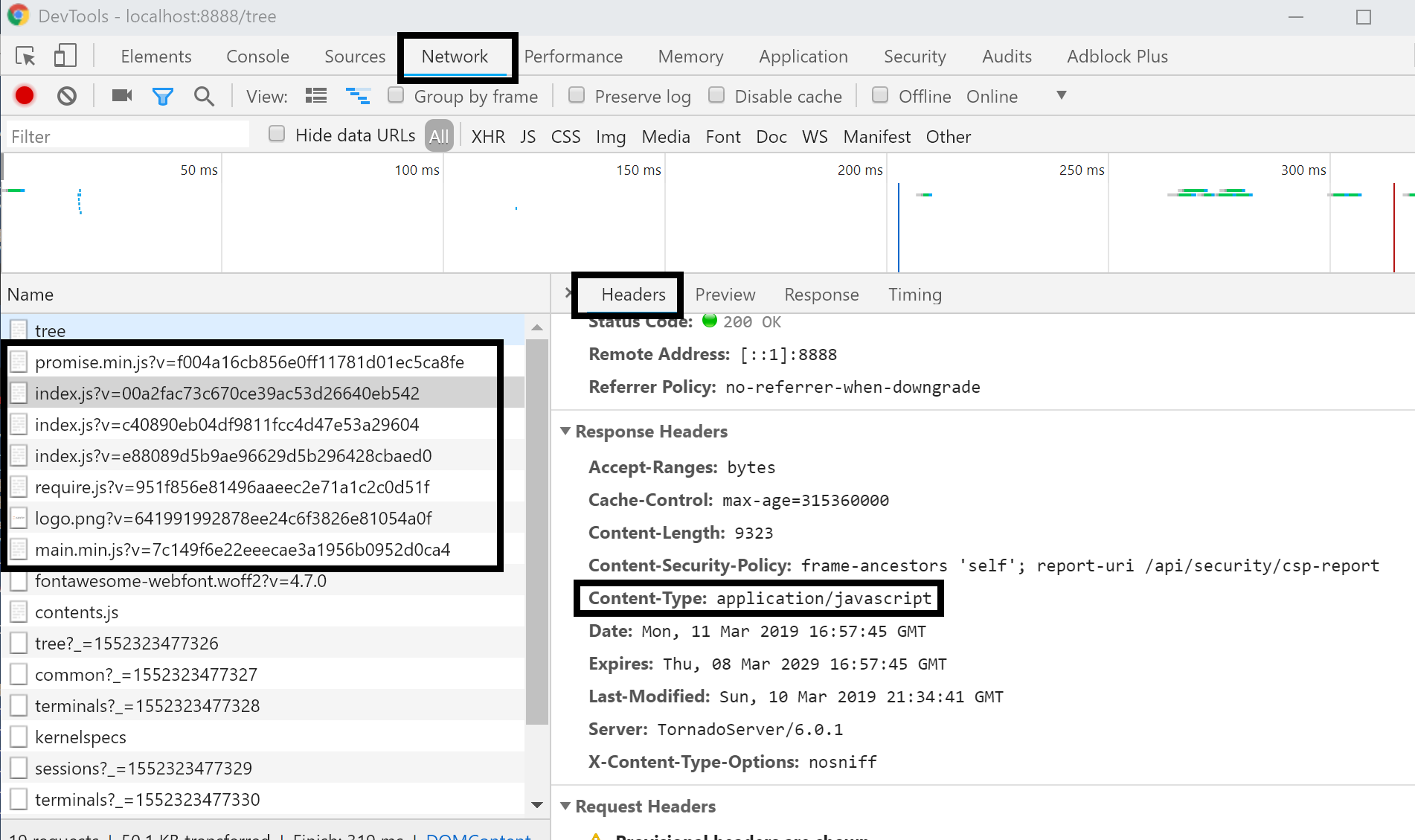
I think it's rather safe to say though that the issue is caused by the X-Content-Type-Options: nosniff added in the last version, given by @LukasLuMueller and other's rollback attempts, as well as the error message in the browser. I doubt doing the above operation is really worthwhile anymore.
Hopefully the PR can get merged so this issue can be fixed and people can also benefit from the security changes in the latest patch. I'd also appreciate it if anyone else is willing to test the patch that is experiencing this issue and provide feedback if it fixes the issue for them (after clearing browser cache)
ghost
on 11 Mar 2019
@ciaranlangton So I checked the Content-type of the .js files in headers and they are application/javascript.
andrewsunst
on 11 Mar 2019
Trying on edge, i get this on powershell (txt file) and this curious message

jupyter log.txt
i hope this could help to fix whatever that's happening
w10 pro - 1809 - microsoft edge
python 3.6.8
 jmwielandt
on 12 Mar 2019
jmwielandt
on 12 Mar 2019
@Ornstein89
In w10 I have the same problem but it does not solve only with this. To solve it, I went to the directory "AppData\Local\Programs\Python\Python37\Lib\site-packages\notebook\templates" and edit the file "page.html" on line 18, changing the double quotes with single quotes.
Before:
<script src="{{static_url("components/es6-promise/promise.min.js")}}" type="text/javascript" charset="utf-8"></script>
After:
<script src="{{static_url('components/es6-promise/promise.min.js')}}" type="text/javascript" charset="utf-8"></script>
 ejmoya
on 12 Mar 2019
ejmoya
on 12 Mar 2019
Same problem for me.
Downgraded notebook to 5.7.4, now it is working.
So do
pip uninstall notebook
pip install notebook==5.7.4Thanks buddy.
I meet same issue on note 5.7.6.
It's work for me. Note version 5.7.6 to 5.7.5.
Thanks a lot.
 sumatrae
on 12 Mar 2019
sumatrae
on 12 Mar 2019
Same problem, downgrade to 5.7.5 and then do ctrl+shift+r to refresh the page works !
 phonygene
on 12 Mar 2019
phonygene
on 12 Mar 2019
For anyone who installs with Anaconda the equivalent fix is:
conda install -c anaconda notebook=5.7.4
 cgravill
on 12 Mar 2019
cgravill
on 12 Mar 2019
Trying on edge, i get this on powershell (txt file) and this curious message
jupyter log.txti hope this could help to fix whatever that's happening
w10 pro - 1809 - microsoft edge
python 3.6.8
edge works for me
 tiandiyijian
on 12 Mar 2019
tiandiyijian
on 12 Mar 2019
It didnt work for me, tryed 5.7.4 and 5.7.3. It worked for everyone?
Just Clear the cache like CTRL+R or CTRL+Shift+R
thanks,it really works!
 NewGoals
on 12 Mar 2019
NewGoals
on 12 Mar 2019
It didnt work for me, tryed 5.7.4 and 5.7.3. It worked for everyone?
Just Clear the cache like CTRL+R or CTRL+Shift+R
works for me, thx
 thekingofcity
on 13 Mar 2019
thekingofcity
on 13 Mar 2019
I found on windows it uses win registry HKCR/.js/Content-Type as the content-type for js files. It's text/plain on my computer.
Changing it to text/javascript fixed it.
 emliunix
on 13 Mar 2019
emliunix
on 13 Mar 2019
It didnt work for me, tryed 5.7.4 and 5.7.3. It worked for everyone?
Just Clear the cache like CTRL+R or CTRL+Shift+R
thank you. it works for me. really nice.
 qoqoh
on 13 Mar 2019
qoqoh
on 13 Mar 2019
Same problem for me.
Downgraded notebook to 5.7.4, now it is working.
So do
pip uninstall notebook
pip install notebook==5.7.5
edit: use 5.7.5 instead of 5.7.4, see below
Thank you very much. it works very well!!
ps. after install notebook use ctrl+shitf+R
Google Chrome+win 10
 neverte
on 14 Mar 2019
neverte
on 14 Mar 2019
Same problem for me.
Downgraded notebook to 5.7.4, now it is working.
So do
pip uninstall notebook
pip install notebook==5.7.5
edit: use 5.7.5 instead of 5.7.4, see below
Thanks. Worked for me after restart.
 syedabdulaala
on 14 Mar 2019
syedabdulaala
on 14 Mar 2019
@andrewsunst sorry to hear that it didn't fix it, is the other PC a Windows based machine? Plus, when you applied the patch, did you clear cache (either explicitly through browser options or CTRL+F5). It would also be helpful if you could see what the
Content-Typeheader is on the working PC for the JavaScript files
Ctrl+F5 fix my problem
 liujunchangqq
on 14 Mar 2019
liujunchangqq
on 14 Mar 2019
Win7 here: downgraded to 5.7.4 but still blank page (refresh & restarted)
[whoops] Sorry, it did work - I had to restart Jupyter NB twice
 Sieboldianus
on 15 Mar 2019
Sieboldianus
on 15 Mar 2019
this worked for me: https://github.com/jupyter/notebook/pull/4468#issuecomment-473387711
 AnMa12
on 17 Mar 2019
AnMa12
on 17 Mar 2019
I found on windows it uses win registry HKCR/.js/Content-Type as the content-type for js files. It's text/plain on my computer.
Changing it to text/javascript fixed it.
Worked on my Win10 machine! Thank you
 halahup
on 18 Mar 2019
halahup
on 18 Mar 2019
I found on windows it uses win registry HKCR/.js/Content-Type as the content-type for js files. It's text/plain on my computer.
Changing it to text/javascript fixed it.Worked on my Win10 machine! Thank you
same thing worked on my windows machine, I initially had gotten blank page with jupyter notebook and even re-install didnt fix the issue initially... but when I followed this registry edit advice, then the jupyter notebook opened regularly...
 late347
on 18 Mar 2019
late347
on 18 Mar 2019
I found on windows it uses win registry HKCR/.js/Content-Type as the content-type for js files. It's text/plain on my computer.
Changing it to text/javascript fixed it.
Thanks..
Work for me.. Win10 Python 3.6.8
 Herm41
on 19 Mar 2019
Herm41
on 19 Mar 2019
Changing the registry fixed it for me as well:
- In the windows menu, search for
regedit, open it. - Navigate to Computer > HKEY_CLASSES_ROOT > .js > ContentType
- Change value data to
text/javascript - Restart
jupyter notebook. - Go to browser (chrome) type
chrome:restart, and it worked. Hard refresh might work to.
 AndreCAndersen
on 24 Mar 2019
AndreCAndersen
on 24 Mar 2019
Changing the registry fixed it for me as well:
- In the windows menu, search for
regedit, open it.- Navigate to Computer > HKEY_CLASSES_ROOT > .js > ContentType
- Change value data to
text/javascript- Restart
jupyter notebook.- Go to browser (chrome) type
chrome:restart, and it worked. Hard refresh might work to.
Great thanks for the instructions.
---------------short summary ------------
Win 8, python 3.6.8.
- Installed Jupyter Notebook 5.7.6 with the blank page as a result.
- uninstalled Jupyter Notebook 5.7.6, after that installed 5.7.5. Works properly.
- Uninstalled 5.7.5 after that installed 5.7.6
- Changed ContentType in registry
- Ctrl+F5 in Opera with opened page
- It works! Works!! nice)
 Palladiumm
on 25 Mar 2019
Palladiumm
on 25 Mar 2019
I have created easy-to-import windows registry file to solve this problem in one click. https://github.com/Palladiumm/Jupyter-Notebook-5.7.6-win-blank-page-solution-js-reg-file
Palladiumm
on 25 Mar 2019
@Palladiumm , Why are we fixing bugs in Jupyter notebook with registry hacks?
 devedse
on 25 Mar 2019
devedse
on 25 Mar 2019
@Palladiumm , Why are we fixing bugs in Jupyter notebook with registry hacks?
IMHO,it is one of the ways to solve this problem rapidly without downgrading Jupyter Notebook to lower version
Palladiumm
on 25 Mar 2019
pip uninstall notebook
pip install notebook==5.7.5
 ycv005
on 25 Mar 2019
ycv005
on 25 Mar 2019
I think there's only 2 good solutions for this problem.
- Revert the changes. Imho a bug like this should be immediately reverted if it can't be fixed the same day
- Fix it in code
I think there could be made some improvements to release management in a product that's used as often as Jupyter Notebook. Things like this shouldn't be open for 2+ weeks.
devedse
on 26 Mar 2019
Same problem for me.
Downgraded notebook to 5.7.4, now it is working.
So do
pip uninstall notebook
pip install notebook==5.7.5
edit: use 5.7.5 instead of 5.7.4, see below
Got the same problem, and solved by this solution. Thanks!
 Pengcheng-Wang
on 27 Mar 2019
Pengcheng-Wang
on 27 Mar 2019
use notebook==5.7.5
below
 geonsme
on 27 Mar 2019
geonsme
on 27 Mar 2019
Use notebook==5.7.5 and also clear the cache.
 m2b
on 27 Mar 2019
m2b
on 27 Mar 2019
The fix for this has been released as 5.7.7
 minrk
on 28 Mar 2019
minrk
on 28 Mar 2019
For those using Conda, run the following command and update to notebook version 5.7.7
conda install notebook
or
conda update notebook
 neilpanchal
on 29 Mar 2019
neilpanchal
on 29 Mar 2019
Changing the registry fixed it for me as well:
- In the windows menu, search for
regedit, open it.- Navigate to Computer > HKEY_CLASSES_ROOT > .js > ContentType
- Change value data to
text/javascript- Restart
jupyter notebook.- Go to browser (chrome) type
chrome:restart, and it worked. Hard refresh might work to.Great thanks for the instructions.
---------------short summary ------------
Win 8, python 3.6.8.
- Installed Jupyter Notebook 5.7.6 with the blank page as a result.
- uninstalled Jupyter Notebook 5.7.6, after that installed 5.7.5. Works properly.
- Uninstalled 5.7.5 after that installed 5.7.6
- Changed ContentType in registry
- Ctrl+F5 in Opera with opened page
- It works! Works!! nice)
It's works for me, thank you!!
 m05542322
on 29 Mar 2019
m05542322
on 29 Mar 2019
Changing the registry fixed it for me as well:
- In the windows menu, search for
regedit, open it.- Navigate to Computer > HKEY_CLASSES_ROOT > .js > ContentType
- Change value data to
text/javascript- Restart
jupyter notebook.- Go to browser (chrome) type
chrome:restart, and it worked. Hard refresh might work to.
THANKS A LOT
 bytesmithing
on 5 Apr 2019
bytesmithing
on 5 Apr 2019
Changing the registry fixed it for me as well:
- In the windows menu, search for
regedit, open it.- Navigate to Computer > HKEY_CLASSES_ROOT > .js > ContentType
- Change value data to
text/javascript- Restart
jupyter notebook.- Go to browser (chrome) type
chrome:restart, and it worked. Hard refresh might work to.Great thanks for the instructions.
---------------short summary ------------
Win 8, python 3.6.8.
- Installed Jupyter Notebook 5.7.6 with the blank page as a result.
- uninstalled Jupyter Notebook 5.7.6, after that installed 5.7.5. Works properly.
- Uninstalled 5.7.5 after that installed 5.7.6
- Changed ContentType in registry
- Ctrl+F5 in Opera with opened page
- It works! Works!! nice)
worked
 BeshoyAnwar
on 8 Apr 2019
BeshoyAnwar
on 8 Apr 2019
Same problem for me.
Downgraded notebook to 5.7.4, now it is working.
So do
pip uninstall notebook
pip install notebook==5.7.5
edit: use 5.7.5 instead of 5.7.4, see below
Worked for me as well :)
 TareqMonwer
on 20 Apr 2019
TareqMonwer
on 20 Apr 2019
Had similar issue with 5.7.6, updated to 5.7.7 issue resolved
 apiszcz
on 20 Apr 2019
apiszcz
on 20 Apr 2019
This issues seems to occur in 5.7.8 as well.

 swayson
on 23 Apr 2019
swayson
on 23 Apr 2019
Update: Okay, it seems to be working again in 5.7.8. Had to clear my cache.
swayson
on 23 Apr 2019
None of these fixes worked for me, but changing my default port to something besides 8888 worked. I do a lot of work on AWS where I tunnel into that port to use Jupyter notebook, so that must have had something to do with it. Even with that connection closed though, my local notebook on 8888 didn't want to load and I was getting the same errors as above.
 BPietschSNI
on 23 Apr 2019
BPietschSNI
on 23 Apr 2019
For me it was clearing the cache
 feldoh
on 6 Jun 2019
feldoh
on 6 Jun 2019
running notebook in aws, after login i get a 302. help????????
 Ianwww
on 15 Sep 2019
Ianwww
on 15 Sep 2019
@lanwww I am running into the same issue. Was running from an ec2 instance and port forwarding, and now I am running into this 302 issue on my Mac.
 amdegroot
on 2 Oct 2019
amdegroot
on 2 Oct 2019
removing the config folder: ~/.jupyter/ solved it for me.
amdegroot
on 2 Oct 2019
Same problem for me.
Downgraded notebook to 5.7.4, now it is working.
So do
pip uninstall notebook
pip install notebook==5.7.5
edit: use 5.7.5 instead of 5.7.4, see below
Good job man. It works!
 Wildprogrammingape
on 17 Oct 2019
Wildprogrammingape
on 17 Oct 2019
I also had the same problem. steps I followed. "conda install jupyterlab"
thats all, then it asked me for rebuild, did that and jupyter lab working fine.
 jainsanmati
on 23 Jan 2020
jainsanmati
on 23 Jan 2020
Related issues
 md-jamal
·
3Comments
md-jamal
·
3Comments
 SmnHgr
·
3Comments
SmnHgr
·
3Comments
 uolter
·
3Comments
uolter
·
3Comments
 itoed
·
3Comments
itoed
·
3Comments
 cmesro
·
3Comments
cmesro
·
3Comments
Most helpful comment
Same problem for me.
Downgraded notebook to 5.7.4, now it is working.
So do
pip uninstall notebook
pip install notebook==5.7.5
edit: use 5.7.5 instead of 5.7.4, see below