Notebook: jupyter notebook not starting!!!
Hello everyone
I am getting this error message:
Traceback (most recent call last):
File "C:Users\Dejan\Anaconda3\Scripts\jupyter-notebook-script.py", line 6, in
from notebook.notebookapp import main
File "C:Users\Dejan\Anaconda3\lib\site-packages\notebook\notebookapp.py", line 62, in
from tornado import httpserver
File "C:Users\Dejan\Anaconda3\lib\site-packages\tornado\httpserver.py", line 33, in
from tornado.http1connection import HTTP1ServerConnection, HTTP1ConnectionParameters
File "C:Users\Dejan\Anaconda3\lib\site-packages\tornado\http1connection.py", line 31, in
from tornado import iostream
File "C:Users\Dejan\Anaconda3\lib\site-packages\tornado\iostream.py", line 41, in
from tornado.netutil import ssl_wrap_socket, _client_ssl_defaults, _server_ssl_defaults
File "C:Users\Dejan\Anaconda3\lib\site-packages\tornado\netutil.py", line 45, in
ssl.Purpose.SERVER_AUTH)
File "C:Users\Dejan\Anaconda3\lib\ssl.py", line 578, in create_default_context
context.load_default_certs(purpose)
File "C:Users\Dejan\Anaconda3\lib\ssl.py", line 479, in load_default_certs
self._load_windows_store_certs(storename, purpose)
File "C:Users\Dejan\Anaconda3\lib\ssl.py", line 471, in _load_windows_store_certs
self.load_verify_locations(cadata=certs)
ssl.SSLError: nested asn1 error (_ssl.c:3926)
I have tried reinstalling anaconda with PATH checked, downloading new copy, updating via command prompt, launching manually or by localhost and none of this works.
Any idea why this is happening?
 prolovic
All 10 comments
solved by reinstalling win10
prolovic
on 12 Jan 2019
Can someone reopen this issue please?
I am getting same error.
Does anybody have any solution that does not include reinstalling OS?
 asdf2154s
on 15 Jan 2019
asdf2154s
on 15 Jan 2019
@asdf2154s , try these code
from urllib.request import urlopen
f = urlopen("https://openssl.org")
print(f.read()[:100])
if you got the same error, that means the problem is related to your OS's root ca not jupyther.
I got the same problem and resolved by remove all suspicious cert in my windows's trusted root ca.
 PaleNeutron
on 21 Jan 2019
PaleNeutron
on 21 Jan 2019
I have the same problem on Windows 7 (64-bit).
@PaleNeutron
Could you please clarify how do you identify suspicious certificates in Windows Trusted Root CA?
 gdukic
on 24 Jan 2019
gdukic
on 24 Jan 2019
@gdukic , 1st, backup all certs in Trusted Root CA
2nd, inspect all certs' descriptions.
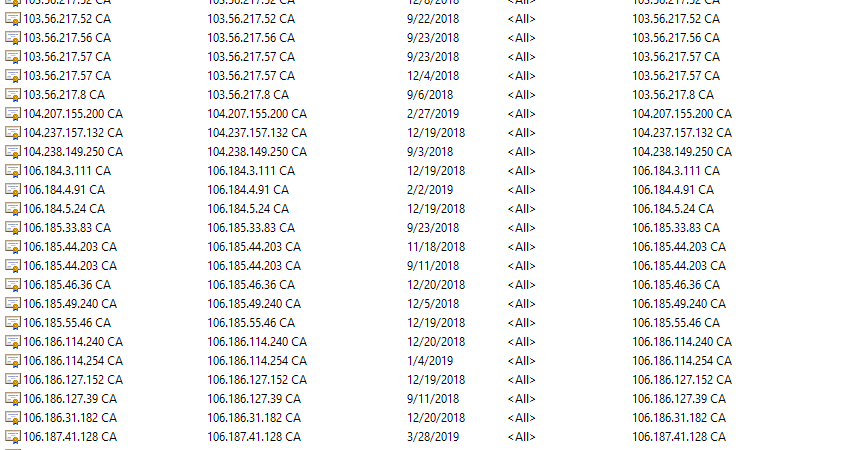
3rd, move all certs which have no clear descriptions into untrusted ca folder.
Here is a screenshot of CA which I have removed
PaleNeutron
on 24 Jan 2019
Thanks @PaleNeutron!
I did not have such certs.
I removed couple of certs isssued by Serbian CAs since they were invalid, but that did not help.
It looks like there are additional invalid certs in my Trusted Root CA and I am not able to figure out which ones are causing the issue.
gdukic
on 24 Jan 2019
@gdukic , for more professional, export all ca in root, and then validate(in fact only read is enough here) the files.
e.g. you got an export.pfx.
openssl.exe pkcs12 -info -in export.pfx
you will got something at the end of lines:
Certificate bag
Bag Attributes
    friendlyName: 45.79.76.29 CA
Error outputting keys and certificates
15628:error:0D0E20DD:asn1 encoding routines:c2i_ibuf:illegal padding:crypto\asn1\a_int.c:187:
15628:error:0D08303A:asn1 encoding routines:asn1_template_noexp_d2i:nested asn1 error:crypto\asn1\tasn_dec.c:626:Field=serialNumber, Type=X509_CINF
15628:error:0D08303A:asn1 encoding routines:asn1_template_noexp_d2i:nested asn1 error:crypto\asn1\tasn_dec.c:626:Field=cert_info, Type=X509
15628:error:0D0C706E:asn1 encoding routines:ASN1_item_unpack:decode error:crypto\asn1\asn_pack.c:60:
friendlyName: 45.79.76.29 CA that is the broken cert name.
PaleNeutron
on 24 Jan 2019
Just to add that for me removing bad certs from "Trusted Root CA" was not enough, so I removed bad certs from "Intermediate CA" too
 vlainic
on 19 Apr 2019
vlainic
on 19 Apr 2019
Thank you guys. Removing certs form Trusted Root and Intermediate CA solved my problem.
 Shansh
on 14 Jan 2020
Shansh
on 14 Jan 2020
Removing all Mup certificates from both Trusted Root and Intermediate CA solved it for me too.
 mmkosanovic
on 5 Feb 2020
mmkosanovic
on 5 Feb 2020
Related issues
 SmnHgr
·
3Comments
SmnHgr
·
3Comments
 Foadsf
·
3Comments
Foadsf
·
3Comments
 mmngreco
·
3Comments
mmngreco
·
3Comments
 jonatanblue
·
3Comments
jonatanblue
·
3Comments
 cmesro
·
3Comments
cmesro
·
3Comments
Most helpful comment
Just to add that for me removing bad certs from "Trusted Root CA" was not enough, so I removed bad certs from "Intermediate CA" too