Notebook: Can't invoke asyncio event_loop after tornado 5.0 update
On fresh python3.6 venv, after pip install jupyter && jupyter notebook and starting a new python3.6 notebook:
import asyncio

async def foo():
    return 42

asyncio.get_event_loop().run_until_complete(foo())
throws:
RuntimeError                              Traceback (most recent call last)
<ipython-input-5-3ad9bf216544> in <module>()
----> 1 asyncio.get_event_loop().run_until_complete(foo())

/usr/local/lib/python3.6/asyncio/base_events.py in run_until_complete(self, future)
    452         future.add_done_callback(_run_until_complete_cb)
    453         try:
--> 454             self.run_forever()
    455         except:
    456             if new_task and future.done() and not future.cancelled():

/usr/local/lib/python3.6/asyncio/base_events.py in run_forever(self)
    406         self._check_closed()
    407         if self.is_running():
--> 408             raise RuntimeError('This event loop is already running')
    409         if events._get_running_loop() is not None:
    410             raise RuntimeError(

RuntimeError: This event loop is already running
If I specify tornado==4.5.3 before pip install jupyter, it works fine
 betafcc
All 73 comments
Same for me (fresh Python 3.6.4 plus Jupyter, on Windows 7 32-bit).
 lschoe
on 6 Mar 2018
lschoe
on 6 Mar 2018
Probably related to the fact that
"On Python 3, IOLoop is always a wrapper around the asyncio event loop."
as listed in "Backwards-compatibility notes" of tornado 5.0: http://www.tornadoweb.org/en/stable/releases/v5.0.0.html#backwards-compatibility-notes
betafcc
on 6 Mar 2018
I'm not sure at the moment what we can do about this; as the error message says, the event loop is already running, because tornado now runs on top of asyncio. What you want is essentially await, but you can't use that outside a function.
@Carreau I think you were working on something related to this. Any ideas?
 takluyver
on 6 Mar 2018
takluyver
on 6 Mar 2018
Guess Tornado needs to use its own event loop coupled to a different thread than the one(s) used for the Jupyter notebook cells. Python 3.6 documentation mentions in Section 18.5.2.4 that "The default policy defines context as the current thread, and manages an event loop per thread that interacts with asyncio." Maybe people have already experimented with this?
lschoe
on 6 Mar 2018
I'd be inclined to figure out a way to run the user's coroutines on the existing event loop rather than starting a new thread. Threads cause all sorts of problems.
takluyver
on 6 Mar 2018
Yep, https://github.com/ipython/ipython/pull/10390 should help, but I din't had much chance to work on it. One of the TODO items is to make it work with ipykernel and run things on the current eventloop.
The framework is there it probably does not need much changes to work.
 Carreau
on 6 Mar 2018
Carreau
on 6 Mar 2018
Hey all, just wondering if there is there any update on this issue?
 mingwandroid
on 27 Mar 2018
mingwandroid
on 27 Mar 2018
I'd like to second this request for an update
As far as I am concerned, this is a major hindrance, as anything remotely useful tends to have some dosage of asyncio these days
 parmentelat
on 28 Mar 2018
parmentelat
on 28 Mar 2018
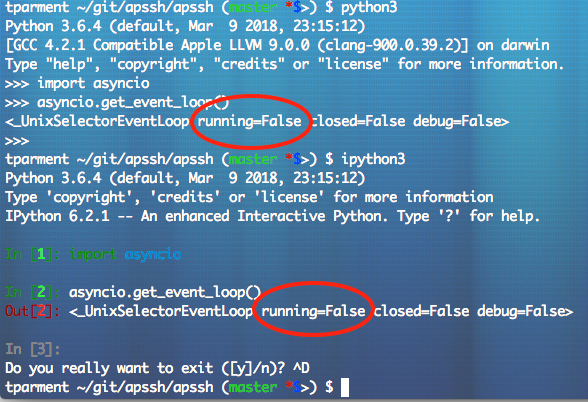
At the risk of stating the obvious, I'd just like to outline the following discrepency between what I get in a terminal - be it python or ipython - and in a notebook
I am not sure that I quite understand the other discussion there ipython/ipython#10390 but regardless, it is my feeling that something is wrong at this very early point already.

parmentelat
on 28 Mar 2018
Yep, that's expected. The kernel itself runs on an event loop, and as of Tornado 5.0, it's using the asyncio event loop. So the asyncio event loop is always running in the kernel. As far as I know, we haven't figured out a way to deal with this yet.
takluyver
on 28 Mar 2018
but wait, as far as I am concerned this means I can't run anything tainted with asyncio in a notebook
which will asymptotically amount to saying, I can't run anything in a notebook ;)
it that right, or am I missing something obvious ?
parmentelat
on 28 Mar 2018
For the moment, that's about right, though I don't think it's ever going to be the case that everything is async. We need to work out a way around it, but so far we haven't got there.
takluyver
on 28 Mar 2018
Right, you can't instantiate and run an asyncio eventloop in a thread with an asyncio loop already running. You can run asyncio in a thread, as seen in #11030, which is tedious and we would like it to be unnecessary. That's going to require that we finish #10390 or similar.
You can pin tornado to 4.x while we figure this out.
 minrk
on 28 Mar 2018
minrk
on 28 Mar 2018
I'm facing the same issue while I'm trying to run some code that uses internally:
with closing(asyncio.new_event_loop()) as loop:
    asyncio.set_event_loop(loop)
    return loop.run_until_complete(get_converted_form(msg))
Jupyter gives: Cannot run the event loop while another loop is running
 btoueg
on 29 Mar 2018
btoueg
on 29 Mar 2018
to make min's suggestion more concrete, I could work around this issue by just issuing
pip3 install tornado==4.5.3
edit: I expect the jupyter server needs to be restarted as well
parmentelat
on 29 Mar 2018
You'll need to restart the kernel - you don't have to restart the whole notebook server.
takluyver
on 29 Mar 2018
I also discovered this because all my asyncio code stopped working after an otherwise innocuous update. For anyone else who comes across this while not _quite_ understanding how event loops work: creating a new event loop won't help, as only one can run at any one time.
Some Google bait:
Spyder IPython Jupyter tornado
RuntimeError: Cannot run the event loop while another loop is running
RuntimeError: This event loop is already running
<_UnixSelectorEventLoop running=True closed=False debug=False>
Can't kill event loop
 andyljones
on 7 Apr 2018
andyljones
on 7 Apr 2018
I think a possible solution/workaround is to to use the ioloop of tornado, instead of running a new ioloop, but I did not get it right, any ideas?
 simsicon
on 15 Apr 2018
simsicon
on 15 Apr 2018
I have the same issue...the only way I was able to make it work was:
import asyncio
loop = asyncio.get_event_loop()
loop.create_task(some_async_func())
heart = broken
 Skorpeo
on 15 Apr 2018
Skorpeo
on 15 Apr 2018
@parmentelat
pip3 install tornado==4.5.3 solved the issue
 AIGyan
on 23 Apr 2018
AIGyan
on 23 Apr 2018
Adding to this thread my idea why it might not be working correctly:
In Jupyter Notebook, using Tornado 5.0 and above:
default_loop = asyncio.get_event_loop()
id(default_loop)  # 140334933252360

new_loop = asyncio.new_event_loop()
id(new_loop)  # 140334932896176

asyncio.set_event_loop(new_loop)
id(asyncio.get_event_loop())  # 140334933252360
Notice that the event loop has not been set up, the default_loop persists and remains to be the event loop of choice for the asyncio.
In Tornado 4.5.3, when calling the last line, the id matches the new_loop, ie:
...

asyncio.set_event_loop(new_loop)
id(asyncio.get_event_loop())  # 140334932896176
 CermakM
on 6 Aug 2018
CermakM
on 6 Aug 2018
It is working correctly with python3.7, Tornado 5.1 and ipykernel 4.8.2 on ArchLinux by manually updating python-ipykernel to the last version (not working with python-ipykernel-4.6.1)
 getzze
on 9 Aug 2018
getzze
on 9 Aug 2018
@getzze
It is working correctly with python3.7, Tornado 5.1 and ipykernel 4.8.2 on ArchLinux by manually updating python-ipykernel to the last version (not working with python-ipykernel-4.6.1)
Running the code snippet in the first post of this thread with Python 3.7.0, Tornado 5.1 and ipykernel 4.8.2 still gives me the same "RuntimeError: This event loop is already running".
Using the new asyncio.run method instead of run_until_complete gives a slightly different "RuntimeError: asyncio.run() cannot be called from a running event loop".
The real problem is imho not with jupyter or tornado, but with this decision for asyncio.
 erdewit
on 14 Aug 2018
erdewit
on 14 Aug 2018
We are aware of the issue and working on making it easier to run async code within a notebook, without having to manipulate the event loop yourself.
Getting it to work was already challenging, having it function on multiple python version is far from being easy, and we lack people willing to test our in-progress pull request to give feedback. In particular on the IPython side:
And ipykernel side:
There a a lot of extremely subtle behavior,

Any help to do other tasks unrelated to this bug might give us some band with to focus on this, but it's relatively complex code that requires multiple hours of focused time, which is becoming rare.
Carreau
on 14 Aug 2018
The new Jupyterhub has:
jupyterhub 0.9.2 has requirement tornado>=5.0, but you'll have tornado 4.5.3 which is incompatible.
after which I am unable to install the older version of tornado in the main environment of the Jupyterhub.
Does this mean that until this issue is solved, the root/main environment of any Jupyterhub>=0.9.2 (at least) is broken?
 basnijholt
on 3 Sep 2018
basnijholt
on 3 Sep 2018
@Carreau Those integrations look really nice, but will they be strictly optional? In other words, will there be a way to have the asyncio loop NOT running at all on Jupyter Notebook going forward?
I use Jupyter as a scratchpad for development and as a developer of asyncio-based apps, not being able to run loop.run_forever or loop.run_until_complete (or the new asyncio.run in 3.7) from Jupyter pretty much makes it useless as a scratchpad for me. I am sticking to Python 3.6.6 with tornado 4.5.3 for now, but that clearly isn't sustainable... (conda won't let me install Python 3.7 with tornado 4.5.3)
 gusutabopb
on 3 Sep 2018
gusutabopb
on 3 Sep 2018
Apologies for the short response without link, I am in a train. Multiple
things:
the hub, notebook and kernels do not need to share a python installation.
So it is possible to run each with a different tornado/IPython version. You
"just" need to configure it right.Currently the Ipython kernel (not the CLI) needs an event loop. It
happens to be tornado/asyncio. We could run with another, but that would
require some extra work.IPython tries to not run the loop when not necessary. In terminal IPython
run_until_complete works with no issues.
In most cases you should be able to replace it in the notebook simple by
'await stuff-you-wish-to-run' if that does not fit your need can you post a
example notebook, we can work on making that simpler later on.
On Mon, Sep 3, 2018, 13:36 Gustavo Bezerra notifications@github.com wrote:
@Carreau https://github.com/Carreau Those integrations look really
nice, but will they be strictly optional? In other words, will there be a
way to have the asyncio loop NOT running at all on Jupyter Notebook going
forward?I use Jupyter as a scratchpad for development and as a developer of
asyncio-based apps, not being able to run loop.run_forever or
loop.run_until_complete (or the new asyncio.run in 3.7) from Jupyter
pretty much makes it useless as a scratchpad for me. I am sticking to
Python 3.6.6 with tornado 4.5.3 for now, but that clearly isn't
sustainable... (conda won't let me install Python 3.7 with tornado 4.5.3)—
You are receiving this because you were mentioned.
Reply to this email directly, view it on GitHub
https://github.com/jupyter/notebook/issues/3397#issuecomment-418088968,
or mute the thread
https://github.com/notifications/unsubscribe-auth/AAUez6UBhKgIFtAjQFzk5xX5P9Gy4e9Qks5uXRRYgaJpZM4ScxZl
.
Carreau
on 3 Sep 2018
Most asyncio packages have an entry point that deals with the loop. Asyncio itself has asyncio.run() which won't work in the Ipython kernel at the moment. Aiohttp has web.run_app(). Other packages have other functions. These functions set up the loop, run the coroutines, and do application-specific nontrivial teardowns of the loop. Currently, one would have to go one step lower, and reimplement these methods in the Notebook. This is not feasible.
 jhrmnn
on 3 Sep 2018
jhrmnn
on 3 Sep 2018
@azag0 Exactly. Having the asyncio loop on the main thread always running basically breaks most asyncio-based apps/libraries out there.
Any new comer to the asyncio world that tries to run the code of some asyncio tutorial on Jupyter will be incredibly frustrated as most sample code they find on the web (which usually uses loop.run_until_complete or loop.run_forever) just simply won't run.
@Carreau I am not familiar with the internals of ipykernel, but is it possible to have the ipykernel/tornado asyncio loop running in a background thread instead of the main thread?
gusutabopb
on 4 Sep 2018
Quick update on conda:
While conda won't allow downgrading to tornado==4.5.3 on Python 3.7:
$ conda create -y -n py37_3 python=3.7 ipykernel tornado=4.5.3
# UnsatisfiableError: The following specifications were found to be in conflict [...]
I have confirmed overriding tornado through pip does work:
$ conda create -y -n py37 python=3.7 ipykernel  # installs tornado 5.1
$ conda activate py37
$ pip install "tornado==4.5.3"  # Successfully installed tornado-4.5.3
I am not sure if this will cause some minor bugs elsewhere or if the conda dependency check is just being overly strict though.
gusutabopb
on 4 Sep 2018
While conda won't allow downgrading to tornado==4.5.3 on Python 3.7:
That probably because some of the dependencies have not (yet) been packaged on conda. They might be compatible with Python 3.7, but the conda package should be rebuilt.
I see:
UnsatisfiableError: The following specifications were found to be in conflict:
  - python=3.7
  - tornado=4.5.3 -> python=3.5 -> readline=6.2
  - tornado=4.5.3 -> python=3.5 -> sqlite=3.9
  - tornado=4.5.3 -> python=3.5 -> tk=8.5
Packaging for old Python takes time, and I guess that's were companies that rely on that could help, but it's hard to ask volunteers to do that. The other possibility is to get a contract with Anaconda and say you are looking for long term support of X,Y,Z on newer Python.
I am not familiar with the internals of ipykernel, but is it possible to have the ipykernel/tornado asyncio loop running in a background thread instead of the main thread?
As many things in open-source the answer is maybe, but we also have the issues that some stuff don't like not being on the main thread. It's a matter of finding the resource to implement/review/maintain.
I'm tempted to also say that asyncio is cooperative scheduling so these applications should give option to run on already existing loops. I understand the use case, it is just hard to figure out how to do the right thing automatically.
Carreau
on 5 Sep 2018
I'm tempted to also say that asyncio is cooperative scheduling so these applications should give option to run on already existing loops. I understand the use case, it is just hard to figure out how to do the right thing automatically.
I agree on that point. For instance, with Aiohttp, rather then the blocking web.run_app(app), one can do
runner = web.AppRunner(app)
await runner.setup()
site = web.TCPSite(runner)  # web server launched as a background task
await site.start()
# user code
await runner.cleanup()
Ideally, all asyncio Python packages should allow such use. Unfortunately, one cannot turn a package that doesn't provide such functionality into a package that does easily. Even better, packages would provide an async context manager:
async with web.AppRunner(app) as runner:
    async with web.TCPSite(runner) as site:
        # user code
If this was common, the current situation with the Ipython kernel wouldn't really be such an issue.
jhrmnn
on 5 Sep 2018
Packaging for old Python takes time, and I guess that's were companies that rely on that could help, but it's hard to ask volunteers to do that.
We can make some old builds if they help the community and there's a good argument for that in this case. I had hoped this issue would be fixed quickly but I don't know anything about the codebase so that hope wasn't based on much! @csoja should we build these packages?
mingwandroid
on 5 Sep 2018
If this was common, the current situation with the IPython kernel wouldn't really be such an issue.
Well it might be a chicken-or-egg problem, they don't provide the functionality because users don't ask. Maybe reaching to them and saying that you need an async entry point could help.
Carreau
on 5 Sep 2018
For those interested, I've just a created package called nest_asyncio that solves the problem by patching asyncio to allow nested event loops. To use it in a notebook is a matter of putting
import nest_asyncio
nest_asyncio.apply()
somewhere near the top.
erdewit
on 7 Sep 2018
We should have prereleases of IPython 7 and ipykernel 5 next week that will enable top-level async/await in IPython or a notebook.
Because ipykernel itself relies on asyncio, if we want to achieve the ability for users to call get_event_loop().run_until_complete(), we have just a few options:
- instruct users to use something like nest_asyncio (neat!)
- use nest_asyncio by default in ipykernel (probably simplest, but I can't speak to how robust it is yet, since it seems to have only existed for a few hours)
- get off the mainloop, and run all of ipykernel in a background thread. We already do this for IOPub, and we could do it for the rest.
Personally, I view the fact that asyncio and tornado are running to be a feature, as user code can launch long-running coroutines on the main eventloop and they will keep running in the background. This would be challenging if the loop were in a thread.
So my inclination is for now, recommend nest_asyncio at the user-level and finish shipping ipykernel 5 / ipython 7 with top-level await / mainloop. We could even add a special exception handler for this RuntimeError to point folks at nest_asyncio or autoawait:
def recommend_nest_asyncio(shell, etype, value, tb, tb_offset=0):
    shell.showtraceback((etype, value, tb), tb_offset=tb_offset)
    if "already running" in str(value):
        print("""
    You might want to check out `nest_asyncio`, which enables asyncio.run_until_complete() even though asyncio is already running.
    Or with IPython 7, you can `await future` at the top-level without calling `run_until_complete`.
""")
get_ipython().set_custom_exc((RuntimeError,), handle_runtime)
And then revisit the possibility of putting the main eventloop into a background thread at a future date.
minrk
on 7 Sep 2018
3. get off the mainloop, and run all of ipykernel in a background thread. We already do this for IOPub, and we could do it for the rest.
This would cause trouble for users that use a local notebook server + GUI Matplotlib backends (as the GUI frameworks complain vigorously about not being on the main thread).
 tacaswell
on 26 Mar 2019
tacaswell
on 26 Mar 2019
With: Windows + Anaconda Python 3.6.5
pip3 install tornado==4.5.3 solved the issue.
Note: Earlier version of tornado is 5.0.2
 vivek-hari
on 7 Jun 2019
vivek-hari
on 7 Jun 2019
hi
fyi: I don't know for windows, but as far as linux, and in particular with the current ubuntu-based docker-stacks jupyter images, this is no longer necessary for me
parmentelat
on 7 Jun 2019
Downgrading tornado==4.5.3 is causing other issues for us, e.g., notebooks not appearing in the home folder.
 lmeyerov
on 2 Aug 2019
lmeyerov
on 2 Aug 2019
And even with
import nest_asyncio
nest_asyncio.apply()
=>
Cannot run the event loop while another loop is running
Running notebook=6.0.0 does not solve the problem in our case (gremlinpython).
Downgrading notebook does:
pip install jupyter notebook==5.7.8 tornado==4.5.3
I cannot say for sure, but IMHO this has more to do with the version of IPython than with the notebook
in any case and for what it's worth, I no longer need to downgrade anything with the current state of affairs, using either pip install on my laptop, or using the current docker-stack releases
parmentelat
on 2 Aug 2019
@lmeyerov Have you tried:
import asyncio
import nest_asyncio
nest_asyncio.apply(loop=asyncio.get_event_loop())
 c-goosen
on 2 Aug 2019
c-goosen
on 2 Aug 2019
If you are using a library, pass the loop to the library or use asyncio.get_event_loop(), so its using jupyter notebook's event loop.
c-goosen
on 2 Aug 2019
No luck.
Repro:
pip install gremlinpython==3.2.7 jupyter nest-asyncio
=>
import asyncio
import nest_asyncio
nest_asyncio.apply(loop=asyncio.get_event_loop())

from gremlin_python.driver import client, serializer

client = client.Client('wss://mydb','g',
    username="myuser", password="mypwd",
    message_serializer=serializer.GraphSONMessageSerializer()
)
=>
/conda/lib/python3.7/site-packages/gremlin_python/driver/connection.py in connect(self)
     44             self._transport.close()
     45         self._transport = self._transport_factory()
---> 46         self._transport.connect(self._url)
     47         self._protocol.connection_made(self._transport)
     48

/conda/lib/python3.7/site-packages/gremlin_python/driver/tornado/transport.py in connect(self, url)
     31     def connect(self, url):
     32         self._ws = self._loop.run_sync(
---> 33             lambda: websocket.websocket_connect(url))
     34
     35     def write(self, message):

/conda/lib/python3.7/site-packages/tornado/ioloop.py in run_sync(self, func, timeout)
    524
    525             timeout_handle = self.add_timeout(self.time() + timeout, timeout_callback)
--> 526         self.start()
    527         if timeout is not None:
    528             self.remove_timeout(timeout_handle)

/conda/lib/python3.7/site-packages/tornado/platform/asyncio.py in start(self)
    146             self._setup_logging()
    147             asyncio.set_event_loop(self.asyncio_loop)
--> 148             self.asyncio_loop.run_forever()
    149         finally:
    150             asyncio.set_event_loop(old_loop)

/conda/lib/python3.7/asyncio/base_events.py in run_forever(self)
    527         if events._get_running_loop() is not None:
    528             raise RuntimeError(
--> 529                 'Cannot run the event loop while another loop is running')
    530         self._set_coroutine_origin_tracking(self._debug)
    531         self._thread_id = threading.get_ident()

RuntimeError: Cannot run the event loop while another loop is running
@lmeyerov
Override Torndado Transport Definition used in gremlin-python. Tornado run_sync actually starts and then stops an event loop for every call. It's not a very performant implementation.
"""
Licensed to the Apache Software Foundation (ASF) under one
or more contributor license agreements.  See the NOTICE file
distributed with this work for additional information
regarding copyright ownership.  The ASF licenses this file
to you under the Apache License, Version 2.0 (the
"License"); you may not use this file except in compliance
with the License.  You may obtain a copy of the License at
http://www.apache.org/licenses/LICENSE-2.0
Unless required by applicable law or agreed to in writing,
software distributed under the License is distributed on an
"AS IS" BASIS, WITHOUT WARRANTIES OR CONDITIONS OF ANY
KIND, either express or implied.  See the License for the
specific language governing permissions and limitations
under the License.
"""
from tornado import ioloop, websocket

from gremlin_python.driver.transport import AbstractBaseTransport

__author__ = 'David M. Brown ([email protected])'


class TornadoTransport(AbstractBaseTransport):

    def __init__(self):
        self._loop = ioloop.IOLoop(make_current=False)

    def connect(self, url):
        self._ws = self._loop.run_sync(
            lambda: websocket.websocket_connect(url))

    def write(self, message):
        self._loop.run_sync(
            lambda: self._ws.write_message(message, binary=True))

    def read(self):
        return self._loop.run_sync(lambda: self._ws.read_message())

    def close(self):
        self._ws.close()
        self._loop.close()

    def closed(self):
        return not self._ws.protocol
 ZhijieWang
on 7 Aug 2019
ZhijieWang
on 7 Aug 2019
Not confirmed on the workaround yet on the competing lib, will report back.
lmeyerov
on 28 Aug 2019
On fresh python3.6 venv, after
pip install jupyter && jupyter notebookand starting a new python3.6 notebook:import asyncio async def foo(): return 42 asyncio.get_event_loop().run_until_complete(foo())throws:
RuntimeError                              Traceback (most recent call last)
<ipython-input-5-3ad9bf216544> in <module>()
----> 1 asyncio.get_event_loop().run_until_complete(foo())

/usr/local/lib/python3.6/asyncio/base_events.py in run_until_complete(self, future)
    452         future.add_done_callback(_run_until_complete_cb)
    453         try:
--> 454             self.run_forever()
    455         except:
    456             if new_task and future.done() and not future.cancelled():

/usr/local/lib/python3.6/asyncio/base_events.py in run_forever(self)
    406         self._check_closed()
    407         if self.is_running():
--> 408             raise RuntimeError('This event loop is already running')
    409         if events._get_running_loop() is not None:
    410             raise RuntimeError(

RuntimeError: This event loop is already running
If I specify
tornado==4.5.3beforepip install jupyter, it works fine
when I firstly pip install tornado==4.5.3,and secondly when I run pip install jupyter notebook...things occur to me,
Installing collected packages: tornado, jupyter-core, jupyter-client, prometheus-client, notebook, jupyter
Found existing installation: tornado 4.5.3
Uninstalling tornado-4.5.3:
Successfully uninstalled tornado-4.5.3
Found existing installation: jupyter-core 4.4.0
Uninstalling jupyter-core-4.4.0:
Successfully uninstalled jupyter-core-4.4.0
Found existing installation: jupyter-client 5.2.3
Uninstalling jupyter-client-5.2.3:
Successfully uninstalled jupyter-client-5.2.3
Successfully installed jupyter-1.0.0 jupyter-client-5.3.4 jupyter-core-4.6.1 notebook-6.0.2 prometheus-client-0.7.1 tornado-6.0.3
how can I specify tornado==4.5.3
 PointCloudNiphon
on 14 Nov 2019
PointCloudNiphon
on 14 Nov 2019
pip install jupyter notebook==5.7.8 tornado==4.5.3
thanks,your solution fit me well
PointCloudNiphon
on 14 Nov 2019
You can also use await foo(), if you go back to software releases from
within the last two years!
On Thu, Nov 14, 2019, 01:41 PointCloudNiphon notifications@github.com
wrote:
pip install jupyter notebook==5.7.8 tornado==4.5.3
thanks,your solution fit me well
—
You are receiving this because you are subscribed to this thread.
Reply to this email directly, view it on GitHub
https://github.com/jupyter/notebook/issues/3397?email_source=notifications&email_token=AAALCRHEZSAET5IVSAS75ETQTTXIVA5CNFSM4ETTCZS2YY3PNVWWK3TUL52HS4DFVREXG43VMVBW63LNMVXHJKTDN5WW2ZLOORPWSZGOEEAYSIQ#issuecomment-553748770,
or unsubscribe
https://github.com/notifications/unsubscribe-auth/AAALCRDQBJJACKDH2D23U3LQTTXIVANCNFSM4ETTCZSQ
.
 bollwyvl
on 14 Nov 2019
bollwyvl
on 14 Nov 2019
i see this issue as closed. but seems the only solution to this is to pin versions of notebook and tornado. is that really the only solution?
 satra
on 1 May 2020
satra
on 1 May 2020
Thanks for the following fix @lmeyerov, it allowed us to get started with using gremlinpython in a notebook. Is it still your current solution? Didn't know if you found another solution that allows using gremlinpython with a later version of notebook or ideally JupyterLab. I've tried various combinations of versions of notebook and tornado to no avail.
Running
notebook=6.0.0does not solve the problem in our case (gremlinpython).Downgrading
notebookdoes:pip install jupyter notebook==5.7.8 tornado==4.5.3
 ryanquincypaul
on 22 May 2020
ryanquincypaul
on 22 May 2020
@lmeyerov did you find a solution regarding notebooks that can not be seen?
 gmuraru
on 2 Jun 2020
gmuraru
on 2 Jun 2020
@minrk - are there any updates here? it's been a while since this issue was closed, but this should really be open, as the workaround is very specific and is affecting us anytime we install a jupyterhub/lab server, we need to pin tornado to that specific version whenever another package that uses asyncio needs to be present, and there are many more of those today.
is there a separate discussion channel that we should be using to discuss this/figure out a path?
satra
on 22 Jul 2020
Hi @satra - I believe you meant to reference @minrk. However, I'm not aware of outstanding issues remaining. While there may have been some initial instabilities in this area at the immediate 6.0 timeframe, my understanding (and experience) is that the tornado/asyncio issues are essentially gone.
I would recommend you try upgrading jupyter notebook to 6.0.3 or, better yet, take 6.1.0rc1 for a spin via pip install --upgrade --pre notebook.
 kevin-bates
on 22 Jul 2020
kevin-bates
on 22 Jul 2020
thank you @kevin-bates - we'll try it out. ping @djarecka and @nicolocin
satra
on 23 Jul 2020
@kevin-bates - thank you for your answer, but unfortunately I'm still getting the same error (This event loop is already running) with notebook 6.0.3 or 6.1.0rc1 (tornado==6.0.4). Everything works when using notebook==5.7.8 and tornado==4.5.3
checked for py37 and py38
 djarecka
on 24 Jul 2020
djarecka
on 24 Jul 2020
Where are you seeing this? In the notebook server console or from within a notebook executing a cell?
Please provide the output of jupyter --version.
kevin-bates
on 24 Jul 2020
@kevin-bates - here is the response from my environment:
$ jupyter --version
jupyter core     : 4.6.1
jupyter-notebook : 6.0.3
qtconsole        : 4.6.0
ipython          : 7.12.0
ipykernel        : 5.1.4
jupyter client   : 5.3.4
jupyter lab      : 1.2.6
nbconvert        : 5.6.1
ipywidgets       : 7.5.1
nbformat         : 5.0.4
traitlets        : 4.3.3
and the results in jupyter-lab are the same error listed here: https://github.com/jupyter/notebook/issues/3397#issue-302410642
satra
on 24 Jul 2020
@kevin-bates : we are executing the cell with the jupyter notebook
One of the version I tested is:
jupyter core     : 4.6.3
jupyter-notebook : 6.1.0rc1
qtconsole        : 4.7.5
ipython          : 7.16.1
ipykernel        : 5.3.4
jupyter client   : 6.1.6
jupyter lab      : not installed
nbconvert        : 5.6.1
ipywidgets       : 7.5.1
nbformat         : 5.0.7
traitlets        : 4.3.3
Your environments look fine (@satra, yours is slightly out of date).
Have you tried adjusting your cell's code to use await instead - as @bollwyvl suggests? I would also suggest revisiting these two (older) comments: https://github.com/jupyter/notebook/issues/3397#issuecomment-412986097 and https://github.com/jupyter/notebook/issues/3397#issuecomment-419474214
If you can't make any progress and given this is directly related to IPython and/or ipykernel, I would suggest opening/searching issues in either of those repositories - where more specialized expertise resides.
I had originally thought your issue was more within notebook and/or kernel startup where tornado/async related issues have essentially died down and apologize for not being more aware of your context. Given this is coming directly from a cell, you may need to make adjustments due to tornado's use of asyncio.
kevin-bates
on 24 Jul 2020
Hi guys,
As Kevin said, you contacted the wrong user. I think you confused "@minrk" with "@mirk".Anyway, good luck with the project.
Best,Mirko D'Angelo
Il mercoledì 22 luglio 2020, 15:00:00 CEST, Satrajit Ghosh <[email protected]> ha scritto:
@Mirk - are there any updates here? it's been a while since this issue was closed, but this should really be open, as the workaround is very specific and is affecting us anytime we install a jupyterhub/lab server, we need to pin tornado to that specific version whenever another package that uses asyncio needs to be present, and there are many more of those today.
is there a separate discussion channel that we should be using to discuss this/figure out a path?
—
You are receiving this because you were mentioned.
Reply to this email directly, view it on GitHub, or unsubscribe.
 Mirk
on 24 Jul 2020
Mirk
on 24 Jul 2020
@kevin-bates - we were able to update our notebooks with the nest_asyncio solution and that works now on binder
satra
on 28 Jul 2020
Hi, running a function in a thread circumvents the problem as shown in here https://github.com/stan-dev/pystan-next/issues/80
In this case async functions are inside the function func
import concurrent.futures
def exec_async(func, *args, **kwargs):
    with concurrent.futures.ThreadPoolExecutor(max_workers=1) as executor:
        future = executor.submit(func, *args, **kwargs)
    return future.result()
then calling a function as
result = exec_async(my_fun, arg_1, kwarg_1="hello")
idea was taken from here https://github.com/ipython/ipython/issues/11030
 ahartikainen
on 29 Jul 2020
ahartikainen
on 29 Jul 2020
For gremlin users, gremlinpython has been fine w/ tornado 5.x for awhile now. For 6.x (standard jupyter), the main technical requirement is py3.6+, but may require install gremlinpython --no-deps , and TBD, patching: https://github.com/apache/tinkerpop/pull/1212
lmeyerov
on 13 Aug 2020
I agree with @satra, this issue seems like it should be open, not closed. The Python REPL and the IPython REPL work fine, jupyter notebook does not.
The problem still occurs with notebook 6.1.3.
 riddell-stan
on 18 Aug 2020
riddell-stan
on 18 Aug 2020
@riddell-stan - we were able to make our notebooks work by installing and inserting nest_asyncio at the beginning of the notebook.
import nest_asyncio
nest_asyncio.apply()
(see https://github.com/nipype/pydra-tutorial/blob/master/notebooks/4_intro_workflow.ipynb)
it would be helpful to include this somewhere in the docs if it is indeed a universal solution. if it's not, i agree, this issue should be reopened.
satra
on 18 Aug 2020
I understand the frustration, but this issue is not happening in the Notebook server process itself - it's happening in the kernel process. Repeating my comment above:
If you can't make any progress and given this is directly related to IPython and/or ipykernel, I would suggest opening/searching issues in either of those repositories - where more specialized expertise resides.
There are no code changes necessary in this repository relative to this particular issue (running async code within a notebook [kernel]). I understand such issues have been handled by this repository in the past. That was back when the active maintainers were also the maintainers in IPython and ipykernel. That's no longer the case and we need to be more diligent about redirecting issues to their appropriate locations. I apologize for this, and a one-stop-shop is always preferred, but that's the only sustainable path forward.
it would be helpful to include this somewhere in the docs if it is indeed a universal solution.
Documentation changes, especially those that help troubleshoot issues, are always welcome. Even if this solution is not _universal_, there have been enough successes that make a doc update something of value.
kevin-bates
on 18 Aug 2020
@kevin-bates - indeed this should go over to ipykernel as the place to troubleshoot/fix. it's just that for most users, they don't understand the distinctions when they use the jupyter notebook/lab
satra
on 18 Aug 2020
Thank you @satra. I understand and completely agree. It's a very complex stack happening here, coupled with extremely varied technical levels. I have no intention of expecting folks to change how issues are reported. I just believe that redirection should happen as early in the analysis as possible and, over time, users will understand. That said, users are always welcome to start that process here (and rightly so).
kevin-bates
on 18 Aug 2020
@kevin-bates Thanks for the response. IPython works fine for me. The error only occurs in notebook and jupyterlab. So I gather that means it is a bug with ipykernel? Confirming that would help identify where the problem is.
Also, if folks really should direct their inquires elsewhere, perhaps it would be useful to lock this and mark it as wontfix?
riddell-stan
on 18 Aug 2020
IPython works fine for me. The error only occurs in notebook and jupyterlab. So I gather that means it is a bug with ipykernel?
Not necessarily - the actual change could wind up being in IPython, but, yes, a deeper investigation should occur from ipykernel.
perhaps it would be useful to lock this and mark it as wontfix
I hesitate to lock the conversation because I feel that part of things can be useful to people. I have applied the 'wontfix' label however (and anxiously waiting for karma come back at me on this one :smile: ).
kevin-bates
on 18 Aug 2020
Related issues
 SmnHgr
·
3Comments
SmnHgr
·
3Comments
 mikepqr
·
3Comments
mikepqr
·
3Comments
 itoed
·
3Comments
itoed
·
3Comments
 qnicole-zakka
·
3Comments
qnicole-zakka
·
3Comments
 harshinielath
·
3Comments
harshinielath
·
3Comments
Most helpful comment
but wait, as far as I am concerned this means I can't run anything tainted with asyncio in a notebook
which will asymptotically amount to saying, I can't run anything in a notebook ;)
it that right, or am I missing something obvious ?