Is it possible to embed tweets in Jupyter notebooks? If not, can an IPython.display option be added similar to HTML, YouTubeVideo, IFrame, etc.
Example
from IPython import display

display.Tweet("http://bit.ly/2vYS5ZD")

 pylang
All 7 comments
It's possible by embedding the relevant HTML, but there isn't a shortcut like YouTubeVideo.
I'd personally favour putting site-specific things like Tweet in third party modules which can be upgraded separately, rather than putting them all into IPython. They're really easy to define: it's just a class with a _repr_html_ method that returns HTML:
class Boo(object):
    def __init__(self, text='Boo'):
        self.text = text

    def _repr_html_(self):
        return '<h1>%s</h1>' % self.text
 takluyver
on 22 Aug 2017
takluyver
on 22 Aug 2017
Thanks @takluyver. With your help, I see how simple it is. For anyone interested, I used the embed string from a selected tweet:
Select the Embed Tweet option:

Copy/Paste the string:

Code:
class Tweet(object):
def __init__(self, embed_str=None):
self.embed_str = embed_str
def _repr_html_(self):
return self.embed_str
s = ("""
<blockquote class="twitter-tweet" data-lang="en"><p lang="en" dir="ltr">Watch <a href="https://twitter.com/hashtag/JupyterCon?src=hash">#JupyterCon</a> keynotes live on Facebook—starts 8:50AM ET <a href="https://t.co/Z6KFG2qQzd">https://t.co/Z6KFG2qQzd</a><a href="https://twitter.com/hashtag/Jupyter?src=hash">#Jupyter</a> <a href="https://twitter.com/hashtag/datascience?src=hash">#datascience</a> <a href="https://twitter.com/ProjectJupyter">@ProjectJupyter</a> <a href="https://twitter.com/NumFOCUS">@NumFOCUS</a> <a href="https://t.co/7FrmpA3jaA">pic.twitter.com/7FrmpA3jaA</a></p>— O'Reilly Media (@OReillyMedia) <a href="https://twitter.com/OReillyMedia/status/901048172738482176">August 25, 2017</a></blockquote>
<script async src="//platform.twitter.com/widgets.js" charset="utf-8"></script>
""")
Output:
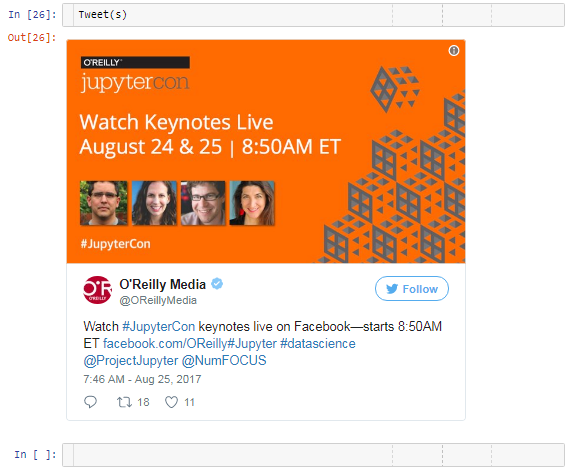
Here's another option using Twitter's oEmbed API to get the HTML markup given a URL:
import requests

class Tweet(object):
    def __init__(self, s, embed_str=False):
        if not embed_str:
            # Use Twitter's oEmbed API
            # https://dev.twitter.com/web/embedded-tweets
            api = 'https://publish.twitter.com/oembed?url={}'.format(s)
            response = requests.get(api)
            self.text = response.json()["html"]
        else:
            self.text = s

    def _repr_html_(self):
        return self.text

Tweet("https://twitter.com/OReillyMedia/status/901048172738482176")
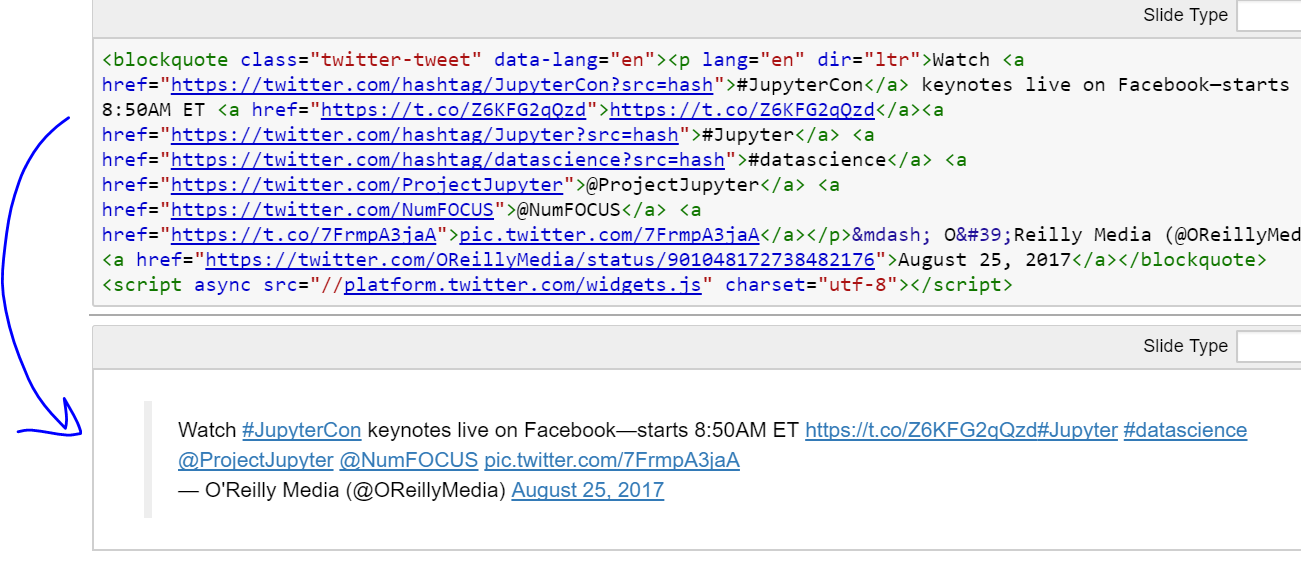
What about embedding Tweets directly into markdown?
Why is this not working?
 jankoslavic
on 19 Sep 2017
jankoslavic
on 19 Sep 2017
Markdown is sanitized to mitigate cross site scripting issues, HTML output is only shown if the notebook is trusted.
 rgbkrk
on 19 Sep 2017
rgbkrk
on 19 Sep 2017
Thanks @rgbkrk. PS: this is a result in a trusted notebook. Is there a way to show also the picture?
jankoslavic
on 20 Sep 2017
I fond another way using %%html magic:
```
%%html
Watch #JupyterCon keynotes live on Facebook—starts 8:50AM ET https://t.co/Z6KFG2qQzd#Jupyter #datascience @ProjectJupyter @NumFOCUS pic.twitter.com/7FrmpA3jaA
— O'Reilly Media (@OReillyMedia) August 25, 2017
jankoslavic
on 20 Sep 2017
I think we actually sanitize markdown regardless of trust; whether a notebook is trusted or not only relates to output.
takluyver
on 20 Sep 2017
Related issues
 mmngreco
·
3Comments
mmngreco
·
3Comments
 toasteez
·
3Comments
toasteez
·
3Comments
 uolter
·
3Comments
uolter
·
3Comments
 okdolly-001
·
3Comments
okdolly-001
·
3Comments
 Foadsf
·
3Comments
Foadsf
·
3Comments
Most helpful comment
I fond another way using %%html magic:
```
%%html