Notebook: juipiter notebook server "connecting to kernel" problem
hi,
i have set up a jupyter notebook server (set up on a VPS) which seems to be working fine for various clients (ie chrome with my ubuntu laptop connected to my home network, chrome with my android phone via mobile data, etc).
problem arise when i try to connect from workplace. i can log in without problems (server machine has SSL cert with letsencrypt) but when i open a ipynb file to work on i cannot connect to kernel:
a "connecting to kernel" orange box on top right appears and after a while also a message: "A connection to the notebook server could not be established. The notebook will continue trying to reconnect. Check your network connection or notebook server configuration."
this is happening with chrome/firefox/IE
any help on how i can solve the problem server-side? or what should i ask for to my IT department?
if it helps here are some more details on server set up:
server is a digitalocean VPS ubuntu 16.04 machine with anaconda 3 installed. nginx is installed and nginx is configured to redirect all requests to path /notebook to port 8888 on localhost where jupyter notebook is executed.
'mywebsite.com' points to DigitalOcean nameservers in order to reach VPS IP address.
nginx is secured with let's encrypt.
this is my nginx configuration: /etc/nginx/sites-available/default:
server {
listen 80 default_server;
listen [::]:80 default_server;
listen 443 ssl http2 default_server;
listen [::]:443 ssl http2 default_server;
server_name 'mywebsite.com';
include snippets/ssl-'mywebsite.com'.conf;
include snippets/ssl-params.conf;
location /notebook {
proxy_pass http://localhost:8888;
proxy_set_header X-Forwarded-For $proxy_add_x_forwarded_for;
proxy_set_header X-Real-IP $remote_addr;
proxy_set_header Host $http_host;
proxy_http_version 1.1;
proxy_redirect off;
proxy_buffering off;
proxy_set_header Upgrade $http_upgrade;
proxy_set_header Connection "upgrade";
proxy_read_timeout 86400;
}
root /var/www/html;
location ~ /.well-known {
allow all;
}
}
while this is jupyter_notebook_config.py:
c.NotebookApp.base_url = '/notebook/'
c.NotebookApp.ip = 'localhost'
c.NotebookApp.port = 8888
c.NotebookApp.port_retries = 50
c.NotebookApp.notebook_dir = '/path/to/notebook_directory'
c.NotebookApp.open_browser = False
VPS ufw status is;
To Action From
22 ALLOW Anywhere
8888 ALLOW Anywhere
443 ALLOW Anywhere
Anywhere ALLOW 127.0.0.1
OpenSSH ALLOW Anywhere
Nginx Full ALLOW Anywhere
22 (v6) ALLOW Anywhere (v6)
8888 (v6) ALLOW Anywhere (v6)
443 (v6) ALLOW Anywhere (v6)
OpenSSH (v6) ALLOW Anywhere (v6)
Nginx Full (v6) ALLOW Anywhere (v6)
any help is appreciated
thanks
 pisteps
All 56 comments
if it can be of help, these are the messages i get on VPS notebook server terminal once i run "jupyter notebook" and then log in on client (Chrome on a Windows 8 PC at workplace) and open an ipynb and run code:
[I 11:23:40.948 NotebookApp] Writing notebook server cookie secret to /run/user/1000/jupyter/notebook_cookie_secret
[I 11:23:41.910 NotebookApp] Serving notebooks from local directory: /myhome/dir
[I 11:23:41.910 NotebookApp] 0 active kernels
[I 11:23:41.911 NotebookApp] The Jupyter Notebook is running at: http://localhost:8888/notebook/
[I 11:23:41.911 NotebookApp] Use Control-C to stop this server and shut down all kernels (twice to skip confirmation).
[I 11:23:59.161 NotebookApp] 302 GET /notebook (127.0.0.1) 0.90ms
[I 11:23:59.210 NotebookApp] 302 GET /notebook/tree? (127.0.0.1) 1.57ms
[I 11:24:07.026 NotebookApp] 302 POST /notebook/login?next=%2Fnotebook%2Ftree%3F (127.0.0.1) 2.50ms
[I 11:24:19.053 NotebookApp] Kernel started: a56cebcf-89fd-420a-8eb8-7501f0c2f063
[W 11:24:20.273 NotebookApp] 400 GET /notebook/api/kernels/a56cebcf-89fd-420a-8eb8-7501f0c2f063/channels?session_id=8C1777D69A704302864F202B3B9A27E1 (127.0.0.1) 863.96ms referer=None
[W 11:24:21.468 NotebookApp] Replacing stale connection: a56cebcf-89fd-420a-8eb8-7501f0c2f063:8C1777D69A704302864F202B3B9A27E1
[W 11:25:54.564 NotebookApp] 400 GET /notebook/api/kernels/a56cebcf-89fd-420a-8eb8-7501f0c2f063/channels?session_id=0DDFCA5440B1443E8C4ABB7D83C65ED9 (127.0.0.1) 5.04ms referer=None
[W 11:25:55.723 NotebookApp] Replacing stale connection: a56cebcf-89fd-420a-8eb8-7501f0c2f063:0DDFCA5440B1443E8C4ABB7D83C65ED9
[I 11:27:39.571 NotebookApp] Kernel shutdown: a56cebcf-89fd-420a-8eb8-7501f0c2f063
pisteps
on 19 Jul 2017
Those symptoms often indicate that websocket connections are not getting through the proxy correctly. I don't recall what you need to do to fix it, but other people have definitely had similar issues if you want to search around.
 takluyver
on 26 Jul 2017
takluyver
on 26 Jul 2017
thanks you. i read everything i found around and tried different solutions.
i always end up with the server working perfectly when i access it from everywhere except when i am at my workplace.
maybe it is some corporate firewall blocking it.
also this server https://try.jupyter.org/ is not working when i try it from workplace.
i get this error;
WebSocket connection to wss:xxxxx failed: Error during WebSocket handshake: Unexpected response code: 400
pisteps
on 26 Jul 2017
maybe somehow corporate firewall blocks websocket connections used by kernels
pisteps
on 26 Jul 2017
Yeah, that does sound like there's some sort of corporate firewall or proxy server which doesn't like websocket connections. I'm surprised it affects https traffic as well, though. :-S
takluyver
on 26 Jul 2017
upstream notebook {
        server localhost:8888;
}
server {
        listen 80;
        server_name xxx.xxxx.com;
        rewrite ^/(.*) https://xxx.xxxx.com/$1 permanent;
}
server{
        listen 443 ssl;
        index index.html index.htm index.php default.html default.htm default.php;
        server_name xxx.xxxx.com;
        root /home/wwwroot/xxx.xxxx.com;
        ssl_certificate /etc/letsencrypt/live/xxx.xxxx.com/fullchain.pem;
        ssl_certificate_key /etc/letsencrypt/live/xxx.xxxx.com/privkey.pem;
        ssl_ciphers "EECDH+CHACHA20:EECDH+CHACHA20-draft:EECDH+AES128:RSA+AES128:EECDH+AES256:RSA+AES256:EECDH+3DES:RSA+3DES:!MD5";
        ssl_protocols TLSv1 TLSv1.1 TLSv1.2;
        ssl_prefer_server_ciphers on;
        ssl_session_cache shared:SSL:10m;

        location / {
                proxy_pass            http://notebook;
                proxy_set_header      Host $host;
        }

        location ~ /api/kernels/ {
                proxy_pass            http://notebook;
                proxy_set_header      Host $host;
                # websocket support
                proxy_http_version    1.1;
                proxy_set_header      Upgrade "websocket";
                proxy_set_header      Connection "Upgrade";
                proxy_read_timeout    86400;
        }
        location ~ /terminals/ {
                proxy_pass            http://notebook;
                proxy_set_header      Host $host;
                # websocket support
                proxy_http_version    1.1;
                proxy_set_header      Upgrade "websocket";
                proxy_set_header      Connection "Upgrade";
                proxy_read_timeout    86400;
        }
}
 tyyzqmf
on 22 Nov 2017
tyyzqmf
on 22 Nov 2017
Hey, I had the same issue with my workplace having locked down non-standard ports to external servers, such as my jupyter server. I came across this which solved it in case you're still having trouble. I just needed to add some additional location configuration to my nginx.conf file. Hope this helps!
 jonasdebeukelaer
on 10 Jan 2018
jonasdebeukelaer
on 10 Jan 2018
@tyyzqmf solution worked for me. Thank you.
 reinert
on 26 Apr 2018
reinert
on 26 Apr 2018
@jonasdebeukelaer I'm on a Google Cloud Instance running Ubuntu 18.04. What do I have to do exactly ?
 gabsens
on 2 Jul 2018
gabsens
on 2 Jul 2018
thanks @tyyzqmf , that's is the solution
proxy_set_header Upgrade "websocket";
proxy_set_header Connection "Upgrade";
 zxx
on 19 Sep 2018
zxx
on 19 Sep 2018
Downgrading tornado to 4.5.3 fixed my problem.
with pip - sudo python3.6 -m pip install tornado==4.5.3
with conda - conda install tornado==4.5.3
 ThejanW
on 2 Mar 2019
ThejanW
on 2 Mar 2019
@ThejanW thank you very much. It worked!
 StratosTso
on 2 Mar 2019
StratosTso
on 2 Mar 2019
Downgrading tornado to 4.5.3 fixed my problem.
with pip -sudo python3.6 -m pip install tornado==4.5.3
with conda -conda install tornado==4.5.3
Thank you so much Sir!1
 ItaloPerez2019
on 3 Mar 2019
ItaloPerez2019
on 3 Mar 2019
Thanks, @ThejanW!
Tornado had a release 6.0.0 on Mar 1, which triggered this problem recently, see: https://github.com/jupyter/notebook/issues/4437
Note: the previous tornado release was 5.1.1
 tvalentyn
on 3 Mar 2019
tvalentyn
on 3 Mar 2019
thanks @tvalentyn and @ThejanW . tornado 6.0 is causing issues with jupyter notebook. Downgradring to 5.1.1 works.
 subhrm
on 3 Mar 2019
subhrm
on 3 Mar 2019
Same here. I had to downgrade to tornado 4.5.3 like @ThejanW suggested for the Kernel to work. Sounds like an issue that Jupyter needs to investigate.
 rafidka
on 3 Mar 2019
rafidka
on 3 Mar 2019
Same here. Fixed using: pip install tornado==4.5.3. If you have a .yml file look for references to that library. In my case there was a line reading - tornado=4.5.1=py36_0 that I changed to - tornado=4.5.3=py36_0.
I'm using python 3.7.2.
 ajaimesv
on 4 Mar 2019
ajaimesv
on 4 Mar 2019
Downgrading tornado to 4.5.3 fixed my problem.
with pip -sudo python3.6 -m pip install tornado==4.5.3
with conda -conda install tornado==4.5.3
I m using python 3.6 in virtualenv. fixed it by $ pip install tornado==5.1.1
Great find. Thanks!
 wyattbiker
on 4 Mar 2019
wyattbiker
on 4 Mar 2019
Yes, pip install tornado==tornado 4.5.3 worked for me too.
Thank you for sharing @ThejanW.
 tjroyale
on 4 Mar 2019
tjroyale
on 4 Mar 2019
sudo python3.6 -m pip install tornado==4.5.3
Awesome!
 callmexss
on 4 Mar 2019
callmexss
on 4 Mar 2019
Thanks a lot !!
Tornado solved my problem, i hadn't install it from the beginning and once i've installed it worked like a charm
 abdlrhmanshehatamoussa
on 4 Mar 2019
abdlrhmanshehatamoussa
on 4 Mar 2019
I m using python 3.6 in virtualenv. fixed it by
$ pip install tornado==5.1.1
Downgrading Tornado from 6.0.1 to 5.1.1 fixed this for me as well, on macOS with Python 3.7 (installed via brew) and Jupyter 4.4.0 (installed via pip):
$ pip3 install tornado==5.1.1
Collecting tornado==5.1.1
  Downloading https://files.pythonhosted.org/packages/e6/78/6e7b5af12c12bdf38ca9bfe863fcaf53dc10430a312d0324e76c1e5ca426/tornado-5.1.1.tar.gz (516kB)
Building wheels for collected packages: tornado
  Building wheel for tornado (setup.py) ... done
  Stored in directory: $HOME/Library/Caches/pip/wheels/6d/e1/ce/f4ee2fa420cc6b940123c64992b81047816d0a9fad6b879325
Successfully built tornado
Installing collected packages: tornado
  Found existing installation: tornado 6.0.1
    Uninstalling tornado-6.0.1:
      Successfully uninstalled tornado-6.0.1
 artob
on 4 Mar 2019
artob
on 4 Mar 2019
Fixed by downgrade from Tornado 6.0.1 to 5.1.1.
Python 3.6.5,
jupyter (1.0.0)
jupyter-client (5.2.4)
jupyter-console (6.0.0)
jupyter-core (4.4.0)
ipython (7.3.0)
 jasompi
on 4 Mar 2019
jasompi
on 4 Mar 2019
thx,'pip3 install tornado==5.1.1 --user' rounds on my win10
 jallenyagn
on 5 Mar 2019
jallenyagn
on 5 Mar 2019
@ThejanW , I'm in a vmware ubuntu16.04 environment , ' pip3 install tornado==4.5.3' save my day!
 fansy1990
on 5 Mar 2019
fansy1990
on 5 Mar 2019
I also have this problem. Any Python codes don' return the result.
Downgrade tornado to 5.1.1 solves the problem.
pip uninstall tornado
pip install tornado==5.1.1
 icoxfog417
on 5 Mar 2019
icoxfog417
on 5 Mar 2019
Same here, downgrading to tornado==5.1.1 does the trick.
 mke21
on 5 Mar 2019
mke21
on 5 Mar 2019
Same here downgrading tornado==5.1.1 work as temporarily fix. Thanks i started to become crazy about this bug
 ikario404
on 5 Mar 2019
ikario404
on 5 Mar 2019
@ThejanW it works for me , thanks.
 ghost
on 5 Mar 2019
ghost
on 5 Mar 2019
Downgrading tornado to 4.5.3 fixed my problem.
with pip -sudo python3.6 -m pip install tornado==4.5.3
with conda -conda install tornado==4.5.3
Thanks, it works.
 wsyxbcl
on 6 Mar 2019
wsyxbcl
on 6 Mar 2019
WOW....
I see also same the issue. i install jupyter and run jupyter notebook ,it can not work .i watch tornado version use pip show tornado ,find tornado version is 6.0.1.then ,i use pip install tornado==4.5.3 and run jupyter notebook ,it can work. the way is usefully.
thanks
 GavinMoreYoung
on 6 Mar 2019
GavinMoreYoung
on 6 Mar 2019
Upgrading to notebook version 5.7.5 will provide compatibility with Tornado 6.x.
 willingc
on 8 Mar 2019
willingc
on 8 Mar 2019
Downgrading tornado to 4.5.3 fixed my problem.
with pip -sudo python3.6 -m pip install tornado==4.5.3
with conda -conda install tornado==4.5.3
This fixed my issue, Thank you!
 imanirajdoost
on 9 Mar 2019
imanirajdoost
on 9 Mar 2019
This worked for me too
conda install tornado==4.5.3
But I wonder if anyone could recap why this actually solves this.
 matanster
on 11 Mar 2019
matanster
on 11 Mar 2019
This worked for me too
conda install tornado==4.5.3But I wonder if anyone could recap why this actually solves this.
The issue has already been fixed, notebook 5.7.5 is now compatible with tornado 6.x
wsyxbcl
on 12 Mar 2019
Worked for me as well. Spent half the afternoon searching for this fix. Thanks.
 kstone5
on 21 Mar 2019
kstone5
on 21 Mar 2019
Downgrading tornado to 4.5.3 fixed my problem.
with pip -sudo python3.6 -m pip install tornado==4.5.3
with conda -conda install tornado==4.5.3
Thanks!!!
 orsegal
on 30 Mar 2019
orsegal
on 30 Mar 2019
I use jupyter in the GCP instance (ubuntu). It was perfectly working till yesterday with tornado==6.0.2. Suddenly today morning this error started showing up and I'm puzzled with it.
I have tried downgrading the tornado versions with all you accepted solutions above but non works for me.
Any help on this would be great!
Thanks
Arav
 Aravinviju
on 3 May 2019
Aravinviju
on 3 May 2019
Hi
I have tried all the versions of the tornado, it doesn't solve the issue.
I started with python 3.6 and tried till python 3.7.3 with all the combinations of tornado versions.
Its still giving the same problem.
As I said I using jupyter in a GCP instance(ubuntu).
The Jupyter notebook was perfectly work till last week and suddenly this happend. I'm not sure what the problem is. I have tried all the solutions you guys have mentioned here.
Any help on this is much apreciated.
Thanks
Arav
Aravinviju
on 7 May 2019
Hi
I have tried all the versions of the tornado, it doesn't solve the issue.
I started with python 3.6 and tried till python 3.7.3 with all the combinations of tornado versions.
Its still giving the same problem.
As I said I using jupyter in a GCP instance(ubuntu).The Jupyter notebook was perfectly work till last week and suddenly this happend. I'm not sure what the problem is. I have tried all the solutions you guys have mentioned here.
Any help on this is much apreciated.
Thanks
Arav
Can you give the error messages?
wsyxbcl
on 7 May 2019
Hi
I have tried all the versions of the tornado, it doesn't solve the issue.
I started with python 3.6 and tried till python 3.7.3 with all the combinations of tornado versions.
Its still giving the same problem.
As I said I using jupyter in a GCP instance(ubuntu).
The Jupyter notebook was perfectly work till last week and suddenly this happend. I'm not sure what the problem is. I have tried all the solutions you guys have mentioned here.
Any help on this is much apreciated.
Thanks
AravCan you give the error messages?
The below is the error message
A connection to the notebook server could not be established. The notebook will continue trying to reconnect. Check your network connection or notebook server configuration.
When I open the jupyter notebook, the connection is successful and the kernel starts but when I open a python(ipynb) file, this is the error I'm getting.
Hope I was clear in explaining.
In the command prompt, I don't any error message,
[I 14:38:57.498 NotebookApp] 302 GET / (165.225.80.69) 0.64ms
[I 14:38:57.608 NotebookApp] 302 GET /tree? (165.225.80.69) 0.79ms
[I 14:39:00.596 NotebookApp] 302 POST /login?next=%2Ftree%3F (165.225.80.69) 1.56ms
[I 14:39:06.526 NotebookApp] Creating new notebook in
[I 14:39:09.701 NotebookApp] Kernel started: 05551eba-430d-4493-8755-237d8a8fdc57
[I 14:45:30.000 NotebookApp] 302 GET / (165.225.80.69) 0.61ms
[I 14:45:44.062 NotebookApp] Kernel shutdown: 05551eba-430d-4493-8755-237d8a8fdc57
[W 14:45:44.064 NotebookApp] delete /Untitled.ipynb
[W 14:45:44.066 NotebookApp] delete /Untitled1.ipynb
[I 14:45:49.856 NotebookApp] Kernel started: ef8aa9f6-34b6-4e51-8c8e-353da3ad9b7a
Thanks
Arav
Aravinviju
on 7 May 2019
I'm getting a smiliar error... #4630
It has something to do with the websocket connection?
I'm not sure how to resolve this issue with the websocket!
The linked issue can give you more details on the issue.
Cheers
Arav
Aravinviju
on 14 May 2019
thank you, @ThejanW
 hitle451997
on 22 May 2019
hitle451997
on 22 May 2019
from my experience, Jupyter should be configured with ssl and start with https, then you will not see this problem.
 zhcf
on 4 Jun 2019
zhcf
on 4 Jun 2019
thanx a lot..downgrading tornado solved my problem
 sachingoyal0104
on 14 Jun 2019
sachingoyal0104
on 14 Jun 2019
Hi, everyone. I'm trying to downgrade to 5.1.1 through conda, but it failed. Can anyone please give some advice?

I'm trying to access Jupyter Notebook in a remote server. I installed using https://hub.docker.com/r/continuumio/anaconda/ and and downgrade to tornado 4.5.3, but still getting the same error.

 cqcn1991
on 10 Jul 2019
cqcn1991
on 10 Jul 2019
Our issue was that our proxy-public ELB in AWS was listening on HTTP instead of TCP, and the kernel endpoint uses web sockets (which goes over TCP)
 wierzba3
on 5 Aug 2019
wierzba3
on 5 Aug 2019
thanks @tyyzqmf , that's is the solution
proxy_set_header Upgrade "websocket";
proxy_set_header Connection "Upgrade";
Where can I set this?
My case is IE and firefox works well, but Chrome developer tool shows me on the Websocket response: Connection closed before receiving a handshake response
 randomseed42
on 29 Aug 2019
randomseed42
on 29 Aug 2019
Solution address: https://segmentfault.com/a/1190000016627630
Here's a solution for me.
I have a cloud server and my own domain name. When I try to access my notenook on my Centos server by using my domain name, some services cannot start (like python).
Then I found that the jupyter notebook need to use websocket to connect the server, which means I need to add some configs to my nginx like this:
server{
    listen  80;
    server_name www.example.com;

    location / {
        proxy_pass http://l127.0.0.1:8888;
        proxy_set_header Host $host;
        proxy_set_header X-Real-Scheme $scheme;
        proxy_set_header X-Real-IP $remote_addr;
        proxy_set_header X-Forwarded-For $proxy_add_x_forwarded_for;

        # WebSocket support
        proxy_http_version 1.1;
        proxy_set_header Upgrade $http_upgrade;
        proxy_set_header Connection "upgrade";

        proxy_read_timeout 120s;
        proxy_next_upstream error;
    }
}
It works!
 ZihuanLing
on 27 Sep 2019
ZihuanLing
on 27 Sep 2019
Downgrading tornado to 4.5.3 fixed my problem.
with pip -sudo python3.6 -m pip install tornado==4.5.3
with conda -conda install tornado==4.5.3
thanks a lot!! worked for me too
 gloriamacia
on 1 Nov 2019
gloriamacia
on 1 Nov 2019
pip uninstall tornado
pip install tornado==4.5.3
 biswajitdikun
on 9 Dec 2019
biswajitdikun
on 9 Dec 2019
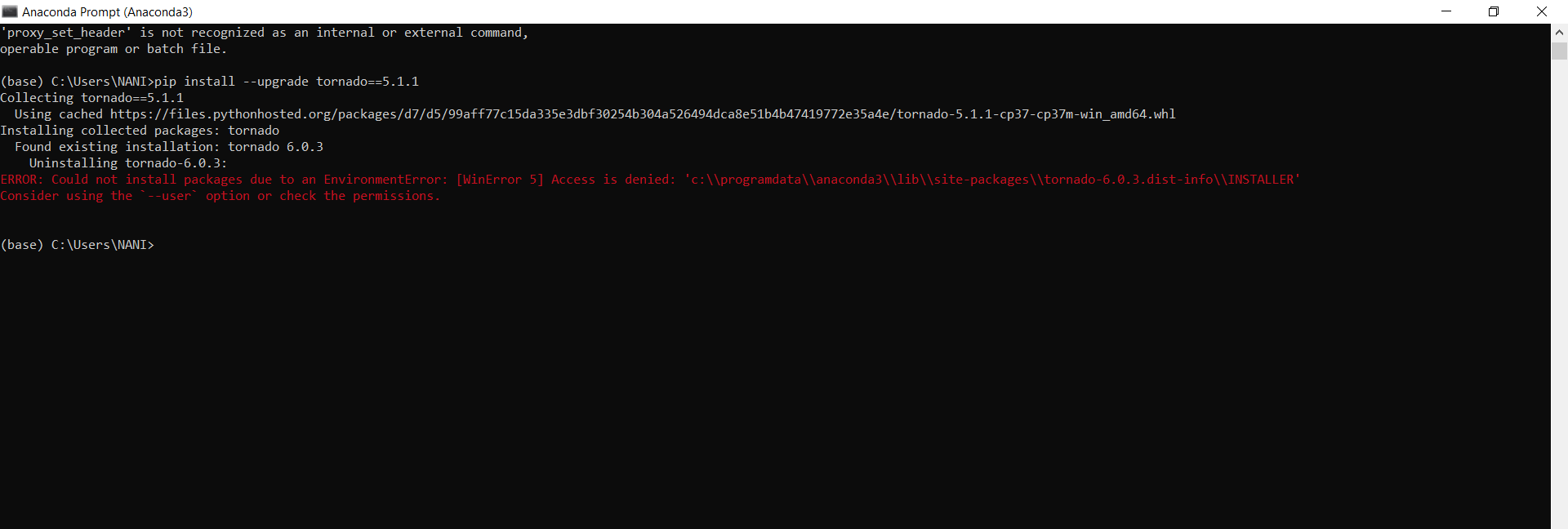
i am getting this error
 nani-samireddy
on 22 Feb 2020
nani-samireddy
on 22 Feb 2020
I resolved with this
upstream jupyter-nb {
  server 127.0.0.1:8888;
}

server {
  server_name example.com;
  location / {
    proxy_set_header Host $host;
    proxy_pass http://jupyter-nb;
    proxy_set_header X-Real-Scheme $scheme;
        proxy_set_header X-Real-IP $remote_addr;
        proxy_set_header X-Forwarded-For $proxy_add_x_forwarded_for;

        # WebSocket support
        proxy_http_version 1.1;
        proxy_set_header Upgrade $http_upgrade;
        proxy_set_header Connection "upgrade";

        proxy_read_timeout 120s;
        proxy_next_upstream error;
  }

    location ~ /api/kernels/ {
        proxy_pass http://jupyter-nb;
        proxy_set_header Host $host;
        # websocket support
        proxy_http_version 1.1;
        proxy_set_header Upgrade "websocket";
        proxy_set_header Connection "Upgrade";
        proxy_read_timeout 86400;
    }
    location ~ /terminals/ {
        proxy_pass http://jupyter-nb;
        proxy_set_header Host $host;
        # websocket support
        proxy_http_version 1.1;
        proxy_set_header Upgrade "websocket";
        proxy_set_header Connection "Upgrade";
        proxy_read_timeout 86400;
    }
}
 ans-4175
on 2 Mar 2020
ans-4175
on 2 Mar 2020
I believe I'm experiencing the same problem still with:
ipykernel (5.1.4)
jupyter-client (6.0.0)
jupyter-core (4.6.3)
jupyter-telemetry (0.0.5)
jupyterhub (1.1.0)
notebook (6.0.3)
tornado (6.0.4)
I have Apache proxy set up after this: https://jupyterhub.readthedocs.io/en/stable/reference/config-proxy.html
Kernel does NOT connect when JHub is access via Apache's Proxy.
Downgrading 'tornado' does not help.
Any help greatly appreciated.
thanks, L.
 lejeczek
on 11 Mar 2020
lejeczek
on 11 Mar 2020
@tyyzqmf You did me a great favor!!! 感谢大神!!!
 sfjdx1144
on 28 Nov 2020
sfjdx1144
on 28 Nov 2020
Our issue was that our proxy-public ELB in AWS was listening on HTTP instead of TCP, and the kernel endpoint uses web sockets (which goes over TCP)
In my case, I am the same as you. After enable the LB websocket choice, then it fixed~
 stevenkwong
on 7 Dec 2020
stevenkwong
on 7 Dec 2020
Related issues
 toasteez
·
3Comments
toasteez
·
3Comments
 cmesro
·
3Comments
cmesro
·
3Comments
 itoed
·
3Comments
itoed
·
3Comments
 ehossain1982
·
3Comments
ehossain1982
·
3Comments
 Foadsf
·
3Comments
Foadsf
·
3Comments
Most helpful comment
Downgrading tornado to 4.5.3 fixed my problem.
with pip -
sudo python3.6 -m pip install tornado==4.5.3with conda -
conda install tornado==4.5.3