Notebook: Jupyter notebook does not launch
After the conda installation, the Jupyter notebook does not start. There is a command window, which shows up for 1-2 seconds but disappears. The Spyder does work properly so far.
More background information here: Windows 7, used to have an older version Anaconda, tried to update but found nothing worked after update. Uninstalled, and reinstalled the latest version Anaconda 4.3.0 with python2.7 64bit. Neither Spyder or Jupyter launches afterwards. Did "conda update --all". Found Spyder works but not Jupyter Notebook.
 hlignin
All 75 comments
Can you get an Anaconda command prompt and run jupyter notebook in it? It probably won't work, but you should get an error message saying what's failing.
 takluyver
on 3 Feb 2017
takluyver
on 3 Feb 2017
takluyver,
Thanks a lot! I just tried, and found it actually works by running from the command window! The problem looks like that the "Jupyter notebook" shortcut in the Windows start menu is messed up?
hlignin
on 3 Feb 2017
I wonder if that's left over from the older version of Anaconda. The shortcut properties might tell you what it's trying to call - there may be a wrong path to Anaconda or something.
takluyver
on 3 Feb 2017
Closing as I don't think there's anything wrong in our code; feel free to keep using comments to work out what's going on.
takluyver
on 3 Feb 2017
Did you fix this problem? I got this problem as well. Jupyter is launching from the cmd but not from the Windows shortcut.
 11257512
on 14 Feb 2017
11257512
on 14 Feb 2017
Can you look at the properties of the Windows shortcut to see what it's launching? The shortcut is something that Anaconda makes, so we don't directly control it.
takluyver
on 14 Feb 2017
i looked at the properties.. this is what it's launching:
C:\Users\Name\Anaconda3\python.exe
C:\Users\Name\Anaconda3\cwp.py
C:\Users\Name\Anaconda3
"C:/Users/Name/Anaconda3/python.exe"
"C:/Users/Name/Anaconda3/Scripts/jupyter-notebook-script.py"
%HOME%
11257512
on 14 Feb 2017
Yes, the problem was resolved. The shortcut was the issue. I had to
manually change the "Shortcut target" (in windows 7) to the following:
C:\Users\'yourusername'\AppData\Local\Continuum\Anaconda2\Scripts\jupyter-notebook.exe
Let me know if works.
Thanks,
On Tue, Feb 14, 2017 at 8:36 AM, 11257512 notifications@github.com wrote:
i looked at the properties.. this is what it's launching:
C:\Users\Name\Anaconda3\python.exe
C:\Users\Name\Anaconda3\cwp.py
C:\Users\Name\Anaconda3
"C:/Users/Name/Anaconda3/python.exe"
"C:/Users/Name/Anaconda3/Scripts/jupyter-notebook-script.py"
%HOME%—
You are receiving this because you authored the thread.
Reply to this email directly, view it on GitHub
https://github.com/jupyter/notebook/issues/2130#issuecomment-279708565,
or mute the thread
https://github.com/notifications/unsubscribe-auth/AHamRcX8YkY54p1TYpQ3Ob4YUfAoj3zHks5rca30gaJpZM4L2ZaY
.
hlignin
on 14 Feb 2017
jap, using jupyter-notebook.exe as shortcut target did the trick!
thank you very much! :-)
11257512
on 14 Feb 2017
Thanks @hlignin . If anyone wants to follow up the shortcut issue, the anaconda-issues repo is probably the place to report it.
takluyver
on 14 Feb 2017
This is my environment.
Windows 10 Pro 64-bit
Anaconda3 4.3.0
I've experienced the same problem.
This is the default target of "Jupyter Notebook" shortcut. (in my case)
C:\Users\hwync\Anaconda3\python.exe C:\Users\hwync\Anaconda3\cwp.py C:\Users\hwync\Anaconda3 "C:/Users/hwync/Anaconda3/python.exe" "C:/Users/hwync/Anaconda3/Scripts/jupyter-notebook-script.py" %HOME%
In here, %HOME% caused the problem.
So, I solved the problem with following solutions.
Please choose your preferred method.
1. Add a new HOME in system variables.
Go to Advanced System Settings > Environment Variables, add a new HOME in system variables.
Variable name : HOME
Variable value : C:\Users\hwync\Documents\Notebooks
2. Change %HOME% to path.
%HOME% ⇒ C:\Users\hwync\Documents\Notebooks
3. Change %HOME% to %JUPYTER_HOME% and add in system variables.
%HOME% ⇒ %JUPYTER_HOME%
Go to Advanced System Settings > Environment Variables, add a new JUPYTER_HOME in system variables.
Variable name : JUPYTER_HOME
Variable value : C:\Users\hwync\Documents\Notebooks
 hwyncho
on 25 Feb 2017
hwyncho
on 25 Feb 2017
Thanks for the detailed write up! Someone should probably report this to
Anaconda, because they make the start menu shortcut.
On 25 Feb 2017 7:24 p.m., "hwyn.cho" notifications@github.com wrote:
This is my environment.
Windows 10 Pro 64-bit
Anaconda3 4.3.0I've experienced the same problem.
This is the default target of "Jupyter Notebook" shortcut. (my case)
C:\Users\hwync\Anaconda3\python.exe C:\Users\hwync\Anaconda3\cwp.py
C:\Users\hwync\Anaconda3 "C:/Users/hwync/Anaconda3/python.exe"
"C:/Users/hwync/Anaconda3/Scripts/jupyter-notebook-script.py" %HOME%In here, %HOME% caused the problem.
So, I solved the problem with following solutions.
Please choose your preferred method.
- Add a new HOME in system variables.
Go to Advanced System Settings > Environment Variables, add a new HOME in
system variables.Variable name : HOME
Variable value : C:\Users\hwync\Documents\Notebooks
- Change %HOME% to path.
%HOME% ⇒ C:\Users\hwync\Documents\Notebooks
- Change %HOME% to %IPYNB_HOME% and Add a new IPYNB_HOME in system
variables.%HOME% ⇒ %IPYNB_HOME
Go to Advanced System Settings > Environment Variables, add a new
IPYNB_HOME in system variables.Variable name : IPYNB_HOME
Variable value : C:\Users\hwync\Documents\Notebooks—
You are receiving this because you modified the open/close state.
Reply to this email directly, view it on GitHub
https://github.com/jupyter/notebook/issues/2130#issuecomment-282506210,
or mute the thread
https://github.com/notifications/unsubscribe-auth/AAUA9fPAprCAjDXFywIr3tvUAAbOeEDpks5rgH_kgaJpZM4L2ZaY
.
takluyver
on 25 Feb 2017
@hwyncho great work! Thanks!
11257512
on 27 Feb 2017
Hi,
I looked at my set up and the icons have the following properties: :
"C:\Users\Name\Anaconda3\envs\env_name\python.exe"
"C:\Users\Name\Anaconda3\cwp.py"
"C:\Users\Name\Anaconda3\envs\env_name"
"C:/Users/Name/Anaconda3/envs/env_name/python.exe"
"C:/Users/Name/Anaconda3/envs/env_name/Scrip
- this part is missing from the target text due to limit on the taget text box in icon properties pop up: ts/jupyter-notebook-script.py"
Two questions:
- I think the missing part of the file path is causing a problem. Would you agree?
- The second entry is not point to the envs version of cwp.py, which could also be causing a problem. Would you agree?
If the first is correct, I believe the only way to correct is for me to change my User folder name which seems quite problematic for Win 10. Any suggestions?
Many Thanks,
Alan
 AlanMc101
on 24 Apr 2017
AlanMc101
on 24 Apr 2017
- I don't know if that's a problem affecting the actual value, or just its display in the properties dialog. If it is affecting the actual value, it could very well be the problem.
- I'm not entirely sure what
cwp.pydoes, but I suspect it doesn't matter that it's not pointing to the one in the env. You're better off asking Anaconda people about it.
takluyver
on 24 Apr 2017
Hi, I have the same issue here as well, Jupyter opens from the command line but not from the shortcut. How do I inspect the shortcut to see where it is linking to? I can't find the shortcut in the Anaconda3 folder.
 yehoshuadimarsky
on 12 May 2017
yehoshuadimarsky
on 12 May 2017
Just solved this for the windows shortcut on Windows 8.1. My windows user has a space in the name, so in the shortcut I had to wrap the %USERPROFILE% path with double quotes as "%USERPROFILE%"
Still have been unable to get the shortcut within anaconda navigator working.
 JosephCardwell
on 11 Jun 2017
JosephCardwell
on 11 Jun 2017
@JoomSavvy Thanks! Put USERPROFILE in double quotes ..now the shortcut is working!
 SPoonja
on 1 Jul 2017
SPoonja
on 1 Jul 2017
@JoomSavvy Thanks, it worked for me!
 DoofCoder
on 10 Aug 2017
DoofCoder
on 10 Aug 2017
It appears your doc and code are not longer in sync e.g. running jupyter notebook fails. Running jupyter-notebook works however.
 SumNeuron
on 14 Sep 2017
SumNeuron
on 14 Sep 2017
I tried to open jupyter from anaconda command prompt and also from navigator but for both it doesn't open up. Instead of Internet explorer microsoft edge comes up but doesn't open jupyter and gets close automatically. what could be the issue ?
P.S. : i am able to open spider.
 Eyshika
on 25 Sep 2017
Eyshika
on 25 Sep 2017
@Eyshika - if you enter jupyter notebook in a command prompt what is the exact, full output you see in the terminal? Just copy/paste the un-abridged/edited output into a new comment.
Even if a browser doesn't open up you should be able to manually open a browser and navigate to localhost:8000.
Also, I'd recommend to never use Internet Explorer, basically for anything but in particular I don't think the notebook works with it.
 dhirschfeld
on 25 Sep 2017
dhirschfeld
on 25 Sep 2017

Also, if I should not open it on Internet explorer then which browser is recommended?
Eyshika
on 25 Sep 2017
Chrome and Firefox are well supported. Edge should be fine, so I'm a bit surprised. If you grab that full url that has the token and put it in Edge, does it do the same weird behavior?
 rgbkrk
on 25 Sep 2017
rgbkrk
on 25 Sep 2017
It works now, with url. i don't know why it was showing error.
But now it's not giving me any output on python3 jupyter
Eyshika
on 25 Sep 2017
Any errors in the output on the terminal you started it from?
rgbkrk
on 25 Sep 2017
Hi I have the same problem on windows 10. Both Jupyter and Spider cannot be launched. I tried all your solutions mentioned above , but still it is not working.
 tatullia
on 5 Oct 2017
tatullia
on 5 Oct 2017
My problem was my user's folder had a space in folder name.
After creating a new user and switching to that windows user, windows shortcuts and links from within' Anaconda worked fine.
Windows 8.1 64 Bit. Latest Anaconda.
Note: I ended up uninstalling an reinstalling Anaconda but my sense is the problem was really just the space in the windows user username/user folder.
JosephCardwell
on 6 Oct 2017
@rgbkrk you were right, It works perfectly now
Eyshika
on 6 Oct 2017
@tatullia When you type jupyter notebook in your prompt it must be giving you some url, use that url to open jupyter
Eyshika
on 6 Oct 2017
Trying to update, re-installed completely and now I get this error.
 briancullinan
on 27 Oct 2017
briancullinan
on 27 Oct 2017
@megamindbrian What is the error you are getting ?
Eyshika
on 27 Oct 2017
I tried installing with pip and got (py36)
C:\Users\brian.cullinan\Documents\jupytangular2>jupyter lab
Cannot open
C:\Users\brian.cullinan\AppData\Local\Continuum\Miniconda3\envs\py36\Scripts\jupyter-script.py
Installed with conda instructions and it works now. Thank you! Might need
to look into the installer code because I don't think pip install works on
Windows.
On Fri, Oct 27, 2017 at 12:36 PM, Eyshika Agarwal notifications@github.com
wrote:
@megamindbrian https://github.com/megamindbrian What is the error you
are getting ?—
You are receiving this because you were mentioned.
Reply to this email directly, view it on GitHub
https://github.com/jupyter/notebook/issues/2130#issuecomment-340065897,
or mute the thread
https://github.com/notifications/unsubscribe-auth/AX5XbpkKwxb5uayzIxbapV-778GbfDV_ks5swjC_gaJpZM4L2ZaY
.
--
CONFIDENTIALITY NOTICE: The contents of this email message and any
attachments are intended solely for the addressee(s) and may contain
confidential and/or privileged information and may be legally protected
from disclosure. It is then shared with tech companies, bots, hackers,
government agencies, and marketers. The security of this message is none,
and it may be shared on Instagram at anytime. If you are OK with this,
please respond. There isn't really any security or privacy anywhere. If
you disagree you may want to go camping and talk to people face-to-face
like in old times.
briancullinan
on 27 Oct 2017
The error I get is
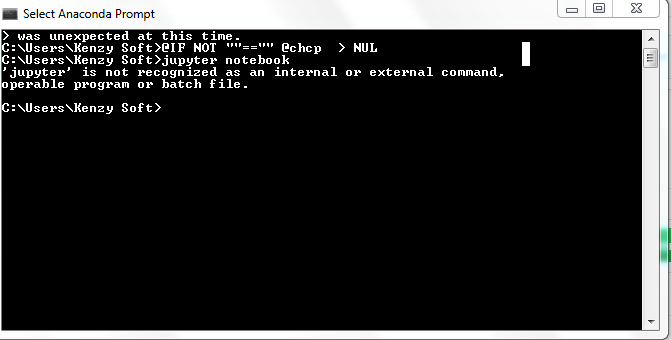
 tareknahool
on 15 Jan 2018
tareknahool
on 15 Jan 2018
@tareknahool That looks like a path problem. In "Advanced system settings" -> Environment Variables, what does the PATH= read as?
Did you follow conda instructions?
briancullinan
on 15 Jan 2018
Dear megamindbrian ,thax for your prompt response.
But, actually I don’t know how to solve this problem.
tareknahool
on 15 Jan 2018
Try these instructions, and post your PATH variable and what instructions
you followed to start installing jupyter in the first place:
https://www.computerhope.com/issues/ch000549.htm
On Mon, Jan 15, 2018 at 1:51 PM, tareknahool notifications@github.com
wrote:
Dear megamindbrian ,thax for your prompt response.
But, actually I don’t know how to solve this problem.—
You are receiving this because you were mentioned.
Reply to this email directly, view it on GitHub
https://github.com/jupyter/notebook/issues/2130#issuecomment-357786401,
or mute the thread
https://github.com/notifications/unsubscribe-auth/AX5Xbqv32AFd0iNCh7zwLb_MMwkq2Pnsks5tK7pXgaJpZM4L2ZaY
.
--
"I studied computers"
CONFIDENTIALITY NOTICE: The contents of this email message and any
attachments are intended solely for the addressee(s) and may contain
confidential and/or privileged information and may be legally protected
from disclosure. It is then shared with tech companies, bots, hackers,
government agencies, and marketers. The security of this message is none,
and it may be shared on Instagram at anytime. If you are OK with this,
please respond. There isn't really any security or privacy anywhere. If
you disagree you may want to go camping and talk to people face-to-face
like in old times.
briancullinan
on 15 Jan 2018
The Anaconda prompt is supposed to set up PATH for you, but it looks like it's going wrong. You might try asking on anaconda-issues: https://github.com/ContinuumIO/anaconda-issues/
takluyver
on 15 Jan 2018
Same issue here with the latest Anaconda3 build (5.0.1) for Win10 64-bit. After installing the full anaconda distribution, neither Python nor Jupyter can be launched from the command prompt. I get "xyz is not a recognized command....." error on the Anaconda prompt. I'm planning to manually add the Anaconda home directory/scripts paths to the PATH environment variable and report back what I encounter thereafter.
 MuqadderIqbal
on 16 Jan 2018
MuqadderIqbal
on 16 Jan 2018
If python doesn't work either, that's definitely an Anaconda problem, so I'd suggest opening an issue on anaconda-issues.
takluyver
on 16 Jan 2018
I installed anaconda3.6 for windows 10 64 bit via UI and then did "conda install py27" . I am able to start spyder etc and change engine from 3.6 to 2.7. I have added anaconda in the path for my user. Jupyter notebok no longer loading and it shows below error.
abc> jupyter notebook
Traceback (most recent call last):
  File "F:\opt\Continuum\anaconda3\Scripts\jupyter-notebook-script.py", line 6, in <module>
    from notebook.notebookapp import main
  File "F:\opt\Continuum\anaconda3\lib\site-packages\notebook\__init__.py", line 25, in <module>
    from .nbextensions import install_nbextension
  File "F:\opt\Continuum\anaconda3\lib\site-packages\notebook\nbextensions.py", line 27, in <module>
    from jupyter_core.utils import ensure_dir_exists
ImportError: cannot import name 'ensure_dir_exists'
 atulkumar2
on 26 Jan 2018
atulkumar2
on 26 Jan 2018
You'll need to update the jupyter_core package in conda.
takluyver
on 27 Jan 2018
install from cmd as pip3 install jupyter

after that it is installed
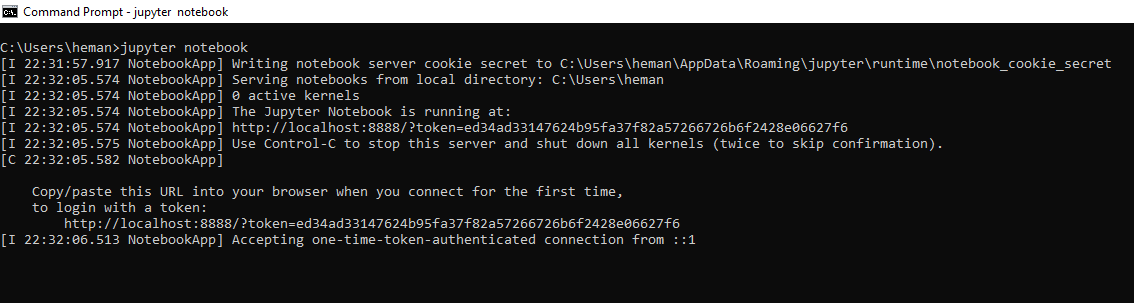
 hemanth786
on 30 Jan 2018
hemanth786
on 30 Jan 2018
Jupyter launch error ## Your help
(base) C:\Users\i5>jupyter notebook
[I 14:02:50.592 NotebookApp] The port 8888 is already in use, trying another port.
[I 14:02:50.608 NotebookApp] The port 8889 is already in use, trying another port.
[I 14:02:50.608 NotebookApp] The port 8890 is already in use, trying another port.
[I 14:02:50.608 NotebookApp] The port 8891 is already in use, trying another port.
[I 14:02:50.608 NotebookApp] The port 8892 is already in use, trying another port.
[I 14:02:50.654 NotebookApp] JupyterLab beta preview extension loaded from C:\Users\i5\Anaconda3\lib\site-packages\jupyterlab
[I 14:02:50.654 NotebookApp] JupyterLab application directory is C:\Users\i5\Anaconda3\share\jupyter\lab
[W 14:02:50.654 NotebookApp] Error loading server extension jupyterlab
Traceback (most recent call last):
File "C:\Users\i5\Anaconda3\lib\site-packages\jupyterlab\commands.py", line 321, in __init__
self._run(['node', 'node-version-check.js'], cwd=HERE, quiet=True)
File "C:\Users\i5\Anaconda3\lib\site-packages\jupyterlab\commands.py", line 1165, in _run
proc = Process(cmd, **kwargs)
File "C:\Users\i5\Anaconda3\lib\site-packages\jupyterlab\process.py", line 73, in __init__
self.proc = self._create_process(cwd=cwd, env=env)
File "C:\Users\i5\Anaconda3\lib\site-packages\jupyterlab\process.py", line 131, in _create_process
cmd[0] = which(cmd[0], kwargs.get('env'))
File "C:\Users\i5\Anaconda3\lib\site-packages\jupyterlab\jlpmapp.py", line 59, in which
raise ValueError(msg)
ValueError: Please install nodejs 5+ and npm before continuing installation. nodejs may be installed using conda or directly from the nodejs websi
te.
During handling of the above exception, another exception occurred:

Traceback (most recent call last):
  File "C:\Users\i5\Anaconda3\lib\site-packages\notebook\notebookapp.py", line 1454, in init_server_extensions
    func(self)
  File "C:\Users\i5\Anaconda3\lib\site-packages\jupyterlab\extension.py", line 111, in load_jupyter_server_extension
    info = get_app_info(app_dir)
  File "C:\Users\i5\Anaconda3\lib\site-packages\jupyterlab\commands.py", line 244, in get_app_info
    handler = _AppHandler(app_dir, logger)
  File "C:\Users\i5\Anaconda3\lib\site-packages\jupyterlab\commands.py", line 324, in __init__
    raise ValueError(msg)
ValueError: Please install nodejs 5+ and npm before continuing installation. nodejs may be installed using conda or directly from the nodejs websi
te.
[I 14:02:50.795 NotebookApp] Serving notebooks from local directory: C:\Users\i5
[I 14:02:50.795 NotebookApp] 0 active kernels
[I 14:02:50.795 NotebookApp] The Jupyter Notebook is running at:
[I 14:02:50.795 NotebookApp] http://localhost:8822/?token=56cdc59e1a900db63e48d4fc68a5a5024061f6bdc735de51
[I 14:02:50.795 NotebookApp] Use Control-C to stop this server and shut down all kernels (twice to skip confirmation).
[C 14:02:50.795 NotebookApp]
Copy/paste this URL into your browser when you connect for the first time,
to login with a token:
    http://localhost:8822/?token=56cdc59e1a900db63e48d4fc68a5a5024061f6bdc735de51
[I 14:02:51.029 NotebookApp] Accepting one-time-token-authenticated connection from ::1
[I 14:02:55.008 NotebookApp] Creating new notebook in
WHAT I SHOULD DO TO RESOLVE THIS PROBLEM ???
 meteomanradar
on 20 Feb 2018
meteomanradar
on 20 Feb 2018
Please install nodejs 5+ and npm before continuing installation. nodejs may be installed using conda or directly from the nodejs website.
JosephCardwell
on 20 Feb 2018
my jupyter progrmme and jupyter notepad is not getting launched nor from windows shortcurt niether from promt command
 abhishek2994
on 5 Mar 2018
abhishek2994
on 5 Mar 2018
Hii I am a beginner I am getting like this when I am running jupyter notebook can anybody tell me how to resolve it
(work) C:\Users\ASUS\Miniconda3\Scripts>jupyter notebook
Unable to create process using 'C:\Users\ASUS\Miniconda3\envs\workpython.exe C:\Users\ASUS\Miniconda3\envs\work\Scripts\jupyter-script.py notebook'
 pawan4456
on 3 Jun 2018
pawan4456
on 3 Jun 2018
Hello, I'm getting the following error while launching Jupyter notebook from cmd. Please can someone suggest a path forward ?
Gayathrys-MacBook-Air:~ gayathrydasika$ jupyter notebook
/Users/gayathrydasika/anaconda2/lib/python2.7/site-packages/IPython/html.py:14: ShimWarning: TheIPython.htmlpackage has been deprecated since IPython 4.0. You should import fromnotebookinstead.IPython.html.widgetshas moved toipywidgets.
"IPython.html.widgetshas moved toipywidgets.", ShimWarning)
/Users/gayathrydasika/anaconda2/lib/python2.7/site-packages/IPython/config.py:13: ShimWarning: TheIPython.config` package has been deprecated since IPython 4.0. You should import from traitlets.config instead.
"You should import from traitlets.config instead.", ShimWarning)
/Users/gayathrydasika/anaconda2/lib/python2.7/site-packages/IPython/utils/traitlets.py:5: UserWarning: IPython.utils.traitlets has moved to a top-level traitlets package.
warn("IPython.utils.traitlets has moved to a top-level traitlets package.")
Traceback (most recent call last):
File "/Users/gayathrydasika/anaconda2/bin/jupyter-notebook", line 11, in
sys.exit(main())
File "/Users/gayathrydasika/anaconda2/lib/python2.7/site-packages/jupyter_core/application.py", line 266, in launch_instance
return super(JupyterApp, cls).launch_instance(argv=argv, **kwargs)
File "/Users/gayathrydasika/anaconda2/lib/python2.7/site-packages/traitlets/config/application.py", line 657, in launch_instance
app.initialize(argv)
File "
File "/Users/gayathrydasika/anaconda2/lib/python2.7/site-packages/traitlets/config/application.py", line 87, in catch_config_error
return method(app, args, *kwargs)
File "/Users/gayathrydasika/anaconda2/lib/python2.7/site-packages/notebook/notebookapp.py", line 1535, in initialize
self.init_configurables()
File "/Users/gayathrydasika/anaconda2/lib/python2.7/site-packages/notebook/notebookapp.py", line 1238, in init_configurables
log=self.log,
File "/Users/gayathrydasika/anaconda2/lib/python2.7/site-packages/jupyterdrive/mixednbmanager.py", line 51, in __init__
manager_class = import_item(scheme['contents'])
File "/Users/gayathrydasika/anaconda2/lib/python2.7/site-packages/IPython/utils/importstring.py", line 35, in import_item
raise ImportError('No module named %s' % obj)
ImportError: No module named FileContentsManager
`
 gayathry2612
on 3 Jun 2018
gayathry2612
on 3 Jun 2018
@hemanth786 I am getting same error as hemanth.
Please help, in Anaconda prompt, It shows same kind of problem as Hemanth showed.
And it opens a browser tab, which has:
Connection refused: localhost:8888
 KrutarthPujara
on 12 Jul 2018
KrutarthPujara
on 12 Jul 2018
Hey! My Jupyter notebook also cannot launch both through anaconda navigator and the prompt. It shows like this.


I've tried pasting the URL showing in the cmd to Chrome, but it still cannot launch.
I'll be grateful if anyone can answer to my question.
 Croissante
on 8 Aug 2018
Croissante
on 8 Aug 2018
@dhirschfeld Hi, do you know what can I do if localhost:8000 cannot also open in the browser? I've tried Chrome, IE, Edge...And installed Anaconda twice...
Croissante
on 8 Aug 2018
In IE you need to go to the Internet Options and under the proxy info there add a bypass for localhost,127.0.0.1
dhirschfeld
on 8 Aug 2018
@dhirschfeld Thanks so much! It works well now!
Croissante
on 9 Aug 2018
I had installed Anaconda in C:\ root directory and Jupyter was not launching.Fortunately my IT Sys admin helped me to trace it in C:\Anaconda3\Scripts and I changed my shortcut path and Jupyter launched.
 transtrades
on 23 Aug 2018
transtrades
on 23 Aug 2018
Hi,
I am not able to create new or view any of my .ipynb files in the browser when launched either through cmd prompt or Anaconda Navigator. I could easily launch and view files till yesterday but I don't know what happened that I can't anymore. The screenshot show the successful opening of Jupyter notebook dashboard but I am not able to view .ipynb files.
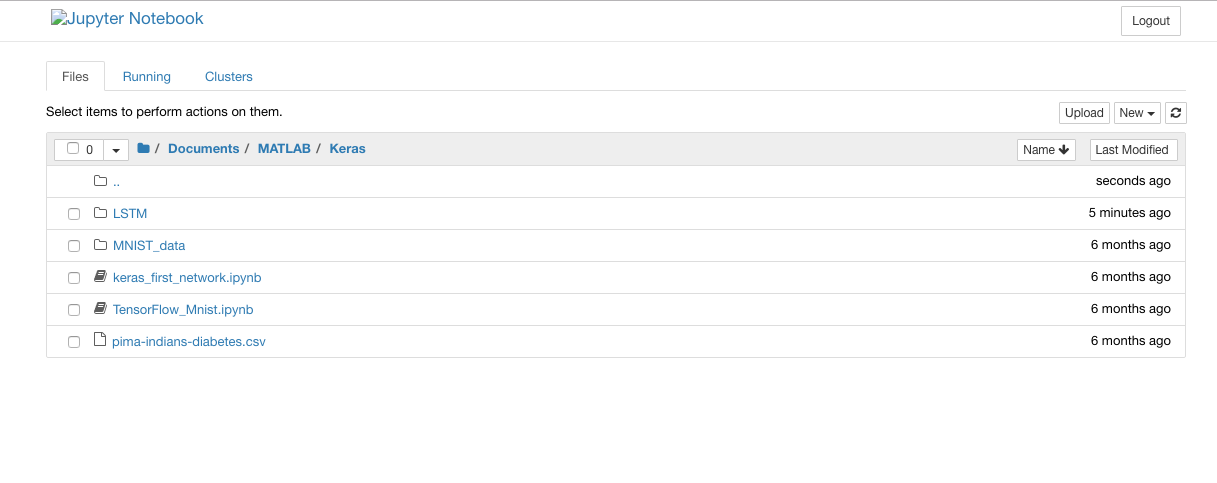
 megha89
on 19 Dec 2018
megha89
on 19 Dec 2018
@megha89 did you resolve your problem? I have the exact same issue where I can launch jupyter notebook but I can't open or edit any of my notebooks. Everything was working fine until I tried to install the ggplot library via the conda prompt and now I get an internal server 500 error.
 shortyDS
on 20 Mar 2019
shortyDS
on 20 Mar 2019
I think Anti-virus is blocking your application. When you installed
Anaconda a screen pops up stating do you want to allow the application to
access outside. You might have cancelled that screen which is why you may
be facing the problem. Disable antivirus and launch jupyter. If it doesnt
work again. Please uninstall the software and reinstall once again, this
time carefully see each screen.
Rgds
Prasad
On Thu, Mar 21, 2019 at 3:28 AM shortyDS notifications@github.com wrote:
[image: Boxbe] https://www.boxbe.com/overview This message is eligible
for Automatic Cleanup! ([email protected]) Add cleanup rule
https://www.boxbe.com/popup?url=https%3A%2F%2Fwww.boxbe.com%2Fcleanup%3Fkey%3DagGoC0sLXqiz4tyrz%252Fak2ExUgjsWKKGjDcuA6GuyfFw%253D%26token%3Dv0yOxtQD8KjCaDENL5uMHlkpk%252BjLmQvCBLHZjeAAazdBL9c7I7SdsCATdp5AUyXOqu6DV0Z62F%252BvvKIvd586iKYudWdh5ktf1%252BaYv8YgyQIg7FzkG6PUzOmrjxqkDufTSSy%252F1Eh1ACBGzm%252FiAmoABg%253D%253D&tc_serial=48917408593&tc_rand=195670913&utm_source=stf&utm_medium=email&utm_campaign=ANNO_CLEANUP_ADD&utm_content=001
| More info
http://blog.boxbe.com/general/boxbe-automatic-cleanup?tc_serial=48917408593&tc_rand=195670913&utm_source=stf&utm_medium=email&utm_campaign=ANNO_CLEANUP_ADD&utm_content=001@megha89 https://github.com/megha89 did you resolve your problem? I
have the exact same issue where I can launch jupyter notebook but I can't
open or edit any of my notebooks. Everything was working fine until I tried
to install the ggplot library via the conda prompt and now I get an
internal server 500 error.—
You are receiving this because you commented.
Reply to this email directly, view it on GitHub
https://github.com/jupyter/notebook/issues/2130#issuecomment-475041296,
or mute the thread
https://github.com/notifications/unsubscribe-auth/AcW3PS5MPQejrl__Cfti3RKQ7WJbVbdEks5vYqxFgaJpZM4L2ZaY
.
--
Prasad K
Mobile: 98456 98426
transtrades
on 21 Mar 2019
Thanks @transtrades , I tried that but didn't seem to resolve the problem. I'll have to uninstall and reinstall. Any chance you know of an easy way to archive all my files before I uninstall?
shortyDS
on 21 Mar 2019
Did you try from start menu? Go to Windows Start-->Anaconda3-->Jupyter and
open.It may open Jupyter after a minute.
If you want to reinstall, Your files will not be lost if you have saved
them in some folder with a name and not as Untitled1, Untitled2...Untitled
files get lost.
Better transfer all the code files to a backup drive such as D or E ....or
pen drive.
Dont keep any files in C:\ drive and its sub folders.
When you uninstall there will still be traces of the software in folders
under your Users. There will be minor folders such as .anaconda , .conda,
.spyder....... just delete them using Shift + del.
Restart the system and then reinstall anaconda. It is advisable to install
in root directories such as C:\Anaconda3 or D:\Anaconda3 or E:\Anaconda3
while installing.
Reason you will need to add libraries later using cmd (command prompt) It
will be easy to go to C:\Anaconda3 or D:\Anaconda3 or E:\Anaconda3 and
install the libraries.
While installing you will get a java pop up asking that a program is trying
to access outside, do you want to allow? you check the options and say Yes
After Jupyter is installed, go to Start-->Anaconda3-->Jupyter Notebook. It
will take a minute opens and gives out a weblink on cmd prompt.copy the
same and paste it on chrome / netscape/internet explorer and Jupyter will
open on the browser.
Rgds
Prasad
On Thu, Mar 21, 2019 at 8:21 PM shortyDS notifications@github.com wrote:
Thanks @transtrades https://github.com/transtrades , I tried that but
didn't seem to resolve the problem. I'll have to uninstall and reinstall.
Any chance you know of an easy way to archive all my files before I
uninstall?—
You are receiving this because you were mentioned.
Reply to this email directly, view it on GitHub
https://github.com/jupyter/notebook/issues/2130#issuecomment-475261239,
or mute the thread
https://github.com/notifications/unsubscribe-auth/AcW3PcJ-C9vgzECvy6XjRG_OPVS_XbWdks5vY5x6gaJpZM4L2ZaY
.
--
Prasad K
Mobile: 98456 98426
transtrades
on 21 Mar 2019
I tried launching from the start menu, from the anaconda navigator, and from the conda prompt. Each time I am able to launch the Jupyter NOtebook tree but when I try to open a python notebook I get the 500: Internal Server error. And this is what I see in the prompt:
File "C:\Users\xxxxx\Anaconda3\lib\site-packages\nbconvert\postprocessors\serve.py", line 21, in ProxyHandler
        @web.asynchronous
    AttributeError: module 'tornado.web' has no attribute 'asynchronous'
[E 12:50:55.719 NotebookApp] {
      "Host": "localhost:8888",
      "Connection": "keep-alive",
      "Upgrade-Insecure-Requests": "1",
      "User-Agent": "Mozilla/5.0 (Windows NT 10.0; Win64; x64) AppleWebKit/537.36 (KHTML, like Gecko) Chrome/72.0.3626.121 Safari/537.36",
      "Accept": "text/html,application/xhtml+xml,application/xml;q=0.9,image/webp,image/apng,*/*;q=0.8",
      "Referer": "http://localhost:8888/tree/DSC_478/Project",
      "Accept-Encoding": "gzip, deflate, br",
      "Accept-Language": "en-US,en;q=0.9",
      "Cookie": "_xsrf=2|da6e3a18|94fdd0d03f7b90bd8c34f7b344fed7c2|1552337150; username-localhost-8891=\"2|1:0|10:1552441088|23:username-localhost-8891|44:ODI4MzNmNWYzMjY1NGM1YjkyMGZjZTY3NTE4MmNkM2Q=|06e18d70072c6f90915fba6794ec295b44335b4f74db3e93dfe152acf10021be\"; username-localhost-8890=\"2|1:0|10:1553112919|23:username-localhost-8890|44:MWMxMzYyMTYyNjgzNDFiOGI2ZDNmYzg0YTAzMmYyOTc=|83e5e5dda2c15aad8e2ab9e232bd01aef16805bf3b2f450dd9b49b44423cdf3e\"; username-localhost-8889=\"2|1:0|10:1553117677|23:username-localhost-8889|44:NjVlMzFhYTFlYmNhNDU0NDk4NDZkMWM4NGU1MjVlZjk=|515cfe8178bb17ad0df4caecb643d1fea89bcb6b3f59bcdd6138e63efa46088d\"; username-localhost-8888=\"2|1:0|10:1553187047|23:username-localhost-8888|44:ODkxZjk0OWExNzgwNDY4MGJkN2E4ZDNhOWY5YjAzMmY=|fb200c31dca5e004bab27cf4e7707217365ab270a10ef67e392247294edb56a4\""
    }
[E 12:50:55.730 NotebookApp] 500 GET /notebooks/DSC_478/Project/Norm%20and%20weight.ipynb (::1) 204.49ms referer=http://localhost:8888/tree/DSC_478/Project
shortyDS
on 21 Mar 2019
Pls go to start. Select Anaconda Command prompt, Right click and open as
administrator. In the command prompt type pip install --upgrade jupyter
and press enter. See whether it works
Rgds
Prasad
On Thu, Mar 21, 2019 at 10:29 PM shortyDS notifications@github.com wrote:
[image: Boxbe] https://www.boxbe.com/overview This message is eligible
for Automatic Cleanup! ([email protected]) Add cleanup rule
https://www.boxbe.com/popup?url=https%3A%2F%2Fwww.boxbe.com%2Fcleanup%3Fkey%3DptU3l9dGLBBczvfFtlT4xobAcAnuPUrqnVYsRN36l%252F8%253D%26token%3Dlm%252BGycB7AAJvyOkKNH%252F9L3GmB176ue3t2m8fTKKzaEt9WDK%252FXD2zDh1ntHs3xNPE1H8f85uAllbCUhRM02KFvdCiPyEC5GBVDj3kVzp7yF4E%252BYuGOMsvx%252FxusQCvZb59oaVecJsRRmKH4R%252F5MvYupQ%253D%253D&tc_serial=48941022265&tc_rand=2126302470&utm_source=stf&utm_medium=email&utm_campaign=ANNO_CLEANUP_ADD&utm_content=001
| More info
http://blog.boxbe.com/general/boxbe-automatic-cleanup?tc_serial=48941022265&tc_rand=2126302470&utm_source=stf&utm_medium=email&utm_campaign=ANNO_CLEANUP_ADD&utm_content=001I tried launching from the start menu, from the anaconda navigator, and
from the conda prompt. Each time I am able to launch the Jupyter NOtebook
tree but when I try to open a python notebook I get the 500: Internal
Server error. And this is what I see in the prompt:File
"C:\Usersxxxxx\Anaconda3\lib\site-packages\nbconvert\postprocessors\serve.py",
line 21, in ProxyHandler @web.asynchronous AttributeError: module
'tornado.web' has no attribute 'asynchronous' [E 12:50:55.719 NotebookApp]
{ "Host": "localhost:8888", "Connection": "keep-alive",
"Upgrade-Insecure-Requests": "1", "User-Agent": "Mozilla/5.0 (Windows NT
10.0; Win64; x64) AppleWebKit/537.36 (KHTML, like Gecko)
Chrome/72.0.3626.121 Safari/537.36", "Accept":
"text/html,application/xhtml+xml,application/xml;q=0.9,image/webp,image/apng,/;q=0.8",
"Referer": "http://localhost:8888/tree/DSC_478/Project",
"Accept-Encoding": "gzip, deflate, br", "Accept-Language":
"en-US,en;q=0.9", "Cookie":
"_xsrf=2|da6e3a18|94fdd0d03f7b90bd8c34f7b344fed7c2|1552337150;
username-localhost-8891=\"2|1:0|10:1552441088|23:username-localhost-8891|44:ODI4MzNmNWYzMjY1NGM1YjkyMGZjZTY3NTE4MmNkM2Q=|06e18d70072c6f90915fba6794ec295b44335b4f74db3e93dfe152acf10021be\";
username-localhost-8890=\"2|1:0|10:1553112919|23:username-localhost-8890|44:MWMxMzYyMTYyNjgzNDFiOGI2ZDNmYzg0YTAzMmYyOTc=|83e5e5dda2c15aad8e2ab9e232bd01aef16805bf3b2f450dd9b49b44423cdf3e\";
username-localhost-8889=\"2|1:0|10:1553117677|23:username-localhost-8889|44:NjVlMzFhYTFlYmNhNDU0NDk4NDZkMWM4NGU1MjVlZjk=|515cfe8178bb17ad0df4caecb643d1fea89bcb6b3f59bcdd6138e63efa46088d\";
username-localhost-8888=\"2|1:0|10:1553187047|23:username-localhost-8888|44:ODkxZjk0OWExNzgwNDY4MGJkN2E4ZDNhOWY5YjAzMmY=|fb200c31dca5e004bab27cf4e7707217365ab270a10ef67e392247294edb56a4\""
} [E 12:50:55.730 NotebookApp] 500 GET
/notebooks/DSC_478/Project/Norm%20and%20weight.ipynb (::1) 204.49ms referer=
http://localhost:8888/tree/DSC_478/Project—
You are receiving this because you were mentioned.
Reply to this email directly, view it on GitHub
https://github.com/jupyter/notebook/issues/2130#issuecomment-475314710,
or mute the thread
https://github.com/notifications/unsubscribe-auth/AcW3PQiXu5VgrqXLW_-P59HQXkJIL_yFks5vY7nKgaJpZM4L2ZaY
.
--
Prasad K
Mobile: 98456 98426
transtrades
on 22 Mar 2019
If your jupyter doen't open, dont bother. You can use google collab which
gives free jupyter interface for programming. you will be working on google
hosted server. you can work from laptop or mobile and you just need to have
internet connection and gmail account. You can work at a stretch for 8
hours. visit http://colab.research.google.com and open your account. Then
go and open new jupyter notebook and do coding.
Rgds
Prasad
On Fri, Mar 22, 2019 at 10:28 AM Prasad K kprasad8@gmail.com wrote:
Pls go to start. Select Anaconda Command prompt, Right click and open as
administrator. In the command prompt type pip install --upgrade jupyter
and press enter. See whether it works
Rgds
PrasadOn Thu, Mar 21, 2019 at 10:29 PM shortyDS notifications@github.com
wrote:[image: Boxbe] https://www.boxbe.com/overview This message is eligible
for Automatic Cleanup! ([email protected]) Add cleanup rule
https://www.boxbe.com/popup?url=https%3A%2F%2Fwww.boxbe.com%2Fcleanup%3Fkey%3DptU3l9dGLBBczvfFtlT4xobAcAnuPUrqnVYsRN36l%252F8%253D%26token%3Dlm%252BGycB7AAJvyOkKNH%252F9L3GmB176ue3t2m8fTKKzaEt9WDK%252FXD2zDh1ntHs3xNPE1H8f85uAllbCUhRM02KFvdCiPyEC5GBVDj3kVzp7yF4E%252BYuGOMsvx%252FxusQCvZb59oaVecJsRRmKH4R%252F5MvYupQ%253D%253D&tc_serial=48941022265&tc_rand=2126302470&utm_source=stf&utm_medium=email&utm_campaign=ANNO_CLEANUP_ADD&utm_content=001
| More info
http://blog.boxbe.com/general/boxbe-automatic-cleanup?tc_serial=48941022265&tc_rand=2126302470&utm_source=stf&utm_medium=email&utm_campaign=ANNO_CLEANUP_ADD&utm_content=001I tried launching from the start menu, from the anaconda navigator, and
from the conda prompt. Each time I am able to launch the Jupyter NOtebook
tree but when I try to open a python notebook I get the 500: Internal
Server error. And this is what I see in the prompt:File
"C:\Usersxxxxx\Anaconda3\lib\site-packages\nbconvert\postprocessors\serve.py",
line 21, in ProxyHandler @web.asynchronous AttributeError: module
'tornado.web' has no attribute 'asynchronous' [E 12:50:55.719 NotebookApp]
{ "Host": "localhost:8888", "Connection": "keep-alive",
"Upgrade-Insecure-Requests": "1", "User-Agent": "Mozilla/5.0 (Windows NT
10.0; Win64; x64) AppleWebKit/537.36 (KHTML, like Gecko)
Chrome/72.0.3626.121 Safari/537.36", "Accept":
"text/html,application/xhtml+xml,application/xml;q=0.9,image/webp,image/apng,/;q=0.8",
"Referer": "http://localhost:8888/tree/DSC_478/Project",
"Accept-Encoding": "gzip, deflate, br", "Accept-Language":
"en-US,en;q=0.9", "Cookie":
"_xsrf=2|da6e3a18|94fdd0d03f7b90bd8c34f7b344fed7c2|1552337150;
username-localhost-8891=\"2|1:0|10:1552441088|23:username-localhost-8891|44:ODI4MzNmNWYzMjY1NGM1YjkyMGZjZTY3NTE4MmNkM2Q=|06e18d70072c6f90915fba6794ec295b44335b4f74db3e93dfe152acf10021be\";
username-localhost-8890=\"2|1:0|10:1553112919|23:username-localhost-8890|44:MWMxMzYyMTYyNjgzNDFiOGI2ZDNmYzg0YTAzMmYyOTc=|83e5e5dda2c15aad8e2ab9e232bd01aef16805bf3b2f450dd9b49b44423cdf3e\";
username-localhost-8889=\"2|1:0|10:1553117677|23:username-localhost-8889|44:NjVlMzFhYTFlYmNhNDU0NDk4NDZkMWM4NGU1MjVlZjk=|515cfe8178bb17ad0df4caecb643d1fea89bcb6b3f59bcdd6138e63efa46088d\";
username-localhost-8888=\"2|1:0|10:1553187047|23:username-localhost-8888|44:ODkxZjk0OWExNzgwNDY4MGJkN2E4ZDNhOWY5YjAzMmY=|fb200c31dca5e004bab27cf4e7707217365ab270a10ef67e392247294edb56a4\""
} [E 12:50:55.730 NotebookApp] 500 GET
/notebooks/DSC_478/Project/Norm%20and%20weight.ipynb (::1) 204.49ms referer=
http://localhost:8888/tree/DSC_478/Project—
You are receiving this because you were mentioned.
Reply to this email directly, view it on GitHub
https://github.com/jupyter/notebook/issues/2130#issuecomment-475314710,
or mute the thread
https://github.com/notifications/unsubscribe-auth/AcW3PQiXu5VgrqXLW_-P59HQXkJIL_yFks5vY7nKgaJpZM4L2ZaY
.--
Prasad K
Mobile: 98456 98426
--
Prasad K
Mobile: 98456 98426
transtrades
on 22 Mar 2019
Awesome, thanks!
On Fri, Mar 22, 2019, 10:33 AM TransTrades notifications@github.com wrote:
If your jupyter doen't open, dont bother. You can use google collab which
gives free jupyter interface for programming. you will be working on google
hosted server. you can work from laptop or mobile and you just need to have
internet connection and gmail account. You can work at a stretch for 8
hours. visit http://colab.research.google.com and open your account. Then
go and open new jupyter notebook and do coding.Rgds
PrasadOn Fri, Mar 22, 2019 at 10:28 AM Prasad K kprasad8@gmail.com wrote:
Pls go to start. Select Anaconda Command prompt, Right click and open as
administrator. In the command prompt type pip install --upgrade jupyter
and press enter. See whether it works
Rgds
PrasadOn Thu, Mar 21, 2019 at 10:29 PM shortyDS notifications@github.com
wrote:[image: Boxbe] https://www.boxbe.com/overview This message is
eligible
for Automatic Cleanup! ([email protected]) Add cleanup rule
<
https://www.boxbe.com/popup?url=https%3A%2F%2Fwww.boxbe.com%2Fcleanup%3Fkey%3DptU3l9dGLBBczvfFtlT4xobAcAnuPUrqnVYsRN36l%252F8%253D%26token%3Dlm%252BGycB7AAJvyOkKNH%252F9L3GmB176ue3t2m8fTKKzaEt9WDK%252FXD2zDh1ntHs3xNPE1H8f85uAllbCUhRM02KFvdCiPyEC5GBVDj3kVzp7yF4E%252BYuGOMsvx%252FxusQCvZb59oaVecJsRRmKH4R%252F5MvYupQ%253D%253D&tc_serial=48941022265&tc_rand=2126302470&utm_source=stf&utm_medium=email&utm_campaign=ANNO_CLEANUP_ADD&utm_content=001>
I tried launching from the start menu, from the anaconda navigator, and
from the conda prompt. Each time I am able to launch the Jupyter
NOtebook
tree but when I try to open a python notebook I get the 500: Internal
Server error. And this is what I see in the prompt:File
"C:\Usersxxxxx\Anaconda3\lib\site-packages\nbconvert\postprocessors\serve.py",
line 21, in ProxyHandler @web.asynchronous AttributeError: module
'tornado.web' has no attribute 'asynchronous' [E 12:50:55.719
NotebookApp]
{ "Host": "localhost:8888", "Connection": "keep-alive",
"Upgrade-Insecure-Requests": "1", "User-Agent": "Mozilla/5.0 (Windows NT
10.0; Win64; x64) AppleWebKit/537.36 (KHTML, like Gecko)
Chrome/72.0.3626.121 Safari/537.36", "Accept":"text/html,application/xhtml+xml,application/xml;q=0.9,image/webp,image/apng,/;q=0.8",
"Referer": "http://localhost:8888/tree/DSC_478/Project",
"Accept-Encoding": "gzip, deflate, br", "Accept-Language":
"en-US,en;q=0.9", "Cookie":
"_xsrf=2|da6e3a18|94fdd0d03f7b90bd8c34f7b344fed7c2|1552337150;username-localhost-8891=\"2|1:0|10:1552441088|23:username-localhost-8891|44:ODI4MzNmNWYzMjY1NGM1YjkyMGZjZTY3NTE4MmNkM2Q=|06e18d70072c6f90915fba6794ec295b44335b4f74db3e93dfe152acf10021be\";
username-localhost-8890=\"2|1:0|10:1553112919|23:username-localhost-8890|44:MWMxMzYyMTYyNjgzNDFiOGI2ZDNmYzg0YTAzMmYyOTc=|83e5e5dda2c15aad8e2ab9e232bd01aef16805bf3b2f450dd9b49b44423cdf3e\";
username-localhost-8889=\"2|1:0|10:1553117677|23:username-localhost-8889|44:NjVlMzFhYTFlYmNhNDU0NDk4NDZkMWM4NGU1MjVlZjk=|515cfe8178bb17ad0df4caecb643d1fea89bcb6b3f59bcdd6138e63efa46088d\";
username-localhost-8888=\"2|1:0|10:1553187047|23:username-localhost-8888|44:ODkxZjk0OWExNzgwNDY4MGJkN2E4ZDNhOWY5YjAzMmY=|fb200c31dca5e004bab27cf4e7707217365ab270a10ef67e392247294edb56a4\""
} [E 12:50:55.730 NotebookApp] 500 GET
/notebooks/DSC_478/Project/Norm%20and%20weight.ipynb (::1) 204.49ms
referer=
http://localhost:8888/tree/DSC_478/Project—
You are receiving this because you were mentioned.
Reply to this email directly, view it on GitHub
<https://github.com/jupyter/notebook/issues/2130#issuecomment-475314710
,
or mute the thread
<
https://github.com/notifications/unsubscribe-auth/AcW3PQiXu5VgrqXLW_-P59HQXkJIL_yFks5vY7nKgaJpZM4L2ZaY.
--
Prasad K
Mobile: 98456 98426--
Prasad K
Mobile: 98456 98426—
You are receiving this because you commented.
Reply to this email directly, view it on GitHub
https://github.com/jupyter/notebook/issues/2130#issuecomment-475643957,
or mute the thread
https://github.com/notifications/unsubscribe-auth/AtLFK2cXHFydqfiQr-eBORZYy41ZHoy9ks5vZOnWgaJpZM4L2ZaY
.
shortyDS
on 23 Mar 2019
I had same problem. Conda didn't launch jupyter notebook. I found a hard way and I can open now. My solution is:
1- Open Anaconda Navigator
2- C:\Users\Your Pc Name.anaconda\navigator\scripts in this folder Run notebook.bat
3- In same folder open notebook-err-1.txt and you will see like this: file:///C:/Users/o%C4%9Fuzhan%20pc/AppData/Roaming/jupyter/runtime/nbserver-10688-open.html
copy and paste this your browser and done. I hope it will be helpfull
 oguzhandurmaz
on 24 Jul 2019
oguzhandurmaz
on 24 Jul 2019
Traceback (most recent call last):
File "C:\ProgramData\Anaconda3\Scripts\jupyter-notebook-script.py", line 6, in
from notebook.notebookapp import main
File "C:\Users\prajw\AppData\Roaming\Python\Python37\site-packages\notebook\notebookapp.py", line 49, in
from zmq.eventloop import ioloop
File "C:\Users\prajw\AppData\Roaming\Python\Python37\site-packages\zmq__init__.py", line 47, in
from zmq import backend
File "C:\Users\prajw\AppData\Roaming\Python\Python37\site-packages\zmq\backend__init__.py", line 40, in
reraise(*exc_info)
File "C:\Users\prajw\AppData\Roaming\Python\Python37\site-packages\zmq\utils\sixcerpt.py", line 34, in reraise
raise value
File "C:\Users\prajw\AppData\Roaming\Python\Python37\site-packages\zmq\backend__init__.py", line 27, in
_ns = select_backend(first)
File "C:\Users\prajw\AppData\Roaming\Python\Python37\site-packages\zmq\backend\select.py", line 28, in select_backend
mod = __import__(name, fromlist=public_api)
File "C:\Users\prajw\AppData\Roaming\Python\Python37\site-packages\zmq\backend\cython__init__.py", line 6, in
from . import (constants, error, message, context,
ImportError: cannot import name 'constants' from 'zmq.backend.cython' (C:\Users\prajw\AppData\Roaming\Python\Python37\site-packages\zmq\backend\cython__init__.py)
I am getting this error
 prajwolrg
on 12 Dec 2019
prajwolrg
on 12 Dec 2019
hi i ve been trying to launch jupyter and spyder both don't work. I tried to open through command prompt there is no response for indefinite time. tried to install notebook from pip too.
using a win 10 64 bit os.
 Ishikakhurana
on 17 Jun 2020
Ishikakhurana
on 17 Jun 2020
Is this the first time? You have cancelled a small screen which would have
said. Python is trying to contact external site. That's why you are not
able to open. Restart, try to open spider or Jupiter. If you get that
message, enable it. Then spyder/Jupiter will open. If you dont get the
screen. Uninstall and reinstall anaconda. This time if a small screen pops
up python is trying to contact external site, enable it
On Wed, Jun 17, 2020, 18:19 Ishikakhurana notifications@github.com wrote:
hi i ve been trying to launch jupyter and spyder both don't work. I tried
to open through command prompt there is no response for indefinite time.
tried to install notebook from pip too.
using a win 10 64 bit os.—
You are receiving this because you were mentioned.
Reply to this email directly, view it on GitHub
https://github.com/jupyter/notebook/issues/2130#issuecomment-645352868,
or unsubscribe
https://github.com/notifications/unsubscribe-auth/AHC3OPJVFZIRPDSWAMKNSJDRXC3T7ANCNFSM4C6ZS2MA
.
transtrades
on 17 Jun 2020
Is this the first time? You have cancelled a small screen which would have said. Python is trying to contact external site. That's why you are not able to open. Restart, try to open spider or Jupiter. If you get that message, enable it. Then spyder/Jupiter will open. If you dont get the screen. Uninstall and reinstall anaconda. This time if a small screen pops up python is trying to contact external site, enable it
…
On Wed, Jun 17, 2020, 18:19 Ishikakhurana @.*> wrote: hi i ve been trying to launch jupyter and spyder both don't work. I tried to open through command prompt there is no response for indefinite time. tried to install notebook from pip too. using a win 10 64 bit os. — You are receiving this because you were mentioned. Reply to this email directly, view it on GitHub <#2130 (comment)>, or unsubscribe https://github.com/notifications/unsubscribe-auth/AHC3OPJVFZIRPDSWAMKNSJDRXC3T7ANCNFSM4C6ZS2MA .
First time working with jupyter? no.
no, did not get any sort of popup screen ,have already tried uninstalling and reinstalling a couple of times what changed this time was spyder launched till completion of code for python but i still couldnt access the environment. when i try to close anaconda navigator it prompts that notebook and spyder are running. i tried manually accessing localhost:port with all the browsers. thanks for the response though.
Ishikakhurana
on 17 Jun 2020
What's your RAM & CPU configuration,? Usually spyder takes 3 minutes to
start. Jupiter also takes a minute or two.
For spyder wait for 3-4 min. Incase of jupyterwhen you click on Jupiter in
START menu a popup command prompt opens. Move your mouse cursor inside that
command window and press enter. It will show some messages and opens in
your browser
On Thu, Jun 18, 2020, 01:20 Ishikakhurana notifications@github.com wrote:
Is this the first time? You have cancelled a small screen which would have
said. Python is trying to contact external site. That's why you are not
able to open. Restart, try to open spider or Jupiter. If you get that
message, enable it. Then spyder/Jupiter will open. If you dont get the
screen. Uninstall and reinstall anaconda. This time if a small screen pops
up python is trying to contact external site, enable it
… <#m_-3062274508707996723_>
On Wed, Jun 17, 2020, 18:19 Ishikakhurana @.*> wrote: hi i ve been
trying to launch jupyter and spyder both don't work. I tried to open
through command prompt there is no response for indefinite time. tried to
install notebook from pip too. using a win 10 64 bit os. — You are
receiving this because you were mentioned. Reply to this email directly,
view it on GitHub <#2130 (comment)
https://github.com/jupyter/notebook/issues/2130#issuecomment-645352868>,
or unsubscribe
https://github.com/notifications/unsubscribe-auth/AHC3OPJVFZIRPDSWAMKNSJDRXC3T7ANCNFSM4C6ZS2MA
.First time working with jupyter? no.
no, did not get any sort of popup screen ,have already tried uninstalling
and reinstalling a couple of times what changed this time was spyder
launched till completion of code for python but i still couldnt access the
environment. when i try to close anaconda navigator it prompts that
notebook and spyder are running. i tried manually accessing localhost:port
with all the browsers. thanks for the response though.—
You are receiving this because you were mentioned.
Reply to this email directly, view it on GitHub
https://github.com/jupyter/notebook/issues/2130#issuecomment-645586905,
or unsubscribe
https://github.com/notifications/unsubscribe-auth/AHC3OPOPHJFYRMSDFH2ENIDRXENAVANCNFSM4C6ZS2MA
.
transtrades
on 18 Jun 2020
Your firewall is blocking python
On Thu, Jun 18, 2020, 10:29 Prasad K kprasad8@gmail.com wrote:
What's your RAM & CPU configuration,? Usually spyder takes 3 minutes to
start. Jupiter also takes a minute or two.For spyder wait for 3-4 min. Incase of jupyterwhen you click on Jupiter in
START menu a popup command prompt opens. Move your mouse cursor inside that
command window and press enter. It will show some messages and opens in
your browserOn Thu, Jun 18, 2020, 01:20 Ishikakhurana notifications@github.com
wrote:Is this the first time? You have cancelled a small screen which would
have said. Python is trying to contact external site. That's why you are
not able to open. Restart, try to open spider or Jupiter. If you get that
message, enable it. Then spyder/Jupiter will open. If you dont get the
screen. Uninstall and reinstall anaconda. This time if a small screen pops
up python is trying to contact external site, enable it
… <#m_-6456994824693947391_m_-3062274508707996723_>
On Wed, Jun 17, 2020, 18:19 Ishikakhurana @.*> wrote: hi i ve been
trying to launch jupyter and spyder both don't work. I tried to open
through command prompt there is no response for indefinite time. tried to
install notebook from pip too. using a win 10 64 bit os. — You are
receiving this because you were mentioned. Reply to this email directly,
view it on GitHub <#2130 (comment)
https://github.com/jupyter/notebook/issues/2130#issuecomment-645352868>,
or unsubscribe
https://github.com/notifications/unsubscribe-auth/AHC3OPJVFZIRPDSWAMKNSJDRXC3T7ANCNFSM4C6ZS2MA
.First time working with jupyter? no.
no, did not get any sort of popup screen ,have already tried uninstalling
and reinstalling a couple of times what changed this time was spyder
launched till completion of code for python but i still couldnt access the
environment. when i try to close anaconda navigator it prompts that
notebook and spyder are running. i tried manually accessing localhost:port
with all the browsers. thanks for the response though.—
You are receiving this because you were mentioned.
Reply to this email directly, view it on GitHub
https://github.com/jupyter/notebook/issues/2130#issuecomment-645586905,
or unsubscribe
https://github.com/notifications/unsubscribe-auth/AHC3OPOPHJFYRMSDFH2ENIDRXENAVANCNFSM4C6ZS2MA
.
transtrades
on 18 Jun 2020
C:\Users\R>python
Python 3.7.9 (tags/v3.7.9:13c94747c7, Aug 17 2020, 18:58:18) [MSC v.1900 64 bit (AMD64)] on win32
Type "help", "copyright", "credits" or "license" for more information.
exit()
C:\Users\R>python -m pip install --upgrade pip
Requirement already up-to-date: pip in c:\users\r\appdata\local\programspythonpython37\lib\site-packages (20.2.4)
C:\Users\R>pip install jupyter
Requirement already satisfied: jupyter in c:\users\r\appdata\local\programspythonpython37\lib\site-packages (1.0.0)
Requirement already satisfied: ipywidgets in c:\users\r\appdata\local\programspythonpython37\lib\site-packages (from jupyter) (7.5.1)
Requirement already satisfied: jupyter-console in c:\users\r\appdata\local\programspythonpython37\lib\site-packages (from jupyter) (6.2.0)
Requirement already satisfied: qtconsole in c:\users\r\appdata\local\programspythonpython37\lib\site-packages (from jupyter) (4.7.7)
Requirement already satisfied: nbconvert in c:\users\r\appdata\local\programspythonpython37\lib\site-packages (from jupyter) (6.0.7)
Requirement already satisfied: ipykernel in c:\users\r\appdata\local\programspythonpython37\lib\site-packages (from jupyter) (5.3.4)
Requirement already satisfied: notebook in c:\users\r\appdata\local\programspythonpython37\lib\site-packages (from jupyter) (6.1.4)
Requirement already satisfied: widgetsnbextension~=3.5.0 in c:\users\r\appdata\local\programspythonpython37\lib\site-packages (from ipywidgets->jupyter) (3.5.1)
Requirement already satisfied: ipython>=4.0.0; python_version >= "3.3" in c:\users\r\appdata\local\programspythonpython37\lib\site-packages (from ipywidgets->jupyter) (7.18.1)
Requirement already satisfied: traitlets>=4.3.1 in c:\users\r\appdata\local\programspythonpython37\lib\site-packages (from ipywidgets->jupyter) (5.0.5)
Requirement already satisfied: nbformat>=4.2.0 in c:\users\r\appdata\local\programspythonpython37\lib\site-packages (from ipywidgets->jupyter) (5.0.8)
Requirement already satisfied: prompt-toolkit!=3.0.0,!=3.0.1,<3.1.0,>=2.0.0 in c:\users\r\appdata\local\programspythonpython37\lib\site-packages (from jupyter-console->jupyter) (3.0.8)
Requirement already satisfied: jupyter-client in c:\users\r\appdata\local\programspythonpython37\lib\site-packages (from jupyter-console->jupyter) (6.1.7)
Requirement already satisfied: pygments in c:\users\r\appdata\local\programspythonpython37\lib\site-packages (from jupyter-console->jupyter) (2.7.2)
Requirement already satisfied: ipython-genutils in c:\users\r\appdata\local\programspythonpython37\lib\site-packages (from qtconsole->jupyter) (0.2.0)
Requirement already satisfied: pyzmq>=17.1 in c:\users\r\appdata\local\programspythonpython37\lib\site-packages (from qtconsole->jupyter) (19.0.2)
Requirement already satisfied: qtpy in c:\users\r\appdata\local\programspythonpython37\lib\site-packages (from qtconsole->jupyter) (1.9.0)
Requirement already satisfied: jupyter-core in c:\users\r\appdata\local\programspythonpython37\lib\site-packages (from qtconsole->jupyter) (4.6.3)
Requirement already satisfied: pandocfilters>=1.4.1 in c:\users\r\appdata\local\programspythonpython37\lib\site-packages (from nbconvert->jupyter) (1.4.3)
Requirement already satisfied: defusedxml in c:\users\r\appdata\local\programspythonpython37\lib\site-packages (from nbconvert->jupyter) (0.6.0)
Requirement already satisfied: jinja2>=2.4 in c:\users\r\appdata\local\programspythonpython37\lib\site-packages (from nbconvert->jupyter) (2.11.2)
Requirement already satisfied: mistune<2,>=0.8.1 in c:\users\r\appdata\local\programspythonpython37\lib\site-packages (from nbconvert->jupyter) (0.8.4)
Requirement already satisfied: bleach in c:\users\r\appdata\local\programspythonpython37\lib\site-packages (from nbconvert->jupyter) (3.2.1)
Requirement already satisfied: entrypoints>=0.2.2 in c:\users\r\appdata\local\programspythonpython37\lib\site-packages (from nbconvert->jupyter) (0.3)
Requirement already satisfied: testpath in c:\users\r\appdata\local\programspythonpython37\lib\site-packages (from nbconvert->jupyter) (0.4.4)
Requirement already satisfied: nbclient<0.6.0,>=0.5.0 in c:\users\r\appdata\local\programspythonpython37\lib\site-packages (from nbconvert->jupyter) (0.5.1)
Requirement already satisfied: jupyterlab-pygments in c:\users\r\appdata\local\programspythonpython37\lib\site-packages (from nbconvert->jupyter) (0.1.2)
Requirement already satisfied: tornado>=4.2 in c:\users\r\appdata\local\programspythonpython37\lib\site-packages (from ipykernel->jupyter) (6.0.4)
Requirement already satisfied: argon2-cffi in c:\users\r\appdata\local\programspythonpython37\lib\site-packages (from notebook->jupyter) (20.1.0)
Requirement already satisfied: prometheus-client in c:\users\r\appdata\local\programspythonpython37\lib\site-packages (from notebook->jupyter) (0.8.0)
Requirement already satisfied: terminado>=0.8.3 in c:\users\r\appdata\local\programspythonpython37\lib\site-packages (from notebook->jupyter) (0.9.1)
Requirement already satisfied: Send2Trash in c:\users\r\appdata\local\programspythonpython37\lib\site-packages (from notebook->jupyter) (1.5.0)
Requirement already satisfied: pickleshare in c:\users\r\appdata\local\programspythonpython37\lib\site-packages (from ipython>=4.0.0; python_version >= "3.3"->ipywidgets->jupyter) (0.7.5)
Requirement already satisfied: backcall in c:\users\r\appdata\local\programspythonpython37\lib\site-packages (from ipython>=4.0.0; python_version >= "3.3"->ipywidgets->jupyter) (0.2.0)
Requirement already satisfied: setuptools>=18.5 in c:\users\r\appdata\local\programspythonpython37\lib\site-packages (from ipython>=4.0.0; python_version >= "3.3"->ipywidgets->jupyter) (47.1.0)
Requirement already satisfied: colorama; sys_platform == "win32" in c:\users\r\appdata\local\programspythonpython37\lib\site-packages (from ipython>=4.0.0; python_version >= "3.3"->ipywidgets->jupyter) (0.4.4)
Requirement already satisfied: decorator in c:\users\r\appdata\local\programspythonpython37\lib\site-packages (from ipython>=4.0.0; python_version >= "3.3"->ipywidgets->jupyter) (4.4.2)
Requirement already satisfied: jedi>=0.10 in c:\users\r\appdata\local\programspythonpython37\lib\site-packages (from ipython>=4.0.0; python_version >= "3.3"->ipywidgets->jupyter) (0.17.2)
Requirement already satisfied: jsonschema!=2.5.0,>=2.4 in c:\users\r\appdata\local\programspythonpython37\lib\site-packages (from nbformat>=4.2.0->ipywidgets->jupyter) (3.2.0)
Requirement already satisfied: wcwidth in c:\users\r\appdata\local\programspythonpython37\lib\site-packages (from prompt-toolkit!=3.0.0,!=3.0.1,<3.1.0,>=2.0.0->jupyter-console->jupyter) (0.2.5)
Requirement already satisfied: python-dateutil>=2.1 in c:\users\r\appdata\local\programspythonpython37\lib\site-packages (from jupyter-client->jupyter-console->jupyter) (2.8.1)
Requirement already satisfied: pywin32>=1.0; sys_platform == "win32" in c:\users\r\appdata\local\programspythonpython37\lib\site-packages (from jupyter-core->qtconsole->jupyter) (228)
Requirement already satisfied: MarkupSafe>=0.23 in c:\users\r\appdata\local\programspythonpython37\lib\site-packages (from jinja2>=2.4->nbconvert->jupyter) (1.1.1)
Requirement already satisfied: packaging in c:\users\r\appdata\local\programspythonpython37\lib\site-packages (from bleach->nbconvert->jupyter) (20.4)
Requirement already satisfied: six>=1.9.0 in c:\users\r\appdata\local\programspythonpython37\lib\site-packages (from bleach->nbconvert->jupyter) (1.15.0)
Requirement already satisfied: webencodings in c:\users\r\appdata\local\programspythonpython37\lib\site-packages (from bleach->nbconvert->jupyter) (0.5.1)
Requirement already satisfied: nest-asyncio in c:\users\r\appdata\local\programspythonpython37\lib\site-packages (from nbclient<0.6.0,>=0.5.0->nbconvert->jupyter) (1.4.2)
Requirement already satisfied: async-generator in c:\users\r\appdata\local\programspythonpython37\lib\site-packages (from nbclient<0.6.0,>=0.5.0->nbconvert->jupyter) (1.10)
Requirement already satisfied: cffi>=1.0.0 in c:\users\r\appdata\local\programspythonpython37\lib\site-packages (from argon2-cffi->notebook->jupyter) (1.14.3)
Requirement already satisfied: pywinpty>=0.5; os_name == "nt" in c:\users\r\appdata\local\programspythonpython37\lib\site-packages (from terminado>=0.8.3->notebook->jupyter) (0.5.7)
Requirement already satisfied: parso<0.8.0,>=0.7.0 in c:\users\r\appdata\local\programspythonpython37\lib\site-packages (from jedi>=0.10->ipython>=4.0.0; python_version >= "3.3"->ipywidgets->jupyter) (0.7.1)
Requirement already satisfied: importlib-metadata; python_version < "3.8" in c:\users\r\appdata\local\programspythonpython37\lib\site-packages (from jsonschema!=2.5.0,>=2.4->nbformat>=4.2.0->ipywidgets->jupyter) (2.0.0)
Requirement already satisfied: pyrsistent>=0.14.0 in c:\users\r\appdata\local\programspythonpython37\lib\site-packages (from jsonschema!=2.5.0,>=2.4->nbformat>=4.2.0->ipywidgets->jupyter) (0.17.3)
Requirement already satisfied: attrs>=17.4.0 in c:\users\r\appdata\local\programspythonpython37\lib\site-packages (from jsonschema!=2.5.0,>=2.4->nbformat>=4.2.0->ipywidgets->jupyter) (20.2.0)
Requirement already satisfied: pyparsing>=2.0.2 in c:\users\r\appdata\local\programspythonpython37\lib\site-packages (from packaging->bleach->nbconvert->jupyter) (2.4.7)
Requirement already satisfied: pycparser in c:\users\r\appdata\local\programspythonpython37\lib\site-packages (from cffi>=1.0.0->argon2-cffi->notebook->jupyter) (2.20)
Requirement already satisfied: zipp>=0.5 in c:\users\r\appdata\local\programspythonpython37\lib\site-packages (from importlib-metadata; python_version < "3.8"->jsonschema!=2.5.0,>=2.4->nbformat>=4.2.0->ipywidgets->jupyter) (3.4.0)
C:\Users\R>jupyter notebook
Even though everything is satisfied jupyter notebook not opening in browser. its just stuck over there in command problem. I could not even type anything.There is absolutely no response in command prompt.I used pip for installation on windows 10 64 bit.
Please anybody has any solution? I will be really grateful because I m doing this since yesterday and stuck at it.
Thank You.

 shweta19c
on 27 Oct 2020
shweta19c
on 27 Oct 2020
Your firewall and antivirus would be blocking python. If you allow python
to be connected to internet by providing exception in antivirus or firewall
you will not face problem.
Instead of installing python in your computer, try using cloud version of
python in google colab. It is free but you need internet
colab.research.google.com
On Tue, 27 Oct, 2020, 19:54 shweta19c, notifications@github.com wrote:
C:\Users\R>python
Python 3.7.9 (tags/v3.7.9:13c94747c7, Aug 17 2020, 18:58:18) [MSC v.1900
64 bit (AMD64)] on win32
Type "help", "copyright", "credits" or "license" for more information.exit()
C:\Users\R>python -m pip install --upgrade pip
Requirement already up-to-date: pip in
c:\users\r\appdata\local\programspythonpython37\lib\site-packages (20.2.4)C:\Users\R>pip install jupyter
Requirement already satisfied: jupyter in
c:\users\r\appdata\local\programspythonpython37\lib\site-packages (1.0.0)
Requirement already satisfied: ipywidgets in
c:\users\r\appdata\local\programspythonpython37\lib\site-packages (from
jupyter) (7.5.1)
Requirement already satisfied: jupyter-console in
c:\users\r\appdata\local\programspythonpython37\lib\site-packages (from
jupyter) (6.2.0)
Requirement already satisfied: qtconsole in
c:\users\r\appdata\local\programspythonpython37\lib\site-packages (from
jupyter) (4.7.7)
Requirement already satisfied: nbconvert in
c:\users\r\appdata\local\programspythonpython37\lib\site-packages (from
jupyter) (6.0.7)
Requirement already satisfied: ipykernel in
c:\users\r\appdata\local\programspythonpython37\lib\site-packages (from
jupyter) (5.3.4)
Requirement already satisfied: notebook in
c:\users\r\appdata\local\programspythonpython37\lib\site-packages (from
jupyter) (6.1.4)
Requirement already satisfied: widgetsnbextension~=3.5.0 in
c:\users\r\appdata\local\programspythonpython37\lib\site-packages (from
ipywidgets->jupyter) (3.5.1)
Requirement already satisfied: ipython>=4.0.0; python_version >= "3.3" in
c:\users\r\appdata\local\programspythonpython37\lib\site-packages (from
ipywidgets->jupyter) (7.18.1)
Requirement already satisfied: traitlets>=4.3.1 in
c:\users\r\appdata\local\programspythonpython37\lib\site-packages (from
ipywidgets->jupyter) (5.0.5)
Requirement already satisfied: nbformat>=4.2.0 in
c:\users\r\appdata\local\programspythonpython37\lib\site-packages (from
ipywidgets->jupyter) (5.0.8)
Requirement already satisfied:
prompt-toolkit!=3.0.0,!=3.0.1,<3.1.0,>=2.0.0 in
c:\users\r\appdata\local\programspythonpython37\lib\site-packages (from
jupyter-console->jupyter) (3.0.8)
Requirement already satisfied: jupyter-client in
c:\users\r\appdata\local\programspythonpython37\lib\site-packages (from
jupyter-console->jupyter) (6.1.7)
Requirement already satisfied: pygments in
c:\users\r\appdata\local\programspythonpython37\lib\site-packages (from
jupyter-console->jupyter) (2.7.2)
Requirement already satisfied: ipython-genutils in
c:\users\r\appdata\local\programspythonpython37\lib\site-packages (from
qtconsole->jupyter) (0.2.0)
Requirement already satisfied: pyzmq>=17.1 in
c:\users\r\appdata\local\programspythonpython37\lib\site-packages (from
qtconsole->jupyter) (19.0.2)
Requirement already satisfied: qtpy in
c:\users\r\appdata\local\programspythonpython37\lib\site-packages (from
qtconsole->jupyter) (1.9.0)
Requirement already satisfied: jupyter-core in
c:\users\r\appdata\local\programspythonpython37\lib\site-packages (from
qtconsole->jupyter) (4.6.3)
Requirement already satisfied: pandocfilters>=1.4.1 in
c:\users\r\appdata\local\programspythonpython37\lib\site-packages (from
nbconvert->jupyter) (1.4.3)
Requirement already satisfied: defusedxml in
c:\users\r\appdata\local\programspythonpython37\lib\site-packages (from
nbconvert->jupyter) (0.6.0)
Requirement already satisfied: jinja2>=2.4 in
c:\users\r\appdata\local\programspythonpython37\lib\site-packages (from
nbconvert->jupyter) (2.11.2)
Requirement already satisfied: mistune<2,>=0.8.1 in
c:\users\r\appdata\local\programspythonpython37\lib\site-packages (from
nbconvert->jupyter) (0.8.4)
Requirement already satisfied: bleach in
c:\users\r\appdata\local\programspythonpython37\lib\site-packages (from
nbconvert->jupyter) (3.2.1)
Requirement already satisfied: entrypoints>=0.2.2 in
c:\users\r\appdata\local\programspythonpython37\lib\site-packages (from
nbconvert->jupyter) (0.3)
Requirement already satisfied: testpath in
c:\users\r\appdata\local\programspythonpython37\lib\site-packages (from
nbconvert->jupyter) (0.4.4)
Requirement already satisfied: nbclient<0.6.0,>=0.5.0 in
c:\users\r\appdata\local\programspythonpython37\lib\site-packages (from
nbconvert->jupyter) (0.5.1)
Requirement already satisfied: jupyterlab-pygments in
c:\users\r\appdata\local\programspythonpython37\lib\site-packages (from
nbconvert->jupyter) (0.1.2)
Requirement already satisfied: tornado>=4.2 in
c:\users\r\appdata\local\programspythonpython37\lib\site-packages (from
ipykernel->jupyter) (6.0.4)
Requirement already satisfied: argon2-cffi in
c:\users\r\appdata\local\programspythonpython37\lib\site-packages (from
notebook->jupyter) (20.1.0)
Requirement already satisfied: prometheus-client in
c:\users\r\appdata\local\programspythonpython37\lib\site-packages (from
notebook->jupyter) (0.8.0)
Requirement already satisfied: terminado>=0.8.3 in
c:\users\r\appdata\local\programspythonpython37\lib\site-packages (from
notebook->jupyter) (0.9.1)
Requirement already satisfied: Send2Trash in
c:\users\r\appdata\local\programspythonpython37\lib\site-packages (from
notebook->jupyter) (1.5.0)
Requirement already satisfied: pickleshare in
c:\users\r\appdata\local\programspythonpython37\lib\site-packages (from
ipython>=4.0.0; python_version >= "3.3"->ipywidgets->jupyter) (0.7.5)
Requirement already satisfied: backcall in
c:\users\r\appdata\local\programspythonpython37\lib\site-packages (from
ipython>=4.0.0; python_version >= "3.3"->ipywidgets->jupyter) (0.2.0)
Requirement already satisfied: setuptools>=18.5 in
c:\users\r\appdata\local\programspythonpython37\lib\site-packages (from
ipython>=4.0.0; python_version >= "3.3"->ipywidgets->jupyter) (47.1.0)
Requirement already satisfied: colorama; sys_platform == "win32" in
c:\users\r\appdata\local\programspythonpython37\lib\site-packages (from
ipython>=4.0.0; python_version >= "3.3"->ipywidgets->jupyter) (0.4.4)
Requirement already satisfied: decorator in
c:\users\r\appdata\local\programspythonpython37\lib\site-packages (from
ipython>=4.0.0; python_version >= "3.3"->ipywidgets->jupyter) (4.4.2)
Requirement already satisfied: jedi>=0.10 in
c:\users\r\appdata\local\programspythonpython37\lib\site-packages (from
ipython>=4.0.0; python_version >= "3.3"->ipywidgets->jupyter) (0.17.2)
Requirement already satisfied: jsonschema!=2.5.0,>=2.4 in
c:\users\r\appdata\local\programspythonpython37\lib\site-packages (from
nbformat>=4.2.0->ipywidgets->jupyter) (3.2.0)
Requirement already satisfied: wcwidth in
c:\users\r\appdata\local\programspythonpython37\lib\site-packages (from
prompt-toolkit!=3.0.0,!=3.0.1,<3.1.0,>=2.0.0->jupyter-console->jupyter)
(0.2.5)
Requirement already satisfied: python-dateutil>=2.1 in
c:\users\r\appdata\local\programspythonpython37\lib\site-packages (from
jupyter-client->jupyter-console->jupyter) (2.8.1)
Requirement already satisfied: pywin32>=1.0; sys_platform == "win32" in
c:\users\r\appdata\local\programspythonpython37\lib\site-packages (from
jupyter-core->qtconsole->jupyter) (228)
Requirement already satisfied: MarkupSafe>=0.23 in
c:\users\r\appdata\local\programspythonpython37\lib\site-packages (from
jinja2>=2.4->nbconvert->jupyter) (1.1.1)
Requirement already satisfied: packaging in
c:\users\r\appdata\local\programspythonpython37\lib\site-packages (from
bleach->nbconvert->jupyter) (20.4)
Requirement already satisfied: six>=1.9.0 in
c:\users\r\appdata\local\programspythonpython37\lib\site-packages (from
bleach->nbconvert->jupyter) (1.15.0)
Requirement already satisfied: webencodings in
c:\users\r\appdata\local\programspythonpython37\lib\site-packages (from
bleach->nbconvert->jupyter) (0.5.1)
Requirement already satisfied: nest-asyncio in
c:\users\r\appdata\local\programspythonpython37\lib\site-packages (from
nbclient<0.6.0,>=0.5.0->nbconvert->jupyter) (1.4.2)
Requirement already satisfied: async-generator in
c:\users\r\appdata\local\programspythonpython37\lib\site-packages (from
nbclient<0.6.0,>=0.5.0->nbconvert->jupyter) (1.10)
Requirement already satisfied: cffi>=1.0.0 in
c:\users\r\appdata\local\programspythonpython37\lib\site-packages (from
argon2-cffi->notebook->jupyter) (1.14.3)
Requirement already satisfied: pywinpty>=0.5; os_name == "nt" in
c:\users\r\appdata\local\programspythonpython37\lib\site-packages (from
terminado>=0.8.3->notebook->jupyter) (0.5.7)
Requirement already satisfied: parso<0.8.0,>=0.7.0 in
c:\users\r\appdata\local\programspythonpython37\lib\site-packages (from
jedi>=0.10->ipython>=4.0.0; python_version >= "3.3"->ipywidgets->jupyter)
(0.7.1)
Requirement already satisfied: importlib-metadata; python_version < "3.8"
in c:\users\r\appdata\local\programspythonpython37\lib\site-packages
(from jsonschema!=2.5.0,>=2.4->nbformat>=4.2.0->ipywidgets->jupyter) (2.0.0)
Requirement already satisfied: pyrsistent>=0.14.0 in
c:\users\r\appdata\local\programspythonpython37\lib\site-packages (from
jsonschema!=2.5.0,>=2.4->nbformat>=4.2.0->ipywidgets->jupyter) (0.17.3)
Requirement already satisfied: attrs>=17.4.0 in
c:\users\r\appdata\local\programspythonpython37\lib\site-packages (from
jsonschema!=2.5.0,>=2.4->nbformat>=4.2.0->ipywidgets->jupyter) (20.2.0)
Requirement already satisfied: pyparsing>=2.0.2 in
c:\users\r\appdata\local\programspythonpython37\lib\site-packages (from
packaging->bleach->nbconvert->jupyter) (2.4.7)
Requirement already satisfied: pycparser in
c:\users\r\appdata\local\programspythonpython37\lib\site-packages (from
cffi>=1.0.0->argon2-cffi->notebook->jupyter) (2.20)
Requirement already satisfied: zipp>=0.5 in
c:\users\r\appdata\local\programspythonpython37\lib\site-packages (from
importlib-metadata; python_version <
"3.8"->jsonschema!=2.5.0,>=2.4->nbformat>=4.2.0->ipywidgets->jupyter)
(3.4.0)C:\Users\R>jupyter notebook
even though everything is satisfied jupyter notebook not opening in
browser. its just stuck over there in command problem.
[image: cmd error]
https://user-images.githubusercontent.com/38325597/97314957-38a9b200-188e-11eb-8018-2664499f2d22.png—
You are receiving this because you were mentioned.
Reply to this email directly, view it on GitHub
https://github.com/jupyter/notebook/issues/2130#issuecomment-717280513,
or unsubscribe
https://github.com/notifications/unsubscribe-auth/AHC3OPKN4FMWOUUO57T37QLSM3J3VANCNFSM4C6ZS2MA
.
transtrades
on 27 Oct 2020
If your jupyter doen't open, dont bother. You can use google collab which gives free jupyter interface for programming. you will be working on google hosted server. you can work from laptop or mobile and you just need to have internet connection and gmail account. You can work at a stretch for 8 hours. visit http://colab.research.google.com and open your account. Then go and open new jupyter notebook and do coding. Rgds Prasad
…
On Fri, Mar 22, 2019 at 10:28 AM Prasad K @.> wrote: Pls go to start. Select Anaconda Command prompt, Right click and open as administrator. In the command prompt type pip install --upgrade jupyter and press enter. See whether it works Rgds Prasad On Thu, Mar 21, 2019 at 10:29 PM shortyDS *@.> wrote: > [image: Boxbe] https://www.boxbe.com/overview This message is eligible > for Automatic Cleanup! @.*) Add cleanup rule > https://www.boxbe.com/popup?url=https%3A%2F%2Fwww.boxbe.com%2Fcleanup%3Fkey%3DptU3l9dGLBBczvfFtlT4xobAcAnuPUrqnVYsRN36l%252F8%253D%26token%3Dlm%252BGycB7AAJvyOkKNH%252F9L3GmB176ue3t2m8fTKKzaEt9WDK%252FXD2zDh1ntHs3xNPE1H8f85uAllbCUhRM02KFvdCiPyEC5GBVDj3kVzp7yF4E%252BYuGOMsvx%252FxusQCvZb59oaVecJsRRmKH4R%252F5MvYupQ%253D%253D&tc_serial=48941022265&tc_rand=2126302470&utm_source=stf&utm_medium=email&utm_campaign=ANNO_CLEANUP_ADD&utm_content=001 > | More info > http://blog.boxbe.com/general/boxbe-automatic-cleanup?tc_serial=48941022265&tc_rand=2126302470&utm_source=stf&utm_medium=email&utm_campaign=ANNO_CLEANUP_ADD&utm_content=001 > > I tried launching from the start menu, from the anaconda navigator, and > from the conda prompt. Each time I am able to launch the Jupyter NOtebook > tree but when I try to open a python notebook I get the 500: Internal > Server error. And this is what I see in the prompt: > > File > "C:\Usersxxxxx\Anaconda3\lib\site-packages\nbconvert\postprocessors\serve.py", > line 21, in ProxyHandler @web.asynchronous AttributeError: module > 'tornado.web' has no attribute 'asynchronous' [E 12:50:55.719 NotebookApp] > { "Host": "localhost:8888", "Connection": "keep-alive", > "Upgrade-Insecure-Requests": "1", "User-Agent": "Mozilla/5.0 (Windows NT > 10.0; Win64; x64) AppleWebKit/537.36 (KHTML, like Gecko) > Chrome/72.0.3626.121 Safari/537.36", "Accept": > "text/html,application/xhtml+xml,application/xml;q=0.9,image/webp,image/apng,/*;q=0.8", > "Referer": "http://localhost:8888/tree/DSC_478/Project", > "Accept-Encoding": "gzip, deflate, br", "Accept-Language": > "en-US,en;q=0.9", "Cookie": > "_xsrf=2|da6e3a18|94fdd0d03f7b90bd8c34f7b344fed7c2|1552337150; > username-localhost-8891=\"2|1:0|10:1552441088|23:username-localhost-8891|44:ODI4MzNmNWYzMjY1NGM1YjkyMGZjZTY3NTE4MmNkM2Q=|06e18d70072c6f90915fba6794ec295b44335b4f74db3e93dfe152acf10021be\"; > username-localhost-8890=\"2|1:0|10:1553112919|23:username-localhost-8890|44:MWMxMzYyMTYyNjgzNDFiOGI2ZDNmYzg0YTAzMmYyOTc=|83e5e5dda2c15aad8e2ab9e232bd01aef16805bf3b2f450dd9b49b44423cdf3e\"; > username-localhost-8889=\"2|1:0|10:1553117677|23:username-localhost-8889|44:NjVlMzFhYTFlYmNhNDU0NDk4NDZkMWM4NGU1MjVlZjk=|515cfe8178bb17ad0df4caecb643d1fea89bcb6b3f59bcdd6138e63efa46088d\"; > username-localhost-8888=\"2|1:0|10:1553187047|23:username-localhost-8888|44:ODkxZjk0OWExNzgwNDY4MGJkN2E4ZDNhOWY5YjAzMmY=|fb200c31dca5e004bab27cf4e7707217365ab270a10ef67e392247294edb56a4\"" > } [E 12:50:55.730 NotebookApp] 500 GET > /notebooks/DSC_478/Project/Norm%20and%20weight.ipynb (::1) 204.49ms referer= > http://localhost:8888/tree/DSC_478/Project > > — > You are receiving this because you were mentioned. > Reply to this email directly, view it on GitHub > <#2130 (comment)>, > or mute the thread > https://github.com/notifications/unsubscribe-auth/AcW3PQiXu5VgrqXLW_-P59HQXkJIL_yFks5vY7nKgaJpZM4L2ZaY > . > -- Prasad K Mobile: 98456 98426
-- Prasad K Mobile: 98456 98426
shweta19c
on 27 Oct 2020
Thank you Transtrades, your information is really helpful
shweta19c
on 27 Oct 2020
Thank you so much for the reply and your information is really helpful.
On Tue, Oct 27, 2020 at 8:07 PM TransTrades notifications@github.com
wrote:
Your firewall and antivirus would be blocking python. If you allow python
to be connected to internet by providing exception in antivirus or firewall
you will not face problem.Instead of installing python in your computer, try using cloud version of
python in google colab. It is free but you need internet
colab.research.google.comOn Tue, 27 Oct, 2020, 19:54 shweta19c, notifications@github.com wrote:
C:\Users\R>python
Python 3.7.9 (tags/v3.7.9:13c94747c7, Aug 17 2020, 18:58:18) [MSC v.1900
64 bit (AMD64)] on win32
Type "help", "copyright", "credits" or "license" for more information.exit()
C:\Users\R>python -m pip install --upgrade pip
Requirement already up-to-date: pip in
c:\users\r\appdata\local\programspythonpython37\lib\site-packages
(20.2.4)C:\Users\R>pip install jupyter
Requirement already satisfied: jupyter in
c:\users\r\appdata\local\programspythonpython37\lib\site-packages
(1.0.0)
Requirement already satisfied: ipywidgets in
c:\users\r\appdata\local\programspythonpython37\lib\site-packages (from
jupyter) (7.5.1)
Requirement already satisfied: jupyter-console in
c:\users\r\appdata\local\programspythonpython37\lib\site-packages (from
jupyter) (6.2.0)
Requirement already satisfied: qtconsole in
c:\users\r\appdata\local\programspythonpython37\lib\site-packages (from
jupyter) (4.7.7)
Requirement already satisfied: nbconvert in
c:\users\r\appdata\local\programspythonpython37\lib\site-packages (from
jupyter) (6.0.7)
Requirement already satisfied: ipykernel in
c:\users\r\appdata\local\programspythonpython37\lib\site-packages (from
jupyter) (5.3.4)
Requirement already satisfied: notebook in
c:\users\r\appdata\local\programspythonpython37\lib\site-packages (from
jupyter) (6.1.4)
Requirement already satisfied: widgetsnbextension~=3.5.0 in
c:\users\r\appdata\local\programspythonpython37\lib\site-packages (from
ipywidgets->jupyter) (3.5.1)
Requirement already satisfied: ipython>=4.0.0; python_version >= "3.3" in
c:\users\r\appdata\local\programspythonpython37\lib\site-packages (from
ipywidgets->jupyter) (7.18.1)
Requirement already satisfied: traitlets>=4.3.1 in
c:\users\r\appdata\local\programspythonpython37\lib\site-packages (from
ipywidgets->jupyter) (5.0.5)
Requirement already satisfied: nbformat>=4.2.0 in
c:\users\r\appdata\local\programspythonpython37\lib\site-packages (from
ipywidgets->jupyter) (5.0.8)
Requirement already satisfied:
prompt-toolkit!=3.0.0,!=3.0.1,<3.1.0,>=2.0.0 in
c:\users\r\appdata\local\programspythonpython37\lib\site-packages (from
jupyter-console->jupyter) (3.0.8)
Requirement already satisfied: jupyter-client in
c:\users\r\appdata\local\programspythonpython37\lib\site-packages (from
jupyter-console->jupyter) (6.1.7)
Requirement already satisfied: pygments in
c:\users\r\appdata\local\programspythonpython37\lib\site-packages (from
jupyter-console->jupyter) (2.7.2)
Requirement already satisfied: ipython-genutils in
c:\users\r\appdata\local\programspythonpython37\lib\site-packages (from
qtconsole->jupyter) (0.2.0)
Requirement already satisfied: pyzmq>=17.1 in
c:\users\r\appdata\local\programspythonpython37\lib\site-packages (from
qtconsole->jupyter) (19.0.2)
Requirement already satisfied: qtpy in
c:\users\r\appdata\local\programspythonpython37\lib\site-packages (from
qtconsole->jupyter) (1.9.0)
Requirement already satisfied: jupyter-core in
c:\users\r\appdata\local\programspythonpython37\lib\site-packages (from
qtconsole->jupyter) (4.6.3)
Requirement already satisfied: pandocfilters>=1.4.1 in
c:\users\r\appdata\local\programspythonpython37\lib\site-packages (from
nbconvert->jupyter) (1.4.3)
Requirement already satisfied: defusedxml in
c:\users\r\appdata\local\programspythonpython37\lib\site-packages (from
nbconvert->jupyter) (0.6.0)
Requirement already satisfied: jinja2>=2.4 in
c:\users\r\appdata\local\programspythonpython37\lib\site-packages (from
nbconvert->jupyter) (2.11.2)
Requirement already satisfied: mistune<2,>=0.8.1 in
c:\users\r\appdata\local\programspythonpython37\lib\site-packages (from
nbconvert->jupyter) (0.8.4)
Requirement already satisfied: bleach in
c:\users\r\appdata\local\programspythonpython37\lib\site-packages (from
nbconvert->jupyter) (3.2.1)
Requirement already satisfied: entrypoints>=0.2.2 in
c:\users\r\appdata\local\programspythonpython37\lib\site-packages (from
nbconvert->jupyter) (0.3)
Requirement already satisfied: testpath in
c:\users\r\appdata\local\programspythonpython37\lib\site-packages (from
nbconvert->jupyter) (0.4.4)
Requirement already satisfied: nbclient<0.6.0,>=0.5.0 in
c:\users\r\appdata\local\programspythonpython37\lib\site-packages (from
nbconvert->jupyter) (0.5.1)
Requirement already satisfied: jupyterlab-pygments in
c:\users\r\appdata\local\programspythonpython37\lib\site-packages (from
nbconvert->jupyter) (0.1.2)
Requirement already satisfied: tornado>=4.2 in
c:\users\r\appdata\local\programspythonpython37\lib\site-packages (from
ipykernel->jupyter) (6.0.4)
Requirement already satisfied: argon2-cffi in
c:\users\r\appdata\local\programspythonpython37\lib\site-packages (from
notebook->jupyter) (20.1.0)
Requirement already satisfied: prometheus-client in
c:\users\r\appdata\local\programspythonpython37\lib\site-packages (from
notebook->jupyter) (0.8.0)
Requirement already satisfied: terminado>=0.8.3 in
c:\users\r\appdata\local\programspythonpython37\lib\site-packages (from
notebook->jupyter) (0.9.1)
Requirement already satisfied: Send2Trash in
c:\users\r\appdata\local\programspythonpython37\lib\site-packages (from
notebook->jupyter) (1.5.0)
Requirement already satisfied: pickleshare in
c:\users\r\appdata\local\programspythonpython37\lib\site-packages (from
ipython>=4.0.0; python_version >= "3.3"->ipywidgets->jupyter) (0.7.5)
Requirement already satisfied: backcall in
c:\users\r\appdata\local\programspythonpython37\lib\site-packages (from
ipython>=4.0.0; python_version >= "3.3"->ipywidgets->jupyter) (0.2.0)
Requirement already satisfied: setuptools>=18.5 in
c:\users\r\appdata\local\programspythonpython37\lib\site-packages (from
ipython>=4.0.0; python_version >= "3.3"->ipywidgets->jupyter) (47.1.0)
Requirement already satisfied: colorama; sys_platform == "win32" in
c:\users\r\appdata\local\programspythonpython37\lib\site-packages (from
ipython>=4.0.0; python_version >= "3.3"->ipywidgets->jupyter) (0.4.4)
Requirement already satisfied: decorator in
c:\users\r\appdata\local\programspythonpython37\lib\site-packages (from
ipython>=4.0.0; python_version >= "3.3"->ipywidgets->jupyter) (4.4.2)
Requirement already satisfied: jedi>=0.10 in
c:\users\r\appdata\local\programspythonpython37\lib\site-packages (from
ipython>=4.0.0; python_version >= "3.3"->ipywidgets->jupyter) (0.17.2)
Requirement already satisfied: jsonschema!=2.5.0,>=2.4 in
c:\users\r\appdata\local\programspythonpython37\lib\site-packages (from
nbformat>=4.2.0->ipywidgets->jupyter) (3.2.0)
Requirement already satisfied: wcwidth in
c:\users\r\appdata\local\programspythonpython37\lib\site-packages (from
prompt-toolkit!=3.0.0,!=3.0.1,<3.1.0,>=2.0.0->jupyter-console->jupyter)
(0.2.5)
Requirement already satisfied: python-dateutil>=2.1 in
c:\users\r\appdata\local\programspythonpython37\lib\site-packages (from
jupyter-client->jupyter-console->jupyter) (2.8.1)
Requirement already satisfied: pywin32>=1.0; sys_platform == "win32" in
c:\users\r\appdata\local\programspythonpython37\lib\site-packages (from
jupyter-core->qtconsole->jupyter) (228)
Requirement already satisfied: MarkupSafe>=0.23 in
c:\users\r\appdata\local\programspythonpython37\lib\site-packages (from
jinja2>=2.4->nbconvert->jupyter) (1.1.1)
Requirement already satisfied: packaging in
c:\users\r\appdata\local\programspythonpython37\lib\site-packages (from
bleach->nbconvert->jupyter) (20.4)
Requirement already satisfied: six>=1.9.0 in
c:\users\r\appdata\local\programspythonpython37\lib\site-packages (from
bleach->nbconvert->jupyter) (1.15.0)
Requirement already satisfied: webencodings in
c:\users\r\appdata\local\programspythonpython37\lib\site-packages (from
bleach->nbconvert->jupyter) (0.5.1)
Requirement already satisfied: nest-asyncio in
c:\users\r\appdata\local\programspythonpython37\lib\site-packages (from
nbclient<0.6.0,>=0.5.0->nbconvert->jupyter) (1.4.2)
Requirement already satisfied: async-generator in
c:\users\r\appdata\local\programspythonpython37\lib\site-packages (from
nbclient<0.6.0,>=0.5.0->nbconvert->jupyter) (1.10)
Requirement already satisfied: cffi>=1.0.0 in
c:\users\r\appdata\local\programspythonpython37\lib\site-packages (from
argon2-cffi->notebook->jupyter) (1.14.3)
Requirement already satisfied: pywinpty>=0.5; os_name == "nt" in
c:\users\r\appdata\local\programspythonpython37\lib\site-packages (from
terminado>=0.8.3->notebook->jupyter) (0.5.7)
Requirement already satisfied: parso<0.8.0,>=0.7.0 in
c:\users\r\appdata\local\programspythonpython37\lib\site-packages (from
jedi>=0.10->ipython>=4.0.0; python_version >= "3.3"->ipywidgets->jupyter)
(0.7.1)
Requirement already satisfied: importlib-metadata; python_version < "3.8"
in c:\users\r\appdata\local\programspythonpython37\lib\site-packages
(from jsonschema!=2.5.0,>=2.4->nbformat>=4.2.0->ipywidgets->jupyter)
(2.0.0)
Requirement already satisfied: pyrsistent>=0.14.0 in
c:\users\r\appdata\local\programspythonpython37\lib\site-packages (from
jsonschema!=2.5.0,>=2.4->nbformat>=4.2.0->ipywidgets->jupyter) (0.17.3)
Requirement already satisfied: attrs>=17.4.0 in
c:\users\r\appdata\local\programspythonpython37\lib\site-packages (from
jsonschema!=2.5.0,>=2.4->nbformat>=4.2.0->ipywidgets->jupyter) (20.2.0)
Requirement already satisfied: pyparsing>=2.0.2 in
c:\users\r\appdata\local\programspythonpython37\lib\site-packages (from
packaging->bleach->nbconvert->jupyter) (2.4.7)
Requirement already satisfied: pycparser in
c:\users\r\appdata\local\programspythonpython37\lib\site-packages (from
cffi>=1.0.0->argon2-cffi->notebook->jupyter) (2.20)
Requirement already satisfied: zipp>=0.5 in
c:\users\r\appdata\local\programspythonpython37\lib\site-packages (from
importlib-metadata; python_version <
"3.8"->jsonschema!=2.5.0,>=2.4->nbformat>=4.2.0->ipywidgets->jupyter)
(3.4.0)C:\Users\R>jupyter notebook
even though everything is satisfied jupyter notebook not opening in
browser. its just stuck over there in command problem.
[image: cmd error]
<
https://user-images.githubusercontent.com/38325597/97314957-38a9b200-188e-11eb-8018-2664499f2d22.png—
You are receiving this because you were mentioned.
Reply to this email directly, view it on GitHub
<https://github.com/jupyter/notebook/issues/2130#issuecomment-717280513
,
or unsubscribe
<
https://github.com/notifications/unsubscribe-auth/AHC3OPKN4FMWOUUO57T37QLSM3J3VANCNFSM4C6ZS2MA.
—
You are receiving this because you commented.
Reply to this email directly, view it on GitHub
https://github.com/jupyter/notebook/issues/2130#issuecomment-717288920,
or unsubscribe
https://github.com/notifications/unsubscribe-auth/AJEM2XNFKDASMAB43UFFH2TSM3LLDANCNFSM4C6ZS2MA
.
shweta19c
on 27 Oct 2020
Related issues
 arilwan
·
3Comments
arilwan
·
3Comments
 mowe96
·
3Comments
mowe96
·
3Comments
 cmesro
·
3Comments
cmesro
·
3Comments
 mmngreco
·
3Comments
mmngreco
·
3Comments
 mikepqr
·
3Comments
mikepqr
·
3Comments
Most helpful comment
Can you get an Anaconda command prompt and run
jupyter notebookin it? It probably won't work, but you should get an error message saying what's failing.