In master, saving a notebook (or autosaving) causes the notebooks div to scroll jump. This may also be in the 4.x series.
 ellisonbg
All 13 comments
@ellisonbg I can't reproduce this. My steps:
- Pull master
npm run build:watchjupyter notebook- Open a notebook
- Scroll to middle of notebook
- "Save and Checkpoint"
 gnestor
on 9 Sep 2016
gnestor
on 9 Sep 2016
I've seen this behavior this week, using the current release (not master). But I only see it in one situation: when I am using a lower-res projector. I never see it on my laptop nor desktop. I'm not sure of the exact dimensions nor zoom of the browser (Chrome on Arch Linux). But I can look at details next time I see it jump.
 dsblank
on 9 Sep 2016
dsblank
on 9 Sep 2016
@dsblank Does it jump down and back up again about 1s later? If so, this is probably the save/checkpoint notification. I observe this behavior in viewports less than 1000px wide.
gnestor
on 9 Sep 2016
@ellisonbg @dsblank Any news on this one?
gnestor
on 30 Sep 2016
@gnestor I believe that you are correct: what I am experiencing is a narrow screen combined with some long text in the save notification. BTW, sometimes if the browser time is different from the server time, you can end up with a message stating "in about a second", which may take up valuable screen space.
dsblank
on 30 Sep 2016
I think the only solution is to make the notification area CSS position: absolute on narrow viewports which would always take up a dedicated space, regardless of whether a notification is displayed (side note: on master the "Trusted" notification is always displayed).
gnestor
on 30 Sep 2016
Here is an example of save/checkpoint notification on a medium-width viewport:

gnestor
on 26 Jul 2017
I'm going to close this for now. Re-open if the issue comes up again.
gnestor
on 26 Jul 2017
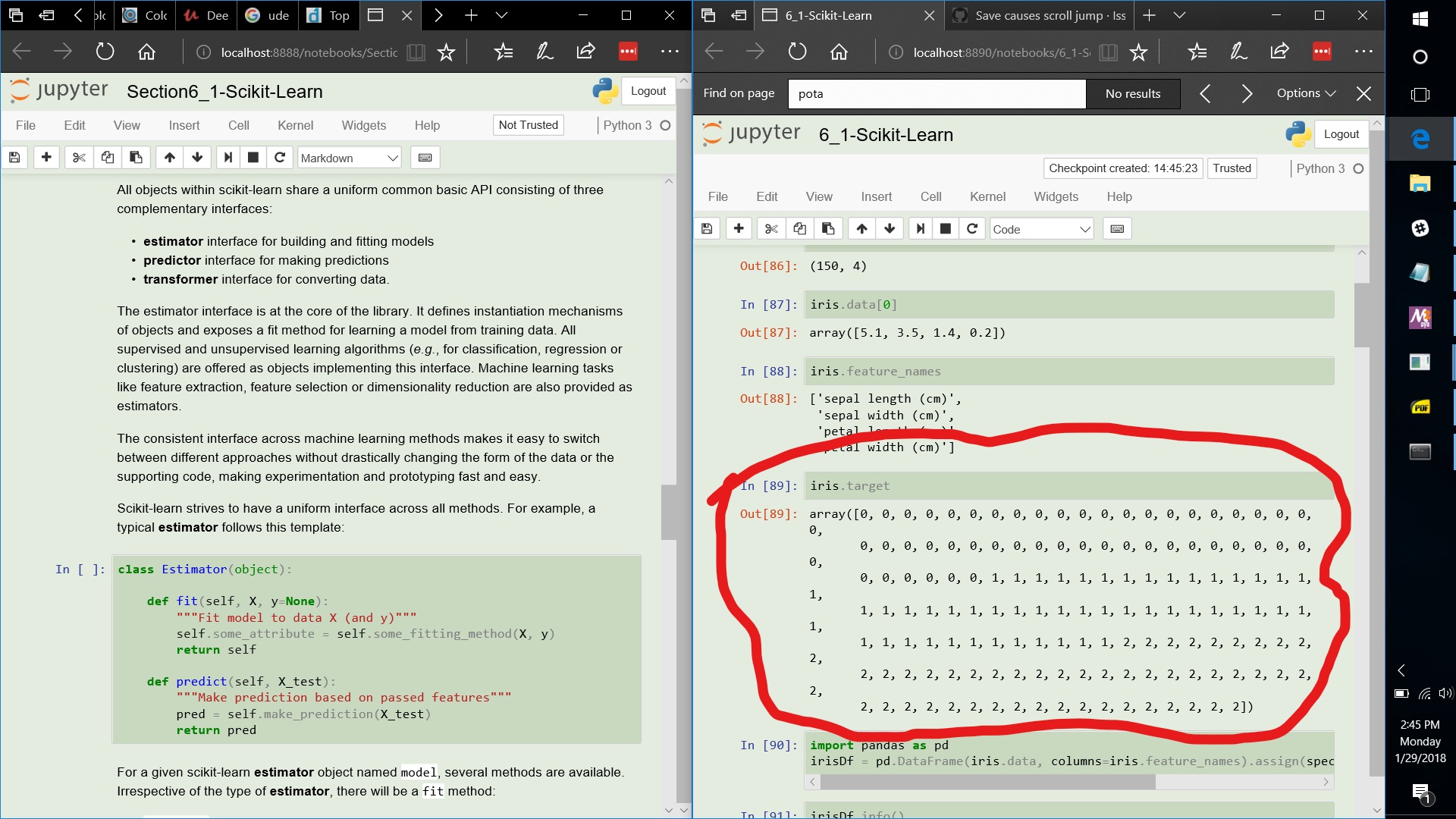
I'm seeing this same issue when viewing notebooks side-by-side on my laptop. There are two components.
1) The save checkpoint moves the content down the expected amount to due to the notification height, this is unfortunate, and could perhaps be addressed by a UI change, but not a big issue since the vertical jump is relatively small.
2) The other is that the vertical spacing in multi-line print output for numpy arrays is momentarily increased while the checkpoint notification is displayed. This is a bigger issue, since the vertical jump can be arbitrarily large depending on the notebook content.
I'm using the latest Anaconda distribution with
(base) C:\Users\ryan>jupyter --version
4.4.0

(base) C:\Users\ryan>jupyter notebook --version
5.0.0
[Note, there is minimal nondefault theming in this screenshot, the issue also happens with the defaults.]
 ryan-feeley
on 29 Jan 2018
ryan-feeley
on 29 Jan 2018
That looks like something is making the available width narrower, so the lines wrap around. Can you see what might be doing that?
 takluyver
on 29 Jan 2018
takluyver
on 29 Jan 2018
@takluyver
Interesting, yes, the available width is changing. It appears to be related to me having changed the default Windows taskbar location to put it on the right side. If you look at the image above, there appear to be two vertical scrollbars on the right side of each notebook. The inner one is useful, and the outer one appears to be a UI bug that is triggered by putting the windows taskbar on the right.
The left window always has two vertical scrollbars (so seems to have a display bug). The right window normally has only one, but a second one appears during the checkpoint save operation.
If I swap the left and right windows, so I'm editing a notebook in the left size, then there are always two scrollbars, so this additional vertical jump during checkpoint save (my # 2 above), does not occur.
If I move the taskbar location to the bottom of the screen, then both windows have only a single scrollbar (so normal expected behavior), and again my # 2 above does not occur.
ryan-feeley
on 30 Jan 2018
If I start with a very narrow window that is displaying the notebook, and horizontally drag the window wider, the 2nd scrollbar repeatedly appears and disappears, so it appears to be present only at discrete widths.
All the above has occurred with the Windows 10 Edge browser. I am unable to reproduce this 2nd scrollbar with the latest firefox version.
ryan-feeley
on 30 Jan 2018
Ah, OK. I don't think we've ever really aimed to support IE/Edge, though we know it mostly works in recent enough versions.
takluyver
on 30 Jan 2018
Related issues
 arilwan
·
3Comments
arilwan
·
3Comments
 uolter
·
3Comments
uolter
·
3Comments
 cmesro
·
3Comments
cmesro
·
3Comments
 Foadsf
·
3Comments
Foadsf
·
3Comments
 cancan101
·
3Comments
cancan101
·
3Comments
Most helpful comment
I'm seeing this same issue when viewing notebooks side-by-side on my laptop. There are two components.
1) The save checkpoint moves the content down the expected amount to due to the notification height, this is unfortunate, and could perhaps be addressed by a UI change, but not a big issue since the vertical jump is relatively small.
2) The other is that the vertical spacing in multi-line print output for numpy arrays is momentarily increased while the checkpoint notification is displayed. This is a bigger issue, since the vertical jump can be arbitrarily large depending on the notebook content.
I'm using the latest Anaconda distribution with
[Note, there is minimal nondefault theming in this screenshot, the issue also happens with the defaults.]