Norns: Allow for (better) remote script editing on a desktop/laptop
Whilst we have the options to work on scripts in Maiden in the browser and by using something like Vim via SSH on norns it would be nice if it would be easily possible to work on scripts using my editor of choice running on my own desktop/laptop computer.
There have been some questions about this on lines as well (for example this topic and this post).
The goal would be to allow users to configure/build something like @ngwese's VS Code setup (screenshot below) using their editor of choice.

I think the following things are required:
- A way to be able to open/edit script files in an editor running on a computer and have them available on norns as well
- A way to remotely trigger running a script
- A way to remotely view the output from matron
Note that I don't expect us to write complete integrations/plugins for specific editors. It's more about making the tools/hooks available so users can configure/build this functionality in their editors themselves.
 simonvanderveldt
All 21 comments
From the initial discussion we have the following suggestions:
- A way to be able to open/edit script files in an editor running on a computer and have them available on norns as well
- Use SSHFS to mount
norns:/home/we/duston the laptop/desktop - Have the sources on the laptop/desktop and rsync them to norns
- Use SSHFS to mount
- A way to remotely trigger running a script
- Have a script/executable that will send
norns.script.load("code/<path to script>")to norns using the websocket server at port 5555.
I don't think we currently have anything that can do this.
- Have a script/executable that will send
- A way to remotely view the output from matron
- Use the
maiden-replexecutable included in this repo, once built it can be run using for examplemaiden-repl ws://norns.local:5555 ws://norns.local:5556to connect to both the matron and crone/SC websockets and stream all the output (and it can also be used as a REPL/to run commands directly).
- Use the
I'll try out these suggestions this week and report back how well it works.
simonvanderveldt
on 6 Apr 2020
Have a script/executable that will send norns.script.load("code/
") to norns using the websocket server at port 5555.
I don't think we currently have anything that can do this.
(summarizing from linked forum topic)
this is easy in any scripting environment that supports websocket subprotocols.
nodejs:
const WebSocket = require('ws');

const ws = new WebSocket('ws://norns.local:5555/', ['bus.sp.nanomsg.org']);

ws.on('open', function open() {
    ws.send('norns.script.load("{YOUR_CODE_LOCATION}")\n');
});

ws.on('message', (d) => {
    if (d.trim() === '<ok>') {
        ws.close();
        console.log('-- Updated Norns --');
    }
});
python3:
import asyncio
import websockets
import sys

ip = "norns.local"
port = "5555"
msg = 'norns.script.load("{YOUR_CODE_LOCATION}")\n'

async def tx():
    uri = "ws://{}:{}/".format(ip, port)
    print ("sending message '{}' to server {}".format(msg, uri))
    print("connecting...")
    async with websockets.connect(uri, subprotocols=['bus.sp.nanomsg.org']) as websocket:
        print("...connected.")
        await websocket.send(msg)
        response = await websocket.recv()
        print(response)

asyncio.get_event_loop().run_until_complete(tx())
tools like websocat are also an option.
should we add some language bindings to the norns repo?
 catfact
on 6 Apr 2020
catfact
on 6 Apr 2020
Some initial findings after a bit of experimentation:
- rsync works fine, it's pretty quick, almost instant to sync a script. I think I prefer this over sshfs because this way all the sources I'm working on are on my computer.
I already had norns in my SSH config so I can just rsync towe@norns. One issue is the default use of password authentication for SSH which is a bit problematic. For now I usedsshpassbut that's obviously not ideal. Maybe a real rsync server might be a better idea for out of the box functionality or alternatively use SSH keys but this is difficult to make work as out of the box functionality. - Remotely triggering a script seems relatively easy. I adapted the Python script @catfact posted (thanks!)
Did need to figure out which script to request from norns to run. For example if you're editing a lib that belongs to a script you probably don't want to run the lib. So for now I've conventionalized on taking the name of the project directory and using that same name for the script name as well. Seems like a sensible default. So I'm sendingnorns.script.load("code/<projectname>/<projectname>.lua") - The remote script load trigger doesn't always work, I sometimes get error messages about nil/traceback etc, not sure yet what's causing this
- Remotely viewing the output seems pretty easy as well. I initially started with
maiden-replbut this doesn't work too well for me at the moment, because of issues with the white bars and issues when resizing. So I wrote a simple Python script to receive messages. Works fine so far as well.
One issue is that there are a lot of disconnects. Not sure yet why this is and if this also happens in maiden/maiden-repl but is just not made visible/if they automatically reconnect without showing the dropped connection.
TODO:
- Figure out why loading a script sometimes doesn't work
- Figure out why the websocket connection gets dropped so often
- Try out websocat
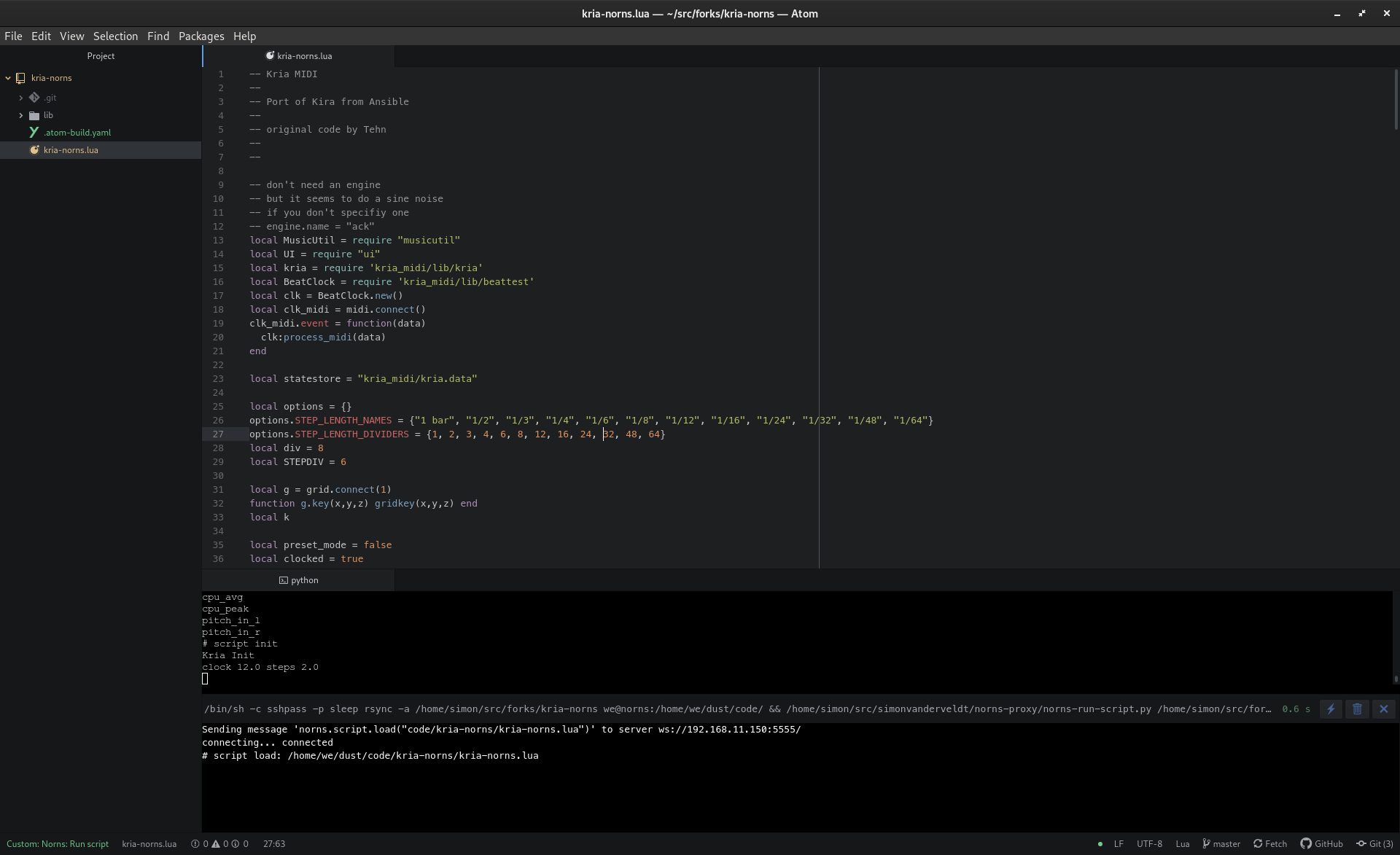
Screenshot of the current state in Atom using atom-build and the Python script running in a terminal showing the websocket output:
simonvanderveldt
on 7 Apr 2020
fyi i believe just running norns.script.load() will reload the currently running script.
 tehn
on 8 Apr 2020
tehn
on 8 Apr 2020
Did a quick testrun using netsocat. For reasons currently unknown to me it seems to be more stable than the scripts I was using. I think it's good enough to use as a starting point for now. If we ever want more functionality we can look into writing something ourselves.
I did have to run it using rlwrap to enable readline functionality (i.e. arrow key navigation) because websocat itself doesn't have it. Seems to work fine, even the history works :)
So how I'm using it now:
# Start a REPL that stays connected. This will print output and accepts input
$ rlwrap websocat --protocol bus.sp.nanomsg.org ws://<norns>:5555
# Load a script
norns.script.load("code/awake/awake.lua")
...
Runing scripts programmatically works as well:
$ echo 'norns.script.load("code/awake/awake.lua")' | websocat --one-message --protocol bus.sp.nanomsg.org ws://<norns>:5555
# script load: /home/we/dust/code/awake/awake.lua
And if the other REPL is still running you'll get the output there.
I'll try to incorporate this into my editor setup to see how well it works from there.
simonvanderveldt
on 8 Apr 2020
So I think I've found a decent setup to start with:
- Atom as editor
- Terminal in Atom (I'm using x-terminal) running websocat via rlwrap connected to the matron websocket at
norns:5555. The full command is
rlwrap websocat -0 --protocol bus.sp.nanomsg.org ws://norns:5555
This shows the output from matron and can be used for interactive/REPL like execution of commands, similar to how the matron tab works in maiden.
- Atom-build target that rsyncs the sources to norns over SSH using
sshpassto automatically fill in the password.
Once the rsync is done it requests to load the script that was just rsynced using a oneshot websocat invocation. This assumes the script has the same name as the project directory opened in Atom.
This is my current .atom-build.yaml:
atomCommandName: "Norns: Run script"
name: 'Norns: Run script'
cmd: 'PROJECT_NAME=$(basename {PROJECT_PATH}) && sshpass -p sleep rsync -a --delete --exclude=".*" --delete-excluded {PROJECT_PATH} we@norns:/home/we/dust/code/ && echo "norns.script.load(\"code/${PROJECT_NAME}/${PROJECT_NAME}.lua\")" | websocat --one-message --protocol bus.sp.nanomsg.org ws://norns:5555'
sh: true
It's been working without issues this whole evening and is pretty much what I was looking for.
I do see some room for improvements, but those can come later/after some more experience as well. One obvious thing would be to write a proper Atom-build provider so no per project config is necessary.
And I'll also give this setup a try in VS Code, it's a bit better out of the box for these purposes since it comes with a terminal and build facilities out of the box.
Screenshot to prove that it really works ;)
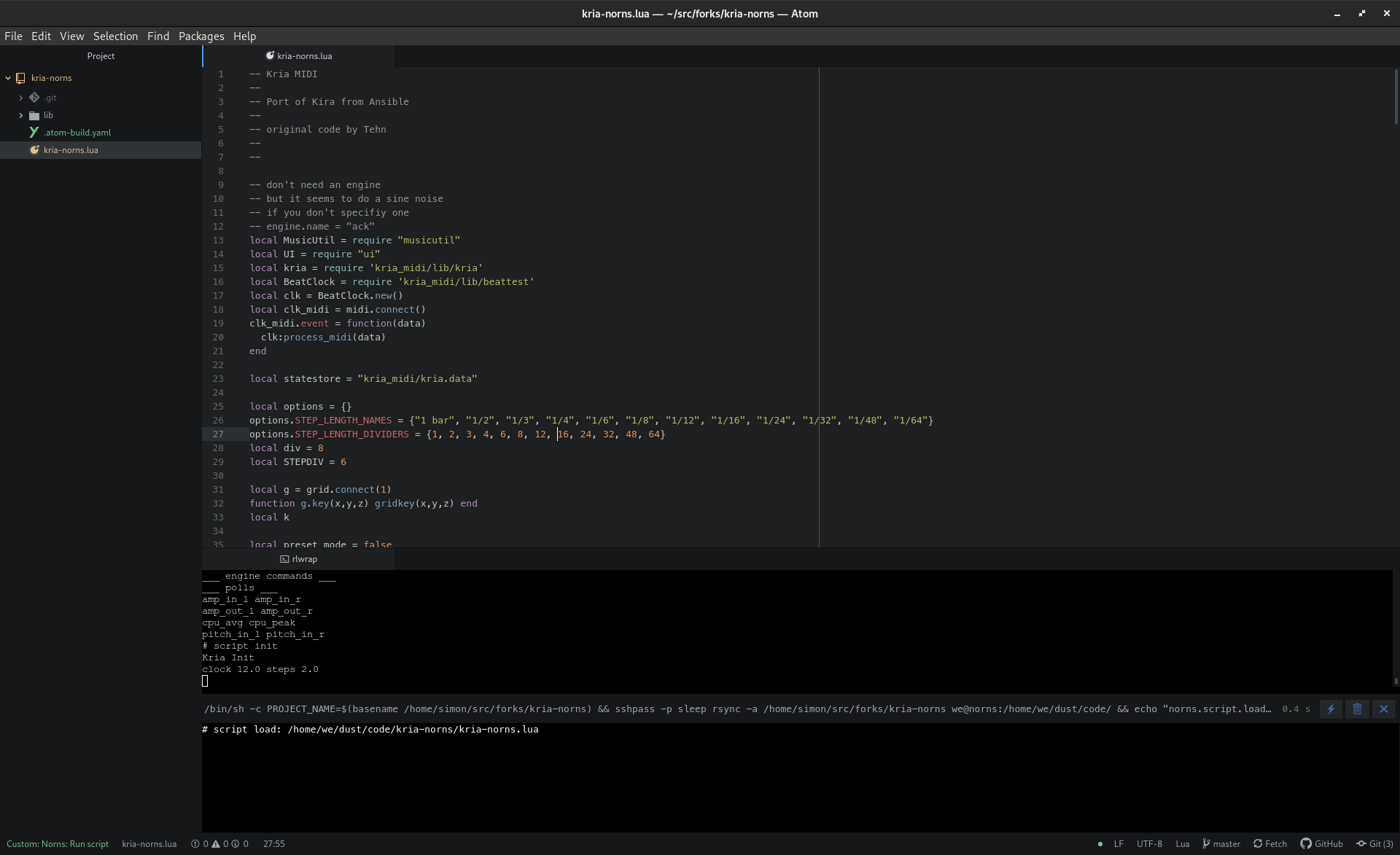
The screen is a bit full here, but the atom-build output at the bottom disappears once its done.
simonvanderveldt
on 9 Apr 2020
@justmat @markwheeler I noticed you +1'd this issue. I don't know which editor you're using but if you're using Atom it would be nice if you could give the setup as described above a try and let us know what you think.
simonvanderveldt
on 9 Apr 2020
I am kind of a caveman when it comes to editors and will pretty much just type into any window that happens to show up and do all file management 100% manually. But then I got jealous seeing the screenshot at the top! Never used Atom, I'll check it out, Sublime is the only editor I have any familiarity with (but still, not much).
 markwheeler
on 9 Apr 2020
markwheeler
on 9 Apr 2020
I use Sublime mostly, and vim most other times. If needed, I am happy to download Atom and try to set this up!
 justmat
on 9 Apr 2020
justmat
on 9 Apr 2020
@markwheeler @justmat The idea of this approach would be that you can use it with any editor/the editor of your choice.
For Sublime it should be possible to achieve +- the same result using for example https://packagecontrol.io/packages/Terminus to run rlwrap websocat and it's built in build integration https://www.sublimetext.com/docs/build for the rsync and run script actions.
It seems like you can even use the variable $ProjectName instead of the workaround I had to implement for Atom using basename
@justmat I only know the basics about vim, but since pretty much anything is possible there I assume it should be possible to integrate the REPL and sync+run script in there as well. I don't really have any suggestions for how to do so though.
P.S. @markwheeler
I am kind of a caveman when it comes to editors and will pretty much just type into any window that happens to show up and do all file management 100% manually.
I'm really surprised by this given the awesome things you have created :open_mouth:
If you're taking suggestions: Try out some editors and stick with one you like and learn it a bit, it can really be a productivity enhancer.
simonvanderveldt
on 10 Apr 2020
@simonvanderveldt curious about the advantage of running rlwrap vs sshing in and running maiden-repl? that way you get all the ncurses improvements.
which got me thinking--- it'd probably be somewhat trivial to modify druid to listen to a websocket instead of a serial stream (for crow).
my dumb editor opinions: i liked sublime a lot before i went full-in on vim. atom (at the time) felt bloated and slow (maybe it's better now). vscode is the first thing that makes me consider going back to a big IDE, so i'm curious to see how people push forward in this domain.
thanks for the investigation!
tehn
on 10 Apr 2020
all the ncurses improvements.
but, what are those? the maiden-repl is my janky ncurses code. ncurses is weird and crusty and some things i tried to do did not work right (scrolling and switching between REPLs.) simon doesn't like some of the visual decisions (white lines) which is legit.
so... the only real enhancement i see is adding readline? (and, i guess, the abliity to keep your input field separate from output window, which is important with lots of output.)
you know, we could just add readline to matron as a runtime option as well, it's very easy.
catfact
on 11 Apr 2020
readline, yes. up-arrow alone is worth it for me.
tehn
on 11 Apr 2020
@tehn The main reason is that this way I only need to run some programs on my local machine. Otherwise I'd first need to SSH to norns before I can run maiden-repl. Not a big difference, but running everything locally is a little bit simpler, especially when i want to automatically open a terminal in my editor that shows the websocket stream.
Note that you don't lose any readline functionality vs maiden-repl, that's what rlwrap is for. I don't know how it does it's magic but all arrow keys work, you get history just like any program that implements readline functionality itself. Your input is always at the bottom as well, so not intertwined with the output and it even keeps the history between invocations.
I think the only functionality I'm missing this way is having both the websocket stream for matron as well as crone available and being able to switch between them using tab. Personally I don't really use that so it's not much of a problem for me and when I do want it I can open a second terminal or use something like tmux.
I also had some issues with maiden-repl. For example the white bars @catfact mentioned. It's not that I don't like them, it's that they had some issues. It gave me a big white bar when used inside a small terminal window in my editor and probably some unicode glitch when used in a regular terminal. See images below
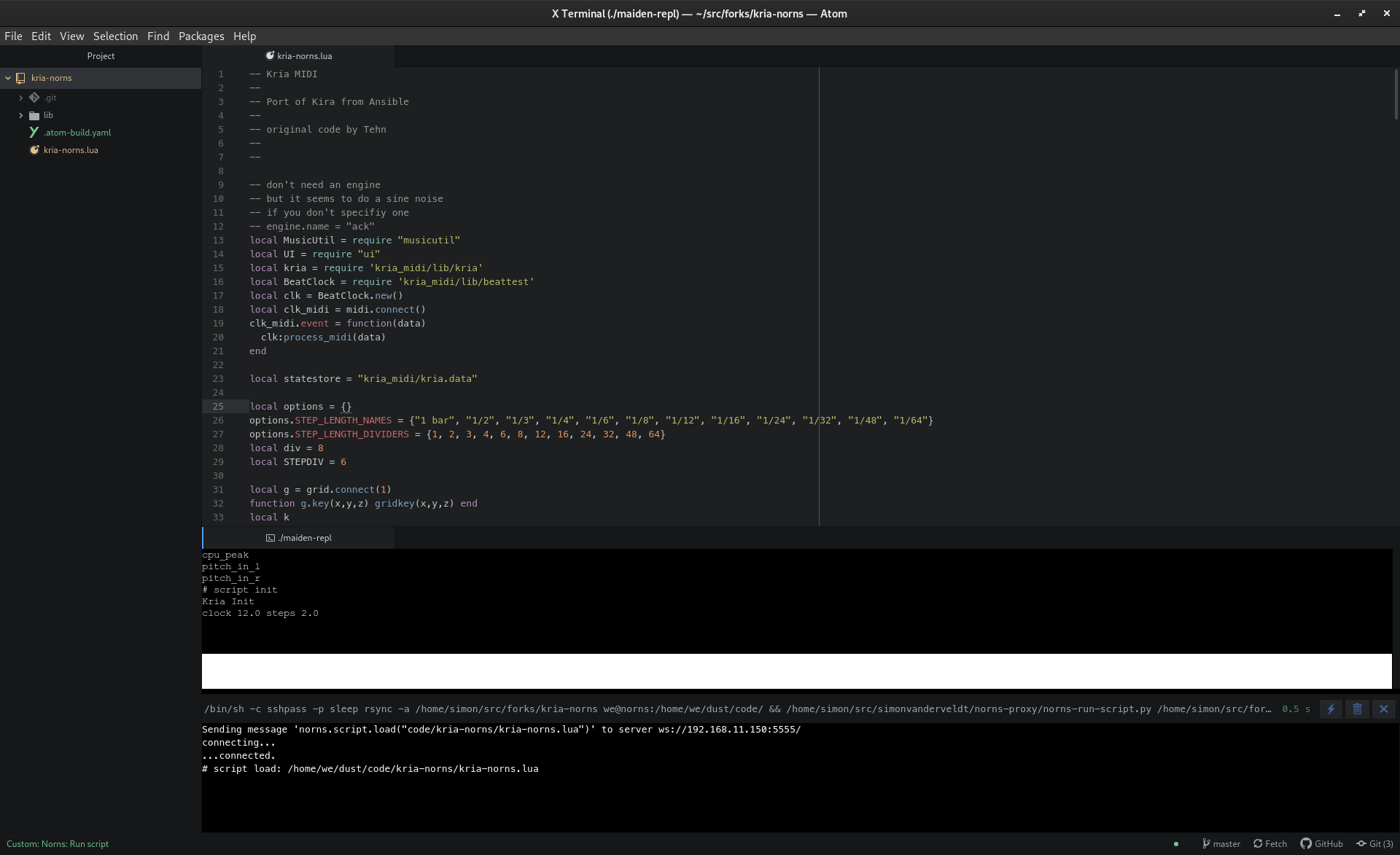
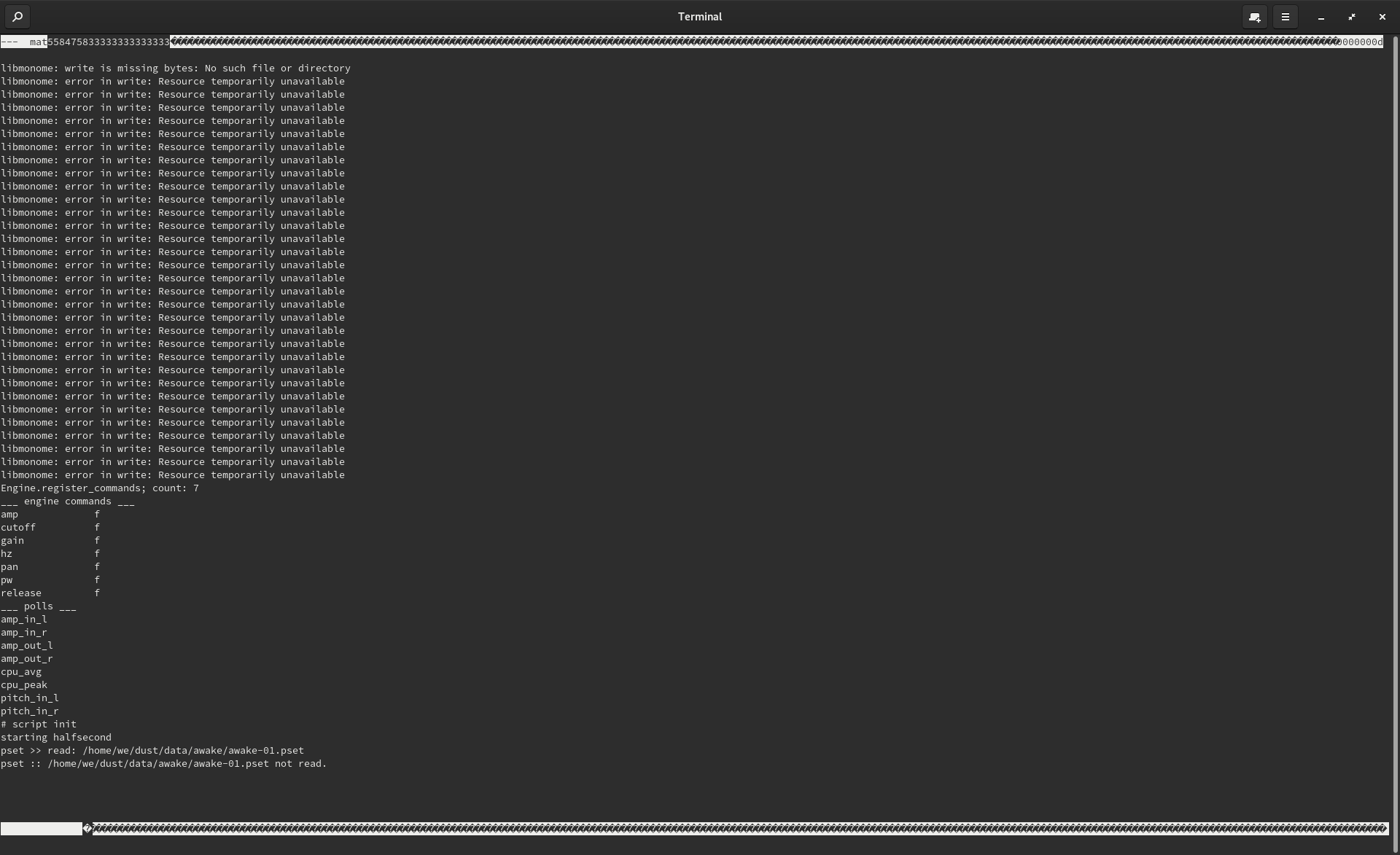
Also the white bars do take up space, which for an integrated terminal isn't ideal.
P.S. I agree that something like druid that mimics the current maiden-repl functionality might be useful, because it could offer a REPL for both matron and crone and it would be relatively easy to add tab completion for supported matron commands. But to get started I think the current setup is good enough.
simonvanderveldt
on 12 Apr 2020
I had a play around setting up vscode using @simonvanderveldt's approach for Atom above. FWIW, here are a few notes from a novice:
- I wasn't able to get websocat to connect using
ws://norns:5555orws://norns.local:5555but it did connect with the norns IP address. I'm on macOS here and rsync is happy connecting tonorns.local - I added
--deleteand--exclude=".*"to the rsync options which is working well for me to allow for deleting and renaming of files on the desktop. - Is there a way to get the SuperCollider output?
- The REPL seems to be working well, I can issue Lua commands there, however the
;restartcommand did not work. What's the best method for restarting after modifying platform stuff with this setup? - My usual process for editing an engine is to make a change, upload to norns, restart (ssh then use stop/start.sh scripts) and then re-run the relevant script once norns has started up. I'm wondering how much this could be automated – this would be the biggest impact for me personally.
Overall it feels promising!
markwheeler
on 12 Apr 2020
I wasn't able to get websocat to connect using
ws://norns:5555orws://norns.local:5555but it did connect with the norns IP address. I'm on macOS here and rsync is happy connecting tonorns.local
Tbh for me connecting to just norns didn't work at first either. I have no clue what changed but it does work now.
One thing to try could be to ping norns to see if your machine can find norns/lookup it's address
$ ping norns
PING norns.localdomain (192.168.11.150) 56(84) bytes of data.
64 bytes from norns.localdomain (192.168.11.150): icmp_seq=1 ttl=64 time=1.92 ms
64 bytes from norns.localdomain (192.168.11.150): icmp_seq=2 ttl=64 time=1.65 ms
^C
I'm not sure why rsync would act differently. You don't have an ~/.ssh/config by chance that contains norns or norns.local?
I added
--deleteand--exclude=".*"to the rsync options which is working well for me to allow for deleting and renaming of files on the desktop.
Thanks for the suggestion. I've updated the command I posted above to include these.
Is there a way to get the SuperCollider output?
Yeah, it's available at port 5556, you can run a separate websocat listener for it just like the one for crone like so:
rlwrap websocat --protocol bus.sp.nanomsg.org ws://norns:5556
This is one of the areas where depending on what you want it might be nicer to use maiden-repl because it can connect to both the matron and crone websockets at the same time.
The REPL seems to be working well, I can issue Lua commands there, however the ;restart command did not work. What's the best method for restarting after modifying platform stuff with this setup?
I think these "magic" commands are some niceties that are only available in maiden (@ngwese can probably confirm if this is correct). It would be nice if we had these available in every REPL.
Depending on what you mean with platform stuff the stack of things to restart might be bigger or smaller.
My usual process for editing an engine is to make a change, upload to norns, restart (ssh then use stop/start.sh scripts) and then re-run the relevant script once norns has started up. I'm wondering how much this could be automated – this would be the biggest impact for me personally.
I think for working on engines/SC code audio:restart() should be all that's needed. @tehn do you know if this is correct?
simonvanderveldt
on 12 Apr 2020
You don't have an ~/.ssh/config by chance that contains norns or norns.local?
No, nothing norns related in there. I can ping norns.local, SSH to it, maiden loads from that address, just not websocat 🤷♂️ Be interested to hear if others on macOS find the same.
Depending on what you mean with platform stuff the stack of things to restart might be bigger or smaller.
Yes, sorry being vague there, my personal involvement is only working on the lua layer of norns – libs or menus etc.
I think for working on engines/SC code audio:restart() should be all that's needed.
Restarting SC has always been somewhat unreliable for me, but it seems particularly failure-prone when using audio:restart() which often causes SC to fail with this jack error #806 we've discussed a bit in the past.
markwheeler
on 13 Apr 2020
I think these "magic" commands are some niceties that are only available in maiden (@ngwese can probably confirm if this is correct). It would be nice if we had these available in every REPL.
The ;restart "magic" commands are implemented by the the HTTP backend for the maiden frontend - the web repl intercepts those commands and handles then entirely outside of matron/supercollider. It is theoretically possible to implement a similar operation directly in matron with some work. Any consumer of the repl connections would need to be taught to re-connect. Regardless using the ;restart commands in retrospect put the system in a somewhat undefined state because matron assumes that supercollider is in a clear slate and supercollider (if polls are setup) incorrectly assumes that matron knows about the polls. There has been some talk of removing the magic commands hand having just ;reset which triggers the same logic as SYSTEM > RESET on the device menu.
 ngwese
on 13 Apr 2020
ngwese
on 13 Apr 2020
Hey guys
Just wanted to give a heads up: I am working on a (n)vim plugin for this, mostly for myself, heavily inspired by @simonvanderveldt 's ideas (thanks!!!). It's still quite rough but works for now
 madskjeldgaard
on 11 Sep 2020
madskjeldgaard
on 11 Sep 2020
Additionally since this ticket was opened I hacked up a tool which can be used to trigger a script load or reload when files change.
https://github.com/ngwese/maiden-run
It hasn't been polished but the intention was to include it on device and provide binaries for people to run from editors running off device.
ngwese
on 11 Sep 2020
this is a pretty nebulous "issue" at this point. lots of great information is contained, and this would better exist as a wiki page or forum thread. if there are concrete code changes to be made, let's identify them as specific issues.
tehn
on 2 Nov 2020
Related issues
 okyeron
·
5Comments
catfact
·
3Comments
catfact
·
7Comments
catfact
·
9Comments
okyeron
·
5Comments
catfact
·
3Comments
catfact
·
7Comments
catfact
·
9Comments
 mhetrick
·
10Comments
mhetrick
·
10Comments