Nopcommerce: Cannot publish from VisualStudio 2017
4.10 BETA
Visual studio v. 15.7.5 (very latest)
.NET SDK 2.1.1 (build 301)
I can't publish from Visual Studio and i get the following error.
dotnet publish works fine.
11/07/2018 12:37:15
System.AggregateException: One or more errors occurred. ---> System.Exception: Build failed. Check the Output window for more details.
   --- End of inner exception stack trace ---
   at System.Threading.Tasks.Task.ThrowIfExceptional(Boolean includeTaskCanceledExceptions)
   at System.Threading.Tasks.Task.Wait(Int32 millisecondsTimeout, CancellationToken cancellationToken)
   at Microsoft.VisualStudio.Web.Publish.PublishService.VsWebProjectPublish.<>c__DisplayClass41_0.<PublishAsync>b__2()
   at System.Threading.Tasks.Task`1.InnerInvoke()
   at System.Threading.Tasks.Task.Execute()
--- End of stack trace from previous location where exception was thrown ---
   at System.Runtime.CompilerServices.TaskAwaiter.ThrowForNonSuccess(Task task)
   at System.Runtime.CompilerServices.TaskAwaiter.HandleNonSuccessAndDebuggerNotification(Task task)
   at Microsoft.VisualStudio.ApplicationCapabilities.Publish.ViewModel.ProfileSelectorViewModel.<RunPublishTaskAsync>d__116.MoveNext()
---> (Inner Exception #0) System.Exception: Build failed. Check the Output window for more details.<---

===================
Output window, unfortunately, has no more details:
1>------ Build started: Project: Nop.Web, Configuration: Release Any CPU ------
1>Nop.Web -> D:\Lavori\Dumont\nopCommerce\src\Presentation\Nop.Web\bin\Release\netcoreapp2.1\Nop.Web.dll
2>------ Publish started: Project: Nop.Web, Configuration: Release Any CPU ------

2>Build failed. Check the Output window for more details.
========== Build: 1 succeeded, 0 failed, 4 up-to-date, 0 skipped ==========
========== Publish: 0 succeeded, 1 failed, 0 skipped ==========
 alecrt
All 28 comments
Cannot reproduce. Works fine.
Where do you publish it? File system?
 AndreiMaz
on 11 Jul 2018
AndreiMaz
on 11 Jul 2018
Nope, to a remote IIS using webdeploy. IIS 10, win server 2016
alecrt
on 11 Jul 2018
From diagnostic verbose level of the output window I get the following tip:
Using "GetReferenceNearestTargetFrameworkTask" task from assembly "C:\Program Files (x86)\Microsoft Visual Studio\2017\Enterprise\Common7\IDE\CommonExtensions\Microsoft\NuGet\NuGet.Build.Tasks.dll".
        Task "GetReferenceNearestTargetFrameworkTask"
        Done executing task "GetReferenceNearestTargetFrameworkTask" -- FAILED.
I already opened a support post on asp.net forum:
https://forums.asp.net/post/6217383.aspx
alecrt
on 12 Jul 2018
Is it published withput errors when ypu try to deploy it to a file system (local)?
AndreiMaz
on 12 Jul 2018
Yes, if I use dotnet publish from command line it works like a charm.
I can confirm that using a folder publish profile from VS also works.
alecrt
on 12 Jul 2018
@alecrt
I tried to reproduce your problem using the latest versions of the .NET Core packages:
Hosting Bundle Installer
.NET Core 2.1 SDK (v2.1.302)
and the following publishing options (local IIS using webdeploy):
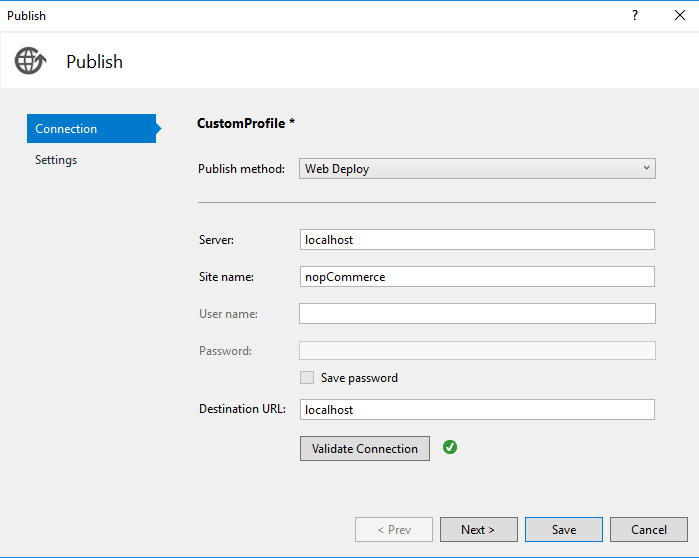
As a result, everything worked.
Try to update the library, perhaps the problem was in the version of the SDK that you used.
 DmitriyKulagin
on 13 Jul 2018
DmitriyKulagin
on 13 Jul 2018
Still fail.. same error. Very strange
Using "GetReferenceNearestTargetFrameworkTask" task from assembly "C:\Program Files (x86)\Microsoft Visual Studio\2017\Enterprise\Common7\IDE\CommonExtensions\Microsoft\NuGet\NuGet.Build.Tasks.dll".
Done building project "Nop.Web.csproj" -- FAILED.
Maybe it's not related with Nop, I'll investigate more when i have some time.
For the moment I'm happy with local publish and manual file transfer
alecrt
on 13 Jul 2018
Is this related? There seems to be a solution at the bottom of the first link's page:
 VR-Architect
on 14 Jul 2018
VR-Architect
on 14 Jul 2018
Unfortunately, already tried.
As I said, I think it’s something related with my env, so if you want close it and let see if someone else encounter the problem.
Inviato da iPhone
Il giorno 14 lug 2018, alle ore 16:29, Architect <[email protected]notifications@github.com> ha scritto:
Is this related? There seems to be a solution at the bottom of the first link's page:
—
You are receiving this because you were mentioned.
Reply to this email directly, view it on GitHubhttps://nam03.safelinks.protection.outlook.com/?url=https%3A%2F%2Fgithub.com%2FnopSolutions%2FnopCommerce%2Fissues%2F3136%23issuecomment-405027086&data=02%7C01%7C%7C39f2dbd06b5b4a1bab7908d5e9963d59%7C84df9e7fe9f640afb435aaaaaaaaaaaa%7C1%7C0%7C636671753833529695&sdata=JI%2BPxdGFWslnJ%2FBDWJ2PAAD6jeextBz%2FzN0terNf%2Baw%3D&reserved=0, or mute the threadhttps://nam03.safelinks.protection.outlook.com/?url=https%3A%2F%2Fgithub.com%2Fnotifications%2Funsubscribe-auth%2FABkjTq-B8biTZ0anuxk13rrdb76AnZpVks5uGgBVgaJpZM4VLCgp&data=02%7C01%7C%7C39f2dbd06b5b4a1bab7908d5e9963d59%7C84df9e7fe9f640afb435aaaaaaaaaaaa%7C1%7C0%7C636671753833529695&sdata=x3eiBiRaq%2FjpCeWWedJEi8KZJKIpjygcbLoyrcXz7W4%3D&reserved=0.
alecrt
on 14 Jul 2018
You tried update your MSBUILD Tools components?
Download the latest version of MSBUILD tools from https://www.visualstudio.com/downloads/#build-tools-for-visual-studio-2017, run it, choose Modify and then select “Web development build tools” and “.NET Core build tools”.
Try the same method suggested here.
DmitriyKulagin
on 16 Jul 2018
Downloaded, installed, disabled Resharper and now i can publish.
Thx @DmitriyKulagin
alecrt
on 23 Jul 2018
I would like to re-open this issue.
I experience the same problem but it only occurs when I have ReSharper enabled on my VS 2017.
 ocinbat
on 11 Nov 2018
ocinbat
on 11 Nov 2018
I am facing the same issue. I am running vs 2017 and trying to deploy using File system. Project successfully build. However throws exception like this during Publish.
4/1/2019 10:46:19 AM
System.AggregateException: One or more errors occurred. ---> System.Exception: Build failed. Check the Output window for more details.
--- End of inner exception stack trace ---
at System.Threading.Tasks.Task.ThrowIfExceptional(Boolean includeTaskCanceledExceptions)
at System.Threading.Tasks.Task.Wait(Int32 millisecondsTimeout, CancellationToken cancellationToken)
at Microsoft.VisualStudio.Web.Publish.PublishService.VsWebProjectPublish.<>c__DisplayClass43_0.
at System.Threading.Tasks.Task`1.InnerInvoke()
at System.Threading.Tasks.Task.Execute()
--- End of stack trace from previous location where exception was thrown ---
at System.Runtime.CompilerServices.TaskAwaiter.ThrowForNonSuccess(Task task)
at System.Runtime.CompilerServices.TaskAwaiter.HandleNonSuccessAndDebuggerNotification(Task task)
at Microsoft.VisualStudio.ApplicationCapabilities.Publish.ViewModel.ProfileSelectorViewModel.
---> (Inner Exception #0) System.Exception: Build failed. Check the Output window for more details.<---
===================

 gopaldahal
on 1 Apr 2019
gopaldahal
on 1 Apr 2019
Hi,
Even i get the same error, but have resolved the issue.
I had updated my application from 2.2.1 to 2.2.2 and now i was trying to publish the application, and was facing the similar issue as reported above.
I think the updation in nuget package must have left some issue of the publish properties.
I closed the VS 2017, went to the properties folder and removed the PublishProfile folder.
I again opened the solution, and created new publish profile.
My project was published with charm.
Regards.
Abhinav Aggarwal
 abhiquiet
on 6 Apr 2019
abhiquiet
on 6 Apr 2019
Adding following to your csproj file might solve the issue
<Import Project="$(VSToolsPath)\WebApplications\Microsoft.WebApplication.targets" Condition="'$(VSToolsPath)' != ''" />
 hasibul2363
on 10 Jul 2019
hasibul2363
on 10 Jul 2019
In case some files included project, but do not exist on folder. The publish wizard will fail.
So please check all files included project correct.
 khaidev
on 18 Jul 2019
khaidev
on 18 Jul 2019
I'm having the same issue, only in VS2019
 matthewpetch
on 26 Jul 2019
matthewpetch
on 26 Jul 2019
Hi
I am solve this error in your project with update MSBUILD Tools for Visual Studio
and get package System.Reflection.Emit from Nuget
 asrinakbari
on 23 Dec 2019
asrinakbari
on 23 Dec 2019
Having same issue in lastest VS2019 as well. Maybe someone that is an attack dog can fix this??????
 marcnoon
on 29 Dec 2019
marcnoon
on 29 Dec 2019
I got a big error message in .tmp file:
12/28/2019 9:53:48 PM
System.AggregateException: One or more errors occurred. ---> System.Exception: Build failed. Check the Output window for more details.
--- End of inner exception stack trace ---
at System.Threading.Tasks.Task.ThrowIfExceptional(Boolean includeTaskCanceledExceptions)
at System.Threading.Tasks.Task.Wait(Int32 millisecondsTimeout, CancellationToken cancellationToken)
at Microsoft.WebTools.Publish.PublishService.VsWebProjectPublish.<>c__DisplayClass43_0.
at System.Threading.Tasks.Task`1.InnerInvoke()
at System.Threading.Tasks.Task.Execute()
--- End of stack trace from previous location where exception was thrown ---
at System.Runtime.CompilerServices.TaskAwaiter.ThrowForNonSuccess(Task task)
at System.Runtime.CompilerServices.TaskAwaiter.HandleNonSuccessAndDebuggerNotification(Task task)
at Microsoft.Publish.Framework.ViewModel.ProfileSelectorViewModel.
---> (Inner Exception #0) System.Exception: Build failed. Check the Output window for more details.<---
System.Exception: Build failed. Check the Output window for more details.
===================
marcnoon
on 29 Dec 2019
I got this working by switching from ftp publishing to Web Deploy using MSDeploy server. Guess ftp doesn't want to always work .. or file publishing doesn't always work. But it looks like in my case MS Deploy or WebDeploy ( or are they the same thing? ) did work.
marcnoon
on 29 Dec 2019
Now when I switched back to file or ftp publish it magically works.?!?
marcnoon
on 29 Dec 2019
I wanted to add one more thing... I think I switched to back to release environment and then when I switched to my production name environment again that started working. Maybe switching the environment setting clears up the old settings somehow so I no longer see that error message.
marcnoon
on 29 Dec 2019
I had similar error on Visual Studio 2019. Don't forget to check Output tab. The last line explains the error!
 rameshkunwar
on 12 Mar 2020
rameshkunwar
on 12 Mar 2020
I'm getting this in VS2019. Good advice to check the build output window.
The issue, at least in my case, seems to have something to do with disagreement between projects over where build output ends up. The publishing project is appending \<framework>\<runtime>\ directories to the path, whether or not the other projects specify them in their build path or not. This means that if the other projects build to \bin\x86\debug\ then the publishing project looks for files in that project's \bin\x86\debug\net40\win-x86\ folder, for example, which doesn't exist. If I change the output folder to \bin\x86\debug\net40\win-x86\ then the publishing project actually looks for files in \bin\x86\debug\net40\win-x86\net40\win-x86\ which is kind of ridiculous...
For class libraries, I only get this wrong path issue if I specify <RuntimeIdentifiers> in the .csproj file of the referenced class library. If I remove that tag, it seems to get the path right. (Though, with all these wrong paths who knows if it's even getting the version of the files that just built or not.)
And unfortunately in this case I am also referencing another executable project, and the wrong path issue happens whether or not I specify <RuntimeIdentifiers> in the executable project file. For this I must manually copy the output files to the 'wrong' folder that it's looking for them in, and then I can finally get a successful publish.
I also notice that the .exe file of the referenced executable project is not being copied to my bin folder, and so is also not being published. This used to work before upgrading to sdk .csproj.
(I have to wonder, what is this publish wizard even accomplishing at this point. I may as well just copy my build output myself, which is what I'm forced to do anyway.)
Actually... if I were to guess I would say that the problem is that the publish wizard is not building the other projects. I noticed when I published in Release mode that I got errors saying basically that no other project existed, so I switched it to Debug. So probably, the publish wizard is supposed to build dependencies before publishing, and I guess when it does so, it uses its own \<framework>\<runtime> sub directory; except since it never runs the build, there's never any files there.
(That still doesn't fix the issue of not copying the referenced .exe project though. Note also that setting Copy Local to Yes on the project reference does nothing.)
 DaveCousineau
on 3 Apr 2020
DaveCousineau
on 3 Apr 2020
12/28/2019 9:53:48 PM
System.AggregateException: One or more errors occurred. ---> System.Exception: Build failed. Check the Output window for more details.
--- End of inner exception stack trace ---
at System.Threading.Tasks.Task.ThrowIfExceptional(Boolean includeTaskCanceledExceptions)
at System.Threading.Tasks.Task.Wait(Int32 millisecondsTimeout, CancellationToken cancellationToken)
at Microsoft.WebTools.Publish.PublishService.VsWebProjectPublish.<>c__DisplayClass43_0.b__3()
at System.Threading.Tasks.Task`1.InnerInvoke()
at System.Threading.Tasks.Task.Execute()
--- End of stack trace from previous location where exception was thrown ---
at System.Runtime.CompilerServices.TaskAwaiter.ThrowForNonSuccess(Task task)
at System.Runtime.CompilerServices.TaskAwaiter.HandleNonSuccessAndDebuggerNotification(Task task)
at Microsoft.Publish.Framework.ViewModel.ProfileSelectorViewModel.d__213.MoveNext()
---> (Inner Exception #0) System.Exception: Build failed. Check the Output window for more details.<---System.Exception: Build failed. Check the Output window for more details.
===================
I am getting this same problem. My IDE is Visual Studio Community 2017 Version 15.9.24.
I am publishing to IIS with FileSystem. Has anyone solved this? Thanks.
 Naz786
on 10 Jun 2020
Naz786
on 10 Jun 2020
I have found the answer thanks to a friend and it works for me. You have to run Visual Studio as Administrator. It explains the 'Access Denied' errors in the output log. Let me know if this helps you. :)
Naz786
on 12 Jun 2020
Related issues
 tigran-avdalyan
·
5Comments
AndreiMaz
·
4Comments
AndreiMaz
·
3Comments
AndreiMaz
·
6Comments
DmitriyKulagin
·
5Comments
tigran-avdalyan
·
5Comments
AndreiMaz
·
4Comments
AndreiMaz
·
3Comments
AndreiMaz
·
6Comments
DmitriyKulagin
·
5Comments
Most helpful comment
I'm having the same issue, only in VS2019