Nomad: Mounting volumes for local development
Nomad version
Nomad v1.0.0-beta2 (3acb12bb809712ab2e63f0adc4a6422c2ade27da)
Issue
The task is simple - I need to bind a local, relative directory into the container so that I can use Nomad not just in production, but also for local development.
I'm aware of host_volumes but using that for local development is extremely unergonomic, compared to the simplicity of Docker Compose.
Job file (if appropriate)
job "simple_api" {
  datacenters = ["dc1"]
  type = "service"

  group "main_group" {
    count = 1
    ephemeral_disk {}
    network {
      port "api" {
        static = 3000
      }
    }

    service {
      name = "simple-api"
      tags = []
      port = "api"
    }

    restart {
      attempts = 0
      interval = "1m"
      delay = "5s"
      mode = "fail"
    }

    task "api" {
      driver = "docker"

      config {
        image = "node"
        ports = ["api"]

        volumes = ["src/simple-api:/app"]
        work_dir = "/app"
        command = "npm"
        args = ["start"]
      }
    }
  }
}
 chmln
chmln
All 8 comments
Hi @chmln!
The task is simple - I need to bind a local, relative directory into the container so that I can use Nomad not just in production, but also for local development.
You can do that, for sure!
I'm aware of
host_volumesbut using that for local development is extremely unergonomic, compared to the simplicity of Docker Compose.
I'm in the middle of drafting up some design ideas for improving host_volume so I've love to know more about what you don't find ergonomic.
Job file (if appropriate)
Ok, well you didn't mention specifically what's not working for you or what error message you're getting (if any), but my guess is that you don't have docker.volumes.enabled = true set in your client configuration. That will let you bind-mount from arbitrary locations, rather than being restricted to the allocation sandbox.
 tgross
on 16 Nov 2020
tgross
on 16 Nov 2020
Hey @tgross thanks for your feedback!
So I do have docker.volumes.enabled = true set in the client config.
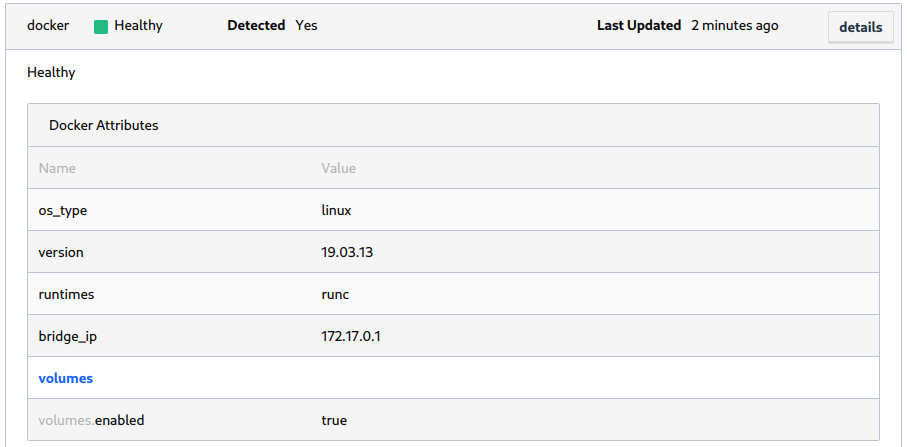
The issue I'm running into is that src/simple-api appears in the allocation files but only as an empty folder.
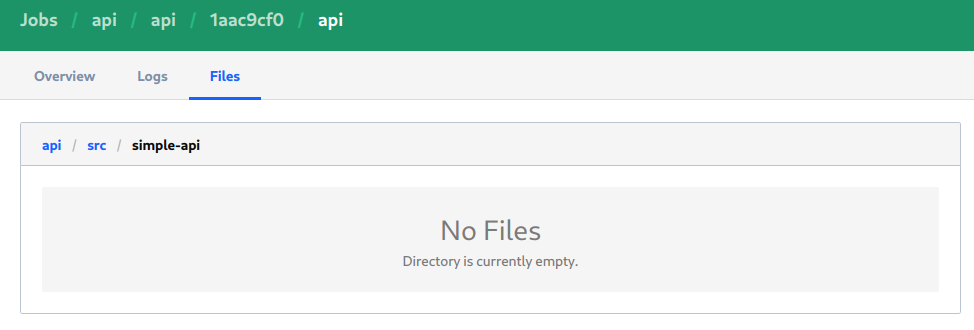
This is what causes the job to fail.
Would you have an idea why this happens? Is it because I'm not using host volumes?
chmln
on 16 Nov 2020
Is src/simple-api relative to the Nomad binary's working directory? Or do you want /src/simple-api?
tgross
on 16 Nov 2020
@tgross Yes, it's relative to both the directory from which I execute nomad run ... and to the job file itself
chmln
on 16 Nov 2020
@tgross Yes, it's relative to both the directory from which I execute nomad run ... and to the job file itself
Ok, so with the exception of some of the new HCL2 features which are shipping in 1.0, no relative path that you pass to Nomad is ever going to be relative to where you're running the command line client. If you imagine running the command line client from your laptop against a server somewhere in the cloud, there wouldn't be any way of binding a directory on your laptop to the agent where the container runs.
So relative paths in jobspecs are generally going to be relative to the task working directory.
What you want for your use case in development is to pass the absolute path to where this src/simple-api directory is (ex. /home/chmln/src/simple-api or whatever)
tgross
on 16 Nov 2020
If you imagine running the command line client from your laptop against a server somewhere in the cloud, there wouldn't be any way of binding a directory on your laptop to the agent where the container runs
Yeah this makes sense.
What you want for your use case in development is to pass the absolute path to where this src/simple-api directory is (ex. /home/chmln/src/simple-api or whatever)
But then each developer needs to change the job files to provide the correct absolute path. That is tedious and wouldn't survive directories being moved etc.
Is there a good solution to this?
chmln
on 17 Nov 2020
But then each developer needs to change the job files to provide the correct absolute path. That is tedious and wouldn't survive directories being moved etc.
Is there a good solution to this?
In Nomad 1.0, currently in beta, we're shipping support for HCL2. The expanded docs for that are still in review (#9322) but there are a bunch of different options to take variables from the environment there. A couple of examples I've just tested locally on my machine (again this only works in local development!!!):
Doing a path expansion of my homedir:
job "example" {
  datacenters = ["dc1"]

  group "group" {
    task "task" {
      driver = "docker"

      config {
        image = "busybox:1"
        command = "/bin/sh"
        args = ["-c", "echo ok; sleep 300"]
        volumes = ["${pathexpand("~/go/src/github.com/hashicorp/nomad-oss")}:/go/src"]
      }
    }
  }
}
Mount my current working directory to the job:
locals {
  # we need to make a variable for this because we can't escape the quotes...
  # I need to chase this down to see if that's a bug or intentional
  path = abspath(".")
}

job "example" {
  datacenters = ["dc1"]

  group "group" {
    task "task" {
      driver = "docker"

      config {
        image = "busybox:1"
        command = "/bin/sh"
        args = ["-c", "echo ok; sleep 300"]
        volumes = ["${local.path}:/go/src"]
      }
    }
  }
}
Hey @tgross that is absolutely perfect! Exactly what I was looking for.
Really appreciate you taking the time to provide feedback and a solution.
chmln
on 17 Nov 2020
Related issues
 dvusboy
·
3Comments
dvusboy
·
3Comments
 samber
·
3Comments
samber
·
3Comments
 jrasell
·
3Comments
jrasell
·
3Comments
 funkytaco
·
3Comments
funkytaco
·
3Comments
 mlafeldt
·
3Comments
mlafeldt
·
3Comments
Most helpful comment
In Nomad 1.0, currently in beta, we're shipping support for HCL2. The expanded docs for that are still in review (#9322) but there are a bunch of different options to take variables from the environment there. A couple of examples I've just tested locally on my machine (again this only works in local development!!!):
Doing a path expansion of my homedir:
Mount my current working directory to the job: