Nomad: Windows Node Drain on Binary - Locks monitor and does not drain
Nomad version
0.10.2
Operating system and Environment details
3 Nomad Servers running on PhotonOS3
5 Windows Servers running Windows Server 2019
Issue
We have a mixed OS Nomad Cluster. Servers are running PhotonOS3 and there are a mixture of clients running PhotonOS3 or Windows Server 2019.
There is a job scheduled as a system job running
Windows nodes are running a Fabio binary scheduled as a system job. There is a group for linux based machines running a container, and a group for windows based machines scheduling the Fabio 1.5.13 executable.
When issuing drain node for 5 windows nodes (scheduled through Ansible). Nomad will wait not timeout on the following command, and hang indefinitely (NOTE: some nodes do not do this, some do. We have been unable to determine why this would happen but it's reproducible for us with 5 windows nodes or more)
"nomad.exe node drain -enable -self -force"
Nodes are all marked as ineligible, their output in the nomad UI shows a drain occurred (see screenshot) , but the allocation is still there and the node is marked as ineligible.
This appears to be entirely around the DRAIN command though because if we go to the UI and stop the job - the tasks are deallocated and the monitor unlocks.
Reproduction steps
- Create a nomad cluster with 3 servers, and 5 clients. Clients should be windows server 2019
- Schedule a job that runs binaries on windows servers.
- After letting the job run for a few minutes. Drain all 5 nodes concurrently using the command above.
Job file (if appropriate)
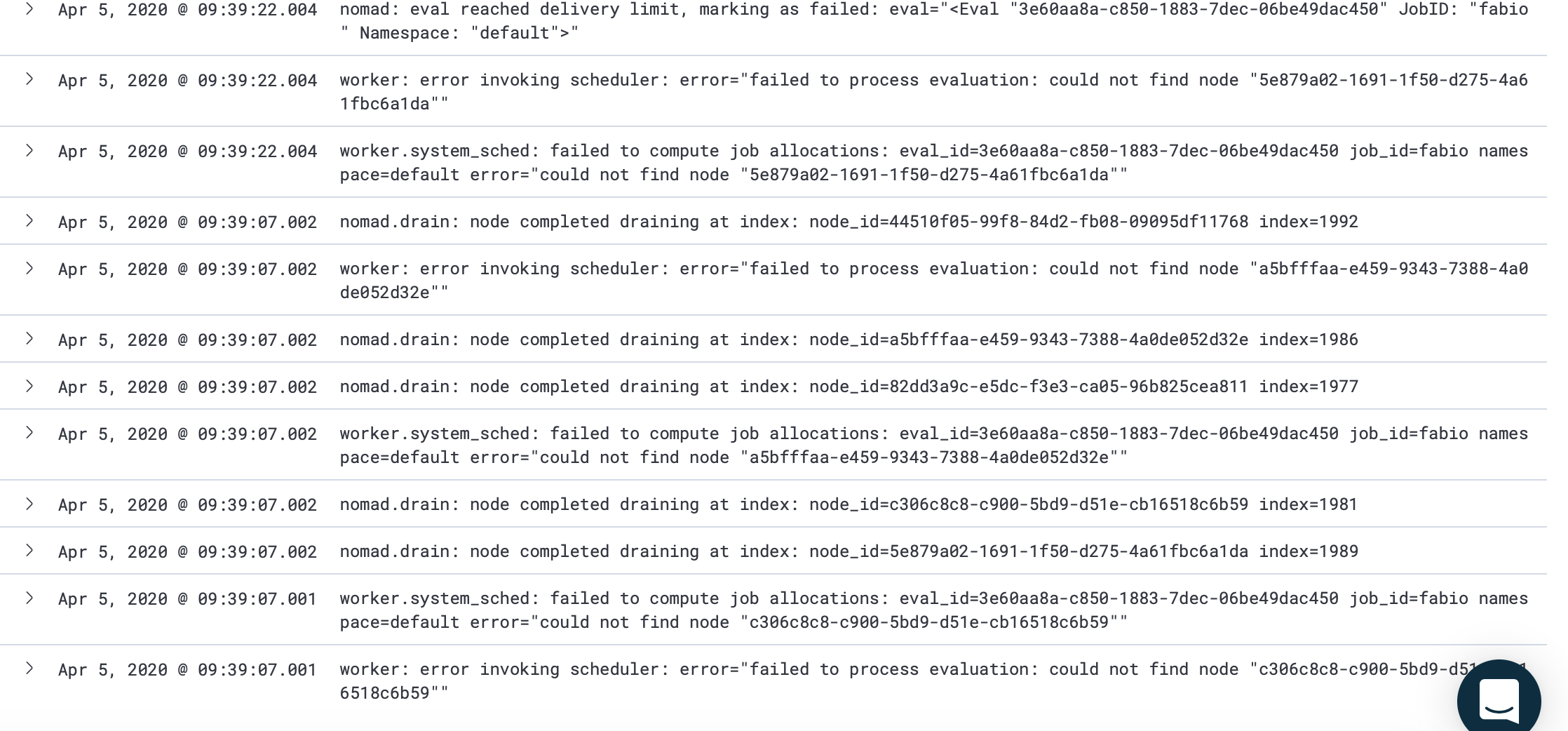
Nomad Server Logs
These types of messages begin spamming until the nomad client is shut down:
worker: error invoking scheduler: error="failed to process evaluation: could not find node "44510f05-99f8-84d2-fb08-09095df11768""
worker.system_sched: failed to compute job allocations: eval_id=4fe7230a-c9b4-6bbc-2400-7ff8e110e673 job_id=fabio namespace=default error="could not find node "5e879a02-1691-1f50-d275-4a61fbc6a1da""
 idrennanvmware
All 9 comments
Client logs. The nodes are ineligible but the monitor just won't exit (reliably). I was able to run the above scenario multiple times. The 2nd time nothing locked, the 3rd time the node (see client logs) never exited the monitor and just sat here
C:\ProgramData\nomad> C:\services\nomad\nomad.exe node drain -enable -self -force
2020-04-06T07:29:25-07:00: Ctrl-C to stop monitoring: will not cancel the node drain
2020-04-06T07:29:25-07:00: Node “754b5723-26dd-a555-56c6-d75efbf571fa” drain strategy set
2020-04-06T07:29:25-07:00: Drain complete for node 754b5723-26dd-a555-56c6-d75efbf571fa
and never went any further. I had to manually CTRL+C to quit the monitor
Nodes that DID NOT lock the monitor show the allocation as "completed" in the nomad ui. Locked nodes show "lost" even though the messages show the drain as complete in the UI summary
idrennanvmware
on 6 Apr 2020
Hi @idrennanvmware!
One thing I'm noticing here is that the job in question is a system job. By default system jobs are left for last, and there's an -ignore-system flag for ignoring system jobs specifically. So there's some special handling of system jobs and that may a clue as to what's going wrong. Are other allocations for service jobs on these Windows nodes getting drained off correctly?
 tgross
on 6 Apr 2020
tgross
on 6 Apr 2020
Hi @tgross !
So the only thing that is running on the windows node is this system job allocation. When the monitor does not lock, I see it draining correctly. When the monitor does lock, I see the message that drain has completed but if I look in the UI the allocation is still actually running on the node and the process is still running on the windows host when I check there too.
idrennanvmware
on 6 Apr 2020
Ok thanks for that added info. I'll take a look into the node drain code base and see if I can come up with an explanation and/or minimal reproduction.
tgross
on 6 Apr 2020
Thanks! If there's anything else you need, please don't hesitate to ask. It's quite easy to reproduce in our environment so we can do whatever helps :)
idrennanvmware
on 6 Apr 2020
Hi @idrennanvmware so I've been able to reproduce even on Windows 2016 and non-system workloads. I want to check Linux as well next. But it looks like in my testing here that performing the drains concurrently seems to be a requirement to trigger the "lock-up" of the drain on one of the client nodes. Does that sound right to your observations?
tgross
on 6 Apr 2020
Hi @tgross !
That's great news you were able to replicate it. In my experience it is far more likely to happen in concurrent scenarios BUT I have been able to replicate this doing 1 node at a time over a group of nodes (just a lot less reliably to lock it up).
Incidentally (if this helps) while a node is draining in this state - the task can still be ended gracefully in the UI by stopping the job.
I have not encountered this on Linux but we also aren't running drain scenarios on them (yet) so I can't say one way or the other on how this may affect that platform
idrennanvmware
on 6 Apr 2020
@tgross should we close this as this appears to be rectified after compilation occurred against a newer golang version (no longer affects new versions)?
idrennanvmware
on 22 Dec 2020
Yes, thanks @idrennanvmware. I know there was a recent golang patch (but I can't seem to recall which specific version) that fixed runtime deadlocks, so it's entirely possible we were running into that. I'll close this and if we see this sort of behavior again we can revisit it.
tgross
on 4 Jan 2021
Related issues
 jrasell
·
3Comments
jrasell
·
3Comments
 hynek
·
3Comments
hynek
·
3Comments
 joliver
·
3Comments
joliver
·
3Comments
 ashald
·
3Comments
ashald
·
3Comments
 byronwolfman
·
3Comments
byronwolfman
·
3Comments