Nomad: Nomad plugin server error (use of closed network connection)
Nomad version
Nomad v0.8.4 (dbee1d7d051619e90a809c23cf7e55750900742a)
Operating system and Environment details
Debian Stretch on ext4
Issue
Randomly some jobs fail to be allocated with these errors :
failed to start task "ha-conversations-call-meeting-batch" for alloc "22ad8033-09ed-08dc-35d4-d9632baa642b": error creating rpc client for executor plugin: plugin exited before we could connect
or
failed to start task "ha-conversations-call-meeting-batch" for alloc "3ec85ef7-fffc-765c-bf98-5876cbcc200e": unable to dispense the executor plugin: unexpected EOF
This one is a periodic defined with :
Periodic:Object
Enabled:true
ProhibitOverlap:true
Spec:"*/1 * * * *"
SpecType:"cron"
TimeZone:"Europe/Paris"
but I found the error on classic service job.
Nomad server is running around 100 allocs.
Nomad Server logs (if appropriate)
found nothing relevant.
Nomad Client logs (if appropriate)
Sep 06 11:33:08 app-10-32-25-84 nomad[2670]: 2018-09-06T11:33:08.320+0200 [DEBUG] plugin.nomad: 2018/09/06 11:33:08 [ERR] plugin: plugin server: accept unix /tmp/plugin934677279: use of closed network connection
Sep 06 11:33:08 app-10-32-25-84 nomad[2670]: 2018-09-06T11:33:08.322+0200 [DEBUG] plugin: plugin process exited: path=/usr/local/bin/nomad
Sep 06 11:33:08 app-10-32-25-84 nomad[2670]:     2018/09/06 11:33:08.338222 [INFO] client: task "sd-conversations-call-meeting-batch" for alloc "c219b04c-f360-eefa-89f3-ba8ca13fd803" completed successfully
Sep 06 11:33:08 app-10-32-25-84 nomad[2670]:     2018/09/06 11:33:08.338253 [INFO] client: Not restarting task: sd-conversations-call-meeting-batch for alloc: c219b04c-f360-eefa-89f3-ba8ca13fd803
Sep 06 11:33:08 app-10-32-25-84 nomad[2670]:     2018/09/06 11:33:08.350421 [INFO] (runner) stopping
Sep 06 11:33:08 app-10-32-25-84 nomad[2670]:     2018/09/06 11:33:08.350529 [INFO] client.gc: marking allocation c219b04c-f360-eefa-89f3-ba8ca13fd803 for GC
Sep 06 11:33:08 app-10-32-25-84 nomad[2670]:     2018/09/06 11:33:08.351584 [INFO] (runner) received finish
Sep 06 11:33:08 app-10-32-25-84 nomad[2670]:     2018/09/06 11:33:08.353363 [INFO] client.gc: garbage collecting allocation c219b04c-f360-eefa-89f3-ba8ca13fd803 due to number of allocations (104) is over the limit (50)
You can also find a golang panic here (not sure if related) : https://gist.github.com/commarla/eeb18bd23e033a4c0419ff5b1848ed49
 commarla
All 12 comments
I just had something similar happen where all the allocations on two nodes died and got migrated away. All i have in the logs is the following...
Sep 11 21:51:02 nomad7-dca nomad[12290]: 2018-09-11T21:51:02.199Z [DEBUG] plugin.nomad: 2018/09/11 21:51:02 [ERR] plugin: plugin server: accept unix /tmp/plugin176199603: use of closed network connection
Sep 11 21:51:02 nomad7-dca nomad[12290]: 2018-09-11T21:51:02.202Z [DEBUG] plugin: plugin process exited: path=/usr/local/bin/nomad
Sep 11 21:51:02 nomad7-dca nomad[12290]: 2018-09-11T21:51:02.339Z [DEBUG] plugin.nomad: 2018/09/11 21:51:02 [ERR] plugin: plugin server: accept unix /tmp/plugin509237478: use of closed network connection
Sep 11 21:51:02 nomad7-dca nomad[12290]: 2018-09-11T21:51:02.342Z [DEBUG] plugin: plugin process exited: path=/usr/local/bin/nomad
Sep 11 21:51:02 nomad7-dca nomad[12290]: 2018-09-11T21:51:02.676Z [DEBUG] plugin.nomad: 2018/09/11 21:51:02 [ERR] plugin: plugin server: accept unix /tmp/plugin706372272: use of closed network connection
Sep 11 21:51:02 nomad7-dca nomad[12290]: 2018-09-11T21:51:02.679Z [DEBUG] plugin: plugin process exited: path=/usr/local/bin/nomad
Sep 11 21:51:02 nomad7-dca nomad[12290]: 2018-09-11T21:51:02.779Z [DEBUG] plugin.nomad: 2018/09/11 21:51:02 [ERR] plugin: plugin server: accept unix /tmp/plugin875119375: use of closed network connection
Sep 11 21:51:02 nomad7-dca nomad[12290]: 2018-09-11T21:51:02.781Z [DEBUG] plugin: plugin process exited: path=/usr/local/bin/nomad
Sep 11 21:51:02 nomad7-dca nomad[12290]: 2018-09-11T21:51:02.916Z [DEBUG] plugin.nomad: 2018/09/11 21:51:02 [ERR] plugin: plugin server: accept unix /tmp/plugin804070724: use of closed network connection
Sep 11 21:51:02 nomad7-dca nomad[12290]: 2018-09-11T21:51:02.918Z [DEBUG] plugin: plugin process exited: path=/usr/local/bin/nomad
Sep 11 21:51:03 nomad7-dca nomad[12290]: 2018-09-11T21:51:03.179Z [DEBUG] plugin.nomad: 2018/09/11 21:51:03 [ERR] plugin: plugin server: accept unix /tmp/plugin178846131: use of closed network connection
Sep 11 21:51:03 nomad7-dca nomad[12290]: 2018-09-11T21:51:03.181Z [DEBUG] plugin: plugin process exited: path=/usr/local/bin/nomad
Sep 11 21:51:03 nomad7-dca nomad[12290]: 2018-09-11T21:51:03.380Z [DEBUG] plugin.nomad: 2018/09/11 21:51:03 [ERR] plugin: plugin server: accept unix /tmp/plugin164484255: use of closed network connection
Sep 11 21:51:03 nomad7-dca nomad[12290]: 2018-09-11T21:51:03.382Z [DEBUG] plugin: plugin process exited: path=/usr/local/bin/nomad
Sep 11 21:51:03 nomad7-dca nomad[12290]: 2018-09-11T21:51:03.560Z [DEBUG] plugin.nomad: 2018/09/11 21:51:03 [ERR] plugin: plugin server: accept unix /tmp/plugin327524250: use of closed network connection
Sep 11 21:51:03 nomad7-dca nomad[12290]: 2018-09-11T21:51:03.562Z [DEBUG] plugin: plugin process exited: path=/usr/local/bin/nomad
Sep 11 21:51:03 nomad7-dca nomad[12290]: 2018-09-11T21:51:03.666Z [DEBUG] plugin.nomad: 2018/09/11 21:51:03 [ERR] plugin: plugin server: accept unix /tmp/plugin126609339: use of closed network connection
Sep 11 21:51:03 nomad7-dca nomad[12290]: 2018-09-11T21:51:03.668Z [DEBUG] plugin: plugin process exited: path=/usr/local/bin/nomad
Sep 11 21:51:03 nomad7-dca nomad[12290]: 2018-09-11T21:51:03.799Z [DEBUG] plugin.nomad: 2018/09/11 21:51:03 [ERR] plugin: plugin server: accept unix /tmp/plugin032540063: use of closed network connection
Sep 11 21:51:03 nomad7-dca nomad[12290]: 2018-09-11T21:51:03.802Z [DEBUG] plugin: plugin process exited: path=/usr/local/bin/nomad
Sep 11 21:51:03 nomad7-dca nomad[12290]: 2018-09-11T21:51:03.984Z [DEBUG] plugin.nomad: 2018/09/11 21:51:03 [ERR] plugin: plugin server: accept unix /tmp/plugin761034220: use of closed network connection
Sep 11 21:51:03 nomad7-dca nomad[12290]: 2018-09-11T21:51:03.986Z [DEBUG] plugin: plugin process exited: path=/usr/local/bin/nomad
Sep 11 21:51:04 nomad7-dca nomad[12290]: 2018-09-11T21:51:04.179Z [DEBUG] plugin.nomad: 2018/09/11 21:51:04 [ERR] plugin: plugin server: accept unix /tmp/plugin385434679: use of closed network connection
Sep 11 21:51:04 nomad7-dca nomad[12290]: 2018-09-11T21:51:04.181Z [DEBUG] plugin: plugin process exited: path=/usr/local/bin/nomad
Sep 11 21:51:04 nomad7-dca nomad[12290]: 2018-09-11T21:51:04.303Z [DEBUG] plugin.nomad: 2018/09/11 21:51:04 [ERR] plugin: plugin server: accept unix /tmp/plugin302798520: use of closed network connection
Sep 11 21:51:04 nomad7-dca nomad[12290]: 2018-09-11T21:51:04.305Z [DEBUG] plugin: plugin process exited: path=/usr/local/bin/nomad
Sep 11 21:51:04 nomad7-dca nomad[12290]: 2018-09-11T21:51:04.402Z [DEBUG] plugin.nomad: 2018/09/11 21:51:04 [ERR] plugin: plugin server: accept unix /tmp/plugin735972627: use of closed network connection
Sep 11 21:51:04 nomad7-dca nomad[12290]: 2018-09-11T21:51:04.404Z [DEBUG] plugin: plugin process exited: path=/usr/local/bin/nomad
Sep 11 21:51:04 nomad7-dca nomad[12290]: 2018-09-11T21:51:04.469Z [DEBUG] plugin.nomad: 2018/09/11 21:51:04 [ERR] plugin: plugin server: accept unix /tmp/plugin698757443: use of closed network connection
Sep 11 21:51:04 nomad7-dca nomad[12290]: 2018-09-11T21:51:04.472Z [DEBUG] plugin: plugin process exited: path=/usr/local/bin/nomad
 perrymanuk
on 12 Sep 2018
perrymanuk
on 12 Sep 2018
What is your PID limit for the nomad process? It is likely just set too low
 dadgar
on 13 Sep 2018
dadgar
on 13 Sep 2018
Hi @dadgar ,
root@admin-10-32-154-246:~# cat /proc/1665/limits
Limit                     Soft Limit           Hard Limit           Units
Max cpu time              unlimited            unlimited            seconds
Max file size             unlimited            unlimited            bytes
Max data size             unlimited            unlimited            bytes
Max stack size            8388608              unlimited            bytes
Max core file size        0                    unlimited            bytes
Max resident set          unlimited            unlimited            bytes
Max processes             62210                62210                processes
Max open files            65536                65536                files
Max locked memory         65536                65536                bytes
Max address space         unlimited            unlimited            bytes
Max file locks            unlimited            unlimited            locks
Max pending signals       62210                62210                signals
Max msgqueue size         819200               819200               bytes
Max nice priority         0                    0
Max realtime priority     0                    0
Max realtime timeout      unlimited            unlimited            us
Nomad is started with systemd with the following settings
[Unit]
Description=Nomad Server
Requires=network-online.target
After=network-online.target

[Service]
EnvironmentFile=/etc/environment.d/nomad
ExecStart=/usr/local/bin/nomad agent \
    -config=/etc/nomad.d/ \
    $NOMAD_OPTIONS
ExecReload=/bin/kill -HUP $MAINPID
KillMode=process
KillSignal=SIGINT
LimitNOFILE=65536
Restart=on-failure
StartLimitBurst=10
StartLimitInterval=60s
User=nomad
Group=

[Install]
WantedBy=multi-user.target
Do you have any advice ?
Thanks,
commarla
on 14 Sep 2018
cat /proc/sys/kernel/pid_max
32768
Hi,
I misread your answer. I increase the value on one node to test
root@app-10-32-22-176:~# cat /proc/sys/kernel/pid_max
36864
root@app-10-32-22-176:~# echo 99999 > /proc/sys/kernel/pid_max
root@app-10-32-22-176:~# cat /proc/sys/kernel/pid_max
99999
root@app-10-32-22-176:~# sysctl kernel.pid_max
kernel.pid_max = 99999
Immediately after I got the same error :
Sep 17 10:34:38 app-10-32-22-176 nomad[2650]: 2018-09-17T10:34:38.490+0200 [DEBUG] plugin.nomad: runtime/cgo: pthread_create failed: Resource temporarily unavailable
Sep 17 10:34:38 app-10-32-22-176 nomad[2650]: 2018-09-17T10:34:38.492+0200 [DEBUG] plugin.nomad: SIGABRT: abort
Sep 17 10:34:38 app-10-32-22-176 nomad[2650]: 2018-09-17T10:34:38.492+0200 [DEBUG] plugin.nomad: PC=0x7fe5316c5fff m=29 sigcode=18446744073709551610
Sep 17 10:34:38 app-10-32-22-176 nomad[2650]: 2018-09-17T10:34:38.492+0200 [DEBUG] plugin.nomad:
Sep 17 10:34:38 app-10-32-22-176 nomad[2650]: 2018-09-17T10:34:38.492+0200 [DEBUG] plugin.nomad: goroutine 0 [idle]:
Sep 17 10:34:38 app-10-32-22-176 nomad[2650]: 2018-09-17T10:34:38.492+0200 [DEBUG] plugin.nomad: runtime: unknown pc 0x7fe5316c5fff
Sep 17 10:34:38 app-10-32-22-176 nomad[2650]: 2018-09-17T10:34:38.492+0200 [DEBUG] plugin.nomad: stack: frame={sp:0x7fe4f27fb978, fp:0x0} stack=[0x7fe4f1ffc2f0,0x7fe4f27fbef0)
Sep 17 10:34:38 app-10-32-22-176 nomad[2650]: 2018-09-17T10:34:38.492+0200 [DEBUG] plugin.nomad: 00007fe4f27fb878:  0000000000000000  0000000000000000
Sep 17 10:34:38 app-10-32-22-176 nomad[2650]: 2018-09-17T10:34:38.492+0200 [DEBUG] plugin.nomad: 00007fe4f27fb888:  0000000000000000  0000000000000000
Sep 17 10:34:38 app-10-32-22-176 nomad[2650]: 2018-09-17T10:34:38.492+0200 [DEBUG] plugin.nomad: 00007fe4f27fb898:  0000000000000000  0000000000000000
Sep 17 10:34:38 app-10-32-22-176 nomad[2650]: 2018-09-17T10:34:38.492+0200 [DEBUG] plugin.nomad: 00007fe4f27fb8a8:  0000000000000000  0000000000000000
Sep 17 10:34:38 app-10-32-22-176 nomad[2650]: 2018-09-17T10:34:38.492+0200 [DEBUG] plugin.nomad: 00007fe4f27fb8b8:  0000000000000000  0000000000000000
Sep 17 10:34:38 app-10-32-22-176 nomad[2650]: 2018-09-17T10:34:38.492+0200 [DEBUG] plugin.nomad: 00007fe4f27fb8c8:  0000000000000000  0000000000000000
Sep 17 10:34:38 app-10-32-22-176 nomad[2650]: 2018-09-17T10:34:38.492+0200 [DEBUG] plugin.nomad: 00007fe4f27fb8d8:  0000000000000000  0000000000000000
Sep 17 10:34:38 app-10-32-22-176 nomad[2650]: 2018-09-17T10:34:38.492+0200 [DEBUG] plugin.nomad: 00007fe4f27fb8e8:  0000000000000000  0000000000000000
thanks,
commarla
on 17 Sep 2018
We see very similar errors
plugin server: accept unix /tmp/plugin086717010: use of closed network connection
 memelet
on 18 Sep 2018
memelet
on 18 Sep 2018
Is there any progress on this? We are also running into this issue a lot. We see an old alloc that is still running but is should not be (13 hours old, deployed almost 6 or 7 deployments ago).
Wondering is this is related or if we should file a new issue?
 urjitbhatia
on 13 Dec 2018
urjitbhatia
on 13 Dec 2018
I think I found why we encountered this behavior. When nomad client is run using systemd, systemd starts every service in a cgroup, to control sub-process behavior.
Since version 227, systemd added support for the pids cgroup controller. This allows to limit the number of tasks a service can fork within its cgroup. On our system, the limit was set to 5529 by default.
Here is how you can check the current and max number of tasks :
# systemctl status nomad-client
● nomad-client.service - Nomad Client
   Loaded: loaded (/etc/systemd/system/nomad-client.service; enabled; vendor preset: enabled)
   Active: active (running) since Tue 2019-01-29 14:48:06 CET; 1 weeks 3 days ago
 Main PID: 2375 (nomad)
    Tasks: 5499 (limit: 5529)
   Memory: 3.2G
      CPU: 3d 14h 39min 39.590s
   CGroup: /system.slice/nomad-client.service
To resolve this, you just need to add a TasksMax=infinity your systemd nomad service file.
 nanoz
on 8 Feb 2019
nanoz
on 8 Feb 2019
Hello,
I would like to start by saying thank you for this question, which has been asked and a couple of solutions have also been proposed. However, I got this problem again and no solution could help me to solve it. I'll tell you what I did: I'm just learning, and I'm trying to start Consul-Nomad in docker container and they are starting. I managed to build and connect Consul-container and Nomad -container(nomadClient-container and nomadServer-container) (registration from Nomad to Consul). Until then everything went well, I mean there were a couple of difficulties, but I solved them. I then tried to start a nomad job inside my nomad-client container, the job is started but a few seconds later it goes to "pending" and then to "dead" and this is repeated endlessly until I disable the nomad-client-container.
I have looked at the logs and there were 2 errors. And I don't know how to solve them :( . I would be happy if you can help me :)
error-logs:

 Dja111
on 28 Mar 2020
Dja111
on 28 Mar 2020
@Dja111 I don't believe your problem is related to this issue. The forums are probably the best place to debug this.
Right now we recommend running Nomad and Consul outside of a Docker container because running them inside Docker requires a lot of careful configuration and always comes with caveats.
The task events and logs for the failing task should give you more details on what is failing. Try:
# View task events
nomad status d27f

# View task logs
nomad logs d27f api
nomad logs -stderr d27f api
The UI is very useful for debugging things like this! It should be available via http://localhost:4646
 schmichael
on 30 Mar 2020
schmichael
on 30 Mar 2020
Hello @schmichael,
thank you very much for your answer and your recommendation :) .
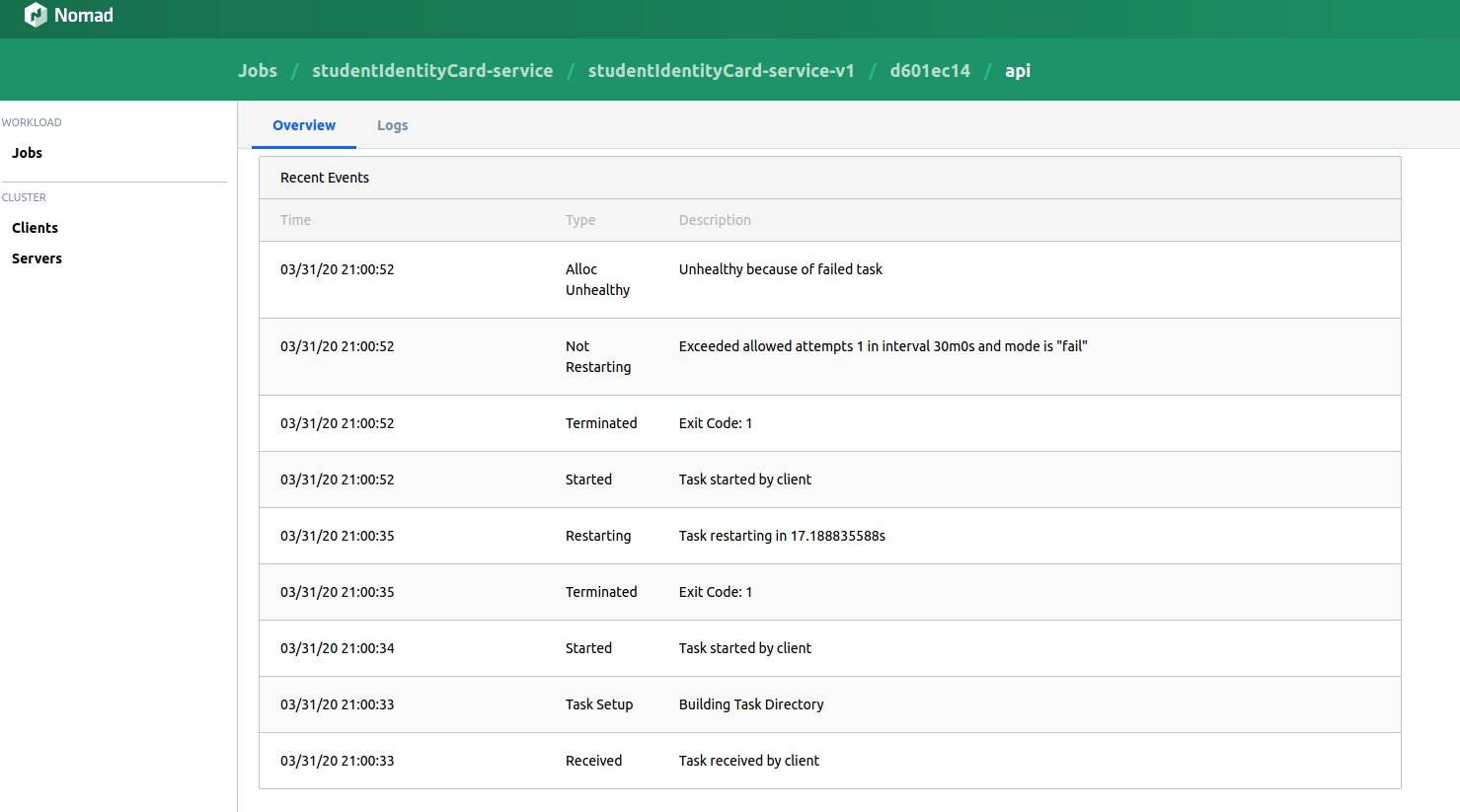
I once looked at the logs from the Nomad UI for the job.
It looks like :
Dja111
on 31 Mar 2020
Those are the task events which are informing you the task failed. The Logs tab toward the top will show you the actual logs which should contain more information.
As this is unrelated to the original issue I'm going to lock further comments. Please use https://discuss.hashicorp.com/c/nomad/28
schmichael
on 3 Apr 2020
Related issues
 Garagoth
·
3Comments
Garagoth
·
3Comments
 clinta
·
3Comments
clinta
·
3Comments
 hynek
·
3Comments
hynek
·
3Comments
 bdclark
·
3Comments
bdclark
·
3Comments
 hamann
·
3Comments
hamann
·
3Comments
Most helpful comment
We see very similar errors
plugin server: accept unix /tmp/plugin086717010: use of closed network connection