Nodemon: Nodemon not completing restart of server on change of server side code
nodemon -v:node -v:- Operating system/terminal environment:
node js - Using Docker? What image:
- Command you ran:
npm run dev-starts fine-update to code does not
Expected behaviour
Restart of server on server side code change
Actual behaviour
freezes and just repeats restarting due to changes-doesnt actually restart
Steps to reproduce
any change to code-
have updated all dependencies
If applicable, please append the --dump flag on your command and include the output here ensuring to remove any sensitive/personal details or tokens.
 hphvac
All 54 comments
Hi there, to be able to debug this issue, you're really going to need to provide more information about what you're doing, what OS you're running - and really all the questions you ignored - otherwise this issue will self close because no one will be able to help you :(
 remy
on 19 Nov 2019
remy
on 19 Nov 2019
node v-10.15.3
nodemon v-1.19.4
Win 10 running win 32 bit
no docker
Node js is server lang
command i use to start server is npm run dev
reproduces whenever it is supposed to restart
hphvac
on 19 Nov 2019
missed those sorry
hphvac
on 19 Nov 2019
just saw-Visual Studio Code-Version 1.40 October 2019 release
hphvac
on 19 Nov 2019
Possible the PR #1579 will fix - please re-test when it's live.
remy
on 20 Nov 2019
im not sure what that means
hphvac
on 20 Nov 2019
@hphvac #1579 was shipped in [email protected] - try that version to see if your issue has been fixed
 joseph-galindo
on 21 Nov 2019
joseph-galindo
on 21 Nov 2019
@joseph-galindo -i am sorry, but it did not.
hphvac
on 21 Nov 2019
@hphvac you're going to need to provide more feedback. Can you start with a screenshot of the output that you're seeing?
remy
on 21 Nov 2019
Hi @joseph-galindo
You could update your NPM packages by using the @latest tag, see example here under:
npm install -g nodemon@latest
Or
npm install --save-dev nodemon@latest
https://bytearcher.com/articles/using-npm-update-and-npm-outdated-to-update-dependencies/
https://flaviocopes.com/update-npm-dependencies/
 Remzi1993
on 21 Nov 2019
Remzi1993
on 21 Nov 2019
here you go, thank you for your time

hphvac
on 21 Nov 2019
@remy @joseph-galindo Thank you
hphvac
on 21 Nov 2019
@hphvac can you re-run with the -V flag so we can see what's causing the restart (in the screenshot)?
remy
on 22 Nov 2019
@remy I really appreciate the help, but i do not know what you mean by that. What restarts it is the normal action of editing server side code, as it should. but it seems as though it never restarts.
a normal restart looks like this
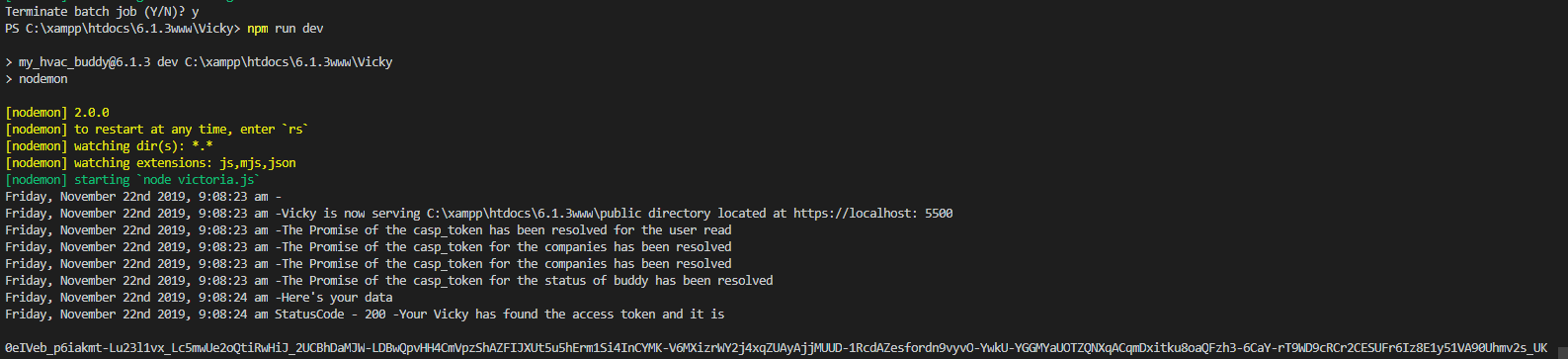
, however whenever i change code, it just hangs here.

hphvac
on 22 Nov 2019
if you have a reference to refer me to i could learn, but all i know about v flag is version...lol
hphvac
on 22 Nov 2019
@hphvac I think he wants you to run it like this:
npm run dev -V
Could you try this?
Remzi1993
on 22 Nov 2019
@Remzi1993 I did try that, there is no change
hphvac
on 22 Nov 2019
Did you also try:
npm run -V dev
Or
npm -V run dev
Also it's capital, npm -v is displaying npm version and this is capital -V
npm <command> --key value and sometimes short variant -tag
EDIT: Oops, he meant run it like this: nodemon -V
If you do nodemon -h you will get a list what you could do with nodemon.
Remzi1993
on 22 Nov 2019
@hphvac just to clarify, can you run the nodemon -V command directly instead of npm run dev (on a unix based system I can tell you how to pass arguments through to nodemon, but I'm not familiar with Windows command line capabilities).
Then, just as you have before, screenshot the output that shows nodemon restarting (the -V flag will tell nodemon to print the files triggering the restart).
remy
on 22 Nov 2019
@Remzi1993 the syntax to send arguments from the command line to the script npm is npm run dev -- -V - the double dash is what tells the command line to stop slurping arguments. But I'm not sure it works on Windows.
remy
on 22 Nov 2019
When I type in nodemon-v , says it is an unrecognized file I stepped out of
the office but I will send it to you when I get back
On Fri, Nov 22, 2019, 2:22 PM Remy Sharp notifications@github.com wrote:
@hphvac https://github.com/hphvac just to clarify, can you run the nodemon
-V command directly instead of npm run dev (on a unix based system I can
tell you how to pass arguments through to nodemon, but I'm not familiar
with Windows command line capabilities).Then, just as you have before, screenshot the output that shows nodemon
restarting (the -V flag will tell nodemon to print the files triggering
the restart).—
You are receiving this because you were mentioned.
Reply to this email directly, view it on GitHub
https://github.com/remy/nodemon/issues/1630?email_source=notifications&email_token=AIXQPNKEK6AJIUL3IZNCMELQVAWQLA5CNFSM4JPFX57KYY3PNVWWK3TUL52HS4DFVREXG43VMVBW63LNMVXHJKTDN5WW2ZLOORPWSZGOEE6TSRA#issuecomment-557660484,
or unsubscribe
https://github.com/notifications/unsubscribe-auth/AIXQPNNS5ZOBPMDLBQCMQC3QVAWQLANCNFSM4JPFX57A
.
--
Best regards,
High Performance Heating & Air Conditioning
2350
Brighton-Henrietta Town Line Road | Rochester, NY 14623
(585) 342-7653
office | *(585) 426-3007 *fax
www.highperformanceheating.com
http://www.highperformanceheating.com/
hphvac
on 22 Nov 2019
@hphvac you need a space between nodemon and the - and it needs to be a capital V (not lower - a lowercase v will print the version).
remy
on 22 Nov 2019
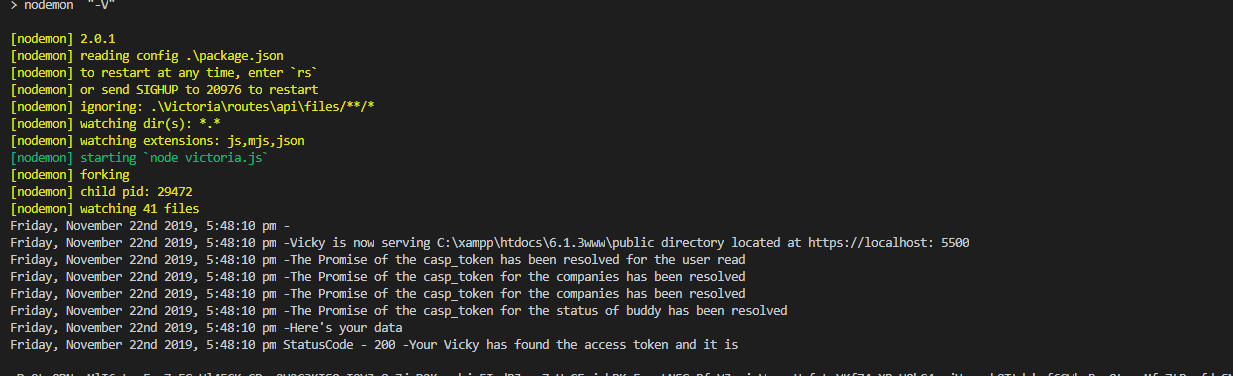
@remy Nice!-Here you go,Thanks!

I also tried adding a delay, no avail.
hphvac
on 22 Nov 2019
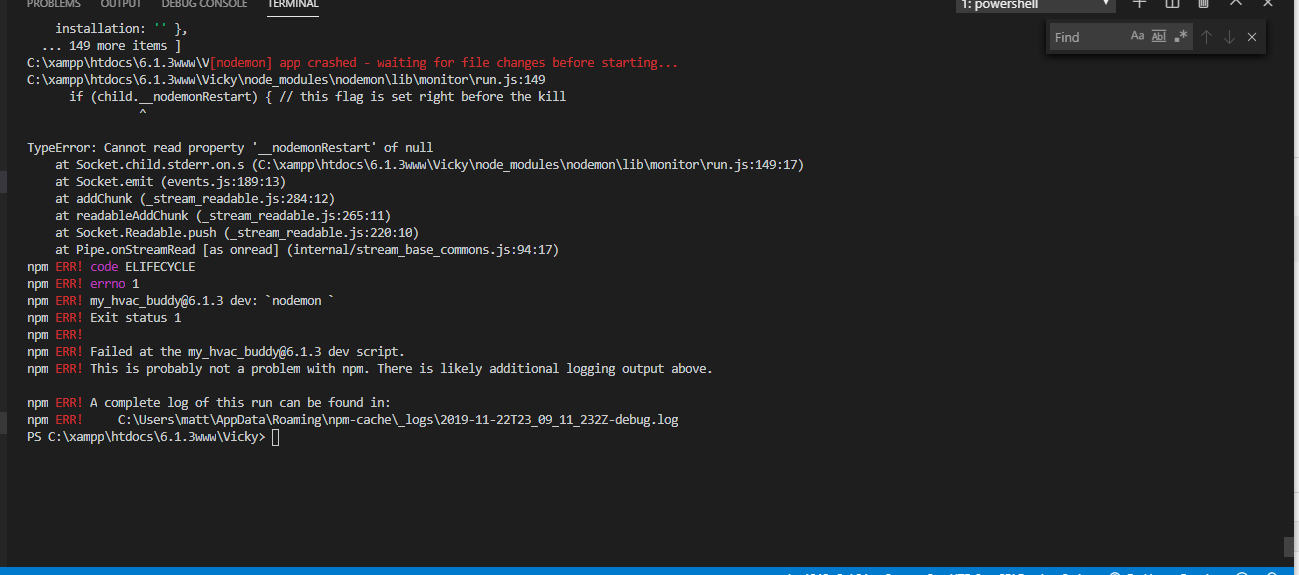
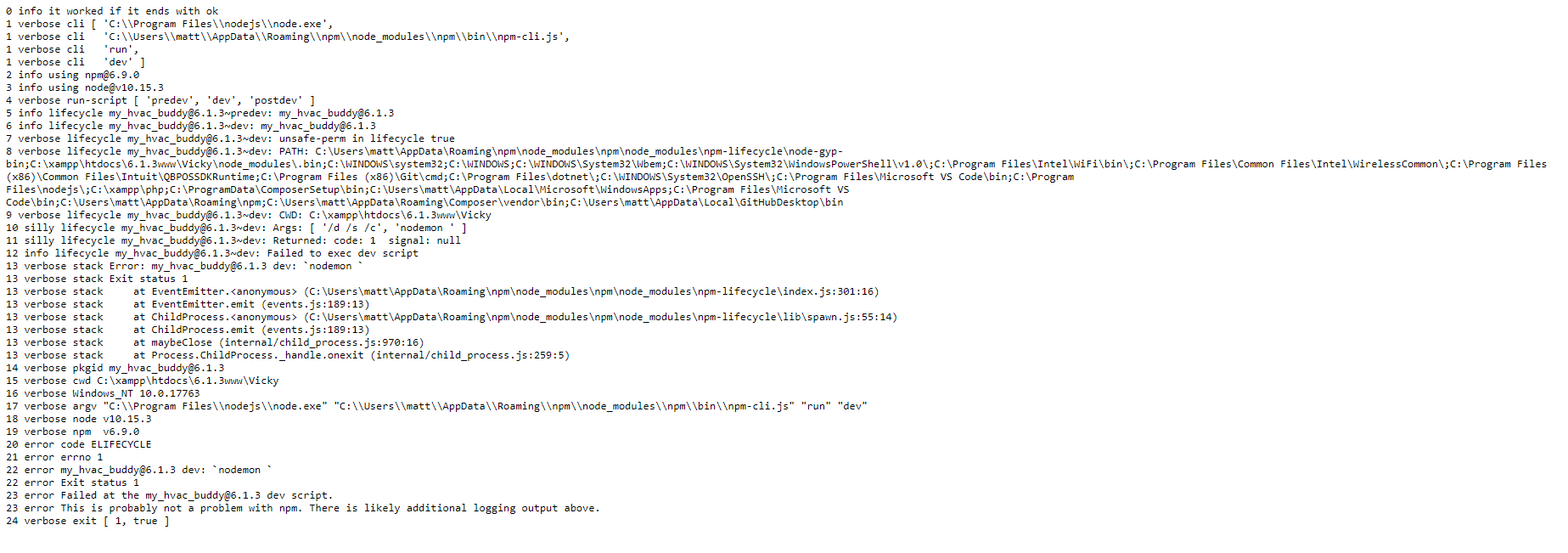
@remy @ just got this!
hphvac
on 23 Nov 2019
@remy @Remzi1993 Good morning-i have found that on node error, the app also restarts correctly- seems only to happen on restart as a result of code change- I have also found that it seems as though the server is actually running. Even though it says it is restarting. Basically on a client side request, the server responds-however it is still running the previous processes-in other words-it is still running the unchanged code-
hphvac
on 25 Nov 2019
@remy This looks looks like a serious issue. Is this related to #1632 or #1635 ?
Seems like something broke it.
PS: It could also be a naming issue, because everything should be subprocesses right?
In the log I see something about a child.__nodemonRestart?
Remzi1993
on 26 Nov 2019
Yes, that's right, but I don't know how child is null/undefined at this point. Possibly makes sense to protect against assigning the prop, but until I can get my hands on Windows to test properly I can't say. I'll try to scrape some time this week with a VM to replicate and debug.
remy
on 27 Nov 2019
@remy I should technically be able to look at the code correct? Fairly new
to node, but I learned JavaScript School of Hard Knocks and I've done an
awful lot of the bugging... like the first four years I did it I didn't
even know de bugging was an option.LOL , but I should be able to look at it
within the module correct?
On Tue, Nov 26, 2019, 6:55 PM Remy Sharp notifications@github.com wrote:
Yes, that's right, but I don't know how child is null/undefined at this
point. Possibly makes sense to protect against assigning the prop, but
until I can get my hands on Windows to test properly I can't say. I'll try
to scrape some time this week with a VM to replicate and debug.—
You are receiving this because you were mentioned.
Reply to this email directly, view it on GitHub
https://github.com/remy/nodemon/issues/1630?email_source=notifications&email_token=AIXQPNJBVBV5BPL7AVIOAQ3QVWZPNA5CNFSM4JPFX57KYY3PNVWWK3TUL52HS4DFVREXG43VMVBW63LNMVXHJKTDN5WW2ZLOORPWSZGOEFH2EYQ#issuecomment-558867042,
or unsubscribe
https://github.com/notifications/unsubscribe-auth/AIXQPNIYCX5WKPFB2PJZYA3QVWZPNANCNFSM4JPFX57A
.
--
Best regards,
High Performance Heating & Air Conditioning
2350
Brighton-Henrietta Town Line Road | Rochester, NY 14623
(585) 342-7653
office | *(585) 426-3007 *fax
www.highperformanceheating.com
http://www.highperformanceheating.com/
hphvac
on 27 Nov 2019
@remy I should technically be able to look at the code correct? Fairly new to node, but I learned JavaScript School of Hard Knocks and I've done an awful lot of the bugging... like the first four years I did it I didn't even know de bugging was an option.LOL , but I should be able to look at it within the module correct?
…
On Tue, Nov 26, 2019, 6:55 PM Remy Sharp @.> wrote: Yes, that's right, but I don't know how child is null/undefined at this point. Possibly makes sense to protect against assigning the prop, but until I can get my hands on Windows to test properly I can't say. I'll try to scrape some time this week with a VM to replicate and debug. — You are receiving this because you were mentioned. Reply to this email directly, view it on GitHub <#1630?email_source=notifications&email_token=AIXQPNJBVBV5BPL7AVIOAQ3QVWZPNA5CNFSM4JPFX57KYY3PNVWWK3TUL52HS4DFVREXG43VMVBW63LNMVXHJKTDN5WW2ZLOORPWSZGOEFH2EYQ#issuecomment-558867042>, or unsubscribe https://github.com/notifications/unsubscribe-auth/AIXQPNIYCX5WKPFB2PJZYA3QVWZPNANCNFSM4JPFX57A .
-- *Best regards, High *Performance Heating & Air Conditioning* 2350 Brighton-Henrietta Town Line Road | Rochester, NY 14623 (585) 342-7653 office | *(585) 426-3007 *fax www.highperformanceheating.com http://www.highperformanceheating.com/
You can just use console.log('Something', variable); but it's a long process to do this, step by step.
Remzi1993
on 27 Nov 2019
@remy , i was unable to see anything, do you have any updates?
hphvac
on 4 Dec 2019
Hello, not sure if I am seeing the same issue here but using nodemon with gatsby I'm having a similar issue. You can see it begin here after i edit my gastby-config.js file:
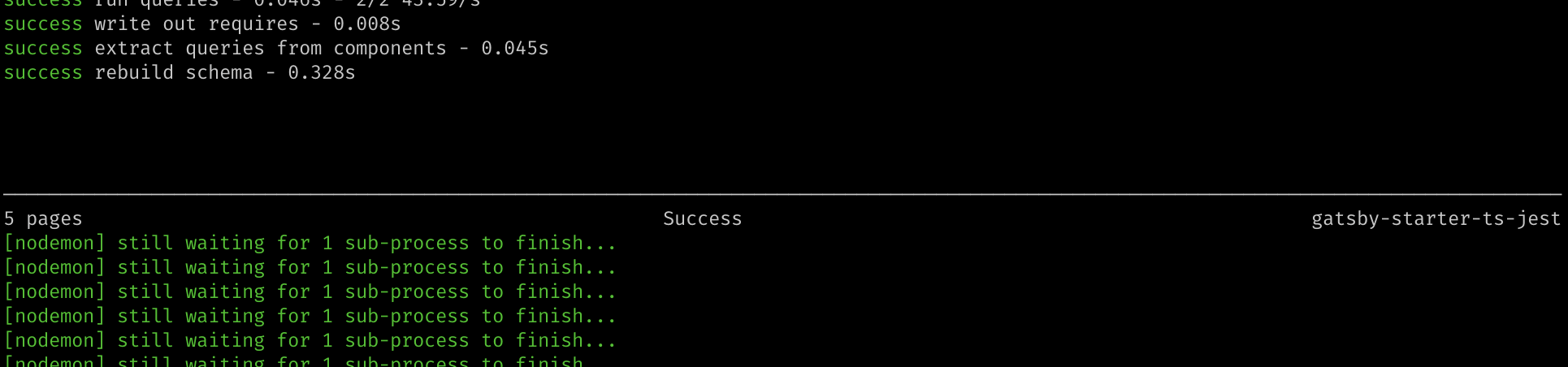
I fixed it by downgrading from ^2.0.1 to ^1.19.1.
You can see my eventual working setup at https://github.com/erikdstock/gatsby-starter-hello-ts - break it by changing the nodemon version, running yarn develop, and editing/saving gatsby-config.js.
(Also if this is a separate issue I am happy to file it)
 erikdstock
on 4 Dec 2019
erikdstock
on 4 Dec 2019
I pushed a change yesterday but it's not passing the ci tests. Need to investigate why the tests are failing but okay offline. Will keep you updated
remy
on 5 Dec 2019
@remy any luck bud? Just looked at one of your other comments, i did not realize you were volunteering...lol----sorry bud
hphvac
on 11 Dec 2019
Okay, [email protected] is now live - if you can re-test.
remy
on 11 Dec 2019
i retested with the new-same thing-actually has more open processes, ....sorry bud..
hphvac
on 18 Dec 2019
I had the same issue with nodemon 2.0.2 on windows 10 x64 whenever there is an express().listen() in the code. On file change the process was stuck on restarting because the child process was not being killed with the kill function for windows exec('taskkill /pid ' + child.pid + ' /T /F'); at lib\monitor\run.js . Killing the child process manually with windows Task Manager seemed to make nodemon work as expected. Upon further check, I realized that taskkill.exe and tasklist.exe were giving ERROR: NOT FOUND for windows. I got a solution for this through this post https://superuser.com/questions/1282867/windows-8-1-tasklist-error-not-found . With this fix nodemon worked as expected.
 MichaelOgunsanmi
on 25 Dec 2019
MichaelOgunsanmi
on 25 Dec 2019
This issue has been automatically marked as idle and stale because it hasn't had any recent activity. It will be automtically closed if no further activity occurs. If you think this is wrong, or the problem still persists, just pop a reply in the comments and @remy will (try!) to follow up.
Thank you for contributing <3
![stale[bot] picture](https://avatars3.githubusercontent.com/in/1724?v=4&s=40) stale[bot]
on 9 Jan 2020
stale[bot]
on 9 Jan 2020
@remy and @Remzi1993 - just noticed that nodemon is not picking up an improperly placed comma versus a semicolon, i am finding places in the code that should have semicolons, but i placed commas, and it did not pick up the error, maybe min-ute, however could this still be getting stuck there? this reported issue is still there with the current version of nodemon for me
hphvac
on 1 Feb 2020
@remy Could you look at this thread? Maybe open this issue if it's not fixed?
Remzi1993
on 8 Feb 2020
@remy @Remzi1993 -Im not sure what happened, but today it started working normally. I am a fairly novice programmer compared to you guys, i am not sure if the comma thing i mentioned earlier in the thread was a viable issue, and was fixed on your end, or i did find......
back when i was stuck in learning mode, i was trying parse my request, and because i had objects posted had characters that needed to be replaced, i stuck them in a for loop. well....i then copied them over again as templates. Going through them, i found that there were multiple things happening on start up because everything was wrapped in 'for' loops. It seems as though, that maybe, today, when i found what may be my last request wrapped in a for loop, it started working correctly-so this issue, as of now, can remain closed, although if you have any input that would be great.
hphvac
on 8 Feb 2020
I had the same issue with nodemon 2.0.2 on windows 10 x64 whenever there is an express().listen() in the code. On file change the process was stuck on restarting because the child process was not being killed with the kill function for windows exec('taskkill /pid ' + child.pid + ' /T /F'); at lib\monitor\run.js . Killing the child process manually with windows Task Manager seemed to make nodemon work as expected. Upon further check, I realized that taskkill.exe and tasklist.exe were giving ERROR: NOT FOUND for windows. I got a solution for this through this post https://superuser.com/questions/1282867/windows-8-1-tasklist-error-not-found . With this fix nodemon worked as expected.
My problem was that my path variables were messed up and "taskkill" was not recognized... Just added system32 to path again and it worked as expected. Thanks!
 Silventino
on 5 Mar 2020
Silventino
on 5 Mar 2020
you can try npm install -g nodemon
that is what i do
npm install -g nodemon
 Abdurahmanm2020
on 7 Jun 2020
Abdurahmanm2020
on 7 Jun 2020
Issues is still happening with latest nodemon. The npm install -g nodemon does not help either. Below are the normal and verbose log screenshots.
Usually I would expect the code to execute again and console log statements to reappear whenever the restart happens. But that does not happen.
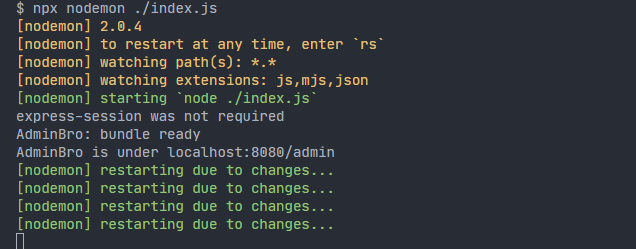
Verbose Log
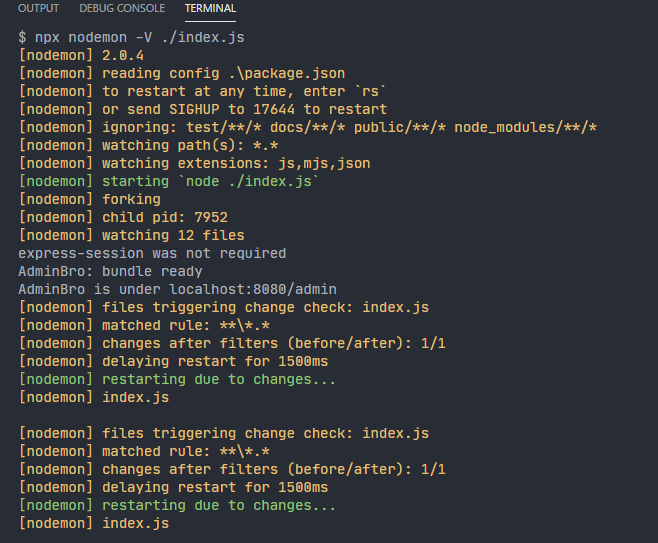
 KrishnaPG
on 13 Jun 2020
KrishnaPG
on 13 Jun 2020
@MichaelOgunsanmi 's solution above about restarting windows Management Instrumentation helped resolve the issue. After restarting the winmgmt processes started to restart correctly.
KrishnaPG
on 13 Jun 2020
Same problem. I tried all the tips and they didn't solve the problem.
 JonatanOrtiz
on 6 Jul 2020
JonatanOrtiz
on 6 Jul 2020
I'm running the latest version of nodemon and I still have this problem.
 Habeebullahi01
on 20 Jul 2020
Habeebullahi01
on 20 Jul 2020
If you're running on windows, make sure system32 folder is in the path variables.
Silventino
on 21 Jul 2020
@remy Seems like folks still have issues with this. Could you kindly re-open this issue?
Remzi1993
on 25 Jul 2020
Best to file a new case with code on how to replicate.
remy
on 25 Jul 2020
Found this post which suggested using nodemon app.js -L to set the legacy flag and enable polling. This worked for me on Windows 10. Not sure why its broken though.
 isaacgr
on 16 Aug 2020
isaacgr
on 16 Aug 2020
If you're running on windows, make sure system32 folder is in the path variables.
@Silventino you're a f**king genius! This worked for me. Thanks so much
 sunny775
on 2 Oct 2020
sunny775
on 2 Oct 2020
If you're running on windows, make sure system32 folder is in the path variables.
@Silventino geniussssssssssssss, it worked for me too. Thanks so much!
 leleoveiga
on 6 Oct 2020
leleoveiga
on 6 Oct 2020
@Silventino thanks boss....... worked for me to
 nilesh-yadav-au6
on 12 Oct 2020
nilesh-yadav-au6
on 12 Oct 2020
@Silventino That Worked for me either, i really want to kiss you 😂, Thanks Alooooooot ❤️
 Marwan1998
on 25 Oct 2020
Marwan1998
on 25 Oct 2020
Related issues
 jagged3dge
·
4Comments
jagged3dge
·
4Comments
 endquote
·
4Comments
endquote
·
4Comments
 piton13
·
3Comments
piton13
·
3Comments
 giacomorebonato
·
5Comments
giacomorebonato
·
5Comments
 robboerman
·
3Comments
robboerman
·
3Comments
Most helpful comment
If you're running on windows, make sure system32 folder is in the path variables.