nodemon stuck on "[nodemon] restarting due to changes..."
nodemon -v: 1.19.4 (tried with many other previous version but didn't work)node -v: 10.15.1- Operating system/terminal environment: windows 10/cmd and vs code integrated terminal
- Command you ran: npm start it runs nodemon app.js
Expected behavior
After detecting change nodemon should restart the server
Actual behaviour
after saving any changes nodemon should restart the server but it fails to do that I get a message [nodemon] restarting due to changes...
output
nodemon app.js
[nodemon] 1.19.4
[nodemon] to restart at any time, enter rs
[nodemon] watching dir(s): .
[nodemon] watching extensions: js,mjs,json
[nodemon] starting node app.js
Server has started!
[nodemon] restarting due to changes...
[nodemon] restarting due to changes...
[nodemon] restarting due to changes...
Steps to reproduce
console.log("stuck")
while(1){
}
If applicable, please append the --dump flag on your command and include the output here ensuring to remove any sensitive/personal details or tokens.
 amanullah28
All 9 comments
Okay, so this issue has been raised before, but no information was provided to actually resolve the issue. Let's try to get under the core of the issue here and find out what's going on.
Related:
- #1520
- #1530
For others that find this issue: not looking for "this happens to me too" but more importantly: here's a pared down version of my code that it definitely happens on.
The later will allow us to replicate, diagnose and resolve.
 remy
on 24 Oct 2019
remy
on 24 Oct 2019
@amanullah28 the sample code you've provided, it's running a tight loop that _might_ not be able to receive a signal to stop. Are you able to replicate with something like this (untested, just written in the comments):
// app.js
function loop() {
  process.nextTick(loop);
}

loop();
@remy recently I used nodemon in another machine with the same development environment it working fine, Is that problem related to system environmental variable?
amanullah28
on 24 Oct 2019
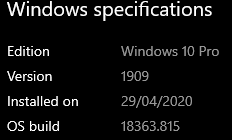
I'm pretty sure, based on the other issues filed that it's speicific to
Windows and maybe even a particular build.
On Thu, 24 Oct 2019, 10:52 Md Amanullah, notifications@github.com wrote:
@remy https://github.com/remy recently I used nodemon in another
machine with the same development environment it working fine, Is that
problem related to system environmental variable?—
You are receiving this because you were mentioned.
Reply to this email directly, view it on GitHub
https://github.com/remy/nodemon/issues/1621?email_source=notifications&email_token=AAADLBEVLZZKMUH5LMHCK6DQQFV6LA5CNFSM4JBUN7T2YY3PNVWWK3TUL52HS4DFVREXG43VMVBW63LNMVXHJKTDN5WW2ZLOORPWSZGOECEODZA#issuecomment-545841636,
or unsubscribe
https://github.com/notifications/unsubscribe-auth/AAADLBDR5VXWC3JKIUOSPNLQQFV6LANCNFSM4JBUN7TQ
.
remy
on 24 Oct 2019
Yes, it can be possible, I am going to reset my laptop if it will work after reset then I will update you ):
amanullah28
on 24 Oct 2019
After resetting my laptop everything works fine, As Remy said it was windows specific problem.
amanullah28
on 25 Oct 2019
Guys, please help me here, I am facing the same problem and CAN'T figure out.
Here's the Dockerfile:
FROM node:12.16.3

WORKDIR /usr/src/twa

COPY package*.json ./

RUN npm ci

COPY . .
Here's the Docker-compose file:
version: '3.7'

services:
    node:
        container_name: node
        build: .
        user: node
        ports:
            - "3000:3000"
        volumes:
            - ".:/usr/src/twa"
        command: "npm run dev"
Here's package.json file:
{
  "name": "api_twa",
  "version": "1.0.0",
  "description": "Api to query on SQL Server database and provide for front end.",
  "main": "index.js",
  "scripts": {
    "start": "node src/server.js",
    "dev": "nodemon --watch src src/server.js"
  },
  "author": "Stephen Goncalves",
  "license": "MIT",
  "dependencies": {
    "express": "^4.17.1",
    "sequelize": "^5.21.7",
    "tedious": "^8.3.0"
  },
  "devDependencies": {
    "nodemon": "^2.0.3",
    "sequelize-cli": "^5.5.1"
  }
}
Here's the app file:
const express = require('express')
const routes = require('./routes')

require('./database')

const port = process.env.PORT || 3000

const app = express()

app.use(express.json())
app.use(routes)

app.listen(port, () => console.log(`Server running on port ${port}`))
I am using Docker version 19.03.8
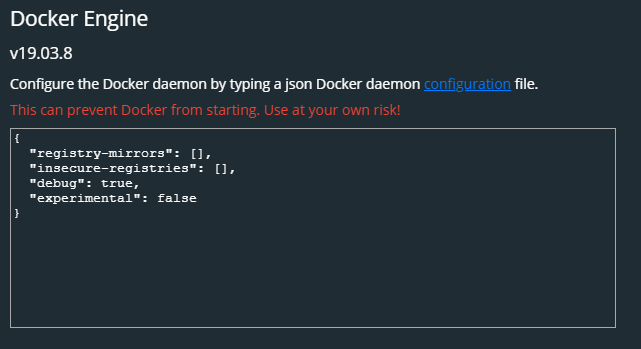
Windows 10 Pro (fresh installed)
I noticed that nodemon only run when I run docker compose up:

If I try to restart the container, it doesn't do anything.
If anyone PLEASE help me here, I'm stuck with this...
 stgonzales
on 6 May 2020
stgonzales
on 6 May 2020
Same
 JonatanOrtiz
on 5 Jul 2020
JonatanOrtiz
on 5 Jul 2020
Use the alternative package called supervisor, click https://www.npmjs.com/package/supervisor to read more about it
 ridbay
on 19 Aug 2020
ridbay
on 19 Aug 2020
Related issues
 maotora
·
4Comments
maotora
·
4Comments
 Mohammad-Quanit
·
5Comments
Mohammad-Quanit
·
5Comments
 Exeteres
·
4Comments
Exeteres
·
4Comments
 endquote
·
4Comments
endquote
·
4Comments
 Bastorx
·
5Comments
Bastorx
·
5Comments
Most helpful comment
I'm pretty sure, based on the other issues filed that it's speicific to
Windows and maybe even a particular build.
On Thu, 24 Oct 2019, 10:52 Md Amanullah, notifications@github.com wrote: