nodemon -v: 1.17.3node -v: 8.10.0- Operating system/terminal environment: MacOS 10.13.4
- Command you ran:
nodemon app.js
Expected behaviour
Should restart the app when there are changes using the same http server (host & server)
Actual behaviour
Restarts the app but throwing an error saying the EADDRINUSE.
Steps to reproduce
- Create a small ExpressJS app. At least 2 files:
app.jsanddummy.js - Let
app.jsrequiredummy.js - Listen to a host (i.e. 127.0.0.1) and port (i.e. 4000)
- run
nodemon app.js - Edit and save
dummy.js
 edmandiesamonte
All 44 comments
Cannot replicate:
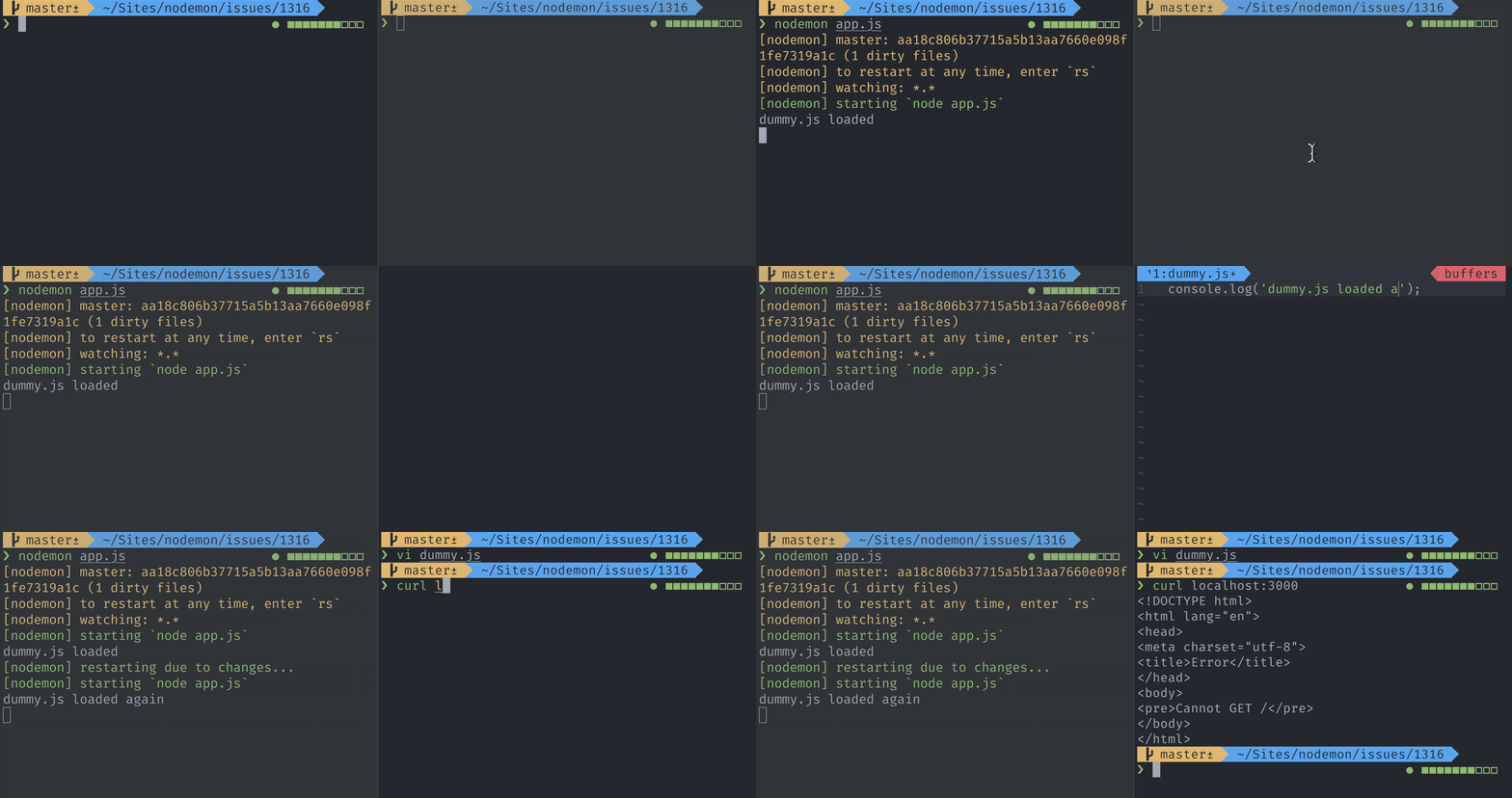
// app.js
require('./dummy.js');
require('express')().listen(3000);
Directory structure (sans node_modules) - also note there's no global nodemon.json in play:
❯ tre
1 .
2 ├── app.js
3 ├── dummy.js
4 ├── package-lock.json
5 └── package.json
6
7 0 directories, 4 files
Dump of config:
--------------
node: v8.9.1
nodemon: master: aa18c806b37715a5b13aa7660e098f1fe7319a1c (1 dirty files)
command: /Users/remy/.nvm/versions/node/v8.9.1/bin/node /Users/remy/.nvm/versions/node/v8.9.1/bin/nodemon --dump
cwd: /Users/remy/Sites/nodemon/issues/1316
OS: darwin x64
--------------
{ run: false,
system: { cwd: '/Users/remy/Sites/nodemon/issues/1316' },
required: false,
dirs: [ '/Users/remy/Sites/nodemon/issues/1316' ],
timeout: 1000,
options:
{ dump: true,
ignore:
[ '**/.git/**',
'**/.nyc_output/**',
'**/.sass-cache/**',
'**/bower_components/**',
'**/coverage/**',
'**/node_modules/**',
re: /.*.*\/\.git\/.*.*|.*.*\/\.nyc_output\/.*.*|.*.*\/\.sass\-cache\/.*.*|.*.*\/bower_components\/.*.*|.*.*\/coverage\/.*.*|.*.*\/node_modules\/.*.*/ ],
watch: [ '*.*', re: /.*\..*/ ],
ignoreRoot:
[ '**/.git/**',
'**/.nyc_output/**',
'**/.sass-cache/**',
'**/bower_components/**',
'**/coverage/**',
'**/node_modules/**' ],
restartable: 'rs',
colours: true,
execMap: { py: 'python', rb: 'ruby' },
stdin: true,
runOnChangeOnly: false,
verbose: false,
signal: 'SIGUSR2',
stdout: true,
watchOptions: {},
execOptions:
{ script: 'index.js',
exec: 'node',
args: [],
scriptPosition: 0,
nodeArgs: undefined,
execArgs: [],
ext: 'js,mjs,json',
env: {} },
monitor:
[ '*.*',
'!**/.git/**',
'!**/.nyc_output/**',
'!**/.sass-cache/**',
'!**/bower_components/**',
'!**/coverage/**',
'!**/node_modules/**' ] },
load: [Function],
reset: [Function: reset],
lastStarted: 0,
loaded: [],
watchInterval: null,
signal: 'SIGUSR2',
command:
{ raw: { executable: 'node', args: [ 'index.js' ] },
string: 'node index.js' } }
--------------
I'll leave this issue open for you to debug and find the answer (assuming it doesn't go stale).
 remy
on 19 Apr 2018
remy
on 19 Apr 2018
I encountered this problem before. It happened accidentally.
IMO, this kind of problem is due to nodemon restart the server before used port have been released.
 jasonxia23
on 24 Apr 2018
jasonxia23
on 24 Apr 2018
Shall we go with replicable cases rather than opinions? It'll help to fix the bug…
If there's anything that can replicate this consistently (even in a contrived way), then let's do it, otherwise this issue will close in about a week.
remy
on 24 Apr 2018
This has been mentioned again recently on a closed issue. https://github.com/remy/nodemon/issues/1025#issuecomment-381025138.
I'll try to create another test and hopefully I could pinpoint the cause.
edmandiesamonte
on 25 Apr 2018
I have the same issue on Ubuntu 16.04 nodemon 1.17.3 with running nodemon --watch src/theme.json --watch webpack.config.js --exec webpack-dev-server --port=4200. Оn clicking CTRL+C nodemon is killed but the webpack-dev-server is not. On running webpack-dev-server by itself I dont get into such issue.
 preslavsh
on 25 Apr 2018
preslavsh
on 25 Apr 2018
@preslavsh can you give me a pared down repo that I can use to replicate? Or are you happy to try to debug nodemon yourself with that example?
remy
on 25 Apr 2018
I cannot share the repo, but I can work on the problem later or reproduce in another project . Thank you.
preslavsh
on 25 Apr 2018
Also experiencing this issue. Unfortunately I cannot share the repository but willing to spend some time later to testing your example, and attempting to reproduce an example in a small repository.
[nodemon] 1.17.3
[nodemon] to restart at any time, enter `rs`
[nodemon] watching: *.*
[nodemon] starting `ts-node ./bin/www`
Starting server from bin/www
Server started at http://localhost:8080
[nodemon] restarting due to changes...
[nodemon] restarting due to changes...
[nodemon] starting `ts-node ./bin/www`
Starting server from bin/www
Error: listen EADDRINUSE :::8080
at Object._errnoException (util.js:1022:11)
at _exceptionWithHostPort (util.js:1044:20)
at Server.setupListenHandle [as _listen2] (net.js:1367:14)
at listenInCluster (net.js:1408:12)
at Server.listen (net.js:1492:7)
at Object.<anonymous> (/home/-----/bin/www:12:28)
at Module._compile (module.js:652:30)
at Object.Module._extensions..js (module.js:663:10)
at Module.load (module.js:565:32)
at tryModuleLoad (module.js:505:12)
at Function.Module._load (module.js:497:3)
at Function.Module.runMain (module.js:693:10)
at Object.<anonymous> (/home/-----/node_modules/ts-node/src/bin.ts:145:12)
at Module._compile (module.js:652:30)
at Object.Module._extensions..js (module.js:663:10)
at Module.load (module.js:565:32)
[nodemon] app crashed - waiting for file changes before starting...
Node: 8.11.1
Nodemon: 1.17.3
OS: Debian 9
Edit: Attempted to replicate with the dummy code above and was unable to replicate. Will do some further testing with my own repository.
 tomalexhughes
on 27 Apr 2018
tomalexhughes
on 27 Apr 2018
@remy Nodemon process sustains after parent process being killed (Webpack out of memory or something similar) in my case.
Here are codes to replicate this case.
jasonxia23
on 28 Apr 2018
OP @edsamonte and others, important:
Which are you using to run your application?
- Yarn
- npm
- Neither (node directly or nodemon directly)
remy
on 30 Apr 2018
@jasonxia23 I'm afraid that's an invalid test. You're sending a SIGKILL (-9) signal to the root node process (nodemon) so it has no ability to clean up the child process.
If you get an out of memory and an OS level kill, then yeah, things are going to go wrong. But this original issue filed isn't about that, it's on a code based restart and the child process still running in the background (sorry, will need to try again).
Still currently no directions on how to replicate this bug.
remy
on 30 Apr 2018
I'm having the same issue.
This is my terminal from the moment I run the server.
➜ dev-connector git:(models-and-authentication) ✗ npm run server
> [email protected] server /home/logan/dev/dev-connector
> nodemon server.js
[nodemon] 1.17.3
[nodemon] to restart at any time, enter 'rs'
[nodemon] watching: *.*
[nodemon] starting 'node server.js'
Server running on port 5000
MongoDB Connected
//SAVING NEW FILE OCCURS HERE.
[nodemon] restarting due to changes...
[nodemon] starting node server.js
events.js:183
throw er; // Unhandled 'error' event
^
Error: listen EADDRINUSE :::5000
at Object._errnoException (util.js:1022:11)
at _exceptionWithHostPort (util.js:1044:20)
at Server.setupListenHandle [as _listen2] (net.js:1367:14)
at listenInCluster (net.js:1408:12)
at Server.listen (net.js:1492:7)
at Function.listen (/home/logan/dev/dev-connector/node_modules/express/lib/application.js:618:24)
at Object.<anonymous> (/home/logan/dev/dev-connector/server.js:33:5)
at Module._compile (module.js:652:30)
at Object.Module._extensions..js (module.js:663:10)
at Module.load (module.js:565:32)
at tryModuleLoad (module.js:505:12)
at Function.Module._load (module.js:497:3)
at Function.Module.runMain (module.js:693:10)
at startup (bootstrap_node.js:188:16)
at bootstrap_node.js:609:3
[nodemon] app crashed - waiting for file changes before starting...
 LBWright
on 2 May 2018
LBWright
on 2 May 2018
I don't know if I can help anything other than what the original poster said.
OS: Ubuntu 16.04
LBWright
on 2 May 2018
Also experiencing this with nodemon 1.17.3, node 8.11
 frog1014
on 2 May 2018
frog1014
on 2 May 2018
Please retest with nodemon --signal SIGTERM and report whether you're able to replicate - or not - the issue.
I've not had anything that allows me to replicate this issue (and I strongly suspect it's a mix of issues based on author code, env, configuration, etc). I'm going to have to close this issue - unless someone is able to attempt to debug themselves.
remy
on 2 May 2018
I haven't been able to replicate it since I had the error. When I did encounter the error again (only one more time), I used the killall node command and I haven't had the error since. It might be an that the OS isn't killing the process before the server restarts. But I can only speculate. I'm sorry that I haven't been much help, I'm still relatively new to the dev world and I'm trying to provide as much help as I can.
Edit: if I encounter the error, I will immediately retest with nodemon --signal SIGTERM.
LBWright
on 4 May 2018
@LBWright thanks! Was having the same issue but killall node fixed it.
 nickjmorrow
on 5 May 2018
nickjmorrow
on 5 May 2018
Solution for Googlers...
For me the problem happens due to use of concurrently (which itself is a workaround the problem that nodemon doesn't understand I need more then one process running). If I'm not mistaken concurrently closes and nodemon considers job done.
Even with out use of concurrently I've had plenty of similar issues in the past due to conflicts of nodemon exiting and the process exiting.
You can solve practically all nonsensical port related problems like this:
"events": {
    "restart": "fuser -k 5000/tcp ; fuser -k 3050/tcp"
}
Essentially the above says "kill anything running on TCP ports 5000 and 3050"
You may also wish to add this in a script before nodemon starts:
# replace with your own ports
fuser -k 5000/tcp
fuser -k 3050/tcp
Also you NEED to add this too to the nodemon command:
--delay 1500ms
If there is no delay then 2 times out of 10 you'll get some port conflict.
The delay also prevents nodemon from spamming restarts since it resets every new change (preventing yet another thing that causes conflicts).
It would be nicer if killing ports before restart was just something that was built in (along with the ability to execute multiple scripts at once).
cc @remy
 srcspider
on 8 May 2018
srcspider
on 8 May 2018
@srcspider thank you for this. I know the OP wasn't using concurrently, but I _do know_ that concurrently has been causing some problems in other issues.
Would you mind opening a PR to add this to the FAQ? It's a useful tip for others. Thanks again.
remy
on 8 May 2018
I'm going to close this issue in the next few hours until anyone can offer any attempt to replicate this issue. I'm afraid as much as people have encountered the issue, I've as yet had enough to go on to replicate.
I also appreciate there's dozens of ways this can occur (the child process refusing to close connections and remain running), but even in contrived tests - I'm not able to replicate (possibly because I don't know ports well enough).
I'm genuinely hoping to get some traction on this issue (and not being a shirty maintainer!).
remy
on 8 May 2018
Happy for anyone to create a new issue with this topic as long as there's something to test with.
Thanks all.
remy
on 8 May 2018
Sorry to bring up a closed issue. Im having this happen with concurrently and didnt feel like it was new issue worthy since @srcspider mentioned a fix above. Just curious how to properly set that up.. is it in the package.json of my server? Or within the nodemon module somewhere?
cc @remy since you agree with the workaround
 eponymz
on 10 Aug 2018
eponymz
on 10 Aug 2018
I was just having the same error, after saving a change, nodemon was reloading the build and crashing due EADDRINUSE issue.
I was using 1.14.1 and updating to *1.18.3* fixed the error, now working smoothly.
 alejandrocoding
on 21 Aug 2018
alejandrocoding
on 21 Aug 2018
Now that you've mentioned it, I don't think I've seen the error in quite a while.
LBWright
on 21 Aug 2018
I had the same issue that I fixed by adding --signal SIGTERM
 bertho-zero
on 10 Oct 2018
bertho-zero
on 10 Oct 2018
Appending --delay 1500ms works for my in preventing address in use. Thanks @srcspider
 MakrisHuang
on 11 Nov 2018
MakrisHuang
on 11 Nov 2018
My solution:
nodemon.json
{
  "execMap": {
    "js": "babel-node"
  },
  "env": {
    "NODE_ENV": "development"
  },
  "ext": ".js,.jsx",
  "ignore": [
    "test",
    "dist",
    "docs",
    "logs"
  ],
  "events": {
    "start": "sh nodemon.sh"
  },
  "script": "./src/server.js",
  "restartable": "rs",
  "verbose": false,
  "watch": ["src"],
  "stdin": false,
  "stdout": true,
  "quiet": true,
  "colours": true
}
nodemon.sh
PID=$(ps aux | grep _babel-node | sed -n '2p' | awk '{print $2}');

if [ ! -z "$PID" ]; then
  { kill -9 $PID && wait $PID; } 2>/dev/null;
fi;
src/server.js
import { exec } from 'child_process';

/* ...skipped for brevity... */

process.on('uncaughtException', (err) => {
  if (/EADDRINUSE/.test(err.message)) {
    exec(`sh nodemon.sh`);
  } else {
    console.error("uncaughtException:", err.message);
  }
});

// or better:
server.on('error', err => {
  if (err.code === 'EADDRINUSE') {
    exec(`sh nodemon.sh`);
  }
});
The trick is to kill the port whenever nodemon start, not when it restarts/crash.
 normancarcamo
on 24 Nov 2018
normancarcamo
on 24 Nov 2018
I used process.exit() instead exec() and works fine. Thanks!
 felipewww
on 24 Nov 2018
felipewww
on 24 Nov 2018
I experienced this issue today and I figured out that when I run nodemon directly from the console it's working like the charm but when using node like
"scripts": {
    "debug": "nodemon"
}
i got that error
[nodemon] restarting due to changes...
Error: listen EADDRINUSE :::5000
    at Object._errnoException (util.js:1022:11)
    at _exceptionWithHostPort (util.js:1044:20)
    at Server.setupListenHandle [as _listen2] (net.js:1367:14)
    at listenInCluster (net.js:1408:12)
    at Server.listen (net.js:1492:7)
    at Function.listen (/home/logan/dev/dev-connector/node_modules/express/lib/application.js:618:24)
    at Object.<anonymous> (/home/logan/dev/dev-connector/server.js:33:5)
    at Module._compile (module.js:652:30)
    at Object.Module._extensions..js (module.js:663:10)
    at Module.load (module.js:565:32)
    at tryModuleLoad (module.js:505:12)
    at Function.Module._load (module.js:497:3)
    at Function.Module.runMain (module.js:693:10)
    at startup (bootstrap_node.js:188:16)
    at bootstrap_node.js:609:3
[nodemon] app crashed - waiting for file changes before starting...
 AhmedMKamal
on 26 Nov 2018
AhmedMKamal
on 26 Nov 2018
A Node.js style solution (work in Mac, Linux, Windows):
yarn add kill-port
in nodemon.json:
{
  "events": {
    "restart": "kill-port 5000",
    "crash": "kill-port 5000"
  },
 "delay": "1500"
}
Replace your port:
"restart": "kill-port [my port]",
 forsigner
on 26 Nov 2018
forsigner
on 26 Nov 2018
Remy, I believe I've managed to put together a fairly minimal repo which replicates this: see https://github.com/chrisveness/koa-hello-world.
For me, this repo will trigger Error: listen EADDRINUSE :::3000 on any code change. If I remove the -r dotenv/config option from the start-dev script in package.json, everything works fine.
I'm running Node v10.13.0 on Linux Mint 18 (Ubuntu 16.04 – Xenial).
 chrisveness
on 26 Nov 2018
chrisveness
on 26 Nov 2018
@remy Can replicate via nestjs sample project:
nest docs: https://docs.nestjs.com/first-steps
$ npm i -g @nestjs/cli
$ nest new project
Update any .ts file in sample project, you will see Error: listen EADDRINUSE
My env: MacOS,Node v10.9.0, "nodemon": "^1.18.6",
forsigner
on 26 Nov 2018
@forsigner same error with nest,js
used this instead of npm package:
events": {
    "restart": "kill $(lsof -t -i:4444)",
    "crash": "kill $(lsof -t -i:4444)"
  }
works at linux
 nzvtrk
on 26 Nov 2018
nzvtrk
on 26 Nov 2018
@nzvtrk would you like to expand on what lsof -t -i:4444 is doing and how this solution works?
chrisveness
on 26 Nov 2018
lsof is Unix-like only so you can't use this command on windows I think kill-port is better solution.
AhmedMKamal
on 26 Nov 2018
FWIW, this happens to me only when running nodemon through a yarn script ("test-watch": "nodemon --exec 'yarn test'").
When running nodemon --exec 'yarn test'" directly, it doesn't occur.
 gubikmic
on 27 Nov 2018
gubikmic
on 27 Nov 2018
For me it happens only when I use Babel with newer versions of nodemon run through a yarn script.
1.13.3 - last working version
1.14.0 - broken in all subsequent versions
 ddillert
on 27 Nov 2018
ddillert
on 27 Nov 2018
I was having the same problem and in the latest version - 1.18.7 this seems to be fixed. Cheers!!
 nagarajay
on 27 Nov 2018
nagarajay
on 27 Nov 2018
Yes, [email protected] appears to have fixed it for me too. Great!
chrisveness
on 27 Nov 2018
Yes! 1.18.7 is working!
ddillert
on 27 Nov 2018
1.18.7 has same problem on here.
 blueyestar
on 28 Nov 2018
blueyestar
on 28 Nov 2018
For me the exact error is shown (@1.18.7) but everything else works (code updates)
 sneakyfildy
on 29 Nov 2018
sneakyfildy
on 29 Nov 2018
I can no longer use nodemon due to this issue, sadly. Happens every time unless I taskkill the previous instance. I'm on windows 7.
I tried the solution suggested by @forsigner with no success, it resulted in me getting the error "Address in use" _every_ time I ran node, _even_ if I had just manually taskkill'd the previous instance. I cannot begin to imagine why.
 julianeden
on 2 Dec 2018
julianeden
on 2 Dec 2018
It's best to avoid debugging by imagination and take a look as to how and why it's breaking.
You're also commenting on an issue that was raised on a much older version of nodemon, on a mac with nothing to test with. I'm going to lock this issue in the hope that if anyone is _still_ seeing similar problems that they will: raise a new issue, include replicating details (with code) and maybe even dig into see if there's a fix they can send in a PR 👍
remy
on 2 Dec 2018
Related issues
 endquote
·
4Comments
endquote
·
4Comments
 Exeteres
·
4Comments
Exeteres
·
4Comments
 dimsmol
·
4Comments
remy
·
5Comments
dimsmol
·
4Comments
remy
·
5Comments
 Bastorx
·
5Comments
Bastorx
·
5Comments
Most helpful comment
Solution for Googlers...
For me the problem happens due to use of
concurrently(which itself is a workaround the problem that nodemon doesn't understand I need more then one process running). If I'm not mistaken concurrently closes and nodemon considers job done.Even with out use of concurrently I've had plenty of similar issues in the past due to conflicts of nodemon exiting and the process exiting.
You can solve practically all nonsensical port related problems like this:
Essentially the above says "kill anything running on TCP ports 5000 and 3050"
You may also wish to add this in a script before nodemon starts:
Also you NEED to add this too to the nodemon command:
If there is no delay then 2 times out of 10 you'll get some port conflict.
The delay also prevents nodemon from spamming restarts since it resets every new change (preventing yet another thing that causes conflicts).
It would be nicer if killing ports before restart was just something that was built in (along with the ability to execute multiple scripts at once).
cc @remy