Nodemon: Nodemon does not kill process on exit with Git Bash on Windows 10
I'm on Windows 10.
When I start a server with nodemon app.js two Node.js instance appear in the Task Manager.
If I use Git Bash command line when exit nodemon by pressing ctrl+c one of the Node.js process still running in the background, I've to kill that process manually to exit the server.
If I use PoweShell or Cmder/cmd it works fine, both process are killed on exit.
 pldg
pldg
All 22 comments
I'm believe I'm having similar experience. Here are some of my conditions when it occurs:
- Windows 10
- nodemon --version 1.12.1
- node v6.11.0
- Have two instances of git bash open, one running webpack watch, the other running server with nodemon
ctrl-cwill work to end webpack process in the first git bash window, but won't work to end nodemon in the second git bash window- Can avoid the problem if run nodemon in powershell instead of second git bash window.
- Miscellaneous and possibly irrelevant info... I had installed _linux subsystem for windows_ that can run _bash on ubuntu_ a couple weeks ago. I have since done a full uninstall of the subsystem (at least according to docs). Not sure if this git bash nodemon problem arose in connection to subsystem install since I wasn't using this machine for dev before I made did the install.
 marigerr
on 6 Oct 2017
marigerr
on 6 Oct 2017
About the last point I'm in the same situation, I done a full uninstall of bash on ubuntu on windows but I don't think its connected with this bug
pldg
on 6 Oct 2017
I am also having the same issue, since upgrading to Node 8.6.0. I'm not sure if this is relevant, but I had also performed a fresh reinstall of Windows 10. ctrl-c does not kill the process, it simply causes my terminal to hang. This happens in both Git Bash and CMD, but not Powershell. Attempting to restart the server (using either nodemon or plain node) results in EADDRINUSE errors in the server log files, unless I initially start the server with node, or manually kill the process (or I use Powershell). Here is my stacktrace caused by attempting to restart the server:
2017-10-11T08:46:14.034Z - error: uncaughtException: listen EADDRINUSE :::3000 date=Wed Oct 11 2017 09:46:14 GMT+0100 (GMT Summer Time), pid=7528, uid=null, gid=null, cwd=C:\Users\joewe\projects\node\webdev_backend_one, execPath=C:\dev\nodejs\node.exe, version=v8.6.0, argv=[C:\dev\nodejs\node.exe, C:\Users\joewe\projects\node\webdev_backend_one\api\index.js], rss=93454336, heapTotal=71921664, heapUsed=46749168, external=19470452, loadavg=[0, 0, 0], uptime=150502.5396814
Error: listen EADDRINUSE :::3000
    at Object._errnoException (util.js:1019:11)
    at _exceptionWithHostPort (util.js:1041:20)
    at Server.setupListenHandle [as _listen2] (net.js:1344:14)
    at listenInCluster (net.js:1385:12)
    at Server.listen (net.js:1469:7)
    at Function.listen (C:\Users\joewe\projects\node\webdev_backend_one\node_modules\express\lib\application.js:618:24)
    at Object.<anonymous> (C:\Users\joewe\projects\node\webdev_backend_one\api\index.js:63:20)
    at Module._compile (module.js:624:30)
    at Object.Module._extensions..js (module.js:635:10)
    at Module.load (module.js:545:32)
    at tryModuleLoad (module.js:508:12)
    at Function.Module._load (module.js:500:3)
    at Function.Module.runMain (module.js:665:10)
    at startup (bootstrap_node.js:187:16)
    at bootstrap_node.js:607:3
Envrironment details:
- Node 8.6.0
- Windows 10 (build 15063.608)
- Nodemon 1.11.0 & 1.12.0
EDIT:
Since updating to nodemon 1.12.0 I can run in CMD, Git Bash is still not working though.
 JavaTheNutt
on 11 Oct 2017
JavaTheNutt
on 11 Oct 2017
i am also experiencing this issue, i have to kill the node processes in my task manager to be able to use the same port again
 twistedrc1017
on 20 Oct 2017
twistedrc1017
on 20 Oct 2017
+1
same
options to resolve ?
 almogk012
on 24 Oct 2017
almogk012
on 24 Oct 2017
Experiencing this since updating to latest version
 DiegoRBaquero
on 25 Oct 2017
DiegoRBaquero
on 25 Oct 2017
I'm having the same issue - Any solutions yet?
 sarah-due
on 1 Nov 2017
sarah-due
on 1 Nov 2017
I resolved the issue by using Windows PowerShell instead of git bash, it is installed with Windows so you don't need to install anything extra. If you start your nodemon application with PowerShell and press Ctrl + C then you will get the following message Terminate batch job (Y/N)? . Entering 'Y' here and then pressing enter will do the job.
To open PowerShell in the same way you open git bash by right-clicking inside folder, replace default CMD with PowerShell by following the steps mentioned here. After that you can just go to folder go to folder you want to open PowerShell to and press Shift + Right Click, this will show an extra option in menu saying Open PowerShell window here.
 xxxzeus
on 1 Nov 2017
xxxzeus
on 1 Nov 2017
I'm also experiencing this issue running:
- Git for Windows 2.15.1(2)
- Node v8.9.1
- npm v5.5.1
As a workaround I keep a cmd.exe shell open and just run: taskkill /F /IM node.exe to kill Node processes. I don't get any EADDRINUSE errors this way.
 vapurrmaid
on 3 Dec 2017
vapurrmaid
on 3 Dec 2017
+1 same issue
- nodemon 1.12.5
- Windows 10 OS
- Git 2.15.1.windows.2
- Node v8.9.2
- npm v5.5.1
 tanyaYourchuck
on 11 Dec 2017
tanyaYourchuck
on 11 Dec 2017
+1 same issue
nodemon 1.12.1
Windows 10 OS
git 2.14.1
node 8.9.1
npm 5.5.1
 GenerationTRS80
on 11 Dec 2017
GenerationTRS80
on 11 Dec 2017
Anyone having a go at PRs?
 remy
on 11 Dec 2017
remy
on 11 Dec 2017
Can _someone_ try with the latest release: [email protected] (on node > 4)? It uses fork instead of spawn so it might solve this problem.
remy
on 13 Dec 2017
@remy [email protected] worked in my env. Thanks for the fix!
tanyaYourchuck
on 13 Dec 2017
@remy Sorry for delay in testing/response
@tanyaYourchuck did you test on git bash? I just ran npm run dev on my project where:
"server": "cross-env NODE_ENV=development nodemon index.js",
"client": "npm run start --prefix client",
"dev": "concurrently \"npm run server\" \"npm run client\""
package.json:
"devDependencies": {
    "concurrently": "^3.5.1",
    "cross-env": "^5.1.1",
    "expect": "^21.2.1",
    "jest": "^21.2.1",
    "mocha": "^4.0.1",
    "node-mocks-http": "^1.6.6",
    "nodemon": "^1.12.6",
    "supertest": "^3.0.0"
  }
on:
- node v.8.9.1
- git bash 2.15.1(2)
It spawns a large number of node processes and ctrl+c only kills one of them.

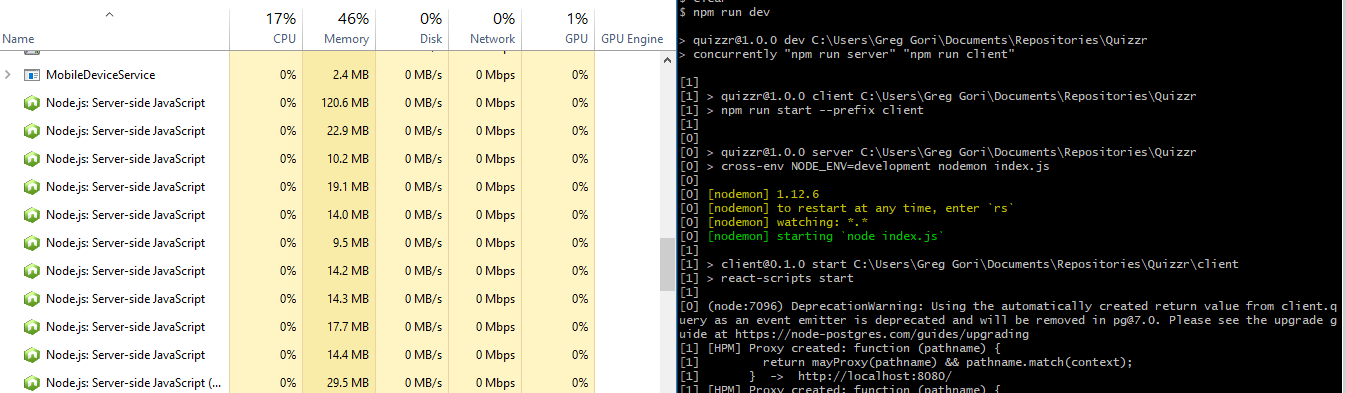
Perhaps it's an issue with another package (concurrently)? Is anyone else still having this issue on git bash?
vapurrmaid
on 14 Dec 2017
@vapurrmaid can you replicate without the concurrently app?
remy
on 14 Dec 2017
@remy Interestingly enough the issue only happens when I execute through a npm run script. If I call node_modules/nodemon/bin/nodemon.js index.js everything works fine.
I added this script: "temp":"nodemon index.js", ran npm run temp and ctrl+c just hung.
I ran this on npm 5.5.1. I'll update to 5.6.0 and see if it persists.
update
Issue still exists with 5.6.0, but again only if nodemon is called through npm run
I'm sure the bug stems from this issue as referenced here.
Further Update/Workaround
It indeed seems the issue is stemming from git-for-windows MinTTY. As a current workaround, use the shell located in C:\Program Files\Git\bin
This completely solved any issue I had before with ctrl+c and nodemon, regardless if called through npm.
vapurrmaid
on 14 Dec 2017
@vapurrmaid yes, I'm using git bash, but using a gulp task to launch the process rather than npm script. In my env with nodemon v1.12.5, ctrl + c did not hang, it returned to prompt but left the node process running (thus still using the port). This was fixed with nodemon v1.12.6.
I tried to run the gulp task in an npm script. Then I observed same as you describe, ctrl+c just hung.
tanyaYourchuck
on 14 Dec 2017
facing the smae
nodemon 1.12.4
Windows 10 OS
git 2.15.0
node 8.9.0
npm 5.5.1
em...
it has been resolved in 1.12.6,so,uninstall it and reinstall one later than 1.12.6
 wangerniu
on 15 Dec 2017
wangerniu
on 15 Dec 2017
Updating git bash to 2.16 fixed this.
 tresdev
on 7 Mar 2018
tresdev
on 7 Mar 2018
I solved this by creating a nodemon.json file in my root directory and adding and added the following:
"events":{
"restart":"fuser -k 8000/tcp && nodemon server"
}
 AndrewOdiit
on 18 Nov 2019
AndrewOdiit
on 18 Nov 2019
@AndrewOdiit Thanks man, that did it.
 Relatora
on 6 Mar 2020
Relatora
on 6 Mar 2020
Related issues
 Exeteres
·
4Comments
Exeteres
·
4Comments
 ehmicky
·
4Comments
ehmicky
·
4Comments
 jagged3dge
·
4Comments
jagged3dge
·
4Comments
 olalonde
·
3Comments
olalonde
·
3Comments
 Autre31415
·
4Comments
Autre31415
·
4Comments
Most helpful comment
Updating git bash to 2.16 fixed this.