Nodejs-storage: Random 502 signing errors
Environment details
- OS: Linux
- Node.js version: ^10
- yarn version: v1.16.0
@google-cloud/storageversion: 2.3.0
Steps to reproduce
- Run an API that returns signed URLs for storage documents
- Observe random 502 errors, once or twice a day
So we have a web service running on Node.js, on GCP Flex environment, which returns signed URLs for signed documents. Most of the time, it's working fine ; but once or twice a day we get weird 502 errors, with the following error message 502. That’s an error. The server encountered a temporary error and could not complete your request. Please try again in 30 seconds. That’s all we know, which on its own is not very helpful.
The code generating the signed URLs looks like this:
const document = storage.bucket(firebaseBucketName).file(firebaseFileRef);
  const options = {
    action: 'read',
    expires: Date.now() + THIRTY_MINUTES,
  };
  const [url] = await document.getSignedUrl(options);
The full stack trace we get from StackDriver is:
<!DOCTYPE html> <html lang=en> <meta charset=utf-8> <meta name=viewport content="initial-scale=1, minimum-scale=1, width=device-width"> <title>Error 502 (Server Error)!!1</title> <style> *{margin:0;padding:0}html,code{font:15px/22px arial,sans-serif}html{background:#fff;color:#222;padding:15px}body{margin:7% auto 0;max-width:390px;min-height:180px;padding:30px 0 15px}* > body{background:url(//www.google.com/images/errors/robot.png) 100% 5px no-repeat;padding-right:205px}p{margin:11px 0 22px;overflow:hidden}ins{color:#777;text-decoration:none}a img{border:0}@media screen and (max-width:772px){body{background:none;margin-top:0;max-width:none;padding-right:0}}#logo{background:url(//www.google.com/images/branding/googlelogo/1x/googlelogo_color_150x54dp.png) no-repeat;margin-left:-5px}@media only screen and (min-resolution:192dpi){#logo{background:url(//www.google.com/images/branding/googlelogo/2x/googlelogo_color_150x54dp.png) no-repeat 0% 0%/100% 100%;-moz-border-image:url(//www.google.com/images/branding/googlelogo/2x/googlelogo_color_150x54dp.png) 0}}@media only screen and (-webkit-min-device-pixel-ratio:2){#logo{background:url(//www.google.com/images/branding/googlelogo/2x/googlelogo_color_150x54dp.png) no-repeat;-webkit-background-size:100% 100%}}#logo{display:inline-block;height:54px;width:150px} </style> <a href=//www.google.com/><span id=logo aria-label=Google></span></a> <p><b>502.</b> <ins>That’s an error.</ins> <p>The server encountered a temporary error and could not complete your request.<p>Please try again in 30 seconds. <ins>That’s all we know.</ins> SigningError: <!DOCTYPE html> <html lang=en> <meta charset=utf-8> <meta name=viewport content="initial-scale=1, minimum-scale=1, width=device-width"> <title>Error 502 (Server Error)!!1</title> <style> *{margin:0;padding:0}html,code{font:15px/22px arial,sans-serif}html{background:#fff;color:#222;padding:15px}body{margin:7% auto 0;max-width:390px;min-height:180px;padding:30px 0 15px}* > body{background:url(//www.google.com/images/errors/robot.png) 100% 5px no-repeat;padding-right:205px}p{margin:11px 0 22px;overflow:hidden}ins{color:#777;text-decoration:none}a img{border:0}@media screen and (max-width:772px){body{background:none;margin-top:0;max-width:none;padding-right:0}}#logo{background:url(//www.google.com/images/branding/googlelogo/1x/googlelogo_color_150x54dp.png) no-repeat;margin-left:-5px}@media only screen and (min-resolution:192dpi){#logo{background:url(//www.google.com/images/branding/googlelogo/2x/googlelogo_color_150x54dp.png) no-repeat 0% 0%/100% 100%;-moz-border-image:url(//www.google.com/images/branding/googlelogo/2x/googlelogo_color_150x54dp.png) 0}}@media only screen and (-webkit-min-device-pixel-ratio:2){#logo{background:url(//www.google.com/images/branding/googlelogo/2x/googlelogo_color_150x54dp.png) no-repeat;-webkit-background-size:100% 100%}}#logo{display:inline-block;height:54px;width:150px} </style> <a href=//www.google.com/><span id=logo aria-label=Google></span></a> <p><b>502.</b> <ins>That’s an error.</ins> <p>The server encountered a temporary error and could not complete your request.<p>Please try again in 30 seconds. <ins>That’s all we know.</ins> at authClient.sign.then.catch.err (/app/node_modules/@google-cloud/storage/build/src/file.js:1019:22) at process._tickCallback (internal/process/next_tick.js:68:7)
I know it is not much, but I don't know what other details I could provide, and maybe other people will have encountered the same issue.
 WaldoJeffers
All 7 comments
Thanks for reporting. Is the 502 returned from the method call of getSignedUrl() itself, or when accessing the signed URL that is returned?
 stephenplusplus
on 16 May 2019
stephenplusplus
on 16 May 2019
@stephenplusplus It's from calling the getSignedUrl method (the 502 error appears in our web service logs, and is converted in a 500 for clients consuming the API).
Let me know if there are any additional details you need. I can add logs if necessary :)
WaldoJeffers
on 16 May 2019
Hey @WaldoJeffers, sorry for my lag here. We've been continually making changes to the underlying libraries that handle authentication and all API requests. Have you still been seeing this issue using the latest versions?
stephenplusplus
on 16 Aug 2019
Hello @stephenplusplus , thanks for your answer.
I got the following error payload on August 15, 2019:
jsonPayload: {
  message:  "SigningError: The service is currently unavailable."
  metadata: {
   slackId:  "INTERNAL_SERVER_ERROR"
  }
 }
 logName:  "projects/XXXXXXX/logs/winston_log"
 receiveTimestamp:  "2019-08-15T14:43:47.085013457Z"
}
I had updated @google-cloud/storage from v3.0.4 to v3.1.0 on August 14, 2019
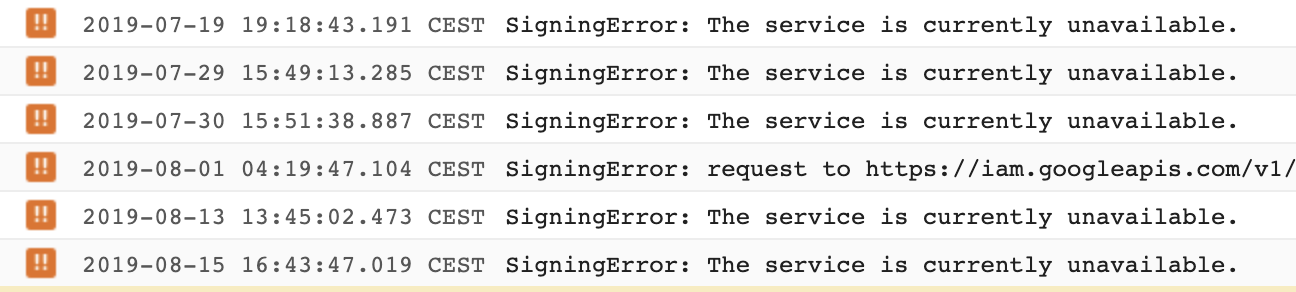
However, the errors seem to be much less frequent than before.
Here's an error report covering the last 30 days:
WaldoJeffers
on 17 Aug 2019
Unfortunately, I don't think we are able to touch this from our side.
@bcoe can we refer @WaldoJeffers to a better support channel for this type of issue?
stephenplusplus
on 22 Oct 2019
:wave: @stephenplusplus, @WaldoJeffers if you have't already, opening an issue here is a great start:
https://issuetracker.google.com/issues/new?component=187243&template=0
It will help make sure that folks on the internal product team take a look.
 bcoe
on 22 Oct 2019
bcoe
on 22 Oct 2019
@WaldoJeffers please keep us updated if there's anything we need to do on our end, and feel free to link back if you choose to go that route.
stephenplusplus
on 22 Oct 2019
Related issues
 lukesneeringer
·
4Comments
lukesneeringer
·
4Comments
 hstemplewski
·
4Comments
hstemplewski
·
4Comments
 jorilallo
·
6Comments
jorilallo
·
6Comments
 fspoettel
·
6Comments
fspoettel
·
6Comments
 jackmatrix
·
5Comments
jackmatrix
·
5Comments