Nodejs-storage: Typings are messed up
When importing version 2.0.3, TypeScript types are completely messed up:
- It's impossible to use Promises as returned methods. Taking one method as example:
exists(options: any, callback?: any): void;. The documentation says that it can be used with Promises too (and it works), but the type definition shows return type as void. - Types are just wrong. In the same method, the JSDoc definition says that the first argument (options) is optional, but the method signature marks it mandatory.
- The library uses
anyas type anywhere. Options dictionaries, callbacks, etc: these are things that should be explicitly typed. - The library still uses JSDoc types everywhere, which should be migrated to TypeScript definitions.
 ItalyPaleAle
All 16 comments
Add getFiles to the list. The signature is getFiles(query: GetFilesRequest, callback?: any): void; but the function returns a promise.
 sabrehagen
on 13 Sep 2018
sabrehagen
on 13 Sep 2018
Almost all methods have wrong typings. I showed one just as example.
ItalyPaleAle
on 13 Sep 2018
When will the fix be released? I have a project due in a few days and pretty much everything is written in typescript. Is the only solution reverting back to an older version? Or is there another workaround?
 ghost
on 19 Sep 2018
ghost
on 19 Sep 2018
@mg131 If it's urgent, you can revert back to using the community-driven @types package.
 mattwelke
on 19 Sep 2018
mattwelke
on 19 Sep 2018
@welkie Thanks. Will do
ghost
on 19 Sep 2018
@welkie -- How do you override the default index.d.ts provided by the package (other than migrating to 1.7.0)? Also, do you have an ETA on when the types will be fixed?
 rraina
on 20 Sep 2018
rraina
on 20 Sep 2018
@rraina Google appears to have disabled the built in types with recent versions of this package until they resolve the issues with them. Therefore, to override them, you'd just opt to use the latest version of of this package with the latest version of the @types package as well. Because I'm not affiliated with Google, I don't know when the issues will be resolved. I'm merely keeping track of their TypeScript efforts so I can reduce the number of dependencies my Node projects have.
mattwelke
on 21 Sep 2018
Thanks Matt. I tried downloading 2.0.3 (the latest package on NPM at time of this writing) and the @types/google-cloud__storage": "^1.7.2”. However, the 2.0.3 package has a conflicting index.d.ts :/. Let me know if I am doing something wrong.
On Sep 21, 2018, at 1:19 PM, Matt Welke <[email protected]notifications@github.com> wrote:
@rrainahttps://github.com/rraina Google appears to have disabled the built in types with recent versions of this package until they resolve the issues with them. Therefore, to override them, you'd just opt to use the latest version of of this package with the latest version of the @typeshttps://github.com/types package as well. Because I'm not affiliated with Google, I don't know when the issues will be resolved. I'm merely keeping track of their TypeScript efforts so I can reduce the number of dependencies my Node projects have.
—
You are receiving this because you were mentioned.
Reply to this email directly, view it on GitHubhttps://github.com/googleapis/nodejs-storage/issues/384#issuecomment-423659233, or mute the threadhttps://github.com/notifications/unsubscribe-auth/ABfM1JmtMAH1z8gizO_GqXiZ4Efi3Urzks5udUnfgaJpZM4WkfGP.
rraina
on 21 Sep 2018
@rraina I can't reproduce that issue. I just created a test project (using the tsconfig file from Microsoft's TypeScript-Node-Starter repo) and it compiled properly when I invoked VS Code's default build task: https://github.com/welkie/node-storage-test
Is it possible you have a TypeScript configuration issue?
mattwelke
on 22 Sep 2018
tried it with the latest [email protected], and has the problem
const isExist = await storage.bucket(CLOUD_STORAGE_BUCKET_NAME || '')
        .file(filePath)
        .exists(undefined);
and I have this problem error TS1345: An expression of type 'void' cannot be tested for truthiness and when I check the typings, the method returns void...
starting typescript 3.1, they have enforce this, so the older version of typescript might work https://github.com/Microsoft/TypeScript/issues/26262
 sweetim
on 29 Sep 2018
sweetim
on 29 Sep 2018
getFiles() promise is fixed in #402
A released is planned ? Thanks!
 LoicMahieu
on 3 Oct 2018
LoicMahieu
on 3 Oct 2018
@welkie Your repo doesn't have enough code to repro the issue.
Try adding this:
import { Storage } from "@google-cloud/storage";
async function listBuckets() {
    const storage = new Storage();
    const [buckets] = await storage.getBuckets();
    return buckets;
}
First the storage.getBuckets(); call will be an error because of lack of parameters:
$ tsc
src/index.ts:7:29 - error TS2554: Expected 2 arguments, but got 0.

7     const [buckets] = await storage.getBuckets();
                              ~~~~~~~~~~~~~~~~~~~~
So no, it doesn't work to just include the types, because even in your own example, it's finding the local index.d.ts first. So 1.7.2 is _entirely broken_ for TypeScript users.
 TimMensch
on 8 Oct 2018
TimMensch
on 8 Oct 2018
@TimMensch Yeah I just tested that and I'm getting the same issue. It looks like any non-trivial code example will run into issues since they're currently bundling type declaration files side by side with their source code files:
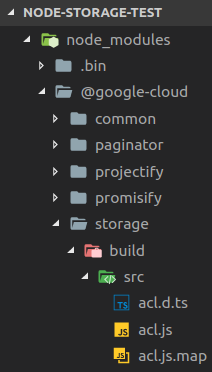
That's going to be a problem and it looks like people will have to revert to older versions of @google-cloud__storage to a version with no type declaration files bundled at all in order to get to a working state. We won't be updating the package in our TS projects at my work until this is resolved.
mattwelke
on 9 Oct 2018
Unfortunately, we had to roll back to an earlier 1.x version of cloud storage.
Also, does not seem to be able to import the File type anymore.
Really hope those will get fixed so that we can use the latest.
 jeremychone
on 10 Oct 2018
jeremychone
on 10 Oct 2018
I must be missing something. It seems that now the 2.x provides it own typing, that take precedence of @types/google-cloud__storage, which is a good step.
However, it feels that now the internal types are vastly different than the original @types/..., which i am not sure it is because the 2.x has a different API or just because the types were written from scratch.
The challenge, is that right now, I am not sure how to use 2.x, since all type check fail?
Anybody else using 2.x with TypeScript ?
jeremychone
on 10 Oct 2018
We haven't moved to 2.x yet. But I see in the team's 2.1.0 release (https://github.com/googleapis/nodejs-storage/releases/tag/v2.1.0) that they "disable TypeScript as we continue to annotate the project with types". So it sounds like they're completely turning off the d.ts file generation for now. I tried updating my example project to 2.1.0 to test this, but they haven't published 2.1.0 to NPM yet. I'm hoping when they publish it, we can go back to using latest version without TypeScript issues.
mattwelke
on 10 Oct 2018
Related issues
 munkhorgil
·
3Comments
munkhorgil
·
3Comments
 digitaljohn
·
6Comments
digitaljohn
·
6Comments
 abutreca
·
3Comments
abutreca
·
3Comments
 muhammadbilal87
·
6Comments
muhammadbilal87
·
6Comments
 jackmatrix
·
5Comments
jackmatrix
·
5Comments
Most helpful comment
Almost all methods have wrong typings. I showed one just as example.