Nodejs-storage: Error message in Node.js console is not the orignial error message
Environment details
- OS: Windows 10
- Node.js version: v8.9.4
- npm version: 5.8.0
@google-cloud/storageversion:
Steps to reproduce
- Not quite sure since I seem to have done something wrong. Anyway this is more general. I am using Formidable to try to upload an audio file to a gcs bucket. For some reason @google-cloud tries to parse this as JSON. That is probably my fault and not the issue here.
The issue is the error message in the console from the local Firebase web server. I get the error
"ApiError: Error during request."
This is not very helpful, of course :-(
Fortunately you can get a trace with "console.log". The error is thrown in
functions\node_modules\@google-cloud\storage\node_modules\@google-cloud\common\src\util.js:193:32
and this line looks like this:
parsedHttpRespBody.err = new util.ApiError('Cannot parse JSON response');
I think it would be much easier for a developer if this error was made visible directly (instead of " ApiError: Error during request").
 lborgman
All 22 comments
Thanks for reporting. As far as I know, we are always interfacing with API endpoints that return JSON. It's difficult to see where this went wrong without any code. Would you be able to try to put together a reproduction repo?
 stephenplusplus
on 9 Apr 2018
stephenplusplus
on 9 Apr 2018
Thanks for the answer. There is an example here in my question here:
firebase - Uploading to google cloud storage with Node.js - Stack Overflow https://stackoverflow.com/questions/49719366/uploading-to-google-cloud-storage-with-node-js/49720441
As you can see there you can make things fail by just adding "/" to the end of the bucket name. I did not notice that I had done that and the error message was less helpful (to say it politly... ;-) )
I would be glad for 2 things here:
1) A better original error message.
2) If you for some reason want to change the error message when it "bubbles" up, then please encapsulate the error messages in the JSON in such a way that it is easy to find.
Eh, I am of course sure you wanted to do just this. But please beware that this is especially important in code that is in beta. There is so many things that can go wrong (docs, real issues, misunderstandings, changes, etc). The possibilities you have to test grows exponentially with all these branches of errors. (As you surely know, of course.)
lborgman
on 9 Apr 2018
Maybe I should also say I turned to test GCS just to test something that I thought was simple. So I did not get into these kind of troubles when doing what I really want to do... ;-)
I simply tried to minimize the number of tests I needed to do. But it did not work that very well.
lborgman
on 9 Apr 2018
Thanks for the details! We can definitely strip out extra slashes from the user-provided bucket name (PR welcome :)).
As far as the error parsing, that took me a bit to see what was happening-- and I'm still not quite sure.
@frankyn: help please! Here's what's up: We send a multipart POST request, per these instructions to https://www.googleapis.com/upload/storage/v1/b/myBucket/o?uploadType=multipart. If the file doesn't exist, the response body is:
Not Found
We try to parse that as JSON, but it doesn't work, because it's not JSON. What we would expect is:
"Not Found"
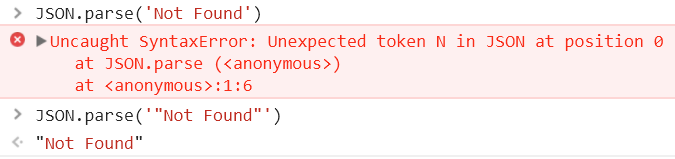
Even still, I would have expected a JSON object error, as outlined here.
Am I doing something wrong?
stephenplusplus
on 9 Apr 2018
@stephenplusplus acking. will look at this tomorrow.
 frankyn
on 10 Apr 2018
frankyn
on 10 Apr 2018
Thank you!
stephenplusplus
on 10 Apr 2018
Any update on this? We see this one on a regular basis, would be great if we could track down what's happening exactly.
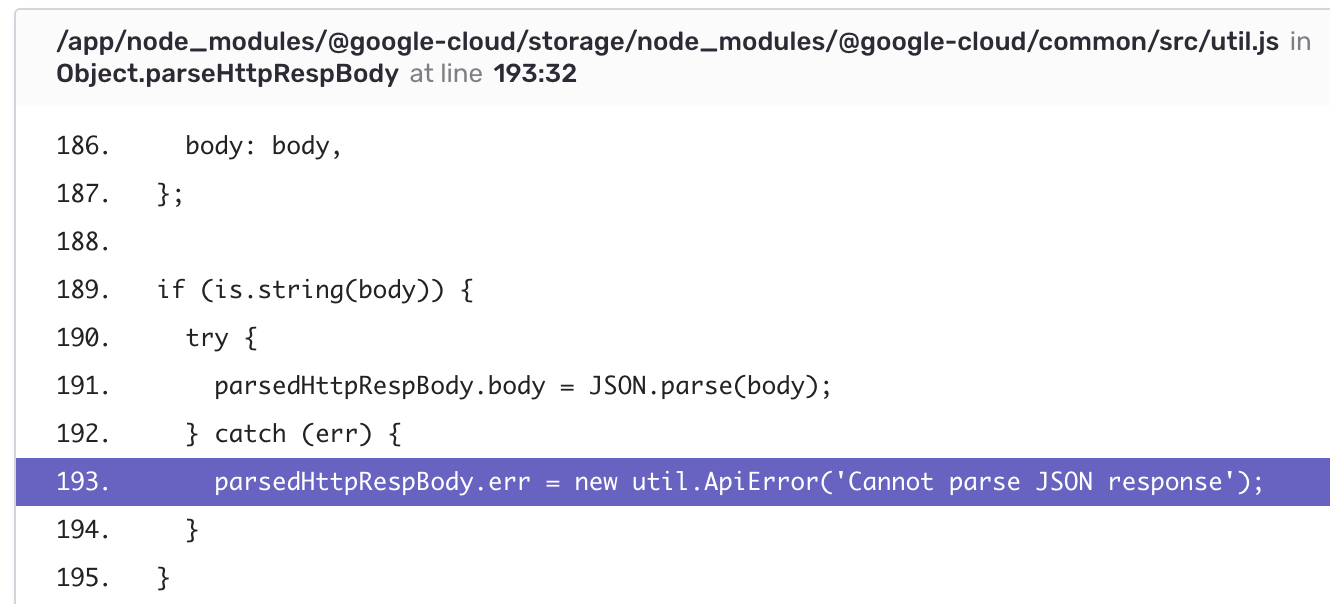
 adriaanmeuris
on 15 May 2018
adriaanmeuris
on 15 May 2018
@stephenplusplus, looping back around. I'm trying to understand what you mean by file not found, when creating a new file. Did you mean if the bucket doesn't exist?
frankyn
on 25 May 2018
The error itself is justified, however the problem our code is having is that the response body isn't actually parse-able as JSON. Most error responses across the Cloud APIs are enclosed in objects, following the usual format:
{
  "error": {
    "code": 401,
    "message": "Request had invalid credentials.",
    // ...
  }
}
Following up on this:
I ran manual test using OAuth Playground to attempt performing a multi-part upload to a bucket that doesn't exist and I received:
Configuration
METHOD: POST
REQUEST URI:
https://www.googleapis.com/upload/storage/v1/b/randomcoderfrank/o?uploadType=multipart
HEADERS:
Content-Type: multipart/related; boundary=foo_bar_baz
REQUEST BODY:
Content-Type: application/json; charset=UTF-8

{
  "name": "myObject"
}

--foo_bar_baz
Content-Type: text/plain

test
--foo_bar_baz--
ERROR RESPONSE:
{
  "error": {
    "code": 404,
    "message": "Not Found",
    "errors": [
      {
        "domain": "global",
        "message": "Not Found",
        "reason": "notFound"
      }
    ]
  }
}
I think I sent us in a bad direction here, sorry. The error was because we sent a malformed URL, and tried to handle a pre-flight error as JSON. PR #266 will sanitize the input.
stephenplusplus
on 27 Jun 2018
This popped up again after we've updated our modules to:
- @google-cloud/common:
0.23.0 - @google-cloud/storage:
2.3.1
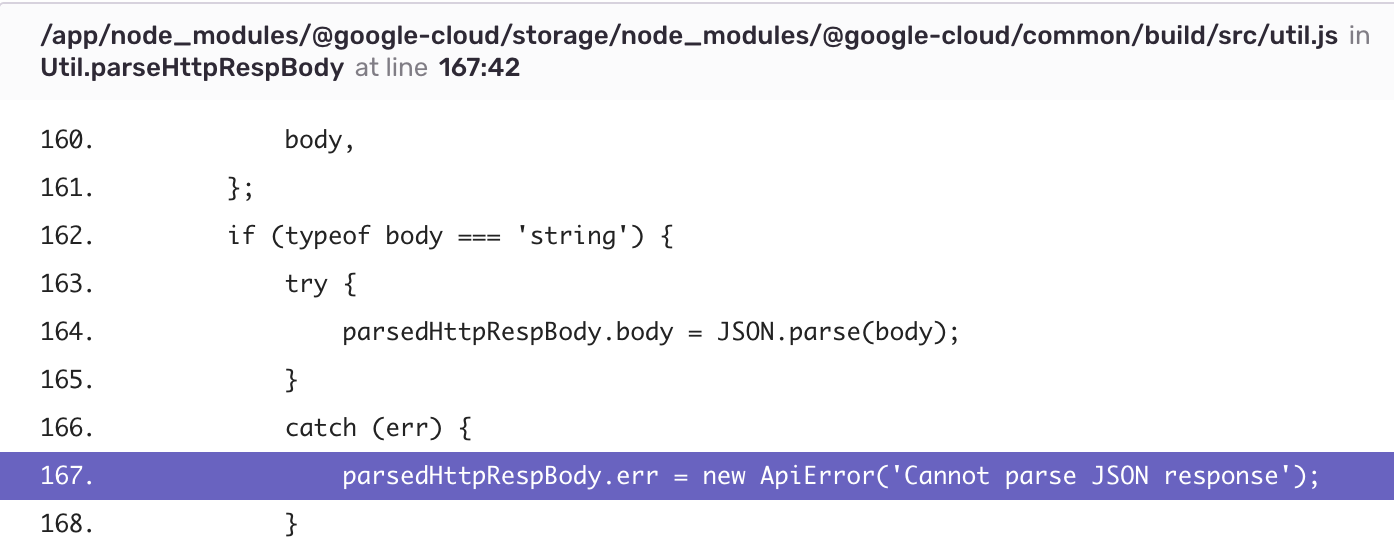
This happened upon uploading a file (Content-Type: image/jpeg) using createWriteStream (we don't use resumable uploads)
adriaanmeuris
on 28 Nov 2018
@adriaanmeuris While @lborgman and you are getting the same error, the original cause was discovered and resolved. Would you mind opening a new issue with reproduction steps or even a small repo or gist I can clone, npm install, and run? I do appreciate you finding this issue though, so we can link them together!
stephenplusplus
on 28 Nov 2018
Computer trouble at the moment (Windows 1803...)
lborgman
on 29 Nov 2018
@stephenplusplus it seems this only happens sporadically: based on yesterday's analytics, this happened 12 times out of 3369 calls to our upload endpoint.
I'd be happy to add some extra logging to investigate further & create a new issue. Do yo have any advice how I can retrieve the contents of the retrieved body, or even the entire response from GCS when this error occurs?
Our implementation is similar to the example from createWriteStream:
  fs.createReadStream('/Users/stephen/Photos/birthday-at-the-zoo/panda.jpg')
    .pipe(file.createWriteStream({
      metadata: {
        contentType: 'image/jpeg',
        metadata: {
          custom: 'metadata'
        }
      }
    }))
    .on('error', function(err) {
      // **Would like to add to extra logging with the (request to / response from) GCS**
    })
    .on('finish', function() {
      // The file upload is complete.
    });
@kinwa91 - can you take a crack at trying to reproduce this?
 JustinBeckwith
on 15 Feb 2019
JustinBeckwith
on 15 Feb 2019
@stephenplusplus do you think we should include the unparsable response so this surfaces up?
 jkwlui
on 21 Feb 2019
jkwlui
on 21 Feb 2019
I think if we get an unparsable response, it means we're sending a malformed request. So, ideally we would be able to prevent that. I'm going to try to reproduce based on these steps: https://github.com/googleapis/nodejs-storage/issues/170#issuecomment-442734375 -- let me know if you have found anything else out.
Also, just since it has been a few months, @adriaanmeuris-- are you still experiencing this?
stephenplusplus
on 22 Feb 2019
Yes, still happens. According to our logs this happened 15 hours ago, and 128 times in the past month (in about ~78K uploads)
Currently using @google-cloud/[email protected] and @google-cloud/[email protected]
adriaanmeuris
on 25 Feb 2019
@stephenplusplus are you able to reproduce @adriaanmeuris's problem?
jkwlui
on 5 Mar 2019
So far, I haven't been able to reproduce. I've been using this sample script. Could you make any modifications you think might help the error appear? Also, updating to the latest versions would put us on the same page.
'use strict'

const BUCKET_NAME = process.env.BUCKET_NAME
const FILE_PREFIX = 'gissue-170' // Used to find and delete later
const TIMES_TO_RUN = 3369

const {Storage} = require('@google-cloud/storage')
const fs = require('fs')
const uuid = require('uuid')

const gcs = new Storage()
const bucket = gcs.bucket(BUCKET_NAME)
const file = bucket.file(`${FILE_PREFIX}--${uuid()}`)

async function deleteFiles() {
  const [files] = await bucket.getFiles({prefix: FILE_PREFIX})
  for (const file of files) await file.delete()
}

async function upload() {
  return new Promise((res, rej) => {
    fs.createReadStream('./pic.jpg')
      .pipe(file.createWriteStream({
        resumable: false,
        metadata: {
          contentType: 'image/jpeg',
          metadata: {
            custom: 'metadata',
          },
        },
      }))
      .on('error', rej)
      .on('finish', res)
  })
}

(async () => {
  for (let i = 0; i < TIMES_TO_RUN; i++) {
    try {
      await upload()
    } catch (err) {
      console.log('Error!', err)
    }
  }

  try {
    await deleteFiles()
  } catch (e) {
    console.log('Error deleting files.', e)
  }

  console.log('all uploads successful')
})()
Many thanks for the example script - I've used it and could not reproduce until ... I worked with a variety of files.
The error from GCS in our case was the following string:
Metadata part is too large.
The actual error is the same as reported earlier in this issue: the response body isn't parsable as JSON.
This is caused by passing metadata which contained a Buffer, due to an image file containing an image profile:
gcs.bucket('my-bucket').file('my-file-path').createWriteStream({
  contentType: 'image/jpeg',

  // metadata object containing data which shouldn't be passed to GCS
  metadata: {
    icc: <Buffer 00 09 fc ... >,
  },
});
We've stripped this from the metadata since it makes no sense storing that kind of information in GCS; all is working perfectly fine now.
I think this could have been detected way earlier if either the API endpoint returns JSON, or if the original error is thrown in util.js. Possible improvement?
adriaanmeuris
on 17 Apr 2019
Related issues
 hstemplewski
·
4Comments
hstemplewski
·
4Comments
 tangkhaiphuong
·
7Comments
tangkhaiphuong
·
7Comments
 digitaljohn
·
6Comments
digitaljohn
·
6Comments
 shaffeeullah
·
3Comments
shaffeeullah
·
3Comments
 dfrankes
·
3Comments
dfrankes
·
3Comments