Nodebb: emoji box doesn't open completely (emoji v2)
- NodeBB version: 1.7.0
- NodeBB git hash: a849a772bf8924181013bbd8f566a79321c0ab45
- Database type: mongo
Database version: 3.2.11
Exact steps to cause this issue:
1- In editor, clicked on emoji icon
2- the emoji box openedWhat you expected:
I expected to see the box opened completely.What happened instead:
It didn't open completely, as you can see below.

 mohammadhassan99
All 7 comments
I'm not sure what you mean by "didn't open completely". What you're seeing is essentially correct, though there may be a slight bug in the CSS for RTL languages.
For instance, this is what I see, which is the expected layout:

 pitaj
on 28 Nov 2017
pitaj
on 28 Nov 2017
Also, please open future issues related to emoji v2 on the Github page for it: https://github.com/nodebb/nodebb-plugin-emoji
pitaj
on 28 Nov 2017
@pitaj I mean the word "people" is not clear and also in NodeBB forum, I see a scroll bar in emoji box but I cant see the scroll bar in my emoji box !
And also one other problem: I can't move the emoji box and It opens exactly on the right of the screen and it is bothering !
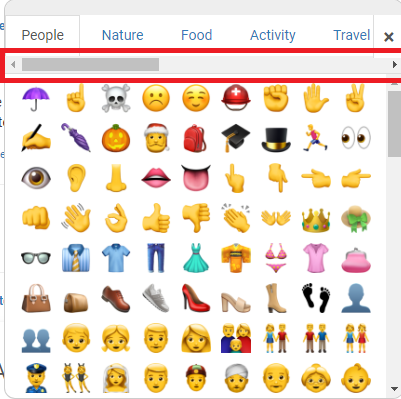
Scroll bar in NodeBB forum ☝️
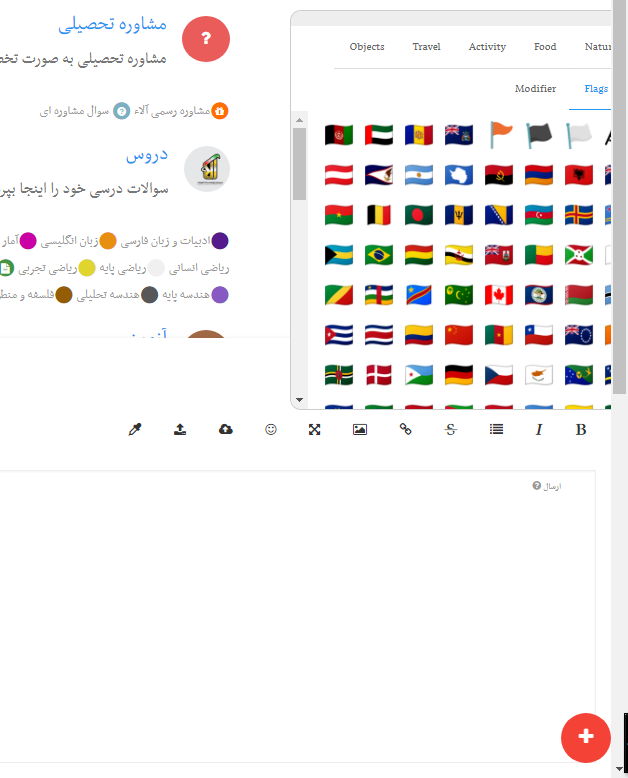
my emoji box ☝️
I think now you can understand what I mean.
mohammadhassan99
on 28 Nov 2017
You can now fix this by running npm i --save nodebb-plugin-emoji@latest
pitaj
on 30 Nov 2017
Won't this revert if he runs ./nodebb upgrade?
On Nov 29, 2017 20:00, "Peter Jaszkowiak" notifications@github.com wrote:
You can fix this by running npm i --save nodebb-plugin-emoji@latest
—
You are receiving this because you are subscribed to this thread.
Reply to this email directly, view it on GitHub
https://github.com/NodeBB/NodeBB/issues/6131#issuecomment-348048321, or mute
the thread
https://github.com/notifications/unsubscribe-auth/AA4VgxiSFm3gNDd0Gv4eIugxgNKbKDsIks5s7f5EgaJpZM4Qtqqj
.
 julianlam
on 30 Nov 2017
julianlam
on 30 Nov 2017
Ya, so don't do that until 1.7.2
pitaj
on 30 Nov 2017
@pitaj @julianlam Ok, thank you all 😊 🙏
mohammadhassan99
on 30 Nov 2017
Related issues
 aStonedPenguin
·
4Comments
aStonedPenguin
·
4Comments
 phit
·
4Comments
phit
·
4Comments
 djensen47
·
4Comments
djensen47
·
4Comments
 cryptoethic
·
4Comments
cryptoethic
·
4Comments
 uplift
·
3Comments
uplift
·
3Comments