Node: Debugging Node 6 in Visual Studio Code bad option: --inspect-brk
- Version: v6.11.3
- Platform: Windows 10 64bit
- Subsystem:
Hello,
I'm debugging a Node.js application with Visual Studio Code.
After the update of Visual Studio Code, I'm getting the following error:
bad option: --inspect-brk=18155
And after a few seconds a dialog appears:
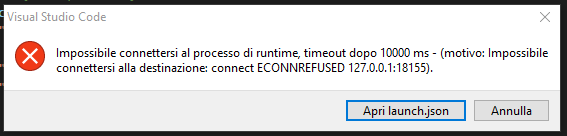
Node version: v6.11.3
Visual Studio Code version: 1.23.1
Platform: Windows 10 64bit
I tried to set in my launch configuration "protocol":"legacy" but in this way sometimes the debugger gets stuck giving this error: Node.js request 'continue' failed (reason: annullato perché Node.js non risponde).
Could you please help me?
Thanks in advance.
 Elisabetta-Ramilli
All 2 comments
Upgrade to the latest v6.x, v6.14.2, that version knows about the --inspect-brk flag.
Can you post questions to nodejs/help next time? Cheers.
 bnoordhuis
on 24 May 2018
bnoordhuis
on 24 May 2018
You can add "protocol": "legacy" to configurations for your launch.sjon.
 DOTA2mm
on 5 Sep 2018
DOTA2mm
on 5 Sep 2018
Related issues
 danielstaleiny
·
3Comments
danielstaleiny
·
3Comments
 vsemozhetbyt
·
3Comments
vsemozhetbyt
·
3Comments
 mcollina
·
3Comments
mcollina
·
3Comments
 Icemic
·
3Comments
Icemic
·
3Comments
 Brekmister
·
3Comments
Brekmister
·
3Comments
Most helpful comment
You can add
"protocol": "legacy"to configurations for your launch.sjon.