Ciao!
How are you?
- Version: 9.1
- Platform: Linux
- Subsystem: Mint / Ubuntu / Debian
Chrome:
new Date()
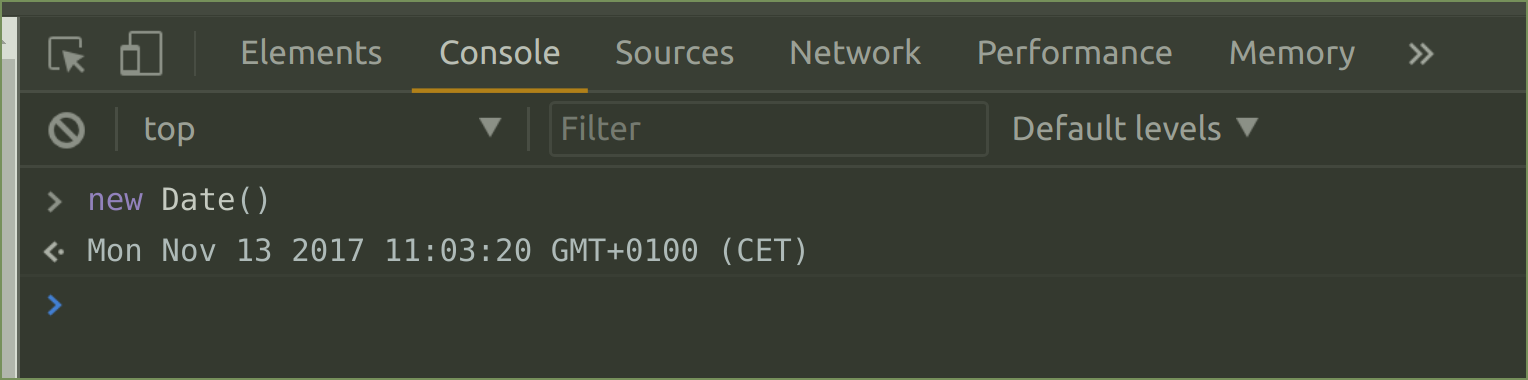
The server:
date

With node it shows wrong time (GMT):

It should show 11 hour but shows 10 hour.
How can we fix? Our taxing is makes wrong and is a huge problems for us.
Thanks so much.
 p3x-robot
All 12 comments
It doesn’t look like there’s anything wrong here? 10:04:33.926Z is the same as 11:03:41 CET, it’s just displayed in a different timezone.
(If you need something that has better built-in support for timezones, you may want to use moment-timezone instead of the built-in Date class)
 addaleax
on 13 Nov 2017
addaleax
on 13 Nov 2017
Ciao! How are you?
I don't understand, in V8 Chrome the new Date() is working, in NODE it is in GMT.
Why are they different?
p3x-robot
on 13 Nov 2017
It looks a bug.
p3x-robot
on 13 Nov 2017
Why are they different?
They are the same time, they aren’t different, it’s just a question of how they are displayed
addaleax
on 13 Nov 2017
Whatever. It is wrong.
p3x-robot
on 13 Nov 2017
new Date().toISOString() should give you the same result in browsers and Node, if that helps convince you
addaleax
on 13 Nov 2017
That's a hack. Chrome works right, this is a bug, but whatever, I am using TZ="Europe/Budapest" before node and now it works.
It doesn't respect the timezone. It uses always GMT that's how it does it.
The JavaScript specification in new Date() respect the timezone.
What you are saying is a hack and whatever I closed its.
p3x-robot
on 13 Nov 2017
I like to elaborate with other people as well.
p3x-robot
on 13 Nov 2017
On the web, this issue is a problem.
p3x-robot
on 13 Nov 2017
Today I learned GitHub has a 🙄 emoticon! How useful!
It doesn't respect the timezone. It uses always GMT that's how it does it.
In fact it uses UTC. Closing this out again because it's emphatically not a bug.
 bnoordhuis
on 13 Nov 2017
bnoordhuis
on 13 Nov 2017
oi reopen the issue m8 its affecting me
 SpeedyCraftah
on 8 Jun 2019
SpeedyCraftah
on 8 Jun 2019
@SpeedyCraftah What exactly does your code do to get affected by the default console output format for dates?
What is shared on the screenshot is just visual representation of the Date objects, in console for Node.js and in Dev Tools for Chrome. The underlying Date object should be exactly the same.
Could you please explain how does that affect your setup and provide a testcase that passes (i.e. does nothing or prints 'OK') in Chrome and fails (i.e. throws an error or prints 'FAIL') in Node?
Also, this should be asked in nodejs/help instead of here.
 ChALkeR
on 8 Jun 2019
ChALkeR
on 8 Jun 2019
Related issues
 jmichae3
·
3Comments
jmichae3
·
3Comments
 mcollina
·
3Comments
mcollina
·
3Comments
 loretoparisi
·
3Comments
loretoparisi
·
3Comments
 fanjunzhi
·
3Comments
fanjunzhi
·
3Comments
 Brekmister
·
3Comments
Brekmister
·
3Comments
Most helpful comment
It doesn’t look like there’s anything wrong here? 10:04:33.926Z is the same as 11:03:41 CET, it’s just displayed in a different timezone.
(If you need something that has better built-in support for timezones, you may want to use moment-timezone instead of the built-in
Dateclass)