Node-telegram-bot-api: Javascript features work on localhost but not when deployed to Heroku - node.js
I'm running a node-telegram-bot-api via node.js in Heroku
I will want to true a false value and is ok in local, But not work in heroku.
How Should I fix?
//step 1
let p = false;
//step  2
bot.onText(/\/book/, (msg) => {
  bot.sendMessage(msg.chat.id, 'This is your Book'); // ok
//step  3
  p = true; // not work in Heroku and still is false, But in local is ok and is true
});

// step  4
bot.on('message', (msg) => {
if (p === true) {
  bot.sendMessage(msg.chat.id, p); // p is still false
}
});
I want to send message only when my condition is true.
 saeedhei
All 7 comments
Try with var instead of let, maybe in Heroku is installed different version of js.
 sidelux
on 8 Oct 2018
sidelux
on 8 Oct 2018
You can try running "heroku logs" on your terminal to find out the issue with your heroku deployment.
 DtCarrot
on 8 Oct 2018
DtCarrot
on 8 Oct 2018
@sidelux I tried and did not work.
@DtCarrot No Error in "heroku logs"
saeedhei
on 8 Oct 2018
@saeedhei Do u add engines part in your package.json?
Maybe it could fix your issue
"engines" : {
  "node" : "<YOUR_LOCAL_NODE_VERSION_HERE>"
}
 olshansky
on 27 Oct 2018
olshansky
on 27 Oct 2018
I think "true" assigning happens after the check because step 4 may happen before or along with step 3.
My logic reasoning is the following:
- Bot receives (or fetch) an Update structure.
- The structure is parsed and checked against some properties through EventEmitter.
- One of them is "message" because it contains a key called so.
- Therefore the message event is triggered and the variable is still false.
- Then check for Regex-matching is done
- If matches, the function is executed and the variable is set to true.
This is the part of the code responsible for the behaviour.
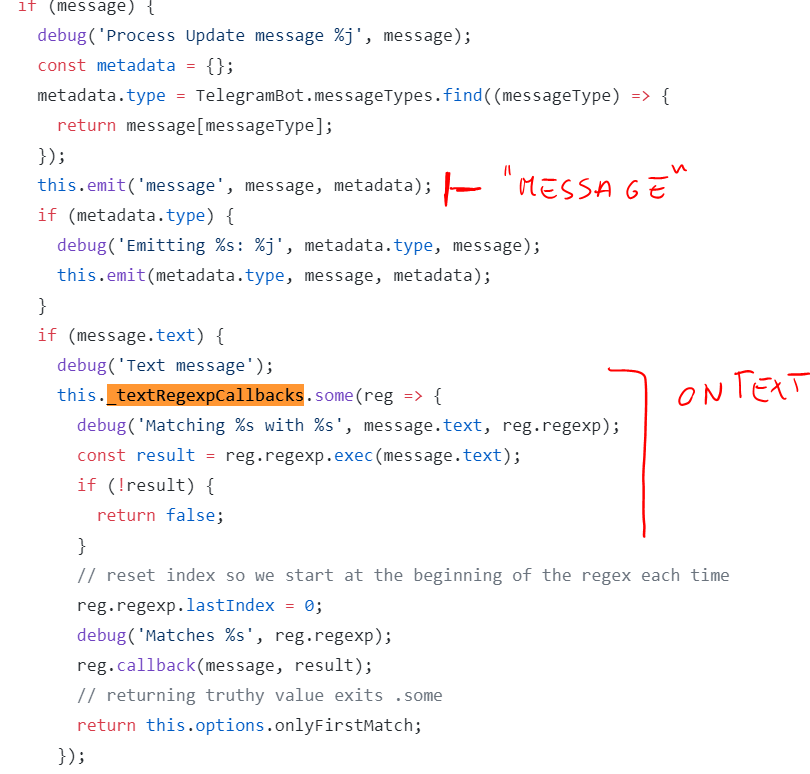
The weird thing is that that chunk of code works in local, not that doesn't work on Heroku.
Moreover, as shown, this is not the best way to achieve what you want to obtain.
1) Global vars shouldn't be used except for specific cases
2) You are working with Asyncronous operations.
I think you shouldn't use also a listener on message.
bot.onText(/\/book/, (message) => {
    bot.sendMessage(msg.chat.id, 'This is your Book').then(() => {
        // do anything else.
    });
});
 alexandercerutti
on 27 Oct 2018
alexandercerutti
on 27 Oct 2018
Thanks I will check that 2 days later, @alexandercerutti step 4 happen after /book command, Because in bot on message has an if condition.
saeedhei
on 28 Oct 2018
@saeedhei, I've tried your code and edited it with a bit more of console.logs.
That's the output:

That's the code (typescript, but is not a problem)
import * as TelegramBot from "node-telegram-bot-api";

const bot = new TelegramBot("token", { polling: true });

console.log("Step 1");
let p = false;
console.log("Anything will execute until user interaction...");

// step 2
bot.onText(/\/book/, (msg) => {
    console.log("Executing step 2")
    bot.sendMessage(msg.chat.id, 'This is your Book').then(() => {
        console.log("Done with step 2");
    });

    console.log("Executing Step 3");
    p = true; // not work in Heroku and still is false, But in local is ok and is true
    console.log(`Done with Step 3 and p is ${p}`);
});

// step  4
bot.on('message', (msg) => {
    console.log("Executing step 4.");
    console.log("\t\tp is:", p);
    if (p === true) {
        console.log("Step 4, p is true");
        bot.sendMessage(msg.chat.id, `${p}`); // p is still false
    } else {
        console.log("Step 4: failed, p is false");
    }
});
As you can see, my logic reasoning is correct. After Step 1, I sent a message to the bot with command /book and as you can see, the first step that got executed was Step 4.
The fact, here, is that you are treating your code as if it would execute synchronously and step-by step.
It is executed as step-by-step on runtime. I mean, yes, the code is read before .onText and then .on("message"), but the inner logic make them behave in the opposite way.
You have to watch it under a different perspective. The fact you are defining first bot.onText and then on("message"), doesn't mean that "message" is executed after "onText".
The code chunk responsible that I putted my last message, shows what is happening.
- An update is received.
- Update JSON is checked against possible keys, like
callback_query,messageor many more. - Since you send a message with a text to your bot, Update.message will make the flow enter inside the "if (message)".
this.emit("message")is executed. This means that TelegramBot, which extends EventEmitter 3, execute the related event. Inside of it, EventEmitter 3 checks if there are any functions associated to "message" event.- Since a message may be of multiple types and since you are writing a text message to your bot,
message.textcondition is fulfilled and then: - A check against RegexCallbacks (like your
/\/book/) withmessage.textis done and if any match happen, the function is executed.
As I said before, it is weird that your code runs "correctly" in local, not that doesn't work on Heroku.
alexandercerutti
on 28 Oct 2018
Related issues
 lenny76
·
3Comments
lenny76
·
3Comments
 Lemmmy
·
3Comments
Lemmmy
·
3Comments
 Rezania815
·
3Comments
Rezania815
·
3Comments
 hems
·
3Comments
hems
·
3Comments
 jacopocappelli1989
·
4Comments
jacopocappelli1989
·
4Comments