Node-telegram-bot-api: Share button under the message
How can I do inline button, that can share message to another chat?
 MrAnsheff
All 15 comments
You can use switch_inline_query:
var iKeys = [];
iKeys.push([{
text: "Share",
switch_inline_query: "Shared message"
}]);
bot.sendMessage(message.chat.id, "Question", {parse_mode: 'HTML', reply_markup: {inline_keyboard: iKeys}});
 sidelux
on 26 Mar 2018
sidelux
on 26 Mar 2018
Hello.
How is it possible to get the switch_inline_id so that when you press the share button, leave @alias of the bot plus the message ID?
Through CallbackData?
Thanks in advance.
 DestroyerIV
on 6 Apr 2018
DestroyerIV
on 6 Apr 2018
I can't understand clearly your question, but try to take a loot at _switch_inline_query_current_chat_, if is something can help you.
sidelux
on 6 Apr 2018
a clear example is to share with a button, a button with different links and publish it on a channel. I hope to have explained to me the best possible. Thanks in advance
DestroyerIV
on 11 Apr 2018
Hello, I have several questions: I have tried to create a button that is responsible for sending a post to another chat. I have tried to modify the example code that is above this section without getting results. I would like if it were possible that they would explain to me quickly the operation of the online keyboards or guide me in the creation of a similar button.
Many thanks in advance
DestroyerIV
on 13 Jul 2018
I think you need that:
var code = "test";
var iKeys = [];
iKeys.push([{
text: "Share query",
switch_inline_query: code
}]);
bot.sendMessage(message.chat.id, "Click below to share your code", {
parse_mode: 'Markdown',
reply_markup: {
inline_keyboard: iKeys
}
});
@sidelux I continue with the same doubt. And that example I still can not make it work. You could explain it a little more if it's not too much trouble. We've been trying to make it work for a week and it's impossible for me.
Check many tutorials by Google, but it was not helpful. So if you can explain it a little more I would appreciate it
 danielperez9430
on 13 Jul 2018
danielperez9430
on 13 Jul 2018
Some like this:

For example send a Message with share botton and send inline to other chats
danielperez9430
on 13 Jul 2018
Exactly how Daniel explained it, I have a database with which to work but I do not show results
DestroyerIV
on 13 Jul 2018
I don't know which part are not clear to you, anyway i provide you an example related to my workflow.
- User use a command like /create to generate an element, bot assign a random code to user for that element
- User can print element in inline mode using that code with
@botname <code> - Also that user can call that element in inline mode with function provided two messages ago.
So:
bot.onText(/^\/create/, function (message, match) {
    var code = Math.random()*1000;
    // save code to database
    var iKeys = [];
    iKeys.push([{
        text: "Share query",
        switch_inline_query: code
    }]);
    bot.sendMessage(message.chat.id, "Click below to share your code", {
        parse_mode: 'Markdown',
        reply_markup: {
            inline_keyboard: iKeys
        }
    });
});
Then:
bot.on("inline_query", function (query) {
    var code = parseInt(query.query);
    // check if the code is in database and user can use it (valid var)
    if (valid == true){
        bot.answerInlineQuery(query.id, [{
                                id: '0',
                                type: 'article',
                                title: 'New item',
                                description: "Publish item",
                                message_text: "Details of your item base on code..."
        }]);
    }else{
        bot.answerInlineQuery(query.id, [{
                                id: '0',
                                type: 'article',
                                title: 'New item',
                                description: "Publish item",
                                message_text: "Code not found"
        }]);
    }
});
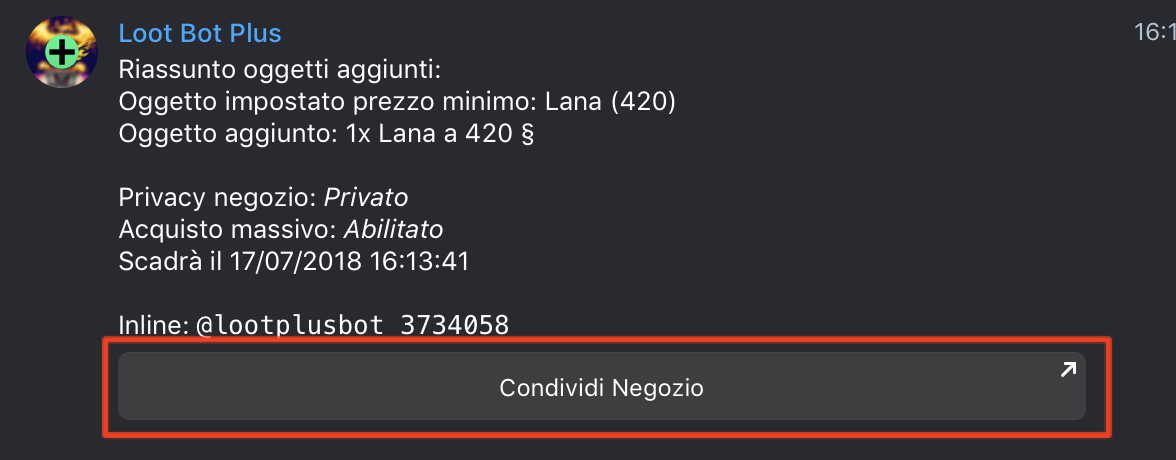
Then, after user selected chat
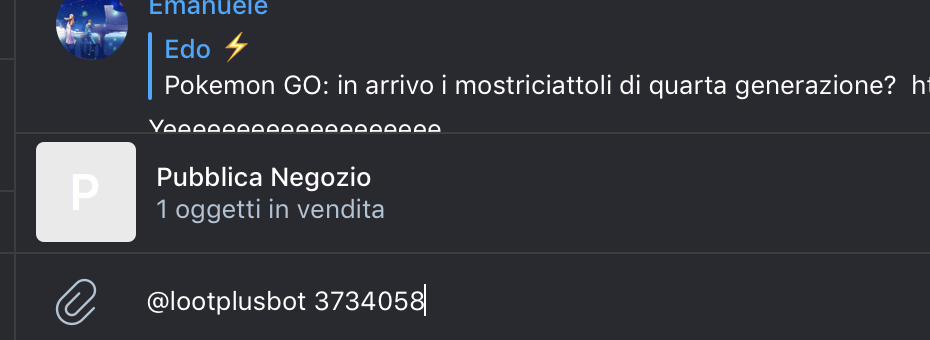
Now, if you not understand yet, please give me a valid example so i can explain you in a more detailed way.
sidelux
on 13 Jul 2018
@sidelux In the third line of code, it says to save the code in the database ... the buttons? send Message?
The var variable that would be referenced in the database?
Thanks in advance
DestroyerIV
on 13 Jul 2018
Thanks Sidelux for your time, mate.
I was using the inline keyboards, but I was wrong. I was missing the bot.on. That's why he did not finish answering
and I have another question that database you use because I see that you put "save code to database".
If I understand well what you keep is the message and the id of it, right?
danielperez9430
on 13 Jul 2018
@DestroyerIV For me is the random generated code:
...
var code = Math.random()*1000;
connection.query("INSERT INTO list VALUES (" + code + ")", function (err, rows, fields) {
    if (err) throw err;
    var iKeys = [];

    ...

});
...
var code = parseInt(query.query);
var valid = false;
connection.query("SELECT 1 FROM list WHERE code = " + code, function (err, rows, fields) {
    if (err) throw err;
    var cnt = Object.keys(rows).length;
    if (cnt > 0)
        valid = true;

    if (valid == true){
    ...

});
@danielperez9430 Nope, is the data i want to use in inline mode (number, string, etc).
sidelux
on 13 Jul 2018
Okey Thanks for the information mate, 😍😍 and thanks for your time
danielperez9430
on 13 Jul 2018
Related issues
 alikhil
·
3Comments
alikhil
·
3Comments
 dimawebmaker
·
3Comments
dimawebmaker
·
3Comments
 lenny76
·
3Comments
lenny76
·
3Comments
 mbrammer
·
3Comments
mbrammer
·
3Comments
 saeedhei
·
4Comments
saeedhei
·
4Comments
Most helpful comment
I don't know which part are not clear to you, anyway i provide you an example related to my workflow.
@botname <code>So:
Then:
Then, after user selected chat
Now, if you not understand yet, please give me a valid example so i can explain you in a more detailed way.