Node-solid-server: Cannot run multi-user Solid Server
Hello,
When I run a single user server, I am able to get to my endpoint UI fine. However, when I try to set up the server as a multi user server, I get the output shown here: https://solid.erikamiguel.com:8443/
My config.json looks like this:
{
  "root": "/var/www/solid.erikamiguel.com/data",
  "port": "8443",
  "webid": true,
  "mount": "/",
  "configPath": "/var/www/solid.erikamiguel.com/config",
  "configFile": "/var/www/solid.erikamiguel.com/config.json",
  "dbPath": "/var/www/solid.erikamiguel.com/.db",
  "sslKey": "/etc/letsencrypt/live/erikamiguel.com/privkey.pem",
  "sslCert": "/etc/letsencrypt/live/erikamiguel.com/fullchain.pem",
  "multiuser": true,
  "enforceToc": false,
  "disablePasswordChecks": true,
  "supportEmail": "",
  "server": {
    "name": "solid.erikamiguel.com",
    "description": "",
    "logo": ""
  }
}
My filesystem looks like this
root@evm-solid:~# tree /var/www
/var/www
└── solid.erikamiguel.com
    ├── config
    │   ├── templates
    │   │   ├── emails
    │   │   │   ├── delete-account.js
    │   │   │   ├── invalid-username.js
    │   │   │   ├── reset-password.js
    │   │   │   └── welcome.js
    │   │   ├── new-account
    │   │   │   ├── favicon.ico
    │   │   │   ├── favicon.ico.acl
    │   │   │   ├── inbox
    │   │   │   ├── index.html
    │   │   │   ├── index.html.acl
    │   │   │   ├── private
    │   │   │   ├── profile
    │   │   │   │   └── card$.ttl
    │   │   │   ├── public
    │   │   │   ├── robots.txt
    │   │   │   ├── robots.txt.acl
    │   │   │   └── settings
    │   │   │       ├── prefs.ttl
    │   │   │       ├── privateTypeIndex.ttl
    │   │   │       ├── publicTypeIndex.ttl
    │   │   │       ├── publicTypeIndex.ttl.acl
    │   │   │       ├── serverSide.ttl
    │   │   │       └── serverSide.ttl.acl
    │   │   └── server
    │   │       ├── favicon.ico
    │   │       ├── favicon.ico.acl
    │   │       ├── index.html
    │   │       ├── index.html.acl
    │   │       ├── robots.txt
    │   │       └── robots.txt.acl
    │   └── views
    │       ├── account
    │       │   ├── account-deleted.hbs
    │       │   ├── delete-confirm.hbs
    │       │   ├── delete.hbs
    │       │   ├── delete-link-sent.hbs
    │       │   ├── invalid-username.hbs
    │       │   ├── register-disabled.hbs
    │       │   ├── register-form.hbs
    │       │   └── register.hbs
    │       ├── auth
    │       │   ├── auth-hidden-fields.hbs
    │       │   ├── change-password.hbs
    │       │   ├── consent.hbs
    │       │   ├── goodbye.hbs
    │       │   ├── login.hbs
    │       │   ├── login-required.hbs
    │       │   ├── login-tls.hbs
    │       │   ├── login-username-password.hbs
    │       │   ├── no-permission.hbs
    │       │   ├── password-changed.hbs
    │       │   ├── reset-link-sent.hbs
    │       │   └── reset-password.hbs
    │       └── shared
    │           ├── create-account.hbs
    │           └── error.hbs
    ├── config.json
    └── data
        └── localhost
            ├── favicon.ico
            ├── favicon.ico.acl
            ├── index.html
            ├── index.html.acl
            ├── robots.txt
            └── robots.txt.acl
 evmiguel
All 27 comments
Hi @evmiguel! Thanks for opening the issue.
Lets get a bit more diagnostics going. Can you start your solid server with a ‘-v’ (verbose) flag, and also add here the error on the console?
 dmitrizagidulin
on 8 Dec 2018
dmitrizagidulin
on 8 Dec 2018
Hi @dmitrizagidulin ,
The -v flag doesn't work:
root@evm-solid:/var/www/solid.erikamiguel.com# solid start -v
error: unknown option `-v'
Running solid start, I get
root@evm-solid:/var/www/solid.erikamiguel.com# cat /var/log/solid.out
Solid server (5.0.0-beta.2) running on https://localhost:8443/
Press <ctrl>+c to stop
In /data you have /localhost you should have /solid.erikamiguel.com
config.json miss the server Uri line
"serverUri" : "https://solid.erikamiguel.com",
 bourgeoa
on 10 Dec 2018
bourgeoa
on 10 Dec 2018
The -v flag doesn't work:
Interesting.. what OS are you using?
(And yes, the config is missing the serverUri parameter, that was gonna be my next suggestion too.)
dmitrizagidulin
on 10 Dec 2018
no idea if that helps, gonna share my experiences. have tried multi-user on debian jessie. the -v option didn' t work neither. the solid init process doesn' t seem to write the serverUri variable. I' m having issues with the port cause I tried port 443 where 8443 at tomcat seems the standard. lets share more config.jsons (mentioning succeeding or not). here is mine. I' ve let the standard document root /var/www/html/ untouched since its the only website at that special box.
{
"root": "/var/www/html/data",
"port": "443",
"webid": true,
"mount": "/",
"configPath": "/var/www/html/config",
"configFile": "/var/www/html/config.json",
"dbPath": "/var/www/html/.db",
"sslKey": "/etc/letsencrypt/live/solidweb.org/privkey.pem",
"sslCert": "/etc/letsencrypt/live/solidweb.org/fullchain.pem",
"multiuser": true,
"enforceToc": false,
"disablePasswordChecks": false,
"supportEmail": "[email protected]",
"server":
{
"name": "solidweb.org",
"description": "free the web",
"logo": "path/to/logo.jpg"
}
}
didn' t run on 443 (port already in use), ran on 3456
and better don' t touch fullchain.pem
I haven' t figured out the markdown editing style yet
 ewingson
on 10 Dec 2018
ewingson
on 10 Dec 2018
Ok, so those two things are definitely a problem:
-vnot working on some OSs (Debian, sounds like)- and
serverUrinot being written bysolid init.
@evmiguel or @ewingson - can you try running it via ./bin/solid start -v ? (I'm assuming you've installed it locally via github, and not globally via npm)
dmitrizagidulin
on 10 Dec 2018
@dmitrizagidulin have installed per npm at a live connected system. solid start succeeded at port 3456. I' m still figuring out lotsa thangs, how all components work together (apache, solid, ssl, systemd, config.json, the files solid is creating.....) would you recommend port 8443 assuming doing the apache configuration in apache2.conf (which seems tomcat as standard in debian) ?
ewingson
on 10 Dec 2018
@dmitrizagidulin I'm using Debian stretch for my Solid server, and I installed solid-server via npm.
Adding serverUri seems to have fixed the issue!
evmiguel
on 10 Dec 2018
So the UI is showing now, but the popup.html is not showing when I hit "Log In"
evmiguel
on 10 Dec 2018
Update: I've changed my site port from 8443 to 443. The only way I can seem to get in is https://solid.erikamiguel.com/login?response_type=&display=&scope=&client_id=&redirect_uri=&state=&nonce=&request=
Not through the popup.
evmiguel
on 10 Dec 2018
Your "serverUri" should end with port value :8443 except when using a proxy.
"port" : "8443",
"serverUri" : "https://solid.erikamiguel.com:8443",
bourgeoa
on 10 Dec 2018
So, for people now migrating to 5.0.0-beta (which you should), the -v flag has disappeared (since verbose is the default, see #909)
The serverUri config should point to the URI as the world sees it, so if you are running behind a proxy, you would typically run on port 8443, but as @bourgeoa says, still have the serverUri without it. If you plan to just set up a server for testing and just run that on 8443, then you'd have that in the serverUri too.
 kjetilk
on 10 Dec 2018
kjetilk
on 10 Dec 2018
My config.json looks like this now:
{
"root": "/var/www/solid.erikamiguel.com/data",
"port": "8443",
"webid": true,
"mount": "/",
"configPath": "/var/www/solid.erikamiguel.com/config",
"configFile": "/var/www/solid.erikamiguel.com/config.json",
"dbPath": "/var/www/solid.erikamiguel.com/.db",
"sslKey": "/etc/letsencrypt/live/solid.erikamiguel.com/privkey.pem",
"sslCert": "/etc/letsencrypt/live/solid.erikamiguel.com/fullchain.pem",
"multiuser": true,
"enforceToc": false,
"disablePasswordChecks": true,
"supportEmail": "",
"serverUri": "https://solid.erikamiguel.com",
"server": {
"name": "solid.erikamiguel.com",
"description": "",
"logo": ""
}
}
So, I've updated my server architecture to an Apache reverse proxy forwarding requests on port 443 to 8443. Here is the Apache config:
<VirtualHost *:443>
ServerName solid.erikamiguel.com
SSLEngine On
SSLProxyEngine On
SSLProxyVerify none
SSLProxyCheckPeerCN off
SSLProxyCheckPeerName off
SSLProxyCheckPeerExpire off
ProxyPreserveHost on
# Set the path to SSL certificate
# Usage: SSLCertificateFile /path/to/cert.pem
SSLCertificateFile /etc/letsencrypt/live/erikamiguel.com/cert.pem
SSLCertificateKeyFile /etc/letsencrypt/live/erikamiguel.com/privkey.pem
SSLCertificateChainFile /etc/letsencrypt/live/erikamiguel.com/chain.pem
# Servers to proxy the connection, or;
# List of application servers:
# Usage:
# ProxyPass / http://[IP Addr.]:[port]/
# ProxyPassReverse / http://[IP Addr.]:[port]/
# Example:
ProxyPass / https://localhost:8443/
ProxyPassReverse / https://localhost:8443/
# Or, balance the load:
# ProxyPass / balancer://balancer_cluster_name
</VirtualHost>
<VirtualHost *:443>
ServerAlias *.solid.erikamiguel.com
SSLEngine On
SSLProxyEngine On
SSLProxyVerify none
SSLProxyCheckPeerCN off
SSLProxyCheckPeerName off
SSLProxyCheckPeerExpire off
ProxyPreserveHost on
# Set the path to SSL certificate
# Usage: SSLCertificateFile /path/to/cert.pem
SSLCertificateFile /etc/letsencrypt/live/solid.erikamiguel.com/cert.pem
SSLCertificateKeyFile /etc/letsencrypt/live/solid.erikamiguel.com/privkey.pem
SSLCertificateChainFile /etc/letsencrypt/live/solid.erikamiguel.com/chain.pem
# Servers to proxy the connection, or;
# List of application servers:
# Usage:
# ProxyPass / http://[IP Addr.]:[port]/
# ProxyPassReverse / http://[IP Addr.]:[port]/
# Example:
ProxyPass / https://localhost:8443/
ProxyPassReverse / https://localhost:8443/
# Or, balance the load:
# ProxyPass / balancer://balancer_cluster_name
</VirtualHost>
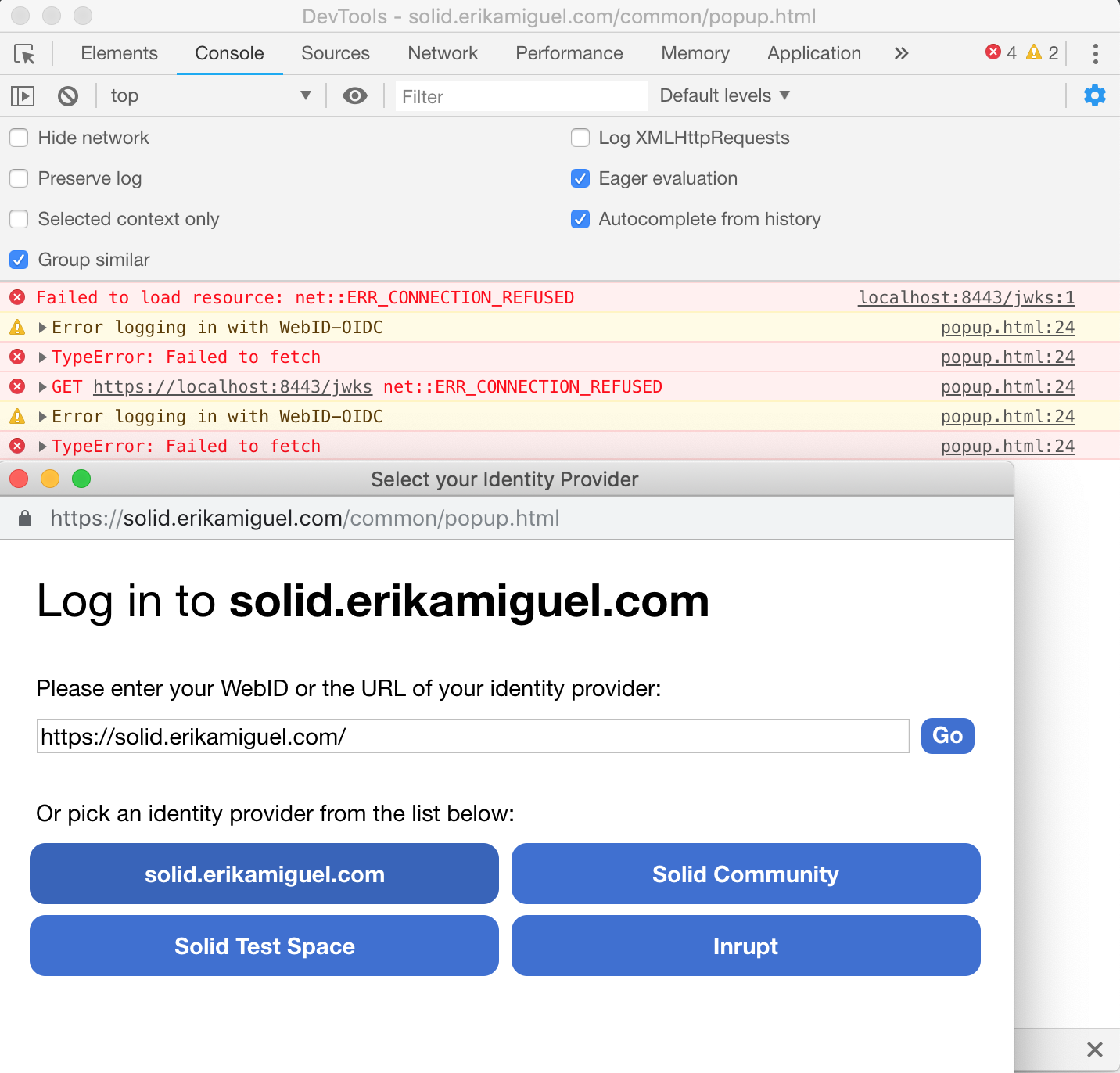
I'm still not getting popup.html to show. See screenshot below:
evmiguel
on 10 Dec 2018
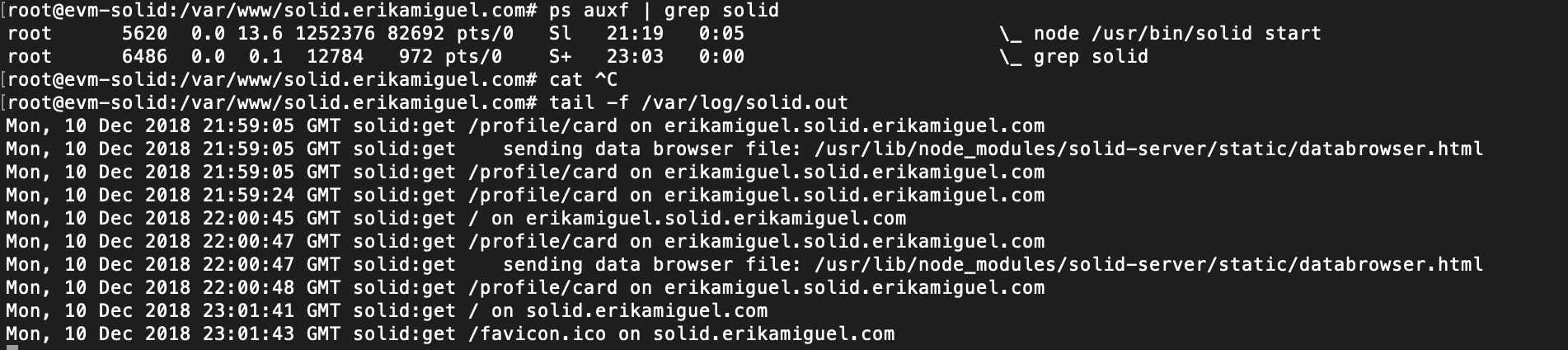
That's pretty weird... Connection refused... Are you sure the solid-server is actually running?
You might want to ask in the forums too, if you don't get an adequate answer here.
kjetilk
on 10 Dec 2018
@kjetilk Yes, solid-server is running. See below:
evmiguel
on 11 Dec 2018
I suppose you solved your problem because I was able to register and login to my account on https://solid.erikamiguel.com.
In my opinion you had a linked to proxy problem.
If it's the case, for the help of everyone could you paste your /config.json file and your Apache config
You also should have /data/solid.erikamiguel.com without port :8443.
I have a docker installation on Synology with inverse proxy activated for a list of xyz.
Then to help the maintainers could you please close the issue
bourgeoa
on 11 Dec 2018
@bourgeoa My config.json and Apache config can be found above. How were you able to login? I'd like to follow your steps so that I can reproduce.
evmiguel
on 11 Dec 2018
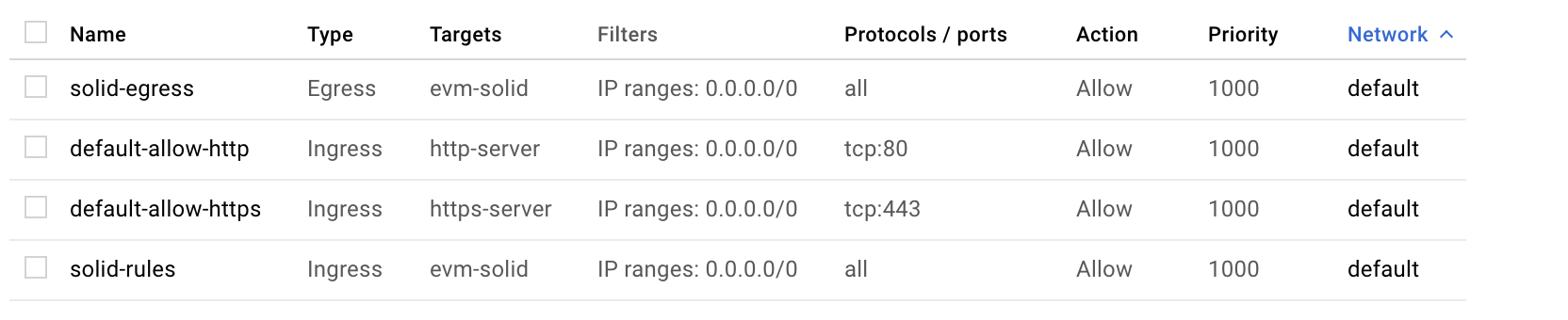
@kjetilk I've opened up all ports to my instance:
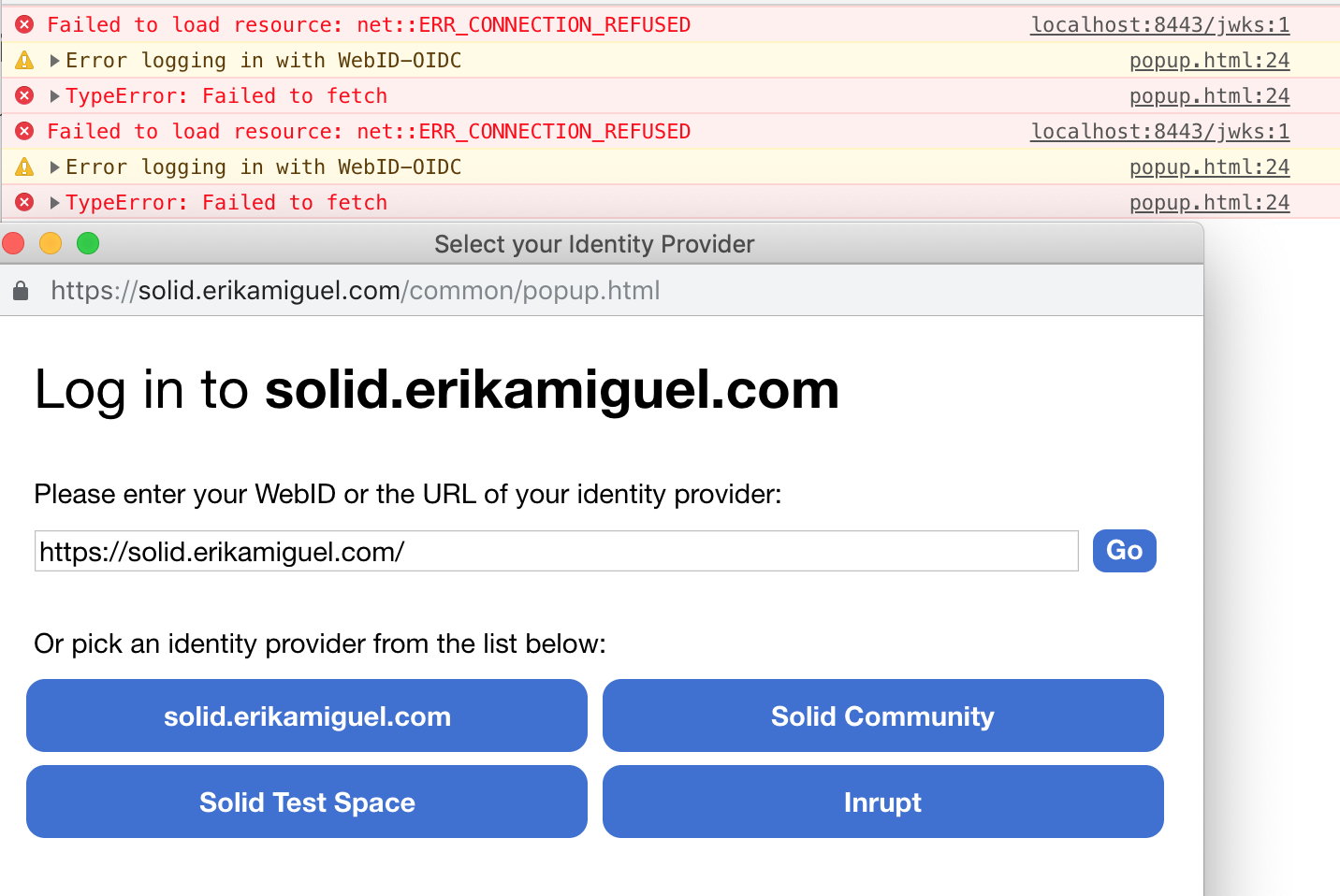
Still getting:
evmiguel
on 11 Dec 2018
Any ideas, @dmitrizagidulin ?
kjetilk
on 11 Dec 2018
I suppose you solved your problem because I was able to register and login to my account on https://solid.erikamiguel.com.
In my opinion you had a linked to proxy problem.
If it's the case, for the help of everyone could you paste your /config.json file and your Apache config
You also should have /data/solid.erikamiguel.com without port :8443.
I have a docker installation on Synology with inverse proxy activated for a list of xyz.
Then to help the maintainers could you please close the issue
bourgeoa
on 11 Dec 2018
As I told I registered with an External WebID with no problem and logged in with that external WebID.
I tried to register an other user without using external WebID and login but I do not succeed
I cannot help you more for the time being.
I will try to build a new Solid server unde V5.00.beta2
Actually I run with V4.3.1 with reverse proxy and have tested V4.4.0.0 without proxy and did not had any problem.
In your situation I will try V4.4.0.0 without reverse proxy, then with it (your need to change serverUri)
And if success retry with V5 beta2.
I don't know how to manually parameter a proxy. (I use the Synology app to do it)
bourgeoa
on 11 Dec 2018
Some hints :
when you rebuild your server make a clean install clear or delete at least /data and /.db
bourgeoa
on 11 Dec 2018
@kjetilk @evmiguel So, the first thing that looks suspicious in those Connection Refused errors is that it's trying to connect to localhost:8443/jwks, not to solid.erikamiguel.com/jwks.
So part of it I suspect is that something got generated (the OIDC provider config, or something else) _before_ you added the serverUri to your config, so it's still using the default url of localhost:8443.
So basically, you want to clear your .db/ directory, at very least, and restart. (I forget if popup.html is also generated at startup).
dmitrizagidulin
on 11 Dec 2018
@dmitrizagidulin deleting ./db and restart worked!
evmiguel
on 12 Dec 2018
Just for everyone's reference. To fix the connection refused error, I deleted .db/ folder per @dmitrizagidulin 's tip.
My final config.json looks like:
{
  "root": "/var/www/solid.erikamiguel.com/data",
  "port": "8443",
  "webid": true,
  "mount": "/",
  "configPath": "/var/www/solid.erikamiguel.com/config",
  "configFile": "/var/www/solid.erikamiguel.com/config.json",
  "dbPath": "/var/www/solid.erikamiguel.com/.db",
  "sslKey": "/etc/letsencrypt/live/erikamiguel.com/privkey.pem",
  "sslCert": "/etc/letsencrypt/live/erikamiguel.com/fullchain.pem",
  "multiuser": true,
  "enforceToc": false,
  "disablePasswordChecks": true,
  "supportEmail": "",
  "serverUri": "https://solid.erikamiguel.com",
  "server": {
    "name": "solid.erikamiguel.com",
    "description": "",
    "logo": ""
  }
}
My final reverse proxy config looks like:
<VirtualHost *:443>
    ServerName solid.erikamiguel.com

    SSLEngine On
    SSLProxyEngine On
    SSLProxyVerify none
    SSLProxyCheckPeerCN off
    SSLProxyCheckPeerName off
    SSLProxyCheckPeerExpire off
    ProxyPreserveHost on

    # Set the path to SSL certificate
    # Usage: SSLCertificateFile /path/to/cert.pem
    SSLCertificateFile /etc/letsencrypt/live/erikamiguel.com/cert.pem
    SSLCertificateKeyFile /etc/letsencrypt/live/erikamiguel.com/privkey.pem
    SSLCertificateChainFile /etc/letsencrypt/live/erikamiguel.com/chain.pem

    Header set Access-Control-Allow-Origin "*"

    # Servers to proxy the connection, or;
    # List of application servers:
    # Usage:
    # ProxyPass / http://[IP Addr.]:[port]/
    # ProxyPassReverse / http://[IP Addr.]:[port]/
    # Example:
    ProxyPass / https://localhost:8443/
    ProxyPassReverse / https://localhost:8443/

    # Or, balance the load:
    # ProxyPass / balancer://balancer_cluster_name

</VirtualHost>
<VirtualHost *:443>
    ServerAlias *.solid.erikamiguel.com

    SSLEngine On
    SSLProxyEngine On
    SSLProxyVerify none
    SSLProxyCheckPeerCN off
    SSLProxyCheckPeerName off
    SSLProxyCheckPeerExpire off
    ProxyPreserveHost on

    # Set the path to SSL certificate
    # Usage: SSLCertificateFile /path/to/cert.pem
    SSLCertificateFile /etc/letsencrypt/live/solid.erikamiguel.com/cert.pem
    SSLCertificateKeyFile /etc/letsencrypt/live/solid.erikamiguel.com/privkey.pem
    SSLCertificateChainFile /etc/letsencrypt/live/solid.erikamiguel.com/chain.pem


    # Servers to proxy the connection, or;
    # List of application servers:
    # Usage:
    # ProxyPass / http://[IP Addr.]:[port]/
    # ProxyPassReverse / http://[IP Addr.]:[port]/
    # Example:
    ProxyPass / https://localhost:8443/
    ProxyPassReverse / https://localhost:8443/

    # Or, balance the load:
    # ProxyPass / balancer://balancer_cluster_name

</VirtualHost>
I met the same problem, and deleting ./db and restart worked! Thanks all
 litianc
on 18 Apr 2019
litianc
on 18 Apr 2019
For anyone stumbling on this, the file is actually ./.db. Mind the dot, it is a hidden file.
 belvederef
on 27 Nov 2019
belvederef
on 27 Nov 2019
Related issues
 ReinsBrain
·
3Comments
ReinsBrain
·
3Comments
 akuckartz
·
6Comments
akuckartz
·
6Comments
 melvincarvalho
·
7Comments
melvincarvalho
·
7Comments
 SvenDowideit
·
6Comments
SvenDowideit
·
6Comments
 TallTed
·
4Comments
TallTed
·
4Comments
Most helpful comment
Just for everyone's reference. To fix the connection refused error, I deleted
.db/folder per @dmitrizagidulin 's tip.My final
config.jsonlooks like:My final reverse proxy config looks like: