Node-slack-sdk: `invalid_service` error in slack slash commands
Description
Describe your issue here.
What type of issue is this? (place an x in one of the [ ])
- [ ] bug
- [ ] enhancement (feature request)
- [x] question
- [x] documentation related
- [ ] testing related
- [x] discussion
Requirements (place an x in each of the [ ])
- [ ] I've read and understood the Contributing guidelines and have done my best effort to follow them.
- [ ] I've read and agree to the Code of Conduct.
- [x] I've searched for any related issues and avoided creating a duplicate issue.
Bug Report
Filling out the following details about bugs will help us solve your issue sooner.
Packages:
Select all that apply:
- [ ]
@slack/web-api - [ ]
@slack/events-api - [ ]
@slack/interactive-messages - [ ]
@slack/rtm-api - [ ]
@slack/webhooks - [x] I don't know
Reproducible in:
package version: Not Applicable
node version: 12.x
OS version(s): Windows 10
Steps to reproduce:
- Create a slack app and create a new slash command, add url, details, etc.
- Reinstall the app on development workspace
- Open slack client, type the slack command (which is visible in the popup meaning it has synced)
Expected result:
Slack accepts the command and hits my provided url using HTTP POST verb along with payload
Actual result:
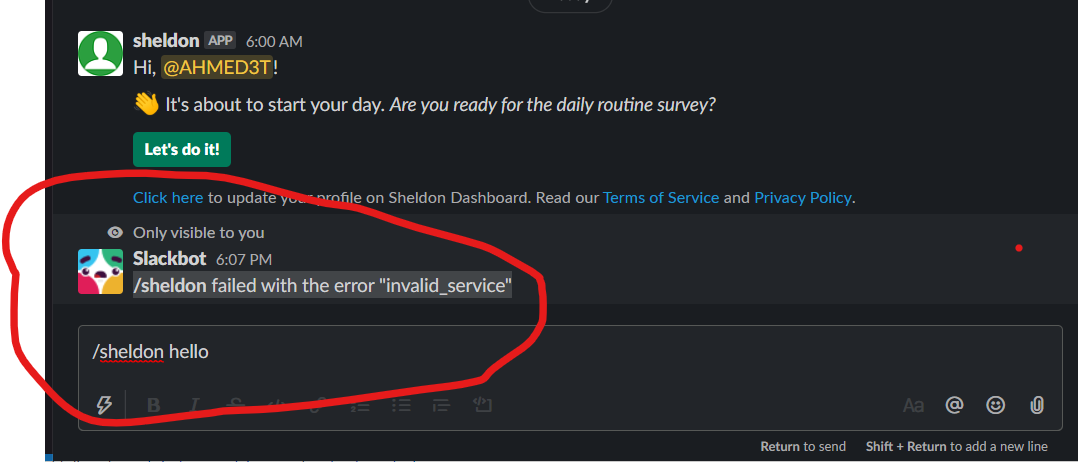
Slackbot returns a silly error "failed with the error invalid_service". My endpoint doesn;t receive any hit from slack.
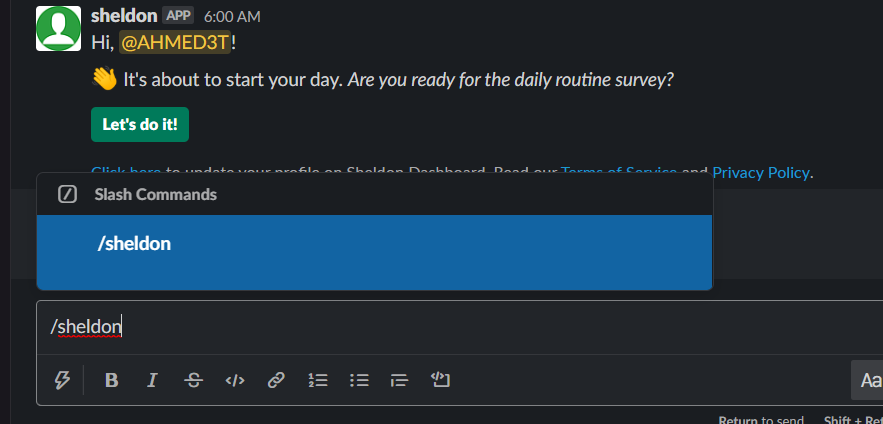
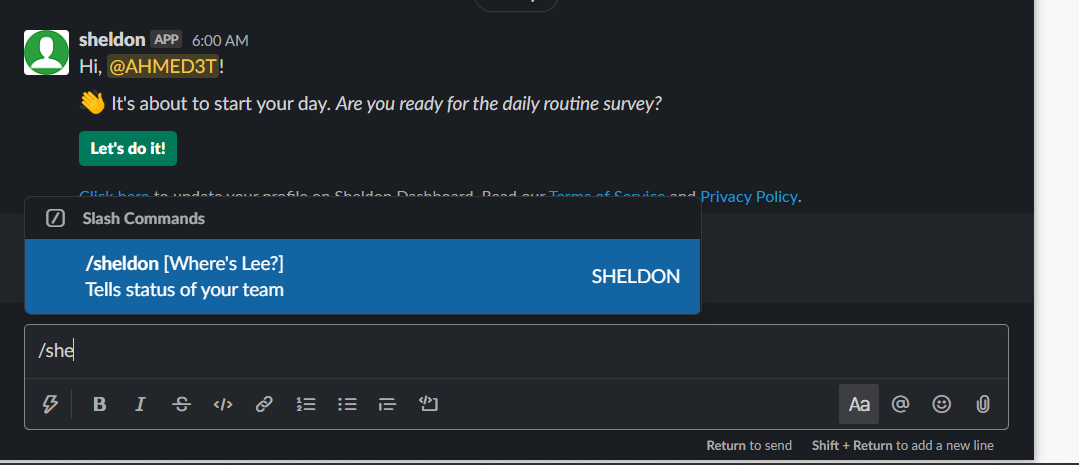
P.S. Sometimes the command is there in the popup but its details like description, etc are gone as shown in screenshot # 2. Then, I reinstall the app and it comes back as shown in screenshot # 3.
I've googled a lot about this problem searched YouTube but didn't find any clue about whats wrong with it. Please help me I'm working on a project and deadline is really near 😞 I've spent a whole day meddling with it but to no avail.
Attachments:
Logs, screenshots, screencast, sample project, funny gif, etc.
 AHMED3T
All 7 comments
Hi @seratch ,
Isn't there any solution for my problem? I've been waiting for a couple of days. I'm working on a project and I need your guidance urgently
AHMED3T
on 27 Apr 2020
@AHMED3T Thank you for writing in here and following up. I've internally reported your requestion/feedback here with the server-side team. I haven't got any information to share with you yet. If this is urgent for you, you can contact Slack's support team. They can do an investigation more deeply by accessing your app/workspace information.
 seratch
on 27 Apr 2020
seratch
on 27 Apr 2020
Hi @seratch,
Thank you for guiding me. Meanwhile, waiting for response of your server-side team, I'll be contacting Slack's support team because it's urgent for me!
Regards
AHMED3T
on 27 Apr 2020
@AHMED3T This seems to be caused by a rare condition on the server-side and unfortunately there is no simple way to fix the state. I hate to say this but could you reinstall your Slack app to the workspace that is having the issue? Revoking all the tokens generated for the workspace and doing the OAuth flow again should work for you. I'm sorry for the inconvenience and my unclear answer here. I would appreciate it if you could understand this.
seratch
on 28 Apr 2020
Thank you @seratch, revoking all tokens and reinstalling the app has solved my problem 😄. I'm closing this issue now. Thanks once again. 👍
AHMED3T
on 28 Apr 2020
Revoking all the tokens generated for the workspace and doing the OAuth flow again should work for you.
Our team got the same issue and we resolved by the same method above.
 goldeneggg
on 20 Jul 2020
goldeneggg
on 20 Jul 2020
Is there a fix for this issue? We keep running into this every so often and it's very frustrating to revoke and reissue tokens and redeploy the app
 rnaimi
on 13 Oct 2020
rnaimi
on 13 Oct 2020
Related issues
 bobrik
·
25Comments
bobrik
·
25Comments
 bmajz
·
14Comments
bmajz
·
14Comments
 jayjanssen
·
13Comments
jayjanssen
·
13Comments
 danielravina
·
16Comments
danielravina
·
16Comments
 thepont
·
17Comments
thepont
·
17Comments
Most helpful comment
Thank you @seratch, revoking all tokens and reinstalling the app has solved my problem 😄. I'm closing this issue now. Thanks once again. 👍