Node-slack-sdk: can bots not join channels?
hi,
I just started writing a bot that joins and listens on all my team's channels. however, according to https://api.slack.com/bot-users there doesn't seem to be an option for bots to join channels (other than #general). — or am I missing s.th. here?
freder
 freder
All 12 comments
Bot users need to be invited to channels. If you say @yourbotusername you will get a dialog to invite him/her/it.
 evansolomon
on 18 Feb 2015
evansolomon
on 18 Feb 2015
The list of methods available to bot users is at the bottom of: https://api.slack.com/bot-users. Not sure why channel.join is prohibited to bots...
 jtatum
on 18 Feb 2015
jtatum
on 18 Feb 2015
No, bots cannot join channels by themselves. This is something we're talking about changing in the future but we have no firm plans yet.
We're tracking that as a bug inside Slack, so I'm going to close this out here. We'll make an announcement on the SlackAPI twitter account if this situation changes...
 paulhammond
on 26 Feb 2015
paulhammond
on 26 Feb 2015
I seemingly cannot post "complex messages" as a bot user.
I'd love to be able to have a bot user call a slash command. I'm not sure if this is possible with complex messages, but I ran into errors while trying.
The bot docs say (with original bolding):
To post more complex messages as a bot user, clients can use the Web API methodchat.postMessage. Be sure and set as_user to true and use your bot user token.
And yet when I set this field:
{ ok: false, error: 'not_in_channel' }
When I try to join the channel:
{ ok: false, error: 'user_is_bot' }
 buley
on 26 Mar 2016
buley
on 26 Mar 2016
Is adding bots to individual channels still not supported? The bot I integrated sends messages to "slackbot" only. Inviting the bot as you'd invite members does not seem to work.
 kristg
on 8 Dec 2017
kristg
on 8 Dec 2017
Sad that this is not supported while coding for the Global Legal Hackathon, 2018, in Chicago.
 hpg-mheck
on 25 Feb 2018
hpg-mheck
on 25 Feb 2018
One could argue that it's part of the slack security model. Because bots may not be trusted (e.g. a third party app), allowing them to join any channel (even public) and read history is not desirable.
jtatum
on 2 Mar 2018
Bot users need to be invited to channels. If you say
@yourbotusernameyou will get a dialog to invite him/her/it.
I wanted to ask how do i disable the bot being added to channels . Is this possible ? Also is there a way i can edit the dialog that comes up when i say @botusername . Thanks! @evansolomon
 AashrithChilkepalli
on 19 Nov 2018
AashrithChilkepalli
on 19 Nov 2018
@AashrithChilkepalli nope, unfortunately you cannot prevent the bot from joining a channel programmatically. this is something we're aware of as something users need, but we don't have a built in solution for this yet.
i have a workaround suggestion: you can make your bot completely non-functional in channels it doesn't recognize. in addition, when it joins a channel it shouldn't be in, you can post a message telling the channel that it won't work there and asking a human user to please /kick itself so that it can leave.
 aoberoi
on 12 Dec 2018
aoberoi
on 12 Dec 2018
This restriction is supposedly lifted, but if I call the conversations.join method using a bot token, I get:
{
    "ok": false,
    "error": "not_allowed_token_type"
}
 alper
on 1 Mar 2020
alper
on 1 Mar 2020
@alper
{
"ok": false,
"error": "not_allowed_token_type"
}
do not use xoxp-xxxxxxxxxxx-x-xx-xx token
use xoxb-xxxx-x-x--x-x-x-x
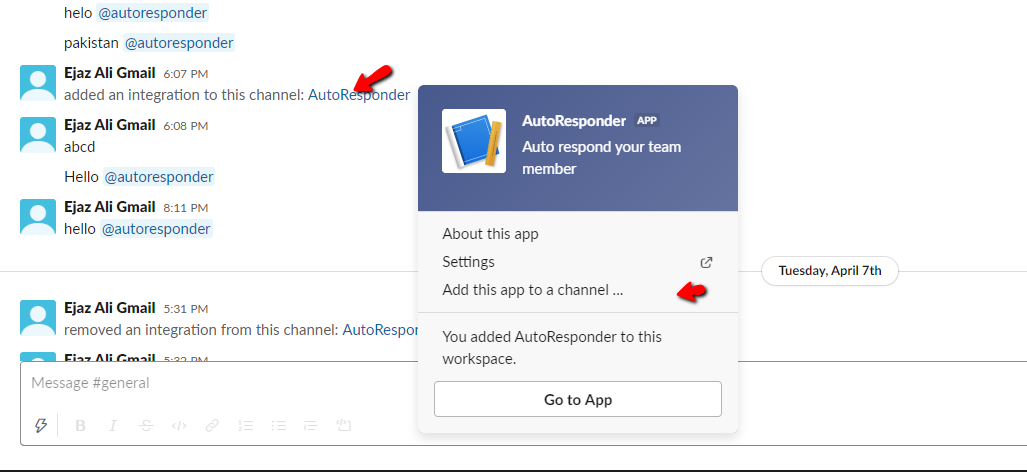
Every time when you will create a bot user or allocate some event subscriptions to a bot, Slack notify you in slack app. You w'll need to manually add this app/bot to specific channel where you want to auto reply or you want to perform any activity :)
 ejazalimadni1
on 10 Apr 2020
ejazalimadni1
on 10 Apr 2020
@alper Did you mean that the "bots can't join channels using conversation.join" restriction is lifted? If so can you point me to where you found that info? It's not working for me, but the message I get is that the bot is already in the channel, which is not right =)
 pfolk
on 9 Nov 2020
pfolk
on 9 Nov 2020
Related issues
 gyunaev
·
12Comments
gyunaev
·
12Comments
 thepont
·
17Comments
thepont
·
17Comments
 zhang699
·
32Comments
zhang699
·
32Comments
 dcsan
·
12Comments
aoberoi
·
16Comments
dcsan
·
12Comments
aoberoi
·
16Comments
Most helpful comment
Bot users need to be invited to channels. If you say
@yourbotusernameyou will get a dialog to invite him/her/it.