Node-slack-sdk: How to make chat.postMessage @here the channel
Description
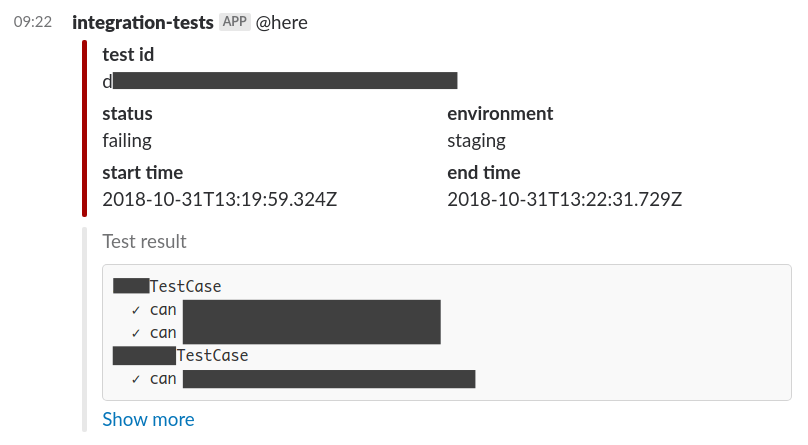
I'm using web.chat.postMessage({ text: '@here', ... }); to ping a channel when tests fail. Alas, the @here appears as normal black text, and doesn't have the notifying behavior I'm expecting from a "real" @here in Slack.
→ What should I do? Also, I looked the doc and didn't find anything, maybe there's this Linking to channel and users section, but it makes no sense to me (what would be the <#...|...> or <@U...> syntax for @here?). Room for docs improvement?
What type of issue is this?
- [x] question
- [x] documentation related
Requirements
- [x] I've read and understood the Contributing guidelines and have done my best effort to follow them.
- [x] I've read and agree to the Code of Conduct.
- [x] I've searched for any related issues and avoided creating a duplicate issue.
Reproducible in:
@slack/client version: 4.8.0
node version: 8.12.0
OS version(s): Ubuntu 18.04.1
Steps to reproduce:
- Run
web.chat.postMessage({ text: '@here', ... });
Expected result:
@here is recognized & highlighted as special keyword, and channel users are notified (normal @here behavior).
Actual result:
@here displays as normal black text, and channel users are not notified. See below screenshot.
Attachments:
 ronjouch
>All comments
@ronjouch good question. you can find the answer in the formatting docs for variables.. In short, you should use the following in the text string:
 aoberoi
on 31 Oct 2018
aoberoi
on 31 Oct 2018
Related issues
 kurisubrooks
·
36Comments
kurisubrooks
·
36Comments
 bobrik
·
25Comments
bobrik
·
25Comments
 jayjanssen
·
13Comments
jayjanssen
·
13Comments
 gyunaev
·
12Comments
gyunaev
·
12Comments
 bmajz
·
14Comments
bmajz
·
14Comments
Most helpful comment
@ronjouch good question. you can find the answer in the formatting docs for variables.. In short, you should use the following in the text string: