Node-slack-sdk: Failed to minify
Description
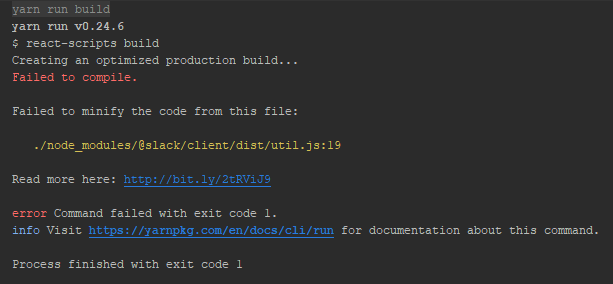
When trying to build my react app I get the following error:
Failed to minify the code from this file:
./node_modules/@slack/client/dist/util.js:19
Is there something I need to do to get this working? I installed the package using NPM.
What type of issue is this? (place an x in one of the [ ])
- [ ] bug
- [ ] enhancement (feature request)
- [x ] question
- [ ] documentation related
- [ ] testing related
- [ ] discussion
Requirements (place an x in each of the [ ])
- [x ] I've read and understood the Contributing guidelines and have done my best effort to follow them.
- [x ] I've read and agree to the Code of Conduct.
- [x ] I've searched for any related issues and avoided creating a duplicate issue.
Bug Report
Filling out the following details about bugs will help us solve your issue sooner.
Reproducible in:
@slack/client version: ^4.2.0
node version: v8.10.0
OS version(s): Windows 10
Steps to reproduce:
- create-react-app
- npm install @slack/client
- react-scripts build
Expected result:
All dependencies would properly build.
Actual result:
Unable to minify files.
Attachments:
Logs, screenshots, screencast, sample project, funny gif, etc.
 Coolranch
All 7 comments
For the Issue Creator:
As of current, there is support for compiling dependencies (node_modules) using Babel in react-scripts@2, the module used by create-react-app for building apps. Check this issue for instructions on upgrading your project to use these new features.
It should be noted thatreact-scripts@2is technically experimental; but, for what it's worth, it seems that v2 ofreact-scriptsis decently stable, and you probably won't run into any huge, breaking issues.
Since writing this, v2 of
react-scriptshas released. This version ofcreate-react-appshould be safe to use.
For Maintainers:
Here's the relevant part of the link from the screenshot/build log.
Basically, create-react-app's v1 production minifier (more on this later, but essentially v1 is currently the default) is purposefully set up to not run Babel on an application's dependencies. The line referenced by this issue's build log uses a template literal (`...`), which is an ES6 feature, which is thus "unminfiable" by the ES5 minifier.
The Fix
The build process should be tweaked to generate fully ES5-compatible code. From what I can tell, this is a guaranteed step in resolving this issue.
What about supporting the
"module"key inpackage.json?
I'm not sure that this wouldn't work, but from checking out a different package's compiled ES module code (referenced by the "module" package key) seemed like it was all ES5 code with one export statement at the end, making me think that even this entry point requires code to be ES5-compatible.
HOWEVER, I'd consider this solution to be a step in the wrong direction. This forces us to compile releases to ES5, giving up features that're supported by our minimum target version of Node. As seen by the first part of this comment, users running into this issue already have a valid and relatively non-dangerous workaround, plus this specific issue will essentially resolve itself when react-scripts eventually updates.
Really, this issue will solve itself in time, and thus should be closed.
Complete Reproduction Steps
$ npx create-react-app temp_project_name
$ cd temp_project_name
$ npm i -S @slack/client
Then, while the package is installing, go to src/index.js and add these two lines (preferably just after the default list of imports):
import { WebClient } from '@slack/client';

const web = new WebClient();
And finally, build:
$ npm run build
 clavin
on 3 May 2018
clavin
on 3 May 2018
@clavin thanks for digging into this! it seems like you've already spent the time to reproduce, so i have a question: are you sure its the template literal that causes the build failure, and not the pkg.name or pkg.version reference which occurs on the same line?
 aoberoi
on 8 May 2018
aoberoi
on 8 May 2018
@clavin here's one thought i just had: if we set up a new tsconfig to extend the current one but change the target to es5 (trivial), and on npm run build add an es5 compatible build into a different directory (let's call it dist-es5), then we should be able to use the "module" key in package.json, right?
pros:
- should help solve the immediate issue without waiting for
react-scripts@2
cons:
- increased build time (negligible)
- package size cost: anyone who runs
npm installwill need to download some more bytes. this shouldn't impact apps which bundle, since the bundle will only capture the bytes they specifically need. i'd like to say this is negligible too, but can we think of an audience that would specifically care about this?
aoberoi
on 8 May 2018
I'm 100% positive it's the template literal, simply because the issue was so widespread and was highly in demand for react-scripts@2. Just to be certain, I did test my previous repro steps using react-scripts@2 and the module built just fine, no errors. It could still be either, but the solution largely remains the same.
As for the workaround, I too considered this, and initially had that written in my initial comment, but my personal vote is against transpiling to pure ES5:
I feel like the majority of users of this package are running on Node, and even of those that are using webpack and Babel to transpile their web apps that use this package, only a portion of those are using create-react-app with completely default settings. From there, there's two solutions these users have to be able to still use this package in its current state:
- Eject (open up the project to manual configuration). It's understandable why some would want to avoid this, though it's also very common, and not necessarily out of the picture--though I do find it less optimal than...
- Upgrading to the
react-scripts@2alpha, which is currently without any known bugs or prominent issues (according to the issue for it)--and will eventually be the default.
My question is: can we think of an audience that is using create-react-app and refuses to either eject or upgrade to the seemingly-stable react-scripts@2? And further, are they large enough to justify requiring everyone else to download a second build of the package?
Again, I'd like to emphasize that this issue can very easily be mitigated by users that are affected by this by just not using react-scripts@1, something that I feel is probably very common.
I will give in some and say that my opinion isn't set in stone. For one, my biggest (and maybe even only) concern here is just package size, and like @aoberoi said, this might just be negligible. Further, the audience I'm talking about might just be monuments bigger than I imagine, in which case my opinion definitely changes to support them.
If we do go down this path, then I'm also against compiling to two targets. Here's the situation we end up with:
- One version (the
"main"field inpackage.json) will have to be CommonJS modules, and completely ES5-compatible code - The other version (
"module"field inpackage.json) will be exactly the same, but the module syntax will change from CommonJS'srequireandmodule.exportsto ES Modules'importandexport. Code is still completely ES5-compatible.
In this case, both compiled versions are, more or less, exactly the same, save for a few lines at the start/end. Most of the code is duplicated, and I don't know what the benefit is in this case, as the transformation is almost 1:1 (each import is a require, each export is an exports), plus the bundler is likely to transform it all back to a CommonJS-like syntax when compiling for browsers.
I don't know if using CommonJS modules affects common bundle strategies like tree shaking, which I know is supported using ES Modules, but I'm unsure of the support for CommonJS modules, which is definitely a fair concern to have.
Really, it'd probably just be better to make sure the current tsconfig.json compiles to ES5-compatible code. I still dislike this idea, because we're giving up syntax supported by what I presume to be the dominating (not just majority, dominating) group of users that can support this ES6+ syntax--even on Node; though it's still at essentially a negligible cost.
clavin
on 8 May 2018
that's some good food for thought.
i 💯 agree that compiling to an ES5 target in the main version is a loss we shouldn't tolerate. the downlevel support for many JavaScript features is much worse from a performance point of view than the native VM implementation. i wasn't suggesting this outcome.
instead, i was suggesting the "module" target be ES5 compatible while the "main" target remain compatible with the oldest engine in package.json's "engines"."node" (as is done today).
@clavin's argument makes a ton of sense to me. on top of that, it would be hard to define how long we need to support the alternative "module" build (probably cannot remove until semver:major bump). and lastly, if the "module" key in package.json ends up being adopted for ESM support (officially or unofficially), we would have degraded the performance of that build by constraining it to ES5 compatibility.
i'm going to rule in favor of keeping the build as-is, and pointing users to the solutions mentioned above. @Coolranch, please speak up if there's any concern of yours i missed.
aoberoi
on 8 May 2018
As a quick update, this issue's surface cause has been resolved since create-react-app recently hit 2.0.0. This fixes this specific case this issue presents, as v2 of react-scripts is now used in React projects created using create-react-app.
The deeper issue is still lingering, but the need to fix it has greatly diminished since it now seems to be a far more trivial issue.
Some "older" projects (this essentially just released) might still run into this issue, but in the release article, there's a section dedicated to updating to v2, helping mitigate this.
clavin
on 4 Oct 2018
@clavin thanks for the update!
given this new information, i think we can close this issue. the preferred fix is to update to react-scripts@2 in the application.
aoberoi
on 5 Oct 2018
Related issues
 CoreyCole
·
12Comments
aoberoi
·
10Comments
CoreyCole
·
12Comments
aoberoi
·
10Comments
 mmmulani
·
10Comments
aoberoi
·
11Comments
mmmulani
·
10Comments
aoberoi
·
11Comments
 danielravina
·
16Comments
danielravina
·
16Comments
Most helpful comment
For the Issue Creator:
As of current, there is support for compiling dependencies (
node_modules) using Babel inreact-scripts@2, the module used bycreate-react-appfor building apps. Check this issue for instructions on upgrading your project to use these new features.For Maintainers:
Here's the relevant part of the link from the screenshot/build log.
Basically, create-react-app's v1 production minifier (more on this later, but essentially v1 is currently the default) is purposefully set up to not run Babel on an application's dependencies. The line referenced by this issue's build log uses a template literal (
`...`), which is an ES6 feature, which is thus "unminfiable" by the ES5 minifier.The Fix
The build process should be tweaked to generate fully ES5-compatible code. From what I can tell, this is a guaranteed step in resolving this issue.
I'm not sure that this wouldn't work, but from checking out a different package's compiled ES module code (referenced by the
"module"package key) seemed like it was all ES5 code with oneexportstatement at the end, making me think that even this entry point requires code to be ES5-compatible.HOWEVER, I'd consider this solution to be a step in the wrong direction. This forces us to compile releases to ES5, giving up features that're supported by our minimum target version of Node. As seen by the first part of this comment, users running into this issue already have a valid and relatively non-dangerous workaround, plus this specific issue will essentially resolve itself when
react-scriptseventually updates.Really, this issue will solve itself in time, and thus should be closed.
Complete Reproduction Steps
Then, while the package is installing, go to
src/index.jsand add these two lines (preferably just after the default list of imports):And finally, build: