Node-serialport: Data made available to the nodejs appln from serialport package is corrupted
Summary of Problem
HW setup: Sensors connected to raspberry pi. Each sensor is sending JSON data every few seconds.
- What are you trying to do?
nodejs appln trying to parse and process read sensors data which are connected to raspberry pi - What happens?
when two sensors send data at the same time, data made available from serialport npm package is corrupted because of which nodejs appln is unable to parse and process the data. - What should have happened?
if received two JSON data packet from sensors at the same time, first received JSON data should be parsed by the serialport package using parser and should be made available to the nodejs appln and process the next JSON data
Code to Reproduce the Issue
const serialport = new SerialPort(path)

// Code
var SerialPort = require("serialport");
const Readline = SerialPort.parsers.Readline;
const parser = new Readline({ delimiter: "rn" });
const serialport = new SerialPort(port.comName, {
baudRate: 9600
});
serialport.pipe(parser);
parser.on("data", (data) => {
console.log(data.toString());
}
output: - Two JSON data are merged
{"systick":{"model_name":"XXXX","device_name":"Unnamed","device_id":"XXXX","uptime":{"value":"686{"Temperature":24.75,"Humidity":36.82}
10","units":"seconds"}}}
expected output:
{"systick":{"model_name":"XXXX","device_name":"Unnamed","device_id":"XXXX","uptime":{"value":"68640","units":"seconds"}}}
{"Temperature":24.74,"Humidity":36.77}
Versions, Operating System and Hardware
- SerialPort@? 6.2.1
- Node.js v? v8.12.0
- Windows? Linux? Mac? Linux
- Hardware and chipset? (Prolific/FTDI/Other) FTDI + Other
Any suggestions is appreciated,
Gautham
 gauthamkantharaju
All 9 comments
serialport debug log attached
outpost_debug.log
gauthamkantharaju
on 20 Sep 2018
@gauthamkantharaju I need some help understanding your setup.
Is the app running on the Raspberry Pi and reading the sensors through one SerialPort?
Can you provide more details about the model / type of sensors you're using?
 HipsterBrown
on 21 Sep 2018
HipsterBrown
on 21 Sep 2018
@HipsterBrown
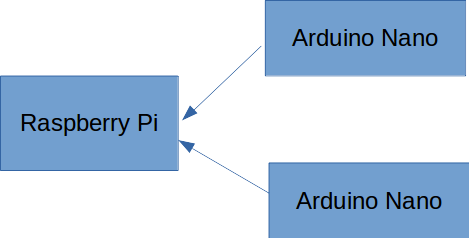
Yes, nodejs appln is running on Raspberry Pi and sensors (arduino nano devices) and are connected to raspberry pi through different serial device nodes for ex: /dev/ttyUSB0, /dev/ttyUSB1 etc...
gauthamkantharaju
on 21 Sep 2018
So are you creating a new serialport instance for each sensor? From reading your example code, it appears there is only one serialport interface.
HipsterBrown
on 22 Sep 2018
Sorry, using SerialPort.list function to traverse through the serial device connected and creating serialport instances for each arduino sensors.
SerialPort.list(function (err, ports) {
    ports.forEach(function (port) {
        if ((port.manufacturer == "1a86") || (port.manufacturer == "FTDI")) {
            serialport[port_count] = new SerialPort(port.comName, {
            baudRate: 9600
        }

        if (!isParseData) {
            parser.on("data", saveData);
            isParseData = true;
        }
        port_count++;
    });
});

function saveData (data) {
    var jdata = {};

    /* Prevents errors when listening */
    if (isJSON(data)) {
        jdata = JSON.parse(data);
    } else {
        console.log("Hiccup Averted"); ------> this code is executed when json data is corrupted!!
        jdata = { "Message": "Blank" }; ------> json data is blank!!
     }
}

 function isJSON (str) {
    try {
        JSON.parse(str);
    } catch (e) {
        return false;
    }
    return true;
}
I guess the issue is that all the serialport instances have a common parser function callback parser.on("data", saveData) where all the sensor data is made available from the serialport package.
So, when two sensors send out or at the raspberry pi end receives data at the same time then serialport package stores the received sensors data into a internal buffer and waits for the parser i.e. 'n', unless the 'n' is received the data is not made available to the nodejs appln. If this is the case, then data made available to the nodejs appln will be corrupted.
gauthamkantharaju
on 22 Sep 2018
@HipsterBrown
any suggestions or update? let me know. Thank you.
gauthamkantharaju
on 25 Sep 2018
@gauthamkantharaju Which parser are you using? The Readline parser?
Where are you defining parser? Ideally, you're defining it when piping it to each SerialPort instance. See the example -> https://serialport.io/docs/api-parser-readline
So, when two sensors send out or at the raspberry pi end receives data at the same time then serialport package stores the received sensors data into a internal buffer and waits for the parse
Each instance of the SerialPort class should have its own internal buffer, so the data shouldn't be mixed together like that.
Have you tried using something like johnny-five with rasp-io? It has a very nice API for working with multiple sensors.
HipsterBrown
on 25 Sep 2018
@HipsterBrown correct, using Readline parser. So we need to define parser for each of the SerialPort instance? which I was not doing, was defining the parser only once. So, will try out and feedback.
Thank you for the info and suggestion.
gauthamkantharaju
on 25 Sep 2018
@HipsterBrown did define parser for each serialport instance and now there are no json packet corruption coming off of sensors connected to raspberrypi.
FYI, the first json packet received doest not matter which sensor, "Hiccup Averted" log shows up though. That too only once for the very first time other than that no issues at all :)
function saveData (data) {
    var jdata = {};

    /* Prevents errors when listening */
    if (isJSON(data)) {
        jdata = JSON.parse(data);
    } else {
        console.log("Hiccup Averted"); ------> this code is executed when json data is corrupted!!
        jdata = { "Message": "Blank" }; ------> json data is blank!!
     }
}

 function isJSON (str) {
    try {
        JSON.parse(str);
    } catch (e) {
        return false;
    }
    return true;
}
Thank you for the suggestion and helping me out,
Gautham
gauthamkantharaju
on 7 Oct 2018
Related issues
 rwaldron
·
7Comments
rwaldron
·
7Comments
 henkbredell
·
5Comments
henkbredell
·
5Comments
 apiel
·
5Comments
apiel
·
5Comments
 Fuzzzzel
·
6Comments
Fuzzzzel
·
6Comments
 HemantJoshi
·
4Comments
HemantJoshi
·
4Comments
Most helpful comment
@gauthamkantharaju Which parser are you using? The Readline parser?
Where are you defining
parser? Ideally, you're defining it when piping it to eachSerialPortinstance. See the example -> https://serialport.io/docs/api-parser-readlineEach instance of the
SerialPortclass should have its own internal buffer, so the data shouldn't be mixed together like that.Have you tried using something like
johnny-fivewith rasp-io? It has a very nice API for working with multiple sensors.