Node-sass: Node 10 with node-sass 4.11 ELIFECYCLE 134 with Windows Subsystem for Linux
No matter what I do, I can't seem to install node-sass either globally or locally. I've spent hours on this problem so any help will be much appreciated!
OS: Debian
Host: WSL (Windows Subsystem for Linux)
Error: [email protected] install: node scripts/install.js
code: ELIFECYCLE
errno: 134
_Steps I followed to get here:_
- Install NodeJs from Linux Binary as per these instructions:
https://github.com/nodejs/help/wiki/Installation
which node
/usr/local/lib/nodejs/node-v10.15.3-linux-x64/bin/node - create syslink for node/npm/npx to
/usr/bin - Add node to PATH (in ~/.profile)
export PATH=/usr/local/lib/nodejs/node-v10.15.3-linux-x64/bin:$PATH
4. set npm config prefix to
/home/mike/.npm-global
Info
npm -v 6.4.1
node -v 10.15.3
node process versions
```{ http_parser: '2.8.0',
node: '10.15.3',
v8: '6.8.275.32-node.51',
uv: '1.23.2',
zlib: '1.2.11',
ares: '1.15.0',
modules: '64',
nghttp2: '1.34.0',
napi: '3',
openssl: '1.1.0j',
icu: '62.1',
unicode: '11.0',
cldr: '33.1',
tz: '2018e' }
**process.platform**: `Linux`

**npm ls node-sass**

```/home/mike
└── (empty)
_Steps to reproduce:_
mkdir temp1
cd temp1
npm i node-sass
_Output:_

_Full Log_ (/home/mike/.npm/_logs/2019-04-25T21_46_52_466Z-debug.log)
2019-04-25T21_46_52_466Z-debug.log
Thanks again. Any more info please let me know.
 MikeShiner
All 13 comments
Looks like you may have a corrupted binary in your npm cache. Try running
npm cache clean, deleted your node_modules, and running npm install again.
On Fri., 26 Apr. 2019, 7:54 am Mike Shiner, notifications@github.com
wrote:
>
- NPM version (npm -v):
- Node version (node -v):
- Node Process (node -p process.versions):
- Node Platform (node -p process.platform):
- Node architecture (node -p process.arch):
- node-sass version (node -p "require('node-sass').info"):
- npm node-sass versions (npm ls node-sass):
No matter what I do, I can't seem to install node-sass either globally or
locally. I've spend hours on this problem so any help will be much
appreciated!
OS: Debian
Host: WSL (Windows Subsystem for Linux)
Error: [email protected] install: node scripts/install.js
code: ELIFECYCLE
errno: 134Steps I followed to get here:
- Install NodeJs from Linux Binary as per these instructions:
https://github.com/nodejs/help/wiki/Installation
which node
/usr/local/lib/nodejs/node-v10.15.3-linux-x64/bin/node- create syslink for node/npm/npx to /usr/bin
- Add node to PATH (in ~/.profile)
export PATH=/usr/local/lib/nodejs/node-v10.15.3-linux-x64/bin:$PATH- set npm config prefix to /home/mike/.npm-global
Info
npm -v 6.4.1
node -v 10.15.3
node process versionsnode: '10.15.3',
v8: '6.8.275.32-node.51',
uv: '1.23.2',
zlib: '1.2.11',
ares: '1.15.0',
modules: '64',
nghttp2: '1.34.0',
napi: '3',
openssl: '1.1.0j',
icu: '62.1',
unicode: '11.0',
cldr: '33.1',
tz: '2018e' }
process.platform: Linux
npm ls node-sass
└── (empty)
Steps to reproduce:
mkdir temp1
cd temp1
npm i node-sassOutput:
[image: image]
https://user-images.githubusercontent.com/5732580/56770514-17a16600-67ac-11e9-8078-53c0d10fec6e.pngFull Log (/home/mike/.npm/_logs/2019-04-25T21_46_52_466Z-debug.log)
2019-04-25T21_46_52_466Z-debug.log
https://github.com/sass/node-sass/files/3119001/2019-04-25T21_46_52_466Z-debug.logThanks again. Any more info please let me know.
—
You are receiving this because you are subscribed to this thread.
Reply to this email directly, view it on GitHub
https://github.com/sass/node-sass/issues/2641, or mute the thread
https://github.com/notifications/unsubscribe-auth/AAENSWACWLHNU3GZQ6GLBS3PSISBRANCNFSM4HIQ6S7Q
.
 xzyfer
on 26 Apr 2019
xzyfer
on 26 Apr 2019
Having the same issue on CI. Can't reproduce on my local machine though.
 mpgo13
on 26 Apr 2019
mpgo13
on 26 Apr 2019
I'm getting a similar error on Gitlab CI as well.
Downloading binary from https://github.com/sass/node-sass/releases/download/v4.11.0/linux-x64-72_binding.node
Cannot download "https://github.com/sass/node-sass/releases/download/v4.11.0/linux-x64-72_binding.node":

HTTP error 404 Not Found
Then it tries to build node-sass, eventually failing with this -
../src/create_string.cpp: In function 'char* create_string(Nan::MaybeLocal<v8::Value>)':
../src/create_string.cpp:17:37: error: no matching function for call to 'v8::String::Utf8Value::Utf8Value(v8::Local<v8::Value>&)'
   v8::String::Utf8Value string(value);
                                     ^
In file included from /root/.node-gyp/12.0.0/include/node/node.h:63:0,
                 from ../../nan/nan.h:53,
                 from ../src/create_string.cpp:1:
/root/.node-gyp/12.0.0/include/node/v8.h:2995:5: note: candidate: v8::String::Utf8Value::Utf8Value(v8::Isolate*, v8::Local<v8::Value>)
     Utf8Value(Isolate* isolate, Local<v8::Value> obj);
     ^~~~~~~~~
/root/.node-gyp/12.0.0/include/node/v8.h:2995:5: note:   candidate expects 2 arguments, 1 provided
binding.target.mk:127: recipe for target 'Release/obj.target/binding/src/create_string.o' failed
make: Leaving directory '/<project>/node_modules/node-sass/build'
make: *** [Release/obj.target/binding/src/create_string.o] Error 1
gyp ERR! build error
gyp ERR! stack Error: `make` failed with exit code: 2
gyp ERR! stack     at ChildProcess.onExit (/<project>/node_modules/node-gyp/lib/build.js:262:23)
gyp ERR! stack     at ChildProcess.emit (events.js:196:13)
gyp ERR! stack     at Process.ChildProcess._handle.onexit (internal/child_process.js:256:12)
gyp ERR! System Linux 4.4.148-k8s
gyp ERR! command "/usr/local/bin/node" "/<project>/node_modules/node-gyp/bin/node-gyp.js" "rebuild" "--verbose" "--libsass_ext=" "--libsass_cflags=" "--libsass_ldflags=" "--libsass_library="
gyp ERR! cwd /<project>/node_modules/node-sass
gyp ERR! node -v v12.0.0
gyp ERR! node-gyp -v v3.8.0
gyp ERR! not ok
Build failed with error code: 1
 SinisterBlade
on 26 Apr 2019
SinisterBlade
on 26 Apr 2019
@SinisterBlade this isn't related, follow #2632 for Node 12
 nschonni
on 26 Apr 2019
nschonni
on 26 Apr 2019
I've executed.. npm cache clean --force, sudo rm -rf node_modules, npm i node-sass
Same issue. I've also done it a second time with emptying my ~/.npm (Cache) and ~/.npm-global
Same error occurs.
Is there a way I can install this globally manually?
MikeShiner
on 26 Apr 2019
@MikeShiner , I think the issue is a hidden dependency of node_sass to the operating system and/or architecture. I had this issue in an Angular project when using powershell and linux containers. Powershell: fine. Docker: error. One solution was not to copy node_modules into the image and running npm install during build again (sloooooow), better approach: npm install && npm rebuild node_sass, that worked fine for me
 marcwittke
on 1 Oct 2019
marcwittke
on 1 Oct 2019
Looks like our pre-built binaries for Linux do not work with WSL. Therefore npm rebuild node-sass should fix the problem.
 saper
on 17 Oct 2019
saper
on 17 Oct 2019
FYI: I've got the same error while using native Win terminals, not WSL (Win 10 Pro):
``bash
npm ERR! code ELIFECYCLE
npm ERR! errno 134
npm ERR! [email protected] install:node scripts/install.js
npm ERR! Exit status 134
npm ERR!
npm ERR! Failed at the [email protected] install script.
npm ERR! This is probably not a problem with npm. There is likely additional logging output above.
npm ERR! A complete log of this run can be found in:
````
To fix this I've switched to the PowerShell terminal and re-run
npm i`. This finished the install script. After this I can re-run the same script in either of shells (terminal, ps) on my local Win 10.
 peterblazejewicz
on 12 Dec 2019
peterblazejewicz
on 12 Dec 2019
Those are all Windows problems and we cannot fix them, I am afraid.
saper
on 14 Dec 2019
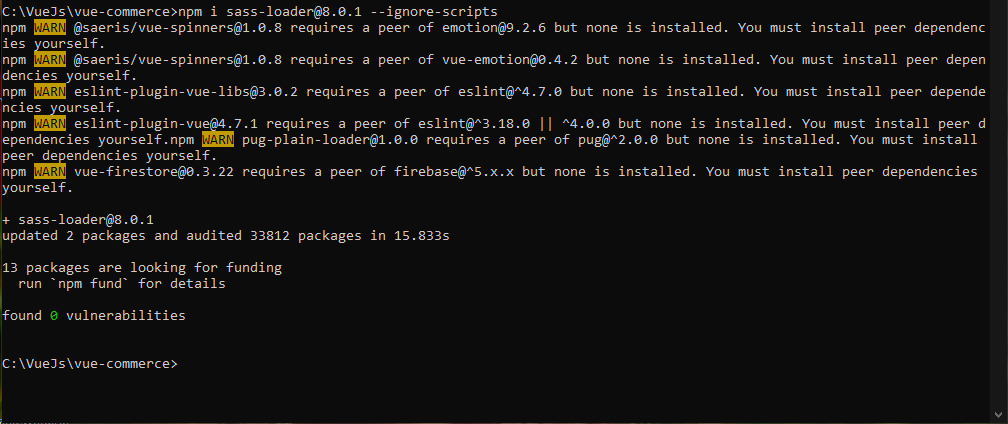
npm i [email protected] --ignore-scripts @
 ghost
on 10 Jan 2020
ghost
on 10 Jan 2020
UPDATE: resolved by installing latest version of nodejs on my Windows Ubuntu WSL.
In Windows 10, WSL with Ubuntu:
ca0v@ca0v-pc:~/blah$ npm rebuild node-sass

> [email protected] install /home/blah/node_modules/node-sass
> node scripts/install.js

npm ERR! code ELIFECYCLE
npm ERR! syscall spawn C:\Program Files\git\bin\bash.exe
npm ERR! file C:\Program Files\git\bin\bash.exe
npm ERR! path C:\Program Files\git\bin\bash.exe
npm ERR! errno ENOENT
npm ERR! [email protected] install: `node scripts/install.js`
npm ERR! spawn C:\Program Files\git\bin\bash.exe ENOENT
npm ERR!
npm ERR! Failed at the [email protected] install script.
npm ERR! This is probably not a problem with npm. There is likely additional logging output above.

npm ERR! A complete log of this run can be found in:
npm ERR!     /home/ca0v/.npm/_logs/2020-11-16T19_11_02_620Z-debug.log
Seems like scripts/install.js thinks we are in windows.
 ca0v
on 16 Nov 2020
ca0v
on 16 Nov 2020
i have error
FATAL ERROR: Ineffective mark-compacts near heap limit Allocation failed - JavaScript heap out of memory
 1: 00007FF7F2451BDF napi_wrap+109135
 2: 00007FF7F23F6F46 v8::internal::OrderedHashTable<v8::internal::OrderedHashSet,1>::NumberOfElementsOffset+33350
 3: 00007FF7F23F7D16 v8::internal::OrderedHashTable<v8::internal::OrderedHashSet,1>::NumberOfElementsOffset+36886
 4: 00007FF7F2CC627E v8::Isolate::ReportExternalAllocationLimitReached+94
 5: 00007FF7F2CAB0CD v8::SharedArrayBuffer::Externalize+781
 6: 00007FF7F2B5550C v8::internal::Heap::EphemeronKeyWriteBarrierFromCode+1516
 7: 00007FF7F2B6086A v8::internal::Heap::ProtectUnprotectedMemoryChunks+1258
 8: 00007FF7F2B5DA19 v8::internal::Heap::PageFlagsAreConsistent+2457
 9: 00007FF7F2B525B1 v8::internal::Heap::CollectGarbage+2033
10: 00007FF7F2B507B5 v8::internal::Heap::AllocateExternalBackingStore+1365
11: 00007FF7F2B70CD7 v8::internal::Factory::NewFillerObject+183
12: 00007FF7F289E501 v8::internal::interpreter::JumpTableTargetOffsets::iterator::operator=+1409
13: 00007FF7F2D4EDCD v8::internal::SetupIsolateDelegate::SetupHeap+463949
14: 00000090B162FC95
npm ERR! code ELIFECYCLE
npm ERR! errno 134
npm ERR! [email protected] dev: `nuxt`
npm ERR! Exit status 134
npm ERR!
npm ERR! Failed at the [email protected] dev script.
npm ERR! This is probably not a problem with npm. There is likely additional logging output above.

npm ERR! A complete log of this run can be found in:
npm ERR!     C:\Users\M\AppData\Roaming\npm-cache\_logs\2020-12-29T00_08_46_853Z-debug.log

Process finished with exit code 134
but memory is okey windows is okey
but Need To C++ addOn
this error relation https://nodejs.org/docs/latest-v13.x/api/addons.html
i think need more software for install - after successfully work
 mansorygit
on 29 Dec 2020
mansorygit
on 29 Dec 2020
after change or install windows LTSC for my loptop
install node v14.13
okey is work success but when install @nuxtjs/vuetify accept throught
after install npm i -g --production windows-build-tools And install Success
but wheen Run Dev me Accept top error,
i need to Python And C++ Because V8 work it
mansorygit
on 29 Dec 2020
Related issues
 YepFury
·
4Comments
YepFury
·
4Comments
 harukaeru
·
3Comments
harukaeru
·
3Comments
 samayo
·
3Comments
samayo
·
3Comments
 tjistooshort
·
4Comments
tjistooshort
·
4Comments
 nagyfej
·
3Comments
nagyfej
·
3Comments