Node-postgres: Potential memory leak
Hi,
Im' investigating a memory leak in one of my app. It seems that this module is generating thousands of strings containing:
(function(parsers,rowData
/**/) {

this['p1'] = rowData[0] == null ? null : parsers[0](rowData[0]);
this['p2'] = rowData[1] == null ? null : parsers[1](rowData[1]);
})
(displayed here as a function, but it is actually a String).
Those seems to be generated in pg/lib/result.js::inlineParser, related to https://github.com/brianc/node-postgres/issues/507:
var inlineParser = function(fieldName, i) {
  throw new Error("PG bug");
  return "\nthis['" +
    //fields containing single quotes will break
    //the evaluated javascript unless they are escaped
    //see https://github.com/brianc/node-postgres/issues/507
    //Addendum: However, we need to make sure to replace all
    //occurences of apostrophes, not just the first one.
    //See https://github.com/brianc/node-postgres/issues/934
    fieldName.replace(/'/g, "\\'") +
    "'] = " +
    "rowData[" + i + "] == null ? null : parsers[" + i + "](rowData[" + i + "]);";
};
Here is an example result from memory analysis using dev tools:
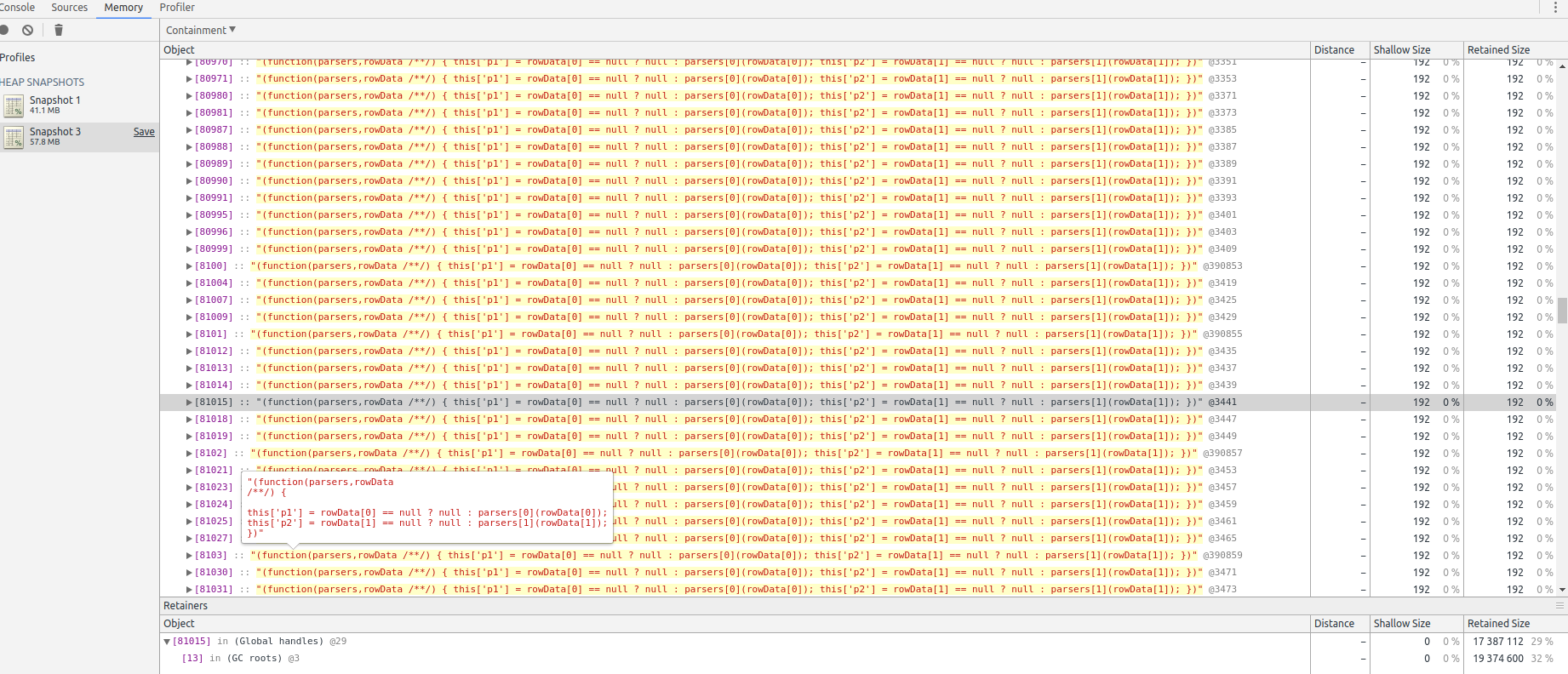
(screenshot: only displaying items created after establishing a memory baseline, and after a forced Garbage collection. I'm only displaying one screen here, but I can scroll for ages on the exact same string).
This leak isn't super fast, it takes roughly a day to OOM on a relatively busy server (70k rpm, around 100 requests to PG/s).
I could also be using the library in a bad way, but the fact that all those strings remains and not my queries is weird.
Thanks,
 Neamar
All 26 comments
Can you create a small, self-contained script that can be used to reproduce the leak, please?
Also: which version of Node are you using?
 charmander
on 18 Aug 2017
charmander
on 18 Aug 2017
Running Node 7.10.1;
Confirmed that by returning dummy data for each query, memory usage remains at a constant level, so there is an issue somewhere in the query (it could be in the way I handle it app-side TBH).
I'll try to work on a small script.
Neamar
on 18 Aug 2017
@charmander here you go!
Set up
Using [email protected], node 7.10.1, and this schema: https://github.com/Neamar/teamward-server/blob/master/lib/model/sql/queries/fixtures.sql
(no need to insert any data)
Script
The following script will leak (replace line 2 with your credentials, you'll need to run npm install async):
"use strict";
var sqlUrl = "postgres://test:test@localhost/teamward-dev";

var async = require("async");

"use strict";
var Pool = require("pg").Pool;
var url = require("url");

function createPool(maxConnections) {
  const params = url.parse(sqlUrl);
  const auth = params.auth.split(':');

  var pool = new Pool({
    user: auth[0],
    password: auth[1],
    host: params.hostname,
    port: params.port,
    database: params.pathname.split('/')[1],
    ssl: true,
    min: 2,
    max: maxConnections
  });

  return pool;
}
var defaultPool = createPool(10);

var lastSeasonRankQuery = "select summoner_id, last_season from matches_participants where summoner_id = ANY($1)";
var participants = [ 258150, 9791994, 8510725, 8551706, 8790867, 948419, 129496, 11620511, 4830329, 6611709 ];

var count = 400000;
async.timesLimit(count, 10, function(i, cb) {
  if(i % 10000 === 0) {
    console.log(i + "/" + count);
  }
  defaultPool.query(lastSeasonRankQuery, [participants], function() {
    // Discard any results
    cb();
  });
}, function() {
  console.log("DONE");
});
Running this script will reserve more and more memory.
How to?
Run with node --inspect stresstst.js.
When you start, as soon as possible, open the link with chrome, move to "memory" tab, force a GC (small bin icon on the top left), and take a heap snapshot, memory usage will be around 10mb (depending on how fast you were setting up the inspector).
Wait for a couple minutes for the script to run (depends on your computer, but hsould be less than 10 minutes), and when you see "DONE" on the terminal, garbage collect again and redo a heap snapshot. This time the snapshot will be around 70mb.
Click on the second heap snapshot. On the top bar, switch from "Summary" to "Containment", and expand "(GC roots)" and then "(Global handles)".
Scroll the list (it's gonna be the string representation of functions used, we don't care about that), then click on the "Show 100 after" as many time as you want: all you'll see is thousands of strings of:
(function(parsers,rowData
/**/) {

this['summoner_id'] = rowData[0] == null ? null : parsers[0](rowData[0]);
this['last_season'] = rowData[1] == null ? null : parsers[1](rowData[1]);
})
each weighting 216 bytes -- not much, but it add fast.
I'm probably wrong somewhere, since the script is relatively simple, but it is the same behavior I'm seeing in my larger app.
My analysis
It look (but I'm not a PG expert) that the fact that this query is running on a PG custom type might be causing the problem:
CREATE TYPE rankType AS ENUM('UNRANKED','BRONZE','SILVER','GOLD','PLATINUM','DIAMOND','MASTER','CHALLENGER');
Running on a table with integers only doesn't cause any leak.
Neamar
on 18 Aug 2017
I think this is a debugger bug. Consider this script, whose memory usage under node --inspect peaks at a reasonable value until the inspector is opened, at which point it resumes growing and stops only when the inspector crashes.
'use strict';

for (let i = 0;; i++) {
  Function('return ' + ++i)();
}
It’s understandable how this could make memory leaks hard to track down, though, and I had been planning on comparing the performance of a well-optimized parser that doesn’t rely on generated JavaScript under modern Node anyway, so maybe an option to disable that could suit your needs as well.
charmander
on 20 Aug 2017
@charmander Yeah I've been considering removing the generated JavaScript parser as well - I don't think it does as much good as it did when it was introduced. When it was added node was on v0.6 i believe and a much earlier version of v8. I just need a bit of time & I can run some benchmarks and figure out the impact.
 brianc
on 20 Aug 2017
brianc
on 20 Aug 2017
@brianc The impact still seems to be there – at least a difference of 20% in some common cases I tried. Maybe more interesting, though: pg-native performed worse than the current pg in every case. Do you know of any situations it still handles better than the JavaScript driver? It would cut down on a lot of complexity if it were dropped, but maybe that’s too optimistic =)
charmander
on 22 Aug 2017
@charmander I get your point about the debugger, but I think it's worth noting two things:
- When I remove all queries, I don't get a memory leak in prod (without the inspector)
- The snippet I posted only leaks when I use a custom Postgres type, not on default integers. It could be that my analysis about the string being repeated dozens of times is wrong, but the fact that it leaks in one case and not the other is worrying.
I'm a little disappointed that you closed the issue, since it's still a real issue (at least for me), and the snippet posted above highlights a difference in behavior depending on the PG schema which shouldn't happen.
Neamar
on 28 Aug 2017
When I remove all queries, I don't get a memory leak in prod (without the inspector)
Yes, that’s because it’s the result parser creating functions dynamically.
The snippet I posted only leaks when I use a custom Postgres type, not on default integers.
I couldn’t reproduce this. Which query were you using to select only integers?
charmander
on 28 Aug 2017
Yes, that’s because it’s the result parser creating functions dynamically.
I thought you said it was a debugger bug. But if it's still happening in prod, without the inspector, doesn't it mean that something is off in the result parser?
I couldn’t reproduce this. Which query were you using to select only integers?
I was using this table instead of the schema linked above:
CREATE TABLE public.matches_participants
(
  id SERIAL,
  summoner_id integer,
  last_season integer NOT NULL
);
and the memory remained constant
Neamar
on 29 Aug 2017
But if it's still happening in prod, without the inspector, doesn't it mean that something is off in the result parser?
Using your minimal test case, are you able to produce a leak with --inspect off?
charmander
on 29 Aug 2017
Good point. I do see a lot of Garbage collection, and memory usage does go up slightly, but nothing comparable to running with --inspect.
Sorry for the noise, as you say having an unreliable --inspect is not going to help at all... I'll keep investigating on my side.
Sorry for the noise,
Neamar
on 29 Aug 2017
Well, that’s a relief =) If you can create a new script that leaks without --inspect, please post it. I’ll make a branch you can use that won’t cloud the inspector.
charmander
on 29 Aug 2017
@charmander actually... I left the script running during the night. The only change I did were running without --inspect, and increasing the number of iterations (line 32) so that it runs longer.
After roughly 3 hours, I got...
33400000/100000000
33410000/100000000
33420000/100000000
33430000/100000000

<--- Last few GCs --->

[11145:0x3d9f660] 10221786 ms: Mark-sweep 1037.0 (1058.5) -> 1023.5 (1058.5) MB, 140.5 / 0.0 ms  allocation failure GC in old space requested
[11145:0x3d9f660] 10221925 ms: Mark-sweep 1023.5 (1058.5) -> 1023.5 (1058.5) MB, 139.0 / 0.0 ms  allocation failure GC in old space requested
[11145:0x3d9f660] 10222065 ms: Mark-sweep 1023.5 (1058.5) -> 1023.5 (1027.0) MB, 140.0 / 0.0 ms  last resort
[11145:0x3d9f660] 10222204 ms: Mark-sweep 1023.5 (1027.0) -> 1023.4 (1027.0) MB, 139.5 / 0.0 ms  last resort


<--- JS stacktrace --->

==== JS stack trace =========================================

Security context: 0x16c1dd113471 <JS Object>
    1: /* anonymous */(aka /* anonymous */) [/home/neamar/Downloads/node_modules/async/dist/async.js:1070] [pc=0x36244e3bf1e2](this=0x16c1dd102241 <undefined>,err=0x16c1dd102241 <undefined>,v=0x16c1dd102241 <undefined>)
    2: arguments adaptor frame: 0->2
    3: /* anonymous */(aka /* anonymous */) [/home/neamar/Downloads/leak.js:39] [pc=0x36244e3bf0de](this=0x16c1dd102241 <undefined>)
    4: ...

FATAL ERROR: CALL_AND_RETRY_LAST Allocation failed - JavaScript heap out of memory
 1: node::Abort() [node]
 2: 0x12b717c [node]
 3: v8::Utils::ReportOOMFailure(char const*, bool) [node]
 4: v8::internal::V8::FatalProcessOutOfMemory(char const*, bool) [node]
 5: v8::internal::Factory::NewUninitializedFixedArray(int) [node]
 6: 0xe642dc [node]
 7: 0xe64c25 [node]
 8: v8::internal::JSObject::AddDataElement(v8::internal::Handle<v8::internal::JSObject>, unsigned int, v8::internal::Handle<v8::internal::Object>, v8::internal::PropertyAttributes, v8::internal::Object::ShouldThrow) [node]
 9: v8::internal::Object::AddDataProperty(v8::internal::LookupIterator*, v8::internal::Handle<v8::internal::Object>, v8::internal::PropertyAttributes, v8::internal::Object::ShouldThrow, v8::internal::Object::StoreFromKeyed) [node]
10: v8::internal::Object::SetProperty(v8::internal::LookupIterator*, v8::internal::Handle<v8::internal::Object>, v8::internal::LanguageMode, v8::internal::Object::StoreFromKeyed) [node]
11: v8::internal::Runtime_SetProperty(int, v8::internal::Object**, v8::internal::Isolate*) [node]
12: 0x36244e1040c7
[1]    11145 abort (core dumped)  node leak.js
This could be related to using async.timesLimit, but I don't think it will generate so much memory. I'll run another test tonight without async. Just thought I'd mention it here for now!
Neamar
on 30 Aug 2017
Just to update -- wasn't able to reproduce without async. Back to square 1, I'll come back if I find more information. Thank you for your patience
Neamar
on 31 Aug 2017
Root cause seemed to be the combination of NewRelic and PG. Probable bugfix here: https://github.com/brianc/node-pg-pool/pull/83
Neamar
on 1 Dec 2017
I just hit this as well - thank you @Neamar for doing the groundwork here, this was a really hard one to follow. We had over 82K of these sitting around in memory (512mb) in some cases. I'll give that PR a try and see if it resolves any other memory issues.
@charmander Can you reopen this? I think everyone is agreed that removing the dynamically generated functions is a good idea.
 contra
on 22 Mar 2018
contra
on 22 Mar 2018
@contra That PR is unrelated to the dynamic functions, but if it doesn’t fix the problem (outside of debug mode) for you, I can set up a PR that is related to try next. =)
charmander
on 22 Mar 2018
@charmander Yep, I'm aware that PR is for a totally unrelated issue. We have two leaks in our application right now that were both mentioned in this PR which is the only reason I brought the other one up. One is the dynamic functions, the other is that newrelic/pg-pool issue. Don't want to go off topic though so let's stick to the dynamic functions.
I'm 100% able to reproduce it with inspect on, up to 512MB of memory used before it crashes. I'm running an API for about an hour, then opening the debugger for the first time and doing a heap dump. I think having delayed the debugger being opened until the last minute to take the heap dump would rule out that the debugger being open is causing the memory leak, but I could be wrong. Now that we have the other memory leak fixed I should be able to isolate this one easier, so I'll follow up with more info as I get it.
contra
on 22 Mar 2018
@charmander I'm going to put a heapdump up for you, here is a preview:

This was from sending ~6 read requests every 2 seconds for ~30 minutes. Can't provide the code since this is from our actual product, but it isn't anything special. 1 HTTP request = 1 read from postgres via sequelize (and thus node-postgres).
Before any activity:
https://nofile.io/f/Xaa2n5eFbGa/before.heapsnapshot
After:
https://nofile.io/f/56k78Gsy0DA/after.heapsnapshot
If you do a comparison between before/after in devtools you'll see all of the memory allocated between them is from the dynamic functions - the top allocation chunk is the actual compiled functions, the second is the actual strings.
A short-term potential fix would be to cache the functions maybe? I don't think there needs to be 2K instances of a function to parse the same row format - we can just reuse the same one over and over, and wouldn't pose a problem unless somebody had massive amounts of tables where the parser function string was different.
For reference, here is another library that uses dynamically generated functions to parse rows - https://github.com/mafintosh/csv-parser/blob/master/index.js (this just does one per csv file though, whereas node-postgres does one per result).
contra
on 2 Apr 2018
I'm 100% able to reproduce it with inspect on, up to 512MB of memory used before it crashes.
@contra And with inspect off?
charmander
on 2 Apr 2018
@charmander Yep - and when I switched our pg module with the PR version our instances of OOM crashes on our staging servers went from ~15/hr to 0.
contra
on 3 Apr 2018
@contra are you going to open a pr against this repo?
 calvinmetcalf
on 17 Apr 2018
calvinmetcalf
on 17 Apr 2018
Using @contra's branch:
now
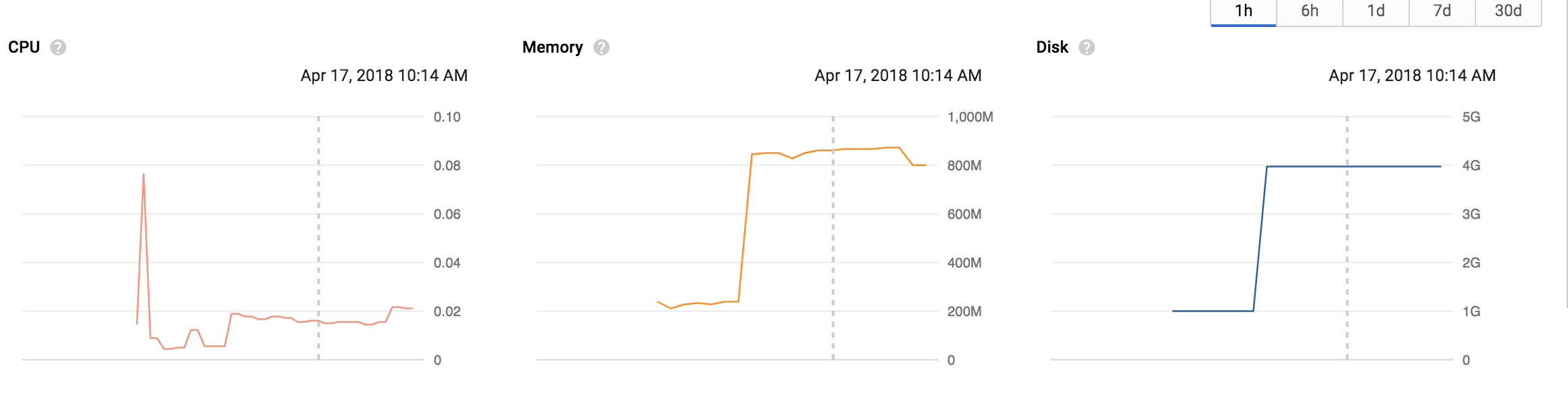
vs before

 knownasilya
on 17 Apr 2018
knownasilya
on 17 Apr 2018
@calvinmetcalf I opened a PR already - https://github.com/brianc/node-postgres/pull/1603 I doubt it will get merged because nobody will acknowledge that this is an actual problem.
@knownasilya Sweet! I'm assuming the 800M is from somewhere else, that seems pretty high for a base RAM. Still better than 1.9GB it was before.
contra
on 17 Apr 2018
@contra that is a combination of 4 pods in a cluster, so it's the total memory of 4 active apps.
This is surely a problem. Memory keeps growing and then swap is used and that increases disk so the memory lows keep rising and sooner or later the pods get evicted because resources get used up.
knownasilya
on 17 Apr 2018
I'm facing the same problem - I think LRU cache might help but I'm currently fine with rowMode: 'array'
Something like:
const key = // somehow identify row parser (ctorBody would work too)

if ( ! cache.has(key)) {
  cache.set(key, Function("parsers", "rowData", ctorBody))
}

this.RowCtor = cache.get(key)
 cztomsik
on 21 Apr 2018
cztomsik
on 21 Apr 2018
Related issues
 mramato
·
22Comments
mramato
·
22Comments
 Andrew-Max
·
23Comments
Andrew-Max
·
23Comments
 vitaly-t
·
29Comments
vitaly-t
·
29Comments
 aahoughton
·
38Comments
aahoughton
·
38Comments
 jcollum
·
43Comments
jcollum
·
43Comments
Most helpful comment
Using @contra's branch:
now

vs before
