Node-mysql2: Server: PROTOCOL_CONNECTION_LOST when connecting with mysqli
We are using mysql2 proxy example and see a fatal PROTOCOL_CONNECTION_LOST exception after several sql queries have successfully executed. MySQL version is 5.7.
My guess is that we are not handling the sequenceId correctly somewhere as we also see Warning: got packets out of order. Expected 2 but received 0.
For testing, the proxy code is as per the vanilla example with the exception that we set the sequencId to 0 in the authCallback and to 1 on query. Here is the full code:
"use strict";

const mysql = require("mysql2");
const ClientFlags = require("mysql2/lib/constants/client.js");

const server = mysql.createServer();
server.listen(3300);

server.on("connection", (conn) => {
  console.log("connection");

  conn.serverHandshake({
    protocolVersion: 10,
    serverVersion: "node.js rocks",
    connectionId: 1234,
    statusFlags: 2,
    characterSet: 8,
    capabilityFlags: 0xffffff,
    authCallback: () => {
      conn.writeOk();
      conn.sequenceId = 0;
    },
  });

  conn.on("field_list", (table, fields) => {
    console.log("field list:", table, fields);
    conn.writeEof();
  });

  const remote = mysql.createConnection({
    user: "root",
    database: "wordpress",
    host: "127.0.0.1",
    password: "supersecret",
    port: 3310,
  });

  conn.on("query", (sql) => {
    console.log(`${sql}\n`);
    conn.sequenceId = 1;
    remote.query(sql, function (err) {
      // overloaded args, either (err, result :object)
      // or (err, rows :array, columns :array)
      if (Array.isArray(arguments[1])) {
        // response to a 'select', 'show' or similar
        const rows = arguments[1],
          columns = arguments[2];
        conn.writeTextResult(rows, columns);
      } else {
        // response to an 'insert', 'update' or 'delete'
        const result = arguments[1];
        conn.writeOk(result);
      }
    });
  });

  conn.on("end", remote.end.bind(remote));
});
Connecting a wordpress site, when loading, it fires a few sql queries and I see:
SELECT @@SESSION.sql_mode

Warning: got packets out of order. Expected 6 but received 0
SET SESSION sql_mode='IGNORE_SPACE,NO_ZERO_IN_DATE,ERROR_FOR_DIVISION_BY_ZERO,NO_AUTO_CREATE_USER,NO_ENGINE_SUBSTITUTION'

Warning: got packets out of order. Expected 2 but received 0
events.js:291
      throw er; // Unhandled 'error' event
      ^

Error: Connection lost: The server closed the connection.
    at Socket.<anonymous> (/Users/VisualStudio/node_modules/mysql2/lib/connection.js:91:31)
    at Socket.emit (events.js:314:20)
    at TCP.<anonymous> (net.js:673:12)
Emitted 'error' event on Connection instance at:
    at Connection._notifyError (/Users/VisualStudio/node_modules/mysql2/lib/connection.js:221:12)
    at Socket.<anonymous> (/Users/VisualStudio/node_modules/mysql2/lib/connection.js:97:12)
    at Socket.emit (events.js:314:20)
    at TCP.<anonymous> (net.js:673:12) {
  fatal: true,
Now, if i reset the sequence id at the end of the remote.query, it gets s lot further (successfully completes multiple sql statements and then fails with the same error. Here is the code with the addition:
conn.on("query", (sql) => {
    console.log(`${sql}\n`);
    conn.sequenceId = 1;
    remote.query(sql, function (err) {
      // overloaded args, either (err, result :object)
      // or (err, rows :array, columns :array)
      if (Array.isArray(arguments[1])) {
        // response to a 'select', 'show' or similar
        const rows = arguments[1],
          columns = arguments[2];
        conn.writeTextResult(rows, columns);
      } else {
        // response to an 'insert', 'update' or 'delete'
        const result = arguments[1];
        conn.writeOk(result);
      }
      conn.sequenceId = 0;
    });
  });
Here is the output when executing with the additional conn.sequenceId = 0;:
SELECT @@SESSION.sql_mode

SET SESSION sql_mode='IGNORE_SPACE,NO_ZERO_IN_DATE,ERROR_FOR_DIVISION_BY_ZERO,NO_AUTO_CREATE_USER,NO_ENGINE_SUBSTITUTION'

Warning: got packets out of order. Expected 2 but received 0
SELECT option_name, option_value FROM wp_options WHERE autoload = 'yes'

SELECT option_value FROM wp_options WHERE option_name = 'WPLANG' LIMIT 1

SELECT * FROM wp_users WHERE user_login = 'ben' LIMIT 1

SELECT user_id, meta_key, meta_value FROM wp_usermeta WHERE user_id IN (1) ORDER BY umeta_id ASC

SELECT option_value FROM wp_options WHERE option_name = 'can_compress_scripts' LIMIT 1

SELECT option_value FROM wp_options WHERE option_name = 'theme_switched' LIMIT 1

SELECT SQL_CALC_FOUND_ROWS  wp_posts.ID FROM wp_posts  WHERE 1=1  AND wp_posts.post_type = 'post' AND (wp_posts.post_status = 'publish' OR wp_posts.post_status = 'private')  ORDER BY wp_posts.post_date DESC LIMIT 0, 10

SELECT FOUND_ROWS()

SELECT wp_posts.* FROM wp_posts WHERE ID IN (1)

SELECT  t.*, tt.*, tr.object_id FROM wp_terms AS t  INNER JOIN wp_term_taxonomy AS tt ON t.term_id = tt.term_id INNER JOIN wp_term_relationships AS tr ON tr.term_taxonomy_id = tt.term_taxonomy_id WHERE tt.taxonomy IN ('category', 'post_tag', 'post_format') AND tr.object_id IN (1) ORDER BY t.name ASC

SELECT post_id, meta_key, meta_value FROM wp_postmeta WHERE post_id IN (1) ORDER BY meta_id ASC

SELECT option_value FROM wp_options WHERE option_name = '_site_transient_update_plugins' LIMIT 1

SELECT option_value FROM wp_options WHERE option_name = '_site_transient_update_themes' LIMIT 1

SELECT option_value FROM wp_options WHERE option_name = '_site_transient_update_core' LIMIT 1


                SELECT comment_approved, COUNT( * ) AS total
                FROM wp_comments

                GROUP BY comment_approved


SELECT * FROM wp_posts  WHERE (post_type = 'page' AND post_status = 'publish')     ORDER BY menu_order,wp_posts.post_title ASC

SELECT   wp_posts.ID FROM wp_posts  WHERE 1=1  AND wp_posts.post_type = 'post' AND ((wp_posts.post_status = 'publish'))  ORDER BY wp_posts.post_date DESC LIMIT 0, 5

SELECT  wp_comments.comment_ID FROM wp_comments JOIN wp_posts ON wp_posts.ID = wp_comments.comment_post_ID WHERE ( comment_approved = '1' ) AND  wp_posts.post_status IN ('publish')  ORDER BY wp_comments.comment_date_gmt DESC LIMIT 0,5

SELECT wp_comments.* FROM wp_comments WHERE comment_ID IN (1)

SELECT comment_id, meta_key, meta_value FROM wp_commentmeta WHERE comment_id IN (1) ORDER BY meta_id ASC

SELECT YEAR(post_date) AS `year`, MONTH(post_date) AS `month`, count(ID) as posts FROM wp_posts  WHERE post_type = 'post' AND post_status = 'publish' GROUP BY YEAR(post_date), MONTH(post_date) ORDER BY post_date DESC

SELECT  t.*, tt.* FROM wp_terms AS t  INNER JOIN wp_term_taxonomy AS tt ON t.term_id = tt.term_id WHERE tt.taxonomy IN ('category') AND tt.count > 0 ORDER BY t.name ASC

SELECT term_id, meta_key, meta_value FROM wp_termmeta WHERE term_id IN (1) ORDER BY meta_id ASC

events.js:291
      throw er; // Unhandled 'error' event
      ^

Error: Connection lost: The server closed the connection.
    at Socket.<anonymous> (/Users/VisualStudio/node_modules/mysql2/lib/connection.js:91:31)
    at Socket.emit (events.js:314:20)
    at TCP.<anonymous> (net.js:673:12)
Emitted 'error' event on Connection instance at:
    at Connection._notifyError (/Users/VisualStudio/node_modules/mysql2/lib/connection.js:221:12)
    at Socket.<anonymous> (/Users/VisualStudio/node_modules/mysql2/lib/connection.js:97:12)
    at Socket.emit (events.js:314:20)
    at TCP.<anonymous> (net.js:673:12) {
  fatal: true,
  code: 'PROTOCOL_CONNECTION_LOST'
}
So it looks like we are not handling the sequenceId's correctly. We would be very grateful for some advice 👍
 haganbt
All 17 comments
To simplify this further, I have an example PHP script that makes a sql request which causes the PROTOCOL_CONNECTION_LOST exception. Running the same query with mysql/knex client does not.
Here is the proxy code running on Node v14.8.0 and also tested on v12.9.1:
"use strict";

const mysql = require("mysql2");
const ClientFlags = require("mysql2/lib/constants/client.js");

const server = mysql.createServer();
server.listen(3300);

server.on("connection", (conn) => {
  console.log("connection");

  conn.serverHandshake({
    protocolVersion: 10,
    serverVersion: "node.js rocks",
    connectionId: 1234,
    statusFlags: 2,
    characterSet: 8,
    capabilityFlags: 0xffffff ^ ClientFlags.SSL,
    authCallback: () => {
      conn.writeOk();
      conn.sequenceId = 0;
      conn.compressedSequenceId = 0;
    },
  });

  conn.on("field_list", (table, fields) => {
    console.log("field list:", table, fields);
    conn.writeEof();
  });

  const remote = mysql.createConnection({
    user: "root",
    database: "wordpress",
    host: "127.0.0.1",
    password: "supersecret",
    port: 3310,
  });

  conn.on("query", (sql) => {
    console.log(`${sql}`);
    conn.sequenceId = 1;

    remote.query(sql, function (err) {
      // overloaded args, either (err, result :object)
      // or (err, rows :array, columns :array)
      if (Array.isArray(arguments[1])) {
        // response to a 'select', 'show' or similar
        const rows = arguments[1],
          columns = arguments[2];
        conn.writeTextResult(rows, columns);
      } else {
        // response to an 'insert', 'update' or 'delete'
        const result = arguments[1];
        conn.writeOk(result);
      }
      conn.sequenceId = 0;
    });
  });

  conn.on("error", (err) => {
    console.log(err);
  });

  conn.on("end", remote.end.bind(remote));
});
Here is the PHP code that causes the exception (example running on php 7.2):
$host = "127.0.0.1:3300";
$mysqli = new mysqli($host);

// Check connection
if ($mysqli -> connect_errno) {
  echo "Failed to connect to MySQL: " . $mysqli -> connect_error;
  exit();
}

$result = $mysqli -> query("SELECT 1");

var_dump($result);
This produces:
SELECT 1
Error: Connection lost: The server closed the connection.
    at Socket.<anonymous> (/Users/VisualStudio/node_modules/mysql2/lib/connection.js:91:31)
    at Socket.emit (events.js:314:20)
    at TCP.<anonymous> (net.js:673:12) {
  fatal: true,
  code: 'PROTOCOL_CONNECTION_LOST'
}
No errors are reported by Apache.
Running this node example:
(async () => {
  const knex = require("knex")({
    client: "mysql",
    version: "5.7",
    connection: {
      host: "127.0.0.1",
      port: 3300,
    },
  });

  const [foo, bar] = await knex.raw(`select 1;`);
  console.log(foo);
})();
Returns:
[ RowDataPacket { '1': 1 } ]
Maybe you can spot an issue with the proxy code @sidorares.
haganbt
on 8 Sep 2020
@sidorares not sure if this is helpful in any way however I added a packet event handler to the proxy code:
conn.on("packet", (foo) => {
    console.log(foo);
  });
When running the PHP example I see the following response:
SELECT 1
Packet {
  sequenceId: 0,
  numPackets: 1,
  buffer: <Buffer 09 00 00 00 03 53 45 4c 45 43 54 20 31>,
  start: 0,
  offset: 4,
  end: 13
}
Packet {
  sequenceId: 0,
  numPackets: 1,
  buffer: <Buffer 01 00 00 00 01>,
  start: 0,
  offset: 4,
  end: 5
}
Error: Connection lost: The server closed the connection.
    at Socket.<anonymous> (/Users/VisualStudio/node_modules/mysql2/lib/connection.js:91:31)
    at Socket.emit (events.js:209:13)
    at TCP.<anonymous> (net.js:588:12) {
  fatal: true,
  code: 'PROTOCOL_CONNECTION_LOST'
}
When I run the node.js example I see:
select 1;
Packet {
  sequenceId: 0,
  numPackets: 1,
  buffer: <Buffer 0a 00 00 00 03 73 65 6c 65 63 74 20 31 3b>,
  start: 0,
  offset: 4,
  end: 14
}
Not sure if this helps but in an attempt to debug this further, I have logged the output of each "chunk" within the packet parser:
console.log("###" + chunk);
For the node.js example that successfully completes I see:
###J
5.7.31�h0q?P|n���~Yr1(>
gu*mysql_native_password
###@

        wordpress
###9���mysql_native_password
###     SELECT 1
###def1
       ��1�
For the php example that fails I see:
###j��mysql_native_password1
                            _client_namemysqlnd
                                               _server_host127.0.0.1:3300
###J
5.7.31�]I1J3���4tT!<J+)dPmysql_native_password
###
select 1;
###@

        wordpress
###def1
       ��1�
###
Error: Connection lost: The server closed the connection.
.....
Hi @haganbt , thanks for more debug info
simple php mysqli "select 1+1" script worked for me with a server from https://github.com/sidorares/node-mysql2/tree/passthrough-auth-token branch.
I'm currently attempting to provide example that would work with master
 sidorares
on 15 Sep 2020
sidorares
on 15 Sep 2020
Great stuff, thanks for the update @sidorares.
haganbt
on 15 Sep 2020
Can you share the proxy code you used please @sidorares ?
FYI, I get the same fatal error when testing with that branch and the example proxy server as detailed above
All of our current testing is on master.
haganbt
on 15 Sep 2020
example to illustrate new server API ( I'd like to simplify it a bit more, might be possible to make it backwards compatible with current master server api. Also sequenceId will be managed automatically, this is possible now because server api focuses on "commands" rather than packets. sequenceId is index of a packet from the beginning of command, most commands are of length 2 ( 0 - request from client, 1 - response from server ) but some have longer request/response sequence
const mysql = require('./index.js');

const ClientFlags = require('./lib/constants/client.js');
const Command = require('./lib/commands/command.js');
const Packets = require('./lib/packets/index.js');
const CommandCode = require('./lib/constants/commands.js');

class QuitCommand extends Command {
  constructor(remote) {
    this.remote = remote;
  }
  start(packet, connection) {
    connection.sequenceId = 1;
    connection.writeOk();
    connection.end();
    this.remote.end();
    return null;
  }
}

class MyCustomHandshakeCommand extends Command {
  constructor(args) {
    super();
    this.args = args;
  }

  start(packet, connection) {
    connection.sequenceId = 0;
    const serverHelloPacket = new Packets.Handshake(this.args);
    this.serverHello = serverHelloPacket;

    serverHelloPacket.setScrambleData(err => {
      connection.writePacket(serverHelloPacket.toPacket(10));
    });
    return MyCustomHandshakeCommand.prototype.readClientReply;
  }

  readClientReply(packet, connection) {
    const clientHelloReply = Packets.HandshakeResponse.fromPacket(packet);
    const serverHello = this.serverHello;
    //console.log({ clientHelloReply, serverHello });
    // you can perform auth here
    connection.writeOk();
    return null;
  }
}

class ServerQueryCommand extends Command {
  constructor(remote) {
    this.remote = remote;
  }

  start(packet, connection) {
    connection.sequenceId = 1;
    this.queryPacket = Packets.Query.fromPacket(
      packet,
      connection.config.serverOptions.encoding
    );

    console.log(this.queryPacket.query);
    remote.query(sql, function(err) {
      // overloaded args, either (err, result :object)
      // or (err, rows :array, columns :array)
      if (Array.isArray(arguments[1])) {
        // response to a 'select', 'show' or similar
        const rows = arguments[1];
        const columns = arguments[2];
        conn.writeTextResult(rows, columns);
      } else {
        // response to an 'insert', 'update' or 'delete'
        const result = arguments[1];
        conn.writeOk(result);
      }
      connection.sequenceId = 0;
    });
    return null;
  }
}

let connectionId = 0;
const server = mysql.createServer({});

server.on('connection', conn => {
  const remote = mysql.createConnection({
    user: 'root',
    database: 'wordpress',
    host: '127.0.0.1',
    password: 'supersecret',
    port: 3310
  });

  conn.config.serverOptions.handleCommand = commandCode => {
    console.log('Handle command::::', commandCode);
    const knownCommands = {
      [CommandCode.QUERY]: ServerQueryCommand,
      [CommandCode.QUIT]: QuitCommand
    };
    const command = knownCommands[commandCode];
    if (!command) {
      console.log(`Unknown command, code: ${commandCode}`);
      return null;
    }
    return new command(remote);
  };

  conn.addCommand(
    new MyCustomHandshakeCommand({
      protocolVersion: 10,
      serverVersion: 'mysql test server constant salt',
      connectionId: connectionId++,
      statusFlags: 2,
      characterSet: 8,
      capabilityFlags: 0xffffff ^ (ClientFlags.COMPRESS | ClientFlags.SSL)
    })
  );
});

server.listen(3309);
Further debugging, i have realized that the same error is generated when not even running a sql query with the PHP example, indicating its a connection/auth issue:
$host = "127.0.0.1:3300";
$mysqli = new mysqli($host);
Error: Connection lost: The server closed the connection.
    at Socket.<anonymous> (/Users/VisualStudio/node_modules/mysql2/lib/connection.js:91:31)
    at Socket.emit (events.js:314:20)
    at TCP.<anonymous> (net.js:673:12) {
  fatal: true,
  code: 'PROTOCOL_CONNECTION_LOST'
}
In an attempt to debug further, I have added some debug to server_handshake.js, specifically the readClientReply method:
If I log the packet buffer: console.log(packet.buffer.toString());, for the working node.js example I see:
9���mysql_native_password
and for the failing PHP example I see:
j��mysql_native_password1
                         _client_namemysqlnd
                                            _server_host127.0.0.1:3300
Again, im not sure if this is useful @sidorares , just desperately trying to find differences in the flow to try and resolve this.
I think the fact that we now know this is not a query issue is a step forward.
haganbt
on 21 Sep 2020
Adding some debug to dispatchCommands:
I see that encoding is utf8 for the node example and latin1 for the PHP example.
If I output commandCode:
I see 3 for the node.js example and 1 for the PHP example.
haganbt
on 21 Sep 2020
1 is for COM_QUIT - php client might be closing connection ( and 3 is COM_QUERY )
thanks for more debug examples, investigating right now
sidorares
on 21 Sep 2020
In server_handshake.js, I can deffinately see 1 get sent as the commandCode:
connection.emit('packet', packet.clone(), knownCommand, commandCode);
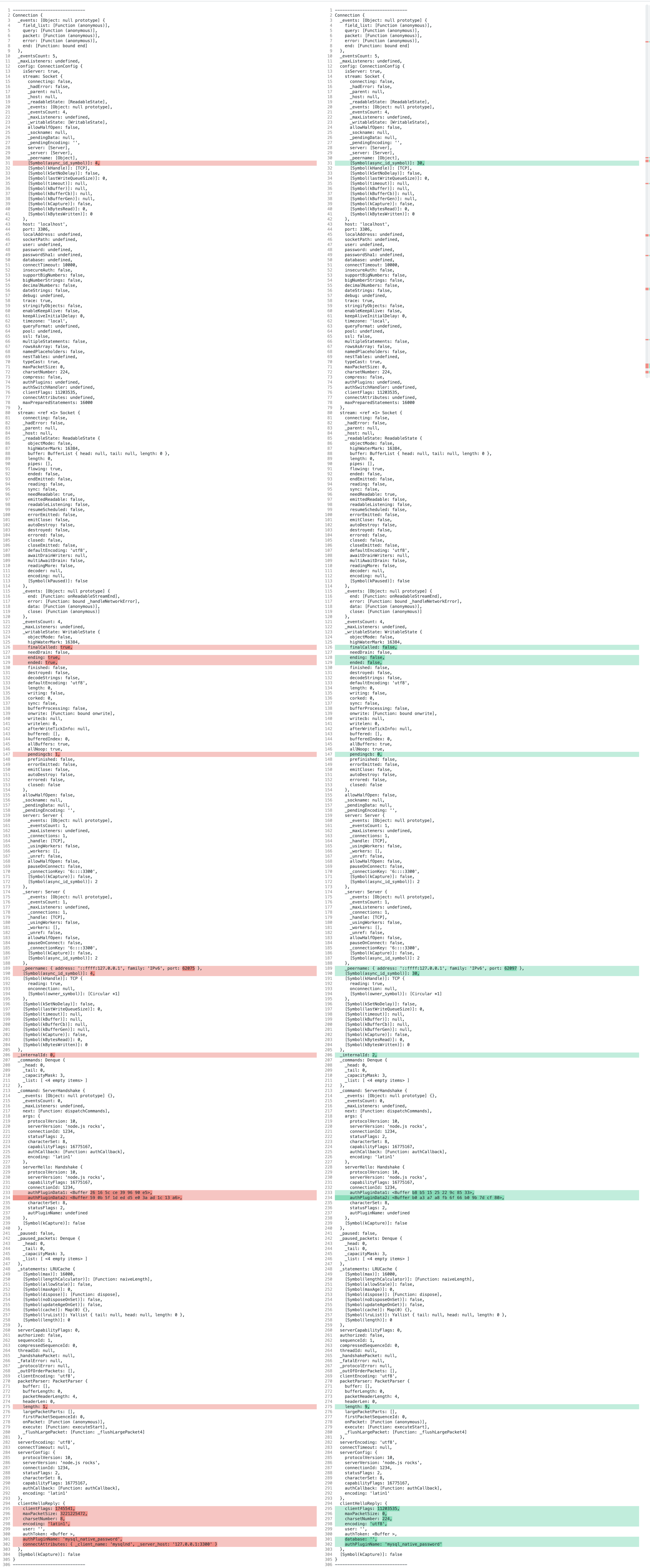
If I log the connection object and diff the results I can see a few differences. Maybe something jumps out to you @sidorares
On the left in red is the PHP example. On the right in green is the node.js example
haganbt
on 23 Sep 2020
Not sure if this is useful, likely expected but testing further, we can eliminate the proxy side of things as this can be recreated with a simple server example:
"use strict";

const mysql = require("mysql2");

const server = mysql.createServer();
server.listen(3300);
server.on("connection", (conn) => {
  conn.serverHandshake({
    protocolVersion: 10,
    serverVersion: "5.6.10", // 'node.js rocks',
    connectionId: 1234,
    statusFlags: 2,
    characterSet: 8,
    capabilityFlags: 0xffffff
  });

  conn.sequenceId = 0;


});
PHP client:
$host = "127.0.0.1:3300";
$mysqli = new mysqli($host);
MySQL2: v2.1.0
haganbt
on 23 Sep 2020
Debugging connection.js and the handlePacket method, I have stringified each packet.buffer and enabled the raw hex debug:
console.log(
          ` raw: ${packet.buffer
            .slice(packet.offset, packet.offset + packet.length())
            .toString('hex')}`
        );
I have also logged each occurrence of _resetSequenceId and _bumpSequenceId so we can see exactly what is being processed before it dies.
Here is the output for the bad PHP connection:
_resetSequenceId called. Was:  0
_resetSequenceId called. Was:  0
_bumpSequenceId: 1
_bumpSequenceId: 2
packetStart--->j����������������������������������mysql_native_password�1
_client_namemysqlnd
_server_host127.0.0.1:3300<---packetEnd
 raw: 85a21a00000000c008000000000000000000000000000000000000000000000000006d7973716c5f6e61746976655f70617373776f726400310c5f636c69656e745f6e616d65076d7973716c6e640c5f7365727665725f686f73740e3132372e302e302e313a33333030
0 undefined ==> undefined#unknown name(1,,110)
_bumpSequenceId: 3
_bumpSequenceId: 1
packetStart--->J���
5.7.31�"��cf8kVz����������������4N7co&:dqnv�mysql_native_password�<---packetEnd
 raw: 0a352e372e33310022010000637f66386b567a0700ffff080200ffc11500000000000000000000344e37636f263a64716e760e006d7973716c5f6e61746976655f70617373776f726400
1 undefined ==> undefined#unknown name(0,,78)
_bumpSequenceId: 2
_bumpSequenceId: 1
packetStart--->���<---packetEnd
 raw: 01
0 undefined ==> undefined#unknown name(0,,5)
Error: Connection lost: The server closed the connection.
    at Socket.<anonymous> (/Users/VisualStudio/node_modules/mysql2/lib/connection.js:91:31)
    at Socket.emit (events.js:314:20)
    at TCP.<anonymous> (net.js:673:12) {
  fatal: true,
  code: 'PROTOCOL_CONNECTION_LOST'
}
_bumpSequenceId: 3
packetStart--->�����@���

    wordpress<---packetEnd
 raw: 00000002400000000c010a09776f72647072657373
1 290 ==> undefined#unknown name(2,maybeOK,25)
Here is the output for the good node.js connection example:
_resetSequenceId called. Was:  0
_resetSequenceId called. Was:  0
_bumpSequenceId: 1
_bumpSequenceId: 1
packetStart--->J���
5.7.31�#��b
!eRD����������������[s0s3#2=`�mysql_native_password�<---packetEnd
 raw: 0a352e372e3331002301000062071d211265524400ffff080200ffc11500000000000000000000105b73307333231716323d60006d7973716c5f6e61746976655f70617373776f726400
1 undefined ==> undefined#unknown name(0,,78)
_bumpSequenceId: 2
_bumpSequenceId: 3
packetStart--->�����@���

    wordpress<---packetEnd
 raw: 00000002400000000c010a09776f72647072657373
1 291 ==> undefined#unknown name(2,maybeOK,25)
_bumpSequenceId: 2
packetStart--->M�����������������������������������;��(�
��w���md���mysql_native_password�<---packetEnd
 raw: cff3aa0000000000e000000000000000000000000000000000000000000000000014a3063be9ad189928c40c00e177a189d36d64a4ac006d7973716c5f6e61746976655f70617373776f726400
0 undefined ==> undefined#unknown name(1,,81)
_bumpSequenceId: 3
Is this helpful at all @sidorares ? Is there anything else I can do to debug?
haganbt
on 24 Sep 2020
For clarity, here is a clear summary of the test case:
Versions
- Tested with Node.js
v14.8.0andv12.9.1. - Mysql:
v5.7 - mysql2
v2.1.0 - PHP
v7.4.10
server.js
"use strict";

const mysql = require("mysql2");

const server = mysql.createServer();
server.listen(3300);
server.on("connection", (conn) => {
  conn.serverHandshake({
    protocolVersion: 10,
    serverVersion: "5.6.10", // 'node.js rocks',
    connectionId: 1234,
    statusFlags: 2,
    characterSet: 8,
    capabilityFlags: 0xffffff,
  });

  conn.sequenceId = 0;
});
PHP client:
<?php

$host = "127.0.0.1:3300";
$mysqli = new mysqli($host);
@haganbt this example works for me:
server:
const mysql = require('mysql2');

let connectionId = 0;

const server = mysql.createServer();
server.listen(3300);
server.on('connection', (conn) => {
  conn.serverHandshake({
    protocolVersion: 10,
    serverVersion: '5.6.10',
    connectionId: connectionId++,
    statusFlags: 2,
    characterSet: 8,
    capabilityFlags: 0xffffff,
    authCallback: () => {
      conn.writeOk();
      conn.sequenceId = 0;
    },
  });

  conn.sequenceId = 0;

  conn.on('query', (sql) => {
    conn.writeTextResult(
      [{ 1: sql }],
      [
        {
          catalog: 'def',
          schema: '',
          table: '',
          orgTable: '',
          name: '1',
          orgName: '',
          characterSet: 63,
          columnLength: 1,
          columnType: 8,
          flags: 129,
          decimals: 0,
        },
      ]
    );
    conn.sequenceId = 0;
  });

  conn.on('quit', () => {
    conn.end();
  });
});
client:
<?php

$host = "127.0.0.1:3300";
$mysqli = new mysqli($host);

// Check connection
if ($mysqli -> connect_errno) {
  echo "Failed to connect to MySQL: " . $mysqli -> connect_error;
  exit();
}

$result = $mysqli -> query("SELECT 1");
$row = $result -> fetch_assoc();

var_dump($row);

$result = $mysqli -> query("SELECT 2");
$row = $result -> fetch_assoc();

var_dump($row);

$result = $mysqli -> query("SELECT 3");
$row = $result -> fetch_assoc();

var_dump($row);
Thanks @sidorares that fixes the test code as I have not got a quit handler. In prod we catch through an error handler.
Looks like PHP's mysqli does not create a persistent connection as default and hence the COM_QUIT is sent.
I'll close this issue as the PROTOCOL_CONNECTION_LOST is resolved.
haganbt
on 26 Sep 2020
Big thanks here @sidorares To summarize, the missing quit handler in the test code was masking the underlying error which was a "packets out of order". PHP dropped in to a loop when each quit occurred. Eventually the proxy failed with an EPIPE exception.
The issue was caused by not setting the sequenceId to 1 on query. After adding this, the issue was resolved.
conn.on("query", (sql) => {;
    conn.sequenceId = 1;
...
Related issues
 DirkWolthuis
·
3Comments
DirkWolthuis
·
3Comments
 MHDante
·
4Comments
MHDante
·
4Comments
 magicxie
·
6Comments
sidorares
·
7Comments
magicxie
·
6Comments
sidorares
·
7Comments
 framp
·
3Comments
framp
·
3Comments