Node-gyp: Can't build with VS2017, error MSB8020 can't find v140 toolset (the installed one is v141)
- Node Version: 10.5.0
- Platform: Microsoft Windows 10 专业版 Insider Preview 10.0.17692 暂缺 Build 17692
- Compiler: 15.5.180.51428
- Module: sqlite3
Can't build with VS2017, error message saying it's using v140 toolset which is not installed
but afaik VS2017 should use the v141 toolset!
Verbose output (from npm or node-gyp):
lyh@Tsubasa-PC MINGW64 /d/Documents/Desktop/llsifce (develop)
$ npm config set msvs_version 2017

lyh@Tsubasa-PC MINGW64 /d/Documents/Desktop/llsifce (develop)
$ npm rebuild sqlite3 --build-from-source --verbose --msvs_version=2017
npm info it worked if it ends with ok
npm verb cli [ 'C:\\Program Files\\nodejs\\node.exe',
npm verb cli   'C:\\Users\\lyh\\AppData\\Roaming\\npm\\node_modules\\npm\\bin\\npm-cli.js',
npm verb cli   'rebuild',
npm verb cli   'sqlite3',
npm verb cli   '--build-from-source',
npm verb cli   '--verbose',
npm verb cli   '--msvs_version=2017' ]
npm info using [email protected]
npm info using [email protected]
npm info readInstalled object
npm verb rebuild path, id [ 'D:\\Documents\\Desktop\\llsifce\\node_modules\\sqlite3',
npm verb rebuild   '[email protected]' ]
npm info build D:\Documents\Desktop\llsifce\node_modules\sqlite3
npm info lifecycle [email protected]~preinstall: [email protected]
npm info linkStuff [email protected]
npm verb rebuildBundles [ '.bin', 'node-pre-gyp', 'tar' ]
npm verb rebuild bundle D:\Documents\Desktop\llsifce\node_modules\sqlite3\node_modules\tar
npm info build D:\Documents\Desktop\llsifce\node_modules\sqlite3\node_modules\tar
npm info lifecycle [email protected]~preinstall: [email protected]
npm info linkStuff [email protected]
npm info lifecycle [email protected]~install: [email protected]
npm info lifecycle [email protected]~postinstall: [email protected]
npm info lifecycle [email protected]~install: [email protected]

> [email protected] install D:\Documents\Desktop\llsifce\node_modules\sqlite3
> node-pre-gyp install --fallback-to-build

node-pre-gyp info it worked if it ends with ok
node-pre-gyp verb cli [ 'C:\\Program Files\\nodejs\\node.exe',
node-pre-gyp verb cli   'D:\\Documents\\Desktop\\llsifce\\node_modules\\sqlite3\\node_modules\\node-pre-gyp\\bin\\node-pre-gyp',
node-pre-gyp verb cli   'install',
node-pre-gyp verb cli   '--fallback-to-build' ]
node-pre-gyp info using [email protected]
node-pre-gyp info using [email protected] | win32 | x64
node-pre-gyp verb command install []
node-pre-gyp info build requesting source compile
node-pre-gyp verb command build [ 'rebuild' ]
gyp info it worked if it ends with ok
gyp verb cli [ 'C:\\Program Files\\nodejs\\node.exe',
gyp verb cli   'C:\\Users\\lyh\\AppData\\Roaming\\npm\\node_modules\\npm\\node_modules\\node-gyp\\bin\\node-gyp.js',
gyp verb cli   'clean' ]
gyp info using [email protected]
gyp info using [email protected] | win32 | x64
gyp verb command clean []
gyp verb clean removing "build" directory
gyp info ok
gyp info it worked if it ends with ok
gyp verb cli [ 'C:\\Program Files\\nodejs\\node.exe',
gyp verb cli   'C:\\Users\\lyh\\AppData\\Roaming\\npm\\node_modules\\npm\\node_modules\\node-gyp\\bin\\node-gyp.js',
gyp verb cli   'configure',
gyp verb cli   '--fallback-to-build',
gyp verb cli   '--module=D:\\Documents\\Desktop\\llsifce\\node_modules\\sqlite3\\lib\\binding\\node-v64-win32-x64\\node_sqlite3.node',
gyp verb cli   '--module_name=node_sqlite3',
gyp verb cli   '--module_path=D:\\Documents\\Desktop\\llsifce\\node_modules\\sqlite3\\lib\\binding\\node-v64-win32-x64',
gyp verb cli   '--napi_version=3',
gyp verb cli   '--node_abi_napi=napi',
gyp verb cli   '--msvs_version=2017' ]
gyp info using [email protected]
gyp info using [email protected] | win32 | x64
gyp verb command configure []
gyp verb check python checking for Python executable "python2" in the PATH
gyp verb `which` failed Error: not found: python2
gyp verb `which` failed     at getNotFoundError (C:\Users\lyh\AppData\Roaming\npm\node_modules\npm\node_modules\which\which.js:13:12)
gyp verb `which` failed     at F (C:\Users\lyh\AppData\Roaming\npm\node_modules\npm\node_modules\which\which.js:68:19)
gyp verb `which` failed     at E (C:\Users\lyh\AppData\Roaming\npm\node_modules\npm\node_modules\which\which.js:80:29)
gyp verb `which` failed     at C:\Users\lyh\AppData\Roaming\npm\node_modules\npm\node_modules\which\which.js:89:16
gyp verb `which` failed     at C:\Users\lyh\AppData\Roaming\npm\node_modules\npm\node_modules\which\node_modules\isexe\index.js:42:5
gyp verb `which` failed     at C:\Users\lyh\AppData\Roaming\npm\node_modules\npm\node_modules\which\node_modules\isexe\windows.js:36:5
gyp verb `which` failed     at FSReqWrap.oncomplete (fs.js:158:21)
gyp verb `which` failed  python2 { Error: not found: python2
gyp verb `which` failed     at getNotFoundError (C:\Users\lyh\AppData\Roaming\npm\node_modules\npm\node_modules\which\which.js:13:12)
gyp verb `which` failed     at F (C:\Users\lyh\AppData\Roaming\npm\node_modules\npm\node_modules\which\which.js:68:19)
gyp verb `which` failed     at E (C:\Users\lyh\AppData\Roaming\npm\node_modules\npm\node_modules\which\which.js:80:29)
gyp verb `which` failed     at C:\Users\lyh\AppData\Roaming\npm\node_modules\npm\node_modules\which\which.js:89:16
gyp verb `which` failed     at C:\Users\lyh\AppData\Roaming\npm\node_modules\npm\node_modules\which\node_modules\isexe\index.js:42:5
gyp verb `which` failed     at C:\Users\lyh\AppData\Roaming\npm\node_modules\npm\node_modules\which\node_modules\isexe\windows.js:36:5
gyp verb `which` failed     at FSReqWrap.oncomplete (fs.js:158:21)
gyp verb `which` failed   stack:
gyp verb `which` failed    'Error: not found: python2\n    at getNotFoundError (C:\\Users\\lyh\\AppData\\Roaming\\npm\\node_modules\\npm\\node_modules\\which\\which.js:13:12)\n    at F (C:\\Users\\lyh\\AppData\\Roaming\\npm\\node_modules\\npm\\node_modules\\which\\which.js:68:19)\n    at E (C:\\Users\\lyh\\AppData\\Roaming\\npm\\node_modules\\npm\\node_modules\\which\\which.js:80:29)\n    at C:\\Users\\lyh\\AppData\\Roaming\\npm\\node_modules\\npm\\node_modules\\which\\which.js:89:16\n    at C:\\Users\\lyh\\AppData\\Roaming\\npm\\node_modules\\npm\\node_modules\\which\\node_modules\\isexe\\index.js:42:5\n    at C:\\Users\\lyh\\AppData\\Roaming\\npm\\node_modules\\npm\\node_modules\\which\\node_modules\\isexe\\windows.js:36:5\n    at FSReqWrap.oncomplete (fs.js:158:21)',
gyp verb `which` failed   code: 'ENOENT' }
gyp verb check python checking for Python executable "python" in the PATH
gyp verb `which` succeeded python C:\Python27\python.EXE
gyp verb check python version `C:\Python27\python.EXE -c "import platform; print(platform.python_version());"` returned: "2.7.14\r\n"
gyp verb get node dir no --target version specified, falling back to host node version: 10.5.0
gyp verb command install [ '10.5.0' ]
gyp verb install input version string "10.5.0"
gyp verb install installing version: 10.5.0
gyp verb install --ensure was passed, so won't reinstall if already installed
gyp verb install version is already installed, need to check "installVersion"
gyp verb got "installVersion" 9
gyp verb needs "installVersion" 9
gyp verb install version is good
gyp verb get node dir target node version installed: 10.5.0
gyp verb build dir attempting to create "build" dir: D:\Documents\Desktop\llsifce\node_modules\sqlite3\build
gyp verb build dir "build" dir needed to be created? D:\Documents\Desktop\llsifce\node_modules\sqlite3\build
gyp verb find vs2017 Found installation at: C:\Program Files (x86)\Microsoft Visual Studio\2017\Community
gyp verb find vs2017   - Found Microsoft.VisualStudio.Component.Windows10SDK.16299.Desktop
gyp verb find vs2017   - Found Microsoft.VisualStudio.Component.VC.Tools.x86.x64
gyp verb find vs2017   - Found Microsoft.VisualStudio.VC.MSBuild.Base
gyp verb find vs2017   - Using this installation with Windows 10 SDK
gyp verb find vs2017 using installation: C:\Program Files (x86)\Microsoft Visual Studio\2017\Community
gyp verb build/config.gypi creating config file
gyp verb build/config.gypi writing out config file: D:\Documents\Desktop\llsifce\node_modules\sqlite3\build\config.gypi
gyp verb config.gypi checking for gypi file: D:\Documents\Desktop\llsifce\node_modules\sqlite3\config.gypi
gyp verb common.gypi checking for gypi file: D:\Documents\Desktop\llsifce\node_modules\sqlite3\common.gypi
gyp verb gyp gyp format was not specified; forcing "msvs"
gyp info spawn C:\Python27\python.EXE
gyp info spawn args [ 'C:\\Users\\lyh\\AppData\\Roaming\\npm\\node_modules\\npm\\node_modules\\node-gyp\\gyp\\gyp_main.py',
gyp info spawn args   'binding.gyp',
gyp info spawn args   '-f',
gyp info spawn args   'msvs',
gyp info spawn args   '-G',
gyp info spawn args   'msvs_version=2015',
gyp info spawn args   '-I',
gyp info spawn args   'D:\\Documents\\Desktop\\llsifce\\node_modules\\sqlite3\\build\\config.gypi',
gyp info spawn args   '-I',
gyp info spawn args   'C:\\Users\\lyh\\AppData\\Roaming\\npm\\node_modules\\npm\\node_modules\\node-gyp\\addon.gypi',
gyp info spawn args   '-I',
gyp info spawn args   'C:\\Users\\lyh\\.node-gyp\\10.5.0\\include\\node\\common.gypi',
gyp info spawn args   '-Dlibrary=shared_library',
gyp info spawn args   '-Dvisibility=default',
gyp info spawn args   '-Dnode_root_dir=C:\\Users\\lyh\\.node-gyp\\10.5.0',
gyp info spawn args   '-Dnode_gyp_dir=C:\\Users\\lyh\\AppData\\Roaming\\npm\\node_modules\\npm\\node_modules\\node-gyp',
gyp info spawn args   '-Dnode_lib_file=C:\\Users\\lyh\\.node-gyp\\10.5.0\\<(target_arch)\\node.lib',
gyp info spawn args   '-Dmodule_root_dir=D:\\Documents\\Desktop\\llsifce\\node_modules\\sqlite3',
gyp info spawn args   '-Dnode_engine=v8',
gyp info spawn args   '--depth=.',
gyp info spawn args   '--no-parallel',
gyp info spawn args   '--generator-output',
gyp info spawn args   'D:\\Documents\\Desktop\\llsifce\\node_modules\\sqlite3\\build',
gyp info spawn args   '-Goutput_dir=.' ]
gyp info ok
gyp info it worked if it ends with ok
gyp verb cli [ 'C:\\Program Files\\nodejs\\node.exe',
gyp verb cli   'C:\\Users\\lyh\\AppData\\Roaming\\npm\\node_modules\\npm\\node_modules\\node-gyp\\bin\\node-gyp.js',
gyp verb cli   'build',
gyp verb cli   '--fallback-to-build',
gyp verb cli   '--module=D:\\Documents\\Desktop\\llsifce\\node_modules\\sqlite3\\lib\\binding\\node-v64-win32-x64\\node_sqlite3.node',
gyp verb cli   '--module_name=node_sqlite3',
gyp verb cli   '--module_path=D:\\Documents\\Desktop\\llsifce\\node_modules\\sqlite3\\lib\\binding\\node-v64-win32-x64',
gyp verb cli   '--napi_version=3',
gyp verb cli   '--node_abi_napi=napi' ]
gyp info using [email protected]
gyp info using [email protected] | win32 | x64
gyp verb command build []
gyp verb build type Release
gyp verb architecture x64
gyp verb node dev dir C:\Users\lyh\.node-gyp\10.5.0
gyp verb found first Solution file build/binding.sln
gyp verb using MSBuild: C:\Program Files (x86)\Microsoft Visual Studio\2017\Community\MSBuild\15.0\Bin\MSBuild.exe
gyp info spawn C:\Program Files (x86)\Microsoft Visual Studio\2017\Community\MSBuild\15.0\Bin\MSBuild.exe
gyp info spawn args [ 'build/binding.sln',
gyp info spawn args   '/nologo',
gyp info spawn args   '/p:Configuration=Release;Platform=x64' ]
在此解决方案中一次生成一个项目。若要启用并行生成,请添加“/m”开关。
生成启动时间为 2018/6/27 8:47:21。
节点 1 上的项目“D:\Documents\Desktop\llsifce\node_modules\sqlite3\build\binding.sln”(默认目标)。
ValidateSolutionConfiguration:
  正在生成解决方案配置“Release|x64”。
项目“D:\Documents\Desktop\llsifce\node_modules\sqlite3\build\binding.sln”(1)正在节点 1 上生成“D:\Documents\Desktop\llsifce\node_m
odules\sqlite3\build\action_after_build.vcxproj.metaproj”(2) (默认目标)。
项目“D:\Documents\Desktop\llsifce\node_modules\sqlite3\build\action_after_build.vcxproj.metaproj”(2)正在节点 1 上生成“D:\Document
s\Desktop\llsifce\node_modules\sqlite3\build\node_sqlite3.vcxproj.metaproj”(3) (默认目标)。
项目“D:\Documents\Desktop\llsifce\node_modules\sqlite3\build\node_sqlite3.vcxproj.metaproj”(3)正在节点 1 上生成“D:\Documents\Desk
top\llsifce\node_modules\sqlite3\build\deps\sqlite3.vcxproj.metaproj”(4) (默认目标)。
项目“D:\Documents\Desktop\llsifce\node_modules\sqlite3\build\deps\sqlite3.vcxproj.metaproj”(4)正在节点 1 上生成“D:\Documents\Desk
top\llsifce\node_modules\sqlite3\build\deps\action_before_build.vcxproj”(5) (默认目标)。
C:\Program Files (x86)\Microsoft Visual Studio\2017\Community\Common7\IDE\VC\VCTargets\Microsoft.Cpp.Platform.targets(57
,5): error MSB8020: 无法找到 v140 的生成工具(平台工具集 =“v140”)。若要使用 v140 生成工具进行生成,请安装 v140 生成工具 。或者,可以升级到当前 Visual Studio 工具,方式是通过选择“
项目”菜单或右键单击该解决方案,然后选择“重定解决方案目标”。 [D:\Documents\Desktop\llsifce\node_modules\sqlite3\build\deps\action_before_build.vcxpro
j]
已完成生成项目“D:\Documents\Desktop\llsifce\node_modules\sqlite3\build\deps\action_before_build.vcxproj”(默认目标)的操 作 - 失败。

已完成生成项目“D:\Documents\Desktop\llsifce\node_modules\sqlite3\build\deps\sqlite3.vcxproj.metaproj”(默认目标)的操作 - 失败。

已完成生成项目“D:\Documents\Desktop\llsifce\node_modules\sqlite3\build\node_sqlite3.vcxproj.metaproj”(默认目标)的操作 - 失败。

已完成生成项目“D:\Documents\Desktop\llsifce\node_modules\sqlite3\build\action_after_build.vcxproj.metaproj”(默认目标)的操作 - 失败。

已完成生成项目“D:\Documents\Desktop\llsifce\node_modules\sqlite3\build\binding.sln”(默认目标)的操作 - 失败。


生成失败。

“D:\Documents\Desktop\llsifce\node_modules\sqlite3\build\binding.sln”(默认目标) (1) ->
“D:\Documents\Desktop\llsifce\node_modules\sqlite3\build\action_after_build.vcxproj.metaproj”(默认目标) (2) ->
“D:\Documents\Desktop\llsifce\node_modules\sqlite3\build\node_sqlite3.vcxproj.metaproj”(默认目标) (3) ->
“D:\Documents\Desktop\llsifce\node_modules\sqlite3\build\deps\sqlite3.vcxproj.metaproj”(默认目标) (4) ->
“D:\Documents\Desktop\llsifce\node_modules\sqlite3\build\deps\action_before_build.vcxproj”(默认目标) (5) ->
(PlatformPrepareForBuild 目标) ->
  C:\Program Files (x86)\Microsoft Visual Studio\2017\Community\Common7\IDE\VC\VCTargets\Microsoft.Cpp.Platform.targets(
57,5): error MSB8020: 无法找到 v140 的生成工具(平台工具集 =“v140”)。若要使用 v140 生成工具进行生成,请安装 v140 生成工 具。或者,可以升级到当前 Visual Studio 工具,方式是通过选
择“项目”菜单或右键单击该解决方案,然后选择“重定解决方案目标”。 [D:\Documents\Desktop\llsifce\node_modules\sqlite3\build\deps\action_before_build.vcxp
roj]

    0 个警告
    1 个错误

已用时间 00:00:00.78
gyp ERR! build error
gyp ERR! stack Error: `C:\Program Files (x86)\Microsoft Visual Studio\2017\Community\MSBuild\15.0\Bin\MSBuild.exe` failed with exit code: 1
gyp ERR! stack     at ChildProcess.onExit (C:\Users\lyh\AppData\Roaming\npm\node_modules\npm\node_modules\node-gyp\lib\build.js:258:23)
gyp ERR! stack     at ChildProcess.emit (events.js:182:13)
gyp ERR! stack     at Process.ChildProcess._handle.onexit (internal/child_process.js:237:12)
gyp ERR! System Windows_NT 10.0.17692
gyp ERR! command "C:\\Program Files\\nodejs\\node.exe" "C:\\Users\\lyh\\AppData\\Roaming\\npm\\node_modules\\npm\\node_modules\\node-gyp\\bin\\node-gyp.js" "build" "--fallback-to-build" "--module=D:\\Documents\\Desktop\\llsifce\\node_modules\\sqlite3\\lib\\binding\\node-v64-win32-x64\\node_sqlite3.node" "--module_name=node_sqlite3" "--module_path=D:\\Documents\\Desktop\\llsifce\\node_modules\\sqlite3\\lib\\binding\\node-v64-win32-x64" "--napi_version=3" "--node_abi_napi=napi"
gyp ERR! cwd D:\Documents\Desktop\llsifce\node_modules\sqlite3
gyp ERR! node -v v10.5.0
gyp ERR! node-gyp -v v3.6.2
gyp ERR! not ok
node-pre-gyp ERR! build error
node-pre-gyp ERR! stack Error: Failed to execute 'C:\Program Files\nodejs\node.exe C:\Users\lyh\AppData\Roaming\npm\node_modules\npm\node_modules\node-gyp\bin\node-gyp.js build --fallback-to-build --module=D:\Documents\Desktop\llsifce\node_modules\sqlite3\lib\binding\node-v64-win32-x64\node_sqlite3.node --module_name=node_sqlite3 --module_path=D:\Documents\Desktop\llsifce\node_modules\sqlite3\lib\binding\node-v64-win32-x64 --napi_version=3 --node_abi_napi=napi' (1)
node-pre-gyp ERR! stack     at ChildProcess.<anonymous> (D:\Documents\Desktop\llsifce\node_modules\sqlite3\node_modules\node-pre-gyp\lib\util\compile.js:83:29)
node-pre-gyp ERR! stack     at ChildProcess.emit (events.js:182:13)
node-pre-gyp ERR! stack     at maybeClose (internal/child_process.js:961:16)
node-pre-gyp ERR! stack     at Process.ChildProcess._handle.onexit (internal/child_process.js:248:5)
node-pre-gyp ERR! System Windows_NT 10.0.17692
node-pre-gyp ERR! command "C:\\Program Files\\nodejs\\node.exe" "D:\\Documents\\Desktop\\llsifce\\node_modules\\sqlite3\\node_modules\\node-pre-gyp\\bin\\node-pre-gyp" "install" "--fallback-to-build"
node-pre-gyp ERR! cwd D:\Documents\Desktop\llsifce\node_modules\sqlite3
node-pre-gyp ERR! node -v v10.5.0
node-pre-gyp ERR! node-pre-gyp -v v0.10.2
node-pre-gyp ERR! not ok
Failed to execute 'C:\Program Files\nodejs\node.exe C:\Users\lyh\AppData\Roaming\npm\node_modules\npm\node_modules\node-gyp\bin\node-gyp.js build --fallback-to-build --module=D:\Documents\Desktop\llsifce\node_modules\sqlite3\lib\binding\node-v64-win32-x64\node_sqlite3.node --module_name=node_sqlite3 --module_path=D:\Documents\Desktop\llsifce\node_modules\sqlite3\lib\binding\node-v64-win32-x64 --napi_version=3 --node_abi_napi=napi' (1)
npm verb lifecycle [email protected]~install: unsafe-perm in lifecycle true
npm verb lifecycle [email protected]~install: PATH: C:\Users\lyh\AppData\Roaming\npm\node_modules\npm\node_modules\npm-lifecycle\node-gyp-bin;D:\Documents\Desktop\llsifce\node_modules\sqlite3\node_modules\.bin;D:\Documents\Desktop\llsifce\node_modules\.bin;C:\Windows\System32\OpenSSH\;C:\Users\lyh\bin;C:\Program Files\Git\mingw64\bin;C:\Program Files\Git\usr\local\bin;C:\Program Files\Git\usr\bin;C:\Program Files\Git\usr\bin;C:\Program Files\Git\mingw64\bin;C:\Program Files\Git\usr\bin;C:\Users\lyh\bin;C:\Program Files (x86)\Common Files\Oracle\Java\javapath;C:\ProgramData\Oracle\Java\javapath;C:\Python27;C:\Python27\Scripts;C:\WINDOWS\system32;C:\WINDOWS;C:\WINDOWS\System32\Wbem;C:\WINDOWS\System32\WindowsPowerShell\v1.0;C:\WINDOWS\System32\OpenSSH;C:\WINDOWS\System32\LibreSSL;C:\Program Files\Git\cmd;C:\Program Files\Git\mingw64\bin;C:\Program Files\Git\usr\bin;C:\Program Files\PuTTY;C:\Program Files\nodejs;C:\Users\lyh\AppData\Local\Microsoft\WindowsApps;C:\Users\lyh\AppData\Local\Programs\Fiddler;C:\Users\lyh\AppData\Local\Microsoft\WindowsApps;C:\Users\lyh\AppData\Roaming\npm;C:\Program Files\Git\usr\bin\vendor_perl;C:\Program Files\Git\usr\bin\core_perl
npm verb lifecycle [email protected]~install: CWD: D:\Documents\Desktop\llsifce\node_modules\sqlite3
npm info lifecycle [email protected]~install: Failed to exec install script
npm verb stack Error: [email protected] install: `node-pre-gyp install --fallback-to-build`
npm verb stack Exit status 1
npm verb stack     at EventEmitter.<anonymous> (C:\Users\lyh\AppData\Roaming\npm\node_modules\npm\node_modules\npm-lifecycle\index.js:304:16)
npm verb stack     at EventEmitter.emit (events.js:182:13)
npm verb stack     at ChildProcess.<anonymous> (C:\Users\lyh\AppData\Roaming\npm\node_modules\npm\node_modules\npm-lifecycle\lib\spawn.js:55:14)
npm verb stack     at ChildProcess.emit (events.js:182:13)
npm verb stack     at maybeClose (internal/child_process.js:961:16)
npm verb stack     at Process.ChildProcess._handle.onexit (internal/child_process.js:248:5)
npm verb pkgid [email protected]
npm verb cwd D:\Documents\Desktop\llsifce
npm verb Windows_NT 10.0.17692
npm verb argv "C:\\Program Files\\nodejs\\node.exe" "C:\\Users\\lyh\\AppData\\Roaming\\npm\\node_modules\\npm\\bin\\npm-cli.js" "rebuild" "sqlite3" "--build-from-source" "--verbose" "--msvs_version=2017"
npm verb node v10.5.0
npm verb npm  v6.1.0
npm ERR! code ELIFECYCLE
npm ERR! errno 1
npm ERR! [email protected] install: `node-pre-gyp install --fallback-to-build`
npm ERR! Exit status 1
npm ERR!
npm ERR! Failed at the [email protected] install script.
npm ERR! This is probably not a problem with npm. There is likely additional logging output above.
npm verb exit [ 1, true ]
npm timing npm Completed in 8268ms

npm ERR! A complete log of this run can be found in:
npm ERR!     C:\Users\lyh\AppData\Roaming\npm-cache\_logs\2018-06-27T00_47_22_395Z-debug.log
 NijiharaTsubasa
All 8 comments
I am getting the same issue (also while trying to install better-sqlite3).
 0d-gg
on 30 Jun 2018
0d-gg
on 30 Jun 2018
the problem is caused by forcing toolset to 140 in
C:\Users\
line 228-246
change them to
versions = {
'2015e': VisualStudioVersion('2015',
'Visual Studio 2015',
solution_version='12.00',
project_version='14.0',
flat_sln=False,
uses_vcxproj=True,
path=path,
sdk_based=sdk_based,
default_toolset='v141'),
'2015': VisualStudioVersion('2015',
'Visual Studio 2015',
solution_version='12.00',
project_version='14.0',
flat_sln=False,
uses_vcxproj=True,
path=path,
sdk_based=sdk_based,
default_toolset='v141'),
and with default
npm install --global --production windows-build-tools --vs2017
npm install sqlite3 --build-from-source --runtime=node-webkit --target_arch=x64 --target=0.31.4 --msvs_version=2017
the shit will compile
 npk48
on 4 Jul 2018
npk48
on 4 Jul 2018
I wrestled with this (and several other issues). I can't recall what I did to fix it, but I ended up writing a much simpler project generator for VS 2017 to get around having to use node-gyp on Windows for simple prototyping and experimenting with native modules.
It's at https://www.npmjs.com/package/create-vs-napi if you want to give it a try. There are no dependencies other than VS 2017 and Node.js >= 10, and takes a couple seconds to generate. Happy to fix any bugs you find.
 billti
on 25 Jul 2018
billti
on 25 Jul 2018
I was trying to install better-sqlite3 but kept getting errors about not finding VCBuild and MSBuild.
I initally tried npm install -g node-gyp by itself but then got different errors.
I then tried to use npm install -g windows-build-tools which installed Visual Studio 2017 and did NOT include the v140 toolset and was getting and error about this.
But Visual Studio 2015 does includes the v140 toolset...
You can force windows-build-tools to install VS2015 instead of VS2017 with this:
npm install --vs2015 -g windows-build-tools
better-sqlite3 installed fine after this.
 jshrek
on 6 Jan 2019
jshrek
on 6 Jan 2019
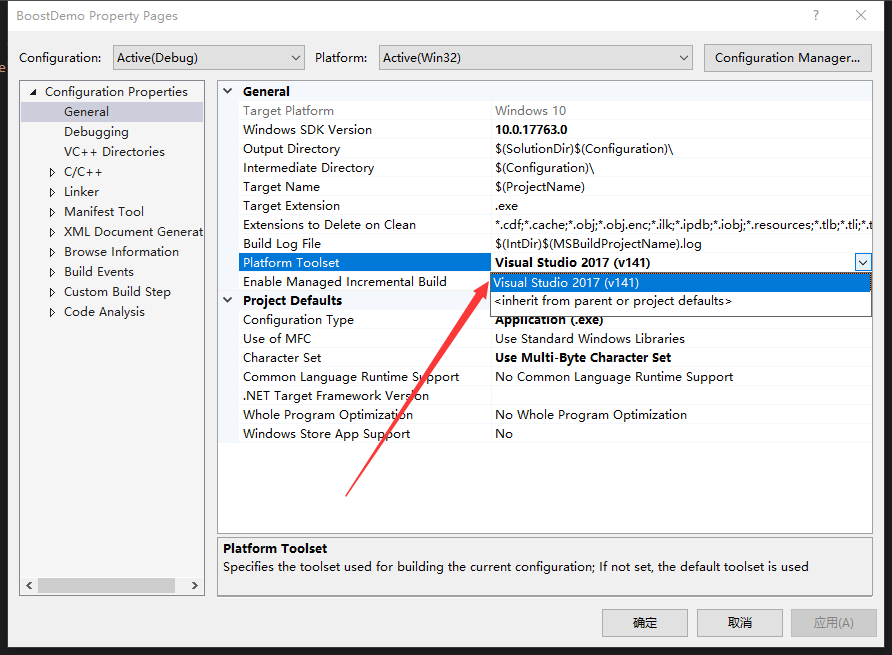
https://stackoverflow.com/questions/50750024/visual-studio-2017-build-tools-150/50997441#50997441
hope this can help
 MRsoymilk
on 28 Mar 2019
MRsoymilk
on 28 Mar 2019
seems to have multiple answers in here, plus also newer node-gyp has more windows work in it so try it out and open a new issue if there's something specific we can look at.
 rvagg
on 20 Jun 2019
rvagg
on 20 Jun 2019
A more direct way to fix this is to go to the Visual Studio Installer that got installed with windows-build tools, and to modify your build tools installation. Under the optional section on the right you will see a "VC++ 2015.3 v14.00 (v140) toolset for desktop" option that you can check and that will work. I'm using Visual Studio Build Tools 2017.
 jaron-l
on 13 Aug 2019
jaron-l
on 13 Aug 2019
I was trying to install better-sqlite3 but kept getting errors about not finding VCBuild and MSBuild.
I initally tried
npm install -g node-gypby itself but then got different errors.I then tried to use npm install -g windows-build-tools which installed Visual Studio 2017 and did NOT include the v140 toolset and was getting and error about this.
But Visual Studio 2015 does includes the v140 toolset...
You can force windows-build-tools to install VS2015 instead of VS2017 with this:
npm install --vs2015 -g windows-build-toolsbetter-sqlite3 installed fine after this.
This solve my problem, thanks a lot!!!
 EdmarPereira
on 27 May 2020
EdmarPereira
on 27 May 2020
Related issues
 adrianescat
·
3Comments
adrianescat
·
3Comments
 Flimm
·
3Comments
Flimm
·
3Comments
 jlchereau
·
3Comments
jlchereau
·
3Comments
 Yamakaky
·
3Comments
Yamakaky
·
3Comments
 meldsza
·
3Comments
meldsza
·
3Comments
Most helpful comment
I was trying to install better-sqlite3 but kept getting errors about not finding VCBuild and MSBuild.
I initally tried
npm install -g node-gypby itself but then got different errors.I then tried to use npm install -g windows-build-tools which installed Visual Studio 2017 and did NOT include the v140 toolset and was getting and error about this.
But Visual Studio 2015 does includes the v140 toolset...
You can force windows-build-tools to install VS2015 instead of VS2017 with this:
npm install --vs2015 -g windows-build-toolsbetter-sqlite3 installed fine after this.