Node-gyp: build the hello world demo failed on win10 creator
I use ms build 2015 on win10 , and last month I update my win10 to creator version, but today I came cross a inexplicable problem, node-gyp build the hello world demo supplied by official docs with errors. node-gyp had build everything successfully before, I don't know weather the update to win10 creator lead the problem.
E:\kuaipan\code\node2\myapp\chapter10\hello>node-gyp build
gyp info it worked if it ends with ok
gyp info using [email protected]
gyp info using [email protected] | win32 | x64
gyp info spawn msbuild
gyp info spawn args [ 'build/binding.sln',
gyp info spawn args   '/clp:Verbosity=minimal',
gyp info spawn args   '/nologo',
gyp info spawn args   '/p:Configuration=Release;Platform=x64' ]
在此解决方案中一次生成一个项目。若要启用并行生成,请添加“/m”开关。
  hello.cc
c:\users\sunny\.node-gyp\6.9.2\include\node\v8.h(345): error C2988: unrecognizable template declaration/definition [E:\
kuaipan\code\node2\myapp\chapter10\hello\build\addon.vcxproj]
c:\users\sunny\.node-gyp\6.9.2\include\node\v8.h(345): error C2059: syntax error : 'using' [E:\kuaipan\code\node2\myapp
\chapter10\hello\build\addon.vcxproj]
c:\users\sunny\.node-gyp\6.9.2\include\node\v8.h(481): error C2988: unrecognizable template declaration/definition [E:\
kuaipan\code\node2\myapp\chapter10\hello\build\addon.vcxproj]
c:\users\sunny\.node-gyp\6.9.2\include\node\v8.h(481): error C2059: syntax error : 'using' [E:\kuaipan\code\node2\myapp
\chapter10\hello\build\addon.vcxproj]
c:\users\sunny\.node-gyp\6.9.2\include\node\v8.h(592): error C2061: syntax error : identifier 'WeakCallbackType' [E:\ku
aipan\code\node2\myapp\chapter10\hello\build\addon.vcxproj]
          c:\users\sunny\.node-gyp\6.9.2\include\node\v8.h(672) : see reference to class template instantiation 'v8::Pe
  rsistentBase<T>' being compiled
c:\users\sunny\.node-gyp\6.9.2\include\node\v8.h(667): error C2253: 'PersistentBase<T>' : pure specifier or abstract ov
erride specifier only allowed on virtual function [E:\kuaipan\code\node2\myapp\chapter10\hello\build\addon.vcxproj]
c:\users\sunny\.node-gyp\6.9.2\include\node\v8.h(874): error C2253: 'Global<T>' : pure specifier or abstract override s
pecifier only allowed on virtual function [E:\kuaipan\code\node2\myapp\chapter10\hello\build\addon.vcxproj]
          c:\users\sunny\.node-gyp\6.9.2\include\node\v8.h(877) : see reference to class template instantiation 'v8::Gl
  obal<T>' being compiled
c:\users\sunny\.node-gyp\6.9.2\include\node\v8.h(882): error C2988: unrecognizable template declaration/definition [E:\
kuaipan\code\node2\myapp\chapter10\hello\build\addon.vcxproj]
c:\users\sunny\.node-gyp\6.9.2\include\node\v8.h(882): error C2059: syntax error : 'using' [E:\kuaipan\code\node2\myapp
\chapter10\hello\build\addon.vcxproj]
c:\users\sunny\.node-gyp\6.9.2\include\node\v8.h(945): error C2989: 'v8::HandleScope' : class template has already been
 declared as a non-class template [E:\kuaipan\code\node2\myapp\chapter10\hello\build\addon.vcxproj]
          c:\users\sunny\.node-gyp\6.9.2\include\node\v8.h(328) : see declaration of 'v8::HandleScope'
c:\users\sunny\.node-gyp\6.9.2\include\node\v8.h(979): error C2989: 'v8::EscapableHandleScope' : class template has alr
eady been declared as a non-class template [E:\kuaipan\code\node2\myapp\chapter10\hello\build\addon.vcxproj]
          c:\users\sunny\.node-gyp\6.9.2\include\node\v8.h(139) : see declaration of 'v8::EscapableHandleScope'
c:\users\sunny\.node-gyp\6.9.2\include\node\v8.h(1009): error C2989: 'v8::Data' : class template has already been decla
red as a non-class template [E:\kuaipan\code\node2\myapp\chapter10\hello\build\addon.vcxproj]
          c:\users\sunny\.node-gyp\6.9.2\include\node\v8.h(76) : see declaration of 'v8::Data'
c:\users\sunny\.node-gyp\6.9.2\include\node\v8.h(1143): error C2989: 'v8::Script' : class template has already been dec
lared as a non-class template [E:\kuaipan\code\node2\myapp\chapter10\hello\build\addon.vcxproj]
          c:\users\sunny\.node-gyp\6.9.2\include\node\v8.h(99) : see declaration of 'v8::Script'
c:\users\sunny\.node-gyp\6.9.2\include\node\v8.h(1582): error C2989: 'v8::StackTrace' : class template has already been
 declared as a non-class template [E:\kuaipan\code\node2\myapp\chapter10\hello\build\addon.vcxproj]
          c:\users\sunny\.node-gyp\6.9.2\include\node\v8.h(104) : see declaration of 'v8::StackTrace'
c:\users\sunny\.node-gyp\6.9.2\include\node\v8.h(1645): error C2989: 'v8::StackFrame' : class template has already been
 declared as a non-class template [E:\kuaipan\code\node2\myapp\chapter10\hello\build\addon.vcxproj]
          c:\users\sunny\.node-gyp\6.9.2\include\node\v8.h(103) : see declaration of 'v8::StackFrame'
c:\users\sunny\.node-gyp\6.9.2\include\node\v8.h(2060): error C2989: 'v8::Value' : class template has already been decl
ared as a non-class template [E:\kuaipan\code\node2\myapp\chapter10\hello\build\addon.vcxproj]
          c:\users\sunny\.node-gyp\6.9.2\include\node\v8.h(112) : see declaration of 'v8::Value'
c:\users\sunny\.node-gyp\6.9.2\include\node\v8.h(2066): error C2989: 'v8::Primitive' : class template has already been
declared as a non-class template [E:\kuaipan\code\node2\myapp\chapter10\hello\build\addon.vcxproj]
          c:\users\sunny\.node-gyp\6.9.2\include\node\v8.h(95) : see declaration of 'v8::Primitive'
c:\users\sunny\.node-gyp\6.9.2\include\node\v8.h(2081): error C2989: 'v8::Boolean' : class template has already been de
clared as a non-class template [E:\kuaipan\code\node2\myapp\chapter10\hello\build\addon.vcxproj]
          c:\users\sunny\.node-gyp\6.9.2\include\node\v8.h(72) : see declaration of 'v8::Boolean'
c:\users\sunny\.node-gyp\6.9.2\include\node\v8.h(2101): error C2989: 'v8::Name' : class template has already been decla
red as a non-class template [E:\kuaipan\code\node2\myapp\chapter10\hello\build\addon.vcxproj]
          c:\users\sunny\.node-gyp\6.9.2\include\node\v8.h(88) : see declaration of 'v8::Name'
c:\users\sunny\.node-gyp\6.9.2\include\node\v8.h(2469): error C2989: 'v8::String' : class template has already been dec
lared as a non-class template [E:\kuaipan\code\node2\myapp\chapter10\hello\build\addon.vcxproj]
          c:\users\sunny\.node-gyp\6.9.2\include\node\v8.h(105) : see declaration of 'v8::String'
c:\users\sunny\.node-gyp\6.9.2\include\node\v8.h(2508): error C2989: 'v8::Symbol' : class template has already been dec
lared as a non-class template [E:\kuaipan\code\node2\myapp\chapter10\hello\build\addon.vcxproj]
          c:\users\sunny\.node-gyp\6.9.2\include\node\v8.h(107) : see declaration of 'v8::Symbol'
c:\users\sunny\.node-gyp\6.9.2\include\node\v8.h(2536): error C2989: 'v8::Private' : class template has already been de
clared as a non-class template [E:\kuaipan\code\node2\myapp\chapter10\hello\build\addon.vcxproj]
          c:\users\sunny\.node-gyp\6.9.2\include\node\v8.h(109) : see declaration of 'v8::Private'
c:\users\sunny\.node-gyp\6.9.2\include\node\v8.h(2550): error C2989: 'v8::Number' : class template has already been dec
lared as a non-class template [E:\kuaipan\code\node2\myapp\chapter10\hello\build\addon.vcxproj]
          c:\users\sunny\.node-gyp\6.9.2\include\node\v8.h(89) : see declaration of 'v8::Number'
c:\users\sunny\.node-gyp\6.9.2\include\node\v8.h(2565): error C2989: 'v8::Integer' : class template has already been de
clared as a non-class template [E:\kuaipan\code\node2\myapp\chapter10\hello\build\addon.vcxproj]
          c:\users\sunny\.node-gyp\6.9.2\include\node\v8.h(84) : see declaration of 'v8::Integer'
c:\users\sunny\.node-gyp\6.9.2\include\node\v8.h(2579): error C2989: 'v8::Int32' : class template has already been decl
ared as a non-class template [E:\kuaipan\code\node2\myapp\chapter10\hello\build\addon.vcxproj]
          c:\users\sunny\.node-gyp\6.9.2\include\node\v8.h(83) : see declaration of 'v8::Int32'
c:\users\sunny\.node-gyp\6.9.2\include\node\v8.h(2593): error C2989: 'v8::Uint32' : class template has already been dec
lared as a non-class template [E:\kuaipan\code\node2\myapp\chapter10\hello\build\addon.vcxproj]
          c:\users\sunny\.node-gyp\6.9.2\include\node\v8.h(110) : see declaration of 'v8::Uint32'
c:\users\sunny\.node-gyp\6.9.2\include\node\v8.h(3015): error C2989: 'v8::Object' : class template has already been dec
lared as a non-class template [E:\kuaipan\code\node2\myapp\chapter10\hello\build\addon.vcxproj]
          c:\users\sunny\.node-gyp\6.9.2\include\node\v8.h(91) : see declaration of 'v8::Object'
c:\users\sunny\.node-gyp\6.9.2\include\node\v8.h(3045): error C2989: 'v8::Array' : class template has already been decl
ared as a non-class template [E:\kuaipan\code\node2\myapp\chapter10\hello\build\addon.vcxproj]
          c:\users\sunny\.node-gyp\6.9.2\include\node\v8.h(71) : see declaration of 'v8::Array'
c:\users\sunny\.node-gyp\6.9.2\include\node\v8.h(3249): error C2504: 'v8::Object' : base class undefined [E:\kuaipan\co
de\node2\myapp\chapter10\hello\build\addon.vcxproj]
c:\users\sunny\.node-gyp\6.9.2\include\node\v8.h(3256): error C2061: syntax error : identifier 'FunctionCallback' [E:\k
uaipan\code\node2\myapp\chapter10\hello\build\addon.vcxproj]
c:\users\sunny\.node-gyp\6.9.2\include\node\v8.h(3260): error C2061: syntax error : identifier 'FunctionCallback' [E:\k
uaipan\code\node2\myapp\chapter10\hello\build\addon.vcxproj]
c:\users\sunny\.node-gyp\6.9.2\include\node\v8.h(3263): error C2535: 'v8::MaybeLocal<F> v8::Function::New(v8::Local<T>)
' : member function already defined or declared [E:\kuaipan\code\node2\myapp\chapter10\hello\build\addon.vcxproj]
          with
          [
              F=v8::Function,
              T=v8::Context
          ]
          c:\users\sunny\.node-gyp\6.9.2\include\node\v8.h(3255) : see declaration of 'v8::Function::New'
c:\users\sunny\.node-gyp\6.9.2\include\node\v8.h(3267): error C2061: syntax error : identifier 'FunctionCallback' [E:\k
uaipan\code\node2\myapp\chapter10\hello\build\addon.vcxproj]
c:\users\sunny\.node-gyp\6.9.2\include\node\v8.h(3277): error C2059: syntax error : 'return' [E:\kuaipan\code\node2\mya
pp\chapter10\hello\build\addon.vcxproj]
c:\users\sunny\.node-gyp\6.9.2\include\node\v8.h(3277): error C2238: unexpected token(s) preceding ';' [E:\kuaipan\code
\node2\myapp\chapter10\hello\build\addon.vcxproj]
c:\users\sunny\.node-gyp\6.9.2\include\node\v8.h(3282): error C2146: syntax error : missing ';' before identifier 'Call
' [E:\kuaipan\code\node2\myapp\chapter10\hello\build\addon.vcxproj]
c:\users\sunny\.node-gyp\6.9.2\include\node\v8.h(3288): error C2270: 'GetName' : modifiers not allowed on nonmember fun
ctions [E:\kuaipan\code\node2\myapp\chapter10\hello\build\addon.vcxproj]
c:\users\sunny\.node-gyp\6.9.2\include\node\v8.h(3296): error C2270: 'GetInferredName' : modifiers not allowed on nonme
mber functions [E:\kuaipan\code\node2\myapp\chapter10\hello\build\addon.vcxproj]
c:\users\sunny\.node-gyp\6.9.2\include\node\v8.h(3302): error C2270: 'GetDebugName' : modifiers not allowed on nonmembe
r functions [E:\kuaipan\code\node2\myapp\chapter10\hello\build\addon.vcxproj]
c:\users\sunny\.node-gyp\6.9.2\include\node\v8.h(3308): error C2270: 'GetDisplayName' : modifiers not allowed on nonmem
ber functions [E:\kuaipan\code\node2\myapp\chapter10\hello\build\addon.vcxproj]
c:\users\sunny\.node-gyp\6.9.2\include\node\v8.h(3314): error C2270: 'GetScriptLineNumber' : modifiers not allowed on n
onmember functions [E:\kuaipan\code\node2\myapp\chapter10\hello\build\addon.vcxproj]
c:\users\sunny\.node-gyp\6.9.2\include\node\v8.h(3319): error C2270: 'GetScriptColumnNumber' : modifiers not allowed on
 nonmember functions [E:\kuaipan\code\node2\myapp\chapter10\hello\build\addon.vcxproj]
c:\users\sunny\.node-gyp\6.9.2\include\node\v8.h(3324): error C2270: 'IsBuiltin' : modifiers not allowed on nonmember f
unctions [E:\kuaipan\code\node2\myapp\chapter10\hello\build\addon.vcxproj]
c:\users\sunny\.node-gyp\6.9.2\include\node\v8.h(3329): error C2270: 'ScriptId' : modifiers not allowed on nonmember fu
nctions [E:\kuaipan\code\node2\myapp\chapter10\hello\build\addon.vcxproj]
c:\users\sunny\.node-gyp\6.9.2\include\node\v8.h(3335): error C2270: 'GetBoundFunction' : modifiers not allowed on nonm
ember functions [E:\kuaipan\code\node2\myapp\chapter10\hello\build\addon.vcxproj]
c:\users\sunny\.node-gyp\6.9.2\include\node\v8.h(3337): error C2270: 'GetScriptOrigin' : modifiers not allowed on nonme
mber functions [E:\kuaipan\code\node2\myapp\chapter10\hello\build\addon.vcxproj]
c:\users\sunny\.node-gyp\6.9.2\include\node\v8.h(3341): error C2059: syntax error : 'private' [E:\kuaipan\code\node2\my
app\chapter10\hello\build\addon.vcxproj]
c:\users\sunny\.node-gyp\6.9.2\include\node\v8.h(3342): error C2059: syntax error : ')' [E:\kuaipan\code\node2\myapp\ch
apter10\hello\build\addon.vcxproj]
c:\users\sunny\.node-gyp\6.9.2\include\node\v8.h(3351): error C2504: 'Object' : base class undefined [E:\kuaipan\code\n
ode2\myapp\chapter10\hello\build\addon.vcxproj]
c:\users\sunny\.node-gyp\6.9.2\include\node\v8.h(3353): error C2504: 'Object' : base class undefined [E:\kuaipan\code\n
ode2\myapp\chapter10\hello\build\addon.vcxproj]
c:\users\sunny\.node-gyp\6.9.2\include\node\v8.h(3359): error C2143: syntax error : missing ';' before '<' [E:\kuaipan\
code\node2\myapp\chapter10\hello\build\addon.vcxproj]
c:\users\sunny\.node-gyp\6.9.2\include\node\v8.h(3359): error C4430: missing type specifier - int assumed. Note: C++ do
es not support default-int [E:\kuaipan\code\node2\myapp\chapter10\hello\build\addon.vcxproj]
c:\users\sunny\.node-gyp\6.9.2\include\node\v8.h(3359): error C2238: unexpected token(s) preceding ';' [E:\kuaipan\code
\node2\myapp\chapter10\hello\build\addon.vcxproj]
c:\users\sunny\.node-gyp\6.9.2\include\node\v8.h(3360): error C2143: syntax error : missing ';' before '<' [E:\kuaipan\
code\node2\myapp\chapter10\hello\build\addon.vcxproj]
c:\users\sunny\.node-gyp\6.9.2\include\node\v8.h(3360): error C4430: missing type specifier - int assumed. Note: C++ do
es not support default-int [E:\kuaipan\code\node2\myapp\chapter10\hello\build\addon.vcxproj]
c:\users\sunny\.node-gyp\6.9.2\include\node\v8.h(3361): error C2238: unexpected token(s) preceding ';' [E:\kuaipan\code
\node2\myapp\chapter10\hello\build\addon.vcxproj]
c:\users\sunny\.node-gyp\6.9.2\include\node\v8.h(3366): error C2143: syntax error : missing ';' before '<' [E:\kuaipan\
code\node2\myapp\chapter10\hello\build\addon.vcxproj]
c:\users\sunny\.node-gyp\6.9.2\include\node\v8.h(3366): error C4430: missing type specifier - int assumed. Note: C++ do
es not support default-int [E:\kuaipan\code\node2\myapp\chapter10\hello\build\addon.vcxproj]
c:\users\sunny\.node-gyp\6.9.2\include\node\v8.h(3366): error C2238: unexpected token(s) preceding ';' [E:\kuaipan\code
\node2\myapp\chapter10\hello\build\addon.vcxproj]
c:\users\sunny\.node-gyp\6.9.2\include\node\v8.h(3372): error C2061: syntax error : identifier 'Local' [E:\kuaipan\code
\node2\myapp\chapter10\hello\build\addon.vcxproj]
c:\users\sunny\.node-gyp\6.9.2\include\node\v8.h(3374): error C2143: syntax error : missing ';' before '<' [E:\kuaipan\
code\node2\myapp\chapter10\hello\build\addon.vcxproj]
c:\users\sunny\.node-gyp\6.9.2\include\node\v8.h(3374): error C4430: missing type specifier - int assumed. Note: C++ do
es not support default-int [E:\kuaipan\code\node2\myapp\chapter10\hello\build\addon.vcxproj]
c:\users\sunny\.node-gyp\6.9.2\include\node\v8.h(3374): error C2238: unexpected token(s) preceding ';' [E:\kuaipan\code
\node2\myapp\chapter10\hello\build\addon.vcxproj]
c:\users\sunny\.node-gyp\6.9.2\include\node\v8.h(3376): error C2061: syntax error : identifier 'Local' [E:\kuaipan\code
\node2\myapp\chapter10\hello\build\addon.vcxproj]
c:\users\sunny\.node-gyp\6.9.2\include\node\v8.h(3378): error C2143: syntax error : missing ';' before '<' [E:\kuaipan\
code\node2\myapp\chapter10\hello\build\addon.vcxproj]
c:\users\sunny\.node-gyp\6.9.2\include\node\v8.h(3378): error C4430: missing type specifier - int assumed. Note: C++ do
es not support default-int [E:\kuaipan\code\node2\myapp\chapter10\hello\build\addon.vcxproj]
c:\users\sunny\.node-gyp\6.9.2\include\node\v8.h(3378): error C2238: unexpected token(s) preceding ';' [E:\kuaipan\code
\node2\myapp\chapter10\hello\build\addon.vcxproj]
c:\users\sunny\.node-gyp\6.9.2\include\node\v8.h(3380): error C2061: syntax error : identifier 'Value' [E:\kuaipan\code
\node2\myapp\chapter10\hello\build\addon.vcxproj]
c:\users\sunny\.node-gyp\6.9.2\include\node\v8.h(3384): error C2061: syntax error : identifier 'Value' [E:\kuaipan\code
\node2\myapp\chapter10\hello\build\addon.vcxproj]
c:\users\sunny\.node-gyp\6.9.2\include\node\v8.h(3394): error C2143: syntax error : missing ';' before '<' [E:\kuaipan\
code\node2\myapp\chapter10\hello\build\addon.vcxproj]
c:\users\sunny\.node-gyp\6.9.2\include\node\v8.h(3394): error C4430: missing type specifier - int assumed. Note: C++ do
es not support default-int [E:\kuaipan\code\node2\myapp\chapter10\hello\build\addon.vcxproj]
c:\users\sunny\.node-gyp\6.9.2\include\node\v8.h(3394): error C2238: unexpected token(s) preceding ';' [E:\kuaipan\code
\node2\myapp\chapter10\hello\build\addon.vcxproj]
c:\users\sunny\.node-gyp\6.9.2\include\node\v8.h(3397): error C2143: syntax error : missing ';' before '<' [E:\kuaipan\
code\node2\myapp\chapter10\hello\build\addon.vcxproj]
c:\users\sunny\.node-gyp\6.9.2\include\node\v8.h(3397): error C4430: missing type specifier - int assumed. Note: C++ do
es not support default-int [E:\kuaipan\code\node2\myapp\chapter10\hello\build\addon.vcxproj]
c:\users\sunny\.node-gyp\6.9.2\include\node\v8.h(3397): error C2238: unexpected token(s) preceding ';' [E:\kuaipan\code
\node2\myapp\chapter10\hello\build\addon.vcxproj]
c:\users\sunny\.node-gyp\6.9.2\include\node\v8.h(3400): error C2143: syntax error : missing ';' before '<' [E:\kuaipan\
code\node2\myapp\chapter10\hello\build\addon.vcxproj]
c:\users\sunny\.node-gyp\6.9.2\include\node\v8.h(3400): error C4430: missing type specifier - int assumed. Note: C++ do
es not support default-int [E:\kuaipan\code\node2\myapp\chapter10\hello\build\addon.vcxproj]
c:\users\sunny\.node-gyp\6.9.2\include\node\v8.h(3400): error C2238: unexpected token(s) preceding ';' [E:\kuaipan\code
\node2\myapp\chapter10\hello\build\addon.vcxproj]
c:\users\sunny\.node-gyp\6.9.2\include\node\v8.h(3401): error C2143: syntax error : missing ';' before '<' [E:\kuaipan\
code\node2\myapp\chapter10\hello\build\addon.vcxproj]
c:\users\sunny\.node-gyp\6.9.2\include\node\v8.h(3401): error C4430: missing type specifier - int assumed. Note: C++ do
es not support default-int [E:\kuaipan\code\node2\myapp\chapter10\hello\build\addon.vcxproj]
c:\users\sunny\.node-gyp\6.9.2\include\node\v8.h(3402): error C2238: unexpected token(s) preceding ';' [E:\kuaipan\code
\node2\myapp\chapter10\hello\build\addon.vcxproj]
c:\users\sunny\.node-gyp\6.9.2\include\node\v8.h(3405): error C2143: syntax error : missing ';' before '<' [E:\kuaipan\
code\node2\myapp\chapter10\hello\build\addon.vcxproj]
c:\users\sunny\.node-gyp\6.9.2\include\node\v8.h(3405): error C4430: missing type specifier - int assumed. Note: C++ do
es not support default-int [E:\kuaipan\code\node2\myapp\chapter10\hello\build\addon.vcxproj]
c:\users\sunny\.node-gyp\6.9.2\include\node\v8.h(3405): error C2238: unexpected token(s) preceding ';' [E:\kuaipan\code
\node2\myapp\chapter10\hello\build\addon.vcxproj]
c:\users\sunny\.node-gyp\6.9.2\include\node\v8.h(3406): error C2143: syntax error : missing ';' before '<' [E:\kuaipan\
code\node2\myapp\chapter10\hello\build\addon.vcxproj]
c:\users\sunny\.node-gyp\6.9.2\include\node\v8.h(3406): error C4430: missing type specifier - int assumed. Note: C++ do
es not support default-int [E:\kuaipan\code\node2\myapp\chapter10\hello\build\addon.vcxproj]
c:\users\sunny\.node-gyp\6.9.2\include\node\v8.h(3407): error C2238: unexpected token(s) preceding ';' [E:\kuaipan\code
\node2\myapp\chapter10\hello\build\addon.vcxproj]
c:\users\sunny\.node-gyp\6.9.2\include\node\v8.h(3415): error C2061: syntax error : identifier 'Value' [E:\kuaipan\code
\node2\myapp\chapter10\hello\build\addon.vcxproj]
c:\users\sunny\.node-gyp\6.9.2\include\node\v8.h(3419): error C2061: syntax error : identifier 'Value' [E:\kuaipan\code
\node2\myapp\chapter10\hello\build\addon.vcxproj]
c:\users\sunny\.node-gyp\6.9.2\include\node\v8.h(3427): error C2504: 'Object' : base class undefined [E:\kuaipan\code\n
ode2\myapp\chapter10\hello\build\addon.vcxproj]
c:\users\sunny\.node-gyp\6.9.2\include\node\v8.h(3429): error C2143: syntax error : missing ';' before '<' [E:\kuaipan\
code\node2\myapp\chapter10\hello\build\addon.vcxproj]
c:\users\sunny\.node-gyp\6.9.2\include\node\v8.h(3429): error C4430: missing type specifier - int assumed. Note: C++ do
es not support default-int [E:\kuaipan\code\node2\myapp\chapter10\hello\build\addon.vcxproj]
c:\users\sunny\.node-gyp\6.9.2\include\node\v8.h(3429): error C2238: unexpected token(s) preceding ';' [E:\kuaipan\code
\node2\myapp\chapter10\hello\build\addon.vcxproj]
c:\users\sunny\.node-gyp\6.9.2\include\node\v8.h(3430): error C2143: syntax error : missing ';' before '<' [E:\kuaipan\
code\node2\myapp\chapter10\hello\build\addon.vcxproj]
c:\users\sunny\.node-gyp\6.9.2\include\node\v8.h(3430): error C4430: missing type specifier - int assumed. Note: C++ do
es not support default-int [E:\kuaipan\code\node2\myapp\chapter10\hello\build\addon.vcxproj]
c:\users\sunny\.node-gyp\6.9.2\include\node\v8.h(3430): error C2238: unexpected token(s) preceding ';' [E:\kuaipan\code
\node2\myapp\chapter10\hello\build\addon.vcxproj]
c:\users\sunny\.node-gyp\6.9.2\include\node\v8.h(3437): error C2143: syntax error : missing ';' before '<' [E:\kuaipan\
code\node2\myapp\chapter10\hello\build\addon.vcxproj]
c:\users\sunny\.node-gyp\6.9.2\include\node\v8.h(3437): error C4430: missing type specifier - int assumed. Note: C++ do
es not support default-int [E:\kuaipan\code\node2\myapp\chapter10\hello\build\addon.vcxproj]
c:\users\sunny\.node-gyp\6.9.2\include\node\v8.h(3439): error C2238: unexpected token(s) preceding ';' [E:\kuaipan\code
\node2\myapp\chapter10\hello\build\addon.vcxproj]
c:\users\sunny\.node-gyp\6.9.2\include\node\v8.h(3441): error C2061: syntax error : identifier 'Value' [E:\kuaipan\code
\node2\myapp\chapter10\hello\build\addon.vcxproj]
c:\users\sunny\.node-gyp\6.9.2\include\node\v8.h(3445): error C2061: syntax error : identifier 'Value' [E:\kuaipan\code
\node2\myapp\chapter10\hello\build\addon.vcxproj]
c:\users\sunny\.node-gyp\6.9.2\include\node\v8.h(3462): error C2504: 'Object' : base class undefined [E:\kuaipan\code\n
ode2\myapp\chapter10\hello\build\addon.vcxproj]
c:\users\sunny\.node-gyp\6.9.2\include\node\v8.h(3479): error C2628: 'ArrayBuffer::Allocator' followed by 'void' is ill
egal (did you forget a ';'?) [E:\kuaipan\code\node2\myapp\chapter10\hello\build\addon.vcxproj]
c:\users\sunny\.node-gyp\6.9.2\include\node\v8.h(3505): error C3861: 'data_': identifier not found [E:\kuaipan\code\nod
e2\myapp\chapter10\hello\build\addon.vcxproj]
c:\users\sunny\.node-gyp\6.9.2\include\node\v8.h(3505): error C2461: 'Contents' : constructor syntax missing formal par
ameters [E:\kuaipan\code\node2\myapp\chapter10\hello\build\addon.vcxproj]
c:\users\sunny\.node-gyp\6.9.2\include\node\v8.h(3505): error C2059: syntax error : 'constant' [E:\kuaipan\code\node2\m
yapp\chapter10\hello\build\addon.vcxproj]
c:\users\sunny\.node-gyp\6.9.2\include\node\v8.h(3505): error C4430: missing type specifier - int assumed. Note: C++ do
es not support default-int [E:\kuaipan\code\node2\myapp\chapter10\hello\build\addon.vcxproj]
c:\users\sunny\.node-gyp\6.9.2\include\node\v8.h(3505): error C2143: syntax error : missing ';' before '{' [E:\kuaipan\
code\node2\myapp\chapter10\hello\build\addon.vcxproj]
c:\users\sunny\.node-gyp\6.9.2\include\node\v8.h(3505): error C2334: unexpected token(s) preceding '{'; skipping appare
nt function body [E:\kuaipan\code\node2\myapp\chapter10\hello\build\addon.vcxproj]
c:\users\sunny\.node-gyp\6.9.2\include\node\v8.h(3507): error C2059: syntax error : 'return' [E:\kuaipan\code\node2\mya
pp\chapter10\hello\build\addon.vcxproj]
c:\users\sunny\.node-gyp\6.9.2\include\node\v8.h(3507): error C2238: unexpected token(s) preceding ';' [E:\kuaipan\code
\node2\myapp\chapter10\hello\build\addon.vcxproj]
c:\users\sunny\.node-gyp\6.9.2\include\node\v8.h(3508): error C2146: syntax error : missing ';' before identifier 'Byte
Length' [E:\kuaipan\code\node2\myapp\chapter10\hello\build\addon.vcxproj]
c:\users\sunny\.node-gyp\6.9.2\include\node\v8.h(3508): error C2270: 'ByteLength' : modifiers not allowed on nonmember
functions [E:\kuaipan\code\node2\myapp\chapter10\hello\build\addon.vcxproj]
c:\users\sunny\.node-gyp\6.9.2\include\node\v8.h(3508): error C4430: missing type specifier - int assumed. Note: C++ do
es not support default-int [E:\kuaipan\code\node2\myapp\chapter10\hello\build\addon.vcxproj]
c:\users\sunny\.node-gyp\6.9.2\include\node\v8.h(3508): error C2065: 'byte_length_' : undeclared identifier [E:\kuaipan
\code\node2\myapp\chapter10\hello\build\addon.vcxproj]
c:\users\sunny\.node-gyp\6.9.2\include\node\v8.h(3510): error C2059: syntax error : 'private' [E:\kuaipan\code\node2\my
app\chapter10\hello\build\addon.vcxproj]
c:\users\sunny\.node-gyp\6.9.2\include\node\v8.h(3514): error C2255: 'friend' : not allowed outside of a class definiti
on [E:\kuaipan\code\node2\myapp\chapter10\hello\build\addon.vcxproj]
c:\users\sunny\.node-gyp\6.9.2\include\node\v8.h(3514): fatal error C1003: error count exceeds 100; stopping compilatio
n [E:\kuaipan\code\node2\myapp\chapter10\hello\build\addon.vcxproj]
gyp ERR! build error
gyp ERR! stack Error: `msbuild` failed with exit code: 1
gyp ERR! stack     at ChildProcess.onExit (d:\Users\sunny\AppData\Roaming\nvm\v6.9.2\node_modules\node-gyp\lib\build.js:276:23)
gyp ERR! stack     at emitTwo (events.js:106:13)
gyp ERR! stack     at ChildProcess.emit (events.js:191:7)
gyp ERR! stack     at Process.ChildProcess._handle.onexit (internal/child_process.js:215:12)
gyp ERR! System Windows_NT 10.0.15063
gyp ERR! command "d:\\Program Files\\nodejs\\node.exe" "d:\\Program Files\\nodejs\\node_modules\\node-gyp\\bin\\node-gyp.js" "build"
gyp ERR! cwd E:\kuaipan\code\node2\myapp\chapter10\hello
gyp ERR! node -v v6.9.2
gyp ERR! node-gyp -v v3.4.0
gyp ERR! not ok
 yunnysunny
All 25 comments
cc/ @refack @joaocgreis
 gibfahn
on 29 May 2017
gibfahn
on 29 May 2017
You should update your copy of node-gyp but that aside, the error messages suggest the compiler does not understand C++11. Probably means it's not using the version of msbuild you think it is.
 bnoordhuis
on 29 May 2017
bnoordhuis
on 29 May 2017
Probably means it's not using the version of msbuild you think it is.
You could try setting set GYP_MSVS_VERSION=2015 before node-gyp build AFAIK it will fail is it can't find your VS2015
 refack
on 29 May 2017
refack
on 29 May 2017
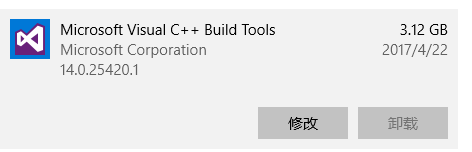
Firstly I have installed ms build 2015:
 .
.
Second, I have tried run node-gyp build in VS2015 x64 Native Tools Command Prompt and VS2015 x86 Native Tools Command Prompt, it both led to the same error I have mentioned before.
Third, I have run npm config set msvs_version 2015 before running node-gyp build.
yunnysunny
on 30 May 2017
Okay, but the point remains that those errors are C++11 related. Do you have an older version of Visual Studio installed, say 2010 or 2012?
bnoordhuis
on 30 May 2017
Yes , I have vs2015 and vs2012 installed.
Do I need to uninstall vs2012 from my pc?
yunnysunny
on 30 May 2017
Yes , I have vs2015 and vs2012 installed.
Do I need to uninstall vs2012 from my pc?
@yunnysunny did you try @bnoordhuis's suggestion to update node-gyp to v3.6.1? The log says you have
gyp ERR! node-gyp -v v3.4.0
Also might be helpful is if you run with --verbose: node-gyp build --verbose or npm i --verbose. It will show which MSBuild is triggered.
refack
on 30 May 2017
E:\kuaipan\code\node2\myapp\chapter10\hello>node-gyp build --verbose
gyp info it worked if it ends with ok
gyp verb cli [ 'd:\\Program Files\\nodejs\\node.exe',
gyp verb cli   'd:\\Program Files\\nodejs\\node_modules\\node-gyp\\bin\\node-gyp.js',
gyp verb cli   'build',
gyp verb cli   '--verbose' ]
gyp info using [email protected]
gyp info using [email protected] | win32 | x64
gyp verb command build []
gyp verb build type Release
gyp verb architecture x64
gyp verb node dev dir C:\Users\sunny\.node-gyp\6.9.2
gyp verb found first Solution file build/binding.sln
gyp verb `which` succeeded for `msbuild` C:\Program Files (x86)\MSBuild\14.0\bin\msbuild.EXE
gyp verb "Release" dir needed to be created? null
gyp verb copying "node.lib" for x64 C:\Users\sunny\.node-gyp\6.9.2\Release\node.lib
gyp info spawn msbuild
gyp info spawn args [ 'build/binding.sln',
gyp info spawn args   '/nologo',
gyp info spawn args   '/p:Configuration=Release;Platform=x64' ]
在此解决方案中一次生成一个项目。若要启用并行生成,请添加“/m”开关。
生成启动时间为 2017/5/30 21:35:07。
节点 1 上的项目“E:\kuaipan\code\node2\myapp\chapter10\hello\build\binding.sln”(默认目标)。
ValidateSolutionConfiguration:
  正在生成解决方案配置“Release|x64”。
项目“E:\kuaipan\code\node2\myapp\chapter10\hello\build\binding.sln”(1)正在节点 1 上生成“E:\kuaipan\code\node2\myapp\chapter10\hello\build\addon.vcxproj”(2) (默认目标)。
InitializeBuildStatus:
  正在对“Release\obj\addon\addon.unsuccessfulbuild”执行 Touch 任务。
ClCompile:
  D:\Program Files (x86)\Microsoft Visual Studio 11.0\VC\bin\x86_amd64\CL.exe /c /I"C:\Users\sunny\.node-gyp\6.9.2\include\node" /I"C:\Users\sunny\.node-gyp\6.9.2\src"
   /I"C:\Users\sunny\.node-gyp\6.9.2\deps\uv\include" /I"C:\Users\sunny\.node-gyp\6.9.2\deps\v8\include" /Zi /nologo /W3 /WX- /Ox /Ob2 /Oi /Ot /Oy /GL /D NODE_GYP_MODU
  LE_NAME=addon /D USING_UV_SHARED=1 /D USING_V8_SHARED=1 /D V8_DEPRECATION_WARNINGS=1 /D WIN32 /D _CRT_SECURE_NO_DEPRECATE /D _CRT_NONSTDC_NO_DEPRECATE /D _HAS_EXCEPT
  IONS=0 /D BUILDING_NODE_EXTENSION /D _WINDLL /GF /Gm- /MT /GS /Gy /fp:precise /Zc:wchar_t /Zc:forScope /GR- /Fo"Release\obj\addon\\" /Fd"Release\obj\addon\vc110.pdb"
   /Gd /TP /wd4351 /wd4355 /wd4800 /wd4251 /errorReport:queue /MP ..\hello.cc
  hello.cc
c:\users\sunny\.node-gyp\6.9.2\include\node\v8.h(345): error C2988: unrecognizable template declaration/definition [E:\kuaipan\code\node2\myapp\chapter10\hello\build\a
ddon.vcxproj]
c:\users\sunny\.node-gyp\6.9.2\include\node\v8.h(345): error C2059: syntax error : 'using' [E:\kuaipan\code\node2\myapp\chapter10\hello\build\addon.vcxproj]
yunnysunny
From: Refael Ackermann
Date: 2017-05-30 20:28
To: nodejs/node-gyp
CC: 白一梓; Mention
Subject: Re: [nodejs/node-gyp] build the hello world demo failed on win10 creator (#1208)
Yes , I have vs2015 and vs2012 installed.
Do I need to uninstall vs2012 from my pc?
@yunnysunny did you try @bnoordhuis's suggestion to update node-gyp to v3.6.1? The log says you have
gyp ERR! node-gyp -v v3.4.0
Also might be helpful is if you run with --verbose: node-gyp build --verbose or npm i --verbose. It will show which MSBuild is triggered.
—
You are receiving this because you were mentioned.
Reply to this email directly, view it on GitHub, or mute the thread.
yunnysunny
on 30 May 2017
I uninstalled the 3.4.1 version, and installed 3.6.1, then cleaned the project, re-run configure and run node-gyp build --verbose,but the same error happened :
E:\kuaipan\code\node2\myapp\chapter10\hello>node-gyp build --verbose
gyp info it worked if it ends with ok
gyp verb cli [ 'd:\\Program Files\\nodejs\\node.exe',
gyp verb cli   'd:\\Program Files\\nodejs\\node_modules\\node-gyp\\bin\\node-gyp.js',
gyp verb cli   'build',
gyp verb cli   '--verbose' ]
gyp info using [email protected]
gyp info using [email protected] | win32 | x64
gyp verb command build []
gyp verb build type Release
gyp verb architecture x64
gyp verb node dev dir C:\Users\sunny\.node-gyp\6.9.2
gyp verb found first Solution file build/binding.sln
gyp verb `which` succeeded for `msbuild` C:\Program Files (x86)\MSBuild\14.0\bin\msbuild.EXE
gyp verb "Release" dir needed to be created? null
gyp verb copying "node.lib" for x64 C:\Users\sunny\.node-gyp\6.9.2\Release\node.lib
gyp info spawn msbuild
gyp info spawn args [ 'build/binding.sln',
gyp info spawn args   '/nologo',
gyp info spawn args   '/p:Configuration=Release;Platform=x64' ]
在此解决方案中一次生成一个项目。若要启用并行生成,请添加“/m”开关。
生成启动时间为 2017/5/30 22:00:39。
节点 1 上的项目“E:\kuaipan\code\node2\myapp\chapter10\hello\build\binding.sln”(默认目标)。
ValidateSolutionConfiguration:
  正在生成解决方案配置“Release|x64”。
项目“E:\kuaipan\code\node2\myapp\chapter10\hello\build\binding.sln”(1)正在节点 1 上生成“E:\kuaipan\code\node2\myapp\chapter10\he
llo\build\addon.vcxproj”(2) (默认目标)。
PrepareForBuild:
  正在创建目录“Release\obj\addon\”。
InitializeBuildStatus:
  正在创建“Release\obj\addon\addon.unsuccessfulbuild”,因为已指定“AlwaysCreate”。
ClCompile:
  D:\Program Files (x86)\Microsoft Visual Studio 11.0\VC\bin\x86_amd64\CL.exe /c /I"C:\Users\sunny\.node-gyp\6.9.2\incl
  ude\node" /I"C:\Users\sunny\.node-gyp\6.9.2\src" /I"C:\Users\sunny\.node-gyp\6.9.2\deps\uv\include" /I"C:\Users\sunny
  \.node-gyp\6.9.2\deps\v8\include" /Zi /nologo /W3 /WX- /Ox /Ob2 /Oi /Ot /Oy /GL /D NODE_GYP_MODULE_NAME=addon /D USIN
  G_UV_SHARED=1 /D USING_V8_SHARED=1 /D V8_DEPRECATION_WARNINGS=1 /D WIN32 /D _CRT_SECURE_NO_DEPRECATE /D _CRT_NONSTDC_
  NO_DEPRECATE /D _HAS_EXCEPTIONS=0 /D BUILDING_NODE_EXTENSION /D _WINDLL /GF /Gm- /MT /GS /Gy /fp:precise /Zc:wchar_t
  /Zc:forScope /GR- /Fo"Release\obj\addon\\" /Fd"Release\obj\addon\vc110.pdb" /Gd /TP /wd4351 /wd4355 /wd4800 /wd4251 /
  errorReport:queue /MP ..\hello.cc "d:\Users\sunny\AppData\Roaming\nvm\v6.9.2\node_modules\node-gyp\src\win_delay_load
  _hook.cc"
  hello.cc
  win_delay_load_hook.cc
c:\users\sunny\.node-gyp\6.9.2\include\node\v8.h(345): error C2988: unrecognizable template declaration/definition (..\
hello.cc) [E:\kuaipan\code\node2\myapp\chapter10\hello\build\addon.vcxproj]
c:\users\sunny\.node-gyp\6.9.2\include\node\v8.h(345): error C2059: syntax error : 'using' (..\hello.cc) [E:\kuaipan\co
de\node2\myapp\chapter10\hello\build\addon.vcxproj]
c:\users\sunny\.node-gyp\6.9.2\include\node\v8.h(481): error C2988: unrecognizable template declaration/definition (..\
hello.cc) [E:\kuaipan\code\node2\myapp\chapter10\hello\build\addon.vcxproj]
c:\users\sunny\.node-gyp\6.9.2\include\node\v8.h(481): error C2059: syntax error : 'using' (..\hello.cc) [E:\kuaipan\co
de\node2\myapp\chapter10\hello\build\addon.vcxproj]
c:\users\sunny\.node-gyp\6.9.2\include\node\v8.h(592): error C2061: syntax error : identifier 'WeakCallbackType' (..\he
llo.cc) [E:\kuaipan\code\node2\myapp\chapter10\hello\build\addon.vcxproj]
yunnysunny
From: Refael Ackermann
Date: 2017-05-30 20:28
To: nodejs/node-gyp
CC: 白一梓; Mention
Subject: Re: [nodejs/node-gyp] build the hello world demo failed on win10 creator (#1208)
Yes , I have vs2015 and vs2012 installed.
Do I need to uninstall vs2012 from my pc?
@yunnysunny did you try @bnoordhuis's suggestion to update node-gyp to v3.6.1? The log says you have
gyp ERR! node-gyp -v v3.4.0
Also might be helpful is if you run with --verbose: node-gyp build --verbose or npm i --verbose. It will show which MSBuild is triggered.
—
You are receiving this because you were mentioned.
Reply to this email directly, view it on GitHub, or mute the thread.
yunnysunny
on 30 May 2017
I think the only way left to me is uninstalling ms build 2015 and installing the latest version.
yunnysunny
on 30 May 2017
You see the D:\Program Files (x86)\Microsoft Visual Studio 11.0\VC\bin\x86_amd64\CL.exe 11.0 == Visual Studio 2012.
I think you either have something in your npm config (check with npm config list) or in the environment (check with set) or in the binding.gyp ('msvs_version': 2012) that makes node-gyp pick 2012 over 2015
Also could you run node -e "console.log(process.platform)" and confirm it prints win32
refack
on 30 May 2017
{lamb} npm config list
; cli configs
user-agent = "npm/3.10.9 node/v6.9.2 win32 x64"

; userconfig C:\Users\sunny\.npmrc
cache = "D:\\Program Files\\nodejs\\node_modules\\npm-cache"
email = "[email protected]"
msvs_version = "2015"
prefix = "D:\\Program Files\\nodejs"
strict-ssl = false

; node bin location = d:\Program Files\nodejs\node.exe
; cwd = C:\Users\sunny
; HOME = C:\Users\sunny
; "npm config ls -l" to show all defaults.
output of npm config list
node -e "console.log(process.platform)" print win32
{
  "targets": [
    {
      "target_name": "addon",
      "sources": [ "hello.cc" ]
    }
  ]
}
The content of binding.gyp
yunnysunny
on 3 Jun 2017
@yunnysunny those two seems fine... So I'm thinking of two things
- try to setup a "VS Developer Console" (just run
"%VS140COMNTOOLS%VsDevCmd.bat") before callingnode-gyp - If that doesn't work, then maybe there's something with the UI Language that confuses
node-gyp...
refack
on 3 Jun 2017
C:\Program Files (x86)\Microsoft Visual Studio 14.0\VC>"%VS140COMNTOOLS%VsDevCmd.bat"
'"C:\Program Files (x86)\Microsoft Visual Studio 14.0\Common7\Tools\VsDevCmd.bat"' 不是内部或外部命令,也不是可运行的程序或批处理文件。
VsDevCmd.bat is not included in my msbuild.
yunnysunny
on 3 Jun 2017
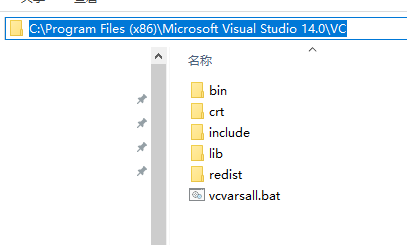
Do you have "C:\Program Files (x86)\Microsoft Visual Studio 14.0\VCvcvarsall.bat"?
refack
on 3 Jun 2017
Yes, I have.
yunnysunny
on 3 Jun 2017
I uninstalled the VS2012 , only left msbuild 2015 in my pc. But another error happened:
C:\Users\sunny\cadd\hello>node-gyp rebuild --verbose
gyp info it worked if it ends with ok
gyp verb cli [ 'd:\\Program Files\\nodejs\\node.exe',
gyp verb cli   'd:\\Program Files\\nodejs\\node_modules\\node-gyp\\bin\\node-gyp.js',
gyp verb cli   'rebuild',
gyp verb cli   '--verbose' ]
gyp info using [email protected]
gyp info using [email protected] | win32 | x64
gyp verb command rebuild []
gyp verb command clean []
gyp verb clean removing "build" directory
gyp verb command configure []
gyp verb check python checking for Python executable "python2" in the PATH
gyp verb `which` failed Error: not found: python2
gyp verb `which` failed     at getNotFoundError (d:\Users\sunny\AppData\Roaming\nvm\v6.9.2\node_modules\node-gyp\node_modules\[email protected]@which\which.js:13:12)
gyp verb `which` failed     at F (d:\Users\sunny\AppData\Roaming\nvm\v6.9.2\node_modules\node-gyp\node_modules\[email protected]@which\which.js:68:19)
gyp verb `which` failed     at E (d:\Users\sunny\AppData\Roaming\nvm\v6.9.2\node_modules\node-gyp\node_modules\[email protected]@which\which.js:80:29)
gyp verb `which` failed     at d:\Users\sunny\AppData\Roaming\nvm\v6.9.2\node_modules\node-gyp\node_modules\[email protected]@which\which.js:89:16
gyp verb `which` failed     at d:\Users\sunny\AppData\Roaming\nvm\v6.9.2\node_modules\node-gyp\node_modules\[email protected]@isexe\index.js:42:5
gyp verb `which` failed     at d:\Users\sunny\AppData\Roaming\nvm\v6.9.2\node_modules\node-gyp\node_modules\[email protected]@isexe\windows.js:36:5
gyp verb `which` failed     at FSReqWrap.oncomplete (fs.js:123:15)
gyp verb `which` failed  python2 { Error: not found: python2
gyp verb `which` failed     at getNotFoundError (d:\Users\sunny\AppData\Roaming\nvm\v6.9.2\node_modules\node-gyp\node_modules\[email protected]@which\which.js:13:12)
gyp verb `which` failed     at F (d:\Users\sunny\AppData\Roaming\nvm\v6.9.2\node_modules\node-gyp\node_modules\[email protected]@which\which.js:68:19)
gyp verb `which` failed     at E (d:\Users\sunny\AppData\Roaming\nvm\v6.9.2\node_modules\node-gyp\node_modules\[email protected]@which\which.js:80:29)
gyp verb `which` failed     at d:\Users\sunny\AppData\Roaming\nvm\v6.9.2\node_modules\node-gyp\node_modules\[email protected]@which\which.js:89:16
gyp verb `which` failed     at d:\Users\sunny\AppData\Roaming\nvm\v6.9.2\node_modules\node-gyp\node_modules\[email protected]@isexe\index.js:42:5
gyp verb `which` failed     at d:\Users\sunny\AppData\Roaming\nvm\v6.9.2\node_modules\node-gyp\node_modules\[email protected]@isexe\windows.js:36:5
gyp verb `which` failed     at FSReqWrap.oncomplete (fs.js:123:15) code: 'ENOENT' }
gyp verb check python checking for Python executable "python" in the PATH
gyp verb `which` succeeded python D:\Python27\python.EXE
gyp verb check python version `D:\Python27\python.EXE -c "import platform; print(platform.python_version());"` returned: "2.7.12\r\n"
gyp verb get node dir no --target version specified, falling back to host node version: 6.9.2
gyp verb command install [ '6.9.2' ]
gyp verb install input version string "6.9.2"
gyp verb install installing version: 6.9.2
gyp verb install --ensure was passed, so won't reinstall if already installed
gyp verb install version is already installed, need to check "installVersion"
gyp verb got "installVersion" 9
gyp verb needs "installVersion" 9
gyp verb install version is good
gyp verb get node dir target node version installed: 6.9.2
gyp verb build dir attempting to create "build" dir: C:\Users\sunny\cadd\hello\build
gyp verb build dir "build" dir needed to be created? C:\Users\sunny\cadd\hello\build
gyp verb Not using VS2017: Could not use PowerShell to find VS2017
gyp verb build/config.gypi creating config file
gyp verb build/config.gypi writing out config file: C:\Users\sunny\cadd\hello\build\config.gypi
gyp verb config.gypi checking for gypi file: C:\Users\sunny\cadd\hello\config.gypi
gyp verb common.gypi checking for gypi file: C:\Users\sunny\cadd\hello\common.gypi
gyp verb gyp gyp format was not specified; forcing "msvs"
gyp info spawn D:\Python27\python.EXE
gyp info spawn args [ 'd:\\Users\\sunny\\AppData\\Roaming\\nvm\\v6.9.2\\node_modules\\node-gyp\\gyp\\gyp_main.py',
gyp info spawn args   'binding.gyp',
gyp info spawn args   '-f',
gyp info spawn args   'msvs',
gyp info spawn args   '-G',
gyp info spawn args   'msvs_version=auto',
gyp info spawn args   '-I',
gyp info spawn args   'C:\\Users\\sunny\\cadd\\hello\\build\\config.gypi',
gyp info spawn args   '-I',
gyp info spawn args   'd:\\Users\\sunny\\AppData\\Roaming\\nvm\\v6.9.2\\node_modules\\node-gyp\\addon.gypi',
gyp info spawn args   '-I',
gyp info spawn args   'C:\\Users\\sunny\\.node-gyp\\6.9.2\\include\\node\\common.gypi',
gyp info spawn args   '-Dlibrary=shared_library',
gyp info spawn args   '-Dvisibility=default',
gyp info spawn args   '-Dnode_root_dir=C:\\Users\\sunny\\.node-gyp\\6.9.2',
gyp info spawn args   '-Dnode_gyp_dir=d:\\Users\\sunny\\AppData\\Roaming\\nvm\\v6.9.2\\node_modules\\node-gyp',
gyp info spawn args   '-Dnode_lib_file=node.lib',
gyp info spawn args   '-Dmodule_root_dir=C:\\Users\\sunny\\cadd\\hello',
gyp info spawn args   '-Dnode_engine=v8',
gyp info spawn args   '--depth=.',
gyp info spawn args   '--no-parallel',
gyp info spawn args   '--generator-output',
gyp info spawn args   'C:\\Users\\sunny\\cadd\\hello\\build',
gyp info spawn args   '-Goutput_dir=.' ]
gyp verb command build []
gyp verb build type Release
gyp verb architecture x64
gyp verb node dev dir C:\Users\sunny\.node-gyp\6.9.2
gyp verb found first Solution file build/binding.sln
gyp verb `which` succeeded for `msbuild` C:\Program Files (x86)\MSBuild\14.0\bin\msbuild.EXE
gyp verb "Release" dir needed to be created? null
gyp verb copying "node.lib" for x64 C:\Users\sunny\.node-gyp\6.9.2\Release\node.lib
gyp info spawn msbuild
gyp info spawn args [ 'build/binding.sln',
gyp info spawn args   '/nologo',
gyp info spawn args   '/p:Configuration=Release;Platform=x64' ]
在此解决方案中一次生成一个项目。若要启用并行生成,请添加“/m”开关。
生成启动时间为 2017/6/3 17:04:24。
节点 1 上的项目“C:\Users\sunny\cadd\hello\build\binding.sln”(默认目标)。
ValidateSolutionConfiguration:
  正在生成解决方案配置“Release|x64”。
MSBUILD : error MSB3428: 未能加载 Visual C++ 组件“VCBuild.exe”。要解决此问题,1) 安装 .NET Framework 2.0 SDK;2) 安装 Microsoft Visual Studio 2005;或 3) 如果将该组件安装到了其 他位置,请将其位置添加到系统路径中。 [C:\Users\sun
ny\cadd\hello\build\binding.sln]
已完成生成项目“C:\Users\sunny\cadd\hello\build\binding.sln”(默认目标)的操作 - 失败。


生成失败。

“C:\Users\sunny\cadd\hello\build\binding.sln”(默认目标) (1) ->
(addon 目标) ->
  MSBUILD : error MSB3428: 未能加载 Visual C++ 组件“VCBuild.exe”。要解决此问题,1) 安装 .NET Framework 2.0 SDK;2) 安装 Microsoft Visual Studio 2005;或 3) 如果将该组件安装到了 其他位置,请将其位置添加到系统路径中。 [C:\Users\s
unny\cadd\hello\build\binding.sln]

    0 个警告
    1 个错误

已用时间 00:00:00.11
gyp ERR! build error
gyp ERR! stack Error: `msbuild` failed with exit code: 1
gyp ERR! stack     at ChildProcess.onExit (d:\Users\sunny\AppData\Roaming\nvm\v6.9.2\node_modules\node-gyp\lib\build.js:285:23)
gyp ERR! stack     at emitTwo (events.js:106:13)
gyp ERR! stack     at ChildProcess.emit (events.js:191:7)
gyp ERR! stack     at Process.ChildProcess._handle.onexit (internal/child_process.js:215:12)
gyp ERR! System Windows_NT 10.0.15063
gyp ERR! command "d:\\Program Files\\nodejs\\node.exe" "d:\\Program Files\\nodejs\\node_modules\\node-gyp\\bin\\node-gyp.js" "rebuild" "--verbose"
gyp ERR! cwd C:\Users\sunny\cadd\hello
gyp ERR! node -v v6.9.2
gyp ERR! node-gyp -v v3.6.1
gyp ERR! not ok
error output of node-gyp rebuild --verbose
I found that the build project generated in the folder of build is named addon.vcproj , which should been created by Visual Studio, but Visual Studio is not installed in my pc, finally, it resulted in the error "loading VCBuild.exe (which supplied by Visual Studio) failed".
I had tried many method to solve it but failed. At last I ran node-gyp rebuild --msvs_version=2015, a miracle happened, everything worked OK. And the project file in build folder has the name of addon.vcxproj now.
I tried to run npm config set msvs_version 2015 --global, but after ran it , I found it helpless.
yunnysunny
on 3 Jun 2017
npm config ... only works when node-gyp is invoked by npm, not when you run node-gyp directly.
Happy to hear it's working now, I'll close this out.
bnoordhuis
on 3 Jun 2017
I found that the build project generated in the folder of build is named addon.vcproj , which should been created by Visual Studio, but Visual Studio is not installed in my pc, finally, it resulted in the error "loading VCBuild.exe (which supplied by Visual Studio) failed".
I had tried many method to solve it but failed. At last I ran node-gyp rebuild --msvs_version=2015, a miracle happened, everything worked OK. And the project file in build folder has the name of addon.vcxproj now.
I tried to run npm config set msvs_version 2015 --global, but after ran it , I found it helpless.
Two comments for posterity:
- Regarding environment/config settings: we documented their behaviour https://github.com/nodejs/node-gyp#configuration
- Regarding
addon.vcprojvsaddon.vcxproj: IfGYPdecided you have an old MSVS version (<= 2008) it will create.vcprojfiles - https://github.com/nodejs/node-gyp/blob/master/gyp/pylib/gyp/MSVSVersion.py#L295
refack
on 3 Jun 2017
I read the code of MSVSVersion.py , it seemed that node-gyp get the version of VS via reading the Windows's regedit. And I found HKEY_LOCAL_MACHINE\SOFTWARE\Microsoft\VisualStudio\14.0, in other words, its version is 2015.
    keys = [r'HKLM\Software\Microsoft\VisualStudio\%s' % version,
            r'HKLM\Software\Wow6432Node\Microsoft\VisualStudio\%s' % version,
            r'HKLM\Software\Microsoft\VCExpress\%s' % version,
            r'HKLM\Software\Wow6432Node\Microsoft\VCExpress\%s' % version]
Though I am not familiar with regedit, I have question why the key's name start with HKLM, which does not exist in my PC.
Now I ran npm i buffertools, it worked correctly. I don't know why and what happened. It should only work successfully with --msvs_version=2015 before.
yunnysunny
on 9 Jun 2017
I read the code of MSVSVersion.py , it seemed that node-gyp get the version of VS via reading the Windows's regedit. And I found HKEY_LOCAL_MACHINE\SOFTWARE\MicrosoftVisualStudio\14.0, in other words, its version is 2015.
Though I am not familiar with regedit, I have question why the key's name start with HKLM, which does not exist in my PC.
Now I ran npm i buffertools, it worked correctly. I don't know why and what happened. It should only work successfully with --msvs_version=2015 before.
HKLMis short forHKEY_LOCAL_MACHINE, so it's Ok.GYPhas _some_ auto detection capabilities. It usually _can_ detect VS2015 (as you said, by reading the registry)--msvs_version=2015is recommended just in case (ifGYPfails or if VS2017 is installed)- In case of VS2017 we "lie" to
GYPand force it to use VS2017 - https://github.com/nodejs/node-gyp/blob/master/lib/configure.js#L152
refack
on 11 Jun 2017
I found that when using node-gyp rebuild directly, the problem would occur still. But it worked OK after running npm install.
Why not node-gyp supply a common solution to make node-gyp detect the version of VS correctly?
yunnysunny
on 26 Sep 2017
It does. The issue here was that you overrode it through npm. If you run node-gyp directly, either pass --msvs_version=... on the command line or set npm_config_msvs_version=... in the environment (that is how node-gyp receives the option from npm.)
node-gyp's auto-detection usually does the right thing. It's only when you have multiple compilers installed (as was the case here) that it may pick the wrong one.
bnoordhuis
on 26 Sep 2017
@bnoordhuis In fact , I uninstalled the VS 2012, and only vs 2015 is installed in my pc now. But it can not detect the vs version correctly.
yunnysunny
on 17 Dec 2017
@refack I modify the python code which check the VS version, and print some log to find the result of the checking.
def _DetectVisualStudioVersions(versions_to_check, force_express):
  """Collect the list of installed visual studio versions.

  Returns:
    A list of visual studio versions installed in descending order of
    usage preference.
    Base this on the registry and a quick check if devenv.exe exists.
    Only versions 8-10 are considered.
    Possibilities are:
      2005(e) - Visual Studio 2005 (8)
      2008(e) - Visual Studio 2008 (9)
      2010(e) - Visual Studio 2010 (10)
      2012(e) - Visual Studio 2012 (11)
      2013(e) - Visual Studio 2013 (12)
      2015    - Visual Studio 2015 (14)
    Where (e) is e for express editions of MSVS and blank otherwise.
  """
  version_to_year = {
      '8.0': '2005',
      '9.0': '2008',
      '10.0': '2010',
      '11.0': '2012',
      '12.0': '2013',
      '14.0': '2015',
  }
  versions = []
  for version in versions_to_check:
    # Old method of searching for which VS version is installed
    # We don't use the 2010-encouraged-way because we also want to get the
    # path to the binaries, which it doesn't offer.
    keys = [r'HKLM\Software\Microsoft\VisualStudio\%s' % version,
            r'HKLM\Software\Wow6432Node\Microsoft\VisualStudio\%s' % version,
            r'HKLM\Software\Microsoft\VCExpress\%s' % version,
            r'HKLM\Software\Wow6432Node\Microsoft\VCExpress\%s' % version]
    for index in range(len(keys)):
      path = _RegistryGetValue(keys[index], 'InstallDir')
      if not path:
        continue
      path = _ConvertToCygpath(path)
      # Check for full.
      full_path = os.path.join(path, 'devenv.exe')
      express_path = os.path.join(path, '*express.exe')
      if not force_express and os.path.exists(full_path):
        # Add this one.
        versions.append(_CreateVersion(version_to_year[version],
            os.path.join(path, '..', '..')))
      # Check for express.
      elif glob.glob(express_path):
        # Add this one.
        versions.append(_CreateVersion(version_to_year[version] + 'e',
            os.path.join(path, '..', '..')))

    # The old method above does not work when only SDK is installed.
    keys = [r'HKLM\Software\Microsoft\VisualStudio\SxS\VC7',
            r'HKLM\Software\Wow6432Node\Microsoft\VisualStudio\SxS\VC7']
    for index in range(len(keys)):
      path = _RegistryGetValue(keys[index], version)
      if not path:
        continue
      path = _ConvertToCygpath(path)
      if version != '14.0':  # There is no Express edition for 2015.
        versions.append(_CreateVersion(version_to_year[version] + 'e',
            os.path.join(path, '..'), sdk_based=True))

  print("current installed vs:")
  print(versions)
  return versions
The last line print(versions) was added by me. Then I ran node-gyp rebuild , it would print that:
λ node-gyp rebuild
gyp info it worked if it ends with ok
gyp info using [email protected]
gyp info using [email protected] | win32 | x64
gyp info spawn D:\Python27\python.EXE
gyp info spawn args [ 'd:\\Users\\sunny\\AppData\\Roaming\\nvm\\v6.9.2\\node_modules\\node-gyp\\gyp\\gyp_main.py',
gyp info spawn args   'binding.gyp',
gyp info spawn args   '-f',
gyp info spawn args   'msvs',
gyp info spawn args   '-G',
gyp info spawn args   'msvs_version=auto',
gyp info spawn args   '-I',
gyp info spawn args   'E:\\tmp\\async-tutorial-code\\addon\\build\\config.gypi',
gyp info spawn args   '-I',
gyp info spawn args   'd:\\Users\\sunny\\AppData\\Roaming\\nvm\\v6.9.2\\node_modules\\node-gyp\\addon.gypi',
gyp info spawn args   '-I',
gyp info spawn args   'C:\\temp\\.gyp\\6.9.2\\include\\node\\common.gypi',
gyp info spawn args   '-Dlibrary=shared_library',
gyp info spawn args   '-Dvisibility=default',
gyp info spawn args   '-Dnode_root_dir=C:\\temp\\.gyp\\6.9.2',
gyp info spawn args   '-Dnode_gyp_dir=d:\\Users\\sunny\\AppData\\Roaming\\nvm\\v6.9.2\\node_modules\\node-gyp',
gyp info spawn args   '-Dnode_lib_file=node.lib',
gyp info spawn args   '-Dmodule_root_dir=E:\\tmp\\async-tutorial-code\\addon',
gyp info spawn args   '-Dnode_engine=v8',
gyp info spawn args   '--depth=.',
gyp info spawn args   '--no-parallel',
gyp info spawn args   '--generator-output',
gyp info spawn args   'E:\\tmp\\async-tutorial-code\\addon\\build',
gyp info spawn args   '-Goutput_dir=.' ]
current installed vs:
[]
gyp info spawn C:\Program Files (x86)\MSBuild\14.0\bin\msbuild.exe
gyp info spawn args [ 'build/binding.sln',
gyp info spawn args   '/clp:Verbosity=minimal',
gyp info spawn args   '/nologo',
gyp info spawn args   '/p:Configuration=Release;Platform=x64' ]
在此解决方案中一次生成一个项目。若要启用并行生成,请添加“/m”开关。
MSBUILD : error MSB3428: 未能加载 Visual C++ 组件“VCBuild.exe”。要解决此问题,1) 安装 .NET Framework 2.0 SDK;2) 安装 Microsoft Visual Studio 2005;或 3) 如果将该组件
安装到了其他位置,请将其位置添加到系统路径中。 [E:\
tmp\async-tutorial-code\addon\build\binding.sln]
gyp ERR! build error
gyp ERR! stack Error: `C:\Program Files (x86)\MSBuild\14.0\bin\msbuild.exe` failed with exit code: 1
gyp ERR! stack     at ChildProcess.onExit (d:\Users\sunny\AppData\Roaming\nvm\v6.9.2\node_modules\node-gyp\lib\build.js:285:23)
gyp ERR! stack     at emitTwo (events.js:106:13)
gyp ERR! stack     at ChildProcess.emit (events.js:191:7)
gyp ERR! stack     at Process.ChildProcess._handle.onexit (internal/child_process.js:215:12)
gyp ERR! System Windows_NT 10.0.15063
gyp ERR! command "d:\\Program Files\\nodejs\\node.exe" "d:\\Program Files\\nodejs\\node_modules\\node-gyp\\bin\\node-gyp.js" "rebuild"
gyp ERR! cwd E:\tmp\async-tutorial-code\addon
gyp ERR! node -v v6.9.2
gyp ERR! node-gyp -v v3.6.1
gyp ERR! not ok
Take attention to the output of current installed vs: , it just printed [], which mean that the auto detection might failed , since I have installed VS2015 in my pc.
yunnysunny
on 23 Dec 2017
Related issues
 Yamakaky
·
3Comments
Yamakaky
·
3Comments
 Sentero-esp12
·
3Comments
Sentero-esp12
·
3Comments
 j4y
·
4Comments
j4y
·
4Comments
 halkar
·
4Comments
halkar
·
4Comments
 jplatte
·
3Comments
jplatte
·
3Comments