Node-fs-extra: Vue-Cli app & Vue-electron - TypeError: Cannot read property 'match' of undefined
- Operating System: Win10 1903 10.0.18362
- Node.js version: 14.7.0
fs-extraversion: ^9.0.1
  Binaries:
    Yarn: 1.22.4
    npm: 6.14.7
  Browsers:
    Chrome: 84.0.4147.105
    Edge: Spartan (44.18362.449.0)
  npmPackages:
    @vue/babel-helper-vue-jsx-merge-props:  1.0.0
    @vue/babel-plugin-transform-vue-jsx:  1.1.2
    @vue/babel-preset-app:  4.4.6
    @vue/babel-preset-jsx:  1.1.2
    @vue/babel-sugar-functional-vue:  1.1.2
    @vue/babel-sugar-inject-h:  1.1.2
    @vue/babel-sugar-v-model:  1.1.2
    @vue/babel-sugar-v-on:  1.1.2
    @vue/cli-overlay:  4.4.6
    @vue/cli-plugin-babel: ~4.4.0 => 4.4.6
    @vue/cli-plugin-eslint: ~4.4.0 => 4.4.6
    @vue/cli-plugin-router:  4.4.6
    @vue/cli-plugin-vuex: ~4.4.0 => 4.4.6
    @vue/cli-service: ~4.4.0 => 4.4.6
    @vue/cli-shared-utils:  4.4.6
    @vue/component-compiler-utils:  3.2.0
    @vue/preload-webpack-plugin:  1.1.2
    @vue/web-component-wrapper:  1.2.0
    eslint-plugin-vue: ^6.2.2 => 6.2.2
    vue: ^2.6.11 => 2.6.11
    vue-eslint-parser:  7.1.0
    vue-hot-reload-api:  2.3.4
    vue-loader:  15.9.3
    vue-style-loader:  4.1.2
    vue-template-compiler: ^2.6.11 => 2.6.11
    vue-template-es2015-compiler:  1.9.1
    vuex: ^3.4.0 => 3.5.1
STEP
Try-1 (without electron builder):
- create vue cli project:
vue create pic2 - install
fs-extra:npm install --save fs-extra/yarn add fs-extra(had tried both) - modify
App.vue: addbuttonand binding onclick: mk()
<template>
    <div id="app">
        <img alt="Vue logo" src="./assets/logo.png">
        <HelloWorld msg="Welcome to Your Vue.js App" />
        <button @click="mk">TEST</button>
    </div>
</template>

<script>
    import HelloWorld from './components/HelloWorld.vue'
    import fs from 'fs-extra'
    export default {
        name: 'App',
        components: {
            HelloWorld
        },
        methods:{
            mk(){
                const dir = 'C:/Users/Proladon/Desktop/123'
                fs.ensureDirSync(dir)
            }
        }
    }
</script>
- run :
yarn serve - got error, and everything not showing
Try-2 (with electron builder):
- create vue cli project:
vue create pic2 - install
fs-extra:npm install --save fs-extra/yarn add fs-extra(had tried both) - modify
App.vue: same as try1 vue add electron-builder(all default)- run:
yarn electron:serve - got same error and not showing everything
Try-3:
- repeat
try1&try2 - delete
node_modules&package-lock.json npm cache clear --forcenpm install/yarn install(had tried both)- run:
yarn serve/yarn electron:serve - got same error and not showing everything
Error
Uncaught TypeError: Cannot read property 'match' of undefined
    at patch (polyfills.js?a0a3:31)
    at patch (graceful-fs.js?0da7:104)
    at Object.eval (graceful-fs.js?0da7:96)
    at eval (graceful-fs.js:356)
    at Object../node_modules/graceful-fs/graceful-fs.js (chunk-vendors.js:1464)
    at __webpack_require__ (app.js:849)
    at fn (app.js:151)
    at eval (index.js?ec2f:5)
    at Object../node_modules/fs-extra/lib/fs/index.js (chunk-vendors.js:1237)
    at __webpack_require__ (app.js:849)
P.S.
if only use fs module, it works...
I also had tried graceful-fs, but got same error.
so only fs can do the job.
 Proladon
All 6 comments
Webpack is bundling stuff incorrectly, can you modify your webpack config to not bundle fs-extra?
 RyanZim
on 3 Aug 2020
RyanZim
on 3 Aug 2020
Webpack is bundling stuff incorrectly, can you modify your webpack config to not bundle fs-extra?
Sorry, i don't understand Webpack ... 😥
My vue-cli project doesn't have webpack.config.js
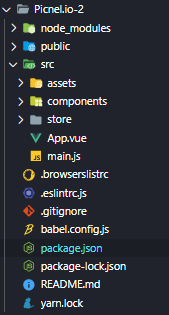
Aaccording to the Vue docs, tweak webpack settings is using vue.config.js
but i still don't know how to "not" bundle fs-extra, sorry 😫
ref: https://cli.vuejs.org/guide/webpack.html#simple-configuration
and yes, it can manual setup webpack, but this way will get more complex to me Lol
ref: https://vue-loader.vuejs.org/guide/#manual-setup
So... would u help me how to modify webpack to not bundle fs-extra
btw, so basically it's webpack cuz the problem, or it's npm / fs-extra cuz the webpack problem?
Proladon
on 4 Aug 2020
I'm not an expert on webpack, but I think you need to define an IgnorePlugin https://webpack.js.org/plugins/ignore-plugin/ in your vue.config.js. Webpack is the cause of this problem, for sure.
RyanZim
on 4 Aug 2020
Still the same 😥
STEP:
- modify
vue.config.js
ref: How to ignore plugin on Vue CLI3 in vue.congif.js
const webpack = require('webpack')
module.exports = {
configureWebpack: {
plugins: [
new webpack.IgnorePlugin({
resourceRegExp: /^\.\/locale$/,
contextRegExp: /fs-extra$/
})
]
}
}
- delete
node_modules、package-lock.json - npm cache clear
- npm install
- run
btw, but if i Ignore fs-extra, that's means i can't use fs-extra anymore?
P.S. And, i'd tried electron-rebuild but still...
Proladon
on 5 Aug 2020
I had already solved the problem!
Solution
Modify vue.config.js to turn on the Node Integration and good to go :
module.exports = {
  pluginOptions: {
    electronBuilder: {
      nodeIntegration: true
    }
  }
}
This in vue plugin: electron-builder document #Security section
and still really grateful @RyanZim for helping and replied~👍
Proladon
on 5 Aug 2020
I had already solved the problem!
Solution
Modify
vue.config.jsto turn on theNode Integrationand good to go :module.exports = { pluginOptions: { electronBuilder: { nodeIntegration: true } } }This in vue plugin:
electron-builderdocument #Security section
and still really grateful @RyanZim for helping and replied~👍
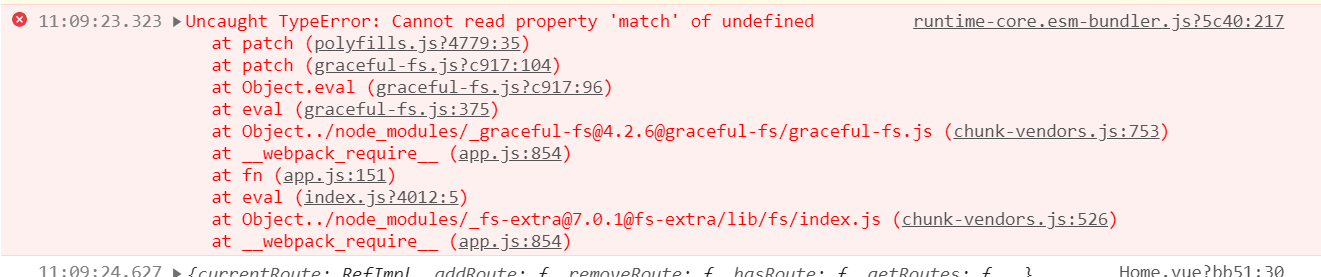
I tried 。
Vue Cli 4.5.12
fs-extra 9.1.0
Still the same 😥
 jiqiangzhu
on 25 Mar 2021
jiqiangzhu
on 25 Mar 2021
Related issues
 fuyapeng123456
·
3Comments
fuyapeng123456
·
3Comments
 delimmy
·
7Comments
delimmy
·
7Comments
 solutionstack
·
3Comments
solutionstack
·
3Comments
 loilo
·
8Comments
loilo
·
8Comments
 monkindey
·
3Comments
monkindey
·
3Comments
Most helpful comment
I had already solved the problem!
Solution
Modify
vue.config.jsto turn on theNode Integrationand good to go :This in vue plugin:
electron-builderdocument #Security sectionand still really grateful @RyanZim for helping and replied~👍