Node-fluent-ffmpeg: How to import fluent-ffmpeg in AWS Lamdba?
Version information
- fluent-ffmpeg version: ^2.1.2
- ffmpeg version: fc20ba9e049e5dde25643bffb2565a5477e6e5f6
- ffmpeg build: ffmpeg-git-20190925-amd64-static.tar.xz
- OS: Lambda / Node 10.x
Code to reproduce
I'm trying to use fluent-ffmpeg in AWS Lambda, but cannot get it setup correctly. At the top of my index.js:
import ffmpeg from "fluent-ffmpeg";
But ffmpeg is always undefined.
ffmpeg === undefined.
I'm using the Serverless framework and have FFmpeg included as a layer.
serverless.yaml
functions:
  createGifFromVideo:
    handler: src/services/createGifFromVideo/index.handler
    layers:
      - { Ref: FfmpegLambdaLayer }
    events:
      - sns: arn:aws:sns:us-east-1:${self:custom.accountId}:NewVideoPostContentTopic-${self:provider.stage}

layers:
  ffmpeg:
    path: src/layers
package.json
{
  "name": "createGifFromVideo",
  "version": "1.0.0",
  "main": "index.js",
  "license": "MIT",
  "private": true,
  "dependencies": {
    "fluent-ffmpeg": "^2.1.2"
  }
}
The uploaded lambda seems to be constructed correctly from what I can tell. Webpack builds the index.js file with fluent-ffmpeg merged in and it is linked to the FFmpeg layer correctly in Lambda.
I can load other packages fine. It's just fluent-ffmpeg that comes back undefined. I've also tried a require statement instead of import. Same result.
From the docs it mentions passing FFMPEG_PATH and FFPROBE_PATH as environment variables. Are these necessary with a Lambda layer? What should they be set to?
I would be grateful to see a configuration that works. What scenarios would cause this import to return undefined?
Expected results
The import statement for fluent-ffmpeg returns a result.
Observed results
The import statement returns undefined.
Checklist
- [x ] I have read the FAQ
- [x ] I tried the same with command line ffmpeg and it works correctly (hint: if the problem also happens this way, this is an ffmpeg problem and you're not reporting it to the right place)
- [x ] I have included full stderr/stdout output from ffmpeg
 joebernard
All 7 comments
My issue turned out to be incorrect environment variables. The correct vars when using FFmpeg as a Lambda layer are:
FFMPEG_PATH: /opt/ffmpeg/ffmpeg
FFPROBE_PATH: /opt/ffmpeg/ffprobe
Hi, @joebernard maybe it is late, but maybe can you at least send me a complete workaround of the installation?
Because i already set up the:
-Serverless file with it's layer
-Uploaded the binaries to the lambda function as a layer
-Already set up the FFPROBE_PATH AND FFMPEG_PATH from the lambda function
Also the weird thing is that: the lambda function just finish working, like sending a response.

I mean also if you could show me step by step how did you installed it in a lambda function?
You will see the following example of how i have everything setup and it stills does not work
1- This is from the lambda console


2- My json dependencies
"dependencies": {
"aws-sdk": "^2.764.0",
"aws-serverless-express": "^3.3.8",
"fluent-ffmpeg": "^2.1.2",
"lambduh-execute": "^1.3.0"
}
3- My serverless file
`service: functionName
provider:
name: aws
runtime: nodejs12.x
memorySize: 3008
timeout: 300
stage: live
region: us-east-1
environment:
FFMPEG_PATH: /opt/ffmpeg/ffmpeg
FFPROBE_PATH: /opt/ffmpeg/ffprobe
functions:
api:
handler: lambda.handler
events:
- s3: ${self:custom.bucket}
layers:
- { Ref: FfmpegLambdaLayer }
layers:
ffmpeg:
path: layer
custom:
bucket: buckename
4- The directory of the layer

5- Javascript file
const fs = require("fs");
const AWS = require("aws-sdk");
const ffmpeg = require("fluent-ffmpeg");
const s3 = new AWS.S3();

exports.handler = async (event, context, callback) => {

ffmpeg({
        source: `**Object file which i already verified it exists**`,
        nolog: true,
      })
        .on("filenames", async (filenames) => {
          console.log("Uploading please wait");
        })
        .on("error", function (err) {
          console.log("Error in filenames section: " + JSON.stringify(err));
        })
        .on("end", function () {
          console.log("Screenshots taken");
        })
        .screenshots({
          count: 10,
          folder: "tmp/",
          filename: "thumbnail-at-%i.png",
          size: "1600x900",
        })
        .on("end", function (stdout, stderr) {
          let destparams = {
            Bucket: dstBucket,
            Key: imageGotoUrl,
            Body: buffer,
            ContentType: "image",
          };

        })
        .on("error", function (err) {
          console.log("Error writing video to disk: " + JSON.stringify(err));
          throw "An error: " + err.message;
        });

};
 isaacp0310
on 7 Oct 2020
isaacp0310
on 7 Oct 2020
What error are you getting? Here is my working config.
in serverless.yml
layers:
  ffmpeg:
    path: src/layers
    name: ffmpeg
    description: FFMPEG for AWS Lambda
    compatibleRuntimes:
      - nodejs10.x
      - python3.6
      - ruby2.5
      - java8
      - go1.x
    licenseInfo: GPL-2.0-or-later

functions:
  createGifFromVideo:
    name: createGifFromVideo
    handler: src/services/createGifFromVideo/index.handler
    description: Create animated gif from uploaded video.
    timeout: 29
    memorySize: 3008
    environment:
      FFMPEG_PATH: /opt/ffmpeg/ffmpeg
      FFPROBE_PATH: /opt/ffmpeg/ffprobe
      VIDEO_THUMBNAIL_LENGTH_MS: 1000
    layers:
      - { Ref: FfmpegLambdaLayer }
    events:
      - sns: ${output:junctureresources.NewVideoPostContentTopicArn}
in my lambda function:
import ffmpeg from "fluent-ffmpeg";

const imgHandler = (vidFname, seekPoint, parsedFname) => {
  return new Promise((resolve, reject) => {
    const renderedFname = `${parsedFname.dir}/${parsedFname.name}.jpg`;
    ffmpeg()
      .input(vidFname)
      .seekInput(seekPoint)
      .addOutputOption(["-vframes 1", "-q:v 2"])
      .on("start", (cmd) => {
        console.log(`Beginning img creation:\n\t${cmd}`);
      })
      .on("end", () => {
        console.log("IMG created");
        resolve({
          key: `${parsedFname.name}.jpg`,
          renderedFname,
        });
      })
      .on("error", (error) => {
        console.log(`ERROR creating img: ${error}`);
        reject(error);
      })
      .output(renderedFname)
      .run();
  }).catch((ex) => {
    console.log(ex);
    throw ex;
  });
};
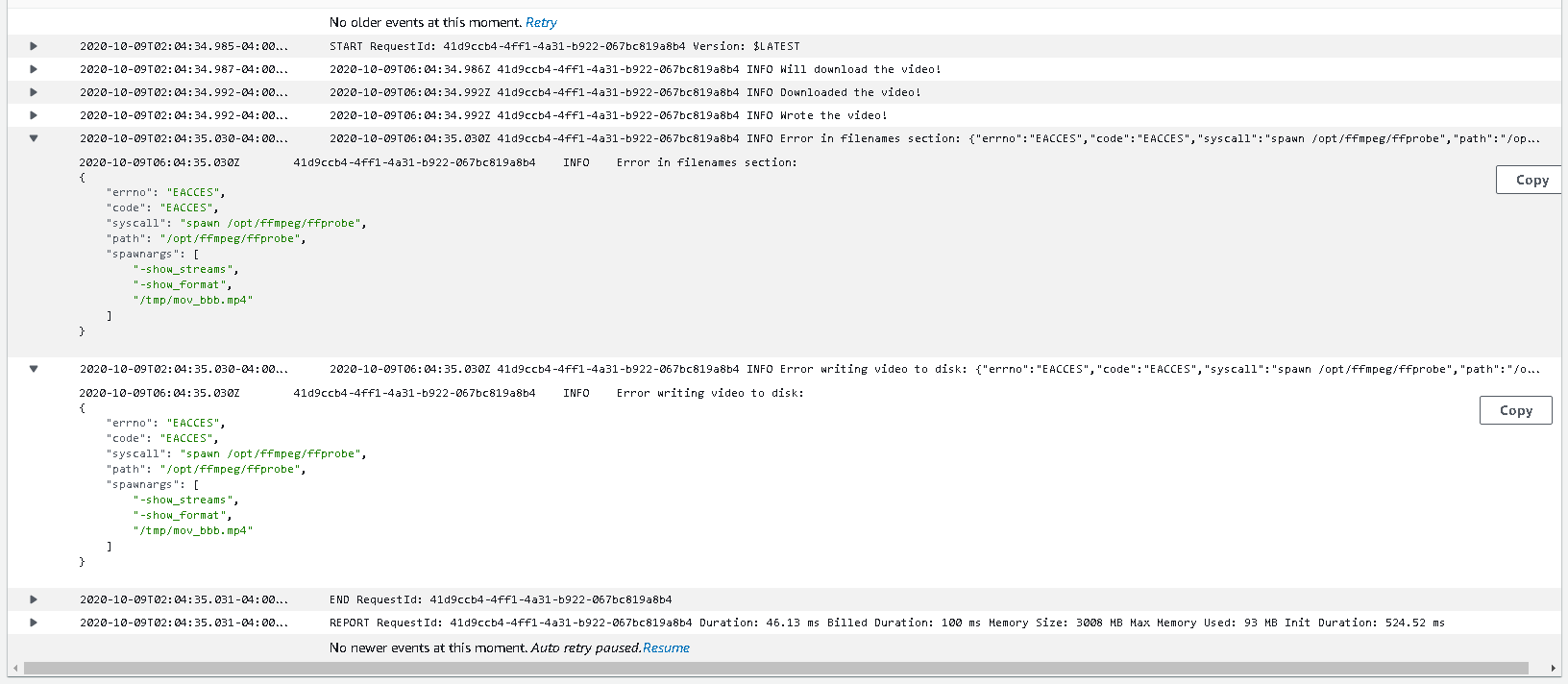
Hi, @joebernard as you can see:
This is the bug that i get, which i get the logs from cloudwatch:
Click the image to see better
isaacp0310
on 9 Oct 2020
And also i get this bug if i unset (Or Remove) the enviroment variables:

isaacp0310
on 9 Oct 2020
Could it be a permissions error? Are you able to write anything to that location even without ffmpeg? This doesn't look familiar to me, you might want to open another ticket.
joebernard
on 9 Oct 2020
@joebernard Thanks, i also tought that could be the mistake.
isaacp0310
on 9 Oct 2020
Related issues
 judemorrissey
·
5Comments
judemorrissey
·
5Comments
 baoxiangyang
·
3Comments
baoxiangyang
·
3Comments
 Laurian
·
4Comments
Laurian
·
4Comments
 mStirner
·
4Comments
mStirner
·
4Comments
 danielbanfield
·
5Comments
danielbanfield
·
5Comments
Most helpful comment
My issue turned out to be incorrect environment variables. The correct vars when using FFmpeg as a Lambda layer are: