Node-bunyan: Bunyan does not print to Stdout when debugging in VSCode
When I debug my application with Visual Studio Code, bunyan does not print anything in the debugging console.
Logging on files works fine.
Steps to reproduce:
Create a project in VSCode and lunch it in debug within VSCode (F5)
'use strict'

var logger = require('bunyan').createLogger({
  name: 'mylogger',
  level: 'debug'
})

console.log('before bunyan logs')

logger.debug('debug')
logger.info('info')
logger.warn('warn')
logger.error('error')

console.log('after bunyan logs')
 officer-rosmarino
All 6 comments
What version of node?
 sppatel
on 12 Feb 2018
sppatel
on 12 Feb 2018
Yeah sorry, I didn't put it. So, I have tested with Node v8.8.1.
Non-debug mode works as expected, printing:
{"name":"mylogger","hostname":"WK-025","pid":7020,"level":20,"msg":"debug","time":"2018-02-13T07:50:01.222Z","v":0}
{"name":"mylogger","hostname":"WK-025","pid":7020,"level":30,"msg":"info","time":"2018-02-13T07:50:01.226Z","v":0}
{"name":"mylogger","hostname":"WK-025","pid":7020,"level":40,"msg":"warn","time":"2018-02-13T07:50:01.227Z","v":0}
{"name":"mylogger","hostname":"WK-025","pid":7020,"level":50,"msg":"error","time":"2018-02-13T07:50:01.228Z","v":0}
Add the following to your launch configuration..
"outputCapture": "std",
sppatel
on 14 Feb 2018
Perfect, that solved the problem. Thank you.
officer-rosmarino
on 14 Feb 2018
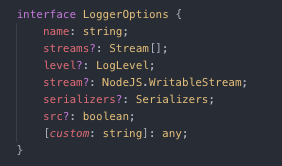
@sppatel dosen't work for me, buyan dosen't have this property
 pookdeveloper
on 10 Sep 2019
pookdeveloper
on 10 Sep 2019
I resolve that the property is in the config of vscode (launch.json):
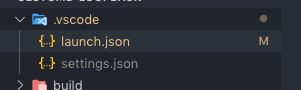
Example:
{
  "version": "0.2.0",
  "configurations": [
    {
      "name": "Debug ts-node",
      "type": "node",
      "request": "launch",
      "program": "${workspaceRoot}/node_modules/ts-node/dist/bin.js",
      "outputCapture": "std",
      "args": [
        "${workspaceRoot}/server/server.ts"
      ],
      "cwd": "${workspaceRoot}",
      "protocol": "inspector"
    }
  ]
}
pookdeveloper
on 10 Sep 2019
Related issues
 yelworc
·
5Comments
yelworc
·
5Comments
 marnusw
·
11Comments
marnusw
·
11Comments
 raybooysen
·
3Comments
raybooysen
·
3Comments
 shaucorp
·
5Comments
shaucorp
·
5Comments
 simonexmachina
·
8Comments
simonexmachina
·
8Comments
Most helpful comment
Add the following to your launch configuration..
"outputCapture": "std",