Nnn: How to overwrite all files in one command?
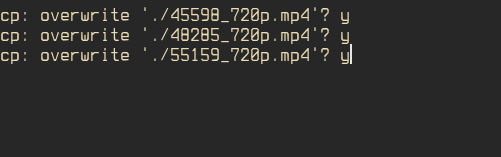
 midexe6380
All 17 comments
before copying/moving/deleting the file it will be asking if it should use force, prompting yes there should delete all of the files
 0xACE
on 7 Dec 2020
0xACE
on 7 Dec 2020
@0xACE I have no option force. How do I activate this option?
midexe6380
on 8 Dec 2020
In the following prompt, press y:
rm -rf 4 file(s)? [Esc cancels]
 jarun
on 10 Dec 2020
jarun
on 10 Dec 2020
@jarun I don't understand you. I can't do that. Help me, please. Here's what I get
https://youtu.be/eREn8KCeTR8
midexe6380
on 11 Dec 2020
Ok. I got it. We always use interactive mode for cp and mv to be on the safer side. To overwrite without asking you'll have to change the code.
jarun
on 11 Dec 2020
LOL 😅 you use cp fork with a progress bar. It's not safe at all.
midexe6380
on 13 Dec 2020
It's optional.
jarun
on 13 Dec 2020
@midexe6380 you are suppose to receive a prompt
rm -rf current file? [Esc cancels]
or similiar when you do writing operations onto disks... Are you using master?
0xACE
on 14 Dec 2020
@0xACE
Are you using
master?
Yes.
you are suppose to receive a prompt
I get https://youtu.be/eREn8KCeTR8
I thought what could be done ya (yes all) and replace all files.
midexe6380
on 14 Dec 2020
rm -rf 4 file(s)? [Esc cancels]
where did you find this promt?
It feels like we are using different versions of NNN.
midexe6380
on 14 Dec 2020
I'm not familiar with the master ui so I can't even tell what you are doing in that video
where did you find this promt?
It feels like we are using different versions of NNN.
That is correct I'm running an outdated personal build of nnn
I just tried it out, with copy operation and in my nnn it doesn't ask to use force... maybe:
Ok. I got it. We always use interactive mode for cp and mv to be on the safer side. To overwrite without asking you'll have to change the code.
This is correct and my memory is serving me wrong... (maybe nnn asked to use force in the past? i can't remember)
0xACE
on 14 Dec 2020
Probably @jarun removed this great feature.
Don't you want to merge with the master?
I think that many people will be interested in this.
midexe6380
on 14 Dec 2020
We have always used cp and mv in interactive mode as far as I remember. Only rm operations prompt to be forced.
jarun
on 14 Dec 2020
Anyway, @midexe6380 this was never there and it is not _useful_ just because it doesn't prompt. It is _dangerous_ to overwrite without confirmation in general and hence it was kept as interactive from the beginning. I have already confirmed that in https://github.com/jarun/nnn/issues/810#issuecomment-742974969.
jarun
on 14 Dec 2020
if you want to overwrite all the time, replace the -i with -f in code.
jarun
on 14 Dec 2020
@jarun
@0xACE
Perhaps I put it wrong.
I meant to make a function like Apply this action to all files and folders
Maybe skip or maybe replace.
https://youtu.be/UohVzLYhlXk
midexe6380
on 15 Dec 2020
I meant to make a function like
Apply this action to all files and folders
Maybe skip or maybe replace.
Doesn't exist. You could try to make a script for it... For now I don't have a solution for this.
0xACE
on 15 Dec 2020
Related issues
 kuntau
·
3Comments
kuntau
·
3Comments
 amanjitsk
·
8Comments
kuntau
·
3Comments
amanjitsk
·
8Comments
kuntau
·
3Comments
 Wuzado
·
9Comments
Wuzado
·
9Comments
 tim77
·
9Comments
tim77
·
9Comments