Rolled from #594.
Cooking
- [x] audit and adapt all plugins for macOS (thanks @gpanders)
- [x] compile-in Alexey Tourbin's QSORT macro (thanks @leovilok)
- [x] cycle time, size, clear orders at sort order prompt with ^T
- [x] option
-Jto disable auto-proceed on select - [x] option
-Dto show dirs in context color, withNNN_FCOLORSset
Up for grabs
- [ ] generate static binary for arm and aarch with new releases (see #623)
- [ ] support predefined filters like bookmarks
Anything else which would add value (please discuss in this thread).
Contribution guideline.
 jarun
jarun
All 37 comments
@jarun, re alignment of nodes, I don't know what's going wrong here. nnn 3.2-1 on Arch, ~/.config/nnn/plugins emptied and re-curl'd, I still can't get back the nice number padding. (I also can't see which plugin handles it.)
 harriott
on 9 Jun 2020
harriott
on 9 Jun 2020
It's a hidden file called .nmv. Can you confirm that it's identical to what's on master?
 KlzXS
on 9 Jun 2020
KlzXS
on 9 Jun 2020
@githububub I ahve added the support for imv (on Ubuntu the binary is named imvr) at commit 0f67e1ff7dcda0bf9023579e86abd9808e770b3a.
jarun
on 10 Jun 2020
Thanks :) . I have yet to pin down the fifo issue as the day of my last post here regarding the issue, the kids were released from school for the summer and we left for a short vacation. Issue continues to persist through 4b4bf6c. Will look into it.
 githububub
on 18 Jun 2020
githububub
on 18 Jun 2020
I find the user experience lacking in nnn a bit lacking. I've just created a PR at https://github.com/jarun/nnn/pull/670 to fix a small issue I found related to that. But I also wanted to give the user feedback on what action is taken. For instance, after answering a prompt to confirm a file overwrite you'd expect some message in the GUI to know what actually happened (for example, overwrote file.txt, or cancelled operation). The first times you do this, the only way to know is to check one of the files you overwrote. This message should go at the bottom, maybe it could replace the ls -l-like information for a couple seconds:
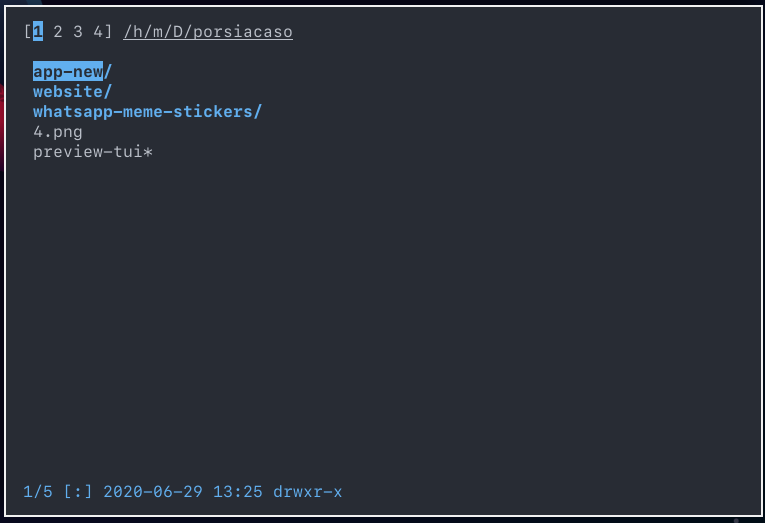
This last part isn't implemented yet because the logic for xconfirm calls is qute optimized, and I don't want to mess anything. Any help?
 marioortizmanero
on 30 Jun 2020
marioortizmanero
on 30 Jun 2020
overwrote file.txt
How do you know for sure the file is overwritten or not? You are calling a third-party utility in both the scenarios.
cancelled operation
User knows when (s)he cancels.
jarun
on 30 Jun 2020
When nnn opens at the top directories are listed then files at the bottom. There is a command to jump to the top of the list with "g" and bottom with "G", Is there a command to jump to the first file after the last directory in the directory list?
 byulen
on 8 Jul 2020
byulen
on 8 Jul 2020
' followed by '.
jarun
on 8 Jul 2020
Thank you that works. Please feel free to remove my question since it is not suitable in "TODO list". :)
byulen
on 8 Jul 2020
Feature Request:
I'd like the ability to choose to use rsync rather than cp for copying files.
The main reason is because I want progress output. I know nnn supports using patched cp and mv with the progress feature, but I don't have the permission to patch, build, and install modified cp and mv on the server. However rsync is already installed and already has a progress feature built in.
 ashleysommer
on 16 Jul 2020
ashleysommer
on 16 Jul 2020
@ashleysommer I understand you need the option -P and I think it's a good improvement. However, we also use the options in cp to make it:
- interactive
- recursive
- preserve permissions
Please raise a PR with the correct options after confirming they are available on Linux, macOS and the *BSDs.
jarun
on 16 Jul 2020
@ashleysommer I could find the following:
-A: preserve ACLs and permissions-P: show progress-r: be recursive
However, i don't see any _interactive_ option. Looks like you can either ignore or overwrite existing files in the destination. Having a preset doesn't work. Most of the time I do not know if the file in destination is something i want to remove or not. Please let me know if my understanding is correct.
I think the best option for you would be to have a plugin instead. There are tons of examples already and it's simple to write one. I would request you to contribute it back as well.
jarun
on 16 Jul 2020
With file type colors enabled as default, how do you go back to the previous behavior where folders mimicked the color of the currently selected context? I looked for an environment variable or make option but I guess I missed it.
 gyvess
on 6 Aug 2020
gyvess
on 6 Aug 2020
If your terminal supports > 256 colors it will be enabled by default. To fallback to older behaviour, use -C.
jarun
on 6 Aug 2020
General note: for binary choices we prefer program switches now.
jarun
on 6 Aug 2020
@bkauler, received a mail from a user that you picked nnn as a file manager for your distro EasyOS. All the best and let us know if you want some help with the integration. I am guessing it is going to be a minimal distro (I personally love those). nnn is already available on tiny solutions like Slitaz and Termux (and several custom ones in industrial solutions too) so I guess you won't have too many hiccups with integration.
Some resources you might find helpful (or informative wrt. your use case):
jarun
on 9 Aug 2020
Yes, it is in the initramfs, see my blog post:
https://bkhome.org/news/202008/nnn-file-manager-now-in-initrd.html
Regards,
Barry
On 8/10/20, Jana notifications@github.com wrote:
@bkauler, received a mail from a user that you picked
nnnas a file
manager for your distro EasyOS. All the best and let us know if you want
some help with the integration. I am guessing it is going to be a minimal
distro (I personally love those).nnnis already available on tiny
solutions like Slitaz and Temux (and several custom ones in industrial
solutions too) so I guess you won't have too many hiccups with integration.Some resources you might find helpful (or informative wrt. your use case):
- https://github.com/jarun/nnn/wiki/Developer-guides#make-options
- https://github.com/jarun/nnn/wiki/Performance
- https://github.com/jarun/nnn#features
--
You are receiving this because you were mentioned.
Reply to this email directly or view it on GitHub:
https://github.com/jarun/nnn/issues/629#issuecomment-671083381
 bkauler
on 10 Aug 2020
bkauler
on 10 Aug 2020
Cool! Some quick notes below based on the post.
I have no idea how to use those tabs, nor how to get the dual-pane.
You can use TAB to cycle tabs/contexts. The dual pane is using dvtm. You probably don't need it.
And some other configure options I disabled, not knowing what they do.
There's an in-built batch-renamer which you can compile out as you have integrated the plugins (which come with a full-blown batch renamer using your $EDITOR). The FIFO one is for live previewers to get the hovered file name.
jarun
on 10 Aug 2020
Correct me if I am wrong, but currently it seems that the fastest way to get from the top/bottom of the screen to the middle is to either hold down a motion key or filter for the name of a file in the middle. Similarly you can move to the top or bottom of the directory with g and G, but there is no keybind for moving to the top or bottom of the current screen. I think it would make things a little more convenient to add something akin to the H, M, and L keys in vim, which jump to the top, middle, and bottom of the screen respectively. Thoughts?
 Zarhult
on 10 Aug 2020
Zarhult
on 10 Aug 2020
Sorry, no plans for new navigational convenience. Please use PgUp/PgDn keys. We don't intend to mimic vim key by key.
jarun
on 10 Aug 2020
@CodeforEvolution can you please confirm latest master (icons, colors... see the list on top) works fine on Haiku? I am planning to freeze features for the next release.
jarun
on 17 Aug 2020
Is there a reason icons only function with file specific colors enabled? Would it be possible to have a pair of specific characters recognized as follow context color? For example, NNN_FCOLORS='0000--000000000000000000' would emulate the -C argument where a pair of hyphens mean follow context color and everything else is default. This way icons can be used with context colors, you can more easily know what context you're in without looking at the top numbers, context colors can be used for more file types giving more options, and perhaps old logic can be removed like the -C argument itself.
For the record I'm using Iosevka Nerd Font and the glyphs used for icons within nnn are all wrong. However, they work as expected with popular vim plugin vim-devicons. Though I just now noticed both of these come from the same person.
gyvess
on 17 Aug 2020
We are using the same flag g_state.oldcolor when we detect < 256 color support and hence icons are also disabled. This is useful when you are using any of the virtual terminals. As you see, icon support is a compile-in support. Follow the ICONS macros and remove the g_state.oldcolor check for your desired output.
jarun
on 17 Aug 2020
I'm using Iosevka Nerd Font and the glyphs
Officially we only support icons-in-terminal and whatever they work with - https://github.com/jarun/nnn/wiki/Advanced-use-cases#file-icons
As per my understanding it isn't dependent on the font you use (I am using Monaco for example).
jarun
on 17 Aug 2020
I will check the functionality @jarun! Testing the codebase on Haiku at this commit: faea2915f4fd764abf6637f251b76b3974b02d28
 CodeforEvolution
on 17 Aug 2020
CodeforEvolution
on 17 Aug 2020
For now, I can say that I could not find a way to configure icons-in-terminal functionality for Haiku's Terminal. This is most likely due to how icons-in-terminal hijacks fontconfig to force a fallback font...but we don't use fontconfig to enumerate fonts here in Haiku...so I don't believe that icons-in-terminal support will be possible for us...
At least NNN_COLORS does seem to be working properly with xterm-256 colors.
I will try to continue testing other features later.
CodeforEvolution
on 17 Aug 2020
Nothing going bad is good news! ;)
jarun
on 17 Aug 2020
Well, that is one way to think about it! :)
CodeforEvolution
on 17 Aug 2020
Feature Request: Status progression dummy bar when theres a file transfer move/copy
 danrobi11
on 19 Aug 2020
danrobi11
on 19 Aug 2020
Feature Request: Status progression dummy bar when theres a file transfer move/copy
it's already there. See option -r, the man and this.
jarun
on 19 Aug 2020
Feature Request: Status progression dummy bar when theres a file transfer move/copy
it's already there. See option
-r, the man and this.
Thank you much! I now have a progress bar :)
Can I suggest that should be embedded by default with a command to set off/on maybe? Although, I wonder who doesnt want a progress bar when mv/cp files that are over 2gb
danrobi11
on 20 Aug 2020
Can I suggest that should be embedded by default with a command to set off/on maybe?
It's not possible to control the utilities that way. Someone else suggested backgrounding, but I really prefer to avoid circumstances like the FM is closed before the operation finishes and there's an error etc. I don't see any ROI from a project priority perspective.
That and we are severely bandwidth-limited.
jarun
on 20 Aug 2020
Hello.
Is there any plans for globalization/localization?
POSIX somewhat provides native language support for utilities (e.g. gencat utility), however, it's a bit difficult to use rather than GNU gettext...
 cmplstofB
on 27 Aug 2020
cmplstofB
on 27 Aug 2020
Not at the moment.
jarun
on 27 Aug 2020
@jarun I see. Thank you.
cmplstofB
on 29 Aug 2020
@gyvess check out option -D in master which forces directories to follow context colors even with new colorscheme.
jarun
on 1 Sep 2020
@mutable-dan I don't think any response from @herrbischoff would be relevant in https://github.com/herrbischoff/awesome-command-line-apps/pull/97 as I see several other instances where the decision is based on _possibly myopic_ personal discretion and "instinct". So I would take this to GitHub for my own understanding of contribution strategy and the correct definition of acceptability of PRs in public repos.
My problem is - if the contribution guideline is not honest (as I believe in this case) people would spend time in raising PRs which would eventually prove to be a waste of time. To avoid that, why not just have a gist with your preferred utilities instead?
Wrt. having nnn in the list - thanks a lot for your efforts and support! However, it's not really important every list has nnn in it.
jarun
on 3 Sep 2020
Related issues
 akimdi
·
6Comments
akimdi
·
6Comments
 amanjitsk
·
8Comments
harriott
·
6Comments
akimdi
·
5Comments
amanjitsk
·
8Comments
harriott
·
6Comments
akimdi
·
5Comments
 leovilok
·
3Comments
leovilok
·
3Comments