Nnn: Terminal display is broken after mounting a remote folder with rclone
Environment details
[x] Operating System: Solus 4
[x] Desktop Environment: Budgie Desktop
[x] Terminal Emulator: Tilix and Gnome terminal
[x] Shell: Bash
[ ] Custom desktop opener (if applicable):
[x] Issue exists on nnn master: yes
Exact steps to reproduce the issue
- Mount a remote folder using
c, thenrfor rclone and type relevant user1@ip and password. - See the terminal display being broken, with text disappearing and issues with refreshing text.
Before:
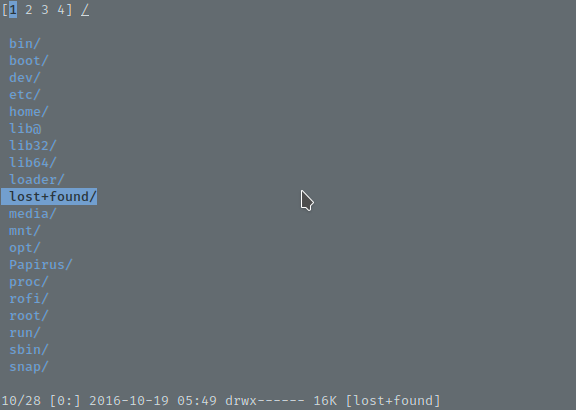
After:
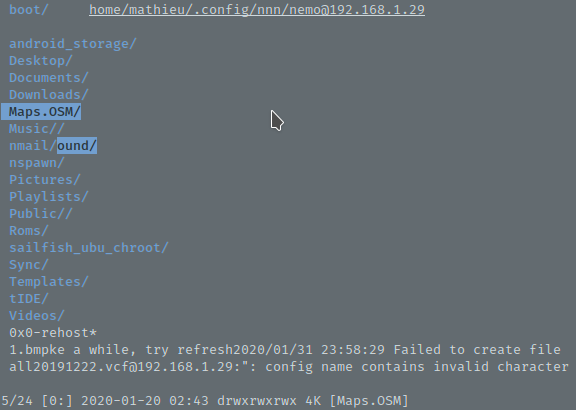
Note the white text at the bottom that won't disappear unless I enter a folder with more text to cover it and refresh those lines. Note also that one folder and part of another one are highlighted in the second screenshot. The contexts are also hidden by some text that will not be refreshed.
It happens for both Tilix and Gnome terminal on my computer.
 Kabouik
All 28 comments
@Kabouik can you please try this on master?
@0xACE please take a look. It appears this has something to do with KEY_RESIZE handling.
 jarun
on 1 Feb 2020
jarun
on 1 Feb 2020
@0xACE please take a look. It appears this has something to do with
KEY_RESIZEhandling.
I'll take a look. None of my machines have rclone and I can't get it tested atm (machine crashed earlier this week, and I'm dealing with other issues).
Is anyone else capable to reproducing this? I've had similiar bugs appear before, and to my understanding it is usually related to a CLI app being run as a GUI
@Kabouik
If you do get a chance to try master try also applying this patch and see if it helps:
diff --git a/src/nnn.c b/src/nnn.c
index 1a07dce..2d73ce6 100644
--- a/src/nnn.c
+++ b/src/nnn.c
@@ -695,16 +695,6 @@ static void clearinfoln(void)
    addch('\n');
 }

-#ifdef KEY_RESIZE
-/* Clear the old prompt */
-static void clearoldprompt(void)
-{
-   clearinfoln();
-   tolastln();
-   addch('\n');
-}
-#endif
-
 /* Messages show up at the bottom */
 static void printmsg(const char *msg)
 {
@@ -751,18 +741,7 @@ static int get_input(const char *prompt)
    if (prompt)
        printprompt(prompt);
    cleartimeout();
-#ifdef KEY_RESIZE
-   do {
-       r = getch();
-       if (r == KEY_RESIZE && prompt) {
-           clearoldprompt();
-           xlines = LINES;
-           printprompt(prompt);
-       }
-   } while (r == KEY_RESIZE);
-#else
    r = getch();
-#endif
    settimeout();
    return r;
 }
@@ -2229,13 +2208,6 @@ static int filterentries(char *path, char *lastname)
        //DPRINTF_S(keyname(*ch));

        switch (*ch) {
-#ifdef KEY_RESIZE
-       case KEY_RESIZE:
-           clearoldprompt();
-           redraw(path);
-           showfilter(ln);
-           continue;
-#endif
        case KEY_DC: // fallthrough
        case KEY_BACKSPACE: // fallthrough
        case '\b': // fallthrough
@@ -2379,7 +2351,7 @@ end:
 static char *xreadline(const char *prefill, const char *prompt)
 {
    size_t len, pos;
-   int x, r;
+   int x, y, r;
    const int WCHAR_T_WIDTH = sizeof(wchar_t);
    wint_t ch[2] = {0};
    wchar_t * const buf = malloc(sizeof(wchar_t) * READLINE_MAX);
@@ -2401,13 +2373,13 @@ static char *xreadline(const char *prefill, const char *prompt)
        len = pos = 0;
    }

-   x = getcurx(stdscr);
+   getyx(stdscr, y, x);
    curs_set(TRUE);

    while (1) {
        buf[len] = ' ';
-       mvaddnwstr(xlines - 1, x, buf, len + 1);
-       move(xlines - 1, x + wcswidth(buf, pos));
+       mvaddnwstr(y, x, buf, len + 1);
+       move(y, x + wcswidth(buf, pos));

        r = get_wch(ch);
        if (r == ERR)
@@ -2493,13 +2465,6 @@ static char *xreadline(const char *prefill, const char *prompt)
            }
        } else {
            switch (*ch) {
-#ifdef KEY_RESIZE
-           case KEY_RESIZE:
-               clearoldprompt();
-               xlines = LINES;
-               printprompt(prompt);
-               break;
-#endif
            case KEY_LEFT:
                if (pos > 0)
                    --pos;
Edit: mixed cli vs gui
 0xACE
on 1 Feb 2020
0xACE
on 1 Feb 2020
I was using the master branch pulled yesterday when I reported the issue, but just pulled again the new commits; the issue is still here. I'm happy to try the diff but have no idea how to apply a patch yet. I'll look into it.
Is the following correct?
git apply --stat file.patch
git apply --check file.patch
git am --signoff < file.patch
Copy the diff as file.patch in src dir.
Then within nnn directory: patch -p1 < src/file.patch
jarun
on 1 Feb 2020
Thanks, done. I still experience the issues, at least with the bottom part where the white warning persists, and the top row where the contexts are normally shown. I haven't observed the highlighting issue in the screenshot I posted earlier, but since it was not 100% reproducible, I may just be lucky this time.
Kabouik
on 1 Feb 2020
Out of curiosity, what happens when you hit Ctrl-L after the problem appears?
0xACE
on 1 Feb 2020
I don't see anything happening.
Kabouik
on 1 Feb 2020
Wait, perhaps I had some white space issue in the patch file:
$ patch -p1 < src/file.patch
patching file src/nnn.c
patch unexpectedly ends in middle of line
Hunk #6 succeeded at 2465 with fuzz 1.
Well from a quick glance, the difference between rclone and sshfs is the flag parameter. and it seems like rclone likes to yap off in the background wheres sshfs is quiet in my testing.
I'm heading to bed. May the tumbling with dragons be peaceful my dude
0xACE
on 1 Feb 2020
See the bug in action here (with master + patch, but did it apply correctly? See message above): https://asciinema.org/a/OMRufxnuRcXXxP5hTLZ2jmHk3
The first remote connection is done with sshfs, the second with rclone.
Kabouik
on 1 Feb 2020
@Kabouik I think I understand the problem. The screen is broken because rclone has thrown an error which is shown in your screenshot "config name contains invalid character".
jarun
on 1 Feb 2020
Please try the following patch:
diff --git a/src/nnn.c b/src/nnn.c
index 1a07dce..137c08e 100644
--- a/src/nnn.c
+++ b/src/nnn.c
@@ -3579,7 +3579,7 @@ static bool archive_mount(char *name, char *path, char *newpath, int *presel)

 static bool remote_mount(char *newpath, int *presel)
 {
-       uchar flag = F_CLI;
+       uchar flag = F_NOTRACE;
        int r, opt = get_input(messages[MSG_REMOTE_OPTS]);
        char *tmp, *env, *cmd;
Yes, this warning was in the screenshot in the first post too, but I have no idea which config name it is referring to.
Thanks for the patch, will try too. Should I do it on top of the previous one?
Kabouik
on 1 Feb 2020
No, apply it independently.
jarun
on 1 Feb 2020
mathieu@xiaomimi-solus ~/.config/nnn $ patch -p1 < src/issue459.patch
patching file src/nnn.c
patch unexpectedly ends in middle of line
Hunk #1 FAILED at 3579.
1 out of 1 hunk FAILED -- saving rejects to file src/nnn.c.rej
src/nnn.c.rej:
--- src/nnn.c
+++ src/nnn.c
@@ -3579,7 +3579,7 @@ static bool archive_mount(char *name, char *path, char *newpath, int *presel)

 static bool remote_mount(char *newpath, int *presel)
 {
-       uchar flag = F_CLI;
+       uchar flag = F_NOTRACE;
        int r, opt = get_input(messages[MSG_REMOTE_OPTS]);
Forget the patch I sent. It wouldn't work. I just tested.
jarun
on 1 Feb 2020
Just change the F_CLI to F_SILENT and try.
jarun
on 1 Feb 2020
Also, instead of sharing general error output copies with devs please try to learn basic stuff like how to apply patches etc. It's probably late night for @0xACE and early morning for me and I am not remotely enjoying having to spoonfeed every step of basic debugging to someone who is interested in using the CLI.
jarun
on 1 Feb 2020
I am sorry for the inconvenience. Being told I'm being spoonfed is not particularly enjoyable either so believe me I would have preferred avoiding this situation. But you are right, I don't really have the skills to help debugging here. I'm interested in using a CLI file manager and there are some things I know how to use with a terminal, but I'm not even remotely a developer and never had to deal with patch tools before.
To explain, I genuinely did not intend to put any pressure on you at this very moment. I see Github issues just as ways to report observations and check back later how/if I can help debugging. In the other issue I opened earlier, I did say that I would check myself how to proceed and report back, but immediately got guidelines directly from you two (which I appreciated, thanks). Since I realized you were both quite active at the same moment and were maybe counting on me to test the patches while you were here, or because @0xACE could not test rclone, I simply tried to keep up with your pace and avoid having you waiting 30 minutes for my next message. I did look how to apply the patch, you posted at the same time. There was just no way I could be responsive enough if trying to figure out the syntax of this toolkit I'm not used to.
Kabouik
on 1 Feb 2020
Since I realized you were both quite active at the same moment
This is exactly the reason we try to fix issues when the issue reporter is available and not wait for another time. And having to explain frequently slows the process down.
Don't worry about it. It's a suggestion that would go a long way and I had also heard a lot of it in my early days with hacking.
Try the F_SILENT change. I think the issue will be fixed.
jarun
on 1 Feb 2020
Well I'm sorry if I misunderstood, but I replaced F_CLI by F_SILENT in the last patch you suggested, but the hunk still fails, even after I made sure my local git folder fully reflects master.
Kabouik
on 1 Feb 2020
can you tell what is all20192222.vcf?
jarun
on 1 Feb 2020
It's just a vcard file in the root remote folder. I don't think it is related to the error, it just happens to be displayed on the raw where the warning showed up when starting rclone, and since the warning does not fully disappear once the connection is done, it shows up next to this file.
Kabouik
on 1 Feb 2020
It says failed to create file.... that's the error. if we can figure out which file and you can share that with me, I can reproduce and fix it.
jarun
on 1 Feb 2020
From the asciinema posted above, here is a snapshot showing the rclone error:
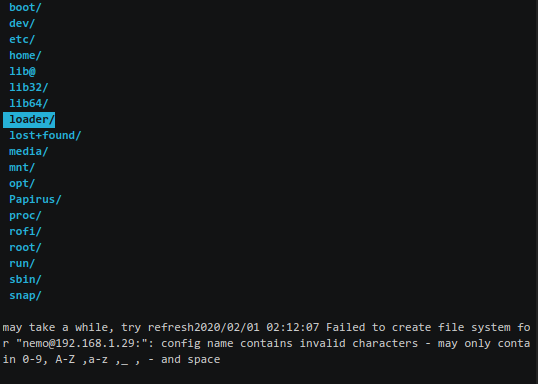
Is it possible that rclone tries to append a : at the end of my user@ip remote machine as if it wanted a port number too, but this is an unwanted character? In any case, the folder [email protected] is correctly created inside the nnn folder, and I can browse it both from nnn or a graphical FM.
Kabouik
on 1 Feb 2020
I can repro it. Just pass an invalid remote name and an error occurs.
jarun
on 1 Feb 2020
This should be fixed now. Thanks for reporting the error!
jarun
on 1 Feb 2020
Thanks for the quick update.
Kabouik
on 2 Feb 2020
Related issues
 z0rc
·
7Comments
0xACE
·
3Comments
z0rc
·
7Comments
0xACE
·
3Comments
 kuntau
·
3Comments
kuntau
·
3Comments
 harriott
·
6Comments
harriott
·
6Comments
 amanjitsk
·
8Comments
amanjitsk
·
8Comments