Nlog: HttpNetworkSender TCP Connection Issue
In HttpNetworkSender.cs, is there any reason why HttpWebRequest is used over a static HttpClient?
As far as I know, HttpClient is much more performant than HttpWebRequest, which is only being kept around for compatibility reasons.
The reason I am asking is because in an Azure Functions app where NLog is used to log to Loggly, I have noticed some issues. When logging is turned on, the app starts using thousands of TCP connections causing it to shutdown. Without logging, there are no issues.
Furthermore, if I use the NLog.Targets.Loggly extension, I see no TCP connection issues because it uses a static HttpClient. While using this instead of the Network Target is a solution, it would be great if an extension wasn't needed because it has other different issues.
I have deployed a custom Azure Functions app where I can input an integer and that many log statements will be logged through the Network Target. I have reproduced the issue this way.
 amikapoor
All 13 comments
Good question, I see it's supported for .NET Standard, but not .NET Framework 3,5-4,5 out of the box
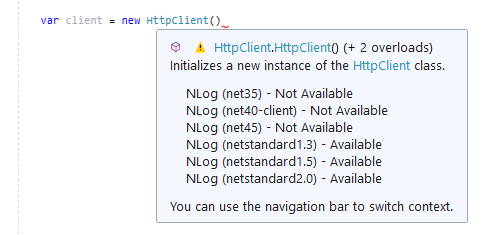
Maybe we could use the HttpClient indeed.
@amikapoor which platform are you using?
edit: Maybe it could be a new target. It's not that easy to change (async, chunks)
Guess we need something like this:
c#
var client = new HttpClient();
ByteArrayContent byteContent = new ByteArrayContent(bytes);
HttpResponseMessage reponse = client.PostAsync(_addressUri, byteContent).ConfigureAwait(false).GetAwaiter().GetResult();
 304NotModified
on 14 May 2020
304NotModified
on 14 May 2020
@304NotModified Thanks for the response.
I'm using netcore2.1.
Do you think it would also be possible to keep it as one target but just have the new code for the newer platforms?
amikapoor
on 14 May 2020
It would make sense to have a bulk-copy HttpClient-target in the NLog-core.
The NLog-NetworkTarget is not perfect for HttpClient, as it is highly optimized for Tcp-Stream, where each individual LogEvent can be written to the same Tcp-Connections (Without opening/closing the connection for each requerst. Not waiting for reply before sending more data).
If there should be a HttpClient-Target then it should be optimized to batch multiple LogEvents into single Http-request. Much like how NLog FileTarget operates to optimize for KeepFileOpen=false. (But with the newline-handling-logic of the NetworkTarget)
Also notice how the LogglyClient sends batches of LogEvents, and not one LogEvent for each request:
Also by having a dedicated target for HttpClient, then one could easily configure things like Proxy / HttpHeaders etc. Instead of being limited by the lowest denominator, like in the NetworkTarget.
I guess inspiration for using HttpClient can be found here:
https://github.com/DarekDan/NLog.Targets.HTTP (Nuget: NLog.Targets.Http)
 snakefoot
on 16 May 2020
snakefoot
on 16 May 2020
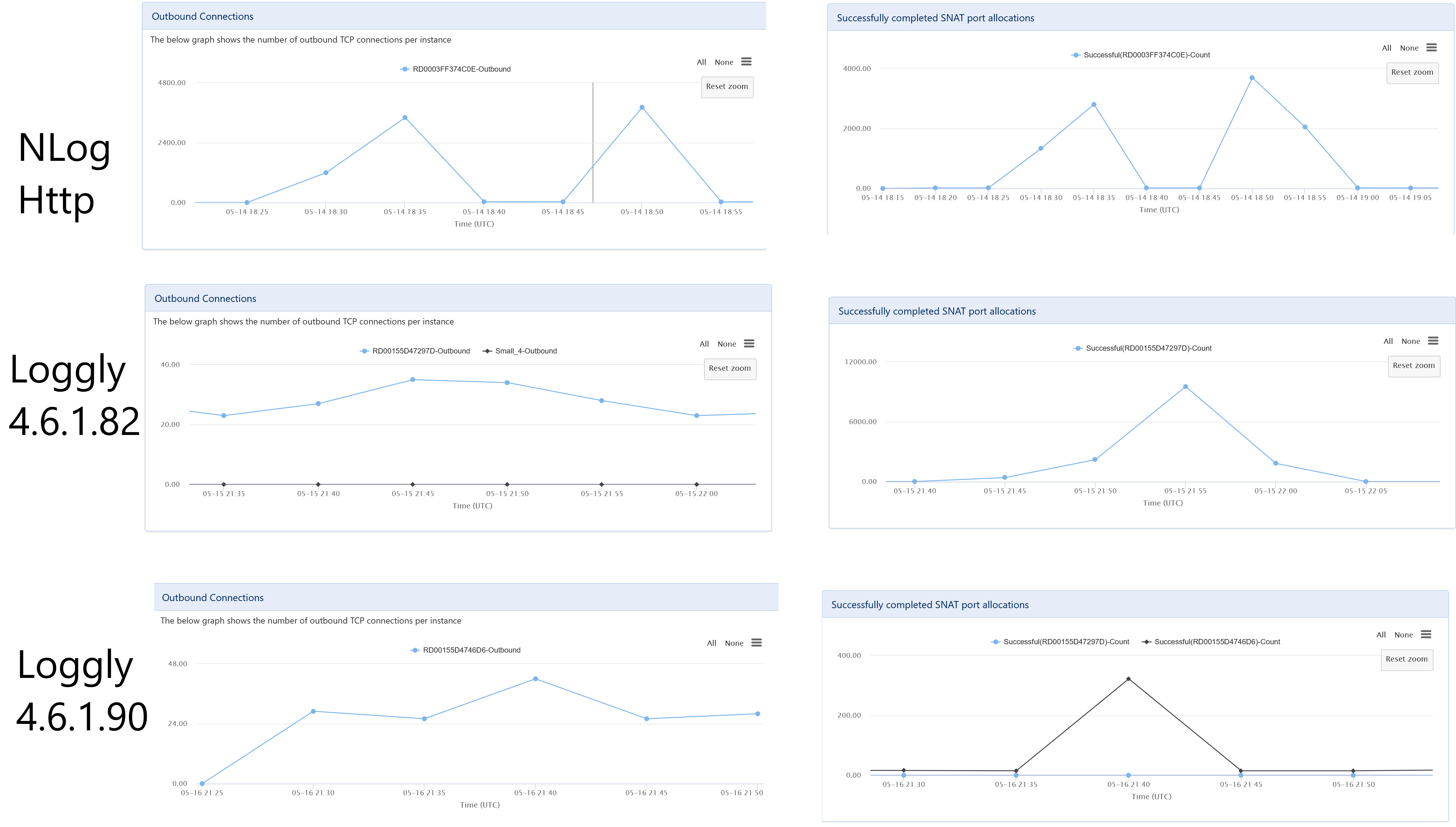
I have ran some tests on my deployed function app and attached are the results.
The function app is simple. I give it a number and it logs that many log statements in a for loop. For all these tests, I gave an input of 40,000.
From the testing, we can see that the Network target when using Http performs the worst of the 3. The TCP connections and SNAT port allocations go into the thousands, which eventually will cause the app to shutdown.
loggly-csharp 4.6.1.82, which is the version prior to my changes, performs better on the TCP side because it reuses the same HttpClient, but it still causes way more SNAT port allocations than necessary because it was unnecessarily closing each connection after each request.
loggly-csharp 4.6.1.90 is the latest version which has the changes I made. We can see here that TCP connections and SNAT port allocations are very low.
TLDR;
| | TCP Ports | SNAT Ports |
| ---| -----------|-------------|
|NLog Network Target Http| ~3,000|~3,000|
|loggly-csharp 4.6.1.82|~30|~9,000|
|loggly-csharp 4.6.1.90|~30|~300|
If the Network target is going to have the HttpNetworkSender, I think it should be optimized so it doesn't cause these types of issues.
amikapoor
on 17 May 2020
@amikapoor Thank you for benchmarks. A good starting point for making improvements. Could be nice with some details out the benchmark. How many logevents in total. How many logevents per second?
Your eagerness to continue change the NetworkTarget makes me think that you have not read my first reply. I think it is better to create a dedicated HttpClientTarget. Any reason you think otherwise?
snakefoot
on 17 May 2020
@snakefoot Thanks for the reply. I read your earlier reply and my thinking is that if NLog is going to have a HttpNetworkSender at all, then it should at least function in a way that doesn't cause the app to break due to using so many connections. I get that the Network target works really well with the TcpNetworkSender, but as soon as HttpNetworkSender comes into play, the connections sky rocket.
For each test it was a simple for loop logging 40,000 events with no rest in between. All the logs came in within 2-3 min.
amikapoor
on 17 May 2020
@amikapoor Well the ability to do http-requests is a "hidden" secret of the network-target (Network-Target is mostly used for TCP/ UDP). Usually people go for the WebService-Target when doing http. Because it has a lot more options for configuring the http-requests (http-headers, proxy etc.)
I think it is great that you want to improve the NLog-library, and pull-requests are always welcome. Just think you might not get the best performance (which seems the goal) by giving the HttpNetworkSender a beating. But please prove me wrong, if there are some easy wins without breaking changes.
snakefoot
on 17 May 2020
@snakefoot ah got it thanks. Didn't realize it was a hidden secret. Question though, what is the reason for keeping this hidden secret around if something like a WebService target already exists?
I will run another test in a bit using the WebService target just for reference. But I think it will suffer from the same problem because looking at the code, it still uses HttpWebRequest instead of HttpClient, which I think is a big reason for these issues.
amikapoor
on 17 May 2020
You are completely right that WebService-Target suffers from the same problem as HttpNetworkSender. Also WebService-Target is intended to perform web-service-requests, where a single LogEvent matches a single web-request.
And again you will notice that WebService-Target will not give optimal performance compared to the loggly-target. Again see my first comment about the missing ability to batch multiple logevents into a single http-request (Something that both WebService-Target and Network-Target cannot do).
snakefoot
on 17 May 2020
In both Loggly target tests, I did not use batching. I did 1 log statement per request. Performance was bad using the old version because connection close was specified in each request. Once that header was removed, HttpClient was able to reuse the connections so performance was good even without batching (low TCP and SNAT numbers).
Basically what I’m saying is that I think we can achieve the same thing in NLog directly just by using a single static HttpClient which is the recommended way to perform requests instead of using HttpWebRequest, even without batching. The changes could be in both HttpNetworkSender, or WebService Target, or both. I can make a PR and do more tests. The problem is HttpClient is not available on all the platforms as @304NotModified stated earlier.
amikapoor
on 17 May 2020
HttpClient will also bring in a new dependency (system.net.http.dll), and we are working towards reducing them for NLog (Splitting into more nuget-packages).
Eventhough HttpClient is included with Net45 (and newer):
https://docs.microsoft.com/en-us/dotnet/api/system.net.http.httpclient?view=netframework-4.5
Then I think here are bugfixes included in the nuget-package:
https://packages.nuget.org/packages/System.Net.Http/
So eventhough you want to "fix" HttpNetworkSender and WebService-Target, then I think the fixing should happen in a new nuget-package. Maybe this HttpClient nuget-package will include NetworkTarget and WebServiceTarget when NLog 5.0 is released.
snakefoot
on 17 May 2020
@amikapoor Maybe you can verify that this NLog-target will also resolve your performance-issues:
https://github.com/DarekDan/NLog.Targets.HTTP (Nuget: NLog.Targets.Http)
snakefoot
on 17 May 2020
Please add the requested info, so we could help you better! (This issue will be closed in 7 days)
![repo-ranger[bot] picture](https://avatars.githubusercontent.com/in/11906?v=4&s=40) repo-ranger[bot]
on 4 Dec 2020
repo-ranger[bot]
on 4 Dec 2020
Related issues
 imanushin
·
3Comments
imanushin
·
3Comments
imanushin
·
3Comments
imanushin
·
3Comments
 linmasaki
·
3Comments
linmasaki
·
3Comments
 Jerefeny
·
3Comments
Jerefeny
·
3Comments
 npandrei
·
3Comments
npandrei
·
3Comments