Nlog: Nlog.Config 4.6.8 is not work in linux by publishing with single file(service)
hi Nlog developers,
I published my NetCore 3.1 Web API Service in Linux with single file(service)
and set Nlog 4.6.8 for this:
<nlog xmlns="http://www.nlog-project.org/schemas/NLog.xsd"
      xmlns:xsi="http://www.w3.org/2001/XMLSchema-instance"
      autoReload="true"
      throwExceptions="true"
      internalLogLevel="Error" internalLogFile="${basedir}/../logs/logfail.txt">

  <!-- optional, add some variables
  https://github.com/nlog/NLog/wiki/Configuration-file#variables
  -->
  <variable name="myvar" value="myvalue"/>
  <targets>
    <target xsi:type="File" name="f1" fileName="${basedir:fixtempdir=true}/../logs/Normal/${shortdate}.txt"
           layout="${longdate} ${newline} ${uppercase:${level}} ${message} ${newline}" />
    <target xsi:type="File" name="f2" fileName="${basedir:fixtempdir=true}/../logs/Error/${shortdate}.txt"
           layout="${longdate} ${newline} ${message} ${newline}" />
    <target xsi:type="File" name="f3" fileName="${basedir:fixtempdir=true}/../logs/Fatal/${shortdate}.txt"
          layout="${longdate} ${newline} ${message} ${newline}" />
    <target xsi:type="File" name="f4" fileName="${basedir:fixtempdir=true}/../logs/Info/${shortdate}.txt"
          layout="${longdate} ${newline} ${message} ${newline}" />
  </targets>

  <rules>
    <logger name="*" minlevel="Trace" maxlevel="Warn" writeTo="f1" />
    <logger name="*" level="Error" writeTo="f2" />
    <logger name="*" level="Fatal" writeTo="f3" />
    <logger name="*" level="Info" writeTo="f4" />
  </rules>
</nlog>
and I read some same issues and changed this from ${BaseDir} to ${BaseDir:FixTempDir=true},but it is still not work...
by the way, before I set Single file, it always worked in linux.
please help me to solve this issue
thanks :)
 longskikondi
All 35 comments
Hi! Thanks for opening your first issue here! Please make sure to follow the issue template - so we could help you better!
![welcome[bot] picture](https://avatars.githubusercontent.com/in/4141?v=4&s=40) welcome[bot]
on 16 Apr 2020
welcome[bot]
on 16 Apr 2020
Think you forgot the most important part from the issue-template.
You need to include the output from NLog InternalLogger on Debug-Level: https://github.com/NLog/NLog/wiki/Internal-Logging
 snakefoot
on 16 Apr 2020
snakefoot
on 16 Apr 2020
Please add the requested info, so we could help you better! (This issue will be closed in 7 days)
![repo-ranger[bot] picture](https://avatars.githubusercontent.com/in/11906?v=4&s=40) repo-ranger[bot]
on 16 Apr 2020
repo-ranger[bot]
on 16 Apr 2020
@longskikondi Can you try this configuration. And attach contents of ${currentdir}/../logs/nlog-internal.txt to this issue?
<nlog xmlns="http://www.nlog-project.org/schemas/NLog.xsd"
      xmlns:xsi="http://www.w3.org/2001/XMLSchema-instance"
      autoReload="true"
      internalLogLevel="Debug"
      internalLogFile="${currentdir}/../logs/nlog-internal.txt">

  <!-- optional, add some variables
  https://github.com/nlog/NLog/wiki/Configuration-file#variables
  -->
  <variable name="myvar" value="myvalue"/>
  <targets>
    <target xsi:type="File" name="f1" fileName="${basedir:fixtempdir=true}/../logs/Normal/${shortdate}.txt"
           layout="${longdate} ${newline} ${uppercase:${level}} ${message} ${newline}" />
    <target xsi:type="File" name="f2" fileName="${basedir:fixtempdir=true}/../logs/Error/${shortdate}.txt"
           layout="${longdate} ${newline} ${message} ${newline}" />
    <target xsi:type="File" name="f3" fileName="${basedir:fixtempdir=true}/../logs/Fatal/${shortdate}.txt"
          layout="${longdate} ${newline} ${message} ${newline}" />
    <target xsi:type="File" name="f4" fileName="${basedir:fixtempdir=true}/../logs/Info/${shortdate}.txt"
          layout="${longdate} ${newline} ${message} ${newline}" />
  </targets>

  <rules>
    <logger name="*" minlevel="Trace" maxlevel="Warn" writeTo="f1" />
    <logger name="*" level="Error" writeTo="f2" />
    <logger name="*" level="Fatal" writeTo="f3" />
    <logger name="*" level="Info" writeTo="f4" />
  </rules>
</nlog>
@longskikondi Can you try this configuration. And attach contents of
${currentdir}/../logs/nlog-internal.txtto this issue?<nlog xmlns="http://www.nlog-project.org/schemas/NLog.xsd" xmlns:xsi="http://www.w3.org/2001/XMLSchema-instance" autoReload="true" internalLogLevel="Debug" internalLogFile="${currentdir}/../logs/nlog-internal.txt"> <!-- optional, add some variables https://github.com/nlog/NLog/wiki/Configuration-file#variables --> <variable name="myvar" value="myvalue"/> <targets> <target xsi:type="File" name="f1" fileName="${basedir:fixtempdir=true}/../logs/Normal/${shortdate}.txt" layout="${longdate} ${newline} ${uppercase:${level}} ${message} ${newline}" /> <target xsi:type="File" name="f2" fileName="${basedir:fixtempdir=true}/../logs/Error/${shortdate}.txt" layout="${longdate} ${newline} ${message} ${newline}" /> <target xsi:type="File" name="f3" fileName="${basedir:fixtempdir=true}/../logs/Fatal/${shortdate}.txt" layout="${longdate} ${newline} ${message} ${newline}" /> <target xsi:type="File" name="f4" fileName="${basedir:fixtempdir=true}/../logs/Info/${shortdate}.txt" layout="${longdate} ${newline} ${message} ${newline}" /> </targets> <rules> <logger name="*" minlevel="Trace" maxlevel="Warn" writeTo="f1" /> <logger name="*" level="Error" writeTo="f2" /> <logger name="*" level="Fatal" writeTo="f3" /> <logger name="*" level="Info" writeTo="f4" /> </rules> </nlog>
yes I replaced it in config ,and reload linux again..it is still not work..in linux
but I can got logs in project debug folder at [localhost] windows 10....
longskikondi
on 17 Apr 2020
If you cannot provide us with the NLog-internal.txt file then we cannot help you (Maybe use absolute path, or enable from code). Sorry
snakefoot
on 17 Apr 2020
Will reopen if there is an internal log
 304NotModified
on 17 Apr 2020
304NotModified
on 17 Apr 2020
sorry for my late response..
I replace it as internalLogFile="${currentdir}/../logs/nlog-internal.txt
I stll not found log or nlog-internal.txt in my app folder or other log folder.
<?xml version="1.0" encoding="utf-8" ?>
<nlog xmlns="http://www.nlog-project.org/schemas/NLog.xsd"
      xmlns:xsi="http://www.w3.org/2001/XMLSchema-instance"
      autoReload="true"
      throwExceptions="true"
      internalLogLevel="Debug" internalLogFile="${currentdir}/../logs/nlog-internal.txt">

  <!-- optional, add some variables
  https://github.com/nlog/NLog/wiki/Configuration-file#variables
  -->
  <variable name="myvar" value="myvalue"/>
  <targets>
    <target xsi:type="File" name="f1" fileName="${basedir:fixtempdir=true}/../logs/Normal/${shortdate}.txt"
           layout="${longdate} ${newline} ${uppercase:${level}} ${message} ${newline}" />
    <target xsi:type="File" name="f2" fileName="${basedir:fixtempdir=true}/../logs/Error/${shortdate}.txt"
           layout="${longdate} ${newline} ${message} ${newline}" />
    <target xsi:type="File" name="f3" fileName="${basedir:fixtempdir=true}/../logs/Fatal/${shortdate}.txt"
          layout="${longdate} ${newline} ${message} ${newline}" />
    <target xsi:type="File" name="f4" fileName="${basedir:fixtempdir=true}/../logs/Info/${shortdate}.txt"
          layout="${longdate} ${newline} ${message} ${newline}" />
  </targets>

  <rules>
    <logger name="*" minlevel="Trace" maxlevel="Warn" writeTo="f1" />
    <logger name="*" level="Error" writeTo="f2" />
    <logger name="*" level="Fatal" writeTo="f3" />
    <logger name="*" level="Info" writeTo="f4" />
  </rules>
</nlog>
@longskikondi Think you have to configure the Internal Logger in code at runtime, to an absolute path, where your application has permissions to file-write. Like this:
```c#
class Program
{
// Make sure to comment out static Logger-objects, or else InternalLogger will not work
// readonly static Logger = LogManager.GetCurrentClassLogger();
static void Main()
{
    NLog.Common.InternalLogger.LogLevel = LogLevel.Debug;
    NLog.Common.InternalLogger.LogToConsole = true;
    NLog.Common.InternalLogger.LogFile = "C:\\Temp\\NLog.Internal.txt";
    Logger logger = LogManager.GetLogger("foo");
    logger.Info("Program started");
    LogManager.Shutdown();  // Remember to flush
}
}
```
See also: https://github.com/NLog/NLog/wiki/Logging-troubleshooting
snakefoot
on 23 Apr 2020
public static void Main()
        {
            IConfigurationRoot config = new ConfigurationBuilder()
                .SetBasePath(Directory.GetCurrentDirectory())
                  .AddJsonFile("appsettings.json", optional: false, reloadOnChange: true)
                  .AddJsonFile($"appsettings.{Environment.GetEnvironmentVariable("ASPNETCORE_ENVIRONMENT")}.json", optional: true, reloadOnChange: true)
                  .AddJsonFile("ErrorMessage.json", optional: false, reloadOnChange: true)
                .Build();

            NLog.Common.InternalLogger.LogLevel = NLog.LogLevel.Debug;
            NLog.Common.InternalLogger.LogToConsole = true;
            NLog.Common.InternalLogger.LogFile ="${currentdir}\\..\\logs\\nlog-internal.txt";
            Logger logger = LogManager.GetLogger("foo");
            logger.Info("Program started");

            LogManager.Shutdown();  // Remember to flush

            var host = new WebHostBuilder()
                .UseKestrel()
                .UseConfiguration(config)
                .UseContentRoot(Directory.GetCurrentDirectory())
                .UseStartup<Startup>().UseNLog()
                .Build();

            host.Run();
        }
I replaced this and reloaded app in linux again, still no log or nlog-internal.txt.
NLog.Common.InternalLogger.LogFile ="${currentdir}\..\logs\nlog-internal.txt"; is it correct for log path in linux?
longskikondi
on 23 Apr 2020
I want you to stop using relative paths, because they are not working for you (Don't use ${currentdir} or anything like that for InternalLogger.LogFile)
Instead you should provide an absolute path to a directory where your application has write-permissions.
Sorry I can not tell you the absolute path where your application has write access. You have to find it yourself.
snakefoot
on 23 Apr 2020
I want you to stop using relative paths, because they are not working for you (Don't use
${currentdir}or anything like that forInternalLogger.LogFile)Instead you should provide an absolute path to a directory where your application has write-permissions.
Sorry I can not tell you the absolute path where your application has write access. You have to find it yourself.
hi
I used this
NLog.Common.InternalLogger.LogFile ="nlog-internal.txt"; in Main
and nlog-internal.txt created in my project app(the single file) folder
and the context is :
2020-04-23 16:45:35.2180 Debug Loading config from /var/tmp/.net/MyProject.Service/xm3unjqp.2b1/NLog.config
2020-04-23 16:45:35.3027 Info Configuring from an XML element in /var/tmp/.net/MyProject.Service/xm3unjqp.2b1/NLog.config...
Excellent. Lets try this then:
c#
            NLog.Common.InternalLogger.LogLevel = NLog.LogLevel.Debug;
            NLog.Common.InternalLogger.LogToConsole = true;
            NLog.Common.InternalLogger.LogFile ="nlog-internal.txt";
            Logger logger = LogManager.GetLogger("foo");
            logger.Info("Program started");
            NLog.Common.InternalLogger.Info("TempPath=" + System.IO.Path.GetTempPath());
            NLog.Common.InternalLogger.Info("ProcessPath=" +
System.Diagnostic.Process.GetCurrentProcess()?.MainModule.FileName);
            NLog.Common.InternalLogger.Info("AppDomainPath=" + System.AppDomain.CurrentDomain.BaseDirectory);
And show the output from you machine.
snakefoot
on 23 Apr 2020
Excellent. Lets try this then:
            NLog.Common.InternalLogger.LogLevel = NLog.LogLevel.Debug;
            NLog.Common.InternalLogger.LogToConsole = true;
            NLog.Common.InternalLogger.LogFile ="nlog-internal.txt";
            Logger logger = LogManager.GetLogger("foo");
            logger.Info("Program started");
            NLog.Common.InternalLogger.Info("TempPath=" + System.IO.Path.GetTempPath());
            NLog.Common.InternalLogger.Info("ProcessPath=" +
System.Diagnostic.Process.GetCurrentProcess()?.MainModule.FileName);
            NLog.Common.InternalLogger.Info("AppDomainPath=" + System.AppDomain.CurrentDomain.BaseDirectory);
And show the output from you machine.
I found that it would create nlog-internal.txt but didn't wirte any path logs even "Program started"
whatever I run app at windows or linux docker ,it just show
2020-04-23 18:05:14.9844 Debug Loading config from C:\Users\user01\Desktop\PudoService\src\Continental.Pudo.Service\bin\Debug\netcoreapp3.1\NLog.config
2020-04-23 18:05:15.2295 Info Configuring from an XML element in C:\Users\user01\Desktop\PudoService\src\Continental.Pudo.Service\bin\Debug\netcoreapp3.1\NLog.config...
Well "Program Started" will not be written to nlog-internal.txt. It will be written to standard NLog Targets according to your NLog-rules. It is only done to initialize the Logger-object, as it triggers loading of NLog.config.
Can you fix your NLog.config file so it becomes like this (Think the loading of Nlog.config reverts your configuration of InternalLogger):
internalLogLevel="Debug" internalLogFile="nlog-internal.txt">
Btw. can you move this line:
LogManager.Shutdown(); // Remember to flush
To under this line:
c#
host.Run();
LogManager.Shutdown();  // Remember to flush
snakefoot
on 23 Apr 2020
Change the code to be like this (Move the path-logging up, so it happens before loading Nlog.config):
```c#
NLog.Common.InternalLogger.LogLevel = NLog.LogLevel.Debug;
NLog.Common.InternalLogger.LogToConsole = true;
NLog.Common.InternalLogger.LogFile ="nlog-internal.txt";
NLog.Common.InternalLogger.Info("TempPath=" + System.IO.Path.GetTempPath());
NLog.Common.InternalLogger.Info("ProcessPath=" +
System.Diagnostic.Process.GetCurrentProcess()?.MainModule.FileName);
NLog.Common.InternalLogger.Info("AppDomainPath=" + System.AppDomain.CurrentDomain.BaseDirectory);
        Logger logger = LogManager.GetLogger("foo");
        logger.Info("Program started");
```
snakefoot
on 23 Apr 2020
Change the code to be like this (Move the path-logging up, so it happens before loading Nlog.config):
            NLog.Common.InternalLogger.LogLevel = NLog.LogLevel.Debug;
            NLog.Common.InternalLogger.LogToConsole = true;
            NLog.Common.InternalLogger.LogFile ="nlog-internal.txt";
            NLog.Common.InternalLogger.Info("TempPath=" + System.IO.Path.GetTempPath());
            NLog.Common.InternalLogger.Info("ProcessPath=" +
System.Diagnostic.Process.GetCurrentProcess()?.MainModule.FileName);
            NLog.Common.InternalLogger.Info("AppDomainPath=" + System.AppDomain.CurrentDomain.BaseDirectory);

            Logger logger = LogManager.GetLogger("foo");
            logger.Info("Program started");
here it is
2020-04-23 18:42:39.3366 Info TempPath=/tmp/
2020-04-23 18:42:39.3711 Info ProcessPath=/app/MyProject.Service
2020-04-23 18:42:39.3711 Info AppDomainPath=/var/tmp/.net/MyProject.Service/rj23jfcy.nes/
2020-04-23 18:42:39.3869 Debug Loading config from /var/tmp/.net/MyProject.Service/rj23jfcy.nes/NLog.config
2020-04-23 18:42:39.4554 Info Configuring from an XML element in /var/tmp/.net/MyProject.Service/rj23jfcy.nes/NLog.config...
So the problem is this:
- TempPath=/tmp/
- AppDomainPath=/var/tmp/.net/MyProject.Service/rj23jfcy.nes/
Because AppDomainPath has the /var/-prefix then it is not recognized as being in the official temp-folder. Curious if one can get the /var/tmp/-path with a C# method-call.
snakefoot
on 23 Apr 2020
Found this: https://unix.stackexchange.com/questions/30489/what-is-the-difference-between-tmp-and-var-tmp
snakefoot
on 23 Apr 2020
Guess one could be evil, and have a fallback so if path begins with /tmp/ or /var/tmp then it is also seen as temp-folder.
snakefoot
on 23 Apr 2020
Can you try this for me:
```c#
NLog.Common.InternalLogger.LogLevel = NLog.LogLevel.Debug;
NLog.Common.InternalLogger.LogToConsole = true;
NLog.Common.InternalLogger.LogFile ="nlog-internal.txt";
NLog.Common.InternalLogger.Info("TempPath=" + System.IO.Path.GetTempPath());
NLog.Common.InternalLogger.Info("ProcessPath=" + System.Diagnostic.Process.GetCurrentProcess()?.MainModule.FileName);
NLog.Common.InternalLogger.Info("AppDomainPath=" + System.AppDomain.CurrentDomain.BaseDirectory);
NLog.Common.InternalLogger.Info("TMPDIR=" + Environment.GetEnvironmentVariable("TMPDIR"));
NLog.Common.InternalLogger.Info("TEMP=" + Environment.GetEnvironmentVariable("TEMP"));
NLog.Common.InternalLogger.Info("TMP=" + Environment.GetEnvironmentVariable("TMP"));
NLog.Common.InternalLogger.Info("TempFolder=" + Environment.GetEnvironmentVariable("TempFolder"));

Logger logger = LogManager.GetLogger("foo");
logger.Info("Program started");
```
snakefoot
on 23 Apr 2020
Can you try this for me:
NLog.Common.InternalLogger.LogLevel = NLog.LogLevel.Debug; NLog.Common.InternalLogger.LogToConsole = true; NLog.Common.InternalLogger.LogFile ="nlog-internal.txt"; NLog.Common.InternalLogger.Info("TempPath=" + System.IO.Path.GetTempPath()); NLog.Common.InternalLogger.Info("ProcessPath=" + System.Diagnostic.Process.GetCurrentProcess()?.MainModule.FileName); NLog.Common.InternalLogger.Info("AppDomainPath=" + System.AppDomain.CurrentDomain.BaseDirectory); NLog.Common.InternalLogger.Info("TMPDIR=" + Environment.GetEnvironmentVariable("TMPDIR")); NLog.Common.InternalLogger.Info("TEMP=" + Environment.GetEnvironmentVariable("TEMP")); NLog.Common.InternalLogger.Info("TMP=" + Environment.GetEnvironmentVariable("TMP")); NLog.Common.InternalLogger.Info("TempFolder=" + Environment.GetEnvironmentVariable("TempFolder")); Logger logger = LogManager.GetLogger("foo"); logger.Info("Program started");
here it is
2020-04-24 10:50:49.3624 Info TempPath=/tmp/
2020-04-24 10:50:49.3939 Info ProcessPath=/app/MyProject.Service
2020-04-24 10:50:49.3939 Info AppDomainPath=/var/tmp/.net/MyProject.Service/ciuox5cw.zxo/
2020-04-24 10:50:49.3942 Info TMPDIR=
2020-04-24 10:50:49.3942 Info TEMP=
2020-04-24 10:50:49.3942 Info TMP=
2020-04-24 10:50:49.3942 Info TempFolder=
2020-04-24 10:50:49.4096 Debug Loading config from /var/tmp/.net/MyProject.Service/ciuox5cw.zxo/NLog.config
2020-04-24 10:50:49.4768 Info Configuring from an XML element in /var/tmp/.net/MyProject.Service/ciuox5cw.zxo/NLog.config...
btw I published my app into linux with container,is it maybe occurred this problem?
longskikondi
on 24 Apr 2020
The problem is that your container on Linux doesn't have the TMPDIR environment-variable defined:
TMPDIR=/var/tmp/
But still think that NLog should handle this situation, since it will probably be common scenario. See also #3921
snakefoot
on 24 Apr 2020
@longskikondi Thank you so much for being persistent and patient. NLog 4.7.1 will fix this issue.
But while waiting for the release, then you can try and setup the TMPDIR-environment-variable for your container.
snakefoot
on 24 Apr 2020
@longskikondi Thank you so much for being persistent and patient. NLog 4.7.1 will fix this issue.
But while waiting for the release, then you can try and setup the TMPDIR-environment-variable for your container.
sorry for my late response and I m glad to help you for this issue.
longskikondi
on 24 Apr 2020
@longskikondi It would be a great help if you could confirm that this pre-release-build resolves your issue:
https://ci.appveyor.com/project/nlog/nlog/builds/32424589/artifacts
Just download NLog.4.7.0.11607-PR3921.nupkg (from above link) and place in a local nuget-folder-repository. Then you should see that fixtempdir=true also works in your Linux Container (without having TMPDIR configured).
snakefoot
on 24 Apr 2020
cause of weekends, sorry for my late response.
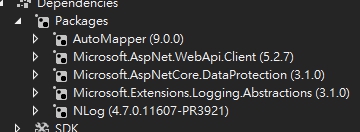
<Project Sdk="Microsoft.NET.Sdk">
  <PropertyGroup>
    <TargetFramework>netstandard2.0</TargetFramework>
  </PropertyGroup>

  <ItemGroup>
    <PackageReference Include="AutoMapper" Version="9.0.0" />
    <PackageReference Include="Microsoft.AspNet.WebApi.Client" Version="5.2.7" />
    <PackageReference Include="Microsoft.AspNetCore.DataProtection" Version="3.1.0" />
    <PackageReference Include="Microsoft.Extensions.Logging.Abstractions" Version="3.1.0" />
    <PackageReference Include="NLog" Version="4.7.0.11607-PR3921" />
  </ItemGroup>
</Project>
I placed it in service and logging project and reload my app
it is exactly not work (no info or normal log there..
this is the Nlog.config
<?xml version="1.0" encoding="utf-8" ?>
<nlog xmlns="http://www.nlog-project.org/schemas/NLog.xsd"
      xmlns:xsi="http://www.w3.org/2001/XMLSchema-instance"
      autoReload="true"
      throwExceptions="true"
      internalLogLevel="Debug" internalLogFile="${basedir:fixtempdir=true}/../logs/logfail.txt">

  <!-- optional, add some variables
  https://github.com/nlog/NLog/wiki/Configuration-file#variables
  -->
  <variable name="myvar" value="myvalue"/>
  <targets>
    <target xsi:type="File" name="f1" fileName="${basedir:fixtempdir=true}/../logs/Normal/${shortdate}.txt"
           layout="${longdate} ${newline} ${uppercase:${level}} ${message} ${newline}" />
    <target xsi:type="File" name="f2" fileName="${basedir:fixtempdir=true}/../logs/Error/${shortdate}.txt"
           layout="${longdate} ${newline} ${message} ${newline}" />
    <target xsi:type="File" name="f3" fileName="${basedir:fixtempdir=true}/../logs/Fatal/${shortdate}.txt"
          layout="${longdate} ${newline} ${message} ${newline}" />
    <target xsi:type="File" name="f4" fileName="${basedir:fixtempdir=true}/../logs/Info/${shortdate}.txt"
          layout="${longdate} ${newline} ${message} ${newline}" />
  </targets>

  <rules>
    <logger name="*" minlevel="Trace" maxlevel="Warn" writeTo="f1" />
    <logger name="*" level="Error" writeTo="f2" />
    <logger name="*" level="Fatal" writeTo="f3" />
    <logger name="*" level="Info" writeTo="f4" />
  </rules>
</nlog>
Thank you for the test. Can you change the NLog.config to this (Updated internalLogFile):
<?xml version="1.0" encoding="utf-8" ?>
<nlog xmlns="http://www.nlog-project.org/schemas/NLog.xsd"
      xmlns:xsi="http://www.w3.org/2001/XMLSchema-instance"
      autoReload="true"
      throwConfigExceptions="true"
      internalLogLevel="Debug" internalLogFile="logfail.txt">

  <!-- optional, add some variables
  https://github.com/nlog/NLog/wiki/Configuration-file#variables
  -->
  <variable name="myvar" value="myvalue"/>
  <targets>
    <target xsi:type="File" name="f1" fileName="${basedir:fixtempdir=true}/../logs/Normal/${shortdate}.txt"
           layout="${longdate} ${newline} ${uppercase:${level}} ${message} ${newline}" />
    <target xsi:type="File" name="f2" fileName="${basedir:fixtempdir=true}/../logs/Error/${shortdate}.txt"
           layout="${longdate} ${newline} ${message} ${newline}" />
    <target xsi:type="File" name="f3" fileName="${basedir:fixtempdir=true}/../logs/Fatal/${shortdate}.txt"
          layout="${longdate} ${newline} ${message} ${newline}" />
    <target xsi:type="File" name="f4" fileName="${basedir:fixtempdir=true}/../logs/Info/${shortdate}.txt"
          layout="${longdate} ${newline} ${message} ${newline}" />
  </targets>

  <rules>
    <logger name="*" minlevel="Trace" maxlevel="Warn" writeTo="f1" />
    <logger name="*" level="Error" writeTo="f2" />
    <logger name="*" level="Fatal" writeTo="f3" />
    <logger name="*" level="Info" writeTo="f4" />
  </rules>
</nlog>
And show the output written to logfail.txt (Should be next to your exe-file)
snakefoot
on 27 Apr 2020
Thank you for the test. Can you change the NLog.config to this (Updated
internalLogFile):<?xml version="1.0" encoding="utf-8" ?> <nlog xmlns="http://www.nlog-project.org/schemas/NLog.xsd" xmlns:xsi="http://www.w3.org/2001/XMLSchema-instance" autoReload="true" throwConfigExceptions="true" internalLogLevel="Debug" internalLogFile="logfail.txt"> <!-- optional, add some variables https://github.com/nlog/NLog/wiki/Configuration-file#variables --> <variable name="myvar" value="myvalue"/> <targets> <target xsi:type="File" name="f1" fileName="${basedir:fixtempdir=true}/../logs/Normal/${shortdate}.txt" layout="${longdate} ${newline} ${uppercase:${level}} ${message} ${newline}" /> <target xsi:type="File" name="f2" fileName="${basedir:fixtempdir=true}/../logs/Error/${shortdate}.txt" layout="${longdate} ${newline} ${message} ${newline}" /> <target xsi:type="File" name="f3" fileName="${basedir:fixtempdir=true}/../logs/Fatal/${shortdate}.txt" layout="${longdate} ${newline} ${message} ${newline}" /> <target xsi:type="File" name="f4" fileName="${basedir:fixtempdir=true}/../logs/Info/${shortdate}.txt" layout="${longdate} ${newline} ${message} ${newline}" /> </targets> <rules> <logger name="*" minlevel="Trace" maxlevel="Warn" writeTo="f1" /> <logger name="*" level="Error" writeTo="f2" /> <logger name="*" level="Fatal" writeTo="f3" /> <logger name="*" level="Info" writeTo="f4" /> </rules> </nlog>And show the output written to
logfail.txt(Should be next to your exe-file)
I replaced it with old config and my program.cs have no any Nlog settings(before ur code I followed)
there is no any internalLogFile after I reload my app
longskikondi
on 29 Apr 2020
Really strange. Since internalLogFile="logfail.txt" (without path) should match what you did here:
NLog.Common.InternalLogger.LogLevel = NLog.LogLevel.Debug;
NLog.Common.InternalLogger.LogToConsole = true;
NLog.Common.InternalLogger.LogFile ="nlog-internal.txt";
I think you have more than one NLog.config file, and you are changing the one that is not being loaded.
Can you do this in your startup:
            NLog.Common.InternalLogger.LogLevel = NLog.LogLevel.Debug;
            NLog.Common.InternalLogger.LogToConsole = true;
            NLog.Common.InternalLogger.LogFile ="nlog-internal.txt";
            NLog.Common.InternalLogger.Info("TempPath=" + System.IO.Path.GetTempPath());
            NLog.Common.InternalLogger.Info("ProcessPath=" +
System.Diagnostic.Process.GetCurrentProcess()?.MainModule.FileName);
            NLog.Common.InternalLogger.Info("AppDomainPath=" + System.AppDomain.CurrentDomain.BaseDirectory);

            Logger logger = LogManager.GetLogger("foo");
            logger.Info("Program started");

            var oldLogFile = NLog.Common.InternalLogger.LogFile;
            NLog.Common.InternalLogger.LogLevel = NLog.LogLevel.Debug;
            NLog.Common.InternalLogger.LogToConsole = true;
            NLog.Common.InternalLogger.LogFile ="nlog-internal.txt";
            NLog.Common.InternalLogger.Info("NLogConfigLogFile=" + oldLogFile);
And provide what output you get for "NLogConfigLogFile=" ?
snakefoot
on 29 Apr 2020
I get the output file: nlog-internal.txt at my app folder
and the output is:
2020-04-30 11:11:38.3804 Info TempPath=/tmp/
2020-04-30 11:11:38.4102 Info ProcessPath=/app/MyProject.Service
2020-04-30 11:11:38.4102 Info AppDomainPath=/var/tmp/.net/MyProject.Service/dld2zutm.vbb/
2020-04-30 11:11:38.4260 Debug Loading config from /var/tmp/.net/MyProject.Service/dld2zutm.vbb/NLog.config
2020-04-30 11:11:38.4943 Info Configuring from an XML element in /var/tmp/.net/MyProject.Service/dld2zutm.vbb/NLog.config...
2020-04-30 11:11:38.6909 Info NLogConfigLogFile=c:\temp\nlog-internal.log
2020-04-30 11:11:38.7610 Debug ScanAssembly('NLog.Web.AspNetCore, Version=4.0.0.0, Culture=neutral, PublicKeyToken=5120e14c03d0593c')
2020-04-30 11:11:38.9055 Debug Hide assemblies for callsite
2020-04-30 11:11:38.9273 Debug Targets not configured for logger: Microsoft.AspNetCore.Hosting.WebHost
2020-04-30 11:11:38.9508 Debug Targets not configured for logger: Microsoft.AspNetCore.Hosting.Diagnostics
2020-04-30 11:11:38.9589 Debug Targets not configured for logger: Microsoft.AspNetCore.Server.Kestrel.Transport.Sockets
2020-04-30 11:11:38.9644 Debug Targets not configured for logger: Microsoft.AspNetCore.Server.Kestrel
2020-04-30 11:11:38.9855 Debug Targets not configured for logger: Microsoft.AspNetCore.Mvc.MvcOptions
2020-04-30 11:11:38.9955 Debug Targets not configured for logger: Microsoft.AspNetCore.Mvc.Formatters.SystemTextJsonInputFormatter
2020-04-30 11:11:39.2159 Debug Targets not configured for logger: Microsoft.AspNetCore.Routing.EndpointMiddleware
2020-04-30 11:11:39.2159 Debug Targets not configured for logger: Microsoft.AspNetCore.Routing.EndpointRoutingMiddleware
2020-04-30 11:11:39.2206 Debug Targets not configured for logger: Microsoft.AspNetCore.HttpsPolicy.HttpsRedirectionMiddleware
2020-04-30 11:11:39.2206 Debug Targets not configured for logger: Microsoft.AspNetCore.Hosting.ApplicationLifetime
2020-04-30 11:11:39.2206 Debug Targets not configured for logger: Microsoft.AspNetCore.Hosting.HostedServiceExecutor
2020-04-30 11:11:39.2206 Debug Targets not configured for logger: Coravel.Scheduling.HostedService.SchedulerHost
2020-04-30 11:12:00.4070 Debug Targets not configured for logger: Microsoft.Extensions.Caching.Memory.MemoryCache
2020-04-30 11:12:00.4675 Debug Targets not configured for logger: Microsoft.EntityFrameworkCore.Infrastructure
2020-04-30 11:12:00.5989 Debug Targets not configured for logger: MyProject.Extensions.NLog.NlogLogger
2020-04-30 11:12:00.6128 Debug Targets not configured for logger: Microsoft.EntityFrameworkCore.ChangeTracking
2020-04-30 11:12:00.6607 Debug Targets not configured for logger: Microsoft.EntityFrameworkCore.Model
2020-04-30 11:12:00.6632 Debug Targets not configured for logger: Microsoft.EntityFrameworkCore.Model.Validation
2020-04-30 11:12:01.6516 Debug Targets not configured for logger: Microsoft.EntityFrameworkCore.Database.Transaction
2020-04-30 11:12:01.6516 Debug Targets not configured for logger: Microsoft.EntityFrameworkCore.Database.Connection
2020-04-30 11:12:01.6553 Debug Targets not configured for logger: Microsoft.EntityFrameworkCore.Query
2020-04-30 11:12:01.6619 Debug Targets not configured for logger: Microsoft.EntityFrameworkCore.Database.Command
2020-04-30 11:12:01.7144 Debug Targets not configured for logger: Microsoft.EntityFrameworkCore.Update
Looks like you are deployed an "empty" NLog.config with your application (no rules and no targets).
Make sure that you are not using this nuget-package:
https://www.nuget.org/packages/NLog.Config
It doesn't work well on NetCore, and can reset your NLog.config.
snakefoot
on 30 Apr 2020
Looks like you are deployed an "empty" NLog.config with your application (no rules and no targets).
Make sure that you are not using this nuget-package:
https://www.nuget.org/packages/NLog.Config
It doesn't work well on NetCore, and can reset your NLog.config.
I used Nlog(4.6.7) and Nlog.config(4.6.8) when I started to develop the project,and run without single file is work. however, I used these after running with single file and the result is not work..
unfortunately , I decide to publish my app on linux by no single file for decreasing some caches.
therefore , I couldn't focus on this issue or help you soon..
thanks for helping me
longskikondi
on 4 May 2020
therefore , I couldn't focus on this issue or help you soon. thanks for helping me
It is okay. You have helped a lot already. But if you get the time, to confirm if the provided pre-release-build resolves the issue (When not using NLog.config-nuget-package), then please tell :)
P.S. There is already a warning at https://www.nuget.org/packages/NLog.config saying:
Unfortunately this package won't work well when using
<PackageReference>
I guess the "warning" could be more precise, about the nuget-package breaking application logging by unexpected reset of NLog.config file :)
snakefoot
on 4 May 2020
Closing as resolved by #3921
snakefoot
on 7 May 2020
Related issues
304NotModified
·
24Comments
 kshkrao3
·
25Comments
kshkrao3
·
25Comments
 staufour
·
26Comments
staufour
·
26Comments
 majumajid
·
31Comments
majumajid
·
31Comments
 aled
·
35Comments
aled
·
35Comments