Hi guys,
There is memory leak problem in NLog.
We started using new target - Graylog, that implements TargetWithContext.
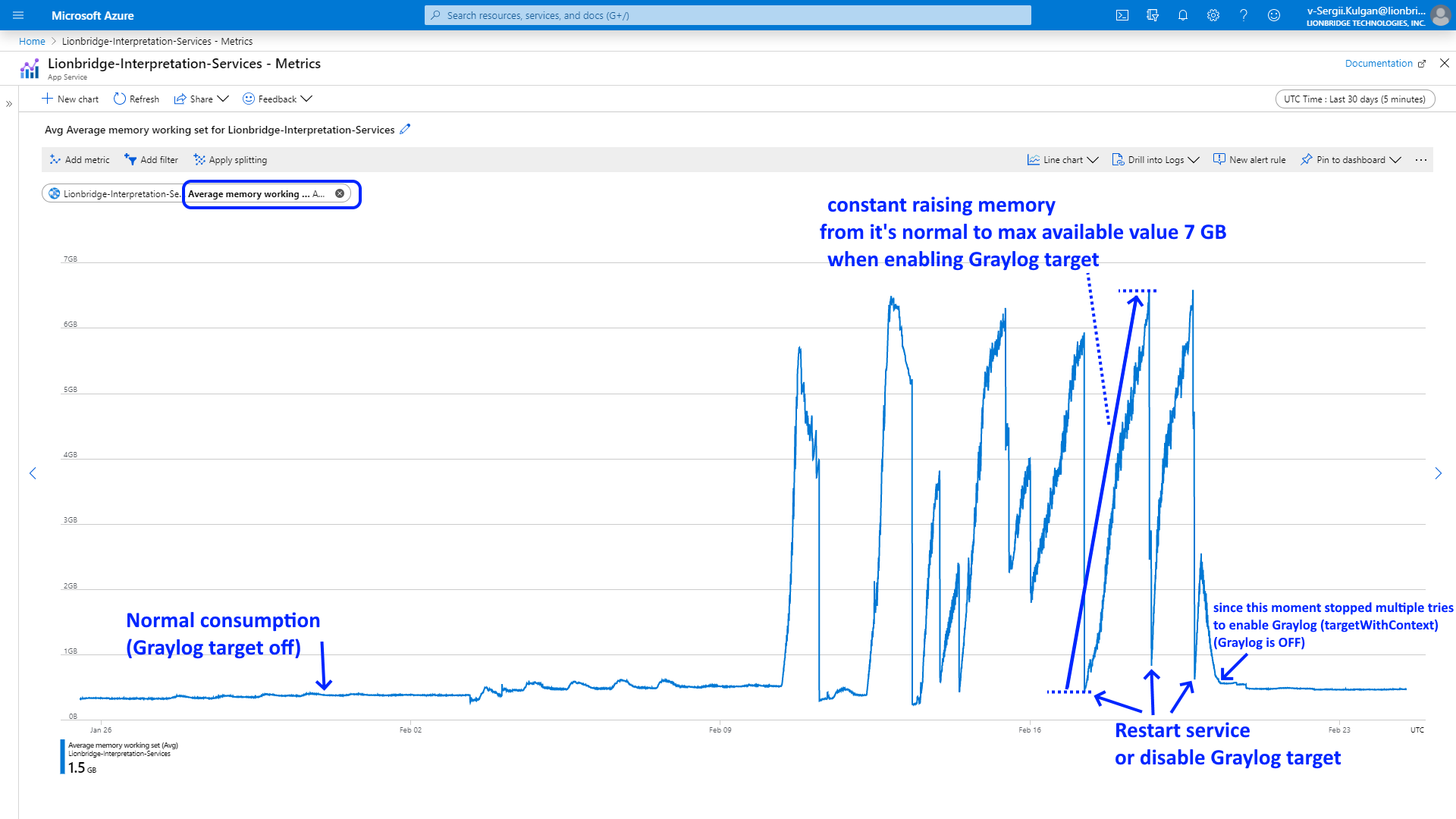
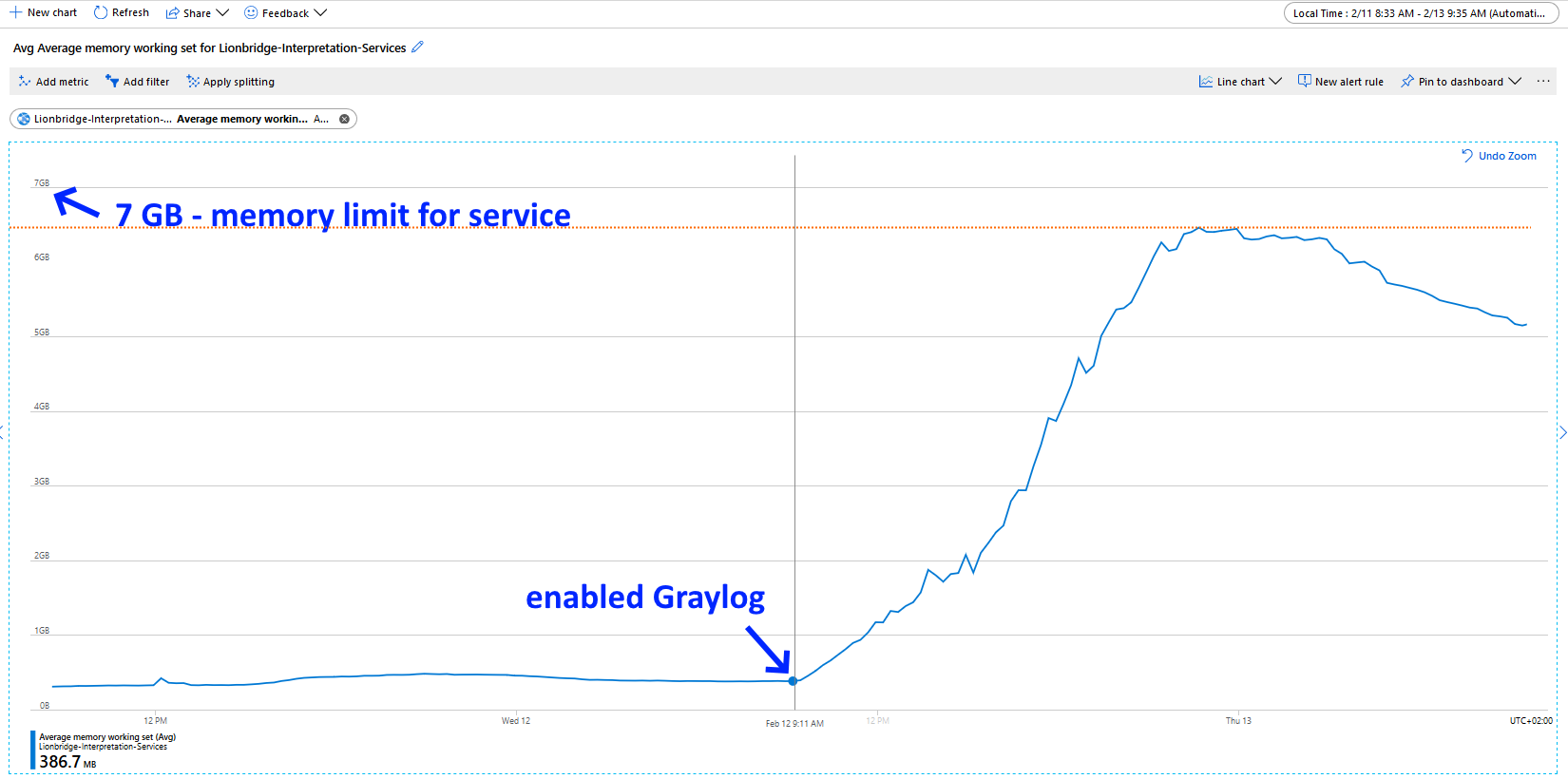
Our most loaded application sends about 200-400 messages per second and, with enabled Graylog target, its memory consumption constantly grow up to almost max available value for the app - 7 GB.
This app service hosted on Azure. Please see "Average memory working set" metric dynamics:
One of spikes (that corresponding to collected memory dump):
Then we collected memory dump of our service with Graylog target enabled.
Here also please see selection from analysis report for this dump:
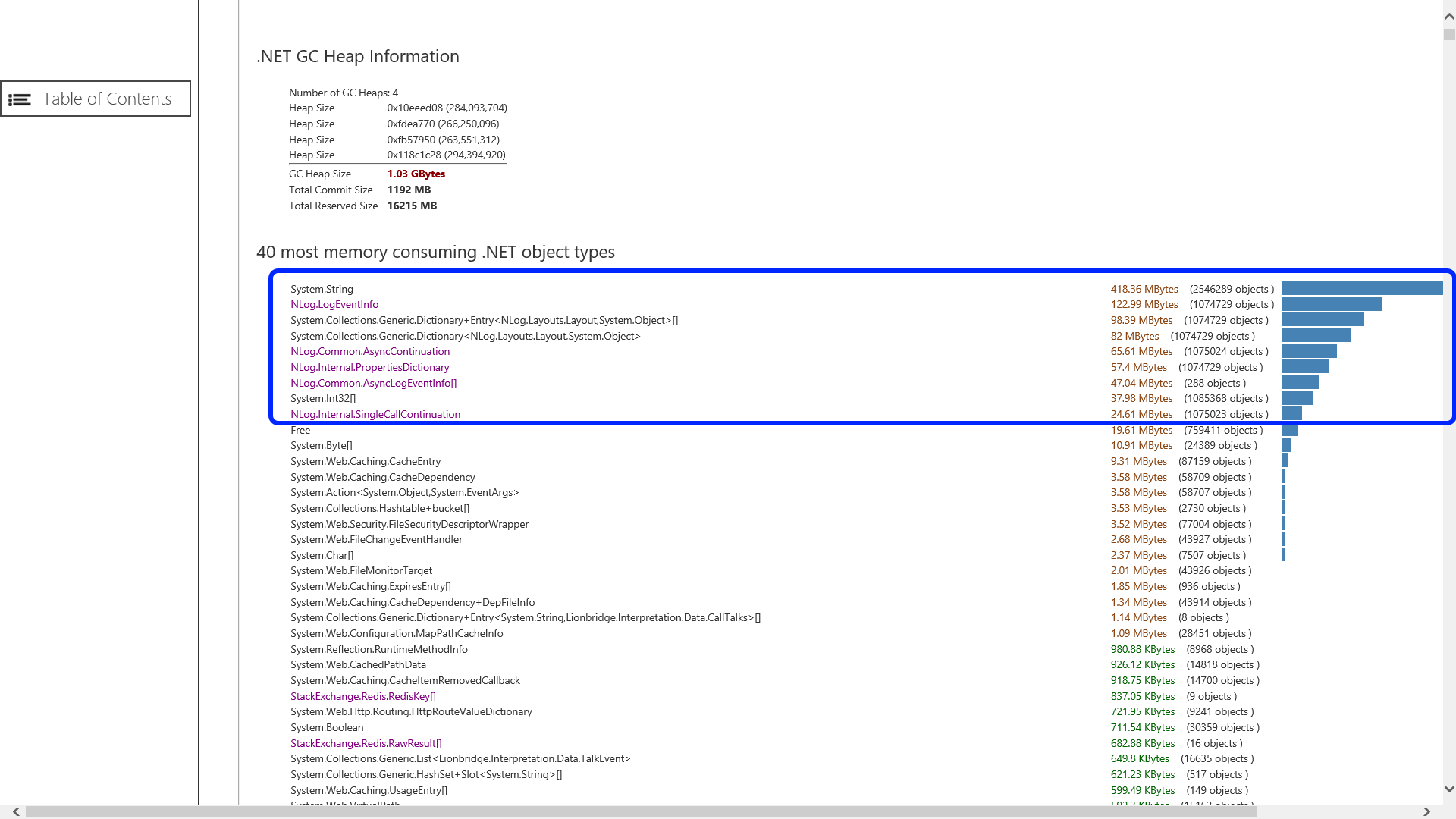
From screenshot above we can see TOP memory consumers are tyoes from NLog.
Observations:
Unlimited constant memory grow happen only with our only app that sends highest number of messages per second.
Problem occurs only when we enable Graylog target (inherited from TargetWithContext).
The same set of messages we duplicate (send) also to Syslog : TargetWithLayout.
But it does not create a problem when Graylog is disabled.
Memory leak occurs only when both enabled.
NLog version: 4.6.8 (latest stable)
Platform: .Net 4.6.1
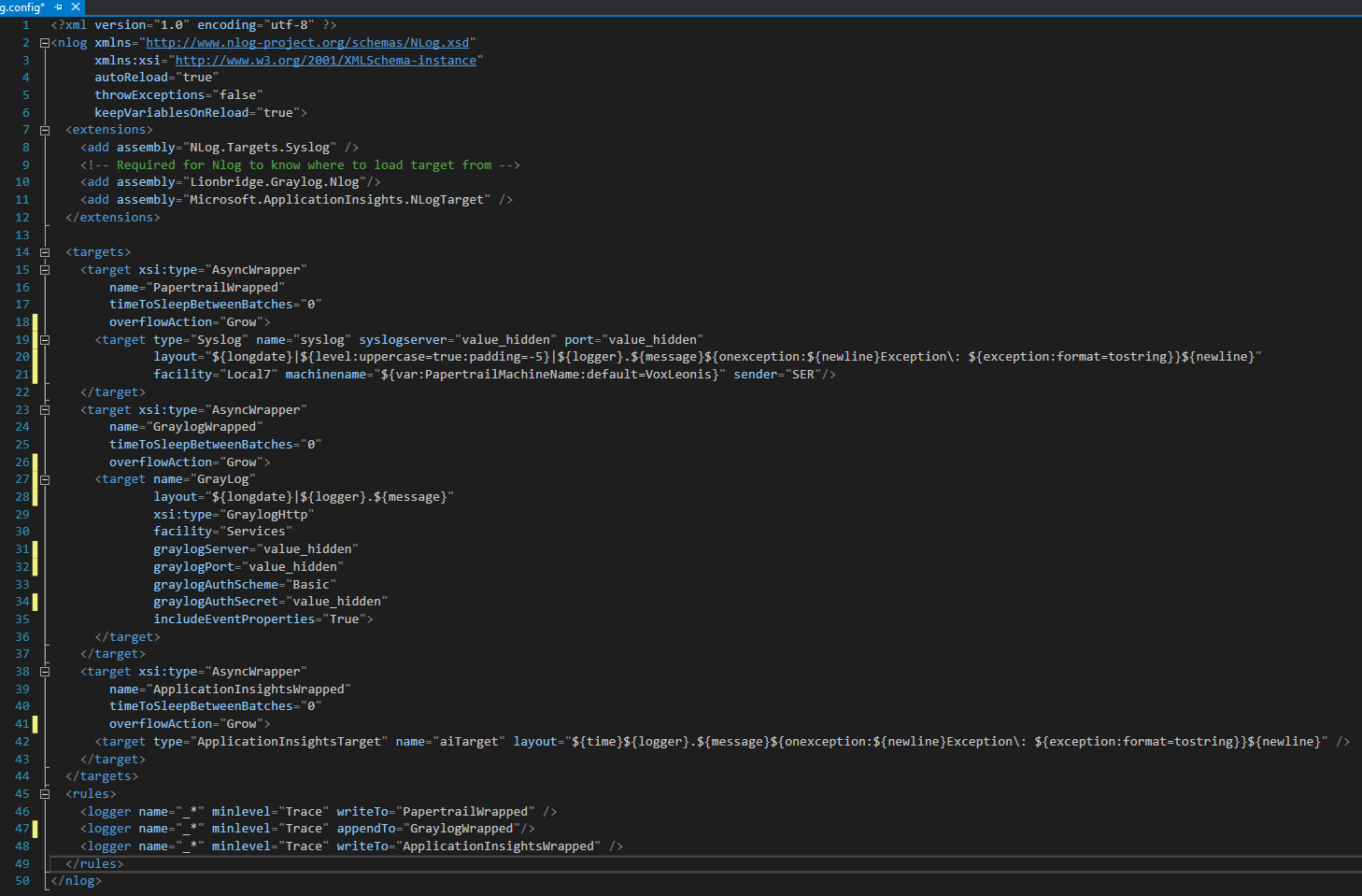
Current NLog config
<?xml version="1.0" encoding="utf-8" ?>
<nlog xmlns="http://www.nlog-project.org/schemas/NLog.xsd"
      xmlns:xsi="http://www.w3.org/2001/XMLSchema-instance"
      autoReload="true"
      throwExceptions="false"
      keepVariablesOnReload="true">
  <extensions>
    <add assembly="NLog.Targets.Syslog" />
    <!-- Required for Nlog to know where to load target from -->
    <add assembly="Lionbridge.Graylog.Nlog"/>
    <add assembly="Microsoft.ApplicationInsights.NLogTarget" />
  </extensions>

  <targets>
    <target xsi:type="AsyncWrapper"
        name="PapertrailWrapped"
        timeToSleepBetweenBatches="0"
        overflowAction="Grow">
      <target type="Syslog" name="syslog" syslogserver="value_hidden" port="value_hidden"
              layout="${longdate}|${level:uppercase=true:padding=-5}|${logger}.${message}${onexception:${newline}Exception\: ${exception:format=tostring}}${newline}"
              facility="Local7" machinename="${var:PapertrailMachineName:default=VoxLeonis}" sender="SER"/>
    </target>
    <target xsi:type="AsyncWrapper"
        name="GraylogWrapped"
        timeToSleepBetweenBatches="0"
        overflowAction="Grow">
      <target name="GrayLog"
              layout="${longdate}|${logger}.${message}"
              xsi:type="GraylogHttp"
              facility="Services"
              graylogServer="value_hidden"
              graylogPort="value_hidden"
              graylogAuthScheme="Basic"
              graylogAuthSecret="value_hidden"
              includeEventProperties="True">
      </target>
    </target>
    <target xsi:type="AsyncWrapper"
        name="ApplicationInsightsWrapped"
        timeToSleepBetweenBatches="0"
        overflowAction="Grow">
      <target type="ApplicationInsightsTarget" name="aiTarget" layout="${time}${logger}.${message}${onexception:${newline}Exception\: ${exception:format=tostring}}${newline}" />
    </target>
  </targets>
  <rules>
    <logger name="_*" minlevel="Trace" writeTo="PapertrailWrapped" />
    <logger name="_*" minlevel="Trace" appendTo="GraylogWrapped"/>
    <logger name="_*" minlevel="Trace" writeTo="ApplicationInsightsWrapped" />
  </rules>
</nlog>
Workarounds I tried:
According to recommendations in similar issues here, I tried:
- Tried to replace:
overflowAction="Grow" with overflowAction="Block" - Remove
layout="${longdate}|${logger}.${message}"
from Graylog target. - Updated NLog from 4.6.8 to newest 4.7.0-rc1
At first glance, it seems it didn't help (according to observations on staging)...
Later on I'll collect and attach metrics and memory dump from production, after above 3 applied
(it still not released on production).
It is interesting what is root cause of problem and where it is in source code, not only workarounds to fix it.
 SergeyKulgan
All 19 comments
Hi! Thanks for opening your first issue here! Please make sure to follow the issue template - so we could help you better!
![welcome[bot] picture](https://avatars.githubusercontent.com/in/4141?v=4&s=40) welcome[bot]
on 24 Feb 2020
welcome[bot]
on 24 Feb 2020
Are you sure it's not an issue of the GraylogTarget itself? Where is the source of GraylogTarget?
 304NotModified
on 24 Feb 2020
304NotModified
on 24 Feb 2020
@304NotModified, thanks for feedback.
GraylogTarget is not open source. It is in NuGet package, that is part of our company software. So, we developed our custom 'Graylog client'. I looked to that code (there are very few) and do not think that reason of memory leak is there.
I suppose problem related to TargetWithContext from NLog, from which inherited our GraylogHttpTarget.
Can you please take a look to that code if I send you it (GraylogHttpTarget.cs) in private message just to understand if problem is there or in NLog library itself?
More about Graylog Server, that we using, if you are interested, here: http://docs.graylog.org/en/3.1/
And here are their sources on https://github.com/Graylog2
SergeyKulgan
on 24 Feb 2020
How about trying out this layout:
https://www.nuget.org/packages/NLog.GelfLayout
And then use it with the NLog NetworkTarget:
<nlog>
  <time type="AccurateUTC" />
  <extensions>
    <add assembly="NLog.Layouts.GelfLayout" />
  </extensions>
  <targets>
    <target xsi:type="AsyncWrapper" name="GraylogWrapped" overflowAction="Grow">
      <target name="graylogt" xsi:type="network" address="http://graylog:12201">
        <layout xsi:type="GelfLayout" facility="Services">
          <field name="exception_type" layout="${exception:Type}" />
        </layout>
      </target>
    </target>
  </targets>
  <rules>
     <logger name="*" minlevel="debug" writeTo="GraylogWrapped" />
  </rules>
</nlog>
To optimize even further then you can change from http (request/reply) to tcp (streaming):
<nlog>
  <time type="AccurateUTC" />
  <extensions>
      <add assembly="NLog.Layouts.GelfLayout" />
  </extensions>
  <targets>
    <target xsi:type="AsyncWrapper" name="GraylogWrapped" overflowAction="Grow">
      <target name="graylogt" xsi:type="network" address="tcp://graylog:12200" newLine ="true" lineEnding="Null" >
        <layout xsi:type="GelfLayout" facility="WebApi">
          <field name="exception_type" layout="${exception:Type}" />
        </layout>
      </target>
    </target>
  </targets>
  <rules>
      <logger name="*" minlevel="debug" writeTo="GraylogWrapped" />
  </rules>
</nlog>
See how to setup Graylog for TCP from #3542
Believe NLog 4.7 RC will improve the Network-Target even further. See also #3739
 snakefoot
on 24 Feb 2020
snakefoot
on 24 Feb 2020
@snakefoot, thanks for an alternative.
I will try it to compare performance.
But I will need also to find memory leak in our library (if there is any).
We adding some custom logic (like adding columns etc), so we will anyway need some 'wrapper' code.
Our package contains class, inherited from TargetWithContext:
public class GraylogHttpTarget : TargetWithContext
@snakefoot , so, do you think problem in TargetWithContext itself?
Do you recommend us to inherit from NetworkTarget instead of TargetWithContext?
SergeyKulgan
on 25 Feb 2020
No I just think people should use the existing building blocks instead of creating their own (when possible)
There is no memory leak in c# only excessive memory allocation. TargetWithContext is used many places without any reports.
But writing good code is hard, when memory allocation is a restriction. So better to focus on reusing / improving the existing building blocks.
You can add extra fields to the Gelf-message by using field-element as shown in the example xml above.
snakefoot
on 25 Feb 2020
Is it possible that messages are simply being written to an async queue faster than the target can stream them out? If, for example, the target successfully writes 200 messages per second and you're adding 400 messages per second the queue will grow by 200 messages every second.
If there's a timestamp on the log and you can place a timestamp on the receiving end you can compare to see how long from the time the event was written to the time that it was received by the server. If that difference continues to grow then it would be a pretty good indicator that this is your problem.
If that is your problem you could either make the logging synchronous so that execution will not continue until the log message has completed writing to the server; otherwise the only way for that queue to catch up is to stop writing messages to it long enough for it to flush the backlog.
 TheXenocide
on 26 Feb 2020
TheXenocide
on 26 Feb 2020
@TheXenocide This is why I recommend changing to TCP-streaming instead of HTTP-request/reply. This will allow TCP-network-protocol to perform batching.
But I guess it is also possible to do batching with HTTP-request/reply by writing multiple logevents into the same payload using newline.
The only problem with batching is handling retransmission's on connection-failure.
snakefoot
on 26 Feb 2020
@SergeyKulgan Have you been able to do some performance tests with GelfLayout together with NetworkTarget ?
Or are you missing some features that prevents you from making it work?
snakefoot
on 28 Feb 2020
Please add the requested info, so we could help you better! (This issue will be closed in 7 days)
![repo-ranger[bot] picture](https://avatars.githubusercontent.com/in/11906?v=4&s=40) repo-ranger[bot]
on 12 Mar 2020
repo-ranger[bot]
on 12 Mar 2020
Hi gentlemen, thank you all for your feedback. Sorry for late response.
@snakefoot, thanks for an alternative with GelfLayout and NetworkTarget
I'm investigating it now and I will compare performance.
The thing is we adding some custom logic (like adding columns to GELF Json message etc), so we will anyway need some 'wrapper' code.
Our package contains class, inherited from TargetWithContext:
public class GraylogHttpTarget : TargetWithContext which is our 'wrapper'.
How it basically works?
- Our GraylogHttpTarget intercepts every message via
protected override void Write(LogEventInfo logEvent)
customize it (adds some extra columns to json message) and send it as separate http request..
I located a problem #1. It is not actually memory leak. It is just a performance bottleneck. Messages are simply collecting in a queue causing memory overflow. Problem is that actually app generates more messages per second than GraylogHttpTarget can send synchronously.
I fixed this problem #1 by removing "Result" from:
_httpClient.PostAsync(_requestAddress, byteContent).Result;
Now Write() function does not wait for result of httpClient.PostAsync()
After this fix 100% of messages arrived and there is no memory grow anymore.
Then I discovered problem #2:
When we fixed problem #1 and started receive 100% messages, we faced another, not less important, issue:
we started experience different multiple http connection-related errors/glitches and such called by Azure support "SNAT port exhaustion" problem especially at time of daily peak load.
I also observed that count of connections consumed by app increased twice, according to metrics.
Our production stream is >500 messages per second. Analyzing this, I'm almost sure that reason is:
- we send every message in separate http request, every request opens and closes connection and it does it too often, what is overhead, it consuming a lot of port/socket resources.
As fix for problem #2 I tried to find a way to send array of messages in single json message (single http request). This would fix the problem, but it is still not supported by graylog server
Appropriate PR, allowing to do that still not approved and not merged:
https://github.com/Graylog2/graylog2-server/pull/5924
So, implement messages streaming over TCP - it seems only solution for now.
However I really want to keep using HTTP for security and some other reasons:
- do not make big changes to our package library, (written by other our guys) and
- do not ask our DevOps to change Graylog server configuration to work with TCP.
More about GELF via HTTP, TCP, UDP:
https://docs.graylog.org/en/3.1/pages/gelf.html
SergeyKulgan
on 13 Apr 2020
Is it possible that messages are simply being written to an async queue faster than the target can stream them out? If, for example, the target successfully writes 200 messages per second and you're adding 400 messages per second the queue will grow by 200 messages every second.
If there's a timestamp on the log and you can place a timestamp on the receiving end you can compare to see how long from the time the event was written to the time that it was received by the server. If that difference continues to grow then it would be a pretty good indicator that this is your problem.
@TheXenocide Yes, problem #1 in above message -was exactly problem you described.
This I fixed, thanks!
SergeyKulgan
on 13 Apr 2020
@TheXenocide This is why I recommend changing to TCP-streaming instead of HTTP-request/reply. This will allow TCP-network-protocol to perform batching.
But I guess it is also possible to do batching with HTTP-request/reply by writing multiple logevents into the same payload using newline.
The only problem with batching is handling retransmission's on connection-failure.
@snakefoot, yes, "batching" - it is exactly what I need, it should fix problem #2 above.
As far, as I understand, it is not possible with HTTP (not supported by Graylog server).
Please look to details in above message.
However I'll double check and try to send multiple messages delimited with newline in Json or make them as a Json object array:
[
{
{
...
]
SergeyKulgan
on 13 Apr 2020
To be more exact what we are doing, attaching our 'wrapper' logic:
(it already contains my fix for problem #1)
class GraylogHttpTarget.cs:
using Newtonsoft.Json;
using NLog;
using NLog.Common;
using NLog.Config;
using NLog.Targets;
using System;
using System.Collections.Generic;
using System.Net;
using System.Net.Http;
using System.Net.Http.Headers;
using System.Threading;
using System.Threading.Tasks;

namespace Lionbridge.Graylog.Nlog
{
    [Target("GraylogHttp")]
    public class GraylogHttpTarget : TargetWithContext
    {
        private HttpClient _httpClient;
        private Uri _requestAddress;
        public GraylogHttpTarget()
        {
            ContextProperties = new List<TargetPropertyWithContext>();
        }

        public string GraylogServer { get; set; }

        public string GraylogPort { get; set; }

        public string GraylogAuthScheme { get; set; }

        public string GraylogAuthSecret { get; set; }

        public string Facility { get; set; }

        public string Host { get; set; }

        public string Application { get; set; }

        [ArrayParameter(typeof(TargetPropertyWithContext), "parameter")]
        [System.Diagnostics.CodeAnalysis.SuppressMessage("Microsoft.Naming", "CA1721:PropertyNamesShouldNotMatchGetMethods", Justification = "NLog Behavior")]
        public override IList<TargetPropertyWithContext> ContextProperties { get; }

        protected override void InitializeTarget()
        {
            if (string.IsNullOrEmpty(Host))
            {
                Host = GetMachineName();
            }

            _httpClient = new HttpClient();

            _requestAddress = new Uri(string.Format(System.Globalization.CultureInfo.InvariantCulture, "{0}/gelf", GraylogServer));

            if (!string.IsNullOrEmpty(GraylogPort))
            {
                _requestAddress = new Uri(string.Format(System.Globalization.CultureInfo.InvariantCulture, "{0}:{1}/gelf", GraylogServer, GraylogPort));
            }

            _httpClient.DefaultRequestHeaders.ExpectContinue = false; // Expect (100) Continue breaks the graylog server
            _httpClient.DefaultRequestHeaders.Authorization = new AuthenticationHeaderValue(GraylogAuthScheme, GraylogAuthSecret);

            // Prefix the custom properties with underscore upfront, so we don't have to do it for each log-event
            foreach (TargetPropertyWithContext p in ContextProperties)
            {
                if (!p.Name.StartsWith("_", StringComparison.Ordinal))
                {
                    p.Name = string.Concat("_", p.Name);
                }
            }
            base.InitializeTarget();
        }

        protected override void Write(LogEventInfo logEvent)
        {
            try
            {
                Dictionary<string, string> dictProperties = new Dictionary<string, string>
                {
                    { "_application" ,Application},
                    { "short_message", logEvent.FormattedMessage },
                    { "Host", Host },
                    { "Level", Convert.ToString(GetLogLevel(logEvent.Level)) },
                    { "_levelName" ,Convert.ToString(logEvent.Level)},
                    { "LoggerName", logEvent.LoggerName }
                };

                if (!string.IsNullOrEmpty(Facility))
                {
                    dictProperties.Add("Facility", Facility);
                }

                if (logEvent.Exception != null)
                {
                    if (!string.IsNullOrEmpty(logEvent.Exception.Message))
                    {
                        dictProperties.Add("ExceptionMessage", logEvent.Exception.Message);
                    }

                    if (!string.IsNullOrEmpty(logEvent.Exception.StackTrace))
                    {
                        dictProperties.Add("ExceptionStackTrace", logEvent.Exception.StackTrace);
                    }
                }

                var properties = GetAllProperties(logEvent);
                foreach (var property in properties)
                {
                    try
                    {
                        if (!string.IsNullOrEmpty(property.Key))
                        {
                            if (Convert.GetTypeCode(property.Value) != TypeCode.Object)
                            {
                                dictProperties.Add(property.Key, Convert.ToString(property.Value));
                            }
                            else
                            {
                                dictProperties.Add(property.Key, property.Value?.ToString());
                            }
                        }
                    }
                    catch (Exception ex)
                    {
                        InternalLogger.Error(ex, "GraylogHttp(Name={0}): Fail to handle LogEvent Properties", Name);
                    }
                }

                var myContent = JsonConvert.SerializeObject(dictProperties);
                var buffer = System.Text.Encoding.UTF8.GetBytes(myContent);
                var byteContent = new ByteArrayContent(buffer);
                byteContent.Headers.ContentType = new MediaTypeHeaderValue("application/json");

                Task.Run(async () =>
                {
                    var cancellationSource = new CancellationTokenSource(TimeSpan.FromSeconds(15));
                    try
                    {
                        var response = await _httpClient.PostAsync(_requestAddress, byteContent, cancellationSource.Token);
                        response.EnsureSuccessStatusCode();
                    }
                    catch (HttpRequestException unsuccessfulResponseException)
                    {
                        InternalLogger.Error("GraylogHttp(Name={0}): Sending message to Graylog failed. Response status code from Graylog server is not successful.", unsuccessfulResponseException.Message);
                    }
                    catch (OperationCanceledException cancelledException)
                    {
                        InternalLogger.Error("GraylogHttp(Name={0}): Sending message to Graylog failed. Operation was cancelled by timeout.", cancelledException.Message);
                    }
                    catch (Exception e)
                    {
                        InternalLogger.Error("GraylogHttp(Name={0}): Sending message to Graylog failed. StackTrace: {1}", e.Message, e.StackTrace);
                    }
                });
            }
            catch (Exception ex)
            {
                InternalLogger.Error("GraylogHttp(Name={0}): The Graylog server seems to be inaccessible, the log messages were not sent to the server.", ex.Message);
            }
        }

        /// <summary>
        /// Gets the machine name
        /// </summary>
        private string GetMachineName()
        {
            return TryLookupValue(() => Environment.GetEnvironmentVariable("COMPUTERNAME"), "COMPUTERNAME")
                ?? TryLookupValue(() => Environment.GetEnvironmentVariable("HOSTNAME"), "HOSTNAME")
                ?? TryLookupValue(() => Dns.GetHostName(), "DnsHostName");
        }

        private string TryLookupValue(Func<string> lookupFunc, string lookupType)
        {
            try
            {
                string lookupValue = lookupFunc()?.Trim();
                return string.IsNullOrEmpty(lookupValue) ? null : lookupValue;
            }
            catch (Exception ex)
            {
                InternalLogger.Warn(ex, "GraylogHttp(Name={0}): Failed to lookup {1}", Name, lookupType);
                return null;
            }
        }

        public int GetLogLevel(LogLevel level)
        {
            int graylogLevel = 0;

            if (level == LogLevel.Trace)
            {
                graylogLevel = (int)GelfLevel_Debug;
            }
            else if (level == LogLevel.Debug)
            {
                graylogLevel = (int)GelfLevel_Debug;
            }
            else if (level == LogLevel.Info)
            {
                graylogLevel = (int)GelfLevel_Informational;
            }
            else if (level == LogLevel.Warn)
            {
                graylogLevel = (int)GelfLevel_Warning;
            }
            else if (level == LogLevel.Fatal)
            {
                graylogLevel = (int)GelfLevel_Critical;
            }
            else
            {
                graylogLevel = (int)GelfLevel_Error;
            }

            return graylogLevel;
        }

        private static readonly object GelfLevel_Critical = 2;
        private static readonly object GelfLevel_Error = 3;
        private static readonly object GelfLevel_Warning = 4;
        private static readonly object GelfLevel_Informational = 6;
        private static readonly object GelfLevel_Debug = 7;
    }
}
The thing is we adding some custom logic (like adding columns to GELF Json message etc), so we will anyway need some 'wrapper' code.
Well if you take a look at GelfLayout then it has support for custom properties (You can use <field>)
https://github.com/farzadpanahi/NLog.GelfLayout#sample-usage-with-custom-extra-fields
So, implement messages streaming over TCP - it seems only solution for now.
However I really want to keep using HTTP for security and some other reasons:
Alternative you could write to a simple logfile in json-format, and then have some other background service to upload the messages.
snakefoot
on 13 Apr 2020
@snakefoot I tested - there is no possibility to send multiple messages in single Http request.
If I will write logs to simple file in json format - then, using Http, even from background service, I will need to make one request per message, what is overhead, not optimal and consumes extra resources that are shared between different app services in Azure. I mean SNAT ports will be shared for all app services under same load balancer.
SergeyKulgan
on 14 Apr 2020
@SergeyKulgan Thought that one of the "features" of Azure Cloud is that console-output is stored in the cloud by default. And one can then setup Azure Functions to upload to central at later stage, maybe in periods where price is low. Anyway not a cloud expert. So I guess you have already consulted with Microsoft experts the most cost-optimal way of storing output from Azure-Hosted applications.
Does the GrayLog-server support Http-Compression like GZip?
Have you considered using a RoundRobin-Gatling cannon to have multiple httpclient-targets sending to the GrayLog-server?
Maybe change from inheriting from TargetWithContext to instead inherit from AsyncTaskTarget. Do not call Task.Run() but instead just return the task. See also: https://github.com/NLog/NLog/wiki/How-to-write-a-custom-async-target
Recall that others complain about ordering in GrayLog-GUI is not that good. But you can always sort using NLog SequenceID as they are always in-order. See also #3542
snakefoot
on 14 Apr 2020
@snakefoot , yes compression is supported, at least for http:
_"Any graylog-server node accepts and stores this as a message when GZIP/ZLIB compressed"_
Package size is not problem, our problem is different: overhead of opening https connection (ssl handshake) very frequent, it eats most of resources.
About Gatling cannon - not an option, this solution should use more connections, and it is bottle neck for our service. We need to use connections with economy, as less as possible, open/close them as rare as possible. We need keep alive existing connection as long as possible.
I decided to use the most efficient solution, according to your suggestion:
TCP NetworkTarget + GelfLayout
My another question is how efficient that NetworkTarget:
If I will use this +AsyncWrapper (right as in example) - will NLog use TCP streaming on base level and keep connection open all the time?
Or it opens and closes tcp connection/socket for sending every single/batch of messages?
Now I'm thinking between use this native approach or write own TCP sender using TCP streaming for maximal performance
SergeyKulgan
on 28 Apr 2020
will NLog use TCP streaming on base level and keep connection open all the time?
There are several option for the connection handling in the network-target:
https://github.com/NLog/NLog/wiki/Network-target#connection-options
By default it just keeps the connection open and writes new messages into the existing TCP-stream.
snakefoot
on 28 Apr 2020
Related issues
 aled
·
35Comments
aled
·
35Comments
 sandersaares
·
30Comments
sandersaares
·
30Comments
 qaqz111
·
25Comments
qaqz111
·
25Comments
 kshkrao3
·
25Comments
kshkrao3
·
25Comments
 nblumhardt
·
39Comments
nblumhardt
·
39Comments
Most helpful comment
How about trying out this layout:
https://www.nuget.org/packages/NLog.GelfLayout
And then use it with the NLog NetworkTarget:
To optimize even further then you can change from http (request/reply) to tcp (streaming):
See how to setup Graylog for TCP from #3542
Believe NLog 4.7 RC will improve the Network-Target even further. See also #3739