Nlog: ColoredConsole target not colored in Visual Studio 2019/Asp.Net Core 3
While settings up Nlog for a new asp.net core 3 project, i tried to use the ColoredConsole target but couldn't get any coloring working in Visual Studio Community 2019.
Has anyone ever got it working ?
NLog version: 4.6.8
NLog.Web.AspNetCore version: 4.9.0
Platform: Asp.NET Core 3 on Windows 10, using Visual studio 2019 Community edition and IISExpress as a webserver
Current NLog config (xml or C#, if relevant)
<?xml version="1.0" encoding="utf-8" ?>
<nlog xmlns="http://www.nlog-project.org/schemas/NLog.xsd"
      xmlns:xsi="http://www.w3.org/2001/XMLSchema-instance"
      autoReload="true"
      throwExceptions="true"
      internalLogLevel="Info"
      internalLogFile="c:\temp\internal-nlog.txt">

  <!-- enable asp.net core layout renderers -->
  <extensions>
    <add assembly="NLog.Web.AspNetCore"/>
  </extensions>

  <!-- the targets to write to -->
  <targets>
    <target xsi:type="ColoredConsole"
          name="Console"
          layout="${longdate}|${level:uppercase=true}|${logger}|${message}"
          useDefaultRowHighlightingRules="true"
          enableAnsiOutput="false"
          DetectOutputRedirected="false"/>
  </targets>

  <!-- rules to map from logger name to target -->
  <rules>
    <logger name="*" minlevel="Trace" writeTo="Console" />
  </rules>
</nlog>
What is the current result?
In the Output > [Name of the project] - ASP.Net Core Web Server window, the ColoredConsole target should write logs doesn't use coloring.

What is the expected result?
In the Output > [Name of the project] - ASP.Net Core Web Server window, the ColoredConsole target should write logs with colors.Please post full exception details (message, stacktrace, inner exceptions)
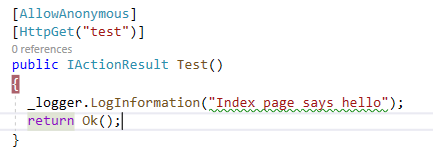
My log code in a WebAPI controller :
Are there any workarounds? YES
This bug occurs only in the Output window of visual studio.
By Default on windows, IISExpress is selected as the default engine for running asp.net core project :
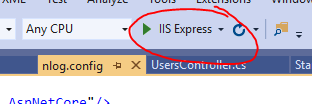
If you change target and switch it the the project name (i.e
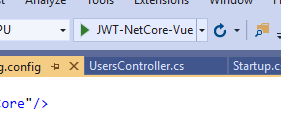 ), a new terminal window is spawned and the program output is redirected to that terminal.
Result is
 and coloring is applied.
Has anyone got it working in the Output window of Visual Studio ?
 Land3r
All 8 comments
Hi! Thanks for opening your first issue here! Please make sure to follow the issue template - so we could help you better!
![welcome[bot] picture](https://avatars.githubusercontent.com/in/4141?v=4&s=40) welcome[bot]
on 15 Nov 2019
welcome[bot]
on 15 Nov 2019
Think the Visual Studio "Output Window" is not a real console window. It just displays the console output from the application.
Try changing the NLog console-Layout to begin with (Putting ${level} first, and remember the colon):
- "Error: " - for errors
- "Warning: " - for warnings:
See also: https://stackoverflow.com/a/54004318/193178
To extend the pattern-matching even further, then you can try VSColorOutput: https://marketplace.visualstudio.com/items?itemName=MikeWard-AnnArbor.VSColorOutput
 snakefoot
on 15 Nov 2019
snakefoot
on 15 Nov 2019
@snakefoot maybe we could add an option to prefix those levels,
e.g.
visualStudioOutputColors=true.
or do you think that's to specific? Doubt here.
 304NotModified
on 18 Nov 2019
304NotModified
on 18 Nov 2019
Think it should just be part of the Wiki for console-target. Think people will be confused by Layout being changed.
snakefoot
on 18 Nov 2019
Added, feel free to edit:
https://github.com/NLog/NLog/wiki/ColoredConsole-target#visual-studio-output-window
304NotModified
on 18 Nov 2019
@Land3r Have your question been answered?
snakefoot
on 2 Dec 2019
Please add the requested info, so we could help you better! (This issue will be closed in 7 days)
![repo-ranger[bot] picture](https://avatars.githubusercontent.com/in/11906?v=4&s=40) repo-ranger[bot]
on 2 Dec 2019
repo-ranger[bot]
on 2 Dec 2019
Yes, i also think that this didn't require any additional source code, an appendix in the wiki is all that is required :)
I ended up using a regular console with the VsColorOutpu Visual studio extension.
Thanks a lot
Land3r
on 2 Dec 2019
Related issues
 FaMouZx3
·
3Comments
FaMouZx3
·
3Comments
 ErcinDedeoglu
·
3Comments
ErcinDedeoglu
·
3Comments
 Rapiiidooo
·
3Comments
Rapiiidooo
·
3Comments
 linmasaki
·
3Comments
linmasaki
·
3Comments
 npandrei
·
3Comments
npandrei
·
3Comments