NLog randomly crashes in UWP app with Microsoft.Extensions.DependencyInjection (only when debugging)
NLog version: 4.6.7
Platform:
UWP: Windows 10, version 1809(10.0; Build 17763) - Windows 10, version 1903(10.0; Build 18362)
Console: .NET Core 2.2
Current NLog config (xml or C#, if relevant)
``` c#
public static void AddLogger(this ServiceCollection services)
{
services.AddLogging(loggingBuilder =>
{
// configure Logging with NLog
loggingBuilder.ClearProviders();
loggingBuilder.SetMinimumLevel(Microsoft.Extensions.Logging.LogLevel.Trace);
loggingBuilder.AddNLog();
});
        // UWP is very restrictive of where you can save files on the disk.
        // The preferred place to do that is app's local folder.
        StorageFolder folder = ApplicationData.Current.LocalFolder;
        string fullPath = folder.Path + @"\Logs\${date:format=yyyy-MM-dd}.Player.log";

        var config = new LoggingConfiguration();
        var fileTarget = new FileTarget("App.log")
        {
            FileName = fullPath,
            Layout = "${longdate} ${uppercase:${level}} ${message} ${exception}"
        };
        config.AddTarget(fileTarget);
        config.AddRule(NLog.LogLevel.Debug, NLog.LogLevel.Fatal, "App.log");

        LogManager.Configuration = config;
    }
```
- What is the current result?
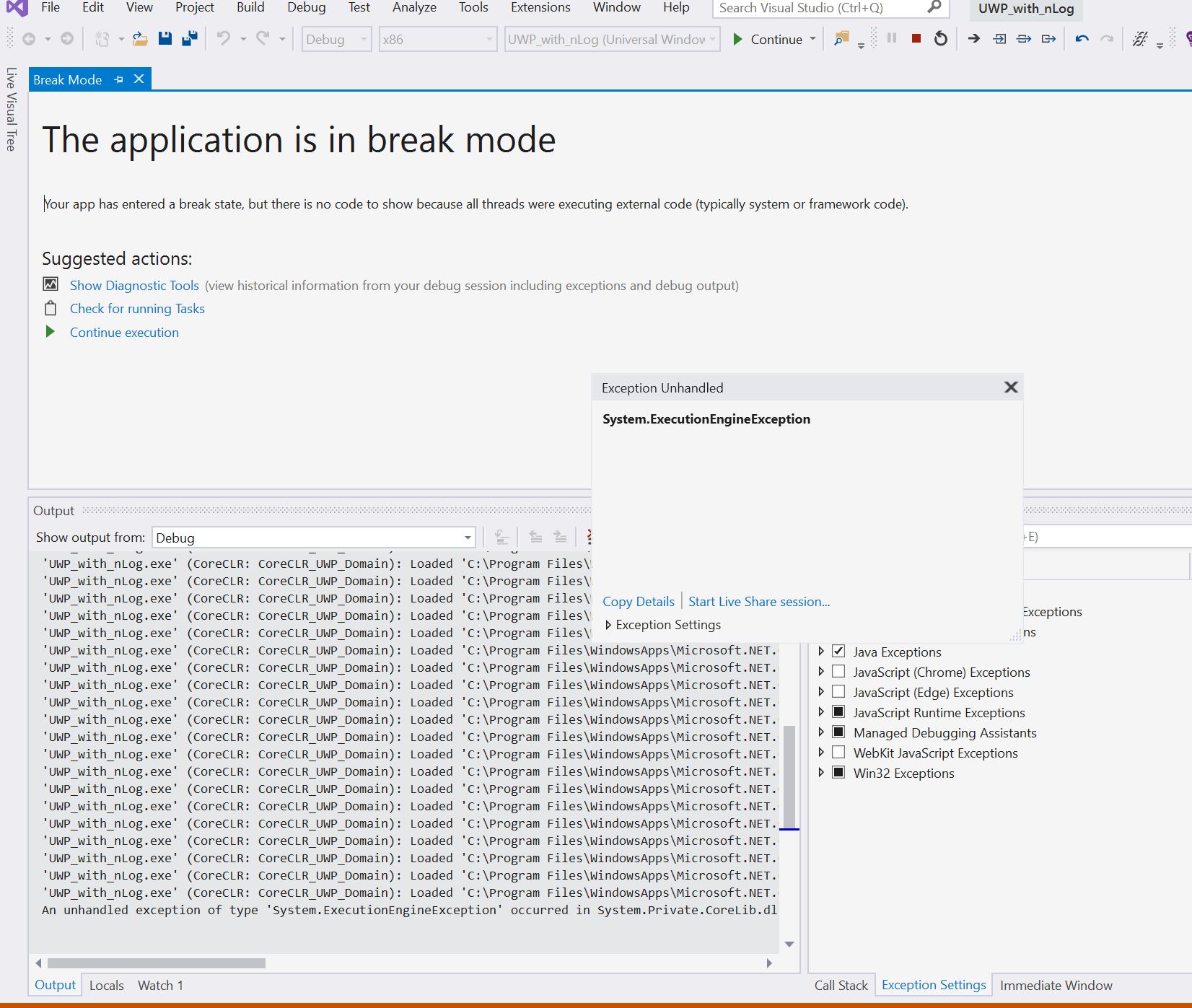
Sometimes it's working. But sometimes UWP app is crashing. So random crash. With no trace, but I know it's because of nlog.
- What is the expected result?
Stable working app. - Did you checked the Internal log?
No. - Please post full exception details (message, stacktrace, inner exceptions)
I've created a minimal reproducible example here: https://github.com/aosyatnik/UWP_with_nLog - Are there any workarounds? yes/no
I don't know. - Is there a version in which it did work?
I don't think so. - Can you help us by writing an unit test?
Maybe.
 aosyatnik
All 18 comments
Hi! Thanks for opening your first issue here! Please make sure to follow the issue template - so we could help you better!
![welcome[bot] picture](https://avatars.githubusercontent.com/in/4141?v=4&s=40) welcome[bot]
on 11 Oct 2019
welcome[bot]
on 11 Oct 2019
Make sure to use the following:
c#
            var fileTarget = new FileTarget("App.log")
            {
                FileName = fullPath,
                Layout = "${longdate} ${uppercase:${level}} ${message} ${exception}",
                ConcurrentWrites = false,
            };
Trying to make it the new default in NLog 5.0. See also #3048
 snakefoot
on 11 Oct 2019
snakefoot
on 11 Oct 2019
But also a good idea to active the NLog InternalLogger, when needing to troubleshoot NLog:
See also: https://github.com/NLog/NLog/wiki/Internal-Logging
As @304NotModified suggested a moment ago :)
snakefoot
on 11 Oct 2019
Hi, @snakefoot . I've tried your suggestions. Nothing worked. That's how my configuration looks like right now:
``` c#
public static void AddLogger(this ServiceCollection services)
{
services.AddLogging(loggingBuilder =>
{
// configure Logging with NLog
loggingBuilder.ClearProviders();
loggingBuilder.SetMinimumLevel(Microsoft.Extensions.Logging.LogLevel.Trace);
loggingBuilder.AddNLog();
});
        // UWP is very restrictive of where you can save files on the disk.
        // The preferred place to do that is app's local folder.
        StorageFolder folder = ApplicationData.Current.LocalFolder;
        string fullPath = folder.Path + @"\Logs\${date:format=yyyy-MM-dd}.Player.log";

        var config = new LoggingConfiguration();
        var fileTarget = new FileTarget("App.log")
        {
            FileName = fullPath,
            Layout = "${longdate} ${uppercase:${level}} ${message} ${exception}",
            ConcurrentWrites = false
        };
        config.AddTarget(fileTarget);
        config.AddRule(NLog.LogLevel.Debug, NLog.LogLevel.Fatal, "App.log");

        LogManager.Configuration = config;

        // Add internal logging.
        InternalLogger.LogFile = folder.Path + @"\Logs\internal.nLog.log";
        InternalLogger.LogLevel = NLog.LogLevel.Trace;
    }
I also pushed these changes to my example repo, so you can also play with it.

And this is what in internal log(nothing special). I was running app 2 times and on 3rd time it crashed:
2019-10-11 18:53:19.9063 Debug Hide assemblies for callsite
2019-10-11 18:53:20.0593 Debug ScanAssembly('NLog.Extensions.Logging, Version=1.0.0.0, Culture=neutral, PublicKeyToken=5120e14c03d0593c')
2019-10-11 18:53:20.1159 Debug Targets for UWP_with_nLog.MainViewModel by level:
2019-10-11 18:53:20.1319 Debug Trace =>
2019-10-11 18:53:20.1466 Debug Debug => App.log
2019-10-11 18:53:20.1542 Debug Info => App.log
2019-10-11 18:53:20.1542 Debug Warn => App.log
2019-10-11 18:53:20.1731 Debug Error => App.log
2019-10-11 18:53:20.1731 Debug Fatal => App.log
2019-10-11 18:53:20.2563 Debug FileTarget(Name=App.log): Process file 'C:\Users\HannaMelashkina\AppData\Local\Packages\cdd0f810-d944-4e57-8574-63dcd902b44d_4r2k005x7atxw\LocalState\Logs\2019-10-11.Player.log' on startup
2019-10-11 18:53:20.2759 Debug Creating file appender: C:\Users\HannaMelashkina\AppData\Local\Packages\cdd0f810-d944-4e57-8574-63dcd902b44d_4r2k005x7atxw\LocalState\Logs\2019-10-11.Player.log
2019-10-11 18:53:20.2903 Trace Opening C:\Users\HannaMelashkina\AppData\Local\Packages\cdd0f810-d944-4e57-8574-63dcd902b44d_4r2k005x7atxw\LocalState\Logs\2019-10-11.Player.log with allowFileSharedWriting=False
2019-10-11 18:53:49.2374 Debug Hide assemblies for callsite
2019-10-11 18:53:49.2944 Debug ScanAssembly('NLog.Extensions.Logging, Version=1.0.0.0, Culture=neutral, PublicKeyToken=5120e14c03d0593c')
2019-10-11 18:53:49.3812 Debug Targets for UWP_with_nLog.MainViewModel by level:
2019-10-11 18:53:49.3958 Debug Trace =>
2019-10-11 18:53:49.4280 Debug Debug => App.log
2019-10-11 18:53:49.4490 Debug Info => App.log
2019-10-11 18:53:49.4724 Debug Warn => App.log
2019-10-11 18:53:49.4921 Debug Error => App.log
2019-10-11 18:53:49.5126 Debug Fatal => App.log
2019-10-11 18:53:49.6398 Debug FileTarget(Name=App.log): Process file 'C:\Users\HannaMelashkina\AppData\Local\Packages\cdd0f810-d944-4e57-8574-63dcd902b44d_4r2k005x7atxw\LocalState\Logs\2019-10-11.Player.log' on startup
2019-10-11 18:53:49.6732 Debug Creating file appender: C:\Users\HannaMelashkina\AppData\Local\Packages\cdd0f810-d944-4e57-8574-63dcd902b44d_4r2k005x7atxw\LocalState\Logs\2019-10-11.Player.log
2019-10-11 18:53:49.6935 Trace Opening C:\Users\HannaMelashkina\AppData\Local\Packages\cdd0f810-d944-4e57-8574-63dcd902b44d_4r2k005x7atxw\LocalState\Logs\2019-10-11.Player.log with allowFileSharedWriting=False
2019-10-11 18:53:57.4991 Debug Hide assemblies for callsite
2019-10-11 18:53:57.5484 Debug ScanAssembly('NLog.Extensions.Logging, Version=1.0.0.0, Culture=neutral, PublicKeyToken=5120e14c03d0593c')
2019-10-11 18:53:57.5929 Debug Targets for UWP_with_nLog.MainViewModel by level:
2019-10-11 18:53:57.6051 Debug Trace =>
2019-10-11 18:53:57.6213 Debug Debug => App.log
2019-10-11 18:53:57.6371 Debug Info => App.log
2019-10-11 18:53:57.6371 Debug Warn => App.log
2019-10-11 18:53:57.6645 Debug Error => App.log
2019-10-11 18:53:57.6856 Debug Fatal => App.log
2019-10-11 18:53:57.9004 Debug FileTarget(Name=App.log): Process file 'C:\Users\HannaMelashkina\AppData\Local\Packages\cdd0f810-d944-4e57-8574-63dcd902b44d_4r2k005x7atxw\LocalState\Logs\2019-10-11.Player.log' on startup
2019-10-11 18:53:57.9317 Debug Creating file appender: C:\Users\HannaMelashkina\AppData\Local\Packages\cdd0f810-d944-4e57-8574-63dcd902b44d_4r2k005x7atxw\LocalState\Logs\2019-10-11.Player.log
2019-10-11 18:53:57.9551 Trace Opening C:\Users\HannaMelashkina\AppData\Local\Packages\cdd0f810-d944-4e57-8574-63dcd902b44d_4r2k005x7atxw\LocalState\Logs\2019-10-11.Player.log with allowFileSharedWriting=False
```
aosyatnik
on 11 Oct 2019
@aosyatnik No errors from NLog from InternalLogger. Think you have to come with more details that shows it is NLog is causing random crashes.
Don't have any ARM processors or much experience with UWP. What happens if you use NLog ver. 4.5.11 ?
snakefoot
on 11 Oct 2019
With 4.5.11 Build error: Cannot find type NLog.Config.LoggingConfigurationParser in module NLog.dll.
How can I find more info, that it's nlog?.. I've already created an empty UWP application with the only(!) nlog added to it. I also created a Console application, that demonstrates, that it's working fine in a console app, but causes the crash in UWP.
aosyatnik
on 11 Oct 2019
With 4.5.11 Build error: Cannot find type NLog.Config.LoggingConfigurationParser in module NLog.dll.
Please also change NLog.Extension.Logging to ver. 1.4.0
How can I find more info, that it's nlog?
An exception callstack or something similar would be a great help.
snakefoot
on 11 Oct 2019
- lease post full exception details (message, stacktrace, inner exceptions)
I've created a minimal reproducible example here: https://github.com/aosyatnik/UWP_with_nLog
I will try running this, but not sure if I have UWP SDK installed currently
 304NotModified
on 11 Oct 2019
304NotModified
on 11 Oct 2019
It's hard to get a stack trace or a better error, i've noticed it sometimes crashes depending on this line:
```c#
loggingBuilder.AddNLog();
having now: (of course logging call disabled)
```c#
 public static void AddLogger(this ServiceCollection services)
        {
            services.AddLogging(loggingBuilder =>
            {
                // configure Logging with NLog
                //  loggingBuilder.ClearProviders();
                loggingBuilder.SetMinimumLevel(Microsoft.Extensions.Logging.LogLevel.Trace);
                loggingBuilder.AddNLog(); // crashes if this line is enabled (sometimes)
            });

            //UWP is very restrictive of where you can save files on the disk.
            // The preferred place to do that is app's local folder.
            //StorageFolder folder = ApplicationData.Current.LocalFolder;
            //string fullPath = folder.Path + @"\Logs\${date:format=yyyy-MM-dd}.Player.log";

            //var config = new LoggingConfiguration();
            //var fileTarget = new FileTarget("App.log")
            //{
            //    FileName = fullPath,
            //    Layout = "${longdate} ${uppercase:${level}} ${message} ${exception}",
            //    ConcurrentWrites = false
            //};
            //config.AddTarget(fileTarget);
            ////  config.AddRule(NLog.LogLevel.Debug, NLog.LogLevel.Fatal, "App.log");

            //LogManager.Configuration = config;

            //// Add internal logging.
            //InternalLogger.LogFile = folder.Path + @"\Logs\internal.nLog.log";
            //InternalLogger.LogLevel = NLog.LogLevel.Trace;
        }
So there is no logging enabled or whatsoever and it still crashes (sometimes)
error details until now:
System.ExecutionEngineException
  HResult=0x80131506
  Source=<Cannot evaluate the exception source>
  StackTrace:
<Cannot evaluate the exception stack trace>
it's always 0x80131506
maybe related: https://developercommunity.visualstudio.com/content/problem/25274/systemexecutionengineexception-when-debugging.html
304NotModified
on 11 Oct 2019
@aosyatnik is it also always 0x80131506 on your side?
304NotModified
on 11 Oct 2019
@304NotModified Yes!
Copied details:
System.ExecutionEngineException
HResult=0x80131506
Source=
StackTrace:
aosyatnik
on 11 Oct 2019
Could you please check that it works without debugging? So,
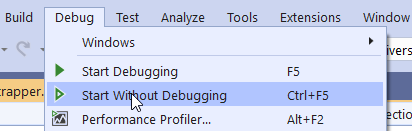
I haven't seen crashes then
304NotModified
on 11 Oct 2019
Yes, without debugging works fine. Also deployed app also works fine.
aosyatnik
on 11 Oct 2019
cool 👍 So I guess this is a debugging issue in VS. Dunno why NLog is triggering this.
related: https://stackoverflow.com/questions/967044/system-executionengineexception-failure
304NotModified
on 11 Oct 2019
I'll ask on microsoft side: https://developercommunity.visualstudio.com/content/problem/773519/random-systemexecutionengineexception-in-uwp-on-st.html
Thanks for helping :)
aosyatnik
on 11 Oct 2019
OK if it's something we could do, please let us know! :)
304NotModified
on 11 Oct 2019
Closing this issue, as caused by external setup. Please re-open if not so.
snakefoot
on 20 Jan 2020
Related issues
 linmasaki
·
3Comments
linmasaki
·
3Comments
 Sam13
·
3Comments
Sam13
·
3Comments
 imanushin
·
3Comments
imanushin
·
3Comments
 smeegoan
·
3Comments
smeegoan
·
3Comments
 ericnewton76
·
3Comments
ericnewton76
·
3Comments