Nlog: Performance counter layout renderer parse bug
Nlog version: 4.6.7
Platform: .Net 4.7
Current NLog config (xml or C#, if relevant)
<nlog xmlns="http://www.nlog-project.org/schemas/NLog.xsd" xmlns:xsi="http://www.w3.org/2001/XMLSchema-instance" internalLogFile="c:/logs/nlog.log" internalLogLevel="Trace">
    <variable name="facilityName" value="BppprCalc" />
    <targets async="true">
        <target name="graylogCounters" xsi:type="GraylogHttp" facility="${facilityName}" graylogServer="http://graylog" graylogPort="12201">
        <parameter name="processor_total" layout="${performancecounter:Category=Processor:Counter=% Processor Time:Instance=_Total}" />
        <parameter name="requests_per_second" layout="${performancecounter:Category=ASP.NET Apps v4.0.30319:Counter=Requests/Sec:Instance=${gdc:InstanceName}}" />
        <parameter name="requests_in_queue" layout="${performancecounter:Category=ASP.NET Apps v4.0.30319:Counter=Requests in Application Queue:Instance=${gdc:InstanceName}}" />
        <parameter name="errors_total_per_second" layout="${performancecounter:Category=ASP.NET Apps v4.0.30319:Counter=Errors Total/Sec:Instance=${gdc:InstanceName}}" />
      </target>
    </targets>
    <rules>
      <logger name="counters" level="debug" writeTo="graylogCounters" final="true"/>
    </rules>
  </nlog>
- What is the current result?
Layout performance counter gives an error while parsing(I think) gdc:. I have putted variables in gdc and value is all right.
This is internal logs of setup.
2019-08-30 13:19:16.5796 Warn Exception in layout renderer. Exception: System.InvalidOperationException: Экземпляр '${gdc' не существует в указанной категории.
  в System.Diagnostics.CounterDefinitionSample.GetInstanceValue(String instanceName)
  в System.Diagnostics.PerformanceCounter.NextSample()
  в NLog.LayoutRenderers.PerformanceCounterLayoutRenderer.GetValue()
  в NLog.LayoutRenderers.PerformanceCounterLayoutRenderer.Append(StringBuilder builder, LogEventInfo logEvent)
  в NLog.LayoutRenderers.LayoutRenderer.RenderAppendBuilder(LogEventInfo logEvent, StringBuilder builder)
In english the result is the gdc do not exist in selected category.
- What is the expected result?
performance counters layout renderer works well and can get data from gdc. - I also tried to add a variable into target and reconfigure my config at application startup(global.asax).
<nlog xmlns="http://www.nlog-project.org/schemas/NLog.xsd" xmlns:xsi="http://www.w3.org/2001/XMLSchema-instance" internalLogFile="c:/logs/nlog.log" internalLogLevel="Trace">
    <variable name="facilityName" value="BppprCalc" />
    <variable name="instanceName" value="DefaultInstance" />
    <targets async="true">
      <target name="graylogCounters" xsi:type="GraylogHttp" facility="${facilityName}" graylogServer="http://graylog" graylogPort="12201">
        <parameter name="processor_total" layout="${performancecounter:Category=Processor:Counter=% Processor Time:Instance=_Total}" />
        <parameter name="requests_per_second" layout="${performancecounter:Category=ASP.NET Apps v4.0.30319:Counter=Requests/Sec:Instance=${instanceName}}" />
        <parameter name="requests_in_queue" layout="${performancecounter:Category=ASP.NET Apps v4.0.30319:Counter=Requests in Application Queue:Instance=${instanceName}}" />
        <parameter name="errors_total_per_second" layout="${performancecounter:Category=ASP.NET Apps v4.0.30319:Counter=Errors Total/Sec:Instance=${instanceName}}" />
      </target>
    </targets>
    <rules>
      <logger name="counters" level="debug" writeTo="graylogCounters" final="true"/>
    </rules>
  </nlog>
code at startup
```c#
NLog.LogManager.Configuration.Variables["instanceName"] = "_LM_W3SVC_1_ROOT_BppprCalc";
NLog.LogManager.ReconfigExistingLoggers();
and there is another mistake
2019-08-30 14:04:12.7192 Warn Exception in layout renderer. Exception: System.InvalidOperationException: Экземпляр 'DefaultInstance' не существует в указанной категории.
в System.Diagnostics.CounterDefinitionSample.GetInstanceValue(String instanceName)
в System.Diagnostics.PerformanceCounter.NextSample()
в NLog.LayoutRenderers.PerformanceCounterLayoutRenderer.GetValue()
в NLog.LayoutRenderers.PerformanceCounterLayoutRenderer.Append(StringBuilder builder, LogEventInfo logEvent)
в NLog.LayoutRenderers.LayoutRenderer.RenderAppendBuilder(LogEventInfo logEvent, StringBuilder builder)
```
 Kirya522
All 9 comments
You have correctly spotted that Instance is not implemented with support for NLog Layout:
PullRequest is welcome.
 snakefoot
on 31 Aug 2019
snakefoot
on 31 Aug 2019
Guess this is https://github.com/NLog/NLog/issues/1234 ?
 304NotModified
on 1 Sep 2019
304NotModified
on 1 Sep 2019
Guess this is #1234 ?
Well implementing #1234 so it works great everywhere is not an easy task. Implementing good dynamic caching logic is not easy, when it has to perform and be predictable.
Also Layout loves to render string-objects, so problem solved here (Instance is a string). Think #1234 is about making it easy to also render other datatypes (bool + integer + enum + etc.).
snakefoot
on 1 Sep 2019
Well, actually I tried to make a variable, set value and reconfigure the target in order to get right performance counter.
c#
NLog.LogManager.Configuration.Variables["instanceName"] = "_LM_W3SVC_1_ROOT_BppprCalc";
NLog.LogManager.ReconfigExistingLoggers();
But strange things happens. layout is wrong
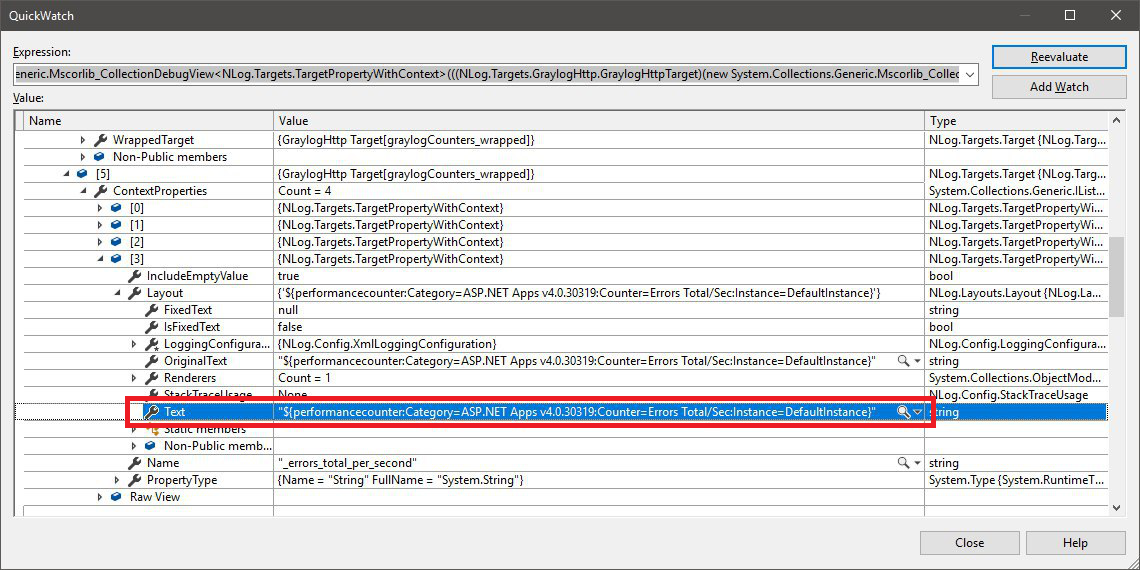
but variable is ok
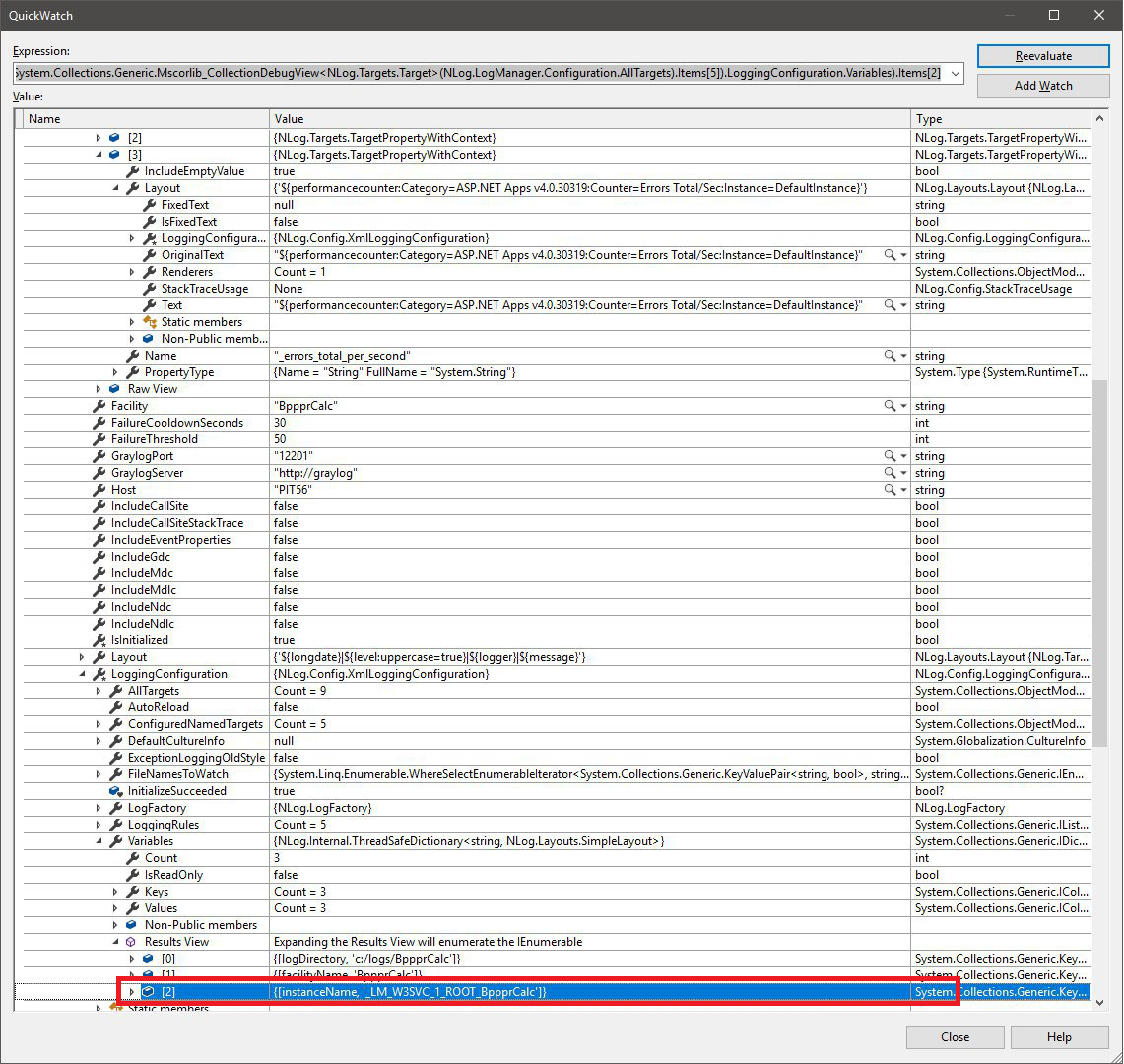
Kirya522
on 2 Sep 2019
Well, actually I tried to make a variable, set value and reconfigure the target in order to get right performance counter.
You are very persistent in making this work, but the NLog-magic only works with Layout. And Instance is not implemented with support for NLog Layout:
PullRequest is welcome.
snakefoot
on 2 Sep 2019
Created #3579 with example of how to implement NLog Layout magic.
snakefoot
on 2 Sep 2019
Has your question being answered?
304NotModified
on 17 Sep 2019
I assume your question has been answered, if not, please let us know!
304NotModified
on 24 Sep 2019
@Kirya522 NLog ver. 4.6.8 has been released that allows NLog Layout-logic to work for the Instance-property:
snakefoot
on 6 Nov 2019
Related issues
 FaMouZx3
·
3Comments
FaMouZx3
·
3Comments
 JustArchi
·
3Comments
JustArchi
·
3Comments
 carkov1990
·
3Comments
carkov1990
·
3Comments
 Jerefeny
·
3Comments
Jerefeny
·
3Comments
 imanushin
·
3Comments
imanushin
·
3Comments